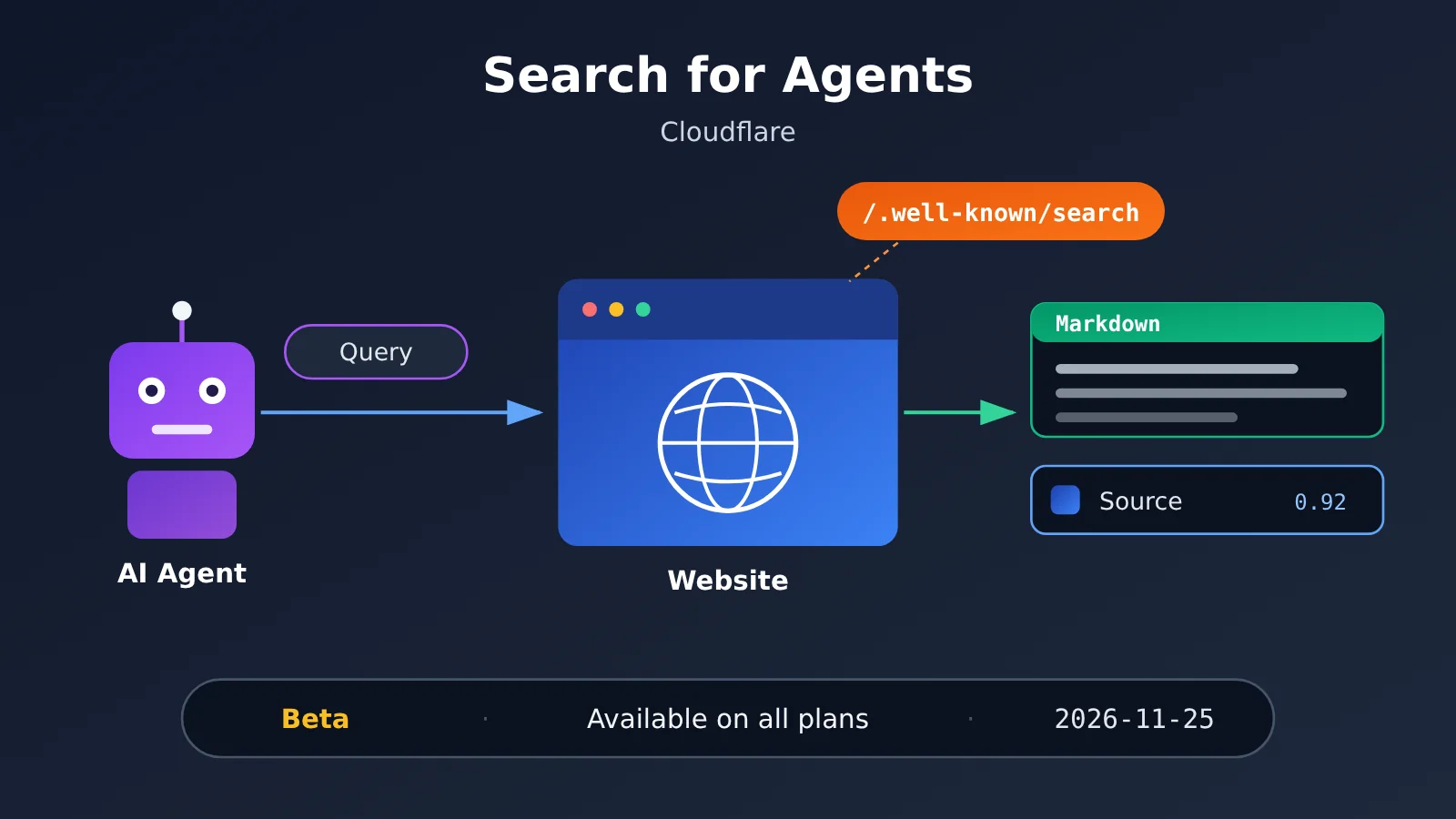
Cloudflare launched Search for Agents on November 25, 2026. Once a site admin flips a switch in the domain console, Cloudflare automatically builds an index and serves a /.well-known/search retrieval endpoint under that domain. AI agents can query this endpoint directly and get back relevant Markdown snippets, source citations, and relevance scores — no need to page through the full text themselves.
The feature is currently in Beta and available on all plans (including the free plan). The underlying service, Cloudflare AI Search, became generally available on October 1, 2026. It’s worth keeping the two timelines separate: the underlying service is already GA, while the site-level switch has only just entered public beta.
What you’ll learn from this article:
- The official release date, Beta status, and billing start point for Search for Agents
- The prerequisites you must meet before turning it on, and what content shouldn’t go into the index
- Who handles crawling, indexing, retrieval, and answer assembly respectively
- How agents discover the search endpoint, and how to write both GET and HTTP QUERY requests
- What’s in the retrieval response, what isn’t, and how to hand it off to a Large Language Model to generate an answer
Outline: The sections below start with a concept table and an at-a-glance impact summary to give you the background. The “Objective Facts” section that follows walks through the timeline, prerequisites, indexing flow, endpoint discovery, and response format, all drawn from Cloudflare’s official documentation and announcements. “Quick Start” provides runnable Python code you can adapt. “Analysis and Judgment” separates official demos, community feedback, and worked examples, and explains how this fits alongside the vendor’s other products. FAQ and further reading come at the end.
Search for Agents: Key Concepts at a Glance (To Know)
These concepts come up repeatedly later on, so here’s a table to keep the terminology consistent.
| Concept | Brief explanation |
|---|---|
| Search for Agents | A domain-level Cloudflare feature. Once enabled, it automatically creates a search entry point for your site so AI Agents can query it |
| AI Search | Cloudflare’s managed search service, handling crawling, indexing, and retrieval. Search for Agents is built on top of it |
/.well-known/search |
The fixed search endpoint that appears under your domain once the feature is enabled |
| Discover mode | The default crawling method, which finds indexable URLs through sitemaps and page links |
| Hybrid retrieval | Uses both a vector index (semantic matching) and an inverted index (term matching), then merges the rankings |
| Markdown for Agents | Another Cloudflare feature. Clients can read a page’s Markdown version directly through content negotiation |
| HTTP QUERY | An HTTP method defined in RFC 10008 with safe, idempotent semantics, letting you put query conditions in the request body |
| AI Crawl Control / WAF | Cloudflare’s crawler access control and Web Application Firewall. Search requests are subject to them too |
| OpenCode | The coding Agent client used in the official demo |
Search for Agents: Impact at a Glance
| Audience | Main impact |
|---|---|
| Site owners / documentation teams | No need to build your own search service and API — flip a switch and you get a discoverable on-site search entry point. You do need to confirm the index only covers public content |
| Agent and tool developers | When visiting sites with the feature enabled, you can query the index first and then open the matching page to verify, cutting down on the cost of fetching and parsing whole pages |
| Help center operators | Users’ natural-language questions can directly match a set of support articles, provided the answers are already written on the site |
| Regular users | Indirect benefit: if the AI assistant they use supports this entry point, it’s more likely to cite the original text from the official site — but this depends on the client, and the site can’t guarantee it |
Search for Agents: Facts About Launch Timing, Prerequisites, and Search Responses
This section draws entirely from Cloudflare’s official developer documentation, changelogs, and release announcements, along with the IETF RFC texts.
Search for Agents Launch Timeline
| Date | Event | Status |
|---|---|---|
| 2026-06 | IETF publishes RFC 10008 (HTTP QUERY method) | Standards Track, Proposed Standard |
| 2026-10-01 | Cloudflare AI Search becomes generally available | GA (generally available) |
| 2026-10-02 | Web Search API via AI Gateway launches | A separate product for public web search |
| 2026-11-25 | Search for Agents launches | Beta, available on all plans, including the Free plan |
| 2026-12-01 | AI Search begins billing | Includes a monthly usage allowance per account; overages follow the current billing page |
The official guide puts it this way: “beta on all plans.” One important distinction: being able to enable it on the Free plan and whether usage is included in the free allowance are two separate questions. Content ingestion, storage, and queries all count toward AI Search usage. For the exact included allowance, check Cloudflare’s current billing documentation; this article doesn’t repeat specific numbers.
Search for Agents: Prerequisites and How to Enable It
The prerequisites and limits listed in the official guide come down to a few key points:
- The domain must be connected to your own Cloudflare account. AI Search instances use sites under the same account as data sources.
- Only index content you already intend to make publicly searchable. The official docs explicitly require this. Backend orders, account data, and similar content should not be within the indexable scope.
- Access controls continue to apply. Search requests are still subject to the domain’s AI Crawl Control and WAF configuration.
- How to enable it: Open the toggle in Quick Actions on the domain Overview page (the official wording is “under Quick Actions”), or enable it through the API.
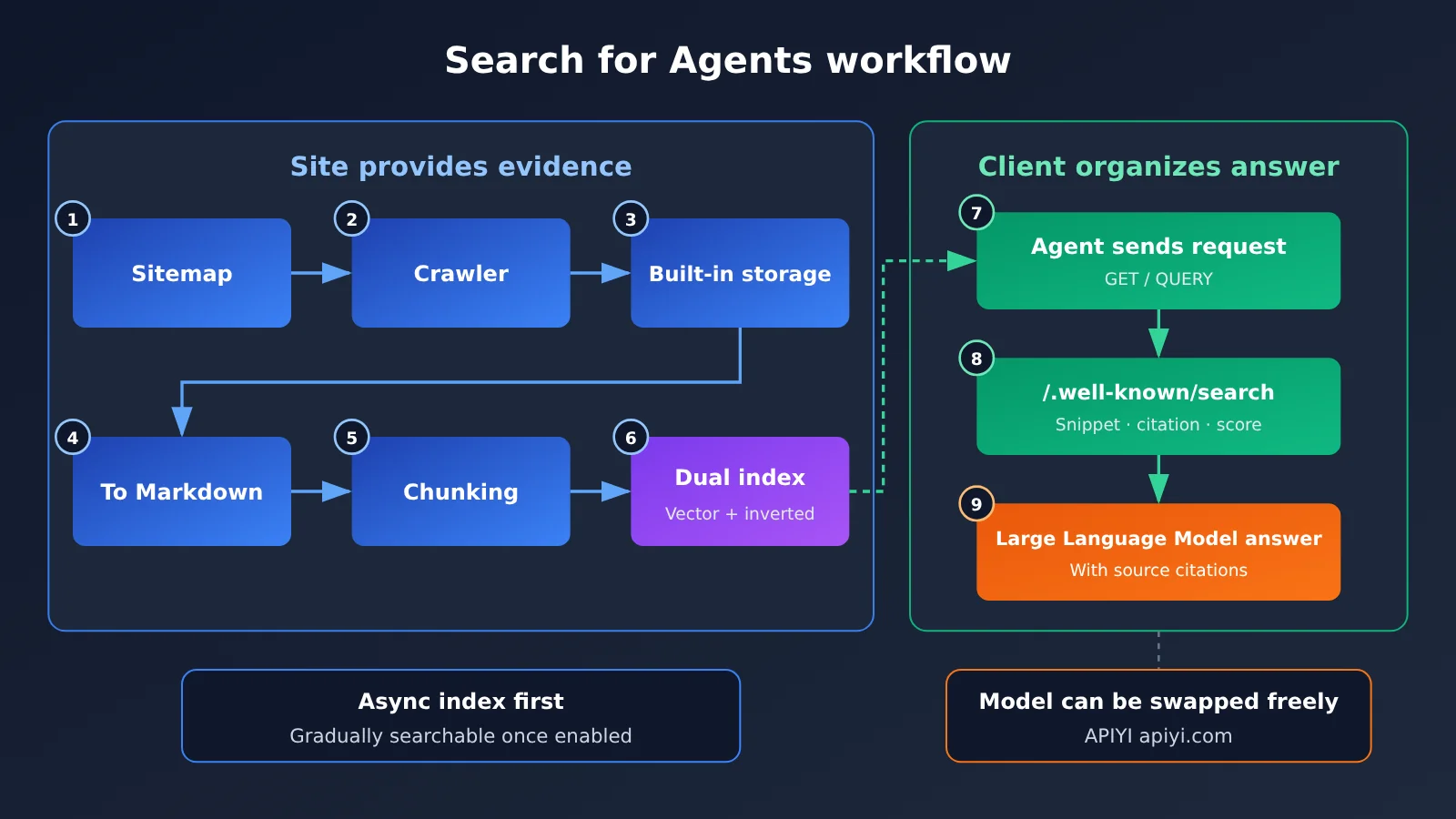
Once the toggle is on, Cloudflare automatically does three things: creates an AI Search instance, starts crawling and indexing, and serves /.well-known/search under the domain. The official announcement describes this experience as “behind a toggle”.
Before this, AI Search already supported websites as data sources. But to provide a discoverable search endpoint on your own domain, site teams still had to set up an instance, connect the interface, and tell callers how to use it. This change turns that deployment process into a product.
Search for Agents: Crawling and Indexing Process
The default Discover mode finds URLs through sitemaps and links on accessible pages, so some sites without a sitemap can still start indexing. The crawler stores pages in built-in storage, converts them to Markdown, and then splits them into chunks suitable for search (official wording: “converted to Markdown, chunked, and indexed”).
When hybrid search is enabled, the system builds both a vector index and a term-based inverted index at the same time. Exact error codes, command names, and product model numbers rely on term matching, while paraphrases or descriptions of symptoms rely on semantic matching, and the two rankings are merged at the end. Indexing is an asynchronous process that has to run first, so right after you flip the switch, not every page will be searchable immediately.
Search for Agents: Entry Discovery and Request Methods
How does an Agent know whether a site has enabled a search entry point? The official guidance offers two paths:
- HTML response: Cloudflare adds discovery information to the headers of the HTML response, including the search address, method, and usage guidance.
- Markdown for Agents: If the site also has this feature enabled, a client requesting a Markdown page that supports conversion can read the same information from the YAML metadata at the top of the returned document.
Once the entry point is found, you can initiate a search using two HTTP methods:
| Request method | Where the query goes | Description |
|---|---|---|
| GET | URL parameter q |
Existing general invocation path; supported by almost all clients |
| HTTP QUERY (plain text) | Request body is the query text | Based on RFC 10008; safe, idempotent, read-only, and doesn’t change state |
| HTTP QUERY (JSON) | Request body is JSON containing a q field |
JSON only describes the request body encoding; the returned content is still Markdown |
RFC 10008 is currently at Proposed Standard status. The standard itself doesn’t guarantee that every client, proxy, and intermediary node already supports the QUERY method. For real-world integration, it’s best to use GET as the default path and QUERY as an optional enhancement.
The Markdown Search Response from Search for Agents
A public site endpoint returns three types of information to the caller: relevant snippets, source citations, and relevance scores (the official text says “relevance scores”), in Markdown format. It does not return a ready-made final answer; the caller’s model is responsible for assembling the answer.
The underlying AI Search instance also offers a Chat Completions API with generation capabilities, but that’s a separate invocation chain and isn’t the same thing as /.well-known/search. One more distinction: relevance scores measure semantic or lexical closeness—they don’t mean “this snippet is the correct answer to the question.” When both old and new versions of documentation for the same product match, the caller needs to use the version identifier and publication date on the page to determine which version applies.
Official Demo: OpenCode Queries Cloudflare Developer Documentation
📌 Source type: official demo, completed and published by Cloudflare on its own site.
The demo in the announcement uses the Cloudflare Developer Documentation site and OpenCode. A user asks about the per-push limit for Cloudflare Artifacts; the Agent opens the documentation homepage, discovers the search endpoint (original wording: “the agent discovering the search endpoint”), and then submits the question. In the Markdown excerpt shown in the announcement, the corresponding limit is 64 MiB per push.
Cloudflare Artifacts here is Cloudflare’s own product, unrelated to Anthropic’s Claude Artifacts. This demo shows that the flow of “discover the endpoint → find evidence → answer with sources” works in this case. It does not provide cross-platform compatibility rates, independent stress-testing, or adoption data.
How to Call Search for Agents: Quick Start Example
The code below has two steps: first retrieve evidence from a site where the feature is enabled, then pass the Markdown snippets to the Large Language Model to generate an answer with sources. Replace the site URL with your own domain where this feature is enabled; the your-domain.com in the example is just a placeholder.
Search for Agents: A Minimal Example
import requests
from openai import OpenAI

SITE = "https://your-domain.com"  # Replace with a domain that has Search for Agents enabled
question = "上个版本是什么时候移除旧参数的?"

# Step 1: The site provides evidence (returns Markdown snippets, source citations, relevance scores)
evidence = requests.get(f"{SITE}/.well-known/search",
                        params={"q": question}, timeout=30).text

# Step 2: The caller's model composes the answer
client = OpenAI(api_key="YOUR_API_KEY", base_url="https://api.apiyi.com/v1")
resp = client.chat.completions.create(
    model="gpt-4o-mini",
    messages=[{"role": "user",
               "content": f"仅根据以下检索结果回答,并注明来源:\n{evidence}\n\n问题:{question}"}],
)
print(resp.choices[0].message.content)
View the full implementation code (including entry-point detection and QUERY fallback)
import requests
from typing import Optional
from openai import OpenAI

SEARCH_PATH = "/.well-known/search"

def site_has_search(site: str) -> bool:
    """Simplified probe: check whether the homepage HTML declares a search entry point.
    For a production implementation, parse the discovery info in its exact format
    per the Cloudflare guidelines."""
    try:
        html = requests.get(site, timeout=15).text
        return SEARCH_PATH in html
    except requests.RequestException:
        return False

def search_site(site: str, q: str, use_query_method: bool = False) -> Optional[str]:
    """Query the site's search entry point and return the Markdown text."""
    url = site.rstrip("/") + SEARCH_PATH
    try:
        if use_query_method:
            # HTTP QUERY: put q in the JSON body; the response is still Markdown
            r = requests.request("QUERY", url, json={"q": q}, timeout=30)
        else:
            r = requests.get(url, params={"q": q}, timeout=30)
        r.raise_for_status()
        return r.text
    except requests.RequestException:
        if use_query_method:
            # Some clients or intermediary nodes may not support QUERY, so fall back to GET
            return search_site(site, q, use_query_method=False)
        return None

def answer_with_evidence(question: str, evidence: str,
                         model: str = "gpt-4o-mini") -> str:
    client = OpenAI(
        api_key="YOUR_API_KEY",
        base_url="https://api.apiyi.com/v1",
    )
    system = ("你是技术支持助手。只依据给定检索片段回答;"
              "若多个版本说法冲突,按页面版本标识和发布时间说明适用范围;"
              "回答末尾列出来源。证据不足时直接说明。")
    resp = client.chat.completions.create(
        model=model,
        messages=[
            {"role": "system", "content": system},
            {"role": "user", "content": f"检索结果:\n{evidence}\n\n问题:{question}"},
        ],
    )
    return resp.choices[0].message.content

if __name__ == "__main__":
    site = "https://your-domain.com"
    q = "上个版本是什么时候移除旧参数的?"
    if not site_has_search(site):
        print("未探测到检索入口,可改用常规抓取或外部搜索")
    else:
        ev = search_site(site, q, use_query_method=True)
        print(answer_with_evidence(q, ev) if ev else "检索失败")
🚀 Getting started tip: the model in step two is swappable at any time. With APIYI (apiyi.com), one key calls OpenAI, Claude, Gemini, and other models — the OpenAI-compatible API only requires changing the
modelparameter, which makes it easy to compare how different models handle the “answer from on-site evidence” task. New users also get free trial credits.
A few practical reminders:
- When you first turn the feature on, the index is built asynchronously, so an empty result doesn’t necessarily mean a misconfiguration — just try again later.
- If your site enforces fairly strict WAF or AI Crawl Control rules, search requests may get blocked too, so you’ll need to evaluate those rules accordingly.
- Asking the model in the prompt to “answer only from the retrieved snippets” lowers the odds it fills gaps with its own knowledge and drifts off.
Search for Agents Analysis: Value, Boundaries, and Product Division of Labor
This section is the author’s interpretation; the facts behind it are laid out in the “Objective Facts” section above. Anything about future trends is judgment, not established fact.
Evidence Tiers: Official, Community, Worked Examples, and Hands-On Testing
To keep readers from mixing up where information comes from, this article sorts its material along the following lines:
- Official: Release dates, Beta status, prerequisites, request methods, response payloads, where billing starts, and the OpenCode demo all come from Cloudflare documentation and announcements.
- Community: As of 2026-11-27, the reference materials contain no citable community reviews or adoption data, so this article doesn’t relay any.
- Worked example: The “software vendor release notes” scenario below is an example built from the official workflow — not a real case.
- Hands-on testing: This article did not independently test any third-party sites. The quickstart code is an example you can adapt; it doesn’t represent a compatibility conclusion.
How Search for Agents Fits with the Vendor’s Other Products
| Product | Who it’s for | What it does | Release status |
|---|---|---|---|
| Search for Agents | Webmasters who run their own sites | Serves matching content from the enabled domain index to visiting tools | Beta (2026-11-25) |
| Web Search API via AI Gateway | App developers who need to find sources across the web | Uses partners such as Ceramic.ai, Exa, and Linkup to search public web pages | Released 2026-10-02 |
| Markdown for Agents | Clients that already know the target URL | Reads the Markdown version of a page via content negotiation | Available |
| Other channels for AI Search instances | Teams that need more integration options | Workers binding, public REST, MCP, and a search component for humans | Can be enabled separately; not a prerequisite for the toggle |
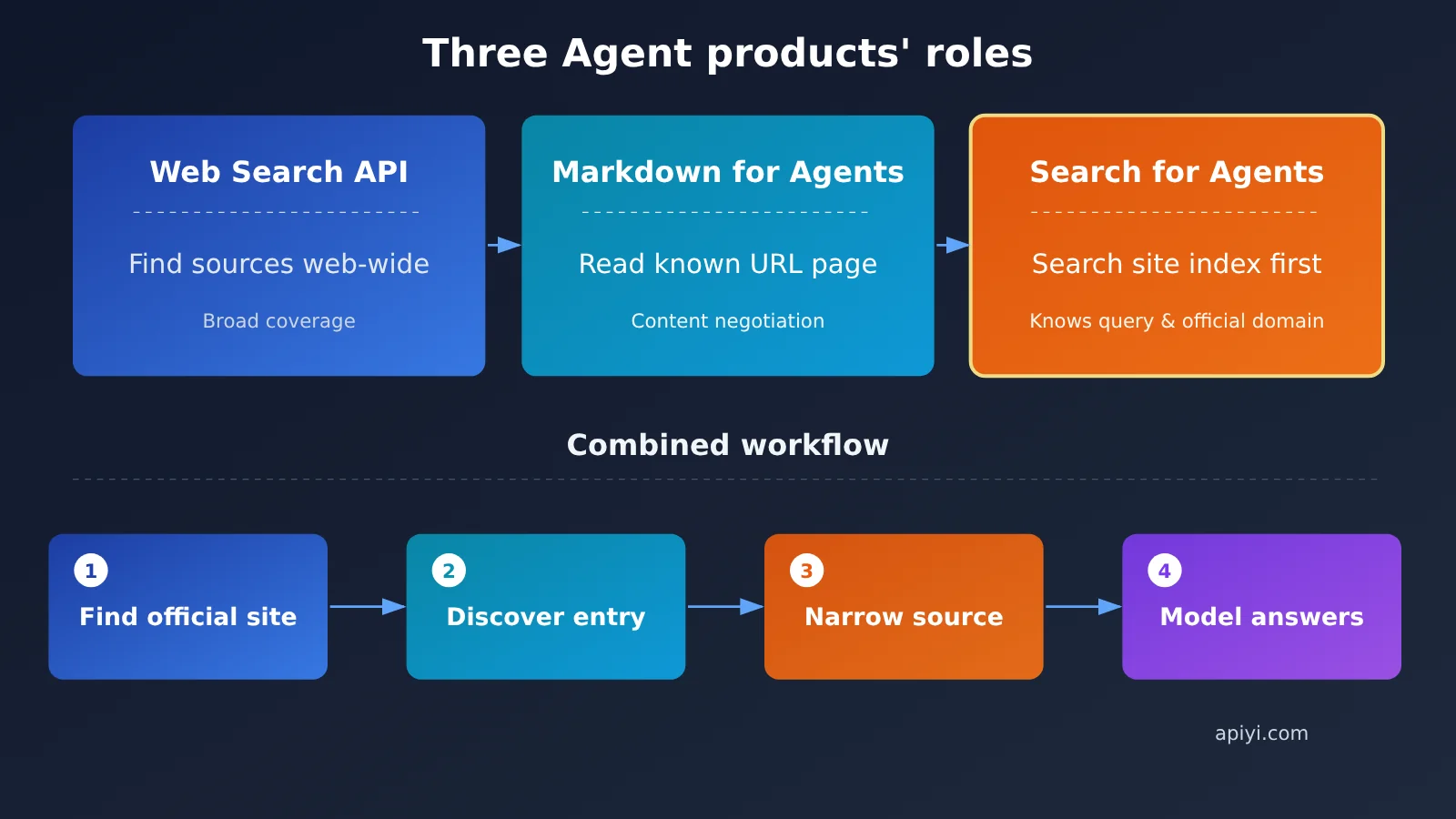
Web Search API has broader coverage when it comes to “finding sources across the web,” but what it returns are public web results, which don’t necessarily lead to the most authoritative original document. By contrast, Search for Agents searches only the site’s own index, making it better suited to situations where “you already know the official site and need to pinpoint the original text.” The two can be used in tandem: first use external search to identify the project’s official site, then discover the retrieval entry point from the official site, and finally use the site’s index to narrow down to the original release document. This combination is a usage pattern derived from how the two products divide the work; it isn’t a fixed approach officially prescribed.
The same AI Search instance can also connect to a Workers binding, REST, MCP, or a search component. That means sites that have long been using the search component can also turn on the new switch, while new users who turn it on get a deterministic site capability that doesn’t depend on these channels.
Worked Example: A Software Vendor’s Release Notes
📐 Type: worked example — constructed from the official workflow to illustrate the approach.
Imagine a software vendor publishes release notes, and a customer asks, “When was the old parameter removed in the last version?” An assistant visiting the site typically won’t see the specific fact just by reading the homepage. On-site search can first return the changelog entry that mentions the parameter name, then pull in the migration notes from the adjacent version as context. If the old and new docs are written differently, it’s reasonable for the search to return both descriptions at once — in that case, you should use the page version identifier and publish date to determine which one applies to the target in question.
Which Scenarios Fit, and Which Don’t
Suitable scenarios share one common precondition: the answer evidence already exists on the site, and the administrator allows public search. A help center can match support articles to users’ natural-language questions; developer docs let a coding assistant locate API constraints by error code or abbreviation; and for a release history, you can first find the version announcement, then verify the applicable scope by following its references.
Unsuitable scenarios are equally clear. Account-specific orders, remaining stock, and other real-time states require dedicated data interfaces and shouldn’t rely on a public index. Also, “discoverable” only means the site has publicly declared the tool’s address. The client still has to reach the site first and have the ability to read and execute a search — the site can’t promise on that basis that third-party assistants will use, index, or cite it, let alone expect it to improve the site’s ranking.
Variables Worth Watching (My Take)
The division of labor between the site side and the client side is drawn very clearly in this feature: the site provides evidence, the client provides the answer. Even if the client swaps models, the site’s retrieval endpoint remains available. For integrators, decoupling “retrieval” from “generation” means the model layer can be switched flexibly through a unified interface like APIYI apiyi.com, while the evidence layer stays stable.
Three things are worth watching next: how index quality and coverage actually perform during Beta; whether mainstream Agent clients will proactively probe /.well-known/search; and how sites will adjust their control policies over index scope and query volume after billing starts on November 1, 2026. None of this has public data yet—we can only wait for official updates or community testing.
Search for Agents FAQ
Q1: What is Search for Agents?
It’s a domain-level feature from Cloudflare. Once you flip the switch on, Cloudflare automatically creates an AI Search instance for your site, builds an index, and exposes `/.well-known/search` under your domain so AI Agents can submit queries and get back Markdown fragments, source citations, and relevance scores.
Q2: When does it launch? Is it officially released now?
It launched on November 25, 2026, and is currently in Beta, covering all plans including the free plan. The underlying AI Search became generally available on October 1, 2026, and AI Search billing starts on December 1, 2026.
Q3: What are the prerequisites for enabling it?
Your domain needs to be connected to your own Cloudflare account; only index content you intend to make publicly retrievable; retrieval requests are still subject to AI Crawl Control and WAF. The toggle is under Quick Actions on the domain Overview page, and you can also enable it via API.
Q4: Does the retrieval endpoint return answers directly?
No. The public endpoint only returns relevant fragments, source citations, and relevance scores—the final answer is assembled by the caller’s model. The underlying instance does have a Chat Completions API with generation capability, but that’s a separate call path.
Q5: How do I feed retrieval results to a Large Language Model to generate an answer?
Follow the quickstart code in this article: first GET `/.well-known/search?q=…` to fetch the Markdown, then pass it to the model as context. For model invocation, you can set base_url to `https://api.apiyi.com/v1`; after signing up at APIYI apiyi.com you get free trial credits, and the same code can be used to compare different models.
Q6: What are the known limitations of Search for Agents?
Indexing is asynchronous, so it may be incomplete right after you enable it; HTTP QUERY isn’t yet supported by all clients and intermediary nodes; relevance scores don’t equal answer correctness; and site owners can’t guarantee third-party assistants will use the endpoint. There’s also no independent compatibility-rate or stress-test data at the moment.
Q7: How can I reduce multi-model testing costs when building Agents?
Once retrieval and generation are decoupled, you can do side-by-side comparisons by simply swapping the model name on the generation side. With pay-as-you-go access to multiple models through APIYI apiyi.com, it’s well suited to validating “answering based on on-site evidence” with low traffic during the Beta, before deciding on a final choice.