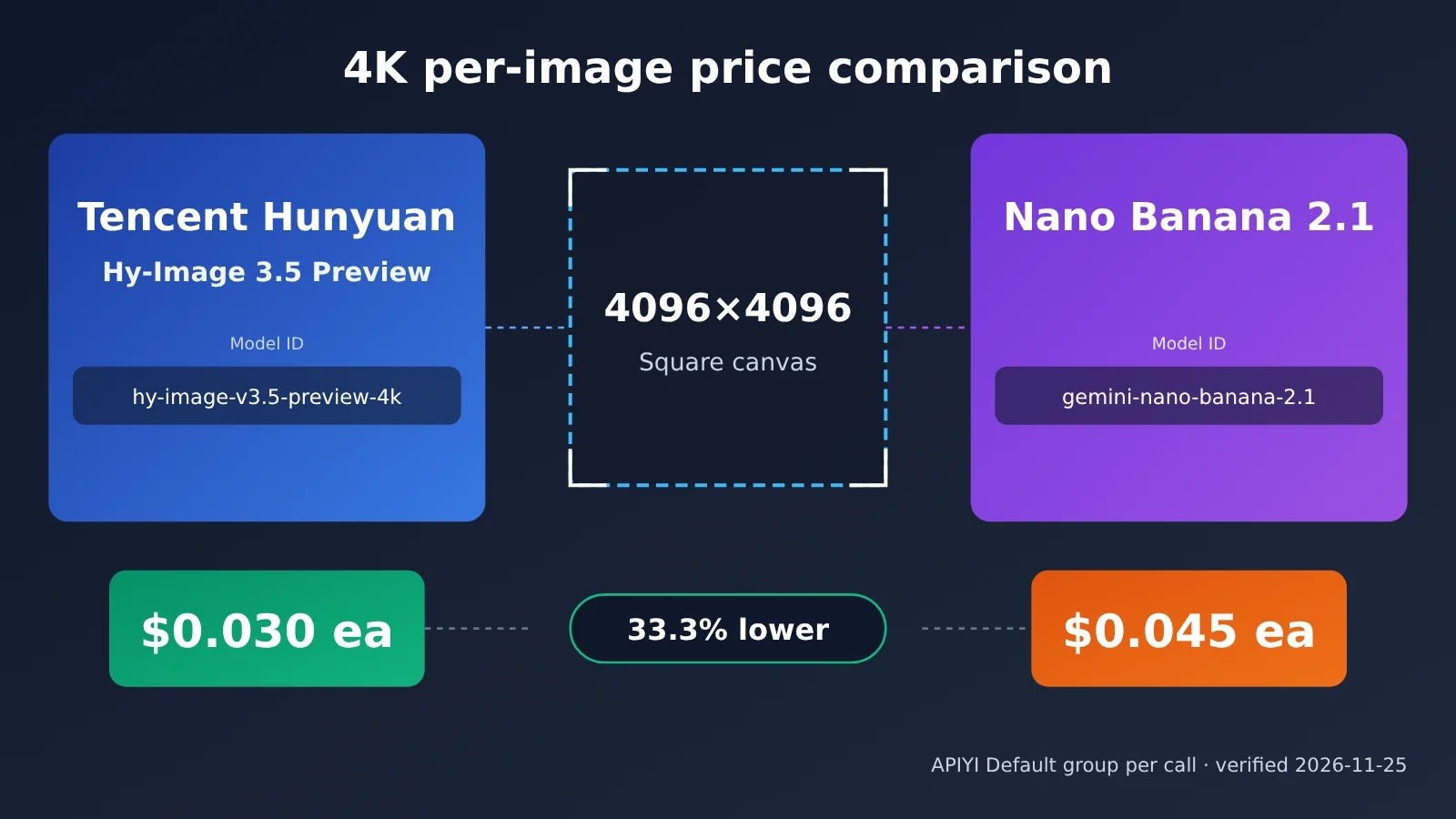
Under per-call billing in APIYI’s Default group, Tencent Hunyuan Hy-Image 3.5 Preview lists a 4096×4096 square image at $0.030, while Nano Banana 2.1 lists it at $0.045. Hunyuan is $0.015 cheaper per image, roughly 33.3% lower. The difference isn’t just about price: Hunyuan takes width and height in pixels directly, whereas Nano Banana 2.1 takes an aspect ratio plus a size tier. And when you do reference-image editing on either side, the way the image is wrapped and the way multi-turn history is maintained also differ. The prices above were verified on 2026-11-25 (Beijing time).
Here’s what you’ll learn in this article:
- The 4K per-image list price for both models under the same basis, the budget for a hundred images, and how rework affects the real cost;
- How Hunyuan’s
sizediffers from Nano Banana 2.1’saspectRatio+imageSize, and why two canvases both called “4K” aren’t the same size; - The request structure for single-turn reference-image editing and for continuous revisions on both sides, with Python examples you can use as-is;
- Timeouts, response parsing, reconciliation fields, and other details you need to sort out before launch.
Index: The “Concepts” table first explains the terms used later, and “Impact at a Glance” explains what this comparison means for each audience. “Objective Facts” then walks through the pricing basis and list prices, the size parameters, quick-start code, reference-image editing, and reconciliation for continuous revisions. “Analysis and Judgment” gives selection guidance for different scenarios, and the FAQ answers a few common questions.
Concepts You Need to Know First for Hy-Image 3.5 Preview and Nano Banana 2.1
| Concept | Brief explanation |
|---|---|
| Default group | APIYI’s billing group; the listed prices for both models in this article are taken from this group |
| Per-request billing | Each successful request is charged a fixed amount, regardless of token usage; Nano Banana 2.1 can also be billed by token |
hy-image-v3.5-preview-4k |
The 4K-tier model ID of Hunyuan Hy-Image 3.5 Preview; the tier is bound to the model |
gemini-nano-banana-2.1 |
The model ID of Nano Banana 2.1; a single model covers all three tiers: 1K, 2K, and 4K |
imageSize / aspectRatio |
The size tier and aspect ratio fields of Nano Banana 2.1; combined, they map to preset width and height |
inlineData |
The segment in the Gemini protocol that carries images, containing mimeType and raw Base64 data |
| Data URI | An inline image format written as data:image/png;base64,...; Hunyuan’s images field can use it |
thoughtSignature |
The signature in Nano Banana 2.1’s response segment; when feeding history back during multi-turn revisions, it must be included exactly as-is |
assembled_history |
The field Tencent Cloud TokenHub’s native API uses to continue a session; APIYI’s compatibility endpoint doesn’t expose it |
| Search grounding | An add-on tool that lets the model call retrieval, billed separately per retrieval |
Hy-Image 3.5 Preview vs. Nano Banana 2.1: Impact at a Glance
- Budget-conscious developers: Assuming one successful request yields one final image, the same $4.50 buys 150 Hunyuan images or 100 Nano Banana 2.1 images. At high volumes of first drafts, that gap gets amplified.
- Teams with strict canvas-size requirements: Hunyuan lets you specify any compliant width and height in pixels; Nano Banana 2.1 only lets you choose from a preset table, so you’ll need to check the actual pixel dimensions for landscape and portrait first.
- Businesses that need multiple output sizes: Under per-call pricing, Nano Banana 2.1 charges the same for 1K, 2K, and 4K—switching tiers only means changing a field. Hunyuan requires changing the model ID to move to a lower tier; otherwise you’re still billed at the 4K tier.
- Products built around multi-image references and iterative revisions: The two differ in reference image limits, encoding wrappers, and multi-turn history mechanisms, so integration code can’t be reused as-is.
Hy-Image 3.5 Preview and Nano Banana 2.1: The Objective Facts
Hy-Image 3.5 Preview vs Nano Banana 2.1: What Does One 4K Image Cost?
The comparison ground rules are identical on both sides: APIYI Default group, billed per call. Each request sends the same text-only prompt, with no reference image and with add-on tools like search switched off; the goal is to successfully return one 4096×4096 square final image. Prices in the table are “USD per call,” and one successful request delivers exactly one final image, so they convert directly to “USD per image.” The live price table data was updated at 12:49 Beijing time on 2026-11-25.
| Item | Tencent Hunyuan Hy-Image 3.5 Preview | Nano Banana 2.1 |
|---|---|---|
| Model ID | hy-image-v3.5-preview-4k |
gemini-nano-banana-2.1 |
| 4K per-image list price (USD/image, Default per call) | 0.030 | 0.045 |
| Tier-to-price relationship | The 4K tier is tied to the model; smaller output sizes are still billed at the 4K model rate | 1K / 2K / 4K cost the same per call |
| List price for 100 successful images | USD 3.00 | USD 4.50 |
| Images you can buy with USD 4.50 | 150 | 100 |
| Price change record | No price adjustment mentioned in the reference materials | Launch price 0.050, 0.045 as of 2026-10-13 |
| Available platform | APIYI apiyi.com | APIYI apiyi.com |
One thing worth flagging: the 0.050 USD in the Nano Banana 2.1 launch announcement was the introductory price, and both the platform’s model page and the series price table record that it has since dropped to 0.045 USD. Also, gemini-3.1-flash-image is the previous generation, Nano Banana 2, so don’t mix it up with 2.1. The same Nano Banana 2.1 model can also be billed by token, so when comparing prices you need to check the group and the billing method together. Top-up bonuses, other groups, direct vendor connections, and add-on tools each carry their own billing conditions and sit outside this baseline.
On that basis, the per-image difference is 0.045 − 0.030 = 0.015 USD. Taking Nano Banana 2.1 as the denominator, Hunyuan is about 33.3% cheaper — its unit price is roughly two-thirds of the other’s. Flip the denominator and Nano Banana 2.1 is 50% more expensive.
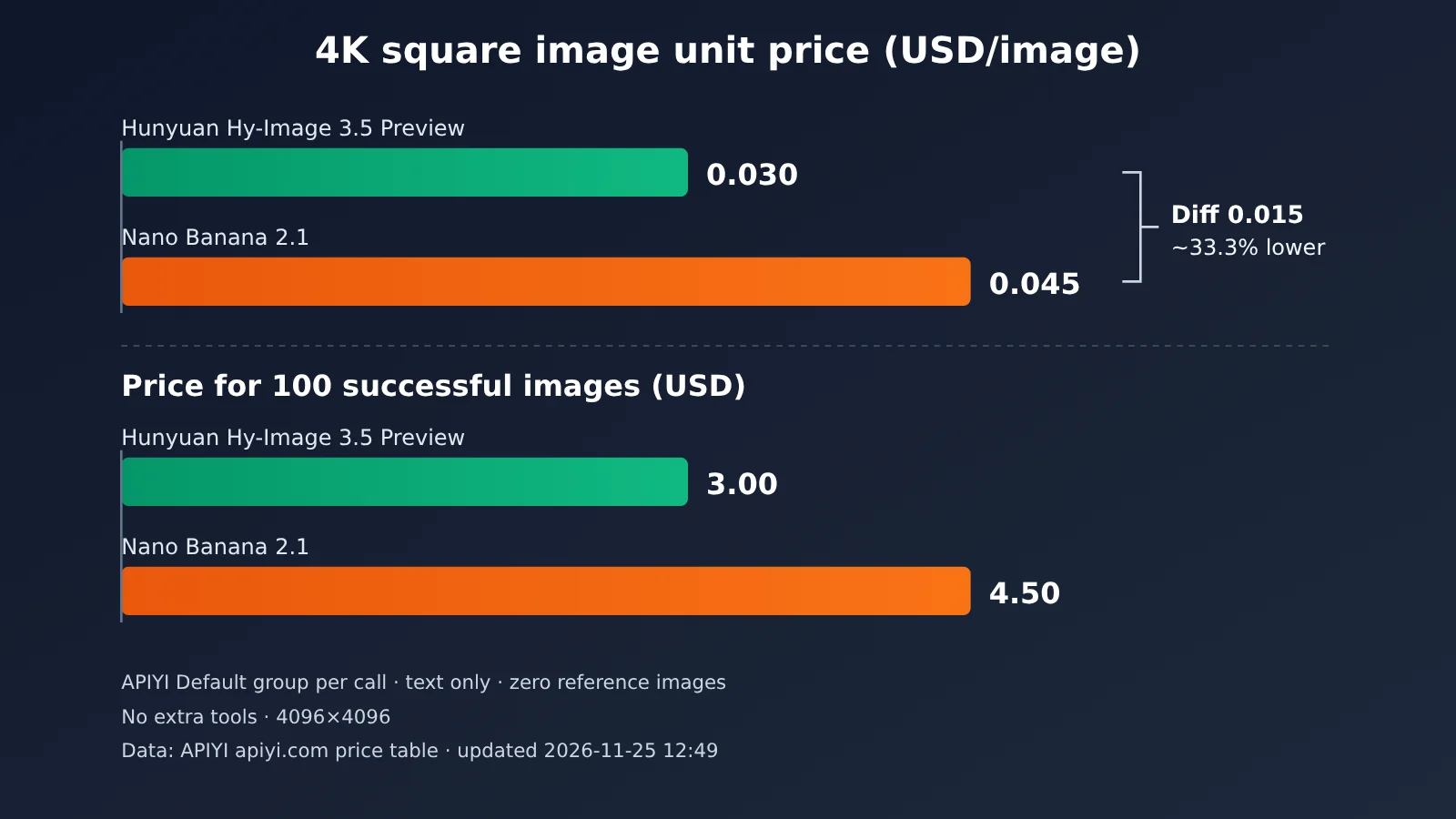
The list-price gap only covers your invocation budget. If you settle up based on “final images actually used,” rework has to be factored in. Say a given design ends up with only one image in use: Hunyuan produces three successful generations and Nano Banana 2.1 produces two, and both sides spend 0.090 USD. Those three and two are assumptions made purely to illustrate the arithmetic, not measured results. The formula you can re-run yourself is: unit price × number of successful requests ÷ number of final images actually used.
How to Specify Size Parameters for Hy-Image 3.5 Preview and Nano Banana 2.1
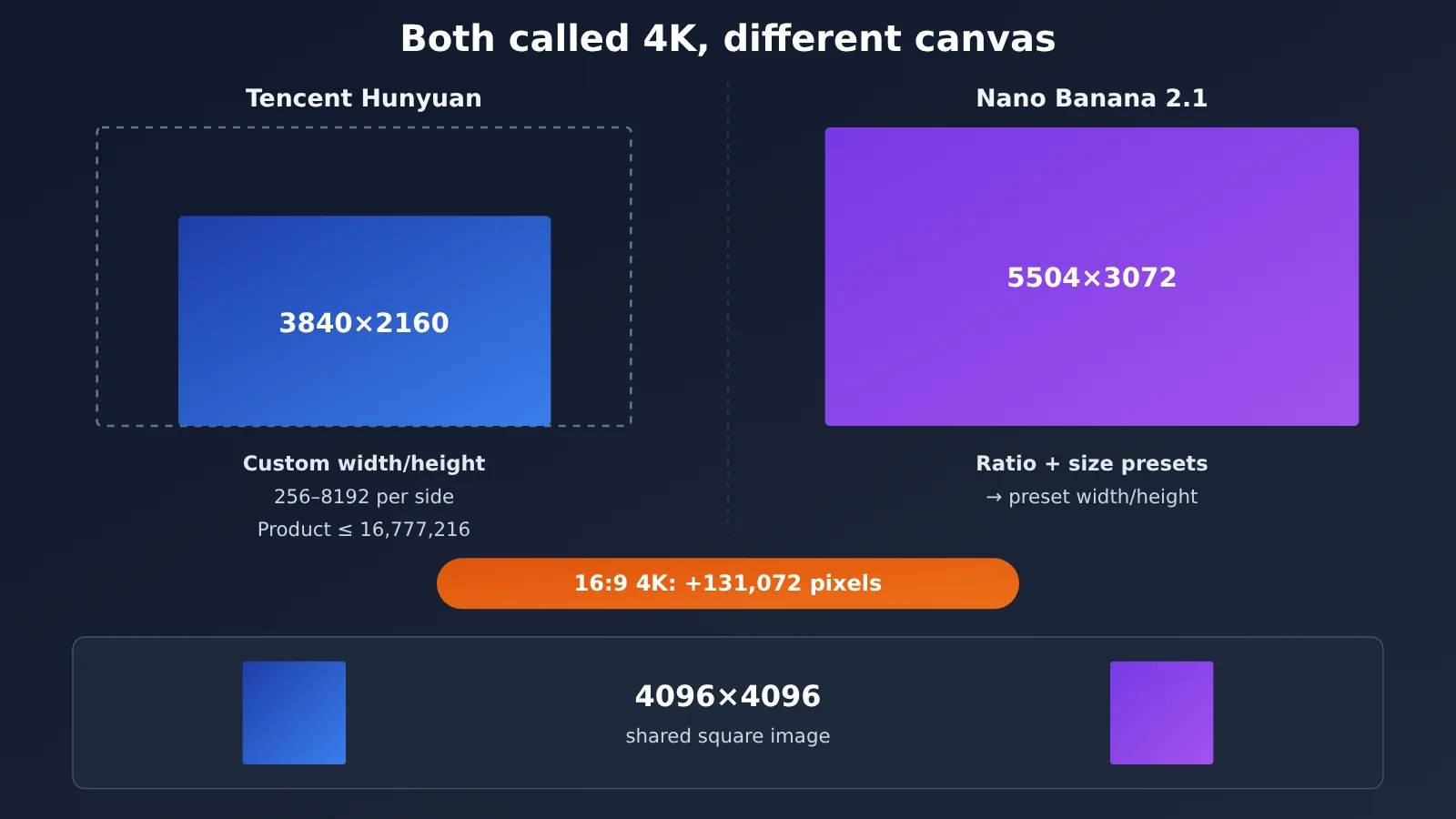
Hunyuan uses the OpenAI-compatible POST /v1/images/generations, and you can write "4096x4096" directly in size. If you don’t pass size to the 4K model, it defaults to these same width and height values. Each request always returns one image, so n can be omitted. Width and height can each be 256–8192 pixels, but their product must not exceed 16,777,216. Exceeding that returns HTTP 400 invalid_size.
Nano Banana 2.1 uses POST /v1beta/models/gemini-nano-banana-2.1:generateContent. Put the text in contents[].parts[].text, set generationConfig.responseModalities to ["IMAGE"], and in generationConfig.imageConfig write aspectRatio: "1:1" and imageSize: "4K". Note that K must be uppercase. For text-only requests, if you don’t specify a size tier, the output defaults to 1K; if you don’t specify an aspect ratio, the model decides based on the content. In Google’s size table, the 1:1 row and 4K column correspond to 4096×4096.
| Target image | Hunyuan syntax and actual pixels | Nano Banana 2.1 syntax and actual pixels |
|---|---|---|
| 4K square | size: "4096x4096" (4K tier default) |
1:1 + 4K → 4096×4096 |
| Landscape 16:9 | e.g. size: "3840x2160", area 8,294,400 |
16:9 + 4K → 5504×3072, area 16,908,288 |
| Portrait 9:16 | e.g. size: "2160x3840" |
9:16 + 4K → 3072×5504 |
| Omit the size field | 4K model defaults to 4096×4096 | defaults to 1K; aspect ratio determined by model |
| How to change tiers | change the model ID (e.g. switch to the 2K tier) | modify imageSize; per-call unit price stays the same |
So even though both say “4K,” the canvas can differ a lot. Nano Banana 2.1’s 4K 16:9 preset area is 131,072 pixels larger than Hunyuan’s 4K product cap, so Hunyuan can’t output a canvas that size. When delivering a landscape image, Hunyuan needs to explicitly fill in width and height within the allowed range, while Nano Banana 2.1 needs to look up the preset table to confirm the actual width and height. When using square images as price samples, both sides need to use the same fixed actual pixel dimensions.
Writing “high resolution” or “square composition” in a prompt can only affect the visual style; the output width and height still need to be determined by structured fields. During acceptance, read the actual width and height of the downloaded or decoded file, and don’t just look at the request parameters.
Hy-Image 3.5 Preview and Nano Banana 2.1 Quick Start
Below are two 4K square-image requests, each a dozen or so lines — swap in your API key and they’re ready to run. Hunyuan returns data[0].b64_json by default; when you pass response_format: "url", read data[0].url instead.
import base64
from openai import OpenAI

client = OpenAI(
    api_key="YOUR_API_KEY",
    base_url="https://api.apiyi.com/v1",  # APIYI OpenAI-compatible endpoint
    timeout=360,  # 360 seconds recommended for 4K + Base64
)

resp = client.images.generate(
    model="hy-image-v3.5-preview-4k",
    prompt="白色陶瓷咖啡杯放在浅灰桌面上,柔和侧光,产品摄影",
    size="4096x4096",
)
with open("hy_4k_square.png", "wb") as f:
    f.write(base64.b64decode(resp.data[0].b64_json))
Nano Banana 2.1’s response may include an intermediate draft first. The platform’s text-to-image approach iterates over candidates[0].content.parts, takes the last part containing inlineData as the final render, and only ever counts one final image per request.
import base64, requests

url = "https://api.apiyi.com/v1beta/models/gemini-nano-banana-2.1:generateContent"
headers = {"Authorization": "Bearer YOUR_API_KEY"}  # auth format follows the platform docs

payload = {
    "contents": [{"role": "user", "parts": [{"text": "白色陶瓷咖啡杯放在浅灰桌面上,柔和侧光,产品摄影"}]}],
    "generationConfig": {
        "responseModalities": ["IMAGE"],
        "imageConfig": {"aspectRatio": "1:1", "imageSize": "4K"},
    },
}
r = requests.post(url, headers=headers, json=payload, timeout=360)
parts = r.json()["candidates"][0]["content"]["parts"]
final = [p for p in parts if "inlineData" in p][-1]  # the last image part is the final render
with open("nano_4k_square.png", "wb") as f:
    f.write(base64.b64decode(final["inlineData"]["data"]))
🚀 Quick start: both models can be called with the same APIYI apiyi.com API key, and new users get free testing credits. We suggest running one 4096×4096 square image on each first to confirm the file dimensions on disk and how the billing is charged, then move on to the batch stage.
Reference Image Editing Interfaces for Hy-Image 3.5 Preview and Nano Banana 2.1
Hunyuan’s editing reuses the JSON route of POST /v1/images/generations, adding an images array on top of the required prompt. Each entry can be either a public direct image URL or a data:image/...;base64,... string. To keep the original aspect ratio, pass a target size with the same ratio. The legacy field image and the legacy route POST /v1/images/edits (multipart/form-data) also validate dimensions against the same tier limits.
Nano Banana 2.1’s editing still calls generateContent. Within the parts of a single user message, put the revision instructions in one separate segment, and give each reference image its own inlineData segment, specifying the correct mimeType (e.g. image/jpeg, image/png) and the raw Base64 data. Output dimensions are still determined by the tier and aspect ratio in imageConfig.
| Dimension | Tencent Hunyuan Hy-Image 3.5 Preview | Nano Banana 2.1 |
|---|---|---|
| Editing endpoint | /v1/images/generations (JSON, images array) |
generateContent (inlineData inside parts) |
| Local image encoding | data:image/png;base64, + content |
mimeType: "image/png" + raw Base64 |
| Reference image limit | ≤20 MB per image, up to 20 images (upstream input spec) | 14 total, ≤10 object images, ≤4 character images |
| Reference image order | Received in images array order |
Received in image parts order |
| Reference image count and price | Doesn’t affect the tier price | Not separately listed in the reference material |
| Mask parameter | Not listed on the dedicated editing-parameters page | Not listed on the dedicated editing-parameters page |
| Multi-turn history | The compatibility entry point doesn’t expose native sessions; resend the previous version each turn | Client maintains contents and fills back thoughtSignature |
Neither editing doc lists a pixel-level mask parameter, so local edits rely on natural language to describe the region to change and what to keep. For example, “replace the background with light gray, keep the subject’s outline, colors, and existing text”—then check the output item by item.
View the full request code for single-turn editing on both sides
import base64, requests
from PIL import Image
from openai import OpenAI

API_KEY = "YOUR_API_KEY"
PROMPT = "将背景替换为浅灰色,保持主体轮廓、颜色与原有文字"

# Same source file, same preprocessing, so the inputs line up
with open("product.png", "rb") as f:
    raw_b64 = base64.b64encode(f.read()).decode()

# -- Hunyuan: images array + Data URI --
client = OpenAI(api_key=API_KEY, base_url="https://api.apiyi.com/v1", timeout=360)
hy = client.images.generate(
    model="hy-image-v3.5-preview-4k",
    prompt=PROMPT,
    size="4096x4096",
    extra_body={"images": [f"data:image/png;base64,{raw_b64}"]},
)
with open("hy_edit.png", "wb") as f:
    f.write(base64.b64decode(hy.data[0].b64_json))

# -- Nano Banana 2.1: text part + inlineData part --
nano_url = "https://api.apiyi.com/v1beta/models/gemini-nano-banana-2.1:generateContent"
payload = {
    "contents": [{
        "role": "user",
        "parts": [
            {"text": PROMPT},
            {"inlineData": {"mimeType": "image/png", "data": raw_b64}},
        ],
    }],
    "generationConfig": {
        "responseModalities": ["IMAGE"],
        "imageConfig": {"aspectRatio": "1:1", "imageSize": "4K"},
    },
}
r = requests.post(nano_url, headers={"Authorization": f"Bearer {API_KEY}"},
                  json=payload, timeout=360)
parts = r.json()["candidates"][0]["content"]["parts"]
final = [p for p in parts if "inlineData" in p][-1]
with open("nano_edit.png", "wb") as f:
    f.write(base64.b64decode(final["inlineData"]["data"]))

# -- Verification: read the actual width and height of the files on disk --
for name in ("hy_edit.png", "nano_edit.png"):
    with Image.open(name) as im:
        print(name, im.size)  # expect (4096, 4096)
If one reference image is landscape and the other is portrait, decide the delivery dimensions first, then assign a role to each image. For instance, use the front-facing product shot to identify the subject and the close-up detail shot to identify the label—and keep the same ordering and the same text/role split on both sides of the request. When landscape material has to come out as a square image, spell out in the instructions which components must be kept fully intact, so there’s room to recompose the shot.
Iterative Revisions and Billing Reconciliation for Hy-Image 3.5 Preview and Nano Banana 2.1
On APIYI’s compatibility endpoint, Hunyuan is submitted round by round: for example, if you want to change the background first and then fine-tune the position, you put the previous result back into images, then attach this round’s instructions and the features you need to preserve. The compatibility layer FAQ explains that the native session isn’t exposed, and that seed doesn’t guarantee reproducibility either. Tencent Cloud TokenHub’s native model hy-image-v3.5-preview, on the other hand, continues history through messages plus the assembled_history returned by the previous round. Watermark and search enhancement also use native fields.
Nano Banana 2.1 on APIYI supports conversational submission, but the client maintains the history: save contents in order, put back the previous round’s role: "model" response segment and its thoughtSignature, then append the new user instruction. If you only send back the previous image, the model’s context contains nothing but the image and text you manually submitted this time. Google’s direct Interactions API has previous_interaction_id, while APIYI currently uses generateContent and doesn’t use that field.
For response handling, the Hunyuan FAQ recommends a client timeout of at least 240 seconds for 4K requests, and 360 seconds when using Base64, and to make sure the proxy can handle a response body of at least 30 MB. The Nano Banana 2.1 model page also recommends 360 seconds. Also keep in mind that the usage returned by Hunyuan is only a compatibility placeholder; if you multiply the token fields by the unit price directly, the resulting number won’t match the tiered bill.
| Reconciliation field | What to record | Purpose |
|---|---|---|
| Task type | Text-only first draft / reference-image edit / multi-round revision | Distinguish different cost structures |
| Number of reference images | Number of images attached to this request | Check against the limit and input consistency |
| Target canvas | size or aspect ratio in the request + tier |
Compare with the saved dimensions |
| Final file dimensions | Actual decoded width and height | Spec acceptance |
| Actual charge | Based on the platform bill | Verify list price against amount paid |
| Accepted or not | Whether the final output passes acceptance | Calculate the cost per usable image |
For example, if 20 styles each successfully generate one text-only 4K first draft, that’s 20 billed generations on each side, with catalog budgets of $0.60 and $0.90, respectively. Reference-image edits should be reconciled separately under the same input image, same revision text, same billing mode, and target size. Search grounding is billed separately by retrieval count; only bills that actually called that tool should be included. After a client timeout, first check the platform logs to confirm whether the request already completed, then estimate the extra cost of a retry.
Hy-Image 3.5 Preview vs Nano Banana 2.1: Analysis and Judgment
Looking only at the per-call cost of 4K square images, Hunyuan has a clear advantage. The gap of $0.030 versus $0.045 is a sure thing when the basis of comparison is consistent, and the bigger the scale, the more obvious the difference. But this conclusion comes with preconditions: it applies only to the two model IDs specified in this article, the Default group, per-call billing, and successful tasks of the same specification. If your business settles by “one usable output,” rework rounds will change the actual cost, and you’ll need to record them separately using the cost reconciliation table above.
In scenarios with multi-size output, Nano Banana 2.1’s billing is less of a headache. 1K, 2K, and 4K cost the same, so one field change in the same codebase gets you three tiers. If Hunyuan uses the 4K model to produce small images, it still charges at the 4K tier — to save money, you have to switch model IDs. Our take: when your business is mostly small images, you should also include Hunyuan’s 2K tier price in the comparison; when 4K dominates, Hunyuan’s per-unit price advantage is more direct.
For projects with exact pixel requirements, Hunyuan’s size is more flexible, while Nano Banana 2.1’s canvas ceiling is higher. When the asset library demands fixed width and height, Hunyuan lets you specify pixels directly, as long as you stay within the product limit. If you need an extra-large landscape format, say 5504×3072, only Nano Banana 2.1’s presets can satisfy it. Either way, accept based on the pixels actually written to disk.
For multi-image references and iterative revision, each has its own strengths. Hunyuan’s spec is looser on the number of reference images (up to 20), and its compatible entry point doesn’t preserve sessions — you send images again each round. The logic is simple, but you have to organize the context by hand. Nano Banana 2.1 has the client maintain the full conversation and signature, which suits scenarios where the model needs to “remember” edits from earlier rounds — at the cost of a more complex client implementation. Editing quality and output usability rate aren’t covered in this article’s materials, so you’ll need to validate them on your own tasks before drawing conclusions.
💡 Selection advice: Price and size can be looked up in the docs; quality needs to be verified on your own assets. We suggest using the same Key on APIYI apiyi.com to send the same set of prompts and reference images to both models, and recording them with the reconciliation fields in this article. A few dozen samples will give you an answer that fits your business.
Common Questions (FAQ)
Q1: How much does a 4K image cost on Hy-Image 3.5 Preview versus Nano Banana 2.1?
Under APIYI’s `Default` group per-call billing, Hunyuan `hy-image-v3.5-preview-4k` costs $0.030 per image, and Nano Banana 2.1 costs $0.045 per image (verified 2026-11-25). If you’re seeing $0.050, that was the launch price for Nano Banana 2.1 — it was adjusted to $0.045 starting 2026-10-13.
Q2: Why did my Nano Banana 2.1 only output a 1K image?
Text-only requests default to 1K if you don’t specify `imageSize`. Add `imageSize: “4K”` (capital K) inside `generationConfig.imageConfig` and specify an `aspectRatio`. Under per-call billing, 1K through 4K cost the same, so writing 4K won’t cost you extra.
Q3: Is the Hunyuan 4K model cheaper if I output a 2K size?
No. Even when the 4K model outputs a smaller size, you’re billed for the model you selected. If you want 2K-tier pricing, you need to switch to the corresponding 2K model ID. The width and height must also satisfy the constraints of 256–8192 pixels per side with a product no greater than 16,777,216, otherwise you’ll get a 400 `invalid_size`.
Q4: Do both models support mask-based local editing?
Neither of the dedicated editing-parameter pages lists a pixel-level locking mask parameter. The current approach is to describe the area to change and what to keep in natural language, for example “change only the background, keep the subject’s outline, colors, and text,” then check each item after the image comes out.
Q5: How can I test both models with a single account?
After registering at APIYI apiyi.com, you can call both with the same API key: Hunyuan goes through the OpenAI-compatible `https://api.apiyi.com/v1`, and Nano Banana 2.1 goes through the `generateContent` path. New users’ free quota is enough to run a few 4K samples on each, so you can verify dimensions and billing.
Q6: My 4K requests keep timing out — what should I do?
For Hunyuan, set the client timeout to at least 240 seconds, or 360 seconds when using Base64, and make sure your proxy can handle responses over 30 MB. For Nano Banana 2.1, 360 seconds is recommended. Don’t retry immediately after a timeout — first check the platform logs at APIYI apiyi.com to confirm whether the request already completed, so you don’t get charged twice.
References
- APIYI Model Pricing Overview: per-call list prices and update dates for both models
- Link:
docs.apiyi.com/models/index
- Link:
- APIYI Hunyuan Image Generation Docs: text-to-image, reference image editing, and FAQs
- Link:
docs.apiyi.com/api-capabilities/hunyuan-image/overview
- Link:
- APIYI Nano Banana 2.1 Docs: overview, text-to-image, editing, and billing notes
- Link:
docs.apiyi.com/api-capabilities/gemini-nano-banana-2.1/overview
- Link:
- Google Image Generation Docs: aspect ratio and size reference table, multi-reference-image specs, thought signatures
- Link:
aistudio.google.com/docs/image-generation
- Link:
- Tencent Cloud TokenHub Calling Guide: session fields for the original
hy-image-v3.5-preview- Link:
cloud.tencent.com/document/product/1823/135745
- Link:
Author: APIYI Technical Team
Technical Support: If you run into parameter or billing issues during integration, feel free to reach us through the APIYI apiyi.com homepage. The complete API reference is available in the docs.apiyi.com documentation center.