Author’s note: For the same image-generation brief, Ideogram 4.6 and GPT Image 2.6 each have strengths in image quality, multi-turn editing, API capabilities, and pricing conventions. This article first explains why the two leaderboards reach opposite conclusions, then lays out how the two models should divide the work.
If you’re already using GPT Image 2.6 for image generation, you’ve probably seen the news about Ideogram 4.6 recently. It launched on November 19, 2026, marketed around “precise editing + native 4K,” and took first place on a third-party multi-step editing leaderboard. Yet on Artificial Analysis’s general text-to-image leaderboard, it ranks only 69th. This article puts Ideogram 4.6 and GPT Image 2.6 against the same brief, and explains their division of labor across leaderboards, APIs, and cost.
This won’t end with a vague “both have their merits” conclusion. The two leaderboards seem to contradict each other because they aren’t measuring the same thing. Once you see that, the division of labor becomes clear.
Core value: After reading this, you’ll be able to decide which model should handle four types of needs—complex typography, e-commerce hero images, long-chain iterative editing, and batch trial-and-error—and understand why the two pricing structures can’t be compared directly.
Ideogram 4.6 vs GPT Image 2.6: How the Two Models Position Themselves
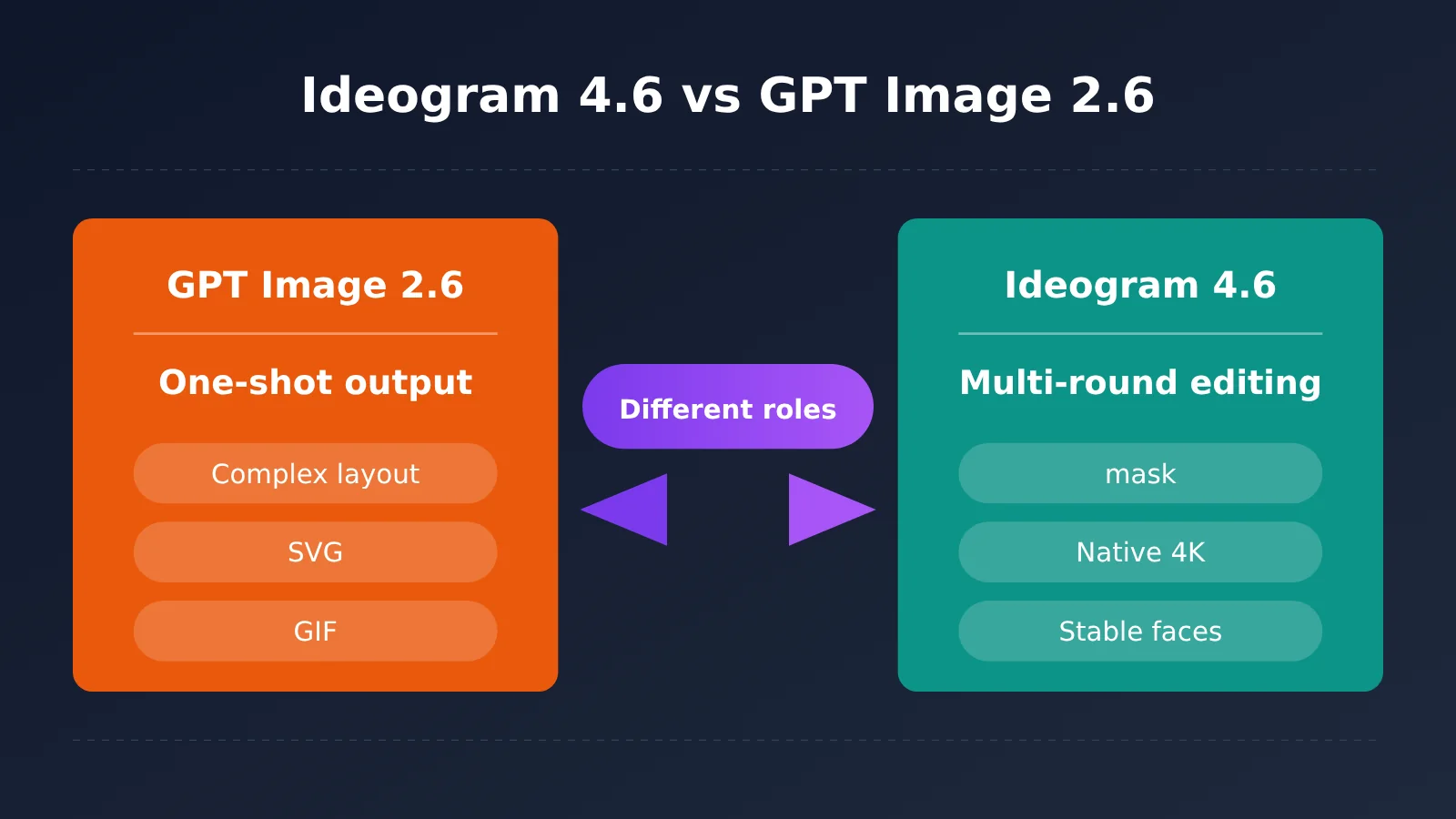
Let’s start with how each model positions itself. Ideogram 4.6 is a model that specializes in image editing. The official tagline is “the new frontier of precise editing, now in native 4K,” emphasizing noticeably less pixel drift outside the edited region and more accurate colors. GPT Image 2.6 is a general-purpose image generation model, strong at text rendering and complex layouts, and it now adds SVG and GIF output.
| Dimension | Ideogram 4.6 | GPT Image 2.6 |
|---|---|---|
| Release date | 2026-11-19 | 2026-11-04 |
| Model lineup | Single model with four tiers: Very low / Low / Medium / High | gpt-image-2.6-flare (fast iteration), gpt-image-2.6-sunburst (fine visual detail) |
| Official focus | Precise editing, native 4K, less pixel drift outside the edited area | Text rendering, complex layouts, SVG / GIF |
| Output ceiling | Native up to 4096×4096, no upscaling | No side over 3840, total pixels no more than 8,294,400 |
| Pricing | Per image, priced by tier and resolution | Per token, varies with input image and quality |
| Best for | Many consecutive edits on the same image | A finished, ready-to-use result in one shot |
The most important line in this table is the last one. The strengths of the two models don’t overlap, so the smarter approach is to split tasks within the same pipeline rather than picking one over the other. The next three sections cover leaderboards, APIs, and cost.
Ideogram 4.6 vs GPT Image 2.6 — Core Difference 1: Why the Two Leaderboards Disagree
AA Leaderboard: GPT Image 2.6 Leads in General Image Quality and Single-Shot Editing
According to Artificial Analysis (AA) data from 2026-11-26, on the AA-Image-T2I v2.1 text-to-image leaderboard, GPT Image 2.6 Sunburst (max) ranks 1st with 1264 ±14, while Flare (max) ranks 3rd with 1226 ±12. Ideogram 4.6 (High) sits at just 985 ±13, placing 69th — even lower than the previous generation Ideogram 4.5 (High) at 1017.
On the AA-Image-Editing v2.1 single-edit leaderboard, GPT Image 2.6 Sunburst (max) ranks 2nd with 1212 ±13; 1st place goes to MAI-Image-2.7 at 1217. Ideogram 4.6 (High) scores 1089 ±14, placing 31st — an improvement over 4.5’s 1064, but still a clear gap from the top. Both leaderboards use blind two-choice voting, reflecting users’ overall preference for single-shot results.
Rapidata Leaderboard: Ideogram 4.6 Leads on Multi-Step Face Stability
The Multi-step Image Edit leaderboard that Rapidata publishes on benchmark.ai (updated November 10, 2026) tells the opposite story. Ideogram 4.6 (Precise Edit, High Quality) ranks 1st at 1892 ±32, with an 86.3% win rate. GPT Image 2.6 Sunburst (Max Quality, High Reasoning) sits at 1001 ±21, ranks 11th, and has a 50.0% win rate; Flare ranks 19th.
It’s important to understand how this leaderboard is measured. It uses 199 real-person photos, and each one gets a 5-step edit chain that only changes clothing, objects, and text—never the face. At each step, the model’s own output from the previous round becomes the input, and finally people blindly choose “which face after step 5 looks more like the original.” There are 413,667 judgments in total, fitted into an Elo score using the Bradley–Terry method. So it measures face identity drift, not general image-editing quality.
| Leaderboard | What it measures | GPT Image 2.6 Sunburst | Ideogram 4.6 (High) |
|---|---|---|---|
| AA-Image-T2I v2.1 | General text-to-image preference | 1264 ±14, 1st | 985 ±13, 69th |
| AA-Image-Editing v2.1 | General single-edit preference | 1212 ±13, 2nd | 1089 ±14, 31st |
| Rapidata Multi-step Edit | Whether the face still looks like the original after 5 edits | 1001 ±21, 11th | 1892 ±32, 1st |
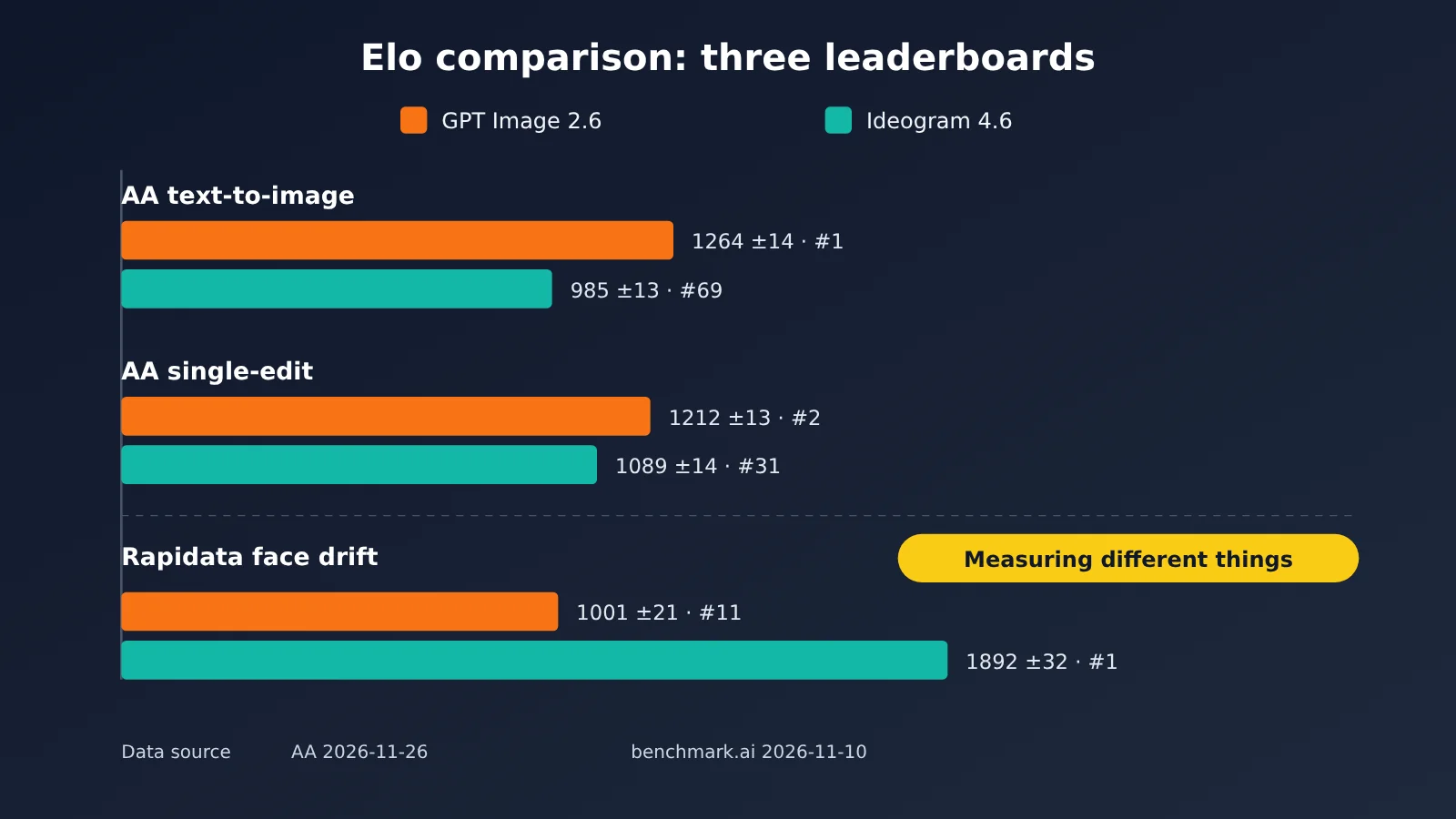
The two leaderboards aren’t measuring the same thing — you can’t just look at one
Neither leaderboard is wrong; they’re just answering different questions. AA cares about “does this image look good, and was the edit done well?” Rapidata cares about “after five rounds of edits, does the same person still look like themselves?” GPT Image 2.6 excels at producing a complete, polished image in one shot, but each regeneration causes the face to drift a little more. Ideogram 4.6 doesn’t score high on single-image aesthetics, but it keeps content outside the edited region very stable.
Two more details are worth noting. On the Rapidata leaderboard, the confidence intervals for 4.6 and 4.5 overlap between 1860–1896, so this board can’t tell which of the two generations is stronger. That said, 4.6 leads the third-place Seedream 5.5 by a total of 87 points, and their intervals don’t overlap — meaning its advantage on this dimension is solid. Separately, Ideogram published a set of self-reported usability figures comparing 4.6 and 4.5 on the same batch of High-tier edit requests:
- Recoloring to match a brand color code: 46% → 83%
- Fixing small product flaws: 61% → 86%
- Product shots: 66% → 88%
- Person still recognizable after swapping scenes: 69% → 85%
- Editing only the brushed region: 82% → 90%
Ideogram hasn’t disclosed the criteria for judging something “usable,” and this data only compares against its own previous generation — so it can’t be used for a head-to-head comparison with GPT Image 2.6.
Ideogram 4.6 vs GPT Image 2.6 — Key Difference #2: API Capabilities
The API differences line up with what the leaderboard showed: GPT Image 2.6’s new capabilities center on “output formats,” while Ideogram 4.6’s center on “editing precision.”
| Capability | GPT Image 2.6 | Ideogram 4.6 |
|---|---|---|
| Endpoint | Supports only /v1/images/generations and /v1/images/edits; doesn’t support Chat Completions or Responses |
/v2/image/generate/ideogram-4-6, /v2/image/precise-edit/ideogram-4-6, multipart/form-data |
| Region editing | markup transparent annotation layer to outline the area, then pair it with a prompt |
Optional mask; output dimensions always match the source image |
| Large-image handling | Custom dimensions; width and height are multiples of 16; aspect ratio 1:3–3:1 | Source images up to 8192×8192; context_window changes only the local area and returns the rest unchanged |
| Special output | SVG, GIF | Transparent background (background=transparent) |
| Reasoning effort | complexity accepts low / medium / high, defaults to high, no separate charge |
Quality tiers from Very low to High |
| Other | SVG requires specifying a text model via svg.model |
Up to 5 source images; dry_run=true lets you get a quote first |
On the GPT Image 2.6 side, SVG output requires you to specify a text model via svg.model to write the code, and that writing model is billed separately. For GIF, use frame_count to control the number of frames (2–64, default 9) and frame_duration_ms to control the duration of each frame (20–2000). markup works by outlining the area you want to change on a transparent layer and then adding a prompt—great for clear edits like “replace this block of text.” One thing to watch: it doesn’t go through Chat Completions, so code in older projects that wraps the chat API needs to be changed to call the images endpoint.
On the Ideogram 4.6 side, the thing to pay most attention to is context_window. When a source image exceeds 4096×4096, it’s downscaled to 4096×4096 by default. If you want to keep the original 4K or 8K dimensions, you can set context_window=auto together with mask, or pass in your own y_min,x_min,y_max,x_max coordinates, and the model will change only that region while returning the rest of the pixels unchanged. The Generate endpoint accepts up to 5 source images (the first is the image being edited, and the rest are reference images), and you can add 3 more when using a mask. The API returns synchronously by default and also supports async and webhook.
Ideogram 4.6 vs GPT Image 2.6, Core Difference 3: You Have to Compare Costs on the Same Basis
The prices on the two sides can’t be compared directly on a per-image basis. GPT Image 2.6 charges by token, while Ideogram 4.6 charges per image, and even the same “per-image price” can correspond to different resolutions and quality tiers.
| Basis | Model / Channel | Price (USD) | Notes |
|---|---|---|---|
| Official token conversion | GPT Image 2.6 high, 1024×1024 | About 0.0527 | 1,756 tokens; low is about 0.0247, max about 0.2107 |
| Usage-based tokens | APIYI apiyi.com gpt-image-2.6-flare / gpt-image-2.6-sunburst |
Image output $30 / 1M tokens | Text input $5, image input $8, cached text $1.25, cached image $2 |
| Per request | APIYI gpt-image-2.6-all |
0.025 / request | Official reverse-proxy channel; native quality when the long side is 512–1536, 2K/4K are upscaled |
| Per image | Ideogram 4.6 High generation | 2K 0.10 / 4K 0.20 | Output over 2048×2048 is billed at the 4K tier |
| Per image | Ideogram 4.6 High editing | 2K 0.22 / 4K 0.60 | Precise Edit and Generate with a source image are the same price |
Here’s how to make sense of GPT Image 2.6’s token pricing: at 1024×1024, the high tier outputs about 1,756 tokens, which at $30 / 1M works out to roughly $0.0527. The xhigh and max tiers use 3,122 and 7,024 tokens respectively, so the price goes up accordingly. Input images also count toward tokens, so the price of an edit varies with the size of the source image; there’s no fixed official per-image price for 2K.
On APIYI, GPT Image 2.6 has two channels, and you shouldn’t lump the prices together. One is the usage-based gpt-image-2.6-flare / gpt-image-2.6-sunburst, billed at the token unit prices in the table above. The other is the per-request official reverse-proxy gpt-image-2.6-all at $0.025 per request, but it’s only native quality when the long side is within 1536; 2K/4K are upscaled results. So 0.025 and Ideogram 4.6’s 2K 0.10 aren’t a comparison at the same image quality. To integrate, set base_url to https://api.apiyi.com/v1 and call /images/generations or /images/edits. Ideogram 4.6 isn’t listed on APIYI yet; we’ll get this model listed as soon as we can. For model names and prices, refer to the platform’s model list.
Let’s also do the math for multiple rounds of image editing. With Ideogram 4.6 High, editing a 2K image for five consecutive rounds costs 5×0.22 = $1.10; at 4K, it’s 5×0.60 = $3.00. For GPT Image 2.6, the price per round depends on the input image and quality tier, so you can’t simply multiply by 5. Also, the per-thousand-image prices listed on the AA leaderboard (Ideogram 4.6 generation $100/1k, editing $220/1k; GPT Image 2.6 $210.72/1k) are normalized based on each provider’s default settings, and they can’t be combined with the table above into a single number.
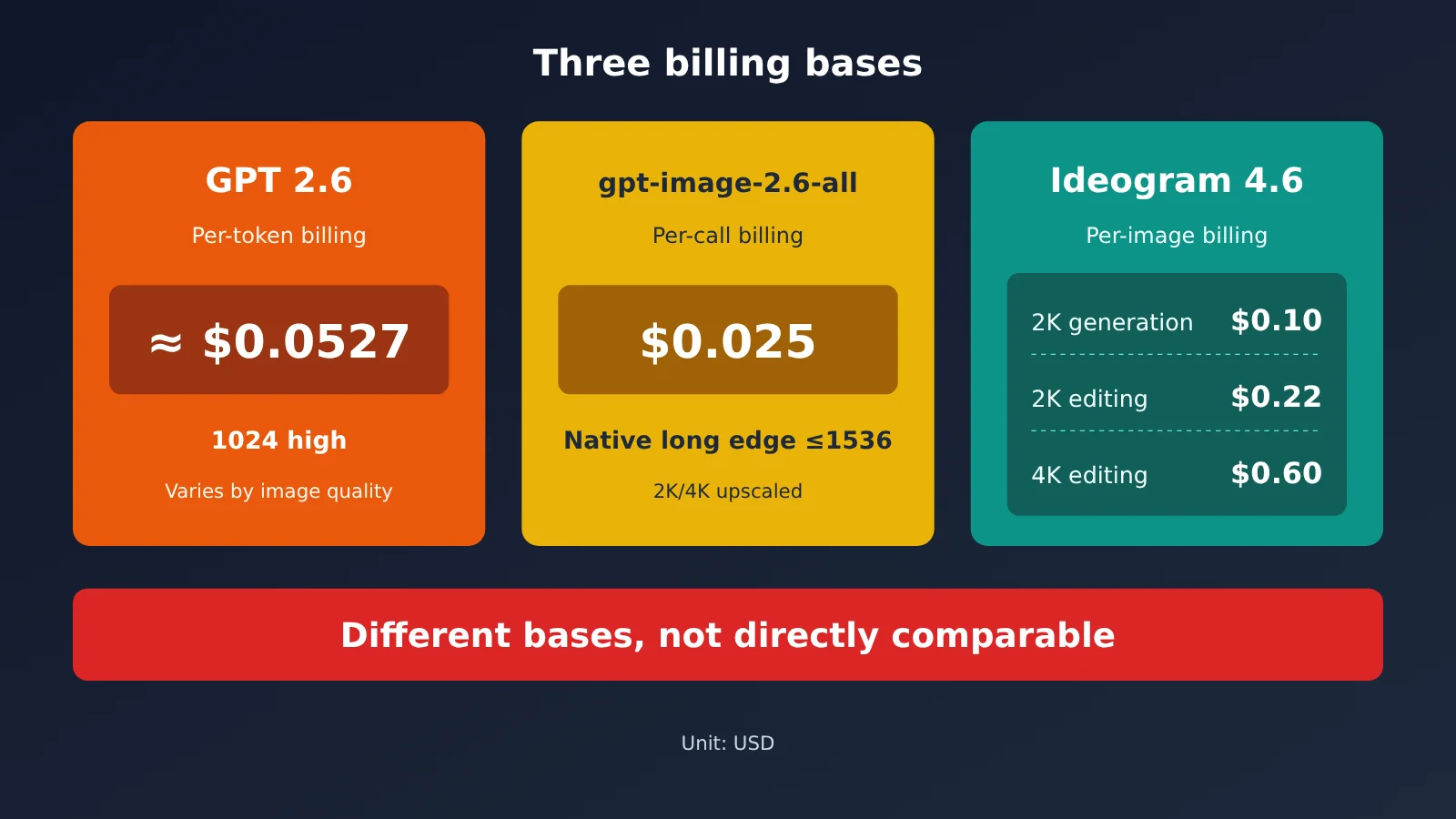
The GPT Image 2.6 channel prices shown above come from the APIYI apiyi.com pricing page, while the Ideogram 4.6 prices are taken from its official pricing page.
🚀 Quick start: If you want to test GPT Image 2.6’s layout capabilities first, you can call
gpt-image-2.6-flareandgpt-image-2.6-sunburstseparately with the same key on APIYI apiyi.com. Use Flare to iterate quickly on your prompt, and once you’re happy, switch to Sunburst for the polished version. The token cost for each image shows up in your billing.
Ideogram 4.6 vs GPT Image 2.6: Which One for Which Scenario
| Scenario | Primary model | Why |
|---|---|---|
| E-commerce hero image | Generate with GPT Image 2.6 first, then refine details with Ideogram 4.6 | 2.6 excels at selling-point copy and layout, while 4.6’s self-reported success rate for color changes and blemish fixes has improved noticeably |
| Complex posters | GPT Image 2.6 | Leads in text rendering and complex layouts, and can output SVG for easy re-editing |
| Long-chain image editing | Ideogram 4.6 | Ranks #1 on Rapidata’s multi-step face drift benchmark, and pixels outside the edit region stay stable when used with a mask |
| Batch experimentation | GPT Image 2.6 Flare or the -all channel |
Fast iteration and low per-call cost — filter for direction first, then refine |
E-commerce hero images: GPT Image 2.6 for layout, Ideogram 4.6 for color and blemishes
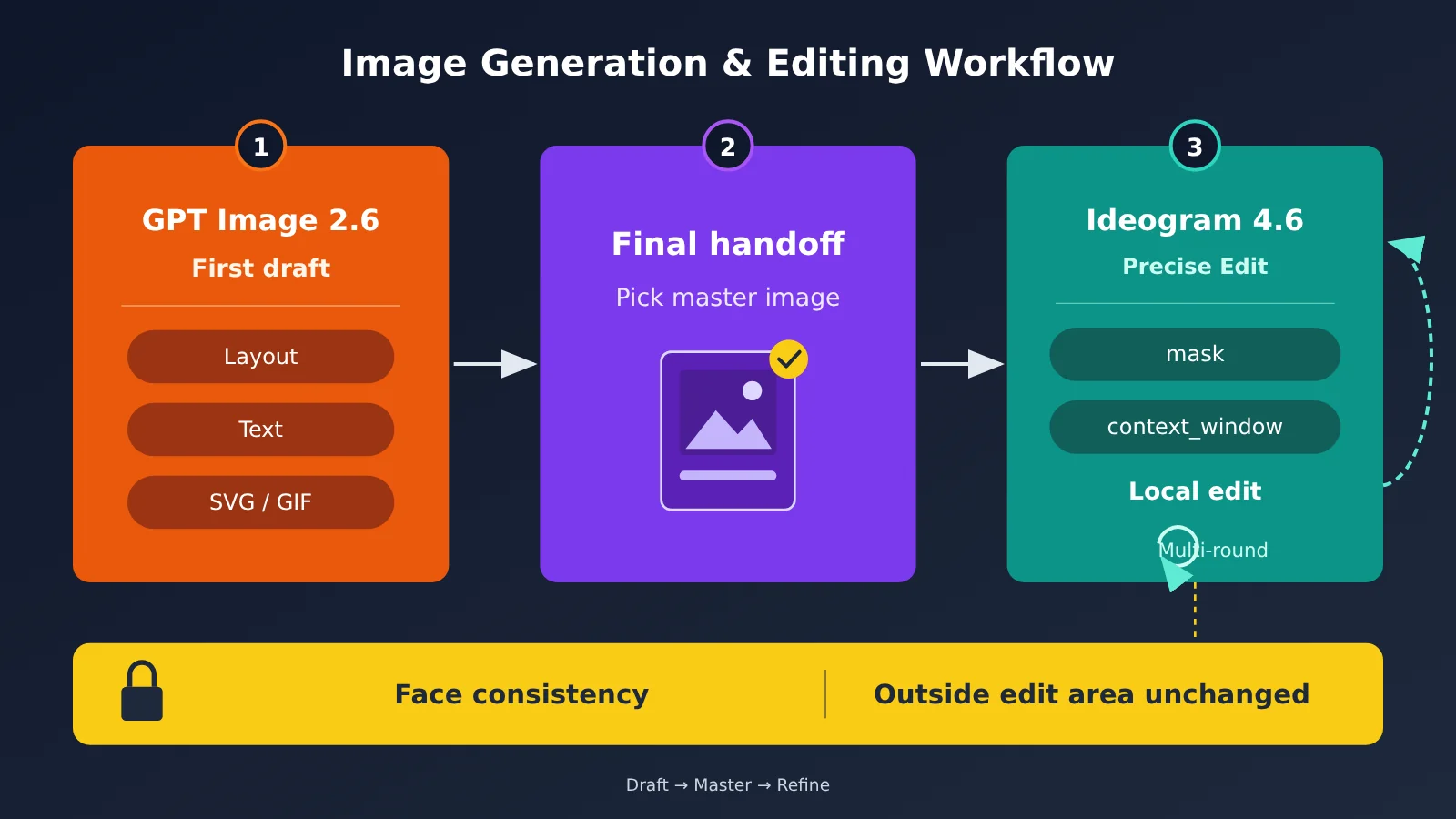
E-commerce hero images usually need both legible selling-point copy and accurate product color. Generating a complete layout with text in one pass is easier with GPT Image 2.6. Later, for edits like “change the cup body to the brand color code” or “remove the scratch on the bottle cap,” hand them over to Ideogram 4.6’s Precise Edit with a mask — the official numbers put success rates for these two task types at 83% and 86% respectively.
Complex posters: GPT Image 2.6 fits better
Event posters contain a lot of multi-level text, multiple information blocks, and brand elements — exactly GPT Image 2.6’s strong suit. When a designer needs to keep tweaking, you can output SVG directly. When you need social media animations, you can use GIF output with frame_count to control the pacing.
Long-chain image editing: Ideogram 4.6 fits better
Changing a model’s outfit, putting the same person into multiple scenes, or editing one image over a dozen rounds — these tasks run the risk of the face gradually morphing into someone else. That’s exactly what the Rapidata benchmark measures, and Ideogram 4.6’s score of 1892 is far above GPT Image 2.6 Sunburst’s 1001. When the source image is large, use context_window to edit only part of it, preserving the original pixels in the rest of the 8K source.
Batch experimentation: start with GPT Image 2.6’s low-cost channels
When exploring creative directions early on, a single prompt often needs to be run through dozens of variants. GPT Image 2.6 Flare is designed for fast iteration, and gpt-image-2.6-all‘s per-call billing makes budgeting easy. Once the direction is locked in, decide whether to produce the final image with Sunburst or hand it to Ideogram 4.6 for refinement.
Ideogram 4.6 vs GPT Image 2.6: Decision Guide
In one sentence: GPT Image 2.6 when you want a finished image in one shot, Ideogram 4.6 when you’ll be iterating ten rounds.
That statement comes with two caveats. First, AA and Rapidata aren’t measuring the same thing. AA says GPT Image 2.6’s single-pass generation and single-pass edits are more aesthetically popular; Rapidata says Ideogram 4.6 holds a face together better across multi-turn edits. You can’t use one leaderboard to disprove the other. Second, Rapidata’s edit chain is only 5 steps, so “ten rounds” is an extrapolation from that trend — before applying it to your own workflow, it’s best to run it once with real material.
💡 Recommendation: If your pipeline is mostly layout-driven image output, start by hooking up GPT Image 2.6 on APIYI apiyi.com, use
complexityplus the Flare / Sunburst variants to tune the quality-to-cost balance, then decide based on your editing volume whether to bring in a dedicated editing model.
FAQ
Q1: What are Ideogram 4.6 and GPT Image 2.6 positioned as?
Ideogram 4.6 is an image generation and editing model released on 2026-11-19, positioned around precise editing and native 4K. GPT Image 2.6 is a general-purpose image generation model OpenAI released on 2026-11-04, split into Flare and Sunburst variants, with strengths in text rendering, complex layouts, and SVG/GIF output.
Q2: Why do the AA and Rapidata leaderboards reach opposite conclusions?
AA measures blind preference votes on single-pass text-to-image and single-pass edits, where GPT Image 2.6 Sunburst scores 1264 and 1212 respectively. Rapidata measures how much a face still looks like the original after a 5-step edit chain, where Ideogram 4.6 ranks first at 1892. The two leaderboards ask different questions, so naturally they land on different answers.
Q3: Can GPT Image 2.6 be called via Chat Completions?
No. It only supports `/v1/images/generations` and `/v1/images/edits`. When integrating through APIYI apiyi.com, you likewise go through those two images endpoints and set base_url to APIYI’s v1 address.
Q4: How do I compare per-image pricing fairly?
First confirm whether resolution and quality tier match. GPT Image 2.6 at 1024 high is about $0.0527, based on official token conversion; `gpt-image-2.6-all` is $0.025 per call, but native quality only holds within a 1536 long edge. Ideogram 4.6 at 2K high-quality generation is $0.10. The three use different bases, so you can’t rank them directly as high or low.
Q5: How do I get started testing GPT Image 2.6 quickly?
1. Register at APIYI apiyi.com and get an API key plus new-user test credits
2. Set base_url to `https://api.apiyi.com/v1`
3. Call `/images/generations` with `model` set to `gpt-image-2.6-flare` for drafts, then switch to `gpt-image-2.6-sunburst` once you’re happy
Q6: What are the known weaknesses of Ideogram 4.6?
Its general text-to-image score is even lower than 4.5’s, ranking 69th on the AA leaderboard — single-image aesthetics aren’t its strong suit. The five-item availability improvement is vendor self-reported and only compares against its own 4.5. On the Rapidata leaderboard its range overlaps with 4.5, so it can’t be shown to be more stable than the previous generation. High-quality 4K editing runs $0.60 per image, so budget ahead for long edit chains.
—
## Ideogram 4.6 vs GPT Image 2.6: Key Takeaways
– **Different strengths**: GPT Image 2.6 excels at getting a finished result in one pass; Ideogram 4.6 excels at precise multi-turn image edits.
– **AA leaderboard**: 2.6 Sunburst ranks 1st in text-to-image and 2nd in single-edit; 4.6 ranks 69th and 31st, respectively.
– **Rapidata leaderboard**: 4.6 ranks 1st with 1892 points for multi-step face drift, while 2.6 Sunburst ranks 11th with 1001 points.
– **API differences**: 2.6 supports SVG, GIF, and `markup`; 4.6 supports `mask` and `context_window` for 8K source images.
– **Pricing basis**: 2.6 is priced per token, while 4.6 is priced per image—so per-image prices aren’t directly comparable.
– **Division of labor**: give layout and first drafts to 2.6; give long-chain image editing and face consistency to 4.6.
—
## Summary
Ideogram 4.6 vs GPT Image 2.6 comes down to this:
1. **Each leaderboard tells you something different**: AA measures single-shot image quality, Rapidata measures multi-turn face drift—you need to look at both.
2. **The API determines how you’ll use it**: choose 2.6 for complex layouts, vectors, and animated GIFs; choose 4.6 for fine local retouching on large images and long-chain editing.
3. **Calculate costs by pricing basis**: the quality you get differs across token-based, per-call, and per-image pricing, so normalize resolution before comparing.
In real projects, a safer approach is to use GPT Image 2.6 for layout and first drafts, then hand the parts that need repeated revisions to a model that specializes in editing. I recommend starting with APIYI (apiyi.com): use a single API key to run both GPT Image 2.6 model variants and both billing channels end to end, validate the results with your own assets, and then decide how to split the pipeline.
—
## 📚 References
1. **Ideogram 4.6 Official Model Page**: specs, quality tiers, and pricing
– Link: `ideogram.ai/models/4.6`
– Details: the source for native 4K, Precise Edit, and the officially reported usable-output rate
2. **Ideogram Official Release Announcement**: release notes from 2026-11-19
– Link: `x.com/ideogram_ai/status/2123461101224624402`
– Details: the official team’s original wording on precise editing and pixel drift improvements
3. **Rapidata Multi-Step Image Editing Leaderboard**: ranking for face identity drift
– Link: `benchmark.ai/multi-step-image-edit`
– Details: the evaluation method and full ranking, based on 199 real photos and 5-step edit chains
4. **Artificial Analysis Image Leaderboard**: AA-Image-T2I v2.1 and AA-Image-Editing v2.1
– Link: `artificialanalysis.ai`
– Details: blind-vote preference scores for single-pass text-to-image and single-pass editing
—
> **Author**: APIYI Technical Team
> **Technical discussion**: Feel free to reach us through the APIYI homepage — more integration resources are available in the docs.apiyi.com documentation center.