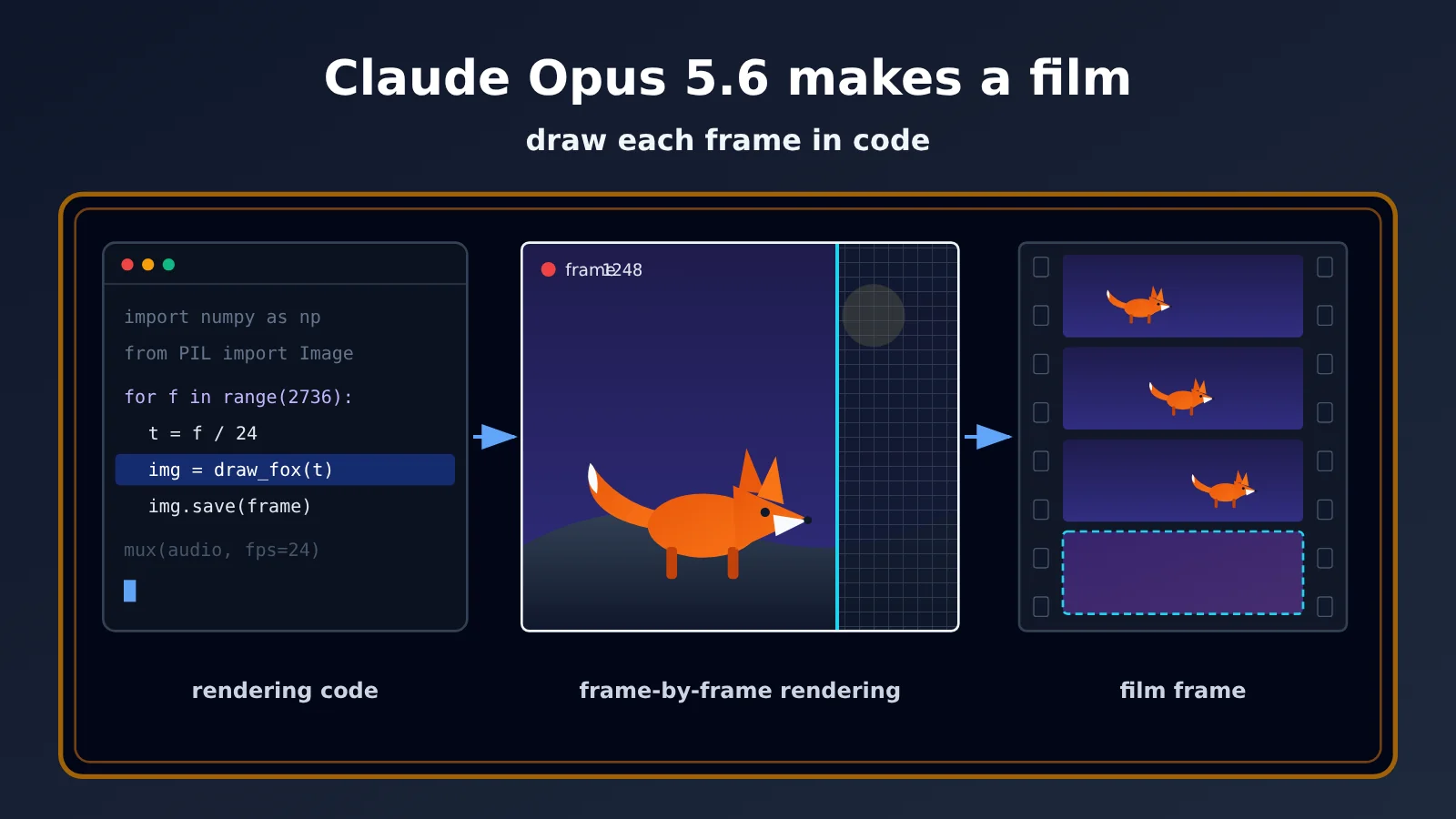
Let’s start with the conclusion: the cinematic feel in these videos is real, but the images aren’t pixels generated by a video model. The model writes rendering code, and then the code computes each frame. One more thing needs to be clear: as of 2026-11-26, Claude Opus 5.6 still doesn’t have an official model ID, pricing, or model card. It’s something the community spotted during a limited rollout test — you can’t call it released.
The question in the title is what readers will ask after watching the video; it isn’t the conclusion. The original posters all talk about AGI, but this article only quotes them verbatim and doesn’t make judgments for anyone. Based on the available material, the real progress in this generation is that long clips from tens of seconds to two minutes stay coherent; pixel-level generation hasn’t changed.
Core value: After reading this, you’ll know how these videos were made, you can use a three-step process to judge whether they’re real yourself, and you can follow a workflow to run your own 10-second sample today with the already-available claude-opus-5-5.
The Core Takeaways from Claude Opus 5.6 Making a Movie
It started with three posts on X between November 25 and 26, 2026. All three films run about two minutes, all are credited to Opus 5.6, and all mention AGI. The table below lays out the basics; the numbers come from the post pages.
| Account | Post time | Duration | Key stats | Notes |
|---|---|---|---|---|
| KC (@karanC_12) | 2026-11-25 22:03 | 1:46 | 14.1K views, 240 likes, 89 bookmarks | Lower-left corner says “From Chetaslua”; this is a repost |
| Salio (@Mr_Salio) | 2026-11-26 00:14 | 1:46 | 2,535 views, 30 likes, 7 bookmarks | 1280×720 animated short |
| Nikita (@fluxxrider) | 2026-11-26 01:15 | 2:04 | 119.1K views, 1,616 likes, 527 bookmarks | Blocky voxel style, theme is RSI |
Now the exact wording. KC wrote, “AGI is here / Opus 5.6 made this banger 🔥” — the Chinese interface rendered it as “AGI is here / Opus 5.6 made this banger.” Salio wrote, “It made this entire anime film, music visuals animations using pure code,” then added the same “AGI is coming” line. Nikita’s post showed up in the Chinese interface as: “Claude Opus 5.6 made a video about RSI:”
Nikita’s post has the most views. The prompt the author posted in the comments is very short. The gist: use Claude’s logo to make an animation about Clawd, with recursive self-improvement as the theme; make it stunning, spare no expense, and make it as good as those demos on Twitter. Someone in the comments machine-translated RSI as “repetitive strain injury”; the intended meaning is recursive self-improvement. This also reminds us that a one-sentence prompt producing a two-minute film only proves the model filled in a lot of storyboards on its own. It doesn’t mean a casual one-liner from you will get the same result.
What really changed in the Claude Opus 5.6 generation: long clips hold up
Sharper visuals aren’t the draw this generation. The images are drawn by code to begin with, so clarity is determined by the resolution parameter, not by how capable the model is. The real change is that the code the model writes in one pass can sustain an entire runtime. Dozens of cuts later, the character’s appearance, the direction of the light, and the beat of the soundtrack still match up. The table below collects the length data we could verify from repositories and posts.
| Work | Duration | Frames and specs | Shots and structure |
|---|---|---|---|
| The Last Page | 65 sec | 1,560 frames, 24 fps, 2048×1152 | 9 storyboards, visuals and soundtrack in pure Python |
| Curse / Celebration | 114 sec | 2,736 frames, 24 fps, 1920×1080 | 37 shots, 160 BPM, includes vocal sections |
| Nikita’s RSI short | 124 sec | 1280×720 | Blocky-style characters, with an 8.0s version marker in the visuals |
There’s also a community comparison worth checking out. On 2026-11-24, Marcel (@marcthecreatorr) ran the same The Last Page prompt through two models, one run each. According to his account, the 5.5 version broke apart into glitchy color blocks, while the suspected new version told the fox story all the way through, with a smooth loop, entirely in code, and no video generation. This is a community comparison, not an official evaluation, and it’s a single sample — but the direction matches the length data above.
Claude Opus 5.6 Rumors: The One Clip Most Worth Rebuilding — The Last Page
Of the three shorts, the one KC shared came from Chetaslua (Chetas Lua), and it lives in the repo github.com/ChetasLua/the-last-page, with the first commit dated 2026-11-24. It deserves its own writeup because it publishes everything that can be published — anyone can grab it and rerun it locally.
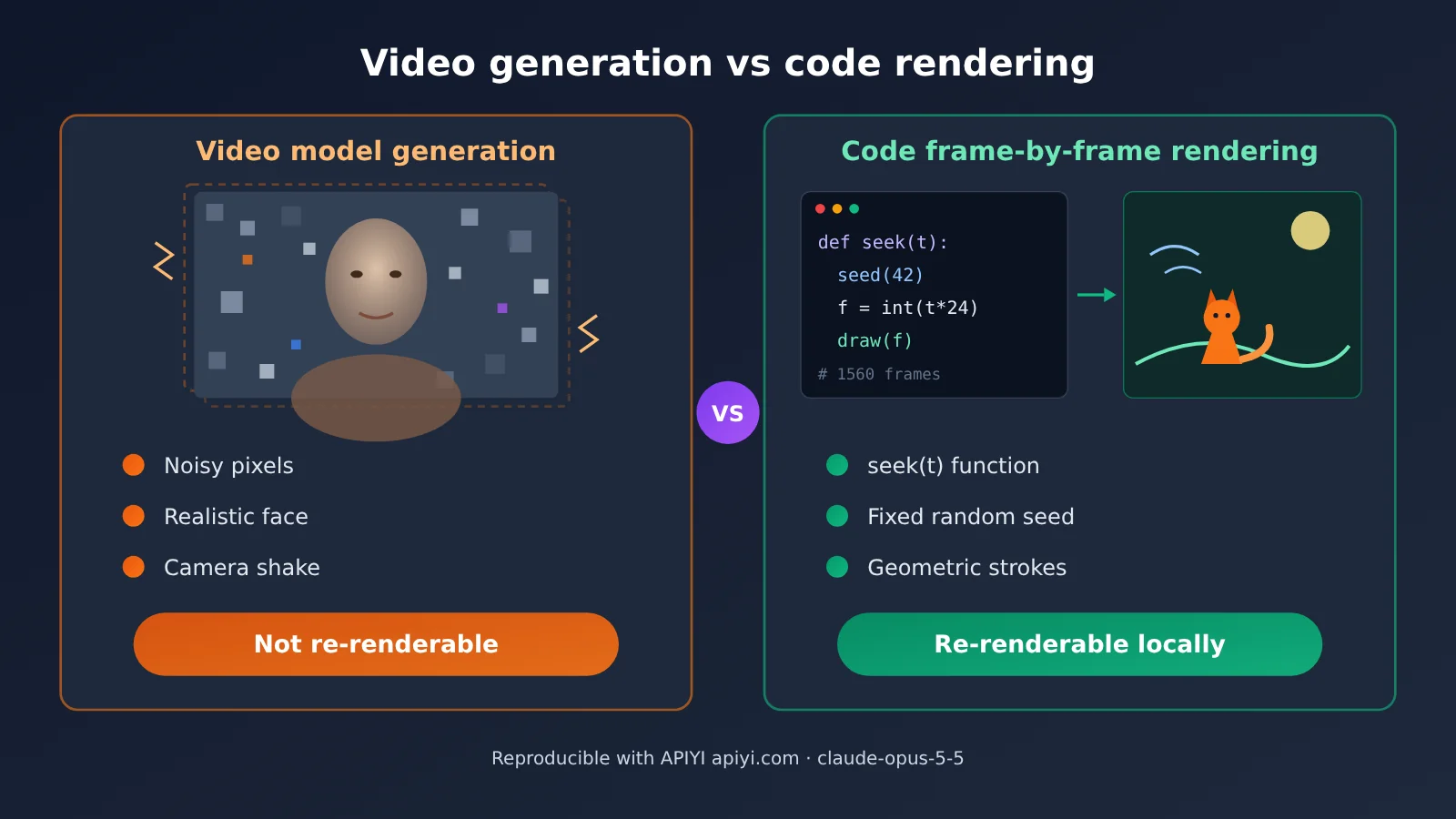
The README is refreshingly blunt: it’s a 65-second hand-drawn-style animated short where the visuals, animation, and score are all drawn and composited in pure Python, at 2048×1152, 24 fps, 1,560 frames. No image models, no image files, no audio samples, no fonts — every brushstroke, cel shading layer, book, cloud, and musical note comes from code, and all random seeds are fixed. The author quotes roughly 7 minutes to re-render on an 18-core M5 Pro, and the third-party report at news.the9.pro recorded the same figure on 2026-11-25.
The repo’s PROMPT.md runs about 15,000 characters and logs, message by message, what was sent to the model at the time. It opens by asking for a pure-Python five-stage workflow: 3D blocking pass, hand-drawn coloring, 1:1 pixel inspection, then fixes. The deliverable is a single self-contained HTML file with audio baked in — a black cinema-style frame with just one play button. The style nods to Ghibli without copying any characters; the protagonist is an original little red fox, and the piece then lays out the time ranges and visuals for all 9 shots, one by one.
One more thing matters here: the README states outright that this is an unofficial concept film, not made or endorsed by Anthropic, and that it doesn’t announce any release. So no matter how good it looks, you can’t treat it as an official Anthropic sample.
Why Claude Opus 5.6’s Label Can’t Be Trusted
Looking through The Last Page’s commit history, the first commit carried Co-Authored-By: Claude Opus 5.5. At the time, the author had selected an entry point called Opus 5.5 Extra in Claude Code, and the repo’s paper trail says 5.5. More interestingly, the first sentence of the original brief was “Create a launch film for Fable 5.5”, which suggests this prompt was originally written for the previous generation’s rumored Fable 5.5.
Here’s the background: starting 2026-10-11, some people in the community suspected that certain Opus 5.5 requests were being routed to an unannounced new model. In a 2026-11-25 article, TestingCatalog called the 11-24 wave an A/B test: some users who chose the Opus 5.5 Extra entry point got noticeably different responses—stronger 3D and SVG, but slower answers. Yet the official model overview only lists Fable 5.2, Opus 5.5, Sonnet 5.5, and Haiku 5.5—no claude-opus-5-6. So “5.6 did this” currently rests only on the author’s own account, with no model ID anyone can verify.
In a 2026-11-25 roundup, MindStudio also pointed out that someone did pass off an AI video generated from a single image as a pure-code demo, and some commenters flat-out said the Opus 5.6 claim was fake. Labels can be written at will; code and repositories can’t be fabricated so easily. That’s the starting point for the three-step check in the next section.
Three Steps to Tell If an “Opus 5.6 Film” Is Real
Regular viewers don’t need to understand rendering. Just ask three questions in order. If a film passes all three, it’s worth trusting—and worth your time learning from its approach.
| Step | Question to Ask | What Passing Looks Like | Red Flags |
|---|---|---|---|
| Step 1: Check the code | Do they dare to publish the code, repo, and prompts, and can you rerender it locally? | There’s a repo, a PROMPT.md, fixed random seeds, and documented rerender steps |
Only a video; when asked for code, they say it’s “confidential” |
| Step 2: Check the model version | Does the model tag include an official model ID and model card? | You can find the matching ID in the official model overview | Only a verbal claim in the post; the commit history shows a different version |
| Step 3: Check the visuals | Does the image look like something pure code could produce? | Geometric brushstrokes, flat color blocks, controllable camera movement | Realistic micro-expressions, real camera shake, text smeared into gibberish |
Step three is the easiest to overlook. Code-based art relies on functions and geometry. It’s hard to conjure the subtle twitches of human skin out of thin air, or the random jitter of a handheld camera, and it won’t turn text into gibberish—because text in code is either not drawn at all or drawn cleanly. When those things show up in a frame, it looks more like an AI video impersonation. Going back through these three steps, The Last Page passes step one and step three, but gets stuck on step two, because the model version itself can’t be verified.
Get Started with the Same Claude Opus 5.6 Workflow: Run It Today on 5.5
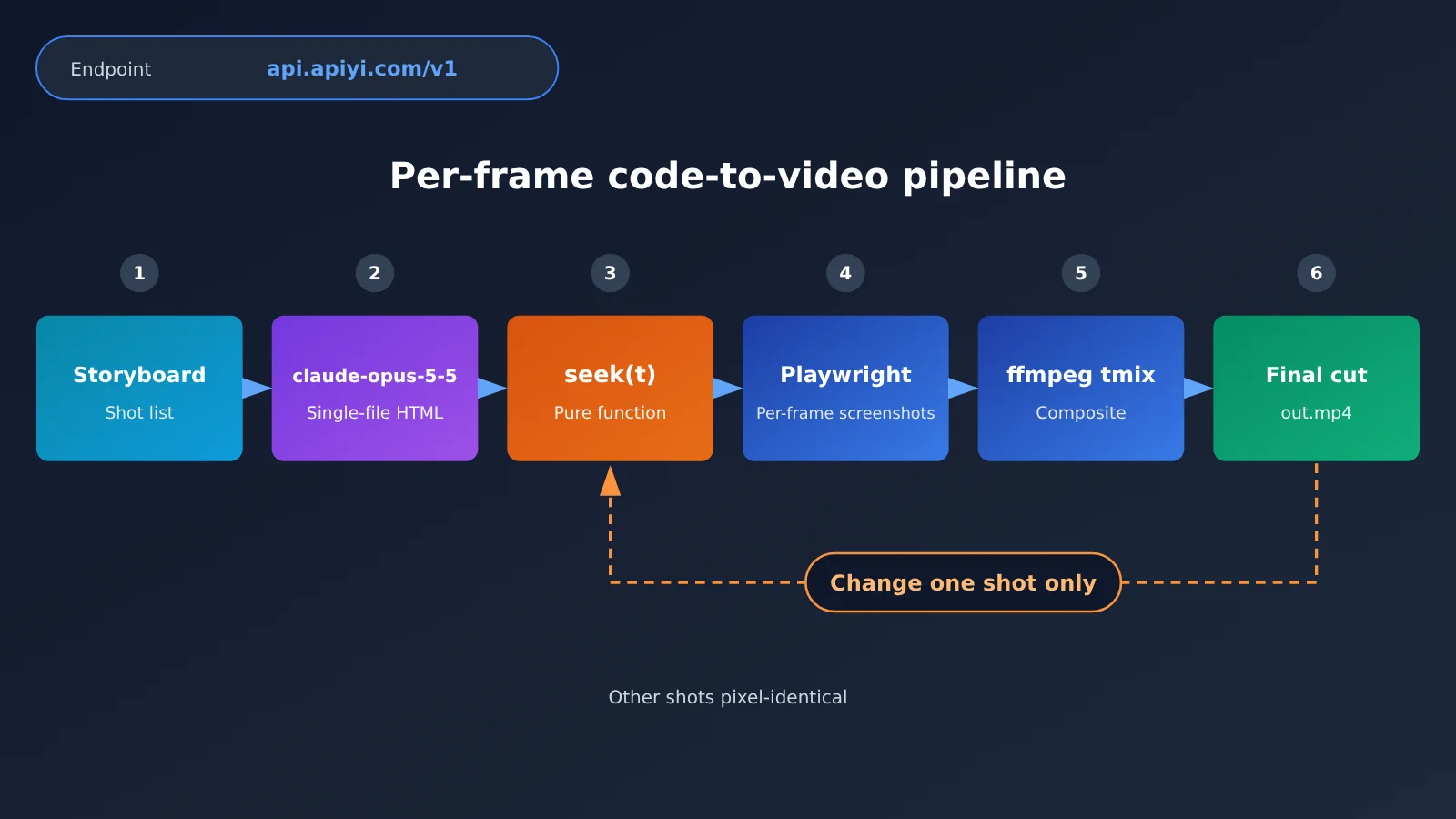
Just because 5.6 isn’t out yet doesn’t mean you can’t get started. This workflow was already made public with the previous generation, and the model is only one piece of it. The six steps below use the claude-opus-5-5 model available on APIYI at apiyi.com. Each step includes acceptance criteria—if you don’t pass, don’t move on.
- Start a conversation. Use an OpenAI-compatible SDK, initialize the client with
client = OpenAI(api_key="YOUR_API_KEY", base_url="https://api.apiyi.com/v1"), then callclient.chat.completions.create(model="claude-opus-5-5", messages=[...]). Acceptance criteria: send a “Hello” and get text back normally. - Give it a storyboard. Don’t just say “make an animation.” For each shot, spell out the time range, visuals, camera movement, and sound—for example, “0–4 seconds: the night sky pushes in toward the windowsill, the camera slowly tilts down, a single piano note.” Acceptance criteria: the storyboard covers the full duration, and adjacent shots start and end at matching times.
- Specify the code structure. Require a single-file HTML, where the frame at second t is computed by a pure function like
seek(t). No CSS transitions, no timers, and no state stored across frames. Acceptance criteria: callseek(7.5)at random in the browser console and the visual should jump straight to that moment; jumping back and forth a few times should give the same result. - Ask for only 10 seconds first. Cut the storyboard down to the first 10 seconds and have it write that. When you render it, focus on whether the character’s appearance and light direction are right. Once you’ve confirmed it, extend to 60 seconds. Acceptance criteria: within those 10 seconds, the character’s face doesn’t change and the light source direction doesn’t jump around.
- Render frame by frame locally, then composite. Use Playwright to call
seek(t)by frame number and take screenshots. First render just one frame per beat to check, then render the whole piece once that looks good. If you need motion blur, sample several subframes per frame and composite them with ffmpeg’stmixfilter. Finally, export the video with a command likeffmpeg -framerate 24 -i frames/%05d.png -c:v libx264 -pix_fmt yuv420p out.mp4. Acceptance criteria: spot-check any frame and it matches what you see in the browser; the final video has no dropped frames. - Fix only the shot that has a problem. After rendering, go back and ask it to fix something specific, like “the light in shot 4 is too bright.” Don’t have it rewrite the whole sequence. Acceptance criteria: after the change, frames from all other shots are pixel-for-pixel identical to the previous version.
You can take the same approach with the soundtrack. First, have the model analyze the beat grid, then have the code synthesize the timbres and notes. Even the vocal sections of Noroi / Iwai were synthesized in Node with zero-dependency JavaScript. The community prompt library for the previous generation, github.com/yihui-dev/awesome-opus5-5-videos, had about 700 entries as of October 2026. You can use it as a reference for how to write storyboards, but it’s a community compilation, not official material.
🚀 Quick start: We recommend claiming the new-user free trial credit on APIYI at apiyi.com first, running through steps 1 to 4, confirming the 10-second sample looks good, and then deciding whether to commit to a longer video.
Claude Opus 5.6 Isn’t Listed Yet — So How Do You Estimate Reproduction Costs?
This kind of work burns tokens because the model has to write thousands of lines of rendering code in a single pass, and then every time you tweak a single shot it has to re-emit the relevant sections. So the cost sits mostly on the output side — the storyboard table on the input side is actually the cheap part. Before you switch models or tools, check the exact model IDs and prices first; that’s far more practical than blindly chasing whatever’s newest.
As of 2026-11-26, APIYI’s model list shows claude-opus-5-5 at $4 per million input tokens, $20 per million output tokens, and $0.2 for cache reads, with the endpoint supporting both chat and messages. Claude Opus 5.6 isn’t listed yet — we’ll get it up as soon as we can. Model IDs and prices are subject to the platform’s model list; you can verify them anytime on the pricing page at apiyi.com.
| Model ID | Input (per million tokens) | Output (per million tokens) | Cache read | Best for | Available on |
|---|---|---|---|---|---|
claude-opus-5-5 |
$4 | $20 | $0.2 | The workhorse for this workflow — writing long rendering code | APIYI |
claude-opus-5-5-thinking |
$4 | $20 | $0.2 | When storyboards are complex and need planning first | APIYI |
claude-fable-5-2 |
$8 | $40 | $0.2 | For comparison when budget allows | APIYI |
claude-opus-5 |
$5 | $25 | $0.5 | Legacy workflow compatibility | APIYI |
Official specs show Opus 5.5 has a 1M context window and 128K max output, at a price 20% lower than Opus 5. A long brief like a 15,000-word PROMPT.md fits comfortably, and thousands of lines of code fit in a single output too. Storyboards and system prompts that get sent repeatedly qualify for the cache-read price, which saves a fair amount when you’re revising over and over. How many tokens a specific video costs depends on shot count and revision rounds — there’s no universal answer, so start by estimating from the bill for a 10-second sample, then scale up.
Risks and Damage Control When Making Films with Code
The first risk is the gray-release entry point. The new model you stumble onto in Opus 5.5 Extra is part of A/B testing, not an official channel—you might hit it today and lose access tomorrow. Don’t buy accounts or change routing just to chase a gray release, and don’t put your production pipeline on a model that doesn’t even have an official model name. If something goes wrong, you won’t even know who to contact.
The second risk is copyright. The README for 《呪い / 祝い》 explicitly states that it’s unauthorized fan work, and the character copyright belongs to Gege Akutami. Making fan work with an IP like Jujutsu Kaisen is something you can only view yourself; using it commercially will get you into trouble. The Last Page went with an original little red fox, which is a safer choice on this front.
You also need to know which requirements shouldn’t go this route. The table below can help you cut your losses.
| Requirement | Is code rendering a good fit? | Reason |
|---|---|---|
| Music visualization, hand-drawn-style short films, geometric animation | Suitable | All visuals can be described by functions; they can be re-rendered and revised shot by shot |
| Icon motion and logo animations in product launch videos | Suitable | Simple assets—Nikita’s piece follows this approach |
| Photorealistic human texture, live-action footage, real scenes | Not suitable | Code can’t draw realistic human micro-expressions or real camera movement |
| Need dozens of pieces batch-produced within a week | Not suitable | Each piece needs storyboarding, review, and shot revisions; the manpower goes into storyboards |
| Adapting copyrighted characters for commercial use | Not suitable | Legal risk, unrelated to technology |
Claude Opus 5.6 Filmmaking FAQ
Q1: Can you make a film with code and get live-action realism and real-shot footage?
No, and don’t count on it. Everything you see on this path is computed from functions and geometry. Its strengths are hand-drawn styles, flat color fills, blocky voxel looks, and music visualization. If you want real people and real footage, you should be using video generation models — these are two different lanes entirely.
Q2: Should I wait for Opus 5.6 to officially launch before starting?
Don’t wait. The storyboard conventions, the pure `seek(t)` function approach, and the Playwright plus ffmpeg rendering pipeline are all model-agnostic. Get the workflow running now with `claude-opus-5-5`, and when 5.6 actually ships you only need to swap the model name. Launch news gets synced to the model list over at APIYI apiyi.com, so you can just compare the two versions side by side when the time comes.
Q3: Can fan films based on anime IP be used commercially?
No. Even the author states right in the README that it’s unauthorized fan work and the character rights belong to the original creator. If you want something commercial, build original characters — like the little red fox in The Last Page.
Q4: How long does rendering take, and is it worth the time?
The only figures you can actually verify are from The Last Page: 65 seconds, 1,560 frames, roughly 7 minutes to re-render on an 18-core M5 Pro. Your machine and your film’s complexity will differ, so the time will differ too — render 10 seconds first and see. Whether it’s worth it depends on what you need. For a stylized short that you can re-render and revise shot by shot, it’s worth it. For live-action footage, it isn’t.
Q5: Are these films official Anthropic sample films?
No. All three are personal projects, and The Last Page explicitly states it’s unofficial and announces no release of any kind. As of 2026-11-26, the latest model launch in the official newsroom is still Claude Fable 5.2 / Claude Mythos 5.2 from 2026-11-09.
Q6: Can I run this workflow without any programming background?
Yes, but you’ll need patience. The model writes the code; your job is mainly writing the storyboard table and checking against the acceptance criteria. When you get stuck, paste the raw error message back into the conversation and let it fix things. Through the unified interface at APIYI apiyi.com, you can also switch to `claude-opus-5-5-thinking` to do the planning first, which is friendlier for beginners.
Making Movies with Claude Opus 5.6 — Key Takeaways
- Where the footage comes from: these films are computed frame by frame by rendering code the model wrote — not pixels generated by a video model.
- Model status: Opus 5.6 has no official model ID, price, or model card; it’s just something the community stumbled on during canary testing.
- Real progress: long segments of tens of seconds to two minutes hold up, and characters and lighting stay consistent across dozens of shots.
- Three steps to spot the real thing: can the code be re-rendered, can the model be looked up, does the footage look like something code could actually draw.
- How to reproduce it: a shot list plus a pure
seek(t)function — render a 10-second sample first, then expand to the full film. - Where the cost concentrates: thousands of lines of code written in one go, so the spend sits mostly on the output side;
claude-opus-5-5output runs $20 per million tokens. - The bottom line: don’t chase canary releases, don’t buy accounts, keep fan works for personal use only, and if you need live-action realism, take a different route.
Summary
Making movies with Claude Opus 5.6 comes down to three points:
- The cinematic feel is real: 65-second, 114-second, and 124-second films all hold their coherence — that’s the most tangible advance of this generation.
- The label is questionable: the repo commit says 5.5, there’s no official 5.6, and “AGI” is just the poster’s own wording.
- The workflow already exists: shot list, pure-function rendering, frame-by-frame screenshots, ffmpeg compositing — all published with the previous generation, and runnable today.
So don’t wait. Get the workflow running on 5.5 right now and turn out a 10-second sample first. When 5.6 actually ships, you only swap the model name — the workflow doesn’t need rewriting. Recommended: start with claude-opus-5-5 on APIYI apiyi.com, with the endpoint https://api.apiyi.com/v1. The free credits for new users are plenty to finish your first sample.
📚 References
-
The Last Page repo: A 65-second hand-drawn-style short film made purely in Python, with complete prompts
- Link:
github.com/ChetasLua/the-last-page - Notes: The README,
PROMPT.md, and commit history can be cross-checked against the data and tag analysis in this article.
- Link:
-
呪い / 祝い repo: A 114-second fan film, with visuals in Python and audio in zero-dependency JavaScript
- Link:
github.com/ChetasLua/noroi-iwai - Notes: Useful for reference on multi-shot structure and code-synthesized singing segments; note the copyright notice.
- Link:
-
Claude official model overview: Currently available models and model IDs
- Link:
platform.claude.com/docs/en/about-claude/models/overview - Notes: The first-hand source for checking whether a model tag has an official ID.
- Link:
-
Community prompt library: A collection of prompts for previous-generation code videos
- Link:
github.com/yihui-dev/awesome-opus5-5-videos - Notes: Community-compiled, useful for reference on storyboard writing, not official material.
- Link:
-
TestingCatalog report: A third-party report on Opus 5.6 A/B testing
- Link:
testingcatalog.com - Notes: An article dated 2026-11-25, documenting the canary rollout of the Opus 5.5 Extra entry point.
- Link:
Author: APIYI Technical Team
Technical exchange: For model availability and pricing changes, please refer to the model list in the docs.apiyi.com documentation center. You’re welcome to contact us via the APIYI website homepage to share practical experience with code animation.