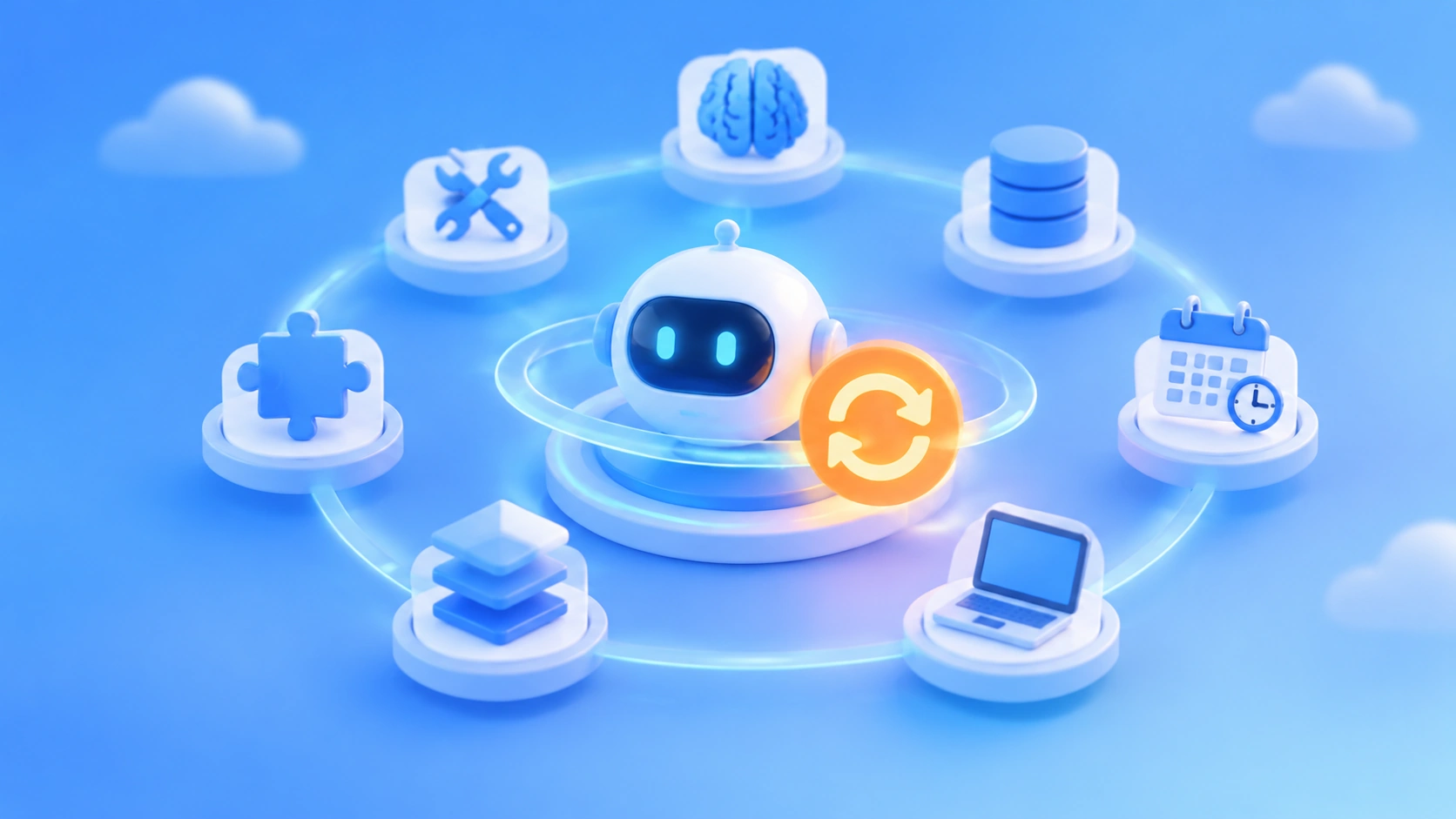
Author’s note: This article explains how to build a personal AI Agent using model APIs, tools, memory, scheduling, and an execution environment, and uses an AI news intelligence workflow as an example to show the responsibilities and costs of each part of a self-built system.
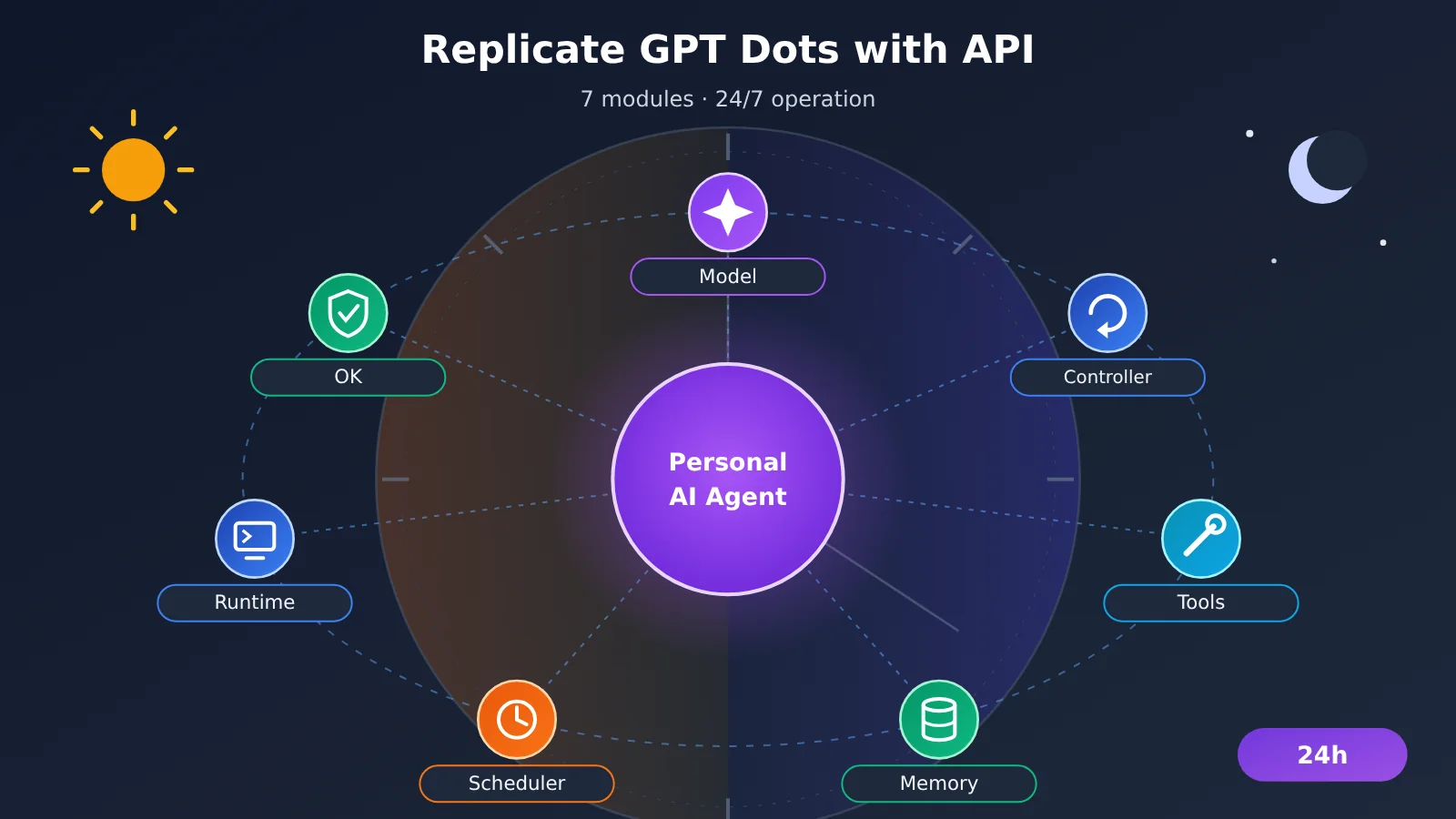
Reproducing GPT Dots with APIs means reproducing its working mode: the model makes the judgments, the program handles execution, the database handles memory, and the scheduler keeps tasks moving after you walk away. The model API is only one layer of it. Tool systems, long-term memory, task queues, execution environments, and approval mechanisms all have to be built by the developer. OpenAI’s proprietary model configuration, cloud computers, and 4,000+ app ecosystem belong to the Dots product itself — you can’t get those parts directly through an API. The “24 hours” in the title refers to the way an Agent keeps pushing tasks forward in the background on a schedule; how much of the time the system is actually available depends on your servers, queues, and retry mechanisms.
The rest of the article follows the build order. Part 1 breaks Dots down into 7 modules and marks which ones the model provides and which ones you have to build yourself. Parts 2 through 6 implement model access, tool calling, long-term memory, background scheduling, and the execution environment in turn. Part 7 combines these components into the complete design for Personal AI Radar. Part 8 works out the total cost, including non-model overhead, and explains the capability boundaries of the self-built approach.
To Know: Terminology You’ll Need Before Reproducing GPT Dots
| Term | Explanation |
|---|---|
| API | An interface that lets an application call a model or an external service. In this article, it mainly refers to the invocation interface for Large Language Models |
| Agent | An application system that uses a model to make decisions and invoke tools to push tasks forward |
| Function Calling | The model outputs a structured tool invocation request; your program executes it, then hands the result back to the model |
| tool_use / tool_result | The message types in the Claude Messages API for tool invocation requests and their execution results |
| SQLite | A single-file embedded database, well suited for storing lightweight data such as preferences, task states, and logs |
| Vector retrieval | Converting text into vectors and looking up related material by semantic similarity |
| Task queue | Stores pending tasks and distributes them to background Workers by order or priority |
| Checkpoint | A progress snapshot saved when a task reaches a certain step; execution resumes from here after an interruption |
| Execution environment | The computer or container that actually runs the browser, code, and file operations |
| Playwright | An automation library for controlling a browser with code, used to open web pages, click, and extract content |
| Prompt Injection | An attack in which malicious instructions are hidden in web pages or documents, attempting to hijack the Agent’s behavior |
| MCP | An open protocol that connects model applications with external tools and data sources |
1 What GPT Dots Is Made Of
1.1 GPT Dots’ Official Capabilities
Dots is a persistent personal AI agent that OpenAI released on September 29, 2026. According to the official materials, it has its own cloud computer and browser, and delegated cloud tasks keep running even after you shut down your laptop. It can combine ChatGPT memory, its own notes, and data from connected apps, work on multiple projects at once, and communicate with you through channels like ChatGPT, Slack, and Microsoft Teams.
Dots also works through three key mechanisms. Proactive Research reads authorized information sources in the background and turns them into research notes — this process is read-only, and any follow-up action still has to go through the normal approval flow. Scheduled tasks and event monitoring let the Dot keep working on a schedule or in response to events. Custom Rules and Auto-review check permissions and user intent before actions like sending email or making purchases, and high-risk operations such as money transfers or password changes must be handed over to the user.
1.2 The Seven Modules of GPT Dots and Their DIY Equivalents
If you break Dots’ capabilities apart, you get 7 modules. The table below shows how each module maps to an implementation in a DIY setup:
| Module | How it shows up in Dots | DIY equivalent | Who provides it |
|---|---|---|---|
| Model | Reasoning, planning, tool selection | Model APIs such as GPT, Claude, Gemini, DeepSeek | Model service |
| Agent controller | Breaking down tasks, coordinating multiple projects | A hand-written loop, or LangGraph / OpenAI Agents SDK | Developer |
| Tools | Browser, app plugins, Codex | Function Calling + your own tool functions, MCP services | Developer |
| Memory | ChatGPT Memory, Dot notes, project context | SQLite + vector search + file system | Developer |
| Task scheduling | Scheduled tasks, event monitoring, background agents | APScheduler, Celery, Redis queues | Developer |
| Execution environment | A dedicated cloud computer | Cloud server, Docker, Playwright | Developer |
| Security and approval | Custom Rules, Auto-review, user takeover | Tool allowlists, approval queues, operation logs | Developer |
Only the first row in that table is provided directly by a model API; the other six rows all require engineering work. That’s why “one API key doesn’t get you the full Dots experience”: an API key opens the door to model invocation, but the agent’s hands, memory, and daily schedule are all things you have to build yourself.
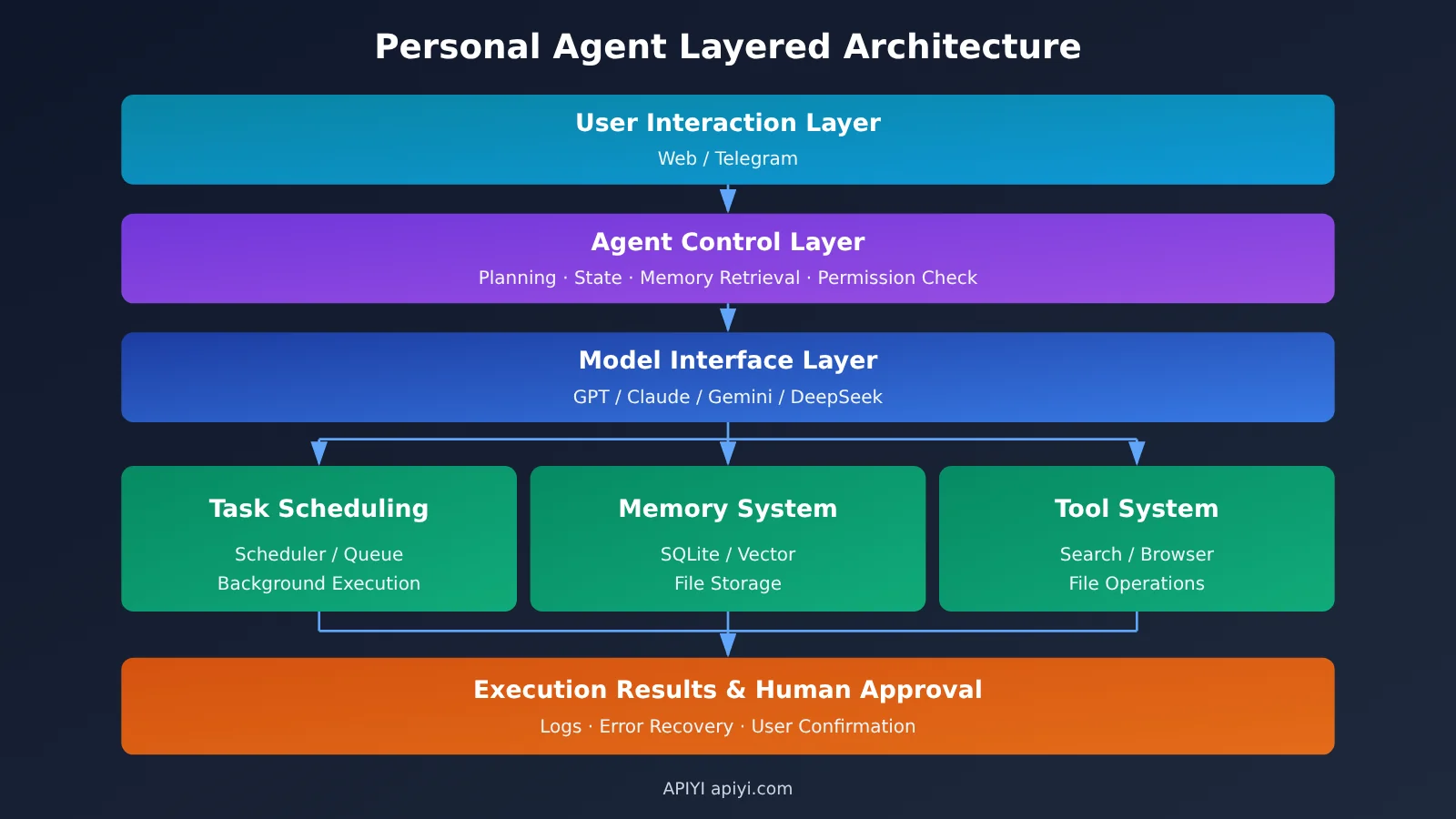
2 Prepare the model interfaces needed to reproduce GPT Dots
2.1 Connect to multiple models through APIYI
APIYI apiyi.com provides an OpenAI-compatible interface and Claude’s native Messages interface. With a single API key, you can call multiple model providers. Different models use different protocols, so you need to distinguish between them during configuration:
| Model type | Protocol | Base URL | Tool invocation fields |
|---|---|---|---|
| OpenAI-compatible models such as GPT, DeepSeek, and Qwen | OpenAI Chat Completions | https://api.apiyi.com/v1 |
tools / tool_calls |
| Claude | Anthropic Messages (/v1/messages) |
https://api.apiyi.com |
tool_use / tool_result |
| Gemini | Gemini-compatible protocol | Configure the corresponding endpoint according to the official documentation | According to the corresponding protocol |
Model IDs and real-time pricing are subject to the platform’s model list. The code below consistently reads the model ID from environment variables. To switch models, you only need to change the configuration; the Agent code stays the same.
2.2 Minimal Model Invocation to Reproduce GPT Dots
First, confirm the endpoint is reachable. Save the following code as llm.py; later chapters will import client from here:
import os
from openai import OpenAI

client = OpenAI(
    api_key=os.environ["APIYI_API_KEY"],
    base_url="https://api.apiyi.com/v1",  # APIYI OpenAI-compatible endpoint
)
MODEL = os.environ["RADAR_MODEL"]  # Enter an actually available model ID from the model list

if __name__ == "__main__":
    resp = client.chat.completions.create(
        model=MODEL,
        messages=[{"role": "user", "content": "用三句话说明什么是个人 AI Agent"}],
    )
    print(resp.choices[0].message.content)
When Claude uses the native Messages API, use the Anthropic SDK with a Base URL that doesn’t include /v1:
import os
import anthropic

claude = anthropic.Anthropic(
    api_key=os.environ["APIYI_API_KEY"],
    base_url="https://api.apiyi.com",  # The SDK appends /v1/messages automatically
)

resp = claude.messages.create(
    model=os.environ["CLAUDE_MODEL"],
    max_tokens=1024,
    tools=[{
        "name": "search_news",
        "description": "检索近期 AI 新闻",
        "input_schema": {
            "type": "object",
            "properties": {"query": {"type": "string"}},
            "required": ["query"],
        },
    }],
    messages=[{"role": "user", "content": "查一下今天的模型发布新闻"}],
)
for block in resp.content:
    if block.type == "tool_use":
        print(block.id, block.name, block.input)
After Claude returns tool_use, your program executes the tool, then sends a tool_result block with role: user, matching it to the request via tool_use_id. If the tool fails, set is_error: true, and the model will adjust its next step accordingly.
🚀 Quick Start: First use APIYI’s free trial quota to run the two code snippets above, confirming that both the OpenAI-compatible and Claude-native paths can return tool calls, then move on to Agent development.
2.3 Interface Compatibility and Tool-Calling Capability Differences
Protocol compatibility only solves the “can the request get out the door” problem. Models still differ in how well they handle tool calling. The multi-model tool-calling test methodology APIYI published in November 2026 highlights a few things to watch: for the Gemini series, pay attention to parallel calls and whether extra text gets mixed into the final JSON; for the Qwen series, look at tool selection under distractor tools and multi-turn ID mapping; for the Claude series, focus on is_error handling and the number of calling rounds; and for the GPT series, check how strictly the Schema is followed and Token usage.
These are test focus areas, not a predetermined answer about which model is better. I recommend giving candidate models the same tool definitions and tasks, recording call counts, parameter error counts, total Tokens, and final accuracy, then using the data to decide your Agent’s primary model.
The Responses API also needs separate validation. The models listed for the /v1/responses endpoint in APIYI’s documentation are mainly GPT-4.1, o3, and similar models, while OpenAI’s current tool-calling docs state that GPT-6 Astra and GPT-6.1 Sol use the Responses API. If you plan to use the Responses API capabilities of newer models, you should list tool calling, built-in tools, and state management as compatibility test items, and verify each one before going live.
3 Using Function Calling to Make a GPT Dots-Style Agent Execute Tasks
3.1 The Function Calling Loop
The Function Calling loop has just four steps: the program sends the task and tool definitions to the model; the model returns the name and parameters of the tool it wants to call; the program actually executes that tool; the program appends the execution result to the messages and sends it back to the model, which then decides whether to keep calling or give an answer.
The key is the third step. The model only generates the call request — accessing a search engine, reading and writing files, sending messages are all done by your code. So the permission scope, input validation, and failure handling for tools are entirely the developer’s responsibility.
3.2 A Minimal Tool System Made Up of Three Tools
Personal AI Radar needs three basic tools: search_news searches news, read_file reads materials in the working directory, and save_note writes the curated results into the knowledge base. Below is the complete agent loop:
View the complete tool-calling loop code reproduced from GPT Dots
import json
import pathlib
import sqlite3
from llm import client, MODEL

WORKDIR = pathlib.Path("./workspace").resolve()
DB_PATH = "radar.db"

TOOLS = [
    {"type": "function", "function": {
        "name": "search_news",
        "description": "检索近期 AI 新闻,返回标题、链接、发布时间和摘要列表",
        "parameters": {
            "type": "object",
            "properties": {
                "query": {"type": "string"},
                "days": {"type": "integer", "minimum": 1, "maximum": 7},
            },
            "required": ["query"],
        },
    }},
    {"type": "function", "function": {
        "name": "read_file",
        "description": "读取工作目录中的文本文件",
        "parameters": {
            "type": "object",
            "properties": {"path": {"type": "string"}},
            "required": ["path"],
        },
    }},
    {"type": "function", "function": {
        "name": "save_note",
        "description": "把一条整理好的新闻资料保存到资料库",
        "parameters": {
            "type": "object",
            "properties": {
                "title": {"type": "string"},
                "url": {"type": "string"},
                "summary": {"type": "string"},
                "project": {"type": "string"},
            },
            "required": ["title", "url", "summary", "project"],
        },
    }},
]

def search_news(query: str, days: int = 1):
    # Connect to the search service you choose: search API, RSS aggregation, or custom scraping
    raise NotImplementedError("请接入实际的搜索服务")

def read_file(path: str):
    p = (WORKDIR / path).resolve()
    if not p.is_relative_to(WORKDIR):          # Only allow reads within the working directory
        return {"error": "path outside workspace"}
    return {"content": p.read_text(encoding="utf-8")[:20000]}

def save_note(title: str, url: str, summary: str, project: str):
    with sqlite3.connect(DB_PATH) as db:
        db.execute(
            "INSERT OR IGNORE INTO notes(url, title, summary, project) VALUES (?, ?, ?, ?)",
            (url, title, summary, project),
        )
    return {"saved": True}

REGISTRY = {"search_news": search_news, "read_file": read_file, "save_note": save_note}

def run_agent(task: str, system: str, max_rounds: int = 8) -> str:
    messages = [
        {"role": "system", "content": system},
        {"role": "user", "content": task},
    ]
    for _ in range(max_rounds):
        msg = client.chat.completions.create(
            model=MODEL, messages=messages, tools=TOOLS,
        ).choices[0].message
        messages.append(msg.model_dump(exclude_none=True))

        if not msg.tool_calls:
            return msg.content

        for call in msg.tool_calls:
            fn = REGISTRY.get(call.function.name)
            try:
                args = json.loads(call.function.arguments or "{}")
                result = fn(**args) if fn else {"error": "unknown tool"}
            except Exception as e:
                result = {"error": f"{type(e).__name__}: {e}"}
            messages.append({
                "role": "tool",
                "tool_call_id": call.id,
                "content": json.dumps(result, ensure_ascii=False),
            })
    raise RuntimeError("超过最大工具调用轮次")
Three design choices in this code are worth keeping. max_rounds limits the number of loop iterations, preventing the model from repeatedly calling the same tool and burning tokens. Tool exceptions are wrapped as {"error": ...} and returned to the model, giving it a chance to change parameters or try a different approach. read_file uses path validation to lock the read scope inside the working directory, which is the most basic permission boundary.
3.3 Upgrading from a Self-Written Loop to an Agent Framework
A self-written loop works well for single-task scenarios with a small number of tools. When tasks need interruption recovery, human approval, or complex branching, you can migrate to LangGraph: it provides State for saving task state, a Checkpointer for persisting progress, and Human-in-the-loop for pausing to wait for review. The OpenAI Agents SDK also offers workflow orchestration and Guardrails. Once the number of tools grows, use MCP to package capabilities like search, files, and email into standalone services that multiple Agents can reuse.
4 Building Long-Term Memory for a GPT Dots–Style Agent
4.1 Dividing Memory into Four Layers
Dots’s context comes from ChatGPT Memory, Dot’s own notes, the current task context, and data from connected apps — and for each new task it retrieves history on demand rather than loading the full chat log. A self-built Agent can take the same approach and manage memory in layers:
| Memory layer | What it stores | Lifecycle | When it’s written |
|---|---|---|---|
| Current context | This task’s instructions, recent tool results | Current task | Every conversation turn |
| Project memory | Project goals, key decisions, progress | For the duration of the project | When a task completes or a decision changes |
| User memory | Preferences, areas of interest, reporting format | Long-term | When the user explicitly states a preference |
| Experience memory | Causes of failures, correction methods | Long-term, updated by rules | After a task fails or the user modifies it |
Each time you call the model, put only the current context plus the relevant retrieved memories into the prompt. Stuffing every historical message into the request both drives up token cost and degrades retrieval quality.
4.2 Designing the SQLite Table Structure
The tables below cover the four memory layers plus task state, and the runs table also handles the checkpoint recovery described in Part 5:
CREATE TABLE IF NOT EXISTS user_memory (
    key TEXT PRIMARY KEY, value TEXT, updated_at TEXT
);
CREATE TABLE IF NOT EXISTS projects (
    id TEXT PRIMARY KEY, goal TEXT, decisions TEXT, status TEXT, updated_at TEXT
);
CREATE TABLE IF NOT EXISTS runs (
    id INTEGER PRIMARY KEY AUTOINCREMENT,
    project_id TEXT, run_date TEXT,
    next_stage TEXT, state_json TEXT,
    status TEXT, error TEXT, updated_at TEXT,
    UNIQUE (project_id, run_date)
);
CREATE TABLE IF NOT EXISTS notes (
    url TEXT PRIMARY KEY, title TEXT, summary TEXT, project TEXT,
    created_at TEXT DEFAULT CURRENT_TIMESTAMP
);
CREATE TABLE IF NOT EXISTS lessons (
    id INTEGER PRIMARY KEY AUTOINCREMENT,
    project_id TEXT, lesson TEXT, created_at TEXT
);
notes uses the URL as its primary key, so scraping the same news article twice is automatically deduplicated. The (project_id, run_date) unique constraint on runs guarantees a single run record per project per day, so after a restart you can find that day’s progress.
4.3 Recalling Historical Material with Vector Search
Query structured data with SQL, and semantic material with vector search. The approach: generate embeddings for notes.summary and lessons.lesson, store them in a vector store such as sqlite-vec or Chroma, and record the project, date, and source in the metadata. When generating topic ideas, first use the day’s news to search for similar material from the past 30 days, then attach the few matching summaries to the prompt. The model can then decide whether “this news is a follow-up on an existing topic or a brand-new event,” and the user doesn’t have to re-explain the background every time.
5 Making GPT Dots-Style Agents Work Continuously in the Background
5.1 How the Three Background Mechanisms Differ
Background execution involves three mechanisms, each with a different job. Scheduled tasks are triggered by a system scheduler (APScheduler, cron) based on time, and they answer “when does it start.” Background model requests refer to asynchronous responses like OpenAI Background Mode: you submit a request and get back a response ID, then poll the status and fetch the result. They have their own lifecycle and data-retention rules, and they’re a good fit for a single long-running inference. Long-running agent scheduling is made up of a task queue, persisted state, and Workers, and it’s what drives multi-day, multi-stage tasks forward—including retries and recovery.
The recommended data flow is: scheduler → task queue → agent Worker → model API → tool execution → result database → notification. Recurring tasks and long-running tasks are managed separately. Recurring tasks only push work into the queue, while long-running tasks are advanced by Workers based on their state.
5.2 Staged Checkpoints and Retry on Failure
Below is the scheduling skeleton for Personal AI Radar. A checkpoint is written after each stage completes, and after a process restart it continues from next_stage:
import time
from datetime import date
from apscheduler.schedulers.blocking import BlockingScheduler
from radar_store import load_or_create_run, save_checkpoint, mark_failed
from radar_stages import HANDLERS, TransientError
from notify import notify_owner

STAGES = ["collect", "verify", "analyze", "topics", "report"]

def daily_radar():
    run = load_or_create_run("ai-radar", date.today().isoformat())
    if run.status == "done":
        return
    start = STAGES.index(run.next_stage)
    for stage in STAGES[start:]:
        for attempt in range(3):
            try:
                run.state = HANDLERS[stage](run.state)
                save_checkpoint(run, done_stage=stage)   # write to the runs table
                break
            except TransientError:                       # retryable errors such as network issues, rate limiting
                time.sleep(30 * 2 ** attempt)
        else:
            mark_failed(run, stage)
            notify_owner(f"Radar 在 {stage} 阶段失败,进度已保存")
            return

sched = BlockingScheduler(timezone="Asia/Shanghai")
sched.add_job(daily_radar, "cron", hour=8, minute=0,
              misfire_grace_time=3600, max_instances=1)
sched.start()
max_instances=1 prevents a duplicate launch while the previous run hasn’t finished, and misfire_grace_time lets the day’s task still run after a brief server outage. On failure, progress is kept and the user is notified; the second trigger will continue from the failed stage. Each stage’s input, output, duration, and token usage are written to the log, making debugging and cost calculation easy.
6 Give a GPT Dots-Style Agent a Computer It Can Actually Work With
6.1 How the Four Execution Environments Divide the Work
Dots has its own cloud computer. When you build your own, you’ll need to provide this part yourself. There are four common choices:
- Playwright: A code-driven browser, well suited for scraping pages with a stable structure and extracting data after login. Behavior is predictable and costs are low.
- Browser Use: Lets the model drive the browser using natural language, well suited for web tasks where page structure varies and steps aren’t fixed. Every step consumes a model invocation.
- Computer Use: The model observes screen captures and operates the mouse and keyboard, well suited for desktop software without APIs. It needs to be paired with a virtual desktop environment.
- Docker: An isolated environment for code execution and file processing. Scripts generated by the Agent run inside containers, so errors don’t affect the host machine.
6.2 Combining Model Decisions with Execution Environments
The model API handles decision-making, while the execution environment handles doing. The two are connected through tool functions. Radar’s typical combination is: Playwright scrapes the news body, a Docker container runs data-cleaning scripts, and the model only receives the cleaned text to make judgments. Web content is always passed to the model as “reference material.” The system prompt explicitly states that instructions in the material must not be executed, and all send/publish-type tools go into an approval queue. This reduces the risk of prompt injection.
🎯 Technical tip: Tool calls related to execution environments can significantly increase conversation turns. Before launch, you can use the same set of tool definitions on APIYI to compare the turns and token consumption of several candidate models, then decide on the primary and fallback models.
7 Hands-On: Building Personal AI Radar with APIs
Here’s the design for Personal AI Radar, showing the complete workflow from information gathering to the daily briefing. How each stage performs in practice depends on the models, search services, and information sources you choose, so you’ll need to validate it with real data before going live.
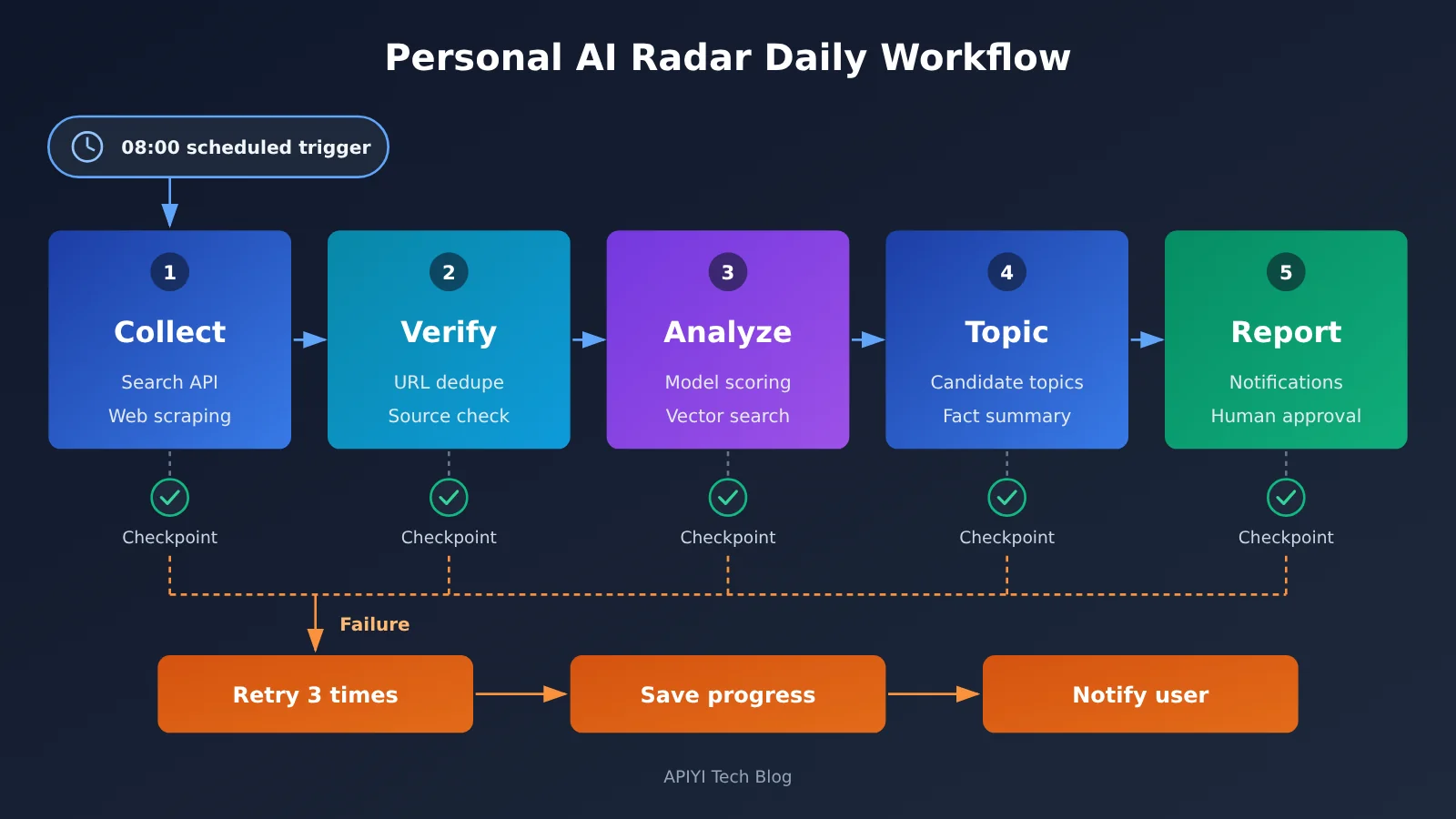
7.1 The Five Stages of Personal AI Radar
- Collect (
collect): Callsearch_newsto retrieve news from the past 24 hours based on the user’s tracked keywords, scrape the full article text with Playwright, deduplicate by URL, and store the results in temporary state. - Verify (
verify): Cross-check multiple sources for the same event, prioritizing official announcements and first-party sources. Items backed by only one source are marked “needs verification”. - Analyze (
analyze): The model outputs structured JSON for each news item, including an event summary, key facts and their sources, and relevance to the user’s areas of interest. It also retrieves historical material to determine whether an item is a new event or an update on an existing topic. - Topic selection (
topics): Combine preferences from user memory with topics already covered in project memory to generate candidate topics. Each topic includes a fact summary and source links, and is written to thenotestable. - Report (
report): Generate the daily briefing and push it to the user. The user replies in chat with commands such as “revise”, “rerun”, or “accept”, and the Agent updates project memory and reruns as needed.
7.2 Key Configuration and Exception Handling
Radar’s core configuration is best kept in a single YAML file. That includes tracked keywords, the source allowlist, primary and fallback model IDs, daily run time, timezone, maximum tool rounds per run, and the daily token budget cap. Model IDs are injected through environment variables, so switching models doesn’t require code changes.
Exception handling is split by type. Network timeouts, rate limits, and other transient errors are retried with exponential backoff. If JSON parsing of the model’s output fails, pass the error message back as a tool result and let the model regenerate once. If the primary model fails repeatedly, switch to the fallback model. When daily token usage exceeds the budget, skip low-relevance items in the analyze stage and note this in the briefing. All publishing and outbound email actions only generate drafts and wait for user confirmation.
8 The Costs and Capability Boundaries of Building a GPT Dots-Style Agent Yourself
8.1 The Five Costs of a Self-Built Solution
The total cost of a self-built agent can be expressed as:
C_total = C_model + C_server + C_database + C_tools + C_maintenance
- Model tokens: Each call accumulates as
input tokens ÷ 10⁶ × input unit price + output tokens ÷ 10⁶ × output unit price. For long-running operations, you also need to count tool-call rounds, retry counts, repeated context transmission, and cache hits. - Server: The cloud host running the scheduler, workers, and browser. Browser automation has relatively high memory requirements.
- Database: SQLite itself costs nothing. As data volume grows, migrating to PostgreSQL or a managed vector database introduces storage costs.
- Tools: Third-party services like search APIs, web scraping proxies, and notification services are billed per call or per month.
- Maintenance: Developer hours spent on information source redesigns, model updates, and dependency upgrades often make up the largest share of costs over the long term.
8.2 Model Pricing Reference
APIYI’s technical note from November 13, 2026 provides the following Claude model pricing examples, which you can use to estimate model costs:
| Model | Input / million tokens | Output / million tokens | Cache read / million tokens | Available platform |
|---|---|---|---|---|
| Claude Opus 5.5 | $4 | $20 | $0.20 | APIYI |
| Claude Sonnet 5.5 | $2 | $10 | $0.10 | APIYI |
| Claude Fable 5.2 | $8 | $40 | $0.20 | APIYI |
For the exact available models, groups, and real-time pricing, refer to the model list at docs.apiyi.com/models. The prices reflect unit rates only—task success rates need to be tested separately using the method described in Section 2.3. For tasks like Radar, most of the input consists of repeated system prompts and historical materials, and the cache read rate is far lower than the regular input rate. Using caching effectively is the main way to keep token costs under control.
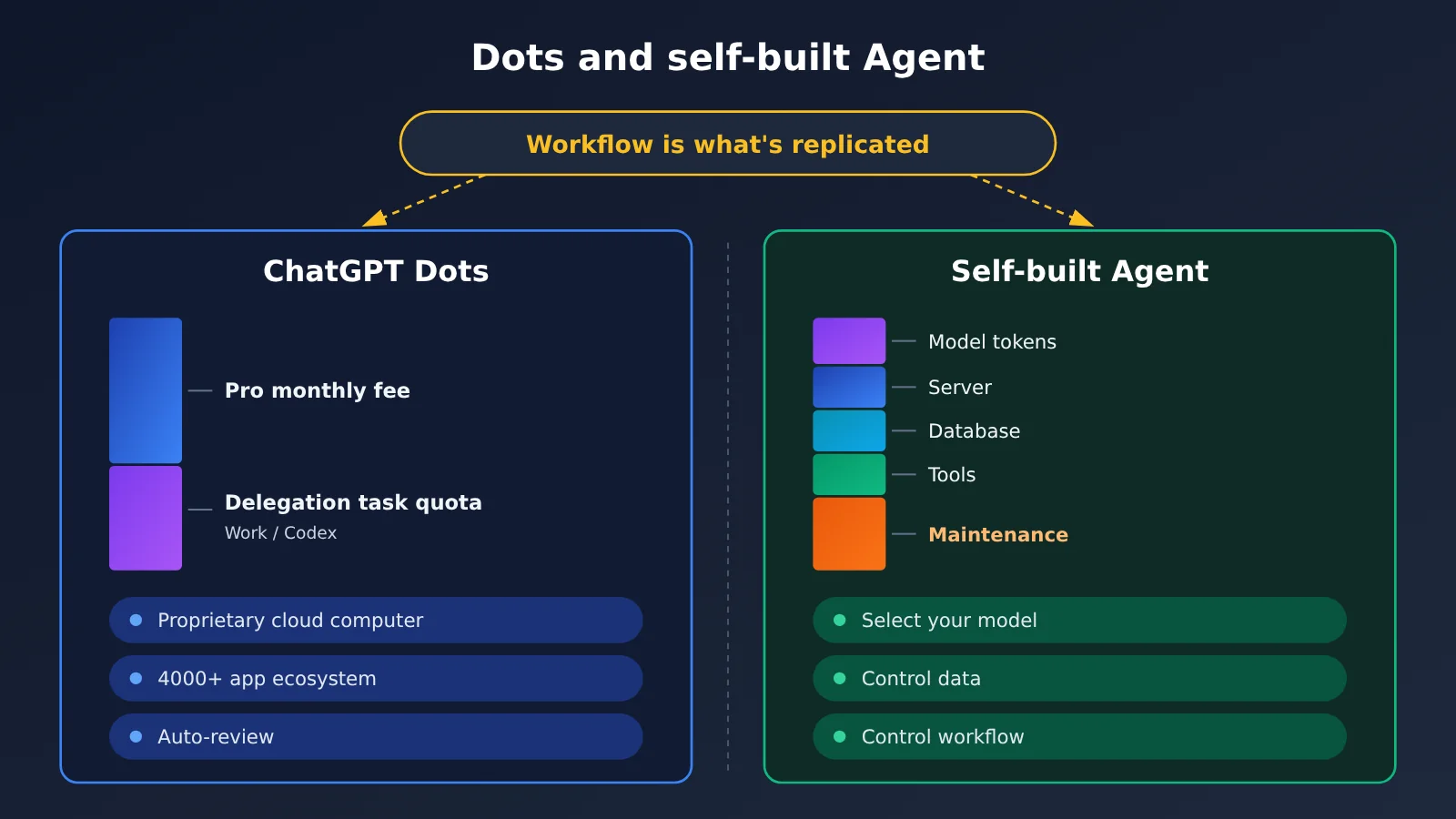
8.3 Dots Subscription Cost Comparison
For individual users, ChatGPT Pro 100, Pro 200, and Pro 500 cost $100, $200, and $500 per month, respectively. All three tiers are eligible to use Dots, and OpenAI doesn’t list a separate monthly fee for Dot on individual Pro plans. ChatGPT Work or Codex tasks delegated through Dot are billed according to the quotas and rules of the corresponding product; consumption depends on the model, context, reasoning, tool calls, and retrieval volume. Individual Pro requires users to be at least 18 and is not yet available in the European Economic Area, the UK, or Switzerland.
For enterprises, eligible Enterprise workspaces can choose a flat rate by work type or usage-based billing. Billing for enabled Dots starts on November 18, 2026; the preview period before that is free, and tasks delegated to Work or Codex are billed separately. Exact amounts are subject to the quote actually applicable to the workspace.
8.4 What a Self-Built Solution Can and Cannot Do
A self-built solution can fully reproduce Dots’ core working model: continuously advancing tasks, layered memory, tool calls, scheduled execution, and human approval. Its advantages are that you can switch models freely, keep full control over data and workflows, and customize workflows in depth for your business.
The proprietary pieces are yours to fill in or accept as a gap: OpenAI’s internal model configuration, Dot’s own cloud computer, the 4,000+ app plugin ecosystem, communication channels spanning Slack and Teams, and the Auto-review safety review framework. Dots itself has limits too. In an October 2026 hands-on test, an Axios reporter found that Dots could complete multi-step travel planning and produce a 38-page commemorative album, but the content included questionable statistics, and in the shopping step it guided users to complete the purchase themselves. A self-built Agent also requires human review of its results; any operations involving accounts or funds should retain human confirmation.
FAQ
Q1: Can a single API Key directly give you all of GPT Dots’ capabilities?
An API Key provides model invocation capability. Memory, tools, scheduling, execution environment, and approvals all have to be built yourself, and Dots’ proprietary cloud computer and app ecosystem can’t be obtained through the API either. With a single Key from APIYI apiyi.com you can conveniently switch between multiple models, while the rest of the Agent is still implemented according to Sections 3 to 6 of this article.
Q2: When reproducing GPT Dots, should you choose the OpenAI-compatible interface or Claude’s native interface?
Both can connect to the same Agent. Models like GPT and DeepSeek go through the OpenAI-compatible interface, while Claude going through the native Messages interface lets you fully use the `tool_use`, `tool_result`, and `is_error` mechanisms. It’s recommended to abstract a unified tool invocation interface in the controller, with one adapter for each of the two chains.
Q3: Do different models perform the same on tool invocation?
Even with protocol compatibility, models still differ in parallel invocation, Schema adherence, error recovery, and invocation rounds. Run comparison tests with the same tool definitions and tasks, tally invocation counts, parameter errors, tokens, and accuracy, then decide on the primary model and the fallback model.
Q4: How does a self-built Agent achieve “24-hour operation”?
“24 hours” refers to a way of working that keeps advancing tasks in the background according to a schedule. Implementation depends on three things: a scheduler on an always-on server, task state with checkpoints, and retryable workers. Tasks pause during server maintenance or dependency failures, and resume from the breakpoint after recovery.
Q5: Roughly how much does Personal AI Radar cost per month?
It depends on the number of information sources, the processing depth of each news item, and the model you choose. Run it for a week first, use logs to tally daily input and output tokens, calculate model costs according to the formula in Section 8.1 and the model unit prices, then add server, search API, and maintenance labor costs.
Q6: How does a self-built Agent guard against Prompt Injection?
Treat web page and document content as reference material, and declare in the system prompt that instructions found in the material are not to be executed; only grant tools the minimum permissions needed to complete the task; outgoing, publishing, and deletion operations go into a human approval queue; all tool invocations are written to logs. These measures can significantly reduce risk, but results still need periodic manual spot checks.
Key Takeaways for Reproducing GPT Dots
- Reproduction goal: Recreate how Dots works. You’ll need to substitute your own proprietary models, cloud computers, and app ecosystem.
- Seven modules: model, controller, tools, memory, scheduler, execution environment, and approval — only the model comes from an API.
- Tool calling: the model makes the request, the program runs the tool, and you (the developer) own permissions and failure handling.
- Layered memory: current context, project, user, and experience stored separately across four layers, retrieved on demand.
- Background running: scheduler + task queue + checkpoint, with retries on failure and resume from the last checkpoint.
- Cost calculation: beyond model tokens, factor in servers, databases, tools, and maintenance hours.
- Model selection: connect multiple models through APIYI and pick your primary model using the same test dataset.
Summary
Key takeaways for reproducing GPT Dots with APIs:
- Separate the layers: the model API makes decisions, the Agent framework handles orchestration, and the execution environment does the hands-on work — build each one separately.
- Get the minimal loop working first: one model, three tools, one SQLite table, and one scheduled task is enough to build a personal Agent that keeps running.
- Let data drive the choice: a model’s tool-calling performance and real cost both need to come from tests run under identical conditions.
Personal AI Radar is a great starting point. It covers five core Dots capabilities: continuous work, memory, tool calling, scheduling, and human-AI collaboration. We recommend connecting multiple candidate models through APIYI apiyi.com, running comparison tests with the same tool definitions, and then putting the most reliable model into your Agent.
📚 References
- OpenAI Official Announcement – Introducing Dots: Dots’ product positioning, cloud computer, and app ecosystem
- Link:
openai.com/index/introducing-dots -
Description: The go-to resource for understanding the official description of Dots’ capabilities
-
ChatGPT Learn – Tasks and memory: Dots’ long-running tasks, background agents, memory, and proactive research
- Link:
learn.chatgpt.com/docs/dots/tasks-and-memory -
Description: A reference for designing memory layers and scheduling mechanisms when building your own agent
-
OpenAI Help Center – About ChatGPT Pro tiers: Pricing and quota rules for Pro 100, Pro 200, and Pro 500
- Link:
help.openai.com/en/articles/9793128-about-chatgpt-pro-tiers -
Description: Comparing build-your-own costs against subscription fees
-
ChatGPT Learn – Dots Enterprise Admin Guide: How to enable and bill Dots in Enterprise workspaces
- Link:
learn.chatgpt.com/docs/enterprise/dots-admin-guide -
Description: A reference for enterprise users evaluating Dots costs
-
OpenAI Function Calling Docs: Request and response formats for tool calls
- Link:
developers.openai.com/api/docs/guides/function-calling -
Description: The official basis for implementing the tool loop in Part 3
-
LangGraph Official Docs: A runtime for stateful, long-running agent workflows
- Link:
langchain-ai.github.io/langgraph -
Description: Ready-made implementations for checkpoints, persistence, and human approval
-
APIYI Multi-Model Tool Calling Reproducible Test: A 5-step mini test for designing multi-turn tool calls
- Link:
help.apiyi.com/en/one-key-multi-model-reproducible-tool-calling-test-en.html -
Description: A testing method for comparing tool calling performance across different models
-
APIYI Base URL Configuration Guide: OpenAI-compatible, Claude, and Gemini endpoint configuration
- Link:
help.apiyi.com/en/apiyi-base-url-v1-claude-gemini-endpoint-config-guide-en.html - Description: A reference when configuring multi-protocol model access
Author: APIYI Technical Team
Technical Discussion: Feel free to reach out through the APIYI official website. For more integration resources, visit the docs.apiyi.com documentation center