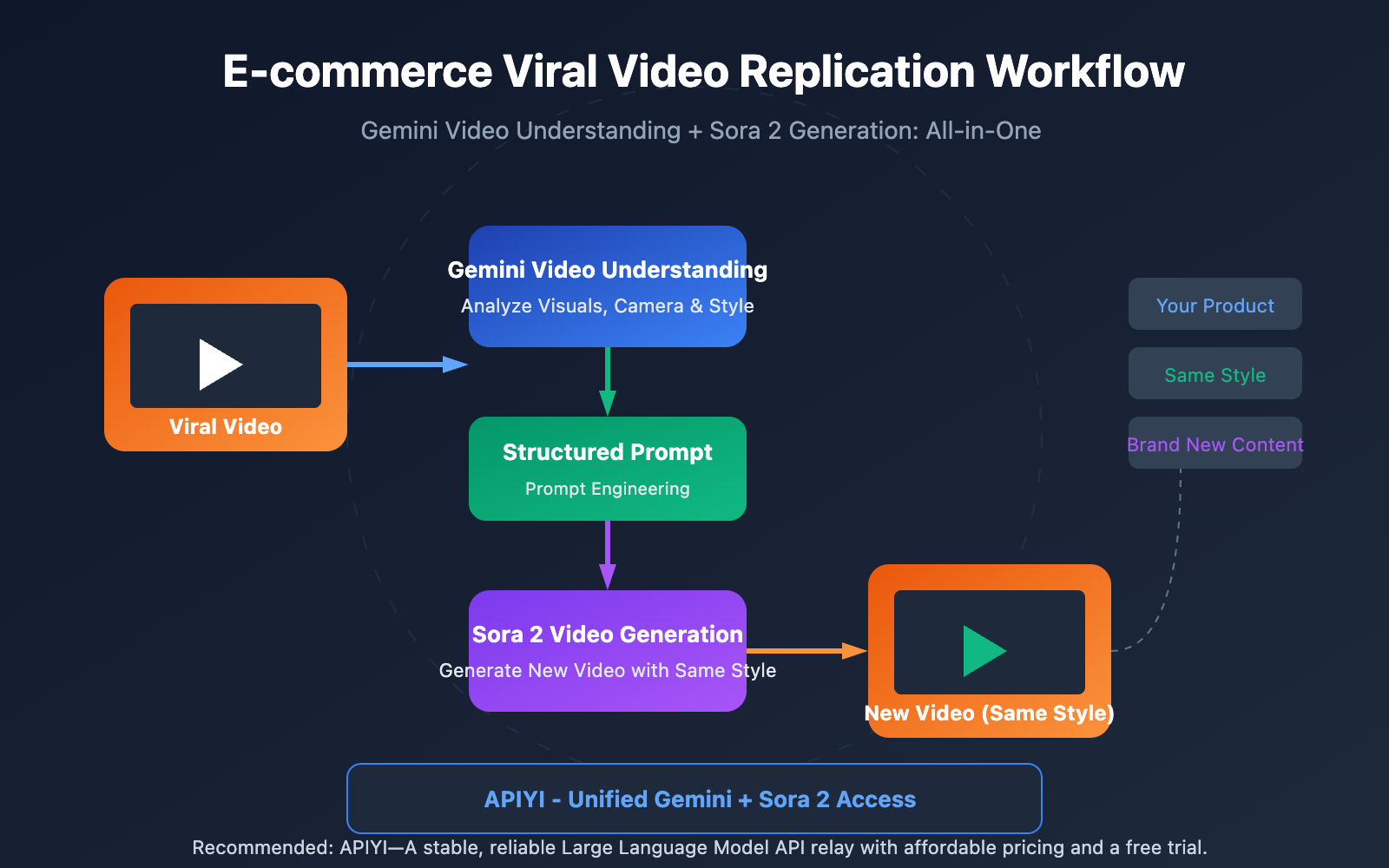
Author's Note: Full tutorial: Using the Gemini Video Understanding API to reverse-engineer viral video prompts and generate new ones with Sora 2—a one-stop e-commerce video replication workflow.
It's a common headache for e-commerce operators: you see a competitor's video go viral, but you have no clue how to recreate that magic yourself. In this post, I'll walk you through a complete workflow using Video Understanding + AI Video Generation. This will help you master the practical skills needed to replicate those viral hits in no time.
Core Value: By the time you're done reading, you'll know how to use Gemini's video understanding to reverse-engineer prompts from any video and use Sora 2 to generate brand-new content in the exact same style.
Key Points for Viral Video Replication
| Point | Description | Value |
|---|---|---|
| Video Understanding Reverse-Engineering | Use AI to analyze visuals, camera movement, style, and pacing. | Accurately extract core elements from viral videos. |
| Prompt Generation | Automatically create structured prompts for video generation. | No more manual guessing or endless tweaking. |
| One-Click Replication | Feed prompts into Sora 2 to generate similar videos. | Quickly produce new content in the same style. |
| One-Stop API | Unified access to Gemini and Sora 2 via one platform. | Simplifies your workflow and cuts integration costs. |
Deep Dive: Viral Video Replication via Video Understanding
Video Understanding is a powerhouse feature of multimodal AI. Gemini models can handle a video's audio and visual frames simultaneously, sampling at one frame per second to pull out visual data while performing comprehensive analysis alongside the audio track. This means the AI doesn't just "watch" the video—it understands the cinematography, lighting, style, and editing rhythm.
Reverse Prompt Engineering is the secret sauce for turning video understanding into content creation. By using specifically designed analysis prompts, the AI can strip a video down to its essentials: shot composition, camera movement, lighting, color grading, subject action, and even background vibes. It then repackages these elements into prompts ready for Sora 2.
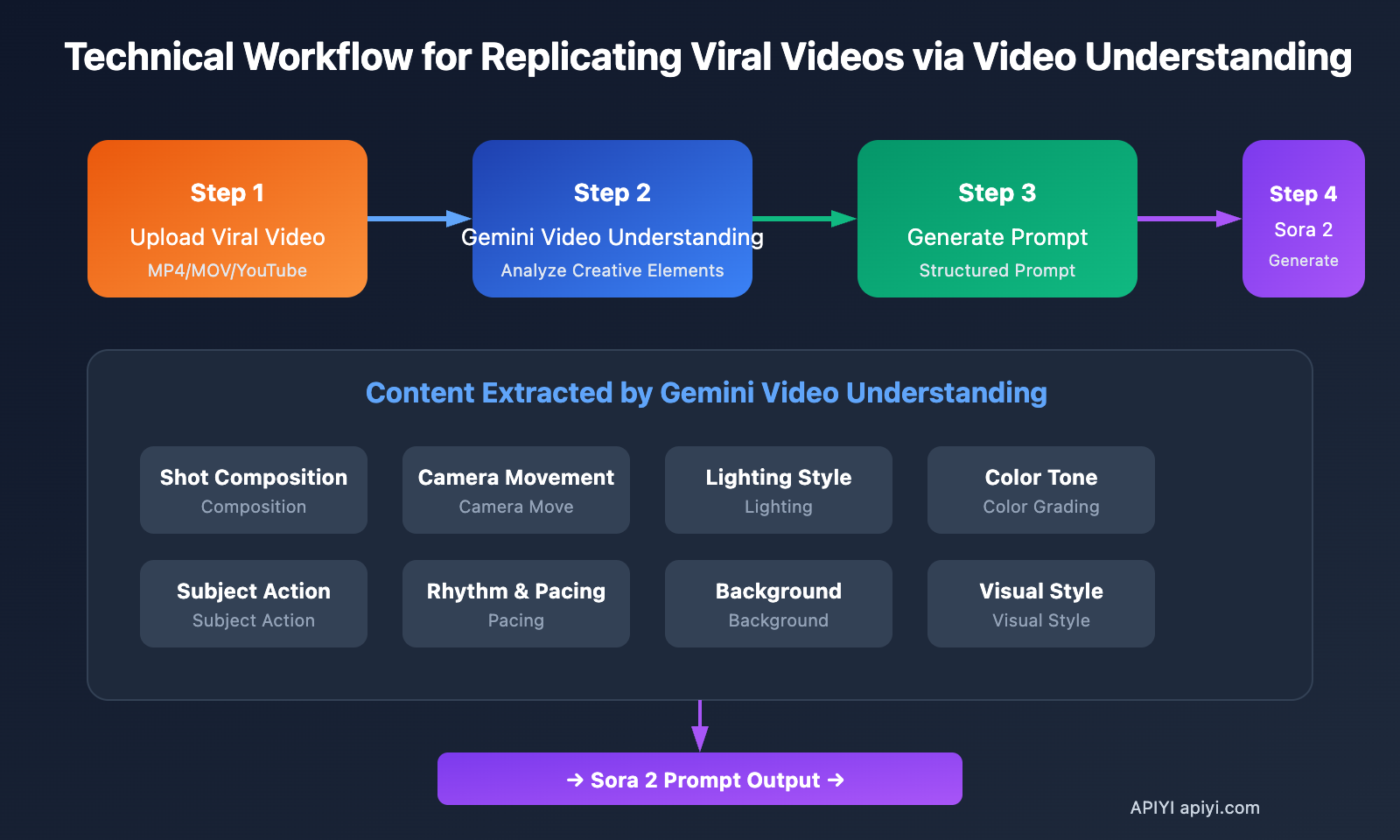
Replicating Viral Videos via Video Understanding: Complete Workflow
Step 1: Uploading the Viral Video
We support multiple video input methods:
| Input Method | Use Case | Limitations |
|---|---|---|
| Local Upload | Downloaded video files | Files < 100MB can be transferred inline |
| File API | Large files or long videos | Supports > 100MB, reusable |
| YouTube URL | Analyze online videos directly | Natively supported by Gemini |
Step 2: Video Understanding & Analysis
Use Gemini's video understanding model to analyze the video content and extract key creative elements:
import requests
import base64

# Configure API
api_key = "YOUR_API_KEY"
base_url = "https://vip.apiyi.com/v1"

# Read video file
with open("viral_video.mp4", "rb") as f:
    video_base64 = base64.b64encode(f.read()).decode()

# Video understanding analysis
response = requests.post(
    f"{base_url}/chat/completions",
    headers={"Authorization": f"Bearer {api_key}"},
    json={
        "model": "gemini-2.5-pro-preview",
        "messages": [{
            "role": "user",
            "content": [
                {"type": "video", "video": video_base64},
                {"type": "text", "text": """Analyze this video and extract the following creative elements:
1. Shot composition and aspect ratio
2. Camera movement (push, pull, pan, tilt, static, etc.)
3. Lighting style and color tone
4. Subject action and rhythm
5. Background environment description
6. Overall visual style keywords

Please format the analysis results into an English prompt suitable for Sora 2."""}
            ]
        }]
    }
)
print(response.json()["choices"][0]["message"]["content"])
Step 3: Generating Structured Prompts
Example of analysis results returned by Video Understanding:
Camera: Slow push-in, centered composition, shallow depth of field
Lighting: Soft diffused studio lighting, warm color temperature (3200K)
Subject: Premium leather handbag rotating on white marble pedestal
Movement: 360-degree rotation over 8 seconds, smooth and elegant
Style: Luxury commercial aesthetic, minimalist background
Color: Warm tones, high contrast, subtle vignette

Sora 2 Prompt:
"A premium leather handbag slowly rotating 360 degrees on a white marble
pedestal, soft diffused studio lighting with warm color temperature,
shallow depth of field, luxury commercial aesthetic, centered composition,
smooth cinematic movement, minimalist white background, high-end product
showcase style"
Step 4: Generating Similar Videos with Sora 2
Input the extracted prompt into Sora 2 to generate a new video:
# Generate a new video using the extracted prompt
sora_response = requests.post(
    f"{base_url}/videos/generations",
    headers={"Authorization": f"Bearer {api_key}"},
    json={
        "model": "sora-2",
        "prompt": extracted_prompt,  # Prompt extracted from the previous step
        "aspect_ratio": "9:16",
        "duration": 10
    }
)
print(sora_response.json())
Recommendation: With APIYI (apiyi.com), you can call both the Gemini video understanding and Sora 2 video generation APIs simultaneously, completing the entire workflow in one stop without needing to integrate multiple platforms separately.
Replicating Viral Videos: Quick Start
Minimalist Example
Here's the complete code for replicating a viral video, ready to run with one click:
import requests
import base64

api_key = "YOUR_API_KEY"
base_url = "https://vip.apiyi.com/v1"

def clone_viral_video(video_path: str) -> dict:
    """One-click viral video replication"""
    # 1. Read video
    with open(video_path, "rb") as f:
        video_b64 = base64.b64encode(f.read()).decode()

    # 2. Gemini Video Understanding
    analysis = requests.post(
        f"{base_url}/chat/completions",
        headers={"Authorization": f"Bearer {api_key}"},
        json={
            "model": "gemini-2.5-pro-preview",
            "messages": [{"role": "user", "content": [
                {"type": "video", "video": video_b64},
                {"type": "text", "text": "Analyze and generate Sora 2 prompt"}
            ]}]
        }
    ).json()

    prompt = analysis["choices"][0]["message"]["content"]

    # 3. Sora 2 generates new video
    result = requests.post(
        f"{base_url}/videos/generations",
        headers={"Authorization": f"Bearer {api_key}"},
        json={"model": "sora-2", "prompt": prompt}
    ).json()

    return {"prompt": prompt, "video": result}

# Usage
result = clone_viral_video("competitor_video.mp4")
View full implementation code (including batch processing and error handling)
import requests
import base64
import time
from typing import Optional, List
from pathlib import Path

class ViralVideoCloner:
    """Viral Video Replicator Utility Class"""

    def __init__(self, api_key: str):
        self.api_key = api_key
        self.base_url = "https://vip.apiyi.com/v1"
        self.headers = {"Authorization": f"Bearer {api_key}"}

    def analyze_video(self, video_path: str) -> str:
        """Analyze video using Gemini and extract prompts"""
        with open(video_path, "rb") as f:
            video_b64 = base64.b64encode(f.read()).decode()

        analysis_prompt = """Analyze this video and extract creative elements:
        1. Camera movement and composition
        2. Lighting style and color grading
        3. Subject action and pacing
        4. Background and environment
        5. Overall visual style

        Generate a detailed Sora 2 prompt in English that can recreate
        a similar video with different products."""

        response = requests.post(
            f"{self.base_url}/chat/completions",
            headers=self.headers,
            json={
                "model": "gemini-2.5-pro-preview",
                "messages": [{
                    "role": "user",
                    "content": [
                        {"type": "video", "video": video_b64},
                        {"type": "text", "text": analysis_prompt}
                    ]
                }]
            }
        )

        return response.json()["choices"][0]["message"]["content"]

    def generate_video(
        self,
        prompt: str,
        aspect_ratio: str = "9:16",
        duration: int = 10
    ) -> dict:
        """Generate new video using Sora 2"""
        response = requests.post(
            f"{self.base_url}/videos/generations",
            headers=self.headers,
            json={
                "model": "sora-2",
                "prompt": prompt,
                "aspect_ratio": aspect_ratio,
                "duration": duration
            }
        )
        return response.json()

    def clone(
        self,
        video_path: str,
        custom_subject: Optional[str] = None
    ) -> dict:
        """Complete video replication workflow"""
        # Analyze original video
        base_prompt = self.analyze_video(video_path)

        # If a custom subject is specified, replace the subject description in the prompt
        if custom_subject:
            base_prompt = self._replace_subject(base_prompt, custom_subject)

        # Generate new video
        result = self.generate_video(base_prompt)

        return {
            "original_video": video_path,
            "extracted_prompt": base_prompt,
            "generated_video": result
        }

    def batch_clone(self, video_paths: List[str]) -> List[dict]:
        """Batch replicate multiple videos"""
        results = []
        for path in video_paths:
            result = self.clone(path)
            results.append(result)
            time.sleep(2)  # Avoid rate limiting
        return results

    def _replace_subject(self, prompt: str, new_subject: str) -> str:
        """Replace the subject in the prompt"""
        # Simplified processing; more complex NLP methods could be used in practice
        return f"{new_subject}, {prompt}"

# Usage Example
cloner = ViralVideoCloner("YOUR_API_KEY")
result = cloner.clone(
    "competitor_bestseller.mp4",
    custom_subject="my product: wireless earbuds in charging case"
)
print(result["extracted_prompt"])
Recommendation: Get your Gemini and Sora 2 API credits through APIYI (apiyi.com). The platform provides unified management for multi-model calls, simplifying your development workflow.
Viral Video Replication: Model Comparison
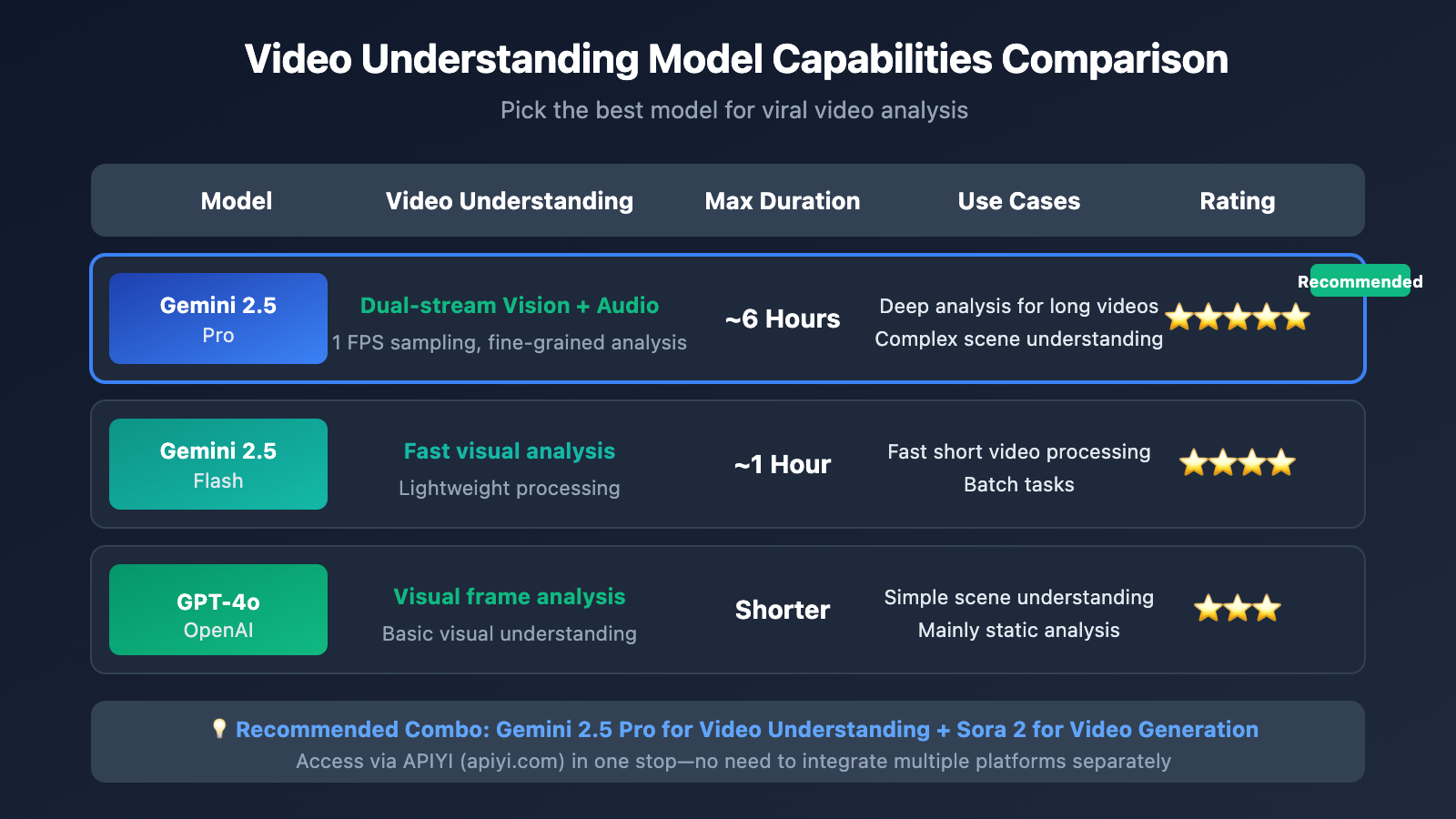
| Model | Video Understanding | Max Duration | Use Cases | Available Platforms |
|---|---|---|---|---|
| Gemini 2.5 Pro | Dual-stream vision + audio analysis | ~6 hours | Deep long video analysis | APIYI, etc. |
| Gemini 2.5 Flash | Fast visual analysis | ~1 hour | Fast short video processing | APIYI, etc. |
| GPT-4o | Visual frame analysis | Shorter | Simple scene understanding | APIYI, etc. |
Why recommend Gemini for video understanding?
The Gemini 2.5 series hits industry-leading benchmarks for video understanding:
- Dual-stream processing: It analyzes both visual frames and audio tracks simultaneously for a much more complete understanding.
- Massive context: With a 2-million token context window, it can handle up to 6 hours of video.
- Fine-grained control: You can customize sampling rates and resolution parameters to get exactly what you need.
- Timestamping: It can pinpoint specific moments in a video using precise MM:SS formatting.
Selection Advice: We suggest using Gemini 2.5 Pro for your video analysis. You can easily access it through APIYI (apiyi.com).
Viral Video Replication: Application Scenarios
It's perfect for these e-commerce scenarios:
- Competitor Analysis: Break down your competitors' viral videos to extract their success factors.
- Style Transfer: Take a trending video style and apply it to your own products.
- Batch Production: Quickly generate multiple product videos using a single successful style template.
- A/B Testing: Create various style variants to see which one performs best in your ads.
| Scenario | Input | Output | Efficiency Boost |
|---|---|---|---|
| Competitor Replication | Competitor's viral video | Your product video in the same style | 10x |
| Style Transfer | Trending style video | Stylized video of your product | 8x |
| Batch Templates | 1 template video | N product videos | 20x |
FAQ
Q1: What video formats and lengths are supported?
Gemini supports common video formats (MP4, MOV, AVI, etc.). Files under 100MB can be transmitted inline, while larger files need to be uploaded via the File API. With Gemini 2.5 Pro's 2-million-token context, it theoretically supports about 6 hours of video analysis.
Q2: Do the extracted prompts need to be manually adjusted?
AI-generated prompts are usually ready to use, but we recommend fine-tuning them based on your specific needs:
- Replace the subject descriptions with your own product.
- Adjust duration and aspect ratio parameters.
- Add style keywords related to your brand.
Q3: How can I quickly start testing video understanding and reproduction?
We recommend using a multi-model API aggregation platform for testing:
- Visit APIYI (apiyi.com) to register an account.
- Get your API Key and free credits.
- Use the code examples in this article for quick verification.
- Complete your Gemini video understanding + Sora 2 generation in a one-stop workflow.
Summary
Here are the core takeaways for reproducing viral hits through video understanding:
- Video understanding is key: Gemini's multimodal capabilities can precisely extract creative elements from any video.
- Prompt engineering automation: AI automatically converts visual analysis into usable generation prompts.
- One-stop workflow: Using Gemini + Sora 2 via unified API calls simplifies the entire development process.
By mastering this workflow, e-commerce operators can quickly replicate the style of trending industry videos, significantly cutting down the trial-and-error costs of video creation.
We suggest quickly verifying the results through APIYI (apiyi.com). The platform provides both Gemini video understanding and Sora 2 video generation APIs, allowing you to complete the entire reproduction process in one place.
📚 References
⚠️ Link Format Note: All external links use the
Resource Name: domain.comformat. This makes them easy to copy while avoiding direct clicks to prevent SEO weight loss.
-
Gemini Video Understanding Official Documentation: Detailed API parameters and usage methods
- Link:
ai.google.dev/gemini-api/docs/video-understanding - Description: The official authoritative documentation to help you understand the full range of video understanding capabilities.
- Link:
-
Sora 2 Prompt Guide: OpenAI's official prompt best practices
- Link:
cookbook.openai.com/examples/sora/sora2_prompting_guide - Description: Learn how to craft high-quality prompts for video generation.
- Link:
-
Reverse Prompt Engineering Guide: A deep dive into video-to-prompt technology
- Link:
skywork.ai/skypage/en/Video-to-Prompt-A-Hands-On-Guide - Description: Gain a deeper understanding of the inner workings of Video-to-Prompt.
- Link:
Author: Technical Team
Tech Talk: We'd love to hear your thoughts in the comments. For more resources, feel free to visit the APIYI apiyi.com technical community.