Encountering the thinking_budget and thinking_level are not supported together error when calling Gemini 3.0 Pro Preview or gemini-3-flash-preview? This is a compatibility issue caused by parameter upgrades between different Google Gemini API versions. In this post, we'll break down the root cause and show you the correct way to configure these settings from an API design evolution perspective.
Core Value: By the end of this article, you'll know exactly how to configure the thinking mode parameters for Gemini 2.5 and 3.0 models. You'll avoid common API errors and optimize both model performance and cost control.
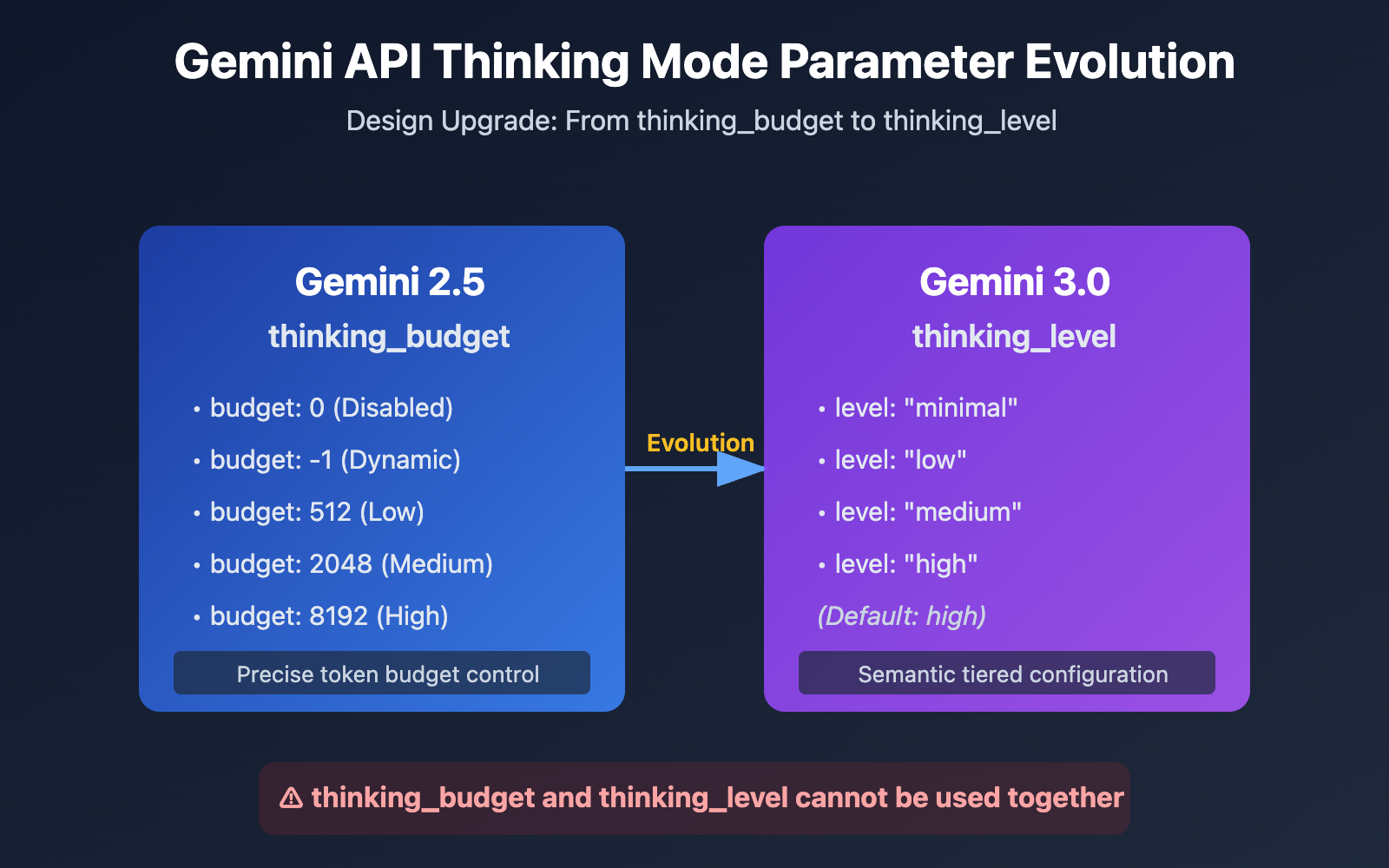
Key Evolution Points of Gemini API Thinking Parameters
| Model Version | Recommended Parameter | Parameter Type | Config Example | Use Case |
|---|---|---|---|---|
| Gemini 2.5 Flash/Flash-Lite | thinking_budget |
Integer or -1 | thinking_budget: 0 (Disabled)thinking_budget: -1 (Dynamic) |
Precise control over the thinking token budget |
| Gemini 3.0 Pro/Flash | thinking_level |
Enum | thinking_level: "minimal"/"low"/"medium"/"high" |
Simplified config, tiered by scenario |
| Compatibility Note | ⚠️ Cannot be used together | – | Sending both parameters triggers a 400 error | Choose one based on model version |
Core Differences in Gemini Thinking Mode Parameters
The main reason Google introduced the thinking_level parameter in Gemini 3.0 was to smooth out the developer experience. While Gemini 2.5's thinking_budget forced you to estimate the exact number of tokens the model needed to "think," Gemini 3.0 abstracts that complexity into four semantic levels, making it much easier to configure.
This design shift reflects Google's trade-off in API evolution: they've sacrificed a bit of granular control for better usability and consistency across different models. For most apps, the thinking_level abstraction is more than enough. You'll likely only need to touch thinking_budget if you're chasing extreme cost optimization or have very specific token budget constraints.
💡 Technical Tip: For actual development, we recommend testing your API calls via the APIYI (apiyi.com) platform. It provides a unified interface supporting Gemini 2.5 Flash, Gemini 3.0 Pro, and Gemini 3.0 Flash, making it easy to quickly verify the actual impact and cost differences of various thinking mode configurations.
Root Cause: Forward Compatibility in Parameter Design
API Error Message Analysis
{
  "status_code": 400,
  "error": {
    "message": "Unable to submit request because thinking_budget and thinking_level are not supported together.",
    "type": "upstream_error",
    "code": 400
  }
}
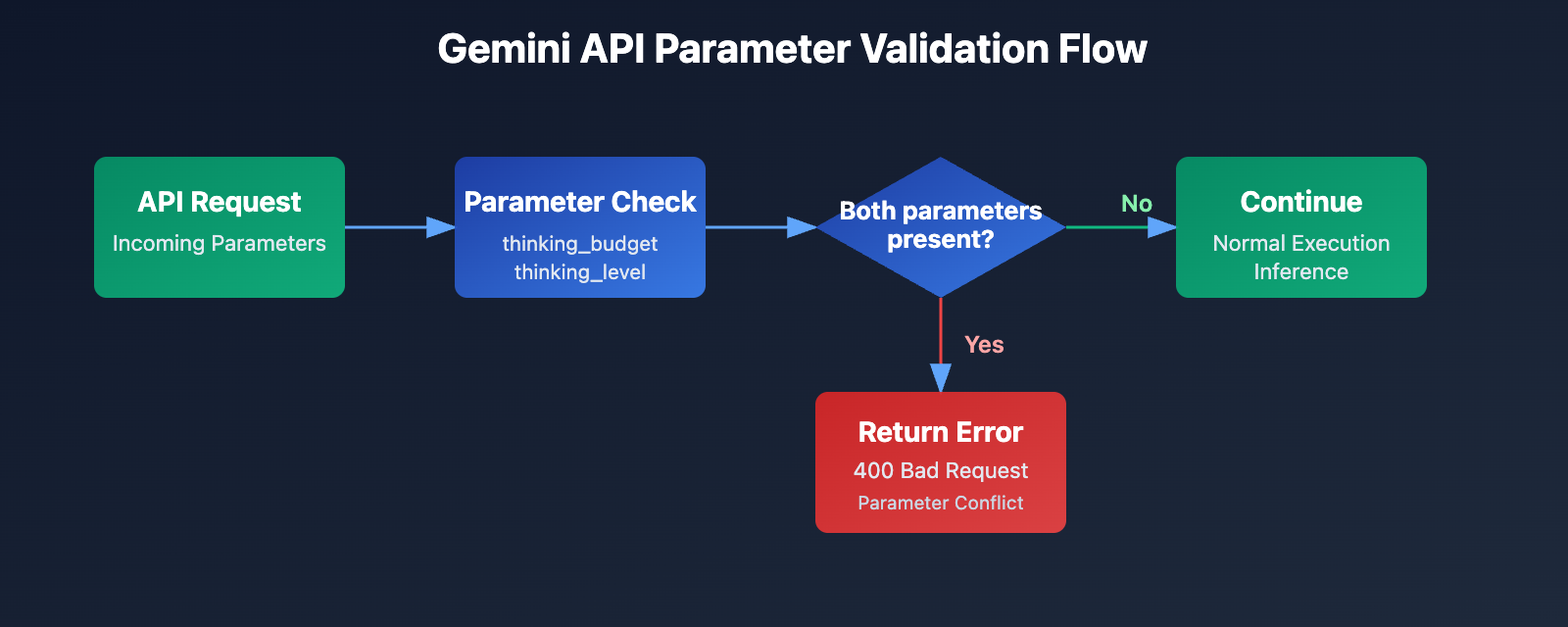
The core of this error is that thinking_budget and thinking_level cannot be used at the same time. When Google introduced new parameters for Gemini 3.0, they didn't completely scrap the old ones. Instead, they opted for a mutual exclusivity strategy:
- Gemini 2.5 Models: These only accept
thinking_budgetand will ignorethinking_level. - Gemini 3.0 Models: These prefer
thinking_level. While they still acceptthinking_budgetfor backward compatibility, they won't allow you to send both in the same request. - Error Trigger: The API request contains both
thinking_budgetandthinking_levelparameters simultaneously.
Why are you seeing this error?
You'll usually run into this in one of these three scenarios:
| Scenario | Cause | Typical Code Pattern |
|---|---|---|
| Scenario 1: SDK Auto-filling | Some AI frameworks (like LiteLLM or AG2) automatically fill in parameters based on the model name, which can lead to both being sent. | Using a pre-packaged SDK without inspecting the actual request body. |
| Scenario 2: Hardcoded Config | You've hardcoded thinking_budget in your code and forgot to update the parameter name when switching to a Gemini 3.0 model. |
Both parameters are assigned values in your config files or source code. |
| Scenario 3: Model Alias Misjudgment | Using aliases like gemini-flash-preview that actually point to Gemini 3.0, while still using 2.5 parameter configurations. |
The model name includes preview or latest, but the parameter config hasn't been updated to match. |
🎯 Pro Tip: When switching Gemini model versions, it's a good idea to test parameter compatibility on the APIYI (apiyi.com) platform first. It lets you quickly switch between Gemini 2.5 and 3.0 models to compare response quality and latency across different thinking configurations, helping you avoid parameter conflicts in production.
3 Solutions: Choosing the Right Parameters Based on Model Version
Solution 1: Gemini 2.5 Configuration (Using thinking_budget)
Applicable Models: gemini-2.5-flash, gemini-2.5-pro, etc.
Parameter Description:
thinking_budget: 0– Completely disables thinking mode for the lowest latency and cost.thinking_budget: -1– Dynamic thinking mode; the model automatically adjusts based on request complexity.thinking_budget: <positive integer>– Precisely specifies the maximum number of thinking tokens.
Simple Example
import openai

client = openai.OpenAI(
    api_key="YOUR_API_KEY",
    base_url="https://api.apiyi.com/v1"
)

response = client.chat.completions.create(
    model="gemini-2.5-flash-preview-04-17",
    messages=[{"role": "user", "content": "Explain the principle of quantum entanglement"}],
    extra_body={
        "thinking_budget": -1  # Dynamic thinking mode
    }
)
print(response.choices[0].message.content)
View Full Code (Including thought extraction)
import openai

client = openai.OpenAI(
    api_key="YOUR_API_KEY",
    base_url="https://api.apiyi.com/v1"
)

response = client.chat.completions.create(
    model="gemini-2.5-flash-preview-04-17",
    messages=[{"role": "user", "content": "Explain the principle of quantum entanglement"}],
    extra_body={
        "thinking_budget": -1,  # Dynamic thinking mode
        "include_thoughts": True  # Enable thought summary return
    }
)

# Extract thinking content (if enabled)
for part in response.choices[0].message.content:
    if hasattr(part, 'thought') and part.thought:
        print(f"Thought Process: {part.text}")

# Extract final answer
final_answer = response.choices[0].message.content
print(f"Final Answer: {final_answer}")
Note: Gemini 2.5 models are scheduled for retirement on March 3, 2026. We recommend migrating to the Gemini 3.0 series early. You can use the APIYI (apiyi.com) platform to quickly compare response quality before and after migration.
Solution 2: Gemini 3.0 Configuration (Using thinking_level)
Applicable Models: gemini-3.0-flash-preview, gemini-3.0-pro-preview
Parameter Description:
thinking_level: "minimal"– Minimal thinking, near-zero budget; requires passing Thought Signatures.thinking_level: "low"– Low-intensity thinking; good for simple instruction following and chat scenarios.thinking_level: "medium"– Medium-intensity thinking; suitable for general reasoning tasks (Gemini 3.0 Flash only).thinking_level: "high"– High-intensity thinking; maximizes reasoning depth for complex problems (default value).
Simple Example
import openai

client = openai.OpenAI(
    api_key="YOUR_API_KEY",
    base_url="https://api.apiyi.com/v1"
)

response = client.chat.completions.create(
    model="gemini-3.0-flash-preview",
    messages=[{"role": "user", "content": "Analyze the time complexity of this code"}],
    extra_body={
        "thinking_level": "medium"  # Medium-intensity thinking
    }
)
print(response.choices[0].message.content)
View Full Code (Including thought signature passing)
import openai

client = openai.OpenAI(
    api_key="YOUR_API_KEY",
    base_url="https://api.apiyi.com/v1"
)

# Round 1
response_1 = client.chat.completions.create(
    model="gemini-3.0-flash-preview",
    messages=[{"role": "user", "content": "Design an LRU cache algorithm"}],
    extra_body={
        "thinking_level": "high",
        "include_thoughts": True
    }
)

# Extract thought signatures (Gemini 3.0 returns these automatically)
thought_signatures = []
for part in response_1.choices[0].message.content:
    if hasattr(part, 'thought_signature'):
        thought_signatures.append(part.thought_signature)

# Round 2: Pass thought signatures to maintain the reasoning chain
response_2 = client.chat.completions.create(
    model="gemini-3.0-flash-preview",
    messages=[
        {"role": "user", "content": "Design an LRU cache algorithm"},
        {"role": "assistant", "content": response_1.choices[0].message.content, "thought_signatures": thought_signatures},
        {"role": "user", "content": "Optimize the space complexity of this algorithm"}
    ],
    extra_body={
        "thinking_level": "high"
    }
)
print(response_2.choices[0].message.content)
💰 Cost Optimization: For budget-sensitive projects, consider calling the Gemini 3.0 Flash API via the APIYI (apiyi.com) platform. It offers flexible billing and more competitive pricing for small teams and individuals. Combining this with
thinking_level: "low"can reduce costs even further.
Solution 3: Parameter Adaptation Strategy for Dynamic Model Switching
Applicable Scenarios: When you need to support both Gemini 2.5 and 3.0 models in your codebase.
Smart Parameter Adaptation Function
def get_thinking_config(model_name: str, complexity: str = "medium") -> dict:
    """
    Automatically selects the correct thinking mode parameter based on model version.

    Args:
        model_name: Gemini model name
        complexity: Thinking complexity ("minimal", "low", "medium", "high", "dynamic")

    Returns:
        Parameter dictionary suitable for extra_body
    """
    # Gemini 3.0 model list
    gemini_3_models = [
        "gemini-3.0-flash-preview",
        "gemini-3.0-pro-preview",
        "gemini-3-flash",
        "gemini-3-pro"
    ]

    # Gemini 2.5 model list
    gemini_2_5_models = [
        "gemini-2.5-flash-preview-04-17",
        "gemini-2.5-flash-lite",
        "gemini-2-flash",
        "gemini-2-flash-lite"
    ]

    # Determine model version
    if any(m in model_name for m in gemini_3_models):
        # Gemini 3.0 uses thinking_level
        level_map = {
            "minimal": "minimal",
            "low": "low",
            "medium": "medium",
            "high": "high",
            "dynamic": "high"  # Default to high
        }
        return {"thinking_level": level_map.get(complexity, "medium")}

    elif any(m in model_name for m in gemini_2_5_models):
        # Gemini 2.5 uses thinking_budget
        budget_map = {
            "minimal": 0,
            "low": 512,
            "medium": 2048,
            "high": 8192,
            "dynamic": -1
        }
        return {"thinking_budget": budget_map.get(complexity, -1)}

    else:
        # Unknown model, default to Gemini 3.0 parameters
        return {"thinking_level": "medium"}

# Usage example
import openai

client = openai.OpenAI(
    api_key="YOUR_API_KEY",
    base_url="https://api.apiyi.com/v1"
)

model = "gemini-3.0-flash-preview"  # Can be switched dynamically
thinking_config = get_thinking_config(model, complexity="high")

response = client.chat.completions.create(
    model=model,
    messages=[{"role": "user", "content": "Your question here"}],
    extra_body=thinking_config
)
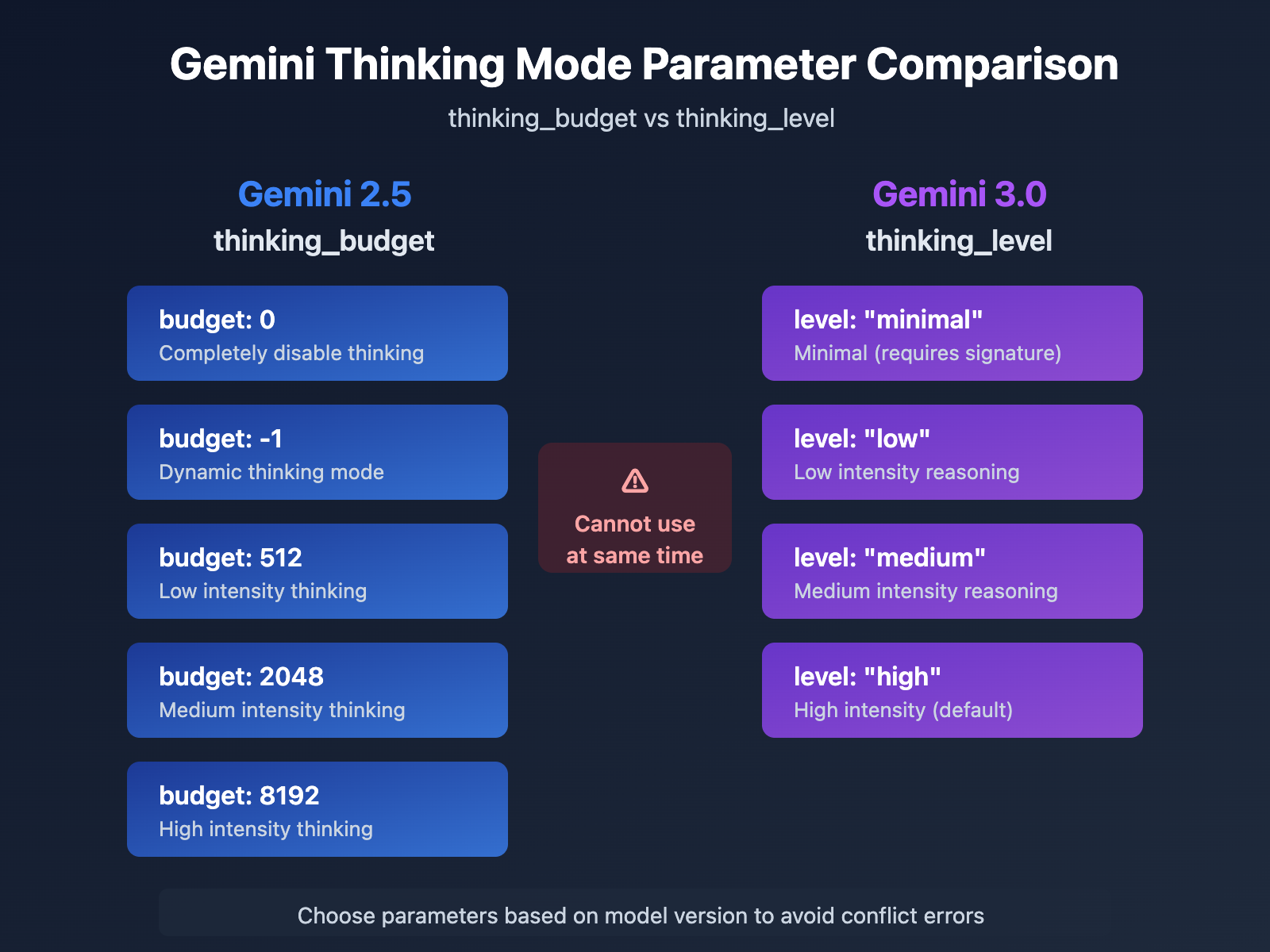
| Complexity | Gemini 2.5 (thinking_budget) | Gemini 3.0 (thinking_level) | Recommended Scenario |
|---|---|---|---|
| Minimal | 0 |
"minimal" |
Simple instruction following, high-throughput apps |
| Low | 512 |
"low" |
Chatbots, lightweight QA |
| Medium | 2048 |
"medium" |
General reasoning, code generation |
| High | 8192 |
"high" |
Complex problem solving, deep analysis |
| Dynamic | -1 |
"high" (default) |
Automatic complexity adaptation |
🚀 Quick Start: We recommend using the APIYI (apiyi.com) platform to build your prototype fast. The platform provides ready-to-use Gemini API endpoints—no complex setup required. You can finish integration in 5 minutes and switch between thinking mode parameters with one click to see what works best.
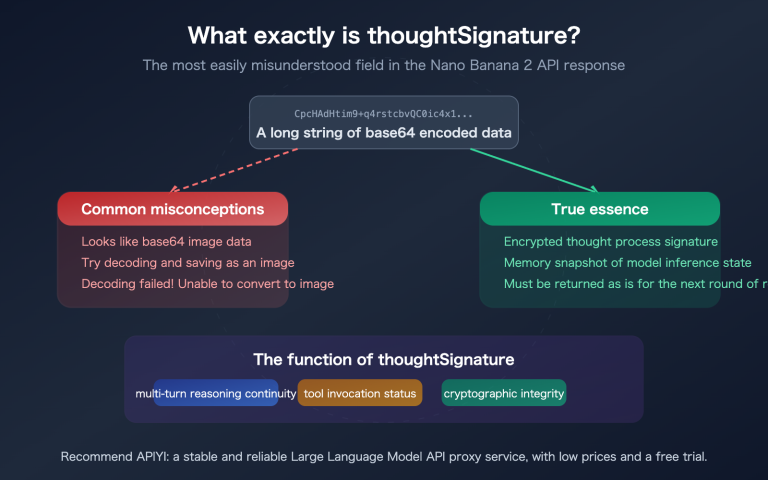
Deep Dive into Gemini 3.0 Thought Signatures
What are Thought Signatures?
Introduced in Gemini 3.0, Thought Signatures are encrypted representations of the model's internal reasoning process. When you enable include_thoughts: true, the model returns an encrypted signature of its thinking process in the response. You can then pass these signatures back in subsequent turns of the conversation, allowing the model to maintain a consistent and coherent chain of reasoning.
Key Features:
- Encrypted Representation: The signature content isn't human-readable; it's only decodable by the model itself.
- Reasoning Chain Continuity: By passing signatures in multi-turn dialogues, the model can pick up right where it left off in its previous train of thought.
- Default Return: Gemini 3.0 returns thought signatures by default, even if they aren't explicitly requested.
Real-World Use Cases for Thought Signatures
| Scenario | Pass Signature? | Description |
|---|---|---|
| Single-turn Q&A | ❌ No | For standalone questions, there's no need to maintain a reasoning chain. |
| Simple Multi-turn Dialogue | ❌ No | Basic context is usually enough; there are no complex reasoning dependencies. |
| Complex Reasoning Dialogue | ✅ Yes | Essential for tasks like code refactoring, mathematical proofs, or multi-step analysis. |
| Minimal Thinking Mode | ✅ Required | thinking_level: "minimal" requires passing a signature, otherwise, it'll return a 400 error. |
Example Code: Passing Thought Signatures
import openai

client = openai.OpenAI(
    api_key="YOUR_API_KEY",
    base_url="https://api.apiyi.com/v1"
)

# Round 1: Ask the model to design an algorithm
response_1 = client.chat.completions.create(
    model="gemini-3.0-pro-preview",
    messages=[{"role": "user", "content": "Design a distributed rate-limiting algorithm"}],
    extra_body={
        "thinking_level": "high",
        "include_thoughts": True
    }
)

# Extract the thought signatures
signatures = []
for part in response_1.choices[0].message.content:
    if hasattr(part, 'thought_signature'):
        signatures.append(part.thought_signature)

# Round 2: Optimize based on previous reasoning
# Note: In a real SDK implementation, ensure the structure matches the API requirements.
response_2 = client.chat.completions.create(
    model="gemini-3.0-pro-preview",
    messages=[
        {"role": "user", "content": "Design a distributed rate-limiting algorithm"},
        {
            "role": "assistant",
            "content": response_1.choices[0].message.content,
            "thought_signatures": signatures  # Pass the thought signatures back
        },
        {"role": "user", "content": "How would you handle distributed clock drift issues?"}
    ],
    extra_body={"thinking_level": "high"}
)
💡 Best Practice: For scenarios requiring complex multi-turn reasoning (like system design, algorithm optimization, or code reviews), we recommend testing the impact of thought signatures on the APIYI (apiyi.com) platform. The platform fully supports Gemini 3.0's thought signature mechanism, making it easy to verify reasoning quality under different configurations.
FAQ
Q1: Why does Gemini 2.5 Flash still return thought content after I set thinking_budget=0?
This is a known bug. In the Gemini 2.5 Flash Preview 04-17 version, thinking_budget=0 isn't executed correctly. Google's official forums have confirmed this issue.
Temporary Workarounds:
- Use
thinking_budget=1(a minimal value) instead of 0. - Upgrade to Gemini 3.0 Flash and use
thinking_level="minimal". - Filter out the thought content during post-processing (if the API returns a
thoughtfield).
We recommend switching to the Gemini 3.0 Flash model via APIYI. The platform supports the latest versions, helping you avoid these types of bugs.
Q2: How can I tell if I’m using a Gemini 2.5 or 3.0 model?
Method 1: Check the Model Name
- Gemini 2.x: Names usually include
2.5-flashor2-flash-lite. - Gemini 3.x: Names usually include
3.0-flash,3-pro, orgemini-3-flash.
Method 2: Send a Test Request
# Pass only thinking_level and observe the response
response = client.chat.completions.create(
    model="your-model-name",
    messages=[{"role": "user", "content": "test"}],
    extra_body={"thinking_level": "low"}
)
# If it returns a 400 error stating thinking_level isn't supported, it's Gemini 2.5.
Method 3: Check API Response Headers
Some API implementations return an X-Model-Version field in the response headers, which directly identifies the model version.
Q3: How many tokens does each Gemini 3.0 thinking_level actually consume?
Google hasn't publicly disclosed the exact token budget for each thinking_level, but they provide the following general guidelines:
| thinking_level | Relative Cost | Relative Latency | Reasoning Depth |
|---|---|---|---|
| minimal | Lowest | Lowest | Almost no thinking |
| low | Low | Low | Shallow reasoning |
| medium | Medium | Medium | Intermediate reasoning |
| high | High | High | Deep reasoning |
Practical Advice:
- Use the APIYI platform to compare the actual token consumption across different levels.
- Use the same prompt and call low/medium/high levels separately to observe the difference in billing.
- Choose the appropriate level based on your specific business needs (balancing response quality vs. cost).
Q4: Can I force the use of thinking_budget in Gemini 3.0?
You can, but it's not recommended.
For backward compatibility, Gemini 3.0 still accepts the thinking_budget parameter. However, the official documentation clearly states:
"While
thinking_budgetis accepted for backwards compatibility, using it with Gemini 3 Pro may result in suboptimal performance."
Why?
- Gemini 3.0's internal reasoning mechanism is specifically optimized for
thinking_level. - Forcing
thinking_budgetmight bypass the newer version's reasoning strategies. - This could lead to a drop in response quality or increased latency.
The Right Way:
- Migrate to the
thinking_levelparameter. - Use a parameter adapter function (as mentioned in the "Scenario 3" logic) to dynamically select the correct parameter for the model you're using.
Summary
Here are the key takeaways regarding Gemini API thinking_budget and thinking_level errors:
- Mutually Exclusive Parameters: Gemini 2.5 uses
thinking_budget, while Gemini 3.0 usesthinking_level. You can't pass both at the same time. - Model Identification: Identify the version via the model name. Use
thinking_budgetfor the 2.5 series andthinking_levelfor the 3.0 series. - Dynamic Adaptation: Implement a parameter adapter function to automatically select the correct parameter based on the model name. This helps you avoid brittle hard-coding.
- Thinking Signatures: Gemini 3.0 introduces a thinking signature mechanism. In complex multi-turn reasoning scenarios, you'll need to pass these signatures to keep the reasoning chain intact.
- Migration Advice: Gemini 2.5 is set to retire on March 3, 2026. It's a good idea to start migrating to the 3.0 series early.
We recommend using APIYI (apiyi.com) to quickly test how different thinking mode configurations perform. The platform supports the full range of Gemini models and offers a unified interface with flexible billing, making it ideal for both quick comparisons and production deployments.
Author: APIYI Technical Team | If you have any technical questions, feel free to visit APIYI at apiyi.com for more AI model integration solutions.