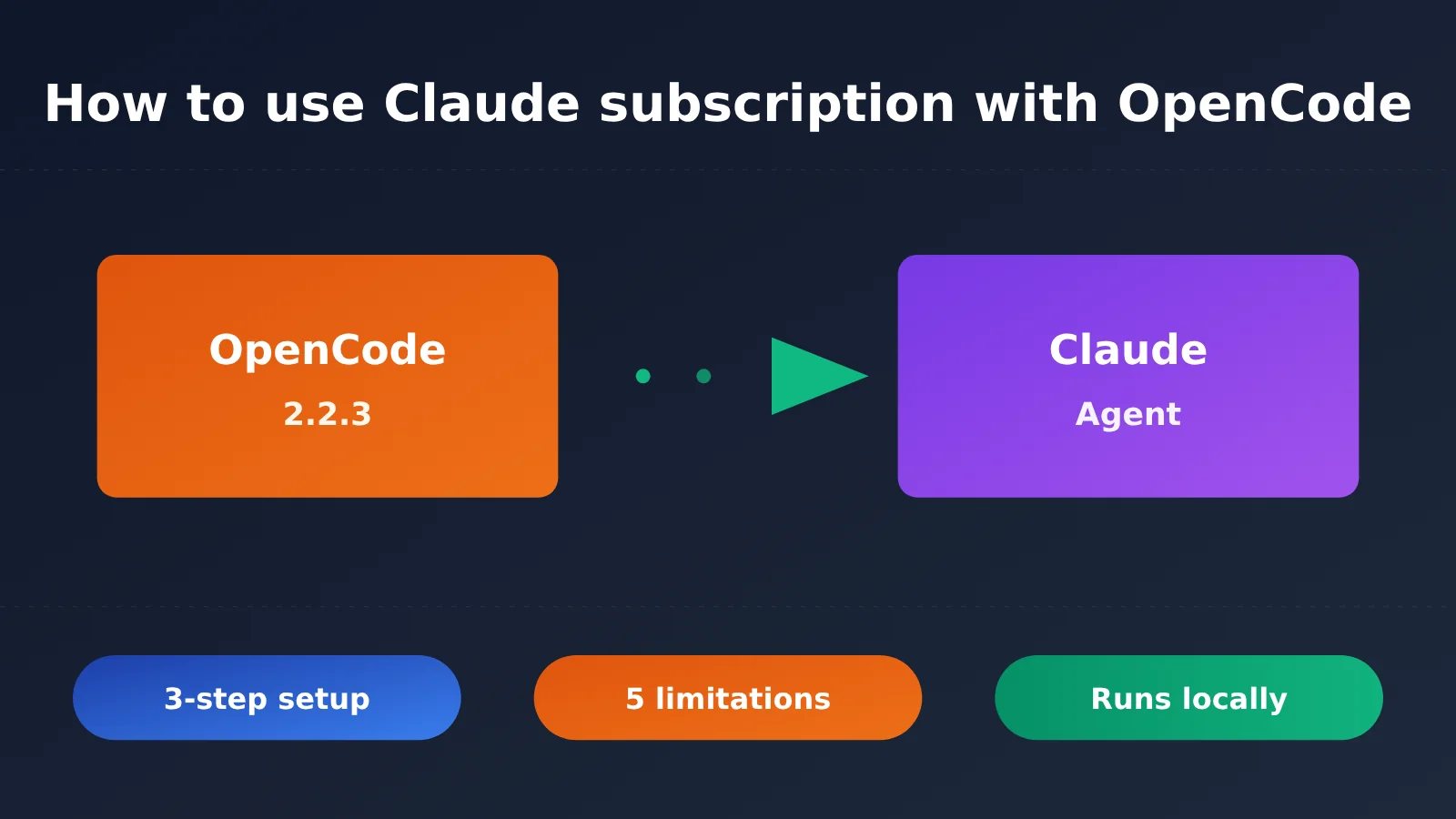
Author’s note: OpenCode 2.2.3 adds a Claude Agent provider. This article explains how it differs from the OAuth plugin removed in March, walks through setup in three steps, and covers five limitations to help you decide whether to use it.
On October 30, OpenCode released version 2.2.3 with a built-in Claude Agent provider. To use it, install Claude Code on your machine, run claude auth login once, then select Claude Agent under /connect in OpenCode. You can then use your Claude subscription to run Claude models. As of October 31, @opencode’s official announcement had received around 510,000 views.
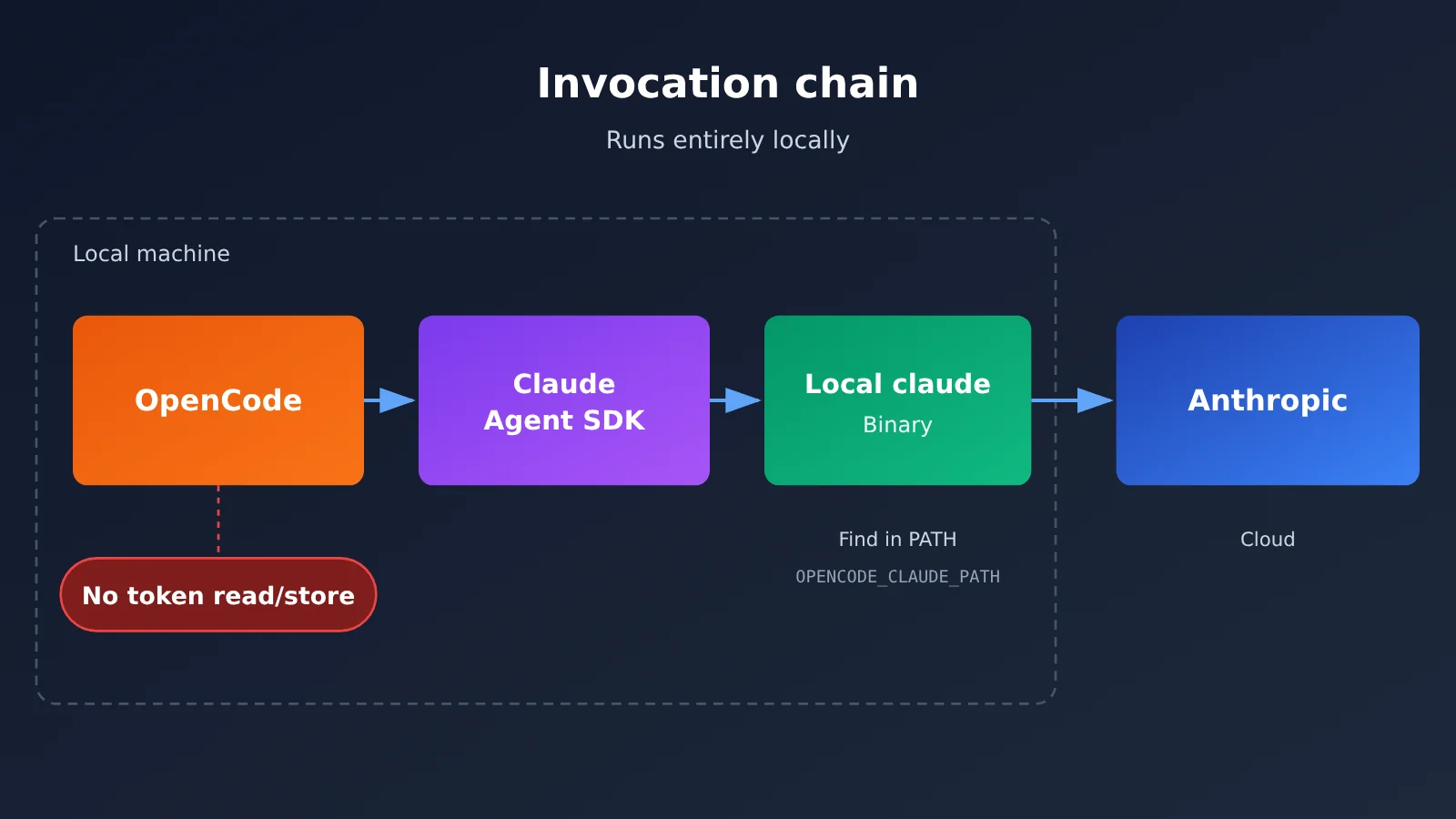
This isn’t the same OAuth setup that was removed in March. The new approach uses the official Claude Code binary and the Claude Agent SDK. OpenCode neither reads nor stores your login credentials; model requests are sent by the local claude process. OpenCode says it has Anthropic’s permission, though Anthropic hasn’t issued a separate announcement.
Developer Chen Cheng (@chenchengpro) examined the implementation: at startup, it sets tools: [] and settingSources: [], allowing only mcp__opencode__* tools. Because the MCP handler can’t access tool_use_id, it has to use a PreToolUse hook to record them one at a time. As a result, parallel file reads become sequential. The system prompt is still Claude Code’s own, and Chen’s assessment is that “the results definitely won’t be as good as using Claude Code directly.” This article covers setup in three steps, five limitations, and recommendations for three types of users.
Note: This article draws on the OpenCode release notes, the PR #58782 design document, official Claude Code documentation, and community feedback. It hasn’t been tested end to end.
Using a Claude Subscription with OpenCode: The Bottom Line
In short: it works, but it’s not the old approach, and there are trade-offs.
- Requirements: OpenCode V2 version 2.2.3 or later, with Claude Code installed on the same machine and signed in using
claude auth login. - How it works: OpenCode uses the Claude Agent SDK to invoke the local
claudeprocess. It doesn’t implement its own OAuth flow, read tokens, or store tokens. - Trade-offs: Tool calls run sequentially, many Claude Code features aren’t available, and it only runs locally—not in hosted or remote environments.
First, a note about “free”: Claude’s free plan doesn’t include Claude Code, so it won’t work with this approach. You’ll need a Pro, Max, Ultra, Team, or Enterprise plan, or a Console account. It’s not unlimited free usage, either: usage still counts against your subscription’s five-hour and weekly limits. OpenCode just displays $0 because the subscription covers the cost.
If you don’t have a subscription, or your team needs a shared entry point, you can use a pay-as-you-go API instead. For example, you can call Claude models through an OpenAI-compatible interface using APIYI at apiyi.com. This approach isn’t tied to a local machine or subject to subscription usage limits.
Why OpenCode Removed Claude Subscription Support in March—and Brought It Back in October
The story unfolded across four key dates in 2026:
- January 9: Anthropic tightened restrictions on third-party harnesses. That day, OpenCode issue #7410, “Broken Claude Max,” appeared, with users reporting that Claude Max had suddenly started throwing errors.
- February 20: International media reported that Anthropic had updated its terms to explicitly prohibit using OAuth tokens in other products, including products built with the Agent SDK.
- March 19: OpenCode merged PR #18186, “anthropic legal requests,” removing the built-in
opencode-anthropic-authplugin and removing anthropic from the provider list. - October 30: Claude Agent returned in OpenCode 2.2.3, and version 2.2.4 added guided setup later that day.
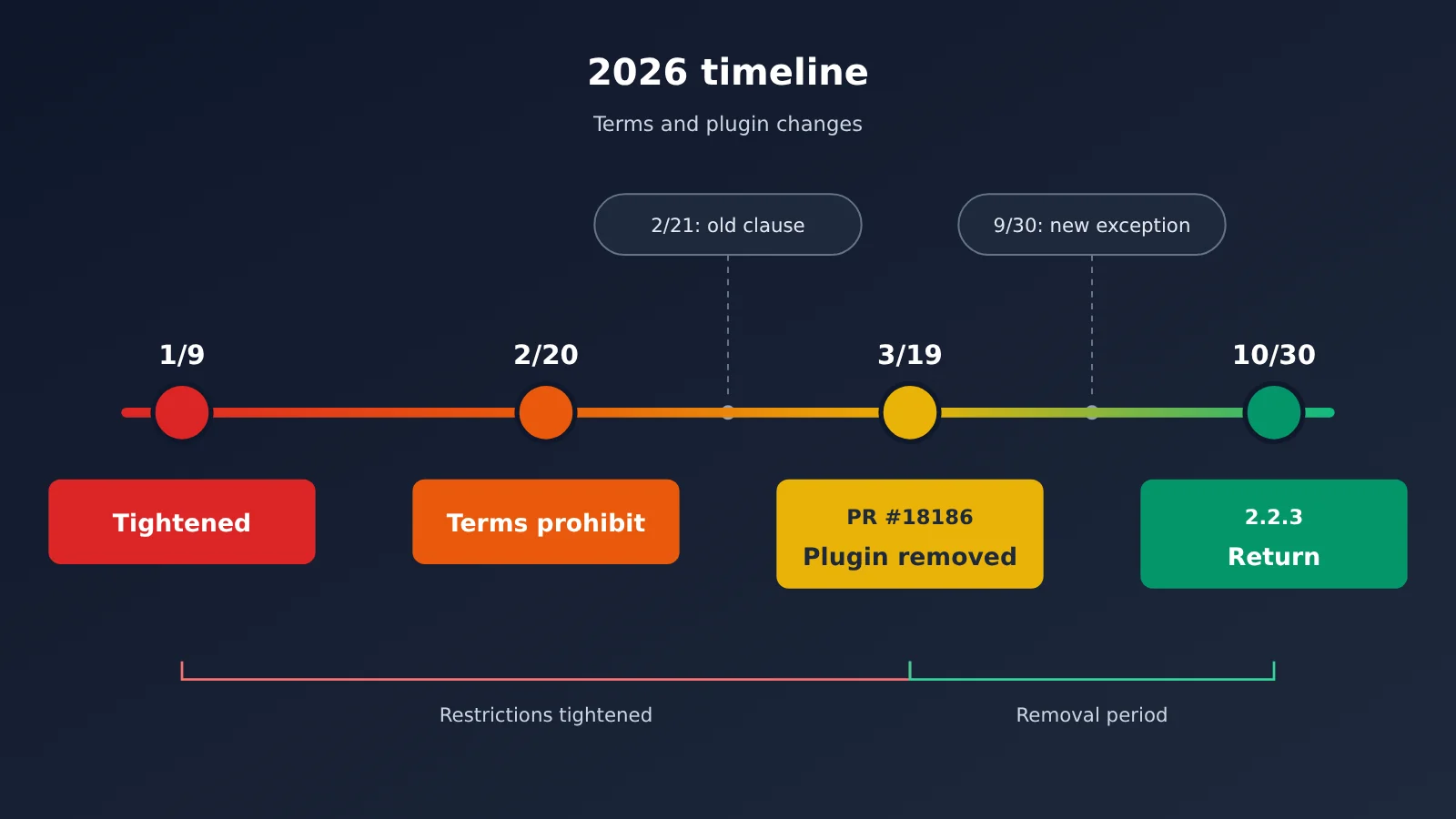
The turning point is in the terms themselves. A February 21 Wayback archive of Anthropic’s legal compliance page still stated that using Free, Pro, or Max OAuth tokens in any other product, tool, or service—including the Agent SDK—violated the Consumer ToS. By the September 30 archive, that sentence had been removed and a new exception added: end users could sign in with their own subscriptions using the unmodified Claude Code binary, including when a platform hosts Claude Code. The October page retained that exception.
OpenCode’s Claude Agent was designed around this exception. In the comments on PR #58782, someone asked whether accounts could be banned. The author, Tarquinen, replied that they had received permission from Anthropic and were fully compliant with the ToS. OpenCode member Daniel Smolsky also posted “We got permission” on X. However, as of October 31, no separate announcement from Anthropic had been found, so the claim that permission was granted currently comes only from OpenCode.
| Aspect | OAuth plugin before March | Claude Agent in October |
|---|---|---|
| Sign-in | OpenCode handled claude.ai OAuth itself and obtained a token | The user runs claude auth login in their local Claude Code installation |
| Who sends requests | OpenCode called the Anthropic API directly | The local claude process sends requests through the Agent SDK |
| Token access or storage | The plugin held the OAuth token | It neither reads nor stores the token; /connect only records which method you selected |
| Anthropic’s position | February’s terms explicitly prohibited it; the plugin was removed in March | OpenCode says it has permission; September’s terms added an exception, but there’s no separate announcement |
| Risk | Risk of account bans and removal | Lower than in March, but policies could change again |
It’s important to be clear about the risks. The current terms reserve the right to enforce them “without prior notice” and still prohibit third parties from collecting, storing, or proxying Claude credentials. So keep two things in mind when connecting: don’t install old OAuth plugins circulating online, and don’t let someone else run your account on their platform.
How the OpenCode Claude Agent Works: Request Flow and Serial Execution
The full chain is: OpenCode → Claude Agent SDK → local claude → Anthropic. OpenCode doesn’t sit between Claude Code and Anthropic, and it doesn’t rewrite requests. By default, it looks for the claude executable in PATH, but you can also specify its location with the OPENCODE_CLAUDE_PATH environment variable.
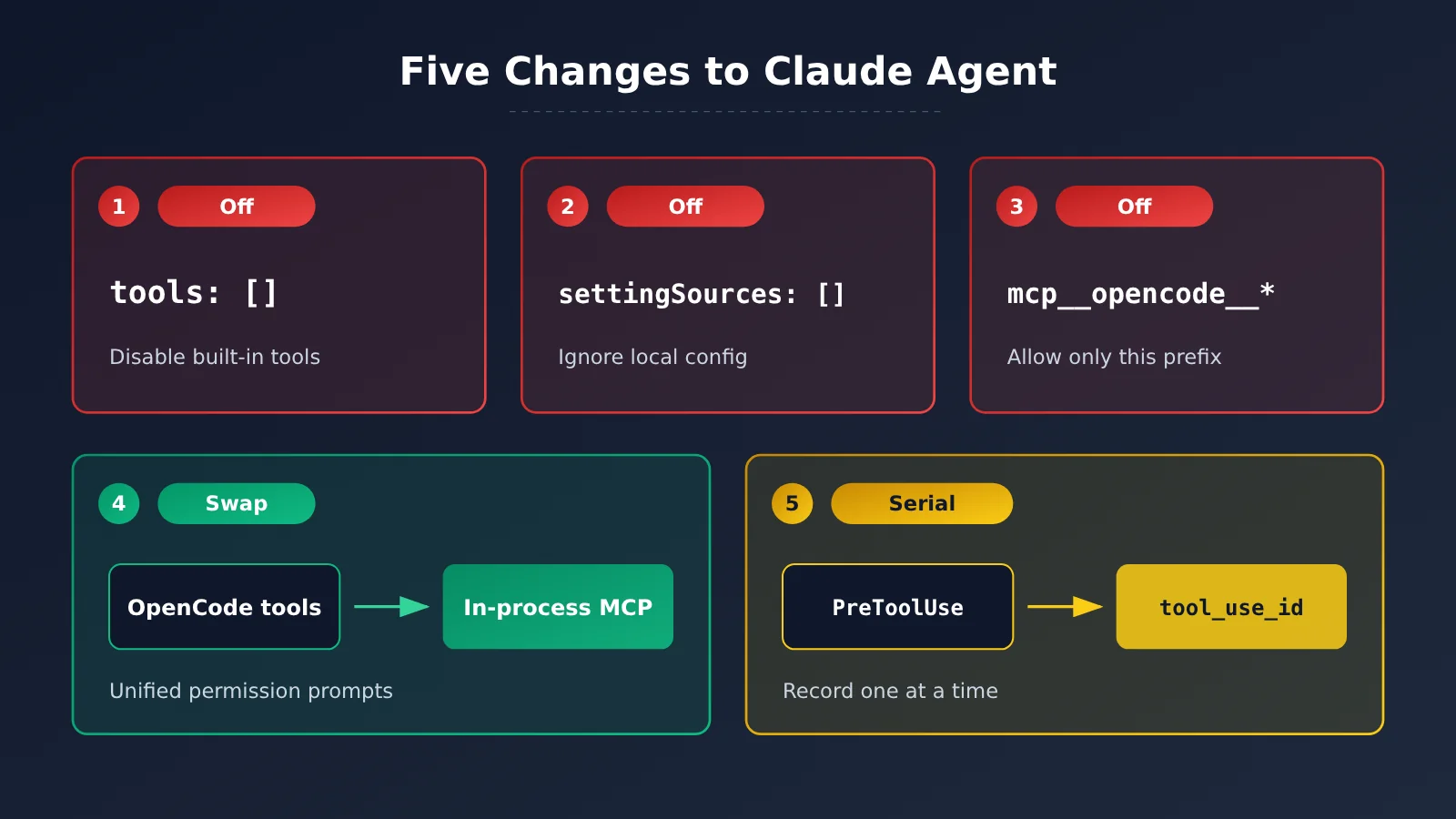
At startup, many of Claude Code’s features are disabled or replaced. You can sum it up as “three restrictions, one replacement, and serial execution”:
- Disable built-in tools: Set
tools: []to disable all of Claude Code’s built-in read, write, and Bash tools. - Disable user configuration: Set
settingSources: []so it doesn’t read~/.claudeor the project’s.claudedirectory. CLAUDE.md, hooks, skills, and MCP servers aren’t loaded either. - Allow only OpenCode tools: Only tools with the
mcp__opencode__*prefix are allowed. If Claude calls a tool by any other name, it receivesNo such tool available, and OpenCode won’t execute the call. - Replace the tool implementations: OpenCode exposes its own tools through an in-process MCP server and uses its own permission prompts when they run. The system prompt is still Claude Code’s built-in prompt, with an additional note that it’s running inside opencode, plus your selected agent prompt and AGENTS.md.
- Run tools serially: OpenCode’s tool handler can’t access Claude’s
tool_use_iddirectly, so aPreToolUsehook has to record it first for the handler to retrieve. The hook can record only one ID at a time, so tools can’t be marked for parallel execution. Claude might normally read several files concurrently, but here it reads them one at a time.
OpenCode has its reasons for this design. The session history uses the same format regardless of which model generated the content, so switching models won’t create confusion. There’s also just one permission system across the board. The trade-off is that many of Claude Code’s original capabilities are stripped away. As Chen Cheng put it: “After all that, I’d expect it to work worse than using Claude Code directly.” That’s worth considering before deciding whether to integrate it.
A few other runtime details: Each session starts a long-running claude process, which stops after five minutes of inactivity and resumes when the next message arrives. Claude Code handles retries for failed requests itself; OpenCode doesn’t retry them separately.
Connect OpenCode to Your Claude Subscription in 3 Steps
Before you start, check these five prerequisites:
- You’re using OpenCode V2, version 2.2.3 or later, not V1.
- Claude Code is installed on your local machine.
- Your Claude account is on a paid plan, or you have a Console account.
- OpenCode and Claude Code are on the same machine.
- You’re not using hosted OpenCode or a remote workspace.
To install V2, run curl -fsSL https://opencode.ai/v2/install | bash. You can also download the desktop app.
Step 1: Install Claude Code
What you’ll see: Run claude --version in your terminal. If you get a command-not-found message, it isn’t installed yet.
What to do: On macOS and Linux, install it using the official install.sh script. On Windows, run the official install.ps1 in PowerShell. If you already have an older version, run claude update to upgrade.
How to check: claude --version should print a version number.
Step 2: Sign In to Your Claude Account
What you’ll see: After you run claude auth login, your browser will open Anthropic’s login page.
What to do: Sign in with your paid Claude account, then run claude auth status to check your status.
How to check: The status should show subscription authentication, not api_key or none.
Here’s a potential gotcha: if ANTHROPIC_API_KEY is set in your shell, Claude Code may use the API key instead, resulting in usage-based charges. Run unset ANTHROPIC_API_KEY before signing in. If Claude Code asks whether to use the key, decline.
Step 3: Connect Claude Agent in OpenCode
What you’ll see: Enter /connect in OpenCode, and a list of providers will appear.
What to do: Select Claude Agent, not “Anthropic.” Then use /models to choose a Claude model. Versions 2.2.4 and later provide a guided flow that helps you copy the login command, checks the installation, and verifies the connection before you select a model. If you prefer the command line, you can also run opencode auth login to do the same thing.
How to check: You should be able to select a Claude model from the list, receive a response to a test prompt, and see OpenCode’s permission dialog appear when a tool is invoked.
Troubleshooting Checklist
- Claude Agent isn’t in the list: Run
opencode --versionto check your version. Upgrade if it’s older than 2.2.3, and make sure you’ve installed V2. - Claude command not found: Check your
PATH, or useOPENCODE_CLAUDE_PATHto specify the absolute path toclaude. - You keep getting sent back to the login page: Some early users reported getting disconnected after one or two sessions and being sent back to the login page when reconnecting. The community is still working on a fix. For now, try running
claude auth loginagain in your terminal, then return to/connect. - You’ve reached your plan limit: You’ve used up your subscription’s five-hour or weekly allowance. You’ll need to wait for the limit to reset.
- You can’t connect from a remote environment: Remote connections aren’t supported by design. You can only use this locally.
One more thing: the OpenCode V1 providers documentation still contains an old warning that “Anthropic bans Pro/Max.” That was the guidance before March. Don’t look for Claude Agent in V1’s /connect menu—it’s only available in V2.
5 Limitations of Using a Claude Subscription with OpenCode
| Limitation | What it means | Who it affects most |
|---|---|---|
| Sequential tool execution | The hook tracks only one tool_use_id at a time, so parallel file reads become sequential |
Large repositories and multi-file refactoring |
| The prompt isn’t OpenCode’s | It uses Claude Code’s system prompt, so OpenCode’s built-in prompt doesn’t take effect | People who rely on OpenCode’s default agent behavior |
| Missing Claude Code features | No /usage, auto mode, memory, cloud sessions, agent teams, and more |
Heavy Claude Code users |
| Local only | Hosted and remote setups aren’t supported; claude must run on the same machine |
Cloud development, remote teams, and CI |
| Parameter and plugin restrictions | Parameters such as temperature, top-p, seed, and stop aren’t supported; the http.request hook doesn’t run |
People who need fine-grained tuning or use a gateway |
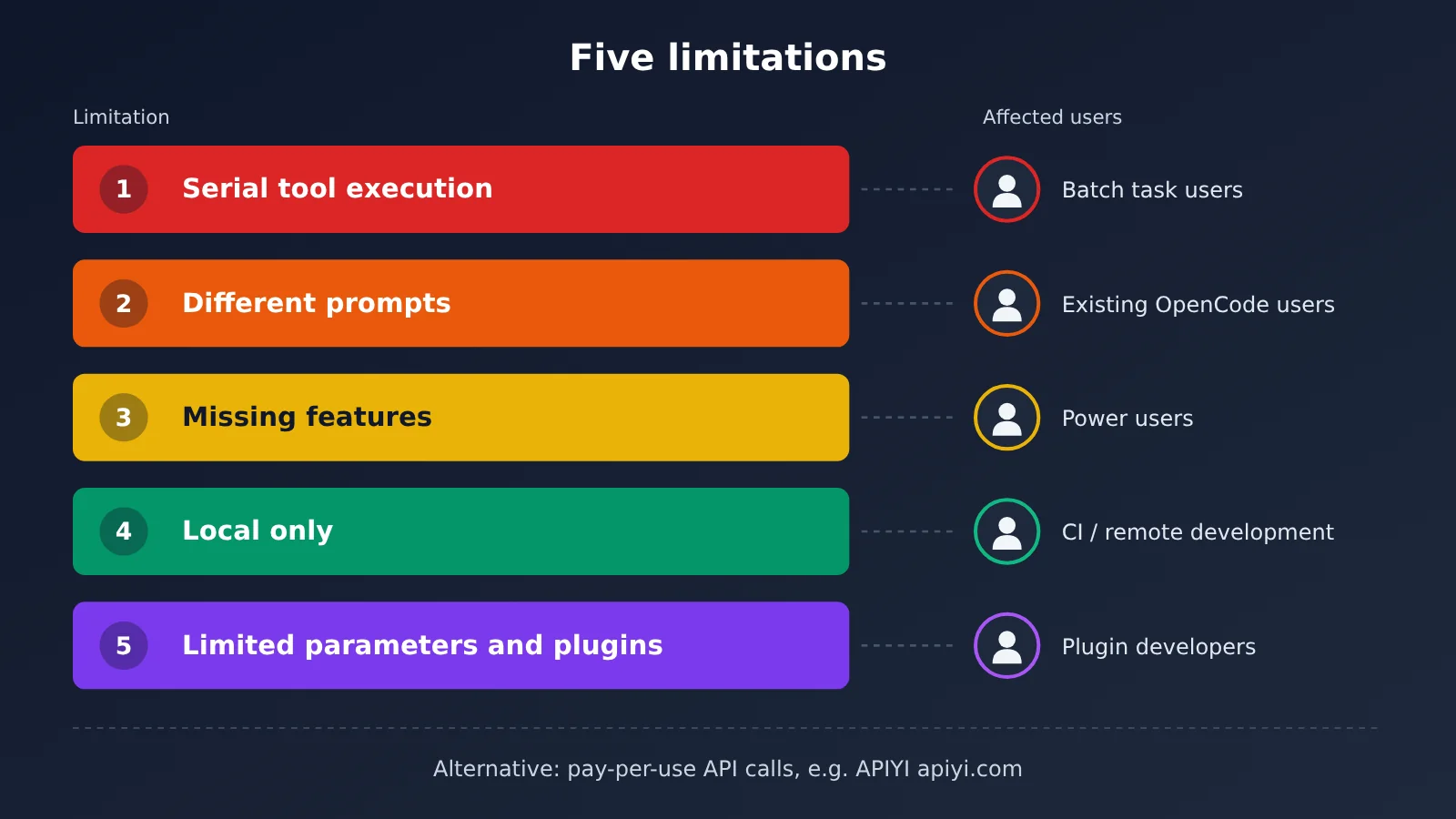
Sequential tool execution: You might not notice this in a small project. But if a task needs to scan dozens of files, the wait can get noticeably longer. If you regularly do large-scale refactoring, factor that extra time in.
The prompt isn’t OpenCode’s: Custom agent prompts still work, but the underlying base prompt comes from Claude Code. If you’re used to the behavior of OpenCode’s built-in agent, you may notice a change in the model’s style after switching.
Missing features: This is the biggest limitation. The design document lists features that Claude Code has but aren’t available through OpenCode, including auto mode, ultracode, auto memory, away summaries, cloud sessions, /teleport, agent teams, /loop, computer use, sandboxed Bash, notebook editing, and built-in skills such as /simplify and /verify.
Local only: The Claude process stops after five minutes of inactivity and resumes with the next message. This setup can’t be used in CI or on a remote development machine.
Parameter and plugin restrictions: Sampling parameters aren’t supported at all. The base URL and headers can only be read from the configuration file; plugins can’t modify them per request. The http.request and http.response hooks won’t run either, because requests are sent by Claude Code.
There are a few usage details to keep in mind, too: you can’t see Claude’s /usage in OpenCode, the session won’t automatically continue after you hit a limit, and you can’t purchase extra usage there. OpenCode’s own /usage shows OpenCode Console usage, which is unrelated to your Claude subscription allowance. There’s also a claim that claude -p and SDK users get less subscription usage than people using Claude Code normally, but the design document explicitly marks this as “unverified,” so it shouldn’t be treated as fact.
In short: if you need auto mode, memory, cloud sessions, agent teams, computer use, or notebook editing, use Claude Code directly. This setup is worth considering only if you want Claude models with OpenCode’s tools and permission system, and you can accept sequential tool execution.
Using OpenCode with a Claude Subscription: Who Should—and Shouldn’t—Try It
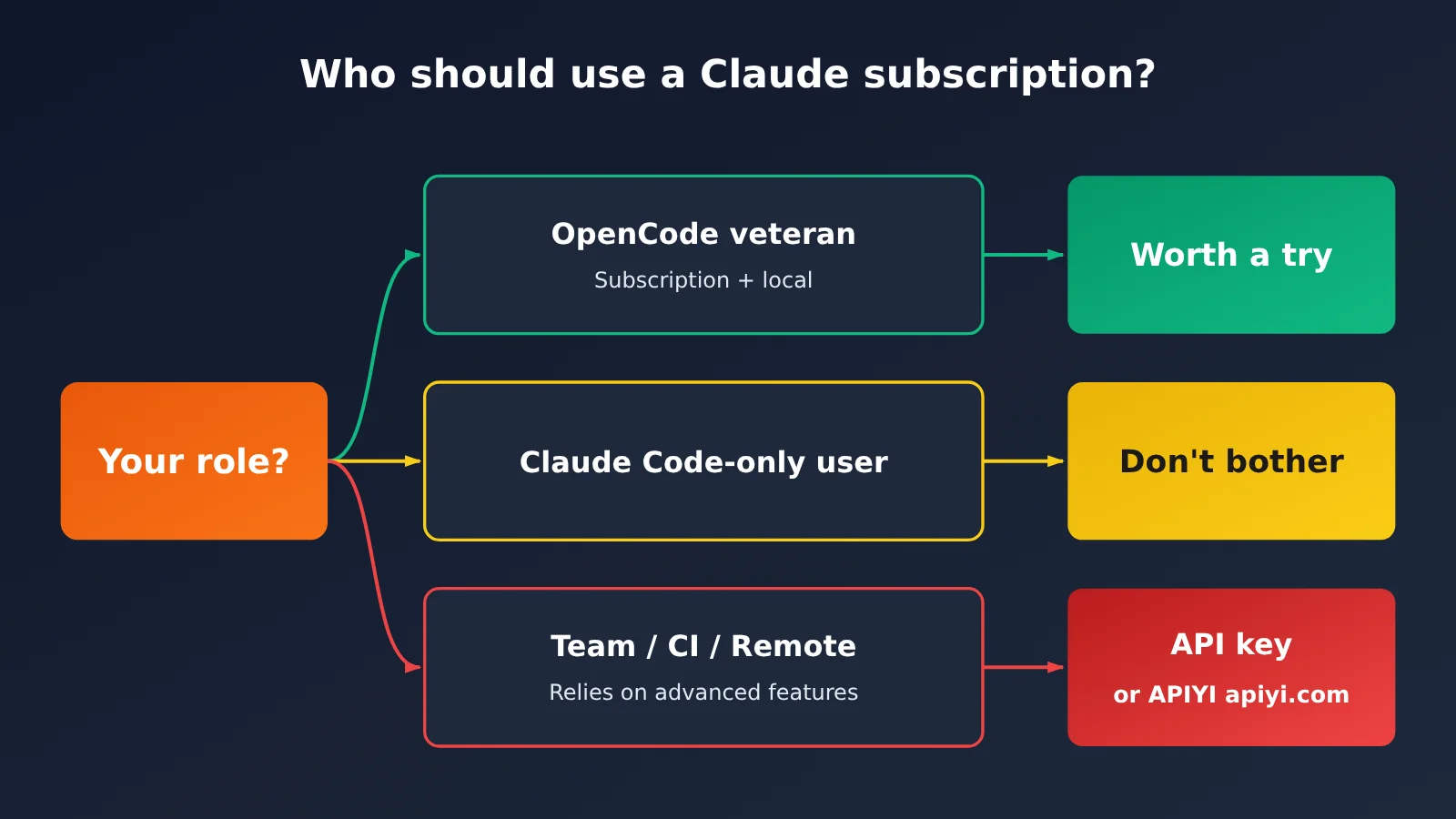
There are roughly three groups to consider:
- You already use OpenCode 2.x, have a Claude subscription, and only code on your local machine: It’s worth a try. You can switch between Claude and other models in the same harness without paying separately for the API.
- You only use Claude Code: Don’t bother switching. Claude Code has a more complete feature set, can run tools in parallel, and uses the original prompt.
- You work on a team, use CI or remote development, or rely on auto mode, memory, or the usage dashboard: Skip this setup. It only runs locally, lacks some features, and doesn’t offer transparent billing. An API key or pay-as-you-go billing through APIYI apiyi.com is a better fit.
| Option | Price (as of October 27) | Best for |
|---|---|---|
| Claude Pro | $20/month | Light individual use, with five-hour and weekly limits |
| Claude Max / Ultra | $100 / $200 per month | Heavy individual use |
| OpenCode client | Free and open source | Everyone |
| OpenCode Go (optional) | $10/month | People who need OpenCode-hosted models; not required to use Claude Agent |
| APIYI Claude Opus 5.5 | $4 input / $20 output | Teams, CI, and clear billing |
| APIYI Claude Sonnet 5.5 / Haiku 5.5 | $2/$10, $0.1/$0.5 | Everyday coding and batch tasks |
APIYI prices in the table are per million tokens. Cache reads are priced separately.
💰 Pay-as-you-go recommendation: If you don’t have a subscription, need to share access across a team, or want to track every expense, consider APIYI apiyi.com. It offers both a
messagesendpoint (Anthropic’s native format) and achatendpoint (OpenAI-compatible format). Set the base_url tohttps://api.apiyi.com/v1. Check the platform’s model list for current models and pricing.
Frequently Asked Questions
Q1: Could my account be banned for using a Claude subscription with OpenCode?
The risk is lower than it was in March: the new approach uses the official binary, OpenCode doesn’t read the token, and it falls within the exception added to the terms in September. However, the claim that it’s authorized comes from OpenCode; Anthropic hasn’t made a separate announcement and reserves the right to enforce its terms without prior notice. Don’t use the old OAuth plugin.
Q2: Why can’t I find Claude Agent in /connect?
It’s usually a version issue: you’re either running a version earlier than 2.2.3 or still using V1. Upgrade to the latest V2 release, then look for “Claude Agent” in `/connect`, not “Anthropic.”
Q3: OpenCode shows a cost of $0. Is it really free?
No. It shows $0 because the cost is covered by your subscription. Your actual usage still counts toward your subscription’s five-hour and weekly limits. If you use an API key, OpenCode displays the cost based on prices from models.dev.
Q4: Can I use it on a remote development machine or in the cloud?
No. `claude` must be installed on the same machine as OpenCode; hosted and remote workspaces aren’t supported. For cloud or CI use, consider an API key or pay-as-you-go model invocation through APIYI at apiyi.com.
Q5: How do I choose between a subscription and an API key?
A subscription works well for personal use on your local machine, provided you’re already paying for it. An API key isn’t tied to a machine, can be shared by multiple people, offers clear billing, and isn’t subject to subscription limits. If you want to compare Claude with other models, APIYI at apiyi.com lets you switch between them and test with a single API key.
Q6: Can I use the free version of Claude?
No. The free version doesn’t include Claude Code. You’ll need at least a Pro plan, or a Team, Enterprise, or Console account.
Summary: OpenCode and Claude Subscriptions in 3 Sentences
Can you connect them? OpenCode 2.2.3 and later use the official Agent SDK to call the local claude installation; OpenCode says it has Anthropic’s permission, though policies may change. How do you connect them? Install Claude Code, run claude auth login, then select Claude Agent in /connect. When should you skip it? If you need parallel tool use, the full set of Claude Code features, remote access, or team use, use Claude Code directly or access Claude on a pay-as-you-go basis through APIYI at apiyi.com.
Author: APIYI Technical Team
Technical support: For questions about accessing Claude models, contact us through the APIYI homepage at apiyi.com. For more documentation, visit docs.apiyi.com.