Author’s note: This guide breaks down five common causes of image API connection interruptions, covering timeout settings, proxy gateways, cross-border network routes, retry strategies, and runtime environments. It’ll help you reliably get results back when generating images across borders.
You send an image generation request, wait for dozens of seconds, and end up with nothing but a Connection reset or Read timed out error. This is a common problem for developers generating images across borders. Even worse, the model may have already generated the image, but the result never made it back to your program. This article covers five common causes of image API connection interruptions and how to fix them, so you can generate images reliably whether you’re running your service overseas or in China.
This isn’t generic networking advice. It’s based on real issues we’ve repeatedly encountered while helping developers integrate with APIs. For example, one developer running their service on a server in the U.S. wanted to know which endpoint to use, whether cross-border requests would be slow, and how to make sure large image responses arrived intact.
What you’ll get: By the end of this article, you’ll know how to troubleshoot image API connection interruptions across five layers—“client → gateway → network route → retries → runtime environment”—and you’ll have a reusable code template for timeout and retry settings.
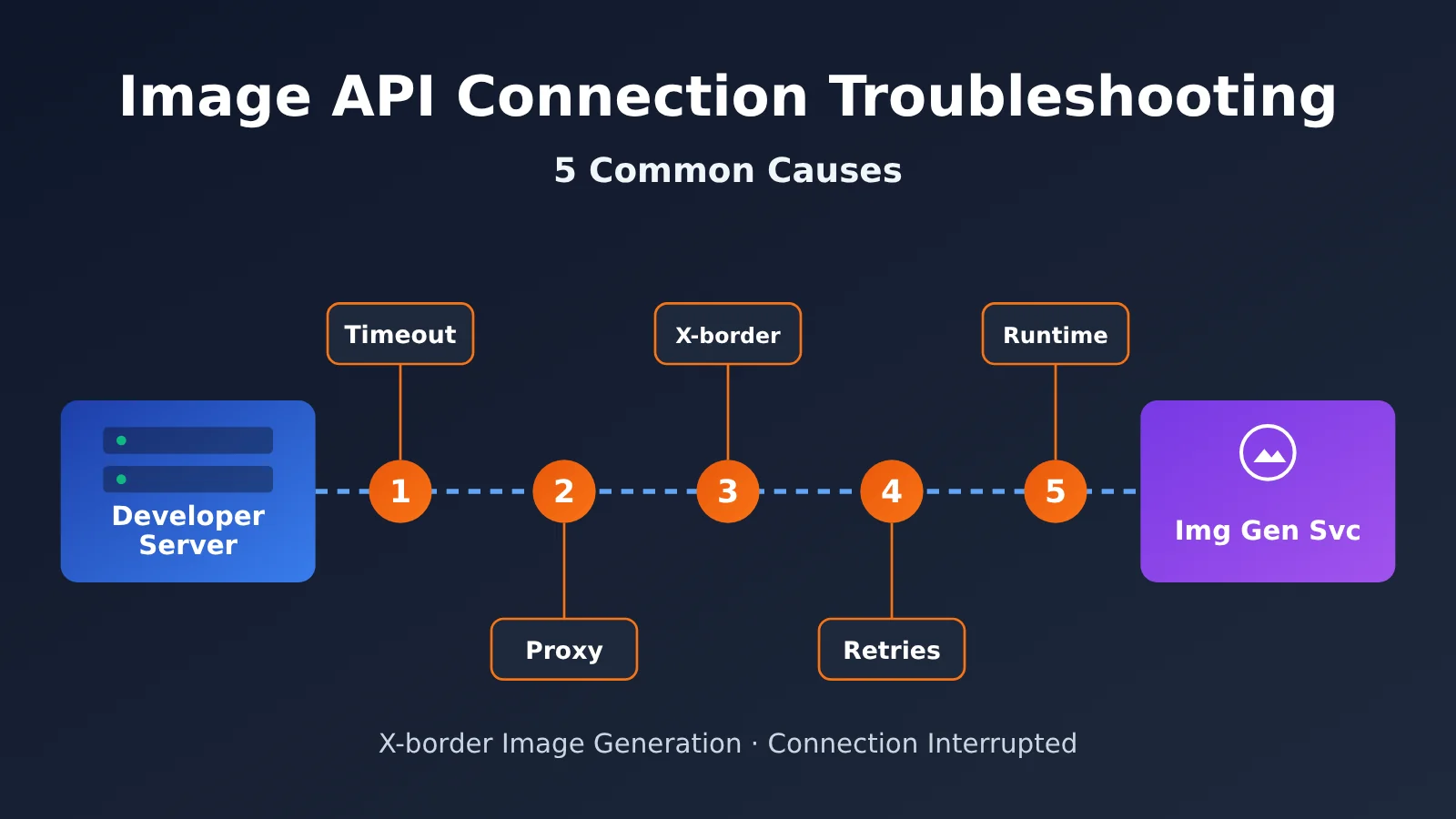
Key Things to Check When an Image API Connection Drops
Here’s the bottom line: image API connections almost always drop at one of these five points, listed in order of troubleshooting priority:
| No. | Common cause | Typical symptoms | How to fix it |
|---|---|---|---|
| 1 | Client timeout is too short | timeout occurs consistently after a set number of seconds |
Increase the read timeout specifically |
| 2 | Proxy or gateway idle timeout | Connection drops consistently around 60 seconds, returning 502/504 | Adjust the Nginx or load balancer timeout |
| 3 | Cross-border network quality and large response bodies | Intermittent drops; larger results are more likely to fail | Choose the right endpoint and reduce the response payload |
| 4 | Poor retry strategy | Duplicate charges, or retries keep failing more often during peak periods | Disable blind automatic retries and add backoff |
| 5 | Limitations of the runtime environment | Connection drops consistently with Serverless or direct browser requests | Switch to a persistent backend process or an asynchronous task |
Why Image APIs Are More Prone to Connection Drops Than Chat APIs
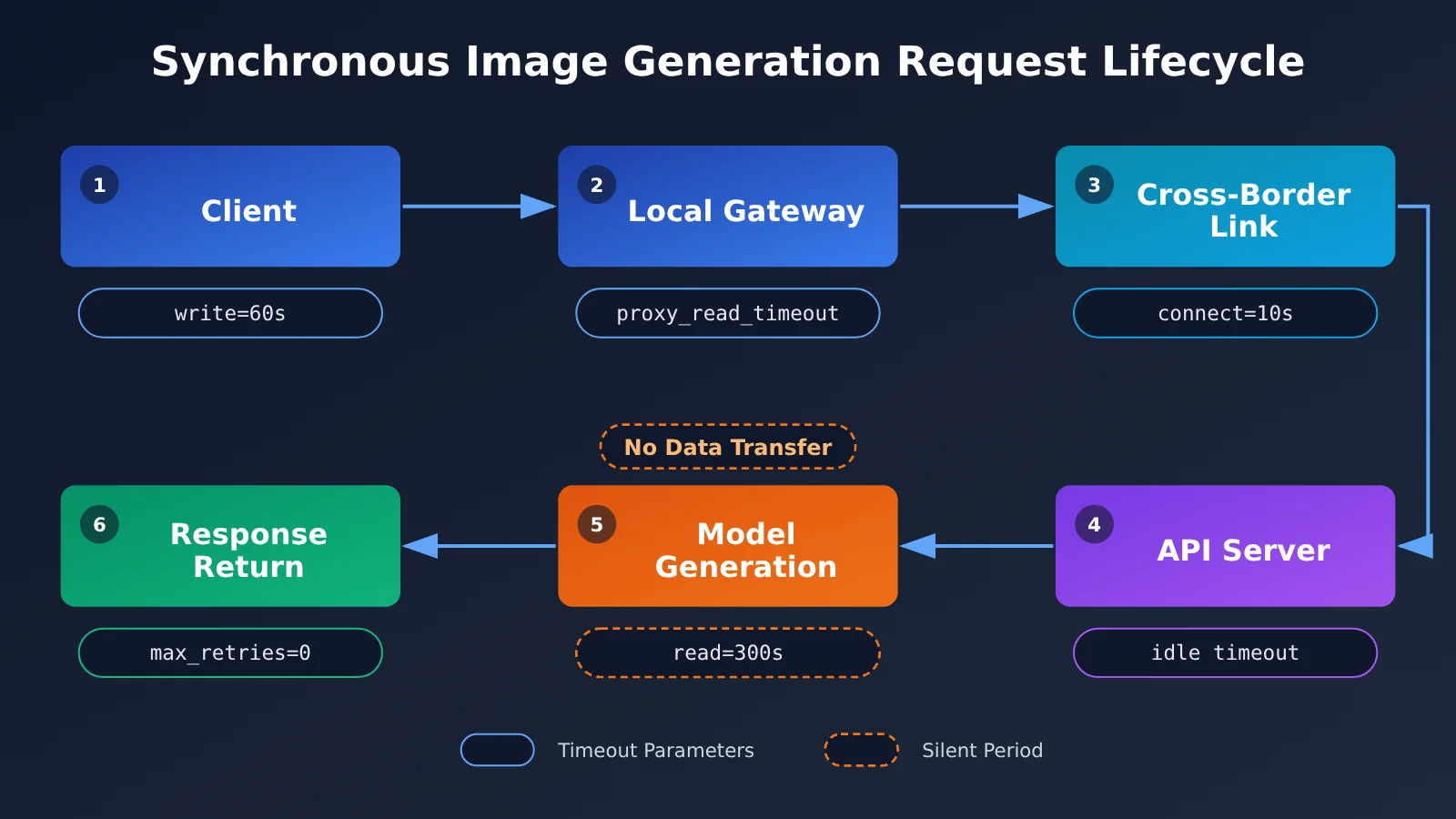
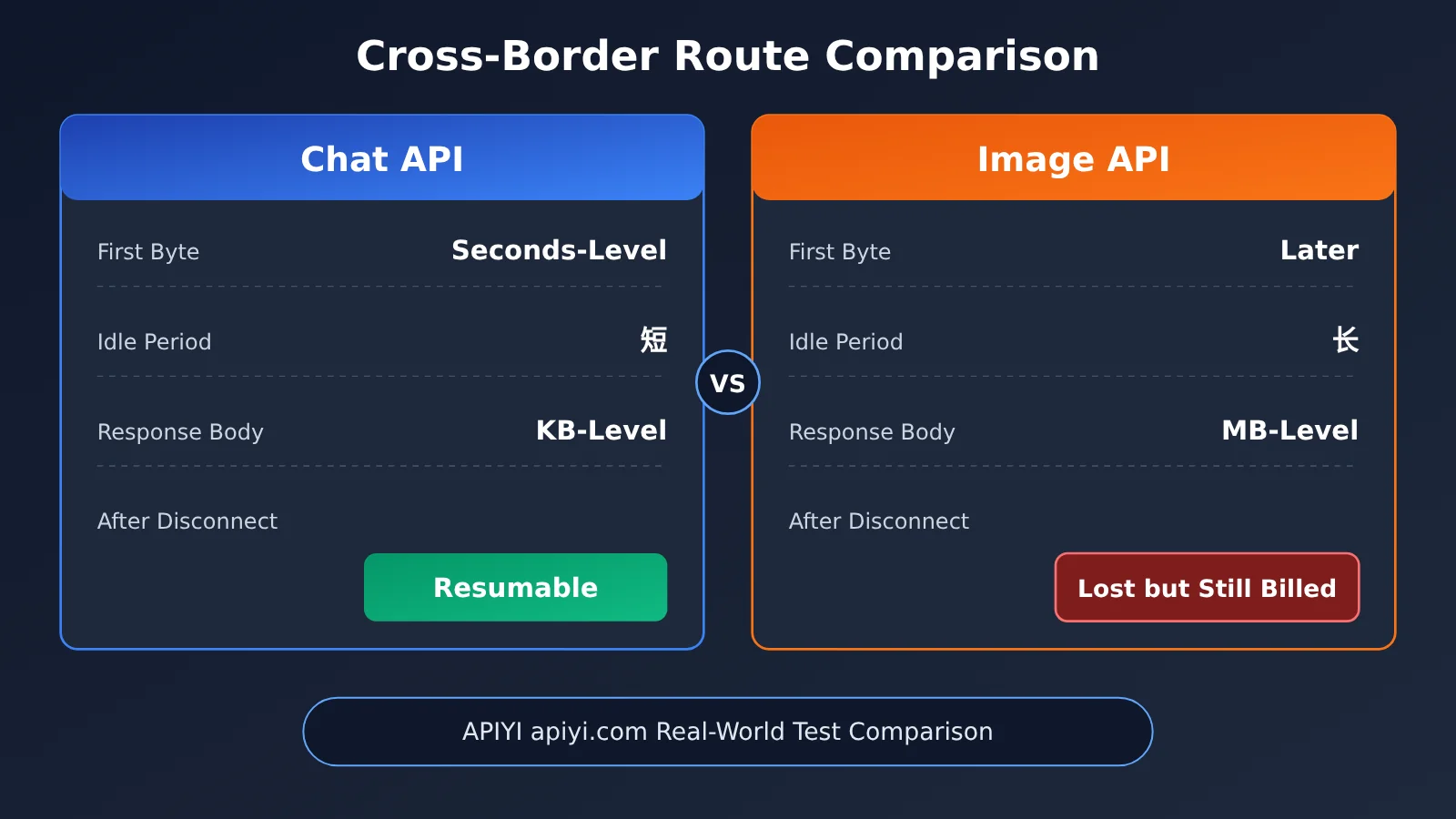
Image generation APIs are usually synchronous: once a request is sent, the connection has to stay open until the model finishes generating the image and sends the result back. Chat APIs can stream output, with data often arriving within a few hundred milliseconds. Image APIs, on the other hand, often transfer no bytes at all while the image is being generated. This “silent period” can last tens of seconds or longer, making it easy to trigger idle timeouts at different layers.
Another key factor is the large response body. A high-resolution image returned as base64 can be several MB, and video results are even larger. Even a brief network hiccup on a cross-border connection can make a large response more likely to arrive incomplete.
The most important thing to keep in mind is that if the connection drops, you lose the result—but generation may already be complete, and you may still be charged. The server can’t resend the result over a connection that’s already closed, so troubleshooting dropped connections isn’t just about reliability; it directly affects your costs.
Choosing an Endpoint for Cross-Border Image Generation
APIYI’s servers are hosted in the western United States, so overseas applications can use https://api.apiyi.com/v1 for low latency and a shorter physical distance. Developers often wonder why connections from mainland China are just as smooth. The reason is that the platform uses accelerated routes to mainland China, specifically to support use cases with large response bodies, such as image and video generation.
| Deployment region | Recommended endpoint | Network characteristics | Notes |
|---|---|---|---|
| US / North American servers | Default endpoint | Same region as the service, with the lowest latency | Check local gateway timeouts |
| European / Asia-Pacific servers outside mainland China | Default endpoint | Uses public cross-region routing; generally stable | Allow a longer read timeout |
| Servers in mainland China | Default endpoint | Uses accelerated routes to mainland China | Avoid adding another unreliable proxy |
| Local development machine | Default endpoint | Highly dependent on the local network | Don’t use local results to judge production performance |
As you can see, with OpenAI-compatible mode, you only need to change base_url when connecting, regardless of where your application is deployed. There’s no need to maintain separate code for different regions. The settings that may need to vary by region are the timeout parameters and intermediate network configuration.
Quick Start: Troubleshooting Image API Connection Drops
Minimal example: Set the timeout and automatic retries correctly
Many connection issues can be resolved by configuring the SDK’s timeout and retry settings correctly. The example below uses the official OpenAI Python SDK:
import openai

client = openai.OpenAI(
    api_key="YOUR_API_KEY",
    base_url="https://api.apiyi.com/v1",  # APIYI unified endpoint for deployments inside and outside China
    timeout=300,      # Image generation is a synchronous call, so allow enough time
    max_retries=0,    # Disable automatic SDK retries to avoid duplicate generations and charges after a disconnect
)

result = client.images.generate(
    model="gpt-image-1",  # Replace with a model from the console's model list
    prompt="A Shiba Inu running in front of snow-capped mountains, with cinematic lighting",
    size="1024x1024",
)
print("Result received. Data length:", len(result.data[0].b64_json or ""))
There are two easy-to-miss details here. First, the OpenAI Python SDK retries automatically by default when it encounters connection errors and timeouts. That’s usually fine for chat endpoints, but every retry on an image endpoint may start a new generation. Second, when timeout is set to a single number, it applies to both the connection and the read. In production, it’s better to set them separately, as shown in the complete code below.
View the complete implementation (separate timeouts + limited retries + save results to disk)
import base64
import time
import uuid
import httpx
import openai

# Separate timeouts: fail fast on connection; allow enough time for the response
TIMEOUT = httpx.Timeout(
    connect=10.0,   # TCP/TLS connection setup; taking more than 10 seconds usually indicates a network issue
    read=300.0,     # Wait for generation and the large response body
    write=60.0,     # Needed when uploading a reference image for image-to-image generation or editing
    pool=10.0,
)

client = openai.OpenAI(
    api_key="YOUR_API_KEY",
    base_url="https://api.apiyi.com/v1",  # APIYI OpenAI-compatible endpoint
    timeout=TIMEOUT,
    max_retries=0,
)

# Retry only errors where the request most likely never reached the server
RETRYABLE_BEFORE_SEND = (openai.APIConnectionError,)

def generate_image(prompt: str, out_dir: str = ".", max_attempts: int = 2) -> str:
    task_id = uuid.uuid4().hex[:8]
    for attempt in range(1, max_attempts + 1):
        start = time.time()
        try:
            resp = client.images.generate(
                model="gpt-image-1",
                prompt=prompt,
                size="1024x1024",
            )
            # Save the result immediately to avoid losing it if a later step fails
            path = f"{out_dir}/img_{task_id}.png"
            with open(path, "wb") as f:
                f.write(base64.b64decode(resp.data[0].b64_json))
            print(f"[{task_id}] Success, took {time.time() - start:.1f}s")
            return path

        except openai.APITimeoutError:
            # Read timeout: the server has likely started generating, so an immediate retry isn't recommended
            print(f"[{task_id}] Read timed out after {time.time() - start:.1f}s. Check the timeout and network path.")
            raise

        except RETRYABLE_BEFORE_SEND as e:
            elapsed = time.time() - start
            # Retry with backoff only if the connection failed quickly, suggesting the request wasn't sent
            if elapsed < 15 and attempt < max_attempts:
                wait = 2 ** attempt
                print(f"[{task_id}] Connection setup failed. Retrying in {wait}s: {e}")
                time.sleep(wait)
                continue
            print(f"[{task_id}] Connection dropped after {elapsed:.1f}s. No further retries: {e}")
            raise

        except openai.APIStatusError as e:
            # Let the calling layer decide how to handle 429 / 5xx errors to avoid cascading failures during peak traffic
            print(f"[{task_id}] Status code {e.status_code}: {e.message}")
            raise

if __name__ == "__main__":
    generate_image("A cyberpunk city at night, neon lights reflected on rain-soaked streets")
🚀 Quick-start tip: Run the minimal example above once in your actual deployment environment and record the total time it takes. Use that to set your read timeout. Sign up at APIYI (apiyi.com) to get free testing credits—handy for tuning your timeout, gateway, and retry settings before launch.
5 Common Causes of Image API Connection Interruptions in Detail
Cause 1: The client timeout is set too low
This is the most common cause—and usually the easiest to fix. Many HTTP clients and application frameworks default to a timeout of just 30 or 60 seconds. That’s plenty for chat requests, but image generation can easily take longer, especially at high resolutions, with complex prompts, or during peak traffic.
There’s a simple way to tell: if every request fails after roughly the same number of seconds, a timeout at some layer is almost certainly being triggered. In that case, distinguish between the connection timeout and the read timeout. Keep the connection timeout short so network issues are detected quickly, but set the read timeout to cover the worst-case generation and response delivery time.
Cause 2: An idle timeout on the proxy or gateway
Even if the client timeout is configured correctly, Nginx, cloud load balancers, and API gateways along the request path have their own timeouts. Nginx’s proxy_read_timeout defaults to 60 seconds, and many cloud load balancers have idle timeouts in the same range. If the image generation’s silent period exceeds that limit, the gateway will close the connection. The client will typically see a 502 or 504 error, or a connection reset.
If your setup forwards requests from the frontend to your backend and then to the image API, check both your backend’s inbound gateway and its outbound proxy:
location /api/image/ {
    proxy_pass http://backend;
    proxy_connect_timeout 10s;
    proxy_send_timeout    120s;
    proxy_read_timeout    300s;   # Covers the image generation silent period
    client_max_body_size  20m;    # Image-to-image and image editing require uploading a reference image
    proxy_buffering       on;
}
| Layer | Key parameter | Typical default | Recommended approach |
|---|---|---|---|
| SDK / HTTP client | read timeout | Varies by framework | Allow for the worst-case generation time, with some headroom |
| Self-hosted Nginx | proxy_read_timeout | 60 seconds by default | Align with the client read timeout |
| Cloud load balancer | idle timeout | Usually under a few minutes | Explicitly increase it in the console |
| Browser / frontend | fetch has no built-in timeout, but is subject to upstream limits | Depends on the gateway | Poll the backend for task status instead |
| Serverless platform | Maximum execution time | Varies by platform | Choose a plan that supports long-running requests or change the architecture |
A useful rule of thumb: the farther out a layer is, the longer its timeout should be—at least as long as the timeout of the layer inside it. If the gateway timeout is shorter than the client timeout, the client’s timeout setting is effectively useless.
Reason 3: Cross-Border Connection Quality and Large Response Bodies
Cross-border connections tend to have acceptable average latency, but jitter and packet loss can be unpredictable. When a small request to a chat API encounters jitter, retransmitting a few packets is usually enough to get through. But when an image API returns several megabytes of data, the transfer takes longer, increasing the chance of encountering jitter.
There are three ways to optimize this layer:
- Choose the right endpoint: If you’re deploying overseas, use the default endpoint to connect to the US West Coast server nearby. If you’re deploying in China, use the default endpoint as well—the platform’s accelerated route back to China handles the cross-border leg. Don’t add a self-managed proxy whose reliability is uncertain.
- Keep response bodies manageable: Choose an appropriate image size and quantity for your needs. Generating multiple images in one request multiplies the amount of data that has to be transferred back.
- Save results as soon as they arrive: Write results to local or object storage immediately. Don’t wait until a series of post-processing steps has finished before saving them.
💡 Connection tip: To compare image generation performance for the same workload on overseas and domestic servers, deploy the test script above in both locations and use APIYI apiyi.com for a consistent connection. Compare the time taken and success rate. Changing only the deployment location—and not the code—makes the results easier to interpret.
Cause 4: Inappropriate Retry Strategies
Retrying isn’t inherently wrong—the problem is retrying every error the same way. If an image API connection drops while reading the response, the server has most likely already started or even completed the generation. Retrying immediately is like placing the same order twice. Worse, during peak periods, a large number of clients retrying rapidly can lead to longer queues and more timeouts, creating a vicious cycle.
| Failure scenario | Was the request delivered? | Should you retry? | How to handle it |
|---|---|---|---|
| DNS resolution failure or connection timeout | Probably not | Yes | Use exponential backoff and limit the number of attempts |
| TLS handshake failure | Probably not | Yes | First check your local proxy and certificates |
| Read timeout | Most likely | With caution | Increase the timeout first, then verify manually |
| Connection reset while receiving the response | Yes, and processing may be complete | Don’t retry automatically | Log the error and investigate the connection |
| 429 rate limit | Delivered but rejected | Yes | Increase the backoff interval and limit concurrency |
| 5xx server error | Delivered | It depends | Retry a limited number of times with backoff, and send an alert |
The key idea is the check in the full code: automatically retry only when the request most likely didn’t reach the server. Leave other cases to the business logic. For image generation explicitly triggered by a user, it’s better to show a clear message—“Generation failed. Please try again.”—than to retry silently in the background.
Cause 5: Limitations of the Runtime Environment
Some connection interruptions have nothing to do with the network—the runtime environment simply “can’t wait long enough.” There are three common cases: Serverless functions have a maximum execution time, after which the platform terminates them; direct calls to image APIs from a browser can be interrupted when users switch pages or mobile networks; and some container platforms reclaim instances when they’re idle.
For these issues, it’s best to run image generation in a persistent backend process or task queue. The frontend submits a task and receives a task ID, then gets the result through polling or push notifications. This decouples the generation process from the user’s connection, so the result won’t be lost even if the user refreshes the page. Video generation produces much larger files, so it’s even more important to handle result delivery this way.
Practical Checklist for Troubleshooting Image API Connection Interruptions
When connection interruptions occur in production, work through these steps in order. You can usually pinpoint the problem layer within half an hour:
- Check the request duration distribution: If failed requests cluster around a fixed duration, the issue is likely a timeout setting. If durations vary randomly, it’s more likely a network path issue.
- Check the error type: Distinguish between connection failures, read timeouts, connection resets, and HTTP status codes. Each points to a different layer.
- Test a direct connection that bypasses intermediate layers: Use a script on the same server to call the API directly. If it succeeds, the issue is likely with your own gateway or proxy.
- Retest at a different time: If the failure rate rises significantly during peak hours, check your concurrency and retry strategies first.
- Cross-check billing records and logs: For requests that disconnected during the read phase, check whether they were still billed. This helps you assess losses and improve your approach.
🎯 Technical tip: During troubleshooting, log the start time, end time, error type, and request ID for every request. If the APIYI apiyi.com console shows that a request succeeded while your program reports an error, the problem is almost certainly in the response delivery path or caused by a timeout.
Frequently Asked Questions
Q1: What does it mean when an image API connection is interrupted?
It means the connection between the client and server was dropped before the image generation request completed. Common errors include read timeouts, connection resets, 502s, and 504s. Because image APIs use synchronous calls, once the connection drops, the generated result can’t be sent to the client.
Q2: Do I need to use different base_url values for overseas and mainland China servers?
No. The server is hosted in the western United States, so overseas applications can use the default endpoint. For access from mainland China, the platform’s routes back to China provide acceleration. Both deployments use the same base_url; only the timeout settings and intermediate gateway configuration differ.
Q3: Will I still be charged if the connection is interrupted?
Possibly. If the interruption happens while the result is being sent back after the model has already generated it, generation is complete and you’ll typically still be charged, even though the result wasn’t delivered. That’s why it’s important to set timeouts carefully and configure retries with caution.
Q4: What’s a reasonable read timeout?
There’s no one-size-fits-all value. Test in your actual deployment environment: run a batch of requests using your target image size and typical prompts, then leave plenty of headroom beyond the longer processing times. Also make sure your gateway and load balancer timeouts are no shorter than this value.
Q5: How can I quickly check whether my timeout and retry settings are reasonable?
Follow these steps:
1. Sign up at APIYI (apiyi.com) to get an API key and free testing credits.
2. Keep `base_url` in the complete code from this article set to `https://api.apiyi.com/v1`, then deploy it to a server in the same region as your production environment.
3. Run a batch of requests, record the latency distribution and failure types, and adjust the settings based on what you find.
Q6: Can the same issue affect video generation APIs?
Yes, and video result files are larger, making them more sensitive to cross-border connection instability. The approach is similar: increase the read timeout, save results to disk as soon as they arrive, decouple the generation process from the user connection, and avoid blindly retrying after a response transfer fails.
Q7: Can these methods eliminate connection interruptions entirely?
No. Occasional cross-border network disruptions can’t be eliminated completely. The methods in this article can reduce the failure rate to an acceptable level and make each failure traceable and easier to diagnose. For critical applications, consider adding alerts and a manual review process.
Key Takeaways for Troubleshooting Image API Connection Drops
- Synchronous calls are the root cause: No data is transferred while the image API is generating an image, making idle timeouts at any layer more likely.
- A disconnect means losing the result: If the connection drops while the result is being returned, generation may already be complete—and billed. Reliability directly affects costs.
- Align timeouts by layer: Keep connection timeouts short and read timeouts long. The outer gateway timeout should be no shorter than the inner timeout.
- Retry based on the failure stage: Automatically retry only connection-establishment errors where the request wasn’t delivered, and use exponential backoff.
- Use a consistent endpoint: Use the same
base_urlfor deployments overseas and in China. You can standardize access through APIYI at apiyi.com. - Decouple long-running tasks: For Serverless and direct browser connections, use backend jobs with polling instead.
Summary
Key points for troubleshooting Image API connection drops:
- Identify the layer first: Check the client, gateway, network path, retries, and runtime environment one by one. Look at where the time is spent and what types of errors occur.
- Then adjust the settings: Configure timeouts by layer, disable blind automatic retries in the SDK, and align the gateway and client timeouts.
- Finally, change the architecture: Write large response bodies to disk as soon as they arrive, and decouple long-running tasks from the user connection.
Cross-border image generation isn’t inherently unreliable. Most connection drops stem from configuration and architecture issues, which can be addressed systematically. Before going live, we recommend running the test scripts in this article in your production environment. You can quickly validate the results through APIYI at apiyi.com, and use a single API key to compare the generation speed and reliability of multiple image models.
📚 References
- APIYI Quick Start and API Guide: Explains the API endpoint and the three-step setup process.
- Link:
docs.apiyi.com -
Details: Covers
base_urlconfiguration for OpenAI-compatible mode and notes on calling image APIs. -
OpenAI Python SDK: The official client library.
- Link:
github.com/openai/openai-python -
Details: See the full documentation for parameters such as
timeoutandmax_retries. -
Nginx Proxy Module Documentation: Explains parameters such as
proxy_read_timeout. - Link:
nginx.org/en/docs/http/ngx_http_proxy_module.html - Details: A reference for adjusting timeout settings when configuring your own gateway.
Author: APIYI Technical Team
Technical questions: Feel free to contact us via the APIYI homepage. For more integration resources, visit the documentation center.