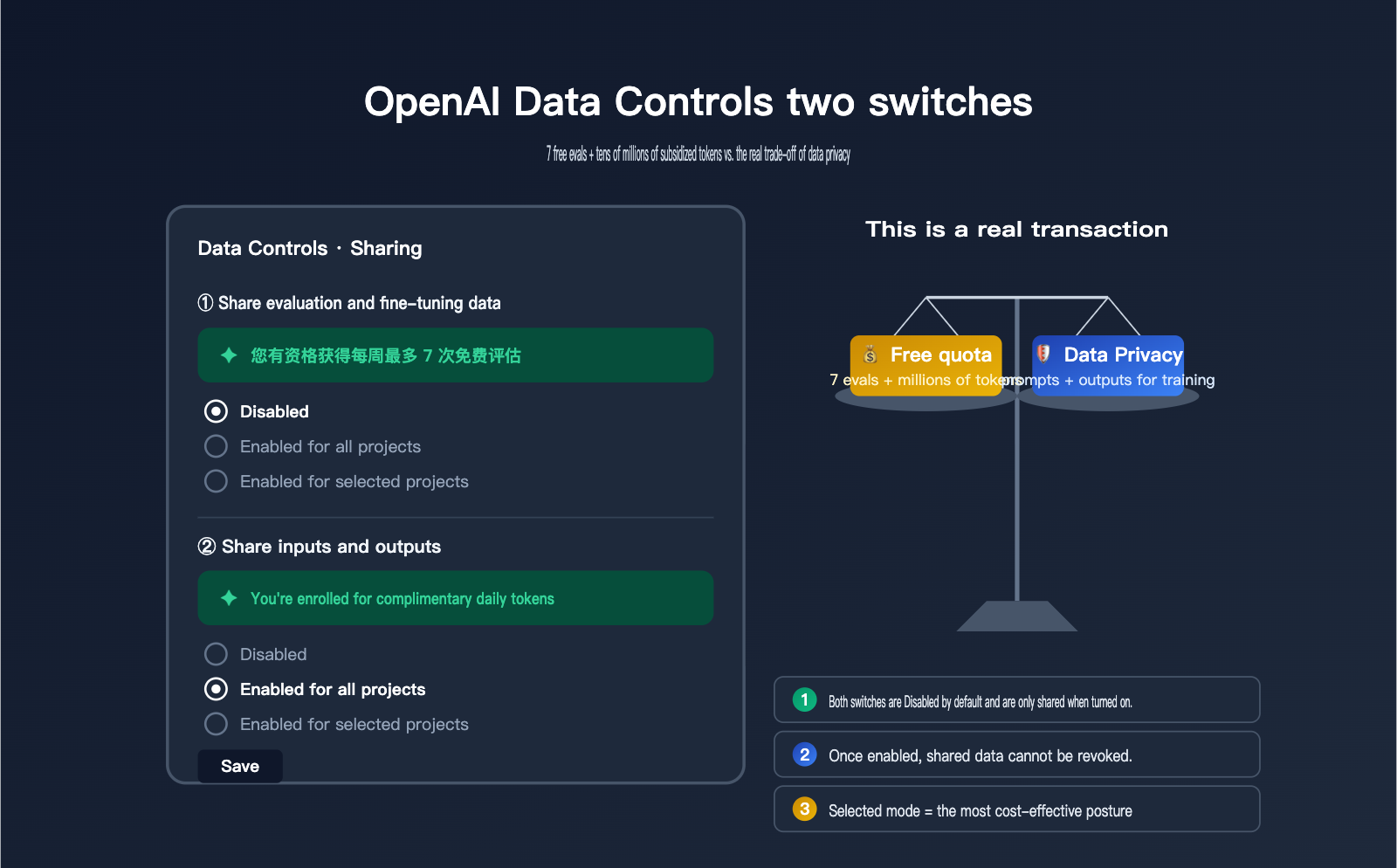
Recently, a client asked us about the "Data Controls" page in their OpenAI dashboard. They noticed two toggles: "Share evaluation and fine-tuning data with OpenAI" and "Share inputs and outputs with OpenAI." Each has three options: Disabled, Enabled for all projects, and Enabled for selected projects. The first one features a green prompt saying, "You're eligible for up to 7 free weekly evals," while the second states, "You're enrolled for complimentary daily tokens." It looks like they're giving away free resources, but the client wasn't sure if it's worth enabling or what the potential costs might be.
In essence, these two toggles represent a two-way trade: OpenAI gives you "free credits" in exchange for "training/evaluation data." The cost of enabling them is very real—your evaluation data and API inputs/outputs will be used by OpenAI to improve future models. Among APIYI (apiyi.com) clients, we've seen some who enabled these for half a year before realizing it was a privacy loophole, and others who kept them disabled for half a year only to realize they were missing out on millions of free tokens daily. This article uses official English documentation to break down the true function, potential credits, privacy impact, and recommended configurations for these two toggles.
Core Definitions of the Two OpenAI Data Control Settings
When you open Settings → Data Controls → Sharing, you'll see two separate but often confused toggles. They involve different content, offer different rewards, and have vastly different privacy impacts. Understanding their boundaries is a prerequisite for making the right decision.
| Setting Item | Share evaluation and fine-tuning data | Share inputs and outputs |
|---|---|---|
| Shared Content | Evaluation prompts + results + grading logic + fine-tuning data | All inputs and outputs of API calls |
| Free Reward | Up to 7 free eval runs per week | Daily token credits (allocated by tier and model group) |
| Data Usage | Improve evaluation pipelines + train future models | Directly used to train/improve models |
| Default State | Disabled | Disabled |
| Granularity | Disabled / All / Selected | Disabled / All / Selected |
| Permissions | Org Owner only | Org Owner only |
| Scope | Only data generated after enabling is shared | Only traffic generated after enabling is shared |
| Difficulty to Disable | Toggle anytime | Toggle anytime |
🎯 Quick Recommendation: If you just want to "safely get free credits," you can set the toggles to "Enabled for selected projects." Create a separate test project to run dev/internal scripts, and keep your main projects and production API traffic running through the APIYI (apiyi.com) gateway to avoid exposing all your projects to the data training pipeline at once.
Detailed Breakdown of "Share evaluation and fine-tuning data" Settings
While the literal meaning of this switch is "Share evaluation and fine-tuning data," the actual scope of what you're sharing is much broader than the name suggests. Once enabled, OpenAI doesn't just receive your eval prompts and completions; they also gain access to your defined grading logic and the prompts + completions within your fine-tuning datasets. This means your scoring methodology, your definition of a "good" response, and the domain-specific knowledge embedded in your training data will all be collected by OpenAI.
The trade-off is up to 7 free eval runs per week. OpenAI explicitly states in their Help Center that "Evaluations you share with OpenAI are currently processed at no cost for up to 7 runs per week." Any usage exceeding this limit or involving models not eligible for the free tier will be billed at standard token rates. While this number might seem small, for teams that frequently perform model selection and benchmarking, 7 free runs per week can save hundreds of dollars in eval costs.
It's important to note that this switch only applies to data generated after it is enabled. Historical data is not retroactively shared, and disabling the switch won't "withdraw" data that has already been shared. Therefore, your decision should be based on "how much eval data do I plan to share over the next 6-12 months," rather than "what data do I currently have."
| Dimension | Benefits of Enabling | Costs of Enabling |
|---|---|---|
| Direct Benefit | 7 free eval runs per week | / |
| Indirect Benefit | Evaluation pipeline optimized by OpenAI | / |
| Data Cost | / | Evaluation prompts, completions, and grading logic collected |
| Business Cost | / | Fine-tuning dataset domain know-how leaked |
| Reversibility | Can be disabled at any time | Shared data cannot be withdrawn |
🎯 When to enable Eval/FT sharing: If your evals are based on public benchmarks or non-sensitive test sets, enabling this is generally harmless. However, if your eval prompts contain real customer data, internal business rules, or proprietary grading logic, it is recommended to use the "Selected" mode and enable it only for sandbox projects.
Detailed Breakdown of "Share inputs and outputs" Settings
This is the switch with the "higher cost but more substantial rewards." Once enabled, every API call passing through this project—both the input prompt and the output completion—will be collected by OpenAI and used to train or improve their models. This is fundamentally different from the default API behavior; since March 2023, OpenAI has explicitly stated that they do not use API data to train models. Enabling this switch effectively revokes that protection.
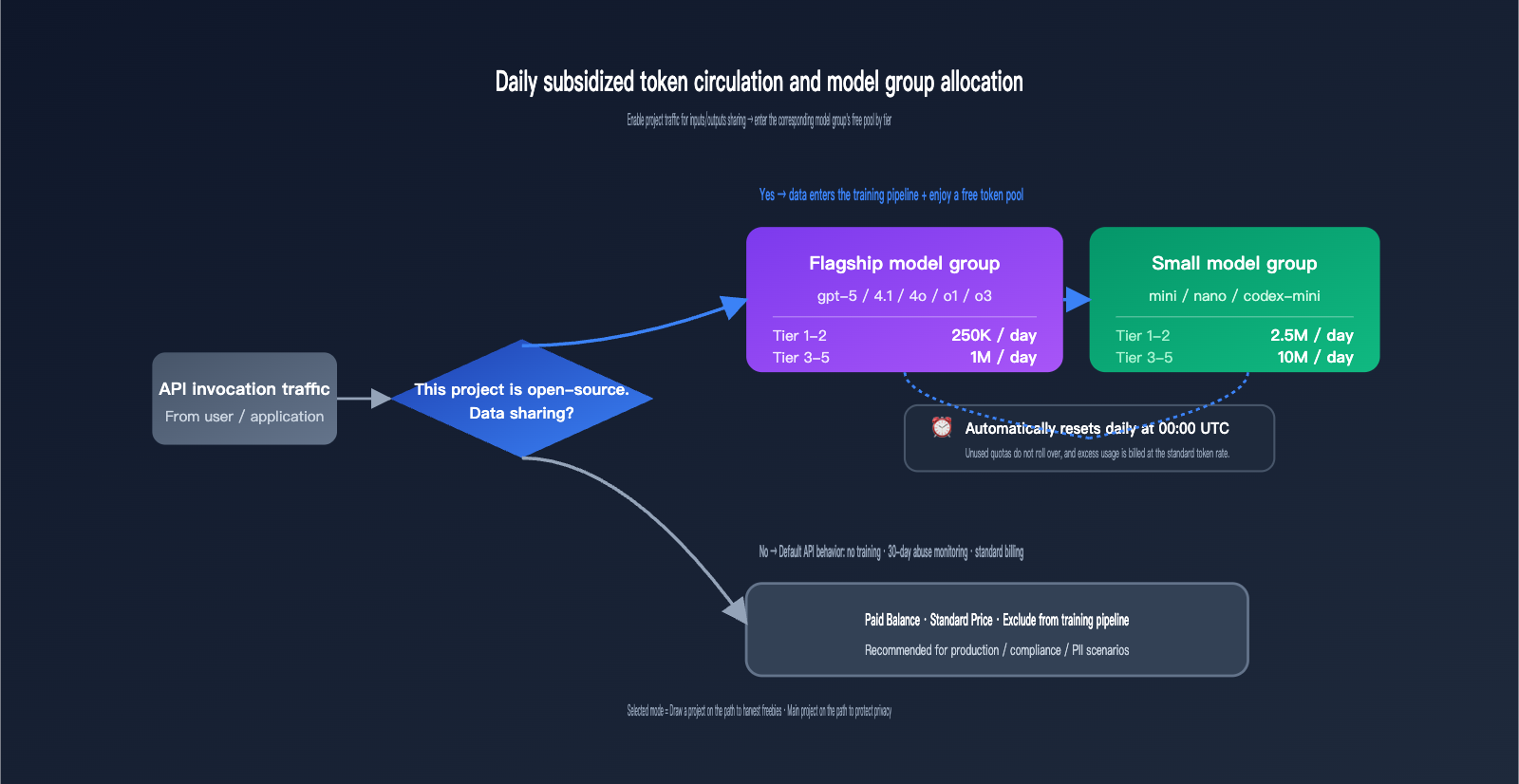
The reward is a daily allotment of complimentary tokens, tiered based on your account level and model group. This is the most specific free-tier program in OpenAI's public data, and it resets automatically every day at 00:00 UTC.
| Model Group | Tier 1-2 Daily Limit | Tier 3-5 Daily Limit | Reset Time |
|---|---|---|---|
| Flagship Models | 250,000 tokens | 1,000,000 tokens | 00:00 UTC |
| Small Models | 2,500,000 tokens | 10,000,000 tokens | 00:00 UTC |
The distinction between "Flagship" and "Small" model groups isn't based on a rough performance estimate, but rather on a specific list provided by OpenAI. Calls to models outside this list do not count toward your free quota.
| Model Group | Included Models |
|---|---|
| Flagship | gpt-5, gpt-5-codex, gpt-5-chat-latest, gpt-4.5-preview, gpt-4.1, gpt-4o, o1, o3, o1-preview |
| Small | gpt-5-mini, gpt-5-nano, gpt-4.1-mini, gpt-4.1-nano, gpt-4o-mini, o1-mini, o4-mini, codex-mini-latest |
🎯 The real value of token credits: Based on an estimate of $0.15/M for input and $0.60/M for output for
gpt-4o-mini, 2.5M small model tokens per day for Tier 1-2 equals roughly $1-2 in free credit daily, saving $30-60 per month. For Tier 3-5, the limit increases to 10M small model tokens, saving $120-240 per month. If your only goal is to obtain these credits, enabling this for your entire organization isn't cost-effective. It's better to set up an independent test project and enable it in "Selected" mode.
Default API Privacy vs. The Reality of Enabling Data Sharing
Many teams are confused about whether their API data is used for training by default. OpenAI's actual policy is: The API is not used for training by default, but data is retained for 30 days for abuse monitoring. Zero Data Retention (ZDR) is a different matter entirely; it requires enterprise customers to contact the OpenAI sales team directly—it's not a simple toggle in the dashboard.
Once you understand this baseline, the impact of the two data control toggles becomes clear: enabling "Inputs/Outputs" means you're "voluntarily opting out of the training protection in place since 2023," and enabling "Eval/FT" means you're "additionally contributing to evaluation methodologies." Neither toggle affects the 30-day abuse monitoring retention, and neither can be combined with ZDR.
| Dimension | Default API (Both Off) | Enable Inputs/Outputs | Enable Eval/FT Data |
|---|---|---|---|
| Used for Training | ❌ No | ✅ Yes | ✅ Yes + Evaluation |
| Abuse Monitoring | 30 Days | 30 Days | 30 Days |
| Data Retractable | / | ❌ No | ❌ No |
| ZDR Compatible | ✅ Yes | ❌ Mutually Exclusive | ❌ Mutually Exclusive |
| Best For | Production / Compliance / PII | Dev / Testing / Public Data | Public Benchmark Eval |
🎯 Privacy Decision Advice: If your business has any compliance requirements (GDPR, HIPAA, corporate NDAs, customer PII, etc.), both toggles should remain disabled. For highly sensitive traffic, use an API proxy service like APIYI (apiyi.com) or apply for ZDR. If you're working on personal projects, internal tools, or hackathon demos with public data, you can safely set them to "Enabled for all projects."
A 4-Tier Decision Framework for OpenAI Data Controls
Giving a binary "on/off" answer is too simplistic. We've created a matrix based on four typical business scenarios, each with its own reasonable configuration. The core decision dimensions are: Data Sensitivity (does your content involve privacy or trade secrets?) and Usage Scale (how much actual value can you get back from the free credits?).
| Business Type | Data Sensitivity | Recommended Inputs/Outputs | Recommended Eval/FT |
|---|---|---|---|
| Personal / Hackathon | Low | Enabled for all | Enabled for all |
| Internal R&D / Model Selection | Medium | Enabled for selected | Enabled for selected |
| To-C App (with PII) | High | Disabled or Selected (dev) | Disabled |
| Enterprise / Compliance | Extremely High | Disabled + Use ZDR | Disabled |
The first category is personal development or hackathon projects. In these cases, token consumption is mostly public prompts (like competition tasks or demo code). Enabling sharing allows you to receive daily credits without exposing sensitive information, making it the best value. The second category is internal R&D; we recommend using the "Selected" mode—create a dedicated "data-share-test" project for experiments where sharing is acceptable, while keeping your main development projects disabled.
The third category is To-C applications, which often involve user input, conversation history, and personal information. In this case, we recommend disabling both toggles. The free credits aren't worth the risk for user-facing applications, as it's nearly impossible to trace or remove PII once it enters the training pipeline. The fourth category is enterprise or compliance-heavy scenarios, such as healthcare, finance, or government clients. These should go directly through ZDR or a compliance-focused gateway like APIYI (apiyi.com) to bypass even the 30-day abuse monitoring.
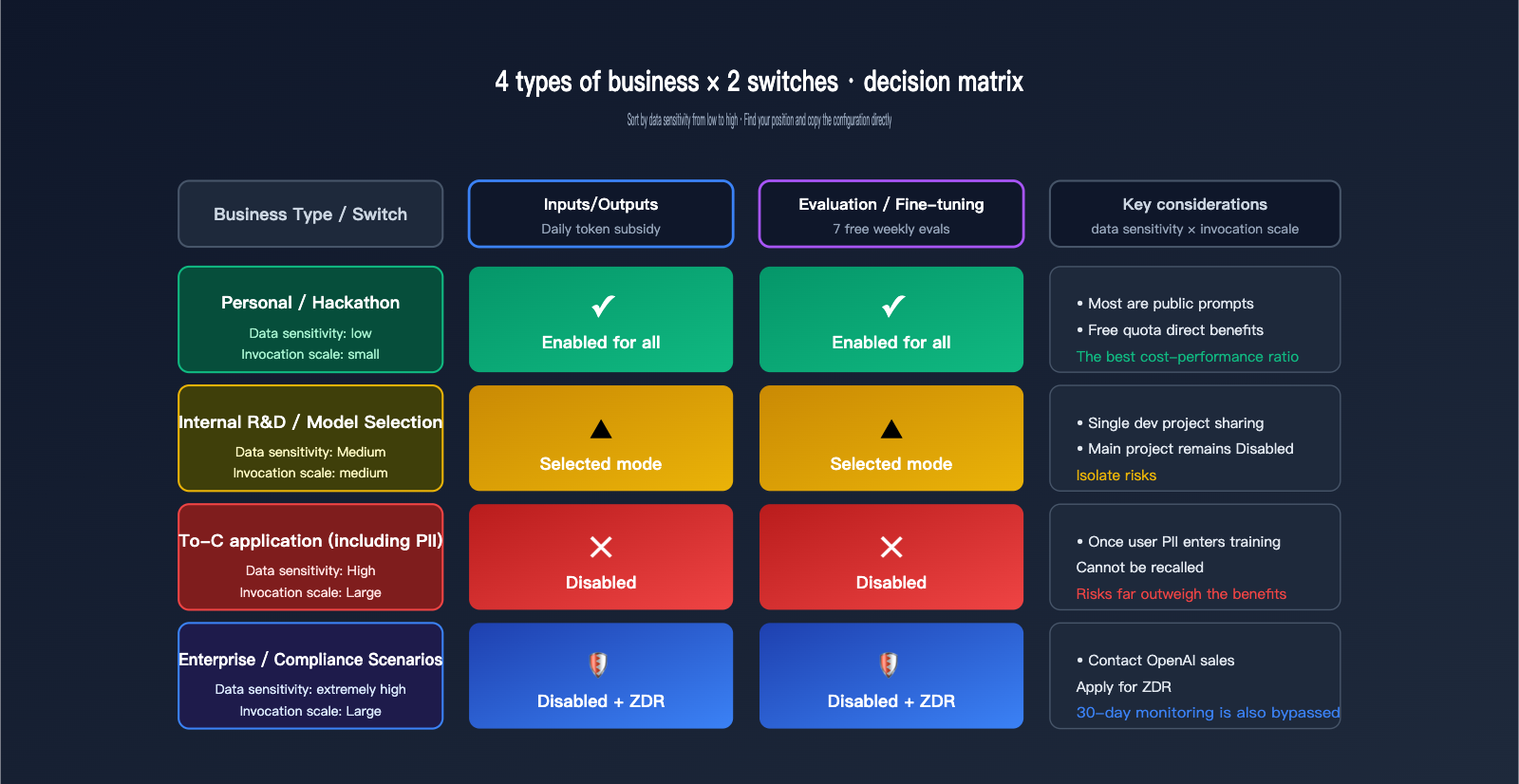
🎯 How to Choose Your Settings: If you decide to enable a toggle, prioritize "Enabled for selected projects" rather than "Enabled for all projects." This allows you to isolate a "training-eligible" project specifically for dev/testing, while keeping production projects isolated. This makes future adjustments easy and minimizes migration costs.
OpenAI Data Controls FAQ
Q1: If I enable Inputs/Outputs, will OpenAI immediately take all my historical data?
No. Both switches explicitly state: "Only traffic sent after turning this setting on will be shared" / "Only evaluation and fine-tuning data created after turning this setting on will be shared." The switches only apply to data generated after they are enabled; historical data will not be backfilled or shared.
Q2: Are free tokens the same thing as Credit Grants?
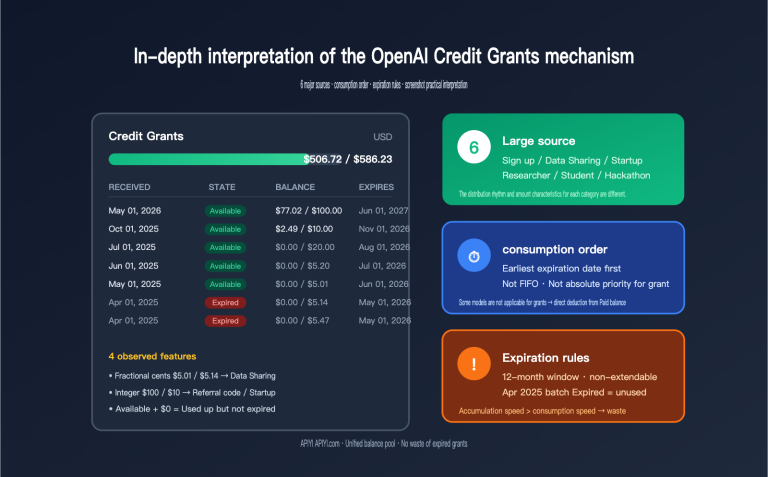
They aren't the same, but they are related. The "daily token pool" is earned through Inputs/Outputs sharing and resets automatically at 00:00 UTC. The "small cents" you see under Credit Grants in the OpenAI dashboard are essentially an ex-post accounting of that pool converted into USD value based on your usage. You can think of them as two different ways of displaying the same program.
Q3: If I use "Selected" mode to share only one project, is the traffic in my main project completely safe?
Yes, it's completely safe. In the settings interface, OpenAI allows you to precisely select which projects participate in sharing. Traffic from unselected projects is handled according to default API behavior—it is not used for training and is retained for 30 days for abuse monitoring. If you're still concerned, you can further route your main project traffic through an API proxy service like APIYI (apiyi.com) to achieve complete architectural isolation.
Q4: How exactly are the "7 free weekly evals" for Eval/FT sharing counted?
They are counted by "run count," not by tokens. Each time an eval is run (regardless of how many samples are processed), it counts as one, with a maximum of 7 free runs per week. Once exceeded, you'll be charged at the standard token rate for the model used in the eval. Note that some models are not on the free list, and running them will incur charges regardless.
Q5: Can I get back data that has already been collected after I turn off Inputs/Outputs?
No. OpenAI's policy clearly states that shared data cannot be retracted. Turning off the switches only prevents future data from entering the training pipeline. This is why we always recommend using an API proxy service like APIYI (apiyi.com) for "hard isolation" of production traffic—it ensures data never enters the OpenAI training pipeline by default, which is much more reliable than trying to "turn it off after the fact."
3 Takeaways on OpenAI Data Controls
First, these two switches are a true "two-way trade": You are exchanging real, quantifiable data (eval methodologies, API inputs/outputs) for quantifiable free credits (7 free evals per week, millions to tens of millions of tokens daily). Understanding that this is a trade rather than a pure gift will keep your decision-making on track.
Second, the default API does not train on your data, but 30-day abuse monitoring remains active. If your business has strict privacy compliance requirements, both switches should be Disabled, and you should further tighten security via ZDR applications or an API proxy service like APIYI (apiyi.com). The switches only determine "whether to grant additional training authorization," not "whether you are being monitored."
Third, prioritize using "Selected" mode for "project-level isolation". Create a separate project specifically for dev/test traffic that you're comfortable sharing, and keep your production projects and sensitive data completely isolated. This is the most cost-effective approach: you get the free credits without letting a single piece of user data flow into the training pipeline.
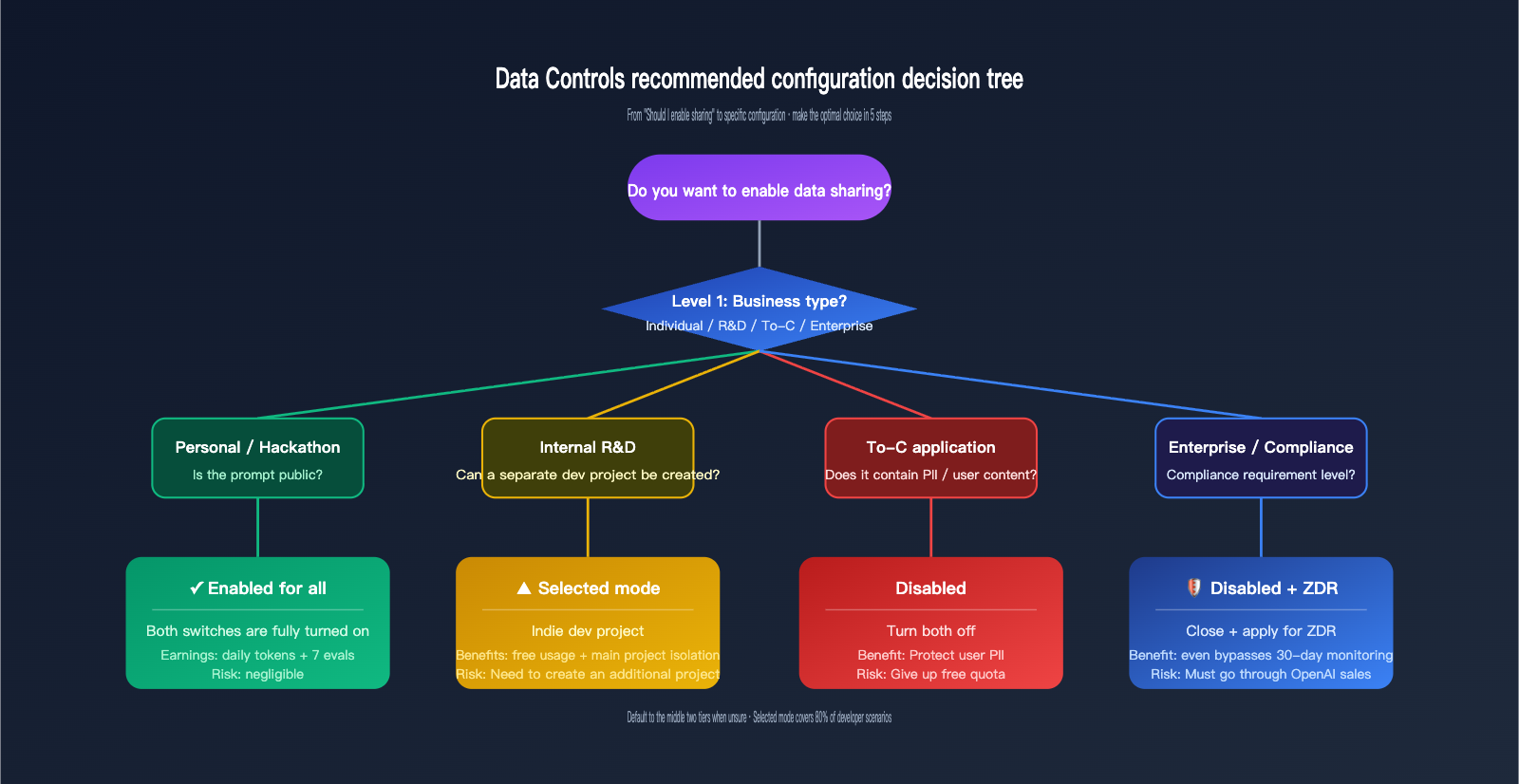
If you are weighing these two switches, the safest approach is to categorize your usage into four types—"Personal / Internal / To-C / Enterprise"—to determine your configuration, then use "Selected" mode to set up an independent test project to earn free credits, while routing your main production traffic through an APIYI (apiyi.com) gateway for architectural isolation. This allows you to enjoy OpenAI's free credit policy while maintaining the privacy boundaries of your user data and business know-how.
📌 Author: APIYI Technical Team — Continuously tracking key policy changes such as OpenAI Data Controls, ZDR, and billing strategies. We provide a unified billing, privacy-controlled multi-model API gateway experience for developers. To learn more, please visit APIYI at apiyi.com.