Many developers who integrate the Nano Banana 2 API (specifically gemini-3.1-flash-image-preview) often encounter a confusing phenomenon: The same prompt generates exquisite, detailed images on the gemini.google.com web interface, while images generated via direct API calls appear plain or even significantly lower in quality.
This gap in image quality between the Nano Banana 2 API and the web version is not a bug in the API itself, nor is it an issue with any API proxy service; it is a systemic difference dictated by Google's product architecture. In this article, we'll break down the three fundamental reasons for this gap from a technical perspective and provide six actionable prompt engineering strategies to help you achieve output quality that matches or even exceeds the web version via the API.
1. Why is there such a big gap between the Nano Banana 2 API and the web version?
To understand this, you must first understand the essential architectural differences between the two paths Google provides for Nano Banana 2.
1.1 The Nano Banana 2 API is a transparent, pure channel
When you call the gemini-3.1-flash-image-preview model via the API, the request chain is:
Your application → API endpoint → Model inference → Return image
The only processing the API endpoint does to your prompt is forwarding it as-is. Whatever you write, the model receives. This transparency is a fundamental requirement for the API as infrastructure—it must be predictable, reproducible, and engineerable.
API proxy services (such as APIYI, apiyi.com) also perform completely transparent forwarding of calls to the official API, handling only protocol adaptation and billing metering; they do not modify your prompts in the middle. Therefore, the effect you see when calling the API through a proxy service is exactly what you see when calling the official API directly.
1.2 gemini.google.com is a comprehensive Agent
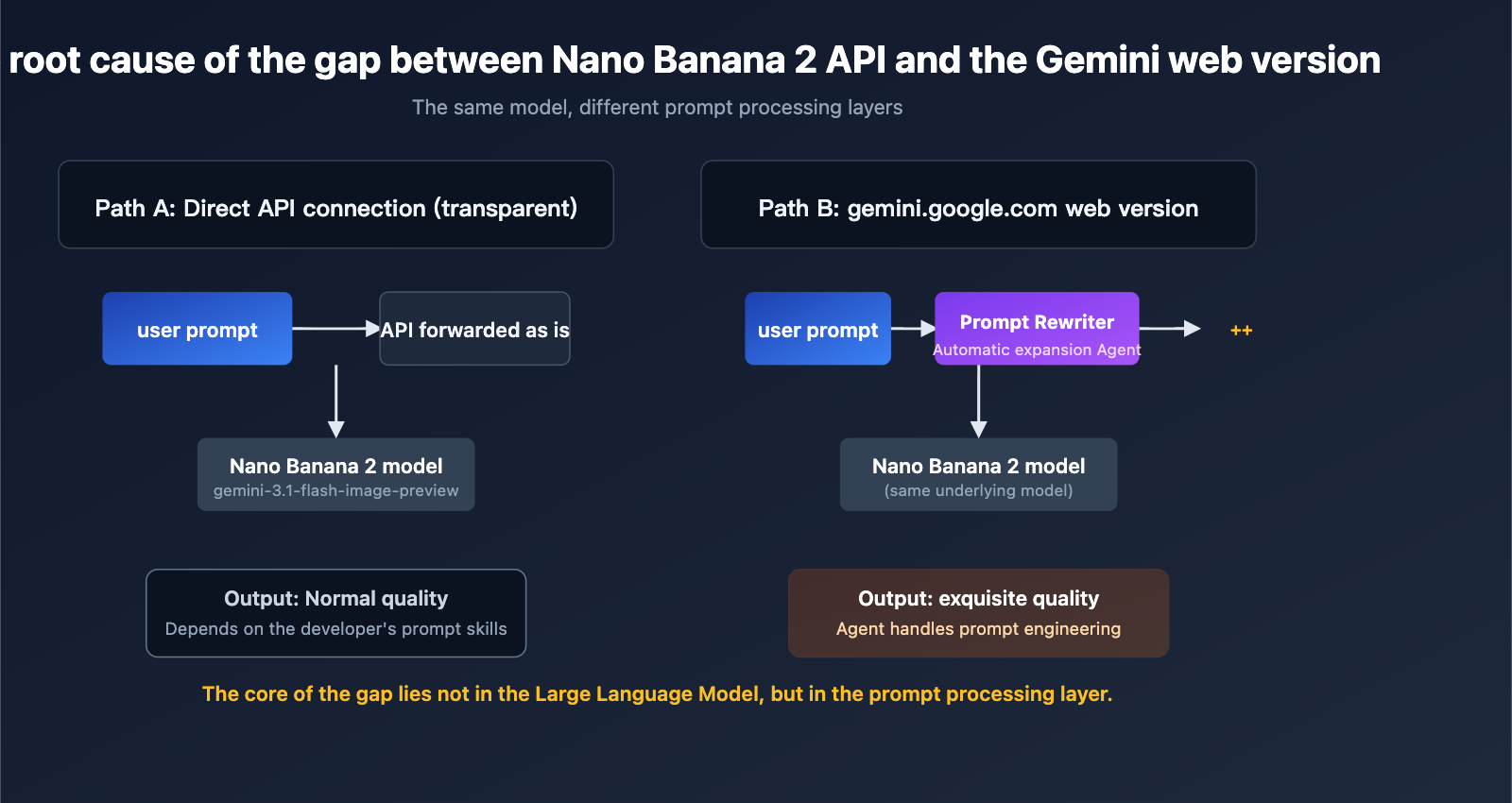
The gemini.google.com web product, beneath its simple "image generation" appearance, is actually a multi-layer Agent pipeline. When you type "generate an image of a cyberpunk city at night" into the web input box, the actual chain that occurs is closer to this:
Your input
  → Frontend UI
  → Prompt Rewriter (LLM-based prompt rewriter)
  → Supplement professional descriptions of composition/lighting/camera angles, etc.
  → May call Google Search / Image Search for visual reference
  → Finally, the complete, rewritten prompt is passed to the model
  → Return image
Google explicitly mentions the existence of this Prompt Rewriter in its Vertex AI documentation—it is an "LLM-based prompt rewriting tool" that obtains higher-quality output images by supplementing basic prompts with more details and descriptive language. The gemini.google.com consumer product incorporates similar capabilities.
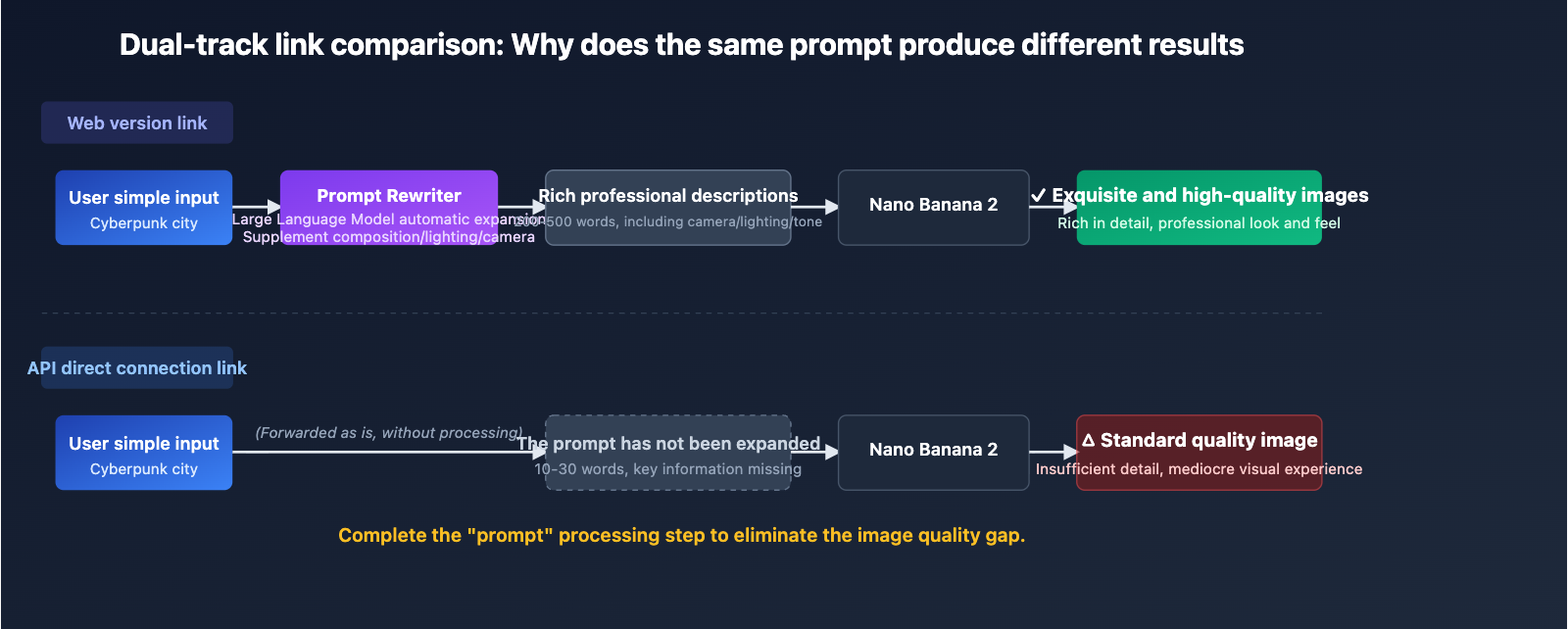
1.3 The essence of the gap is prompt processing, not model capability
We must clarify a key fact here: The API and the web version use the same underlying model. The difference is not in the model itself, but in who wrote the text provided to the model.
| Calling Method | Prompt Processor | Typical Prompt Length | Output Quality Performance |
|---|---|---|---|
| gemini.google.com Web Version | Google built-in Agent auto-expansion | 200-500 words | Exquisite, professional, rich in detail |
| Official Nano Banana 2 API | Developer writes it themselves | User input as-is (often 10-30 words) | Depends on the developer's prompt skills |
| Calling via APIYI apiyi.com | Developer writes it themselves (transparent forwarding) | User input as-is | Consistent with official API results |
| API call after manual preprocessing | Developer + LLM pre-rewriting | 200-500 words | Can approach or exceed web version |
🎯 Core Conclusion: 95% of the quality gap between the Nano Banana 2 API and the web version comes from prompt processing, not from differences in the interface, proxy, or model weights. This means as long as you bridge the gap in prompt engineering, you can make the API output match the web version.
2. Technical Specifications and Capability Boundaries of the Nano Banana 2 API
Before diving into solutions, let's define the API's capability boundaries—this way, you'll know what can be "fixed with a prompt" and what requires adjusting request parameters.
2.1 Key Parameters for the Nano Banana 2 API
| Parameter | Value Range | Default (Web) | Default (API) | Note |
|---|---|---|---|---|
| Resolution | 512px / 1K / 2K / 4K | 2K | 1K | Web default is higher |
| Aspect Ratio | 1:1, 16:9, 9:16, 2:3, 3:2, 4:3, 3:4, 4:5, 5:4, 21:9, 4:1, 1:4, 8:1, 1:8 | 1:1 | 1:1 | Consistent |
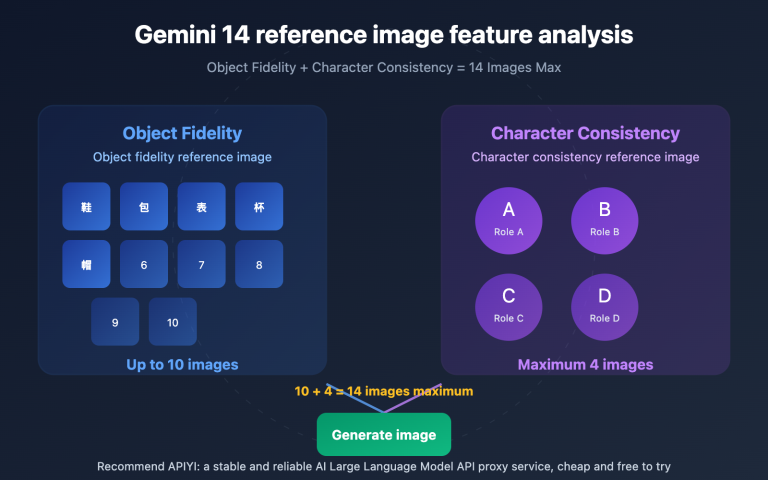
| Reference Images | Up to 14 | – | – | Flash version: 10 objects + 4 characters |
| Input Tokens | Up to 131,072 | – | – | Flash version limit |
| Prompt Length | Recommended 50-500 words | Auto-completed by Agent | As-is | Core discrepancy |
| Grounding Support | Google Search supported | Partially enabled | Requires explicit call | Search enhancement |
The most overlooked point here is: The API default resolution is 1K, while the web version defaults to 2K. This single configuration difference alone makes raw API output look noticeably weaker than the web version, even if the prompt is identical.
2.2 Minimal Example of Nano Banana 2 API Invocation
The following is a standard curl call, showing how to explicitly specify 2K resolution to avoid the visual gap caused by the 1K default:
curl -X POST "https://api.apiyi.com/v1/chat/completions" \
  -H "Authorization: Bearer YOUR_API_KEY" \
  -H "Content-Type: application/json" \
  -d '{
    "model": "gemini-3-pro-image-preview",
    "messages": [
      {
        "role": "user",
        "content": "Generate a cyberpunk-style city night scene, 2K resolution, 16:9 composition"
      }
    ]
  }'
💡 Configuration Tip: When calling via APIYI (apiyi.com), use
https://api.apiyi.com/v1for thebase_url. The model ID remains the same as the official one, requiring no code changes. The transparency of the API proxy service ensures that the performance you see on the official API is exactly the same as what you see on APIYI.
2.3 Two Model Versions Supported by Nano Banana 2 API
| Model ID | Positioning | Typical Use Case | Response Speed | Cost |
|---|---|---|---|---|
gemini-3-pro-image-preview |
Nano Banana Pro, High-fidelity Flagship | Marketing materials, infographics, text rendering | Medium | Higher |
gemini-3.1-flash-image-preview |
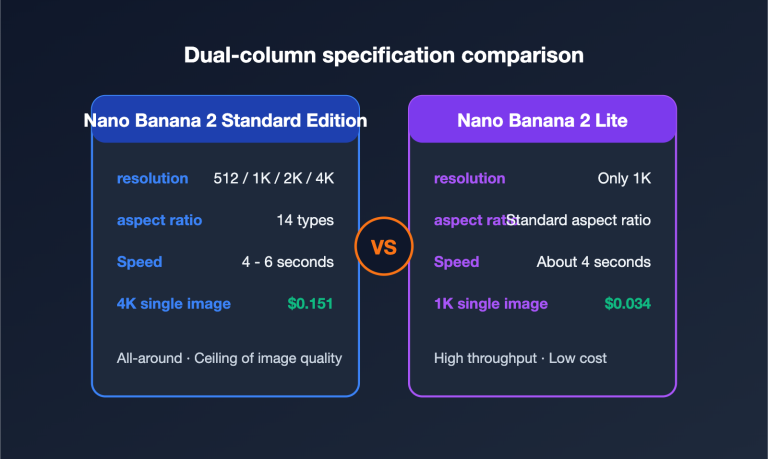
Nano Banana 2, Speed-first | Batch generation, social media assets | Fast | Lower |
Selection Advice: The Pro version is suitable for scenarios requiring high-quality text rendering and image depth, while the Flash version is ideal for high-concurrency, low-latency batch production. Regardless of the version, the gains from prompt engineering are massive.
3. 6 Core Strategies for Nano Banana 2 API Prompt Engineering
Now that we've identified the source of the gap, let's move on to actionable solutions. These 6 strategies are derived from the official Google DeepMind Nano Banana prompt guide and the practical experience of numerous API users.
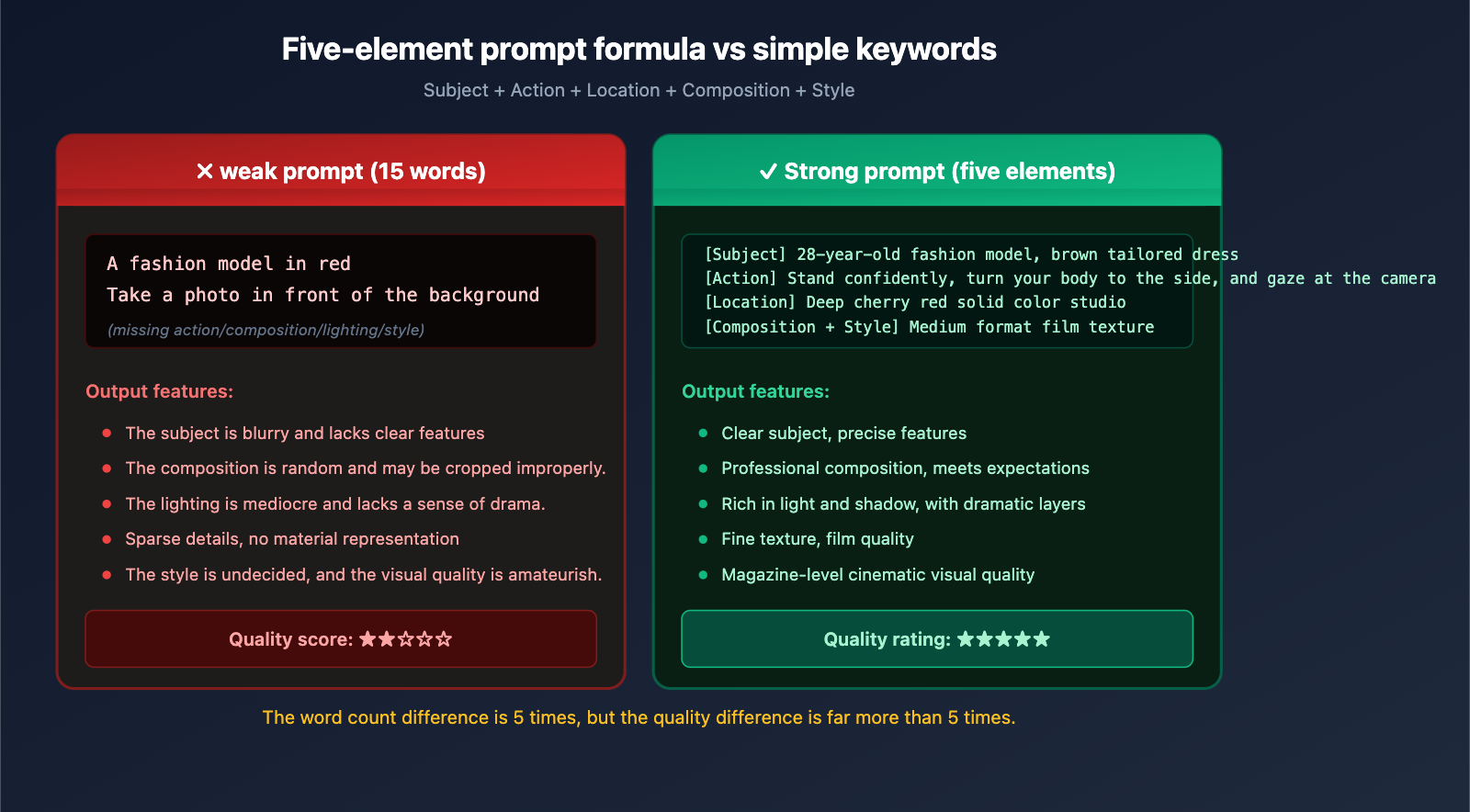
3.1 Using the Five-Element Prompt Formula
The official Google recommended text-to-image formula is:
[Subject] + [Action] + [Location] + [Composition] + [Style]
This isn't just a rigid concatenation; it ensures your prompt covers all dimensions required for visual generation. Comparison example:
❌ Typical weak prompt:
A fashion model taking a photo in front of a red background
✅ Strong prompt using the five-element formula:
[Subject] A 28-year-old fashion model wearing a sharp-tailored brown suit dress, paired with streamlined knee-high boots and a structured handbag
[Action] Standing in a confident and upright posture, body slightly turned, eyes gazing at the camera
[Location] Deep cherry red solid studio background
[Composition] Medium shot, subject centered, with some headroom
[Style] Fashion magazine editorial, medium format film texture, visible grain, high saturation
The word count difference between the two prompts is 5x, but the generation quality gap is far greater. This is exactly what the web-based Agent does "behind the scenes" for regular users.
3.2 Nano Banana 2 API Requires Narrative Descriptions, Not Keyword Lists
This is a principle Google emphasizes repeatedly: "Describe the scene, don't just list keywords."
❌ Keyword stuffing (model easily loses focus):
fashion, model, studio, red background, professional photography, 4K, high quality
✅ Coherent narrative (model understands semantics more easily):
A fashion model shoots an editorial in a professional studio with a deep red background.
The lens captures the moment she stands tall, using the film texture of a medium-format camera,
presenting the high-saturation colors characteristic of fashion magazines.
Nano Banana 2 is a narrative-driven model; it's better at understanding a "scene description" than a string of "tags." This characteristic is completely different from traditional Stable Diffusion prompt habits, and developers migrating from SD especially need to change their mindset.
3.3 Visual Metadata Must Be Added to Nano Banana 2 API
The web-based Agent automatically adds "visual metadata" to your simple requests—these terms are key to pushing model output from "average" to "professional."
| Metadata Category | Example Terms | Purpose |
|---|---|---|
| Lighting Design | Three-point lighting, Chiaroscuro, golden hour backlight, cool blue neon glow | Determines dramatic effect |
| Camera & Lens | 85mm portrait lens, f/1.8 shallow depth of field, GoPro wide-angle, macro lens | Determines visual language |
| Tone & Film | 1980s color film, cinematic cool blue tone, Kodak Portra 400, RAW high dynamic range | Determines color atmosphere |
| Material & Texture | Dark blue tweed, matte ceramic surface, silver engraved armor, distressed leather | Determines detail texture |
| Composition Terms | Low angle, bird's-eye view, rule of thirds, shallow depth of field, central symmetry | Determines image structure |
💡 Practical Tip: When writing prompts, force yourself to add specific descriptions from at least 3 categories: lighting, camera, tone, material, and composition. This is a shortcut to making Nano Banana 2 API output go from "amateur" to "professional." A complete prompt reference library can be found in the developer documentation at APIYI (apiyi.com).
3.4 Text Rendering Tasks in Nano Banana 2 API Must Be Wrapped in Quotes
One of the most prominent capabilities of Nano Banana 2 (especially the Pro version) is high-fidelity text rendering—it can accurately generate text in logos, posters, and infographics. But to trigger this capability, you must:
- Wrap the target text in quotes (English double quotes
") - Specify font characteristics (bold/serif/handwritten, etc.)
- Specify color and size (optional, but recommended)
Comparison example:
❌ Vague approach (text is prone to errors):
Generate a birthday card that says Happy Birthday
✅ Standard approach (accurate text rendering):
Generate a birthday card, rendering "Happy Birthday" in the center of the card using a bold, white, sans-serif font.
The font size should occupy about 60% of the image width, with a dreamy balloon scene in light pink tones as the background.
This is a hardcore differentiator of the Nano Banana 2 API compared to other image models; many developers haven't realized they can use it this way when creating marketing materials.
3.5 Editing Tasks Must Clearly Define "What to Change" and "What to Keep"
The prompt mindset for image editing (i2i) is completely different from text-to-image (t2i)—it's not about describing the entire scene, but telling the model what to change and what to maintain.
❌ Common mistake in editing tasks:
Change this person to wear a red jacket
(The model might also change the background, pose, lighting, and other unmentioned elements)
✅ Editing approach with clear scope:
Change the color of the person's jacket in the image from blue to vibrant tomato red,
while keeping the person's facial features, hairstyle, pose, background, and lighting completely unchanged.
Explicitly preserve all non-jacket elements from the original image.
This dual declaration of "change + keep" can significantly reduce editing deviations. In multi-turn editing scenarios with the Nano Banana 2 API, combining this with the Thought Signatures mechanism can achieve consistency across turns.
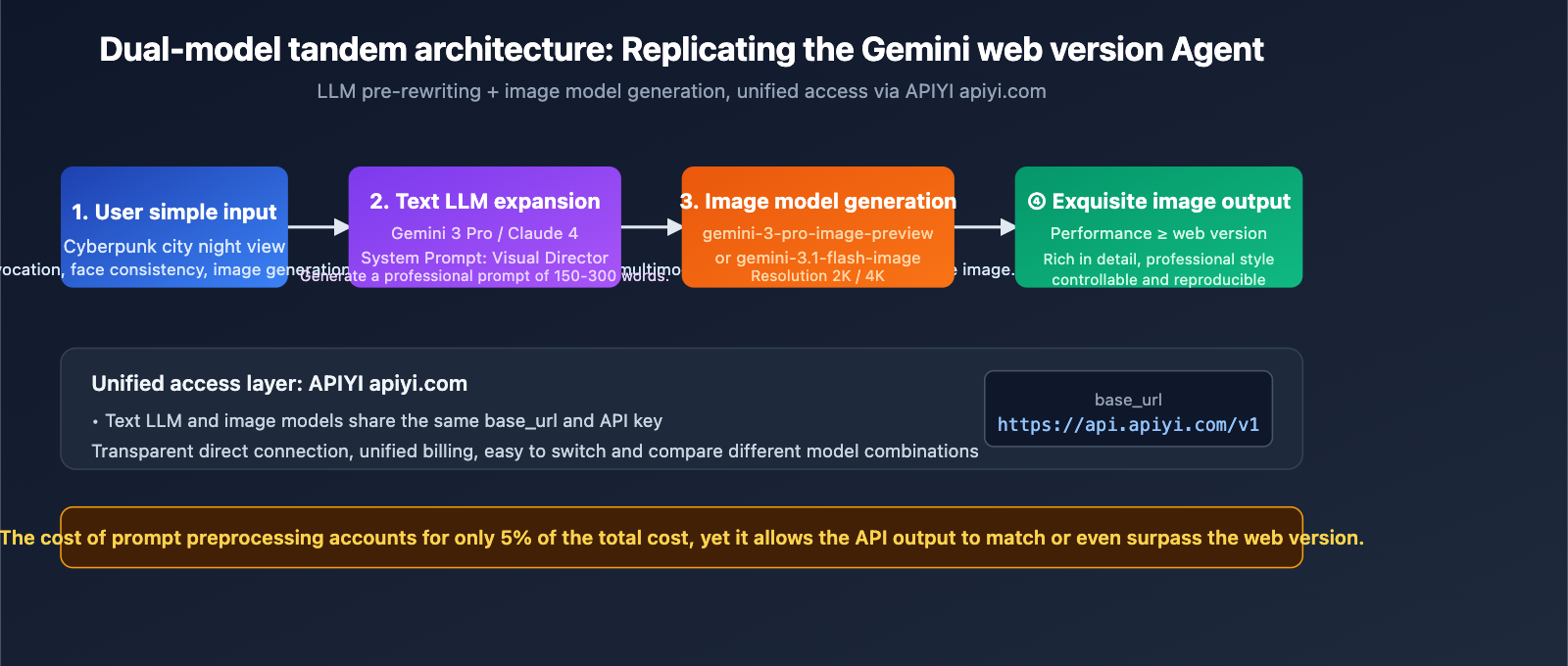
3.6 Using LLM for Prompt Preprocessing (Replicating the Web Agent)
This is the most fundamental strategy: Since the web version automatically rewrites prompts via an Agent, we can use an LLM to expand the prompt before calling the API.
The specific approach is to add a "pre-LLM" layer to your application logic:
from openai import OpenAI

client = OpenAI(
    api_key="YOUR_API_KEY",
    base_url="https://api.apiyi.com/v1"
)

def expand_prompt(user_input: str) -> str:
    """Use an LLM to expand a user's simple prompt into a professional-grade prompt"""
    response = client.chat.completions.create(
        model="gemini-3-pro",
        messages=[
            {
                "role": "system",
                "content": (
                    "You are a senior visual art director responsible for expanding user descriptions into detailed prompts for image models."
                    "Must include: subject details, action, scene, composition, lighting, camera parameters, tone, and materials."
                    "Use coherent narrative, not keyword lists, with a total length of 150-300 words."
                )
            },
            {"role": "user", "content": user_input}
        ]
    )
    return response.choices[0].message.content

def generate_image(user_input: str):
    expanded = expand_prompt(user_input)
    image_response = client.chat.completions.create(
        model="gemini-3-pro-image-preview",
        messages=[{"role": "user", "content": expanded}]
    )
    return image_response

generate_image("Cyberpunk city night scene")
The core logic of this code is manually implementing a Prompt Rewriter Agent—using Gemini 3 Pro (or Claude, GPT-4) to expand the user's short input before passing it to the image model. The effect is essentially on par with the gemini.google.com web version.
🎯 Implementation Advice: If you are building a consumer-facing image generation product, it is highly recommended to adopt a "dual-model chain" architecture: one text LLM for prompt expansion and one image model for final generation. Both calls can be billed uniformly through APIYI (apiyi.com), simplifying integration costs. The platform supports unified interfaces for multiple mainstream models like Gemini, Claude, and GPT, facilitating architectural evolution.
IV. Practical Nano Banana 2 API Prompt Templates
Here are four field-tested prompt templates you can use directly or as a starting point for your own customizations.
4.1 E-commerce Product Image Prompt Template
[Subject] A [Product Type], [Material Description], [Color and Texture], [Key Design Features]
[Action] Product floating in the center of the frame, slightly tilted to showcase the best viewing angle
[Location] [Background Color or Scene], clean or minimalist background
[Composition] Square 1:1, product occupies 60% of the frame, leave space at the top for text
[Style] High-end e-commerce photography, soft top and side lighting, matte texture, high resolution
[Text] At the top of the frame, render "[Product Slogan]" using [Font Description]
4.2 Brand Poster Prompt Template
Design a [Holiday/Event] themed poster for [Brand Name],
The center of the frame features [Core Visual Element], using a [Style, e.g., flat/skeuomorphic/retro] design language,
Primary color [Hex Code], secondary color [Hex Code],
At the bottom of the poster, render "[Event Slogan]" in bold sans-serif font,
Ample white space, clear visual hierarchy, suitable for [Placement Scenario].
4.3 Face Consistency Prompt Template
Used to maintain character consistency across multiple images (use with the 14-reference-image limit):
[Character description based on reference images]
This character appears in a [New Scene],
[New Action Description], [New Expression],
Wearing the same [Clothing Description] as in the reference images,
Maintain facial features, hairstyle, and body proportions exactly as in the reference images.
Image Style: [Consistent lighting and color tone]
4.4 Infographic and Knowledge Visualization Template
Generate an infographic about [Topic],
Title Area: Render "[Title Text]" at the top in bold white font,
Main Structure: [Describe visual hierarchy, e.g., 3-column comparison/timeline/pyramid structure],
Each module contains [Icon Type] + Title + Short explanatory text,
Color Scheme: Dark blue #0f172a background, white primary text, accent color [Hex Code],
Overall Style: Modern tech feel, flat icons, high contrast, suitable for presentation slides.
💡 Pro Tip: These templates are continuously updated in the APIYI (apiyi.com) developer community, covering various verticals like e-commerce, social media, marketing, and education.
V. Common Pitfalls and Troubleshooting for Nano Banana 2 API
Beyond the prompts themselves, there are common technical pitfalls that can make it seem like the API is underperforming compared to the web version.
5.1 Default Parameter Traps
| Pitfall | Symptom | Solution |
|---|---|---|
| Resolution not specified | Blurry 1K output | Explicitly set to 2K or 4K |
| Aspect ratio not specified | Default 1:1 doesn't fit the scene | Specify 16:9, 9:16, etc., based on use case |
| Grounding not enabled | Inaccurate images for real-world info | Explicitly enable for search-based scenarios |
| Temperature too high | High randomness in results | Lower the temperature for deterministic tasks |
| Ignoring Thinking | Pro version not "thinking" | Explicitly enable thinking_level |
5.2 Verifying Consistency Between API Proxy Services and Official APIs
Some developers worry that an API proxy service might be "tampering" with requests, causing quality drops. This concern is unnecessary, but you can verify it in two ways:
- Compare Request Logs: Send the same prompt through both the official API and the APIYI (apiyi.com) proxy service. Compare the output hashes or perform a visual side-by-side; you'll find the results are consistent.
- Check the Proxy Service's Transparency Statement: A reputable API proxy service only handles protocol forwarding and billing; it won't modify your prompts. APIYI (apiyi.com) explicitly promises transparent, direct connections, reflecting the exact performance of the official interface.
Therefore, if you find that the API results (whether official or via a proxy) are worse than the web version, the root cause is almost certainly prompt engineering, not the transmission link.
5.3 Performance Gaps Due to Incorrect Model Versions
This is an extremely common but easily overlooked issue:
- Using
gemini-2.5-flash-image(older Nano Banana) will definitely underperform compared togemini-3.1-flash-image-preview(Nano Banana 2). - Using
gemini-3.1-flash-image-preview(speed-optimized) for marketing materials won't match the quality ofgemini-3-pro-image-preview(quality-optimized).
Before troubleshooting "poor API performance," always confirm that you are calling the latest and most appropriate model ID for your specific task.
6. Advanced Prompt Engineering Techniques for Nano Banana 2 API
Once you've mastered the first six strategies, there are some advanced tricks you can use to really pull ahead of standard, basic calls.
6.1 Adjusting the Thinking Level
Nano Banana Pro lets you explicitly set the depth of its "thinking" process. For tasks involving complex compositions, multiple elements, or fine text, enabling a higher thinking level can significantly boost your success rate. The trade-off, of course, is a bit more latency.
6.2 Grounding with Google Search
For generation tasks that need to be "grounded in reality"—like specific real-world landmarks, recent news events, or brand logos—enabling Grounding allows the model to search before it generates, which helps avoid factual errors. This is a unique advantage of the Nano Banana 2 API compared to other image models.
6.3 Maintaining Context with Multi-turn Editing
The Nano Banana 2 API supports multi-turn image editing. Instead of generating from scratch every time, multi-turn editing lets you preserve Thought Signatures, ensuring that characters, scenes, and styles remain consistent across multiple images.
7. FAQ: Nano Banana 2 API Common Questions
Q1: Is there any difference in performance between calling the Nano Banana 2 API via APIYI (apiyi.com) versus the official Google API?
Not at all. The API proxy service is essentially a transparent protocol forwarder. APIYI (apiyi.com) only handles authentication, billing, and protocol adaptation; it doesn't modify your prompt or the response content. The performance you see via the official API is exactly what you'll get through APIYI. We recommend using apiyi.com to enjoy unified multi-model billing and easier access within China.
Q2: Why is the output still worse than the web version even after I've optimized my prompts as suggested?
Here are a few likely reasons: (1) Your resolution might still be set to the default 1K—try setting it to 2K or 4K; (2) The LLM used for prompt expansion might not be powerful enough—we recommend using Gemini 3 Pro or Claude 4; (3) You haven't enabled Thinking (Pro version); (4) You aren't using enough reference images—Nano Banana 2 supports up to 14, and using them effectively can drastically improve face consistency.
Q3: How should I choose between Nano Banana 2 (Flash) and Nano Banana Pro?
A simple rule of thumb: If you need text rendering, infographics, or posters, go with Pro. If you need high concurrency, batch generation, or lower costs, go with Flash. You can call both directly via APIYI (apiyi.com) by simply swapping the model ID.
Q4: Which model is best for prompt preprocessing?
We recommend Gemini 3 Pro or Claude 4 Sonnet. The Gemini series has the best understanding of image models (since they're from the same family), while Claude has a unique edge in expanding narrative styles. You can access both through APIYI (apiyi.com).
Q5: Are there any ready-made prompt optimization tools?
There isn't an official standalone tool yet, but you can build your own Prompt Rewriter service using the code from section 3.6 of this article. There are also several open-source image-prompt-enhancer projects in the community that you can check out.
Q6: Will API costs increase significantly if my prompts get longer?
Nano Banana 2 billing is primarily based on the number of images generated, and the prompt token count makes up a very small portion of the cost. Even if you expand your prompt from 20 words to 300, the cost increase per call is usually less than 5%, while the improvement in image quality is significant—making the ROI very high.
8. Conclusion: The Root Causes and Solutions for the Gap Between Nano Banana 2 API and the Web Version
Returning to the question we started with: Why is there such a significant gap between the API and the web version? The answer is now clear:
- The Root Cause: The gemini.google.com web interface acts as a comprehensive agent with a built-in prompt rewriter that automatically expands user input. In contrast, the API is a transparent, direct connection—it processes exactly what you provide.
- The Essence: This isn't a difference in the model itself or the API proxy service; it's the absence of a prompt refinement layer.
- The Strategy: By applying the six strategies—the Five-Element Formula, narrative description, visual metadata completion, text quoting, editing scope declaration, and LLM pre-rewriting—you can make your API output match or even outperform the web version.
- The Optimal Architecture: Implementing a dual-model pipeline at the application layer—"Text LLM expansion + Image model generation"—is the definitive way to bridge the quality gap.
For teams currently using the Nano Banana 2 API in production, elevating prompt engineering to the same level of importance as code quality is the highest ROI optimization you can make right now. We recommend using APIYI (apiyi.com) to unify your access to text and image models. This not only simplifies the integration of multiple models but also makes it easy to switch and compare the performance of different models on the fly.
About the Author: The APIYI technical team is dedicated to providing developers with stable, transparent, and comprehensive AI Large Language Model API access. Visit the official APIYI website at apiyi.com to learn more about integration solutions for mainstream models like Nano Banana 2, Gemini 3 Pro, and Claude 4.