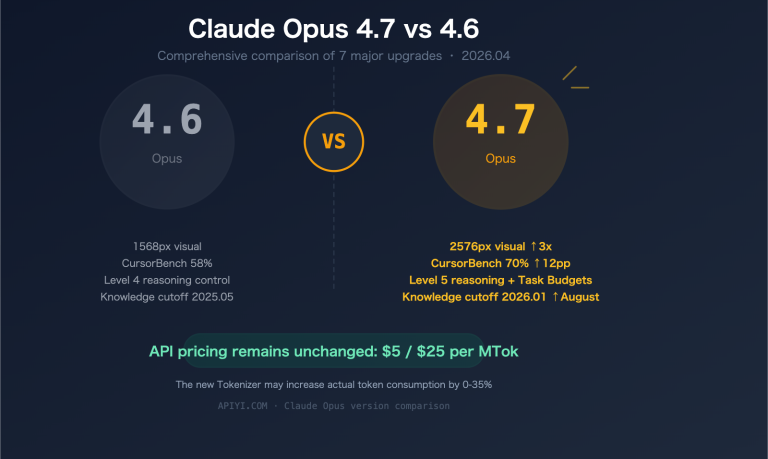
Anthropic officially launched Claude Design on April 17, 2026. Powered by the Claude Opus 4.7 Large Language Model, this AI-driven visual design tool allows even non-designers to quickly generate prototypes, slide decks, and marketing assets through simple conversations. This beginner's guide will take you through what Claude Design is, what it can do, and how it differs from Figma—all in under 3 minutes.
Core Value: By the end of this guide, you’ll understand the product positioning, core capabilities, and use cases of Claude Design, and how to start exploring this new tool with your Pro/Max subscription.
Claude Design: Quick Overview
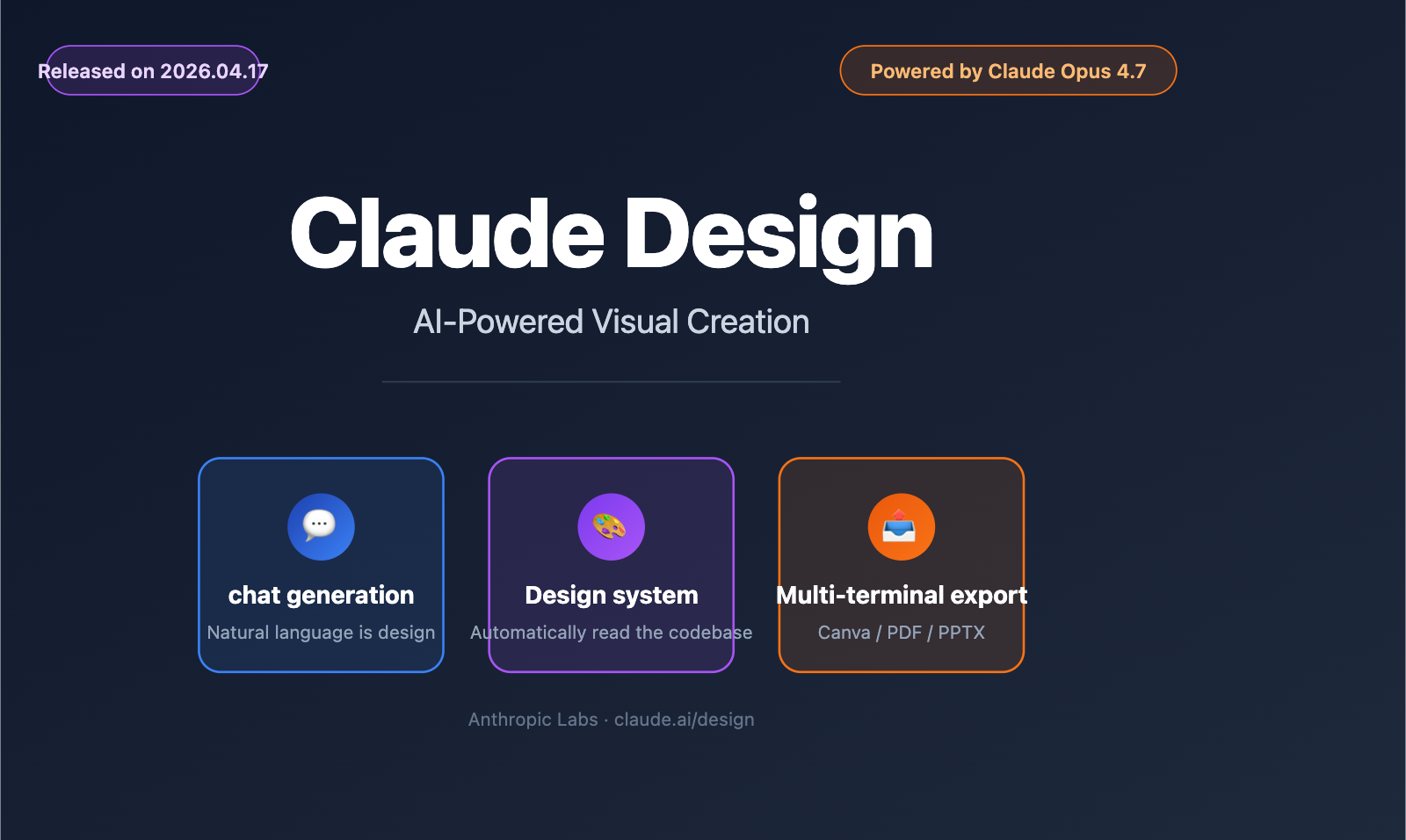
Before diving into the details of Claude Design, here is a quick table summarizing the key points:
| Feature | Details |
|---|---|
| Release Date | April 17, 2026 |
| Developer | Anthropic Labs |
| Product Positioning | AI-driven collaborative visual design tool |
| Foundation Model | Claude Opus 4.7 (Anthropic's most powerful multimodal model) |
| Core Capabilities | Conversational generation of prototypes, slides, one-pagers, and marketing materials |
| Access URL | claude.ai/design (Research Preview) |
| Eligible Subscriptions | Claude Pro, Max, Team, Enterprise |
| Pricing Strategy | Included in your existing subscription, no extra cost |
| Export Formats | URL, PDF, PPTX, HTML, Canva |
| Key Integrations | Deep partnership with Canva; early partners include Brilliant and Datadog |
| Market Reaction | Figma stock dropped; direct challenge to Figma, Adobe, and Lovable |
💡 Tip: Claude Design is currently in Research Preview. Features will be rolled out gradually to all paid users over the coming weeks. If you're a developer interested in the Claude family of models, you can explore the latest models like Claude Opus 4.7 via the APIYI (apiyi.com) platform without waiting for the official rollout.
What is Claude Design?
Claude Design is an AI-native visual creation tool released by Anthropic in April 2026, centered around the concept of "Chat-to-Design." Its target audience is crystal clear: anyone with great ideas but no professional design background—including founders, product managers, marketers, and engineers.
From "Prompt" to "Design Mockup"
Traditional visual design tools (like Figma or Adobe XD) share a common barrier to entry: you have to understand the software, typography, color theory, and component libraries. Claude Design completely flattens this learning curve. You simply describe what you need in the chat box, for example:
"Help me build a prototype for a calm meditation app. Use a misty blue color palette, and make sure the home screen includes a daily meditation tracking feature."
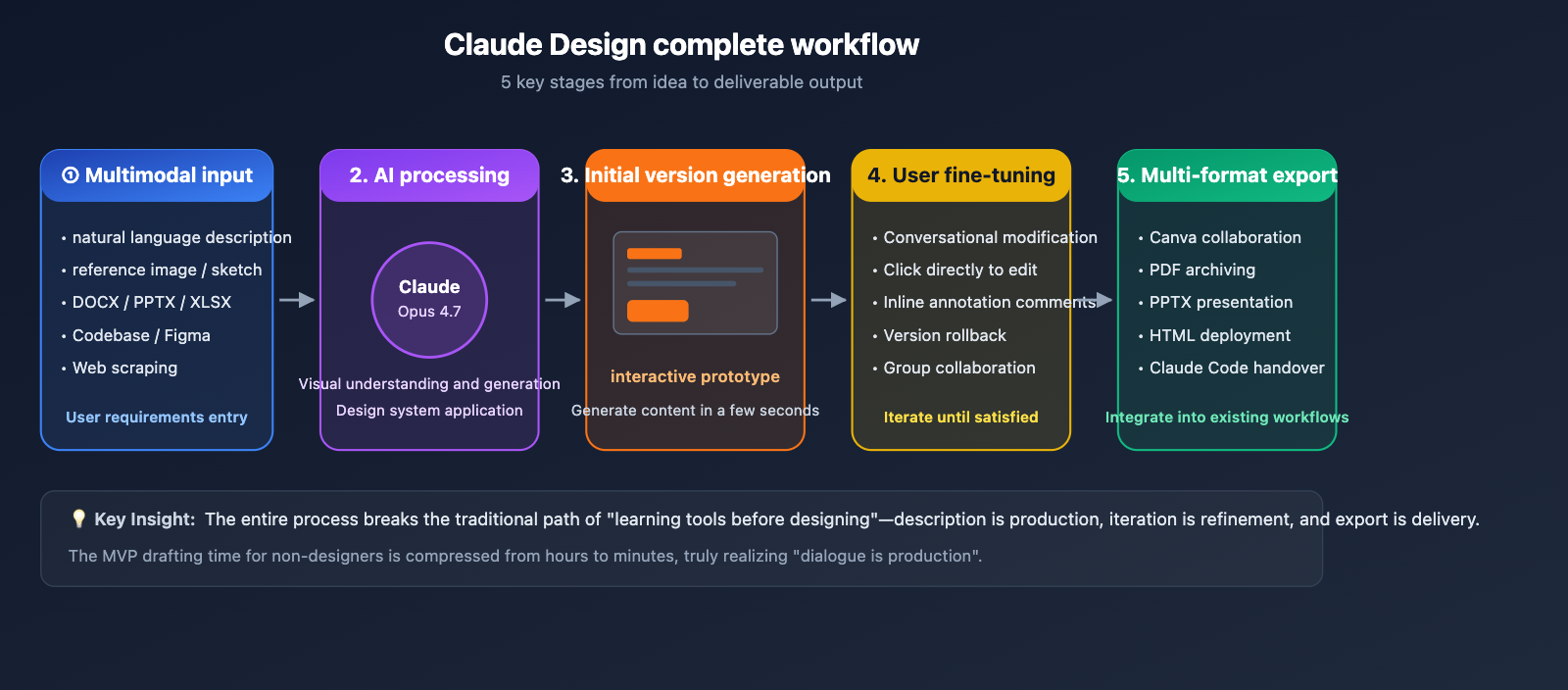
Within seconds, Claude Design generates an interactive prototype. From there, you can continue the conversation or click directly on elements to fine-tune the design. The whole process feels more like chatting with a design-savvy colleague than operating complex software.
The Difference Between Claude Design and Claude.ai
Many newcomers confuse Claude Design with Claude.ai. Here’s a simple breakdown:
- Claude.ai: A general-purpose conversational assistant that primarily outputs text, code, and charts (via Artifacts).
- Claude Design: A specialized tool focused on visual output, producing prototypes, slides, and design files, complete with design systems, collaboration features, and export capabilities.
Think of Claude Design as a "vertical product based on Claude." Anthropic is evolving from a "model provider" into a "full-stack product company," and Claude Design is a key strategic move in that direction.
Why This is a "Milestone" Product
The release of Claude Design is seen by many tech media outlets as a strategic turning point for Anthropic. It sends three clear signals:
- AI is moving from the "tool layer" to the "product layer": While AI has previously existed mainly as plugins or Copilots, Claude Design is an independent, end-user-facing product.
- The design field is becoming a new AI battlefield: Figma's stock price dropped on the day Claude Design was released, signaling that the market perceives it as a direct threat to existing design tools.
- Anthropic's product ambitions: From foundational models to full-fledged applications, Anthropic is following in OpenAI's footsteps, but with a distinct emphasis on "design and creation" rather than just "general conversation."
A Deep Dive into the Core Features of Claude Design
The most noteworthy thing about Claude Design isn't just that "AI can draw pictures" (that's nothing new by 2026); it's that it has completely re-engineered the entire workflow of visual creation using AI. Here’s a breakdown of its 5 core capabilities.
Feature 1: Multimodal Input, Understanding Every Need
Claude Design supports an incredibly rich array of input methods—it goes far beyond simple text prompts:
| Input Type | Supported Formats | Typical Usage |
|---|---|---|
| Natural Language | English/Chinese Conversation | "Create a SaaS pricing page, B2B style, three tiers." |
| Reference Image | PNG/JPG/Sketches | Upload a hand-drawn sketch and have the AI turn it into a digital draft. |
| Document Files | DOCX/PPTX/XLSX | Upload a Product Requirements Document to generate matching visuals. |
| Codebase | Git Repo/Code Files | Read your frontend code to reuse existing components and styles. |
| Design Files | Figma Exports/Designs | Extend new variants based on your existing designs. |
| Web Scraping | Web URL | Scrape color palettes, fonts, and layout elements from a target site. |
This means design work is no longer about starting from scratch; you can quickly generate new drafts based on any existing assets. This is the biggest differentiator for Claude Design compared to traditional AI image generation tools.
Feature 2: Automated Design System, Maintaining Visual Consistency
For enterprise users, the Design System is one of the most powerful capabilities of Claude Design. It can:
- Automatically read your team’s codebase (e.g., GitHub repos) to identify existing colors, fonts, and components.
- Parse team design files (e.g., Figma files) to extract visual specifications.
- Build a dedicated design system, applying it automatically to all newly generated designs.
- Support multiple design systems simultaneously, such as separate systems for your corporate main site, B2B sub-brands, and internal tools.
This solves a typical pain point: previously, AI-generated visuals looked good, but they didn't "look like our company." Claude Design ensures the AI is dressed in your company's "brand identity" from the very beginning.
Feature 3: Interactive Prototypes, More Than Just Static Images
Claude Design doesn't just generate images; it generates interactive prototypes. It supports:
- Dynamic Interaction: Button clicks, page navigation, and form submissions.
- Advanced Elements: Voice interaction, video embedding, Shader effects, and 3D models.
- AI Components: Embed real functions like AI chatboxes or search bars directly into the prototype.
- Theme Switching: Generate dark mode versions or responsive layouts with one click.
- Code Output: Produce production-ready HTML/React code to hand off to your development team.
This elevates Claude Design from being just a "design tool" to a pathway from prototype to shippable MVP. For founders and product managers who need to validate ideas quickly, this is a massive productivity boost.
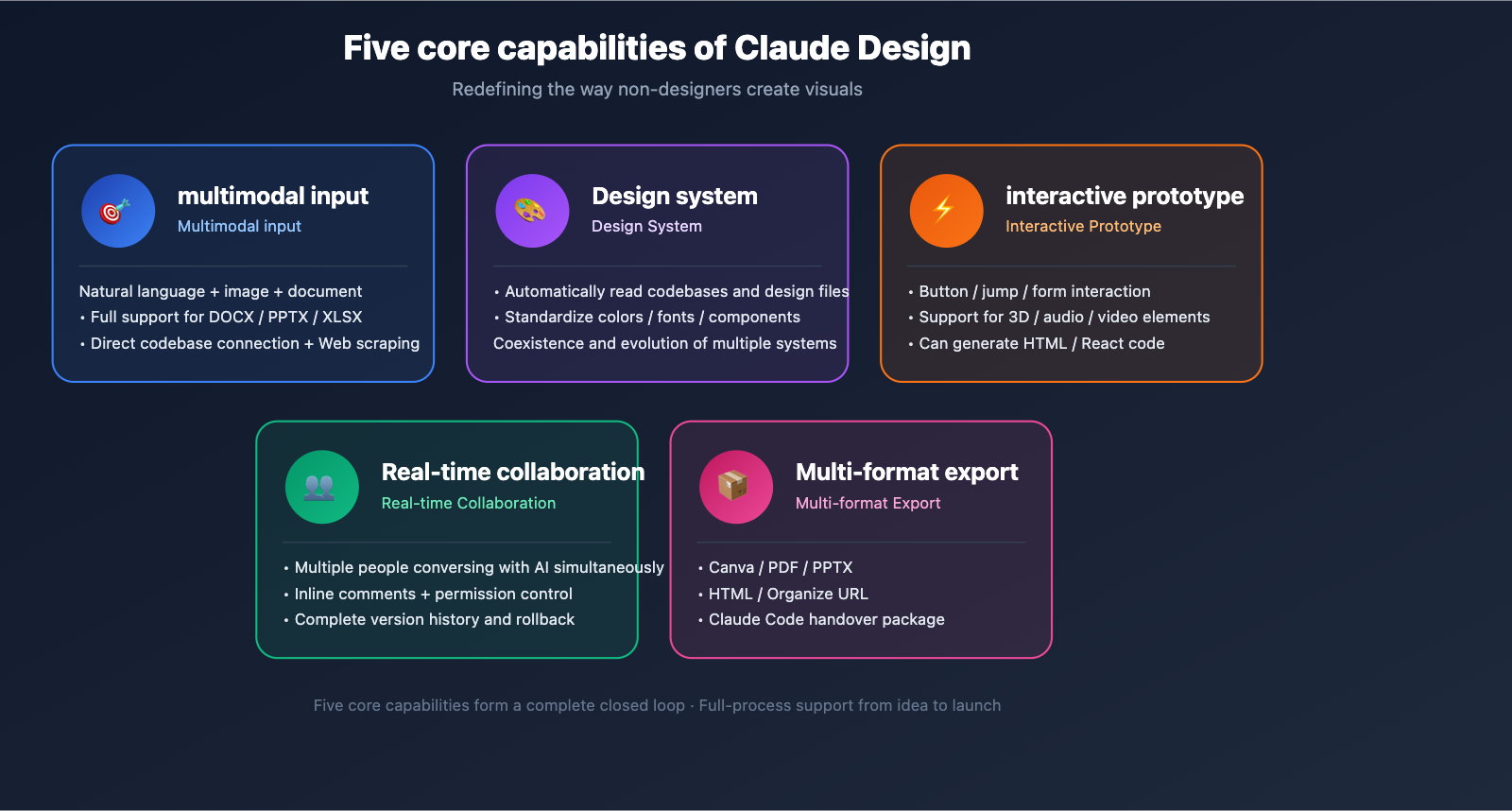
Feature 4: Real-time Collaboration, AI + Team Creation
Claude Design upgrades the concept of "human-AI collaboration" to a model of "multi-person collaboration + AI":
- Organization-wide Sharing: Design files can be set to read-only or editable and shared across the organization.
- Group Conversations: Multiple colleagues can chat with Claude simultaneously to collaboratively modify the same design.
- Inline Comments: Leave annotations on design details, and Claude will suggest modifications based on those comments.
- Version History: Retains a complete record of modifications, allowing you to roll back to any previous version.
- Permission Management: The enterprise version supports granular permission control based on departments and roles.
This makes Claude Design more than just a "design tool"; it’s a "design meeting room" where teams can complete the entire workflow from concept to finalization in a single session.
Feature 5: Full-Format Export, Seamless Integration into Existing Workflows
Claude Design supports exporting outputs in various formats, making it easy to plug into your existing toolchain:
| Export Format | Suitable Scenarios | Features |
|---|---|---|
| Canva | Further refinement and marketing material publishing | Official deep integration; retains editability. |
| PPTX | PowerPoint presentations and reports | Retains layer structure and animations. |
| Printing, archiving, client delivery | High-fidelity rendering; supports vectors. | |
| HTML | Website embedding, email templates | Responsive code ready for direct deployment. |
| Org URL | Internal sharing and link distribution | Real-time updates; no need for re-exporting. |
| Claude Code Handoff | Handover to development team for implementation | Structured code + design specification documentation. |
The collaboration with Canva is particularly noteworthy: on April 10, 2026, Canva announced a strategic partnership with Anthropic, treating Claude Design as the "upstream creative engine" for the Canva ecosystem.
Typical Use Cases for Claude Design
Now that you've got a handle on the features, let’s dive into how Claude Design can help you tackle real-world problems. Here are five of the most proven use cases.
Scenario 1: Founders Preparing for Demo Day
The Situation: A technical founder has a Demo Day presentation in three days, but they’re not great with Keynote, don't know how to use Figma, and all the standard PPT templates look dull.
The Claude Design Solution:
- Upload the business plan PDF.
- Prompt: "Help me create a tech-focused, dark-themed Demo Day presentation, about 15 slides."
- Claude automatically generates the slide deck based on the document.
- Fine-tune: "Replace the chart on page 3 with a line graph."
- Export as PPTX or PDF and head straight to the stage.
Scenario 2: PMs Building Product Prototypes
The Situation: A PM has a new feature idea and needs to quickly create an interactive demo for the engineering team and user testing.
The Claude Design Solution:
- Describe the feature and user flow.
- Claude generates a multi-page interactive prototype.
- Upload existing app screenshots as a visual benchmark.
- Automatically apply the company's design system.
- Share a URL so engineers and testers can experience it firsthand.
Scenario 3: Marketing Teams Creating Landing Pages
The Situation: The marketing team needs a landing page for a new product launch, but the design queue is already full.
The Claude Design Solution:
- Upload product materials and brand guidelines.
- "Create a conversion-oriented landing page, following the style of Linear."
- Claude generates the full page with responsive layout.
- Export the HTML code for direct deployment, or push it to Canva for the marketing team to add final polish.
Scenario 4: Fast-tracking Internal Tool UI
The Situation: The company needs an internal management dashboard, but they don't want to tie up design resources.
The Claude Design Solution:
- Read the existing frontend codebase (connect via GitHub).
- Automatically identify existing UI components and color schemes.
- Generate new module UI based on the current style.
- Export as React code to hand off to developers.
Scenario 5: Competitor Analysis and Design Inspiration
The Situation: A designer wants to quickly analyze a competitor's visual style and distill some design inspiration.
The Claude Design Solution:
- Use a web scraping tool to capture the competitor's website.
- Claude analyzes the color palette, typography, and layout patterns.
- Generate a new draft that features elements of the competitor's style.
- Export as a Figma file for further refinement in professional tools.
💡 Usage Tip: The AI model capabilities involved in these scenarios (Claude Opus 4.7’s visual understanding and generation) are the core of Claude Design. If you want to use the same model power in your own products, you can access the Claude Opus 4.7 API via APIYI at apiyi.com, which supports standard OpenAI-compatible format calls.
How to Get Started with Claude Design
Prerequisites
Claude Design is currently in the research preview phase and requires:
- An active subscription to Claude Pro, Max, Team, or Enterprise.
- The feature is being rolled out; enterprise users can have their admins enable it in the Organization settings.
- Not currently available to Free (Claude Free) users.
Three Steps to Success
Step 1: Access the Portal
Open your browser and navigate to: claude.ai/design and log in with your Claude account. If you don't see the feature yet, it means the rollout hasn't reached your account—feel free to check back in a few days.
Step 2: Create Your First Design
Enter your requirements in the chat box. Here is a starter prompt template:
[Type] + [Subject] + [Style] + [Key Constraints]

Example:
"Create a [mobile app launch screen] with a [AI fitness assistant] theme.
The style should be [youthful and energetic, using an orange/black color scheme],
and include a [login button and swipe-through guide]."
The more specific you are, the better, but there's no need to include everything at once—you can continue to tweak it through follow-up conversations.
Step 3: Iterate and Export
Once you have an initial draft, there are three ways to make changes:
- Conversational Edits: Keep describing what you want to change in the chat box.
- Direct Editing: Click on the text or buttons in the design to edit them in place.
- Comments/Annotations: Add comments to specific areas and have Claude adjust them based on your feedback.
Once you’re happy, click export and choose the format you need.
Common Pitfalls for Beginners
| Pitfall | Recommended Approach |
|---|---|
| Writing a super-long prompt at once | Start with a simple request and iterate through conversation |
| Trying to perfectly match your mental image | Treat Claude as a creative partner and embrace "happy accidents" |
| Relying entirely on Claude for the final version | Use it for quick MVP drafts; professional work still requires a designer's touch |
| Ignoring design system settings | Enterprise users should configure design systems first to ensure consistency |
| Not using reference materials | Uploading a reference image or brand manual significantly improves quality |
🎯 Pro Tip: The underlying capability of Claude Design comes from Claude Opus 4.7. If you are a developer looking to integrate similar "visual understanding + generation" features into your own product, we recommend calling the Claude Opus 4.7 API via APIYI (apiyi.com). It supports multi-turn conversations, image input, structured output, and other complete features.
Claude Design vs. Leading Design Tools
The launch of Claude Design has sparked a big question: Will it replace Figma? And where does it fit alongside Canva? Let’s break down the positioning.
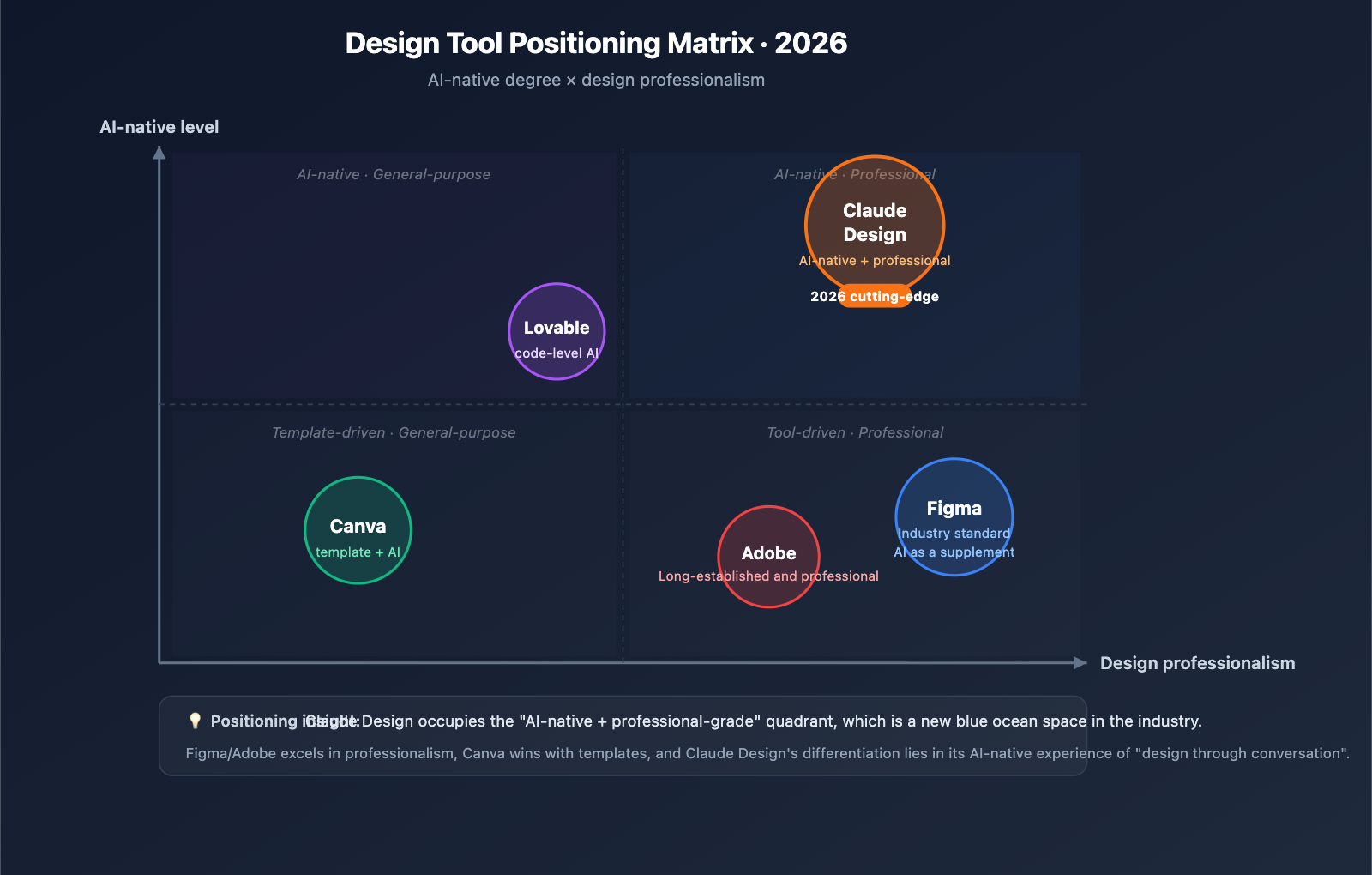
Core Capability Comparison
| Dimension | Claude Design | Figma | Canva | Lovable |
|---|---|---|---|---|
| AI Prompt-based Generation | ⭐⭐⭐⭐⭐ Native | ⭐⭐ Plugin-based | ⭐⭐⭐ Magic Design | ⭐⭐⭐⭐ Code-based |
| Design System Automation | ⭐⭐⭐⭐⭐ Code-aware | ⭐⭐⭐⭐ Manual | ⭐⭐ Limited | ⭐⭐⭐ Code-level |
| Interactive Prototyping | ⭐⭐⭐⭐⭐ Code-driven | ⭐⭐⭐⭐⭐ Prototype Mode | ⭐⭐ Basic | ⭐⭐⭐⭐ High-fidelity |
| Professional Design | ⭐⭐⭐ MVP-level | ⭐⭐⭐⭐⭐ Industry Standard | ⭐⭐⭐ Template-heavy | ⭐⭐ Dev-focused |
| Collaboration | ⭐⭐⭐⭐ Chat-based | ⭐⭐⭐⭐⭐ Real-time | ⭐⭐⭐⭐ Team Space | ⭐⭐⭐ Basic |
| Learning Curve | ⭐ Near Zero | ⭐⭐⭐⭐ Steep | ⭐⭐ Low | ⭐⭐⭐ Coding needed |
| Pricing | ⭐⭐⭐⭐⭐ Subscription | ⭐⭐⭐ Paid | ⭐⭐⭐⭐ Free+Pro | ⭐⭐⭐ Paid |
| Best For | Non-designers | Pro Designers | Marketing/Social | Product/Devs |
When to Choose Claude Design
- You’re a non-designer who frequently needs visual content.
- You need ultra-fast iteration from idea to prototype.
- Your company already has codebases or design files that the AI can read.
- You have a Claude Pro (or higher) subscription and want to maximize its value.
When to Stick with Figma / Canva
- You’re a professional designer focusing on pixel-perfect polish and deep branding → Figma.
- Your main tasks involve social media posts or print materials using templates → Canva.
- Your team already relies heavily on Figma’s ecosystem and workflows → Keep using Figma and use Claude Design as a supplement.
Best Practice: The Trio Workflow
In 2026, Claude Design, Figma, and Canva shouldn't be viewed as competitors, but as parts of a relay race:
Creative Ideation (Claude Design) → Polishing & Refinement (Figma) → Publishing & Distribution (Canva)
This combination lets each tool play to its strengths. Anthropic has clearly stated: "Claude Design is meant to complement Canva, not replace it."
Impact Analysis: What Claude Design Means for the Industry
For Developers
- Prototype Efficiency Boost: Engineers can generate prototypes directly with Claude Design, reducing dependency on designer schedules.
- Shift in Designer Roles: Moving from "drawing drafts" to "setting design systems, refining, and managing specs."
- Blurring Functional Boundaries: The overlap between PMs, engineers, and designers continues to grow.
- Optimized Code Delivery: The link between Claude Design and Claude Code makes the path from "idea to deployment" much faster.
For the Design Tool Industry
- Figma on the Frontline: A dip in stock price on launch day reflected market concerns regarding its long-term dominance.
- Adobe Faces Challenges: The pressure for AI-driven design tools is mounting.
- Rise of AI-Native Tools: Products like Lovable, v0, and Bolt will see increased interest.
- Canva Accelerates Transformation: Through its partnership with Anthropic, Canva is evolving from a "template library" into an "AI creative platform."
For Regular Users
- Democratization of Design: Skills that once required professional training are now accessible to everyone.
- Content Efficiency: Internal visual output capability for enterprises has improved significantly.
- Raising the Aesthetic Bar: AI helps non-designers produce work that meets "above-average" standards.
- Better Subscription Value: The value proposition of Claude Pro/Max has increased, making it more cost-effective.
For Anthropic
Claude Design marks a key step for Anthropic as it moves from the "infrastructure layer" to the "application product layer." Previously, Anthropic relied heavily on API revenue, but Claude Design is a full-fledged product for both consumer and enterprise markets:
- Expanding user reach and lowering the barrier to AI entry.
- Enhancing subscription differentiation to compete with ChatGPT Plus.
- Building a "moat" at the application layer rather than just "providing model APIs."
- Collecting high-quality visual design data to further improve model performance.
FAQ
Q1: Is Claude Design free? Do I need to pay extra?
Claude Design is not charged separately; it is included in Claude Pro, Max, Team, and Enterprise subscriptions, utilizing your existing quota. You can choose to purchase additional usage if you exceed your limit. Claude Free users do not have access at this time. If you only want to experience the underlying Claude Opus 4.7 model capabilities, you can also access them via pay-as-you-go model invocation on APIYI (apiyi.com) without needing a subscription.
Q2: Will Claude Design replace Figma?
It won't fully replace it in the short term, but it will reshape the division of labor in the design industry. Figma still holds a clear advantage in pixel-perfect refinement, professional collaboration, and plugin ecosystems. The strength of Claude Design lies in its rapid output from "idea to prototype." The most likely future landscape is: Claude Design handles 0-1, while Figma handles 1-10, creating a complementary workflow.
Q3: I’m not a designer. Can Claude Design really help me create good-looking designs?
It can generally reach an "above average" level, especially in scenarios like: internal presentation decks, Demo Day slides, product prototypes, and quick Landing Pages. However, if your output is intended for external brand marketing, print publications, or key client deliverables, we still recommend having a professional designer refine the work produced by Claude Design.
Q4: What’s the difference between Claude Design and Claude.ai’s Artifacts?
Claude.ai's Artifacts is an attachment capability within general conversations that can produce code, documents, and simple HTML, but it isn't focused on visual design. Claude Design is an independent visual design product equipped with full design workflow capabilities, including design systems, collaboration, multi-format exports, and Canva integration. You can think of Artifacts as a "handy tool," while Claude Design is a "dedicated studio."
Q5: Will my enterprise data be used by Anthropic to train their models?
According to Anthropic's official policy, data from Team and Enterprise users is not used for model training by default, complying with enterprise-grade data privacy requirements. Individual (Pro, Max) users can toggle off data sharing in their settings. If you are handling sensitive data, we recommend using Team or Enterprise subscriptions, or utilizing the enterprise-grade API solutions via APIYI (apiyi.com) to enjoy more flexible data isolation controls.
Q6: How can I seamlessly hand over Claude Design output to a development team?
Claude Design provides a specialized "Handoff Bundle" feature:
- Export as HTML/React code.
- Generate structured design specification documents.
- Use Claude Code to relay the implementation of full functionality.
- Retain complete component comments and style descriptions.
This workflow is particularly well-suited for small full-stack teams, enabling an end-to-end loop from design to deployment.
Q7: Does Claude Design support Chinese interfaces and Chinese design requirements?
The current interface of Claude Design is primarily in English, but the Claude Opus 4.7 model supports Chinese input. You can describe your requirements in Chinese and generate designs that include Chinese content. For professional needs like Chinese typesetting and specific Chinese fonts, Claude Design's support is still being optimized. Users in China can also access the same Claude Opus 4.7 model capabilities via APIYI (apiyi.com).
Q8: Is there a Claude Design API? Can I integrate it into my own product?
Currently, Claude Design is released as a standalone product, and no product-level API is available. However, its underlying visual generation capability is powered by the Claude Opus 4.7 model, which does have an API. If you want to build a similar application, you can leverage the Claude Opus 4.7 API to implement core features like: multimodal input understanding, design copy generation, and code generation. We recommend using the APIYI (apiyi.com) platform for model invocation, as it is compatible with the OpenAI format and more developer-friendly for users in China.
Conclusion: Is Claude Design worth paying attention to?
Claude Design is a major milestone in the wave of AI productization in 2026. It is not just "another AI design tool," but a strategic pivot for Anthropic from "selling APIs" to "building products." We have the following advice for different types of readers:
| Role | Recommendation |
|---|---|
| Non-Designers (PMs/Founders/Marketers) | Try it immediately; it's the tool you've been waiting for. |
| Professional Designers | Treat it as a "creative accelerator" rather than a threat; focus on mastering it for early-stage exploration. |
| Engineers/Developers | Use it for prototype communication while learning the underlying Claude Opus 4.7 API calls. |
| Enterprise Managers | Evaluate the ROI of introducing it to your team, focusing on the value of design system automation. |
| AI Developers | Study the product design of Claude Design to reflect on the form of AI-native products. |
Quick Action Checklist
If you've decided to try Claude Design after reading this, we suggest following these steps:
- ✅ Confirm your Claude subscription level (Pro or higher).
- ✅ Visit
claude.ai/designto check if you have beta access. - ✅ Run a complete process with a simple requirement (e.g., creating a poster).
- ✅ Try uploading reference images and configuring a design system.
- ✅ Experience key features like Canva export and PPTX export.
- ✅ If you need to call the underlying Claude Opus 4.7 API, you can quickly integrate via APIYI (apiyi.com).
🎯 Final Recommendation: The release of Claude Design marks the true arrival of the "conversation-as-production" era. For teams and developers in China, beyond waiting for official rollout, what's even more worth noting is the capability of its underlying Claude Opus 4.7 model. We recommend directly invoking the Claude Opus 4.7 API via the APIYI (apiyi.com) platform. You can experience the same power without needing an overseas subscription, and it supports the OpenAI-compatible format, making it easy to integrate into your own products and workflows.
Anthropic is redefining the boundaries of AI—from a "model that answers questions" to a "product that creates value." Claude Design is just the beginning; more AI-native products will emerge in the next 12 months. Stay tuned and keep experimenting.
Author: APIYI Technical Team
Release Date: 2026-04-18
Update Notes: Compiled from official Anthropic releases, TechCrunch, VentureBeat, SiliconANGLE, and other sources.
About APIYI: APIYI (apiyi.com) is an enterprise-grade AI Large Language Model API proxy service. It supports unified API calls for mainstream models like Claude Opus 4.7, GPT, and Gemini. We provide stable, high-speed, and low-barrier AI access solutions for developers in China.