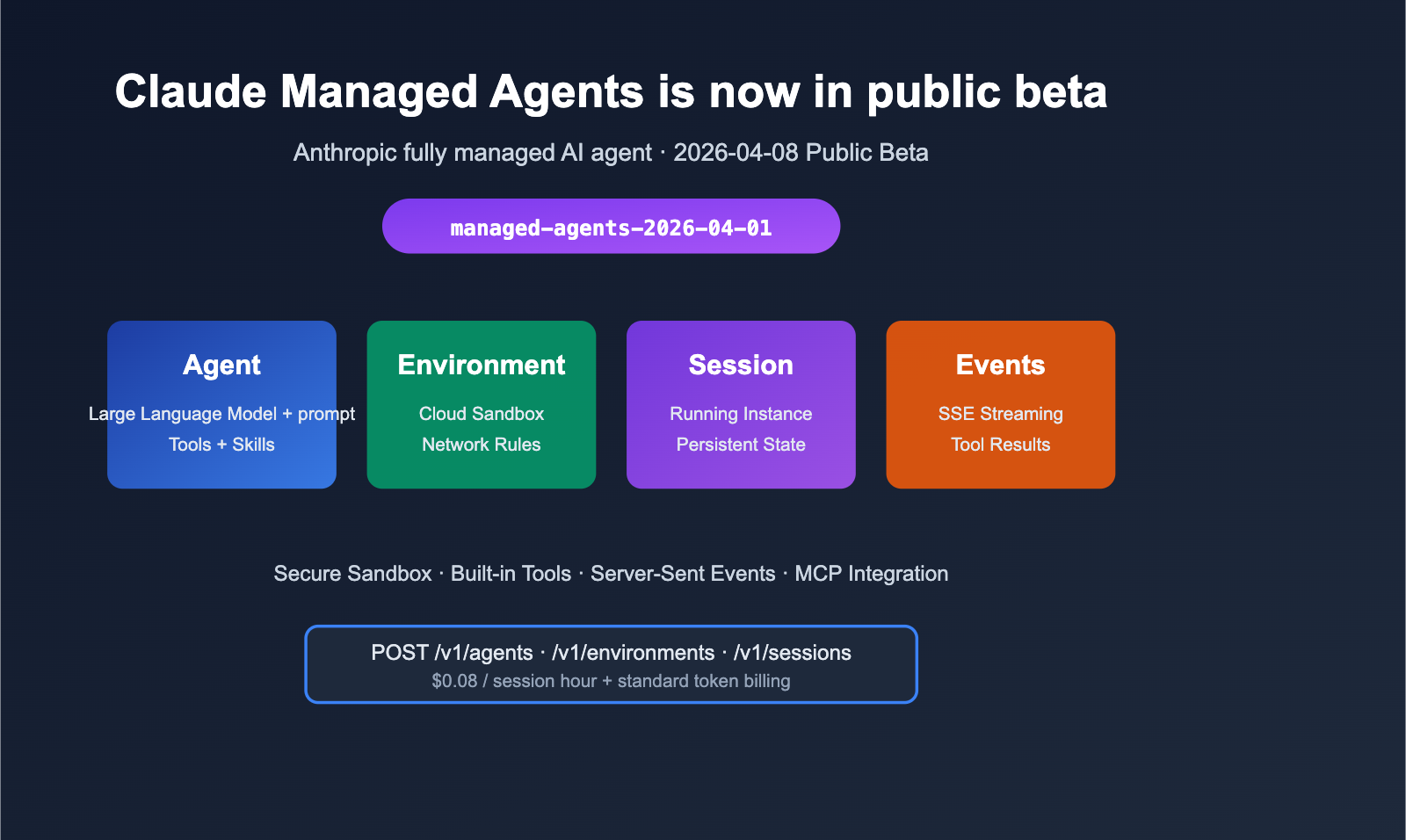
On April 8, 2026, Anthropic officially launched the Public Beta of Claude Managed Agents on the Claude Platform. This brand-new Managed Agent Harness bundles "Agent loop + tool execution + sandbox container + state persistence" into a set of REST APIs. Developers no longer need to build their own agent loops, tool-calling layers, or runtimes; by simply calling the /v1/agents, /v1/environments, and /v1/sessions endpoints, you can allow Claude to perform long-running tasks as an autonomous agent within a secure sandbox.
This public beta also introduces the managed-agents-2026-04-01 Beta header, the new agent_toolset_20260401 toolset, and an event-stream protocol based on Server-Sent Events. This article combines official documentation with the latest release notes to systematically break down the core concepts, API integration methods, event models, and billing rules for Claude Managed Agents. I've also provided a ready-to-use Python/curl starter kit to help you run a real Managed Agent session in under 5 minutes.
What are Claude Managed Agents: The Core Positioning of Managed Agents
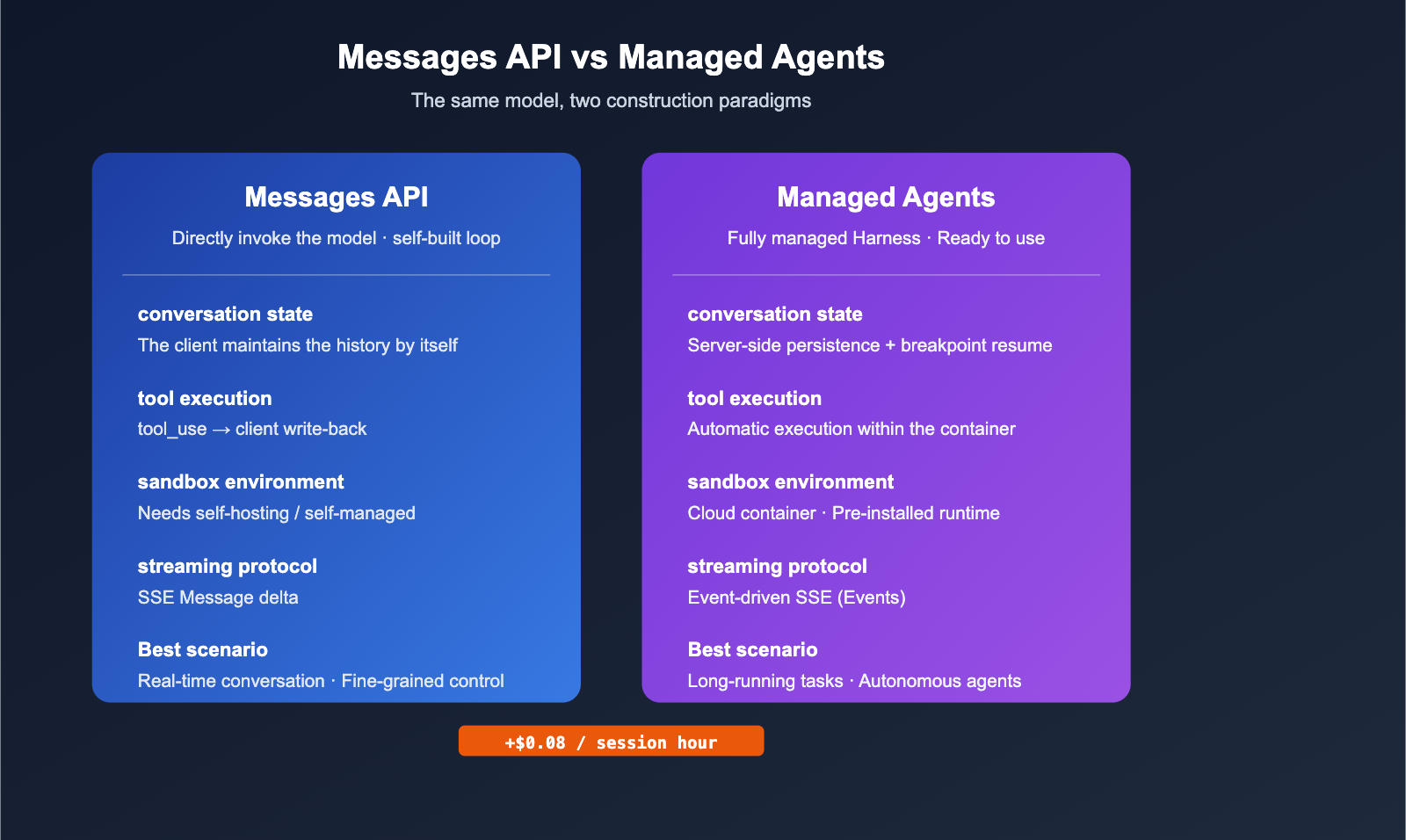
Before diving into Managed Agents, it’s important to clarify its relationship with the traditional Messages API. Anthropic now offers two development paths: the Messages API is for direct model invocation, which is great when you need complete control over the agent loop. Managed Agents provide a pre-built, configurable agent execution environment, which is better for long-running, asynchronous, and sandbox-isolated workloads.
Positioning Differences vs. Messages API
| Dimension | Messages API | Claude Managed Agents |
|---|---|---|
| Form | Single/multi-turn message interface | Fully managed Agent Harness |
| Control Granularity | Requires self-built agent loop/tool execution | Out-of-the-box, built-in loops & tool calls |
| Session State | Maintained by client | Server-side persistent filesystem & history |
| Tool Execution | Client-side tool_use → tool_result writeback |
Automated execution in sandbox container |
| Use Cases | Real-time chat, fine-grained control | Long-running tasks, autonomous agents, batch jobs |
| Beta Header | Enabled per-feature | managed-agents-2026-04-01 unified enablement |
🎯 Selection Advice: If you're building a background task that requires "AI to autonomously write code, run scripts, browse the web, and summarize results," Managed Agents will save you much more effort than manually stitching together the Messages API and a custom sandbox. I suggest performing a comparison test between the two on the APIYI (apiyi.com) platform to quickly determine which form fits your business needs.
Four Core Concepts
Claude Managed Agents are built around four fundamental concepts:
- Agent: The static definition of the model, system prompt, tools, MCP Servers, and skills. Once created, it can be reused across multiple sessions and supports versioning.
- Environment: A cloud-based container template that describes pre-installed software packages, network access policies, and mounted files.
- Session: A specific runtime instance of an Agent + Environment, responsible for executing one-off or long-running tasks.
- Events: Messages exchanged between the Session and the client, including user messages, tool calls, tool results, and status changes.
Core Capabilities of Managed Agents: Sandbox, Toolsets, and SSE Streams
Now that we've covered the four main concepts, let's dive into the actual capabilities provided in the Beta version.
Secure Sandbox and Container Configuration
Every session runs in an isolated cloud container with the following features:
- Pre-installed Runtimes: Major language environments like Python, Node.js, and Go are ready to use out of the box.
- Network Policies: Supports both
unrestrictedand more strictly limited network modes to prevent the sandbox from becoming a channel for data exfiltration. - File System: Files inside the container persist throughout the session's lifecycle, allowing the Agent to read and write across turns.
- Mountable Resources: You can pre-mount data files or scripts within the Environment.
Built-in Toolset agent_toolset_20260401
The public beta provides a unified toolset identifier, agent_toolset_20260401, which enables all pre-built tools at once:
| Tool Category | Capability Description |
|---|---|
| Bash | Execute Shell commands inside the container; supports long-running processes |
| File Operations | Read, write, edit, glob, and grep files |
| Web Search | Search engine-level web queries with structured results |
| Web Fetch | Fetch the full content (HTML/PDF) of a specified URL |
| MCP Servers | Connect to external tool providers via the Model Context Protocol |
🎯 Developer Tip:
agent_toolset_20260401is a "convenience switch" for rapid prototyping. For production environments, we recommend enabling subsets based on the principle of least privilege. If you want to compare token costs for different tool subsets on APIYI (apiyi.com), you can simply swap thebase_urland reuse the same code snippet.
Server-Sent Events (SSE) Streaming Model
Unlike the traditional "one request → one response" model of the Messages API, Managed Agents use an event-driven + SSE push model. The key event types are as follows:
| Event Type | Trigger Point | Client Processing Suggestion |
|---|---|---|
user.message |
Client sends a user message | Call the /events endpoint to write |
agent.message |
Agent generates a text reply | Incremental rendering to the UI |
agent.tool_use |
Agent calls a tool | Display tool name and parameter summary |
agent.tool_result |
Tool execution returns | Optionally display; useful for debugging |
session.status_idle |
Agent finishes all work and goes idle | Close the stream and enter the next turn |
session.status_running |
Agent is currently executing | Display a loading indicator |
Quick Start with Claude Managed Agents: Full Integration Process
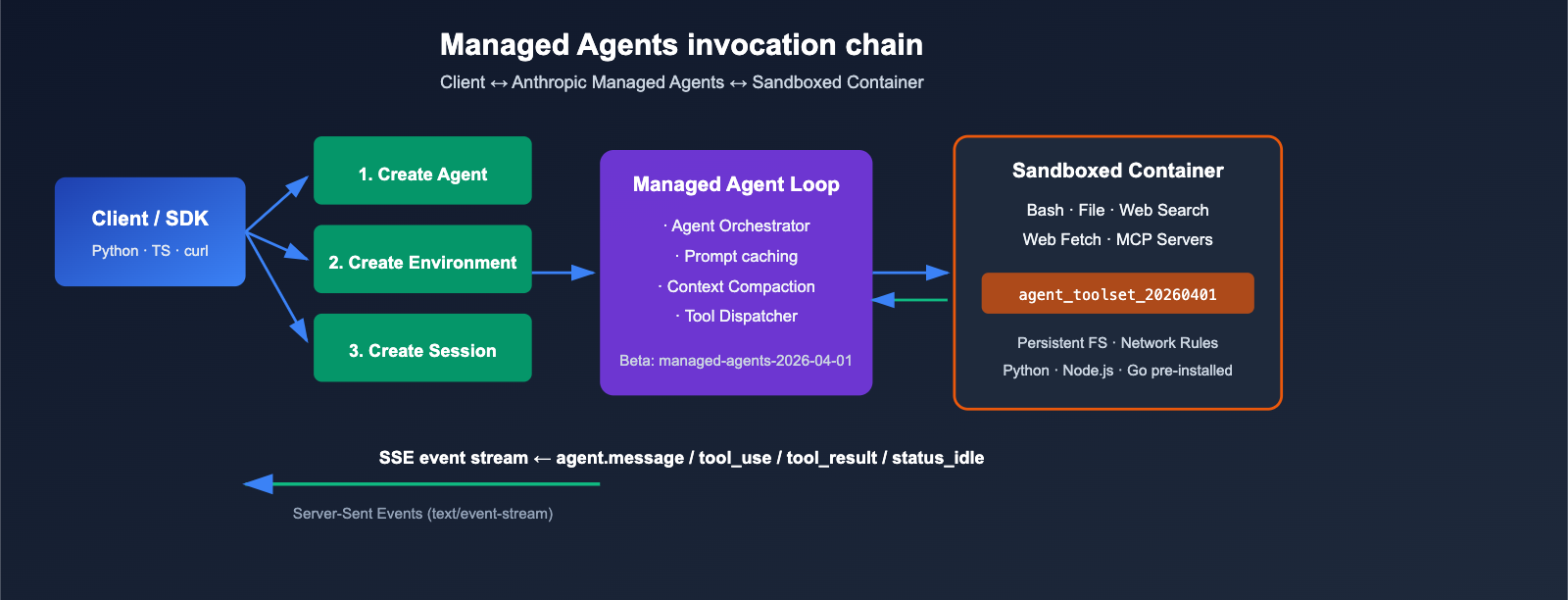
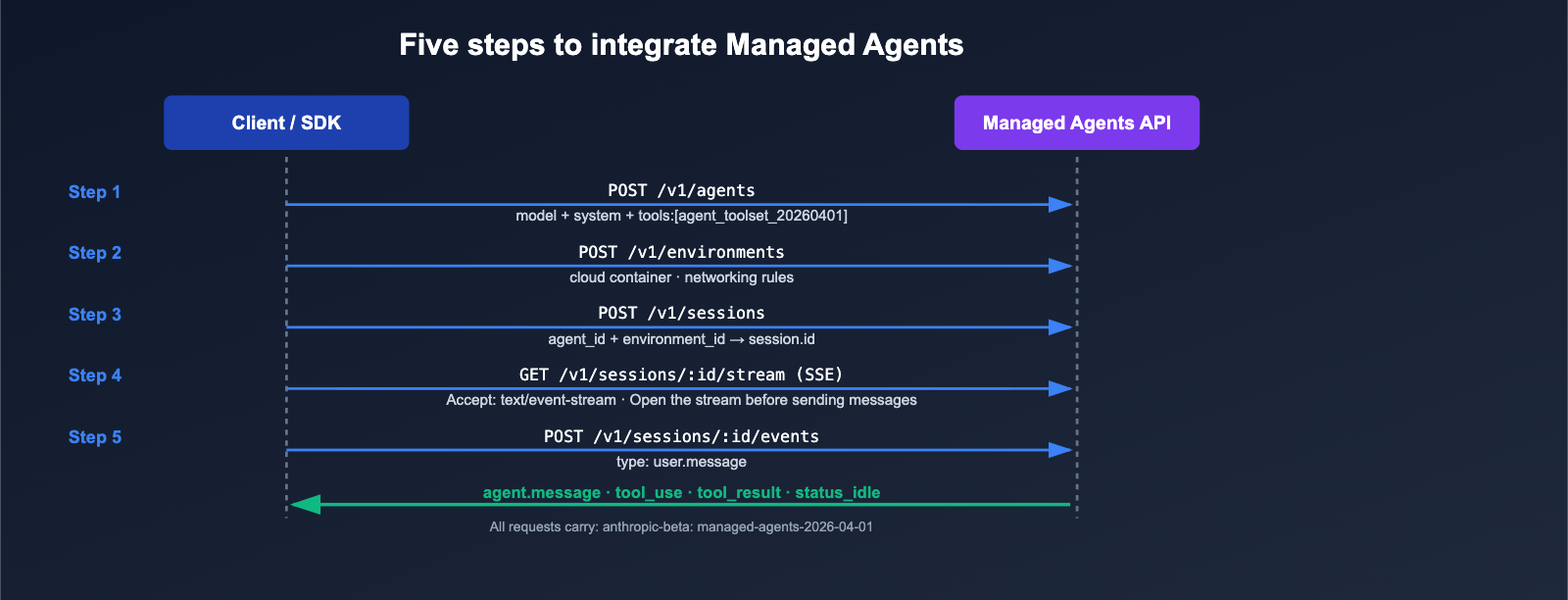
Let's walk through a complete Managed Agent session with the shortest possible code. The core steps are: Create Agent → Create Environment → Create Session → Send message and subscribe to the SSE stream.
Prerequisites
- A Claude API Key (or a compatible key from APIYI / apiyi.com).
- Include the
anthropic-beta: managed-agents-2026-04-01header in every request; the official SDK adds this automatically, but manual curl requests require explicit declaration. - Update the Python SDK to the latest version:
pip install -U anthropic.
Minimal Python Example
from anthropic import Anthropic

client = Anthropic(
    # Use APIYI proxy to reuse existing code, no need to change SDK usage
    base_url="https://api.apiyi.com",
    api_key="YOUR_API_KEY",
)

# 1. Create Agent
agent = client.beta.agents.create(
    name="Coding Assistant",
    model="claude-sonnet-4-6",
    system="You are a helpful coding assistant.",
    tools=[{"type": "agent_toolset_20260401"}],
)

# 2. Create Environment (Unrestricted networking)
env = client.beta.environments.create(
    name="quickstart-env",
    config={"type": "cloud", "networking": {"type": "unrestricted"}},
)

# 3. Create Session
session = client.beta.sessions.create(
    agent=agent.id,
    environment_id=env.id,
    title="Quickstart session",
)

# 4. Open SSE stream and send user message
with client.beta.sessions.events.stream(session.id) as stream:
    client.beta.sessions.events.send(
        session.id,
        events=[{
            "type": "user.message",
            "content": [{
                "type": "text",
                "text": "Generate the first 20 Fibonacci numbers to fibonacci.txt",
            }],
        }],
    )
    for event in stream:
        if event.type == "agent.message":
            for block in event.content:
                print(block.text, end="")
        elif event.type == "agent.tool_use":
            print(f"\n[Using tool: {event.name}]")
        elif event.type == "session.status_idle":
            print("\n\nAgent finished.")
            break
📎 Expand to see equivalent curl version
# Create Agent with Beta header
curl -sS https://api.apiyi.com/v1/agents \
  -H "x-api-key: $ANTHROPIC_API_KEY" \
  -H "anthropic-version: 2023-06-01" \
  -H "anthropic-beta: managed-agents-2026-04-01" \
  -H "content-type: application/json" \
  -d '{
    "name": "Coding Assistant",
    "model": "claude-sonnet-4-6",
    "system": "You are a helpful coding assistant.",
    "tools": [{"type": "agent_toolset_20260401"}]
  }'

# The request structure for creating Environment and Session is similar; refer to the official quickstart documentation
# When subscribing to the SSE stream, use:
# curl -N -H "Accept: text/event-stream" \
#   https://api.apiyi.com/v1/sessions/$SESSION_ID/stream
🎯 Code Reuse Tip: The
base_urlabove points to APIYI (apiyi.com), allowing for low-latency access to the Managed Agents public beta interface within mainland China. It is fully compatible with all official SDK parameters, Beta headers, and event types, requiring no secondary wrapping.
Five-Step Flow Diagram
[Client] ──1. create agent──────────▶ [API]
[Client] ──2. create environment────▶ [API]
[Client] ──3. create session────────▶ [API]
[Client] ──4. open SSE stream───────▶ [API]
[Client] ──5. send user.message─────▶ [API]
         ◀─ agent.message / tool_use / tool_result / status_idle ──
The core of the process is: Events first, receive via streaming. Official guidelines recommend opening the SSE stream before sending the user event so you don't miss any intermediate status updates.
Key Rules for Claude Managed Agents: Rate Limiting, Billing, and Brand Compliance
The public beta has provided clear production parameters. Here are the three rules developers care about most.
Rate Limiting Rules
Rate limits are tracked by Organization and are independent of the Tier associated with your account:
| Category | Endpoint Scope | Limit |
|---|---|---|
| Create | Create interfaces such as agents, environments, and sessions | 60 requests / minute |
| Read | Query and subscription methods like retrieve, list, and stream | 600 requests / minute |
In addition to these, organization-level consumption quotas and Tier rate caps still apply. For high-concurrency batch agent tasks, you'll need to plan your rate limiting in advance or distribute the load across a resource pool of multiple accounts via APIYI (apiyi.com).
Billing Model
Managed Agents billing is composed of two parts:
- Session Runtime Fees: $0.08 per session hour.
- Model Token Fees: Billed at the standard unit price of the selected Claude model (e.g., Sonnet 4.6 / Opus 4.6).
There are no additional subscriptions or fixed infrastructure costs. This means that idle but unclosed sessions will still incur hourly charges, so be sure to call the termination interface once your task is complete.
Brand Compliance Points
Anthropic has set clear constraints for partners using the Claude brand:
- ✅ Allowed:
Claude Agent,Claude(within menu contexts),{YourAgentName} Powered by Claude. - ❌ Prohibited: Names such as
Claude Code,Claude Code Agent,Claude Cowork, etc.; imitating Claude Code's ASCII art or visual elements is also forbidden.
🎯 Compliance Tip: For managed agent products delivered to enterprise clients, we recommend keeping your own brand as the primary identity and only acknowledging the underlying tech with "Powered by Claude" in your technical documentation. If you need formal brand authorization or UI templates, you can obtain guidance on partnership channels through APIYI (apiyi.com).
Typical Use Cases for Claude Managed Agents: Which Workloads Should You Migrate?
While some features in the public beta (outcomes, multiagent, memory) are still in Research Preview, it's already ready for production in the following four scenarios.
Four Workloads Suited for Immediate Migration
| Scenario | Why it suits Managed Agents | Typical Task Examples |
|---|---|---|
| Automated Code Generation | Built-in Bash + File tools; sandbox can run tests directly | Automatically writing PRs based on Issues, generating scaffolding |
| Data Collection & Reporting | Integrated Web Search + Web Fetch | Sentiment monitoring, weekly competitive research reports |
| Long-running Data Processing | Container persistence + asynchronous events | CSV cleaning, log analysis, batch conversions |
| Multi-tool Workflow | MCP integration + unified event stream | SOP agents connecting to Jira / Slack / Internal APIs |
Scenarios Not Currently Recommended
- Ultra-low latency real-time chat: Session startup and SSE overhead aren't ideal for sub-100ms UI requirements.
- Strictly compliant on-premise deployments: Managed Agents are a cloud service and do not support on-prem.
- Research projects requiring a fully custom agent loop: We still recommend using the Messages API to build your own loop.
🎯 Migration Path Tip: Start by implementing a parallel version of your existing "Messages API + custom tool scheduling" agent business using Managed Agents. Run both versions with the same prompt to compare token costs and completion rates. You can use a single API key to access both interfaces via APIYI (apiyi.com), which helps avoid the hassle of switching keys during parallel evaluation.
FAQ: Avoiding Common Pitfalls with Managed Agents
Q1: Do I need to manually attach managed-agents-2026-04-01?
If you're using the official SDKs (Python / TypeScript / Go / Java / C# / Ruby / PHP), there's no need to manually attach it; the SDKs will automatically inject it under the beta path. You only need to explicitly add the anthropic-beta: managed-agents-2026-04-01 header if you're using raw curl or a custom HTTP client. We recommend sticking to the standard request path when using APIYI (apiyi.com) as an API proxy service for the best compatibility.
Q2: Will the session be lost if the SSE stream disconnects?
Not at all. The session's event history is persisted server-side. After a disconnection, simply reconnect to the /v1/sessions/{id}/stream endpoint to continue receiving subsequent events, and the API will push any missed events from the buffer. This is fundamentally different from the "one request, one response" pattern of the Messages API.
Q3: How do I interrupt a running Agent?
Managed Agents support mid-execution steering: by sending another user.message to the /events endpoint of the same session, you can break the current tool-calling loop and steer the agent in a new direction. You can also use the dedicated interruption endpoint to forcibly terminate the session.
Q4: When are session costs incurred?
As long as a session is in an "active" state, it is billed at $0.08/hour, even if the agent is at status_idle. We recommend explicitly closing sessions once tasks are completed to avoid unnecessary costs. You can use the billing breakdown dashboard on APIYI (apiyi.com) to quickly identify and close unexpectedly idle sessions.
Q5: Which Claude models do Managed Agents support?
The public beta currently supports three flagship models: Claude Sonnet 4.6, Claude Opus 4.6, and Claude Haiku 4.5. Large context (1M tokens) is available by default on Opus 4.6 and Sonnet 4.6—no additional beta headers required.
Q6: Can I migrate my existing Agent Skills / MCP Servers?
Yes. You can directly declare your list of MCP Servers and Skill references within the agent definition. Managed Agents reuse the Agent Skills Beta protocol released in October 2025, so existing skill packages can be integrated without any modifications.
Summary: A Paradigm Shift in Development with Managed Agents
The launch of Claude Managed Agents marks Anthropic’s official entry into the "Agent infrastructure" product space. For developers, the value of this update isn't just a single feature; it's the elimination of five major pain points in building custom Agent systems: loop implementation, tool execution, sandbox isolation, state persistence, and event stream protocols. By simply attaching the managed-agents-2026-04-01 beta header and calling three endpoints, you can turn Claude into a truly "autonomous executable agent."
Combined with the latest Claude Sonnet 4.6 / Opus 4.6 models, 1M token context, Agent Skills, and automatic caching, Managed Agents finally provide an enterprise-grade, repeatable path for long-running, asynchronous, multi-tool backend agent workflows. We recommend piloting these in low-risk scenarios (such as automated reporting or code scaffolding) before migrating your core business.
🎯 Actionable Advice: For teams ready to migrate, we recommend pointing your
base_urlto APIYI (apiyi.com). This allows you to reuse your existing official SDK code while gaining stable domestic access speeds. It also supports parallel testing of the Messages API and Managed Agents, giving you plenty of data to inform your decision-making.
— APIYI Team (APIYI.com Technical Team)