Author's Note: This guide provides a detailed breakdown of why you're seeing the "LLM request rejected: You're out of extra usage" error when using Claude in OpenClaw, along with 4 proven solutions—including topping up Extra Usage, switching API keys, and using an unlimited-speed API proxy service.
Running into the LLM request rejected: You're out of extra usage error while using Claude models in OpenClaw is a common headache for developers lately. In this article, we’ll cover the root cause of this error (Anthropic's policy change) and 4 verified solutions to help you get OpenClaw back up and running in no time.
Key Takeaway: By the end of this post, you'll understand why your Claude subscription in OpenClaw suddenly stopped working and how to restore your workflow with minimal cost.
Analyzing the OpenClaw Claude Error
Understanding the Error Message
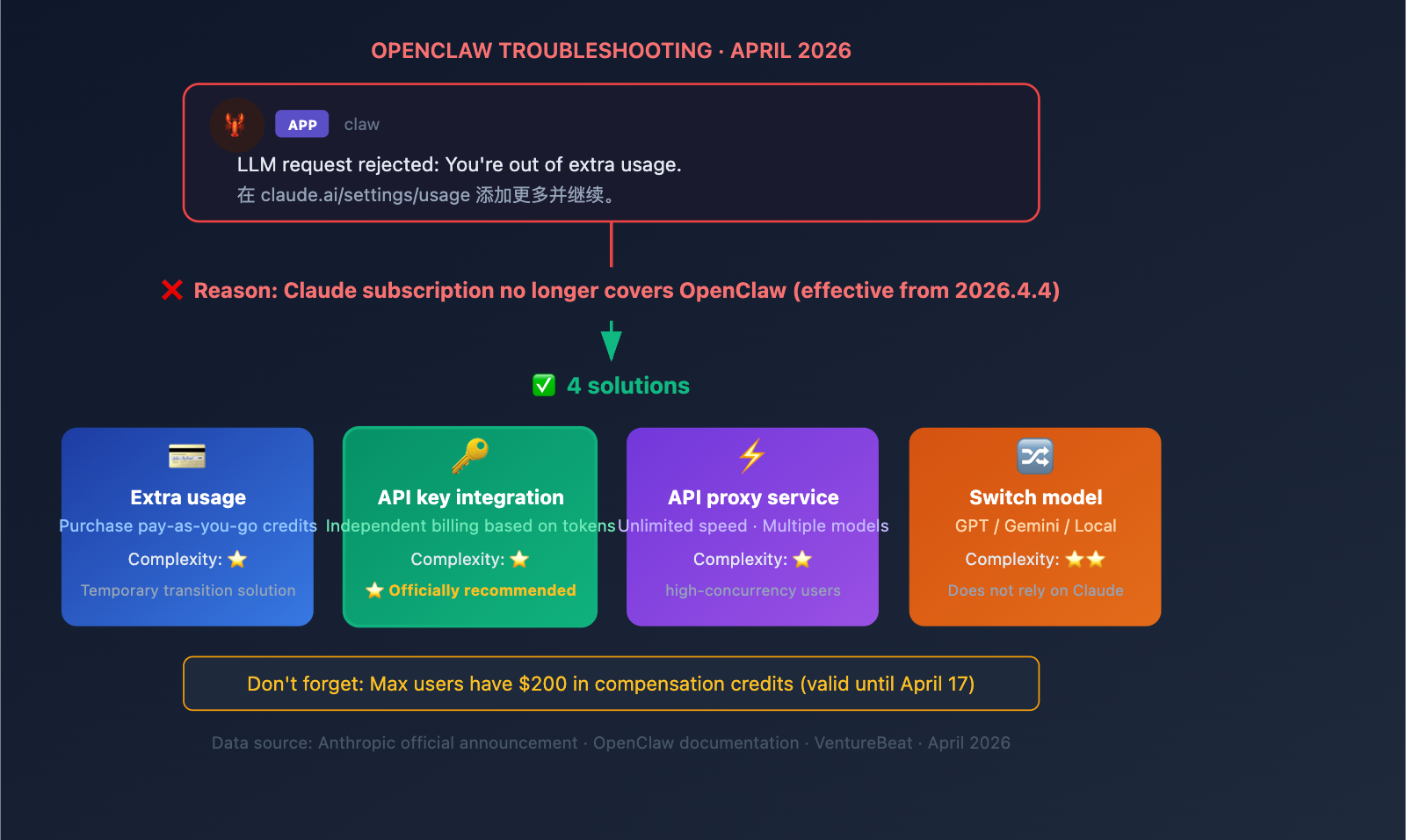
When you see the following error in OpenClaw:
claw APP
LLM request rejected: You're out of extra usage.
Add more at claude.ai/settings/usage and keep going.
This error means: Your Claude subscription quota has been restricted by Anthropic for use with third-party tools like OpenClaw. You need to purchase additional "Extra Usage" credits or switch to a different access method.
| Item | Meaning |
|---|---|
| LLM request rejected | The Claude API rejected the request from OpenClaw |
| You're out of extra usage | You have no available "Extra Usage" (pay-as-you-go) quota |
| claude.ai/settings/usage | Anthropic's link to purchase Extra Usage credits |
| Root Cause | As of April 4, 2026, Claude subscriptions no longer cover third-party tools |
Why Claude in OpenClaw Suddenly Stopped Working
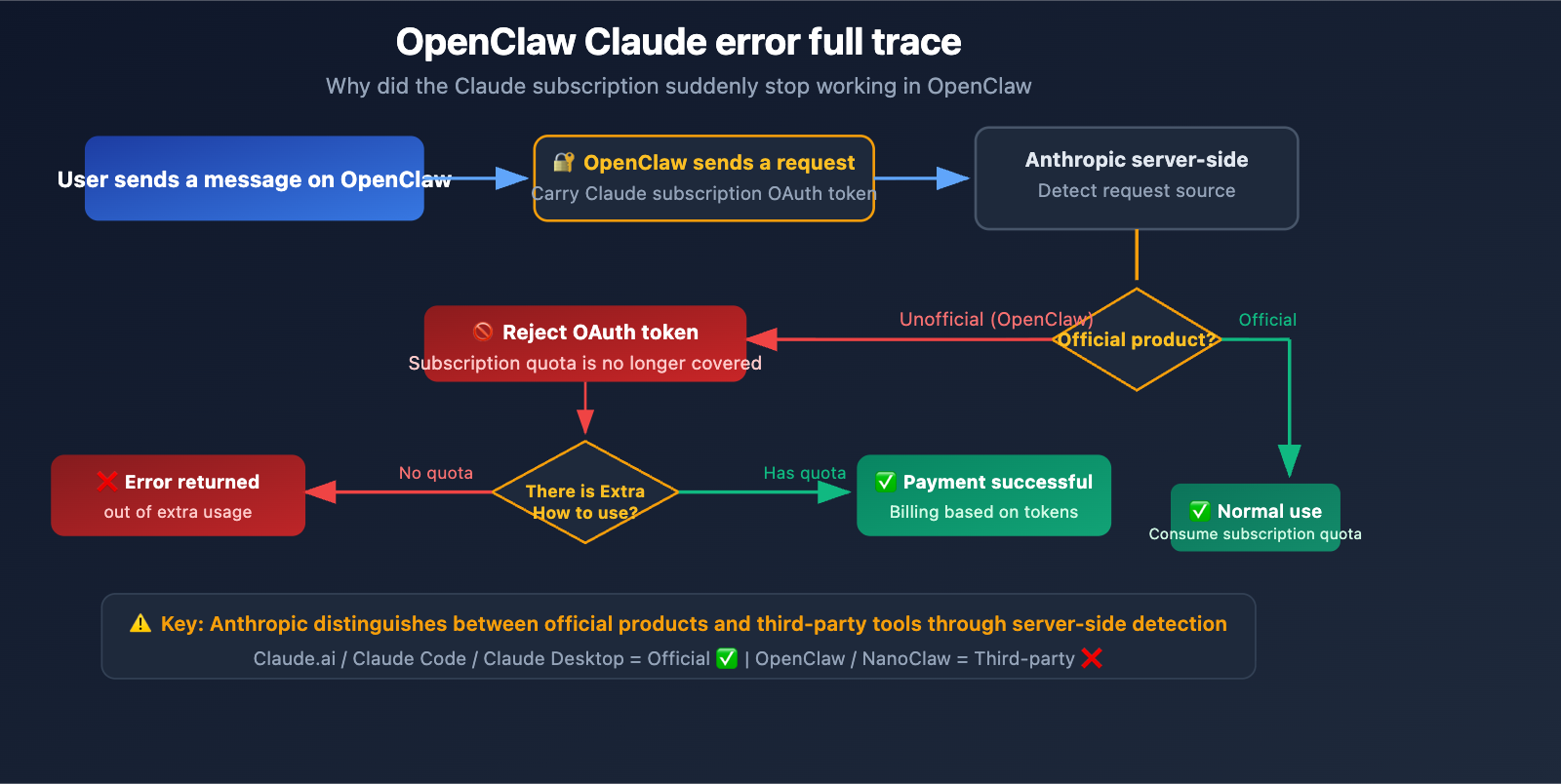
Anthropic officially enforced a ban on third-party tools on April 4, 2026, at 12:00 PM PT. Here are the core changes:
- ❌ Before: Claude Pro ($20/mo) / Max ($200/mo) subscription quotas could be used in OpenClaw.
- ✅ Now: Subscription OAuth tokens are restricted to official products like Claude.ai, Claude Code, and Claude Desktop.
- ⚠️ Third-party tools: OpenClaw, NanoClaw, etc., must now use "Extra Usage" (pay-as-you-go) or an independent API key.
Boris Cherny, head of Claude Code at Anthropic, explained: "Our subscription model wasn't designed for the usage patterns of these third-party tools. These tools place disproportionate stress on our systems."
The technical reason boils down to token arbitrage—some users were running $1,000 to $5,000 worth of workloads in OpenClaw using a $200/month Max subscription. Furthermore, third-party tools couldn't leverage Anthropic's Prompt Cache optimization, resulting in full computational costs for every single request.
OpenClaw Claude Error Solution 1: Purchase Extra Usage Credits
Steps
This is the official method recommended by Anthropic—purchasing Extra Usage pay-as-you-go credits directly on claude.ai.
Step 1: Open your browser and visit claude.ai/settings/usage (the link provided in the error message).
Step 2: Log in to your Claude Pro/Max account.
Step 3: Enable pay-as-you-go billing in the Extra Usage settings.
Step 4: Set an automatic recharge threshold (optional) or purchase a one-time credit amount.
Extra Usage Billing Rates
Extra Usage is billed at standard API rates:
| Claude Model | Input Price (/Million Tokens) | Output Price (/Million Tokens) |
|---|---|---|
| Opus 4.6 | $5 | $25 |
| Sonnet 4.6 | $3 | $15 |
| Haiku 4.5 | $1 | $5 |
Cost Estimation
Using typical OpenClaw usage as an example:
| Usage Intensity | Avg. Daily Token Consumption | Avg. Monthly Cost (Sonnet 4.6) | Comparison to Max Subscription |
|---|---|---|---|
| Light | 500k Tokens | ~$25/month | Lower than $200 sub |
| Moderate | 2M Tokens | ~$100/month | Lower than $200 sub |
| Heavy | 10M Tokens | ~$500/month | Higher than $200 sub |
| Extreme | 50M Tokens | ~$2,500/month | Much higher than $200 sub |
⚠️ Cost Warning: If you were a heavy OpenClaw user previously, the monthly cost of the Extra Usage plan might far exceed your original $200 Max subscription fee. This is exactly why Anthropic stopped covering third-party tools—some users' actual consumption far outweighed the subscription price.
Anthropic $200 Compensation Credits
Anthropic has provided one-time compensation credits equal to the monthly fee for affected users:
- Pro users receive $20 in credits.
- Max users receive $200 in credits.
- Credits must be used by April 17, 2026, after which they will expire.
- Credits can be used for Extra Usage on Claude.ai, Claude Code, Claude Desktop, or third-party applications.
OpenClaw Claude Error Solution 2: Switch to API Key Access (Recommended)
Why the API Key approach is recommended
The official OpenClaw documentation clearly states: For production environments or multi-user scenarios, Anthropic API key authentication is the most secure and recommended approach. Compared to the Extra Usage plan, the API key approach offers several advantages:
- It doesn't depend on your Claude subscription status.
- Costs are more transparent (billed directly by token).
- It's not affected by future changes to Anthropic's policies.
- It supports more flexible quota management.
How to configure your OpenClaw API Key
Method 1: Configure via environment variables
# Set your Anthropic API key
export ANTHROPIC_API_KEY="sk-ant-your-api-key-here"

# Add to your shell configuration file for persistence
echo 'export ANTHROPIC_API_KEY="sk-ant-your-api-key-here"' >> ~/.zshrc
source ~/.zshrc
Method 2: Configure via an API proxy service (Recommended)
# Use the APIYI API proxy service - access all models with one key
export OPENAI_API_KEY="your-apiyi-key"
export OPENAI_BASE_URL="https://api.apiyi.com/v1"
View OpenClaw multi-model API key configuration example
# OpenClaw configuration file
# Switching from OAuth to API Key mode

providers:
  # Method 1: Use Anthropic API key directly
  anthropic:
    api_key: "sk-ant-your-key"
    models:
      - claude-sonnet-4
      - claude-haiku-4

  # Method 2: Unified access via APIYI (Recommended)
  # Access Claude, GPT, and Gemini with a single key
  openai-compatible:
    api_key: "your-apiyi-key"
    base_url: "https://api.apiyi.com/v1"
    models:
      - claude-sonnet-4
      - claude-opus-4
      - gpt-4o
      - gemini-3.1-pro

default_provider: openai-compatible
default_model: claude-sonnet-4
🚀 Quick Migration: Switching from OAuth to an API key takes just 3 steps: get your API key → set your environment variables → restart OpenClaw. Through APIYI (apiyi.com), you can obtain a unified API key, allowing you to access the entire suite of models—including Claude, GPT, and Gemini—with a single configuration, eliminating the need to manage multiple API accounts separately.
OpenClaw Claude Error Solution 3: Using an API Proxy Service
Core Advantages of API Proxy Services
For developers who use OpenClaw frequently, using an API proxy service offers several unique benefits:
| Comparison Dimension | Direct Anthropic | Extra Usage | APIYI Proxy Service |
|---|---|---|---|
| Pay-as-you-go | ✅ | ✅ | ✅ |
| Multi-model Support | Claude only | Claude only | Claude/GPT/Gemini/Qwen, etc. |
| Configuration Complexity | Requires Anthropic account | Requires Claude subscription | Just update the base_url |
| Rate Limiting | Limited | Depends on subscription Tier | No rate limits |
| Pricing | Official price | Official price | Competitive |
| Model Switching | Need to change Key | Claude only | One Key for everything |
Integration Code for Proxy Service
import openai

# Simply modify the base_url; the rest of the code remains unchanged
client = openai.OpenAI(
    api_key="your-apiyi-key",
    base_url="https://api.apiyi.com/v1"
)

# Claude model invocation used in OpenClaw
response = client.chat.completions.create(
    model="claude-sonnet-4",
    messages=[{"role": "user", "content": "Help me analyze this code"}]
)
🎯 Pro Tip: If you're using both Claude and other models in OpenClaw, the unified interface at APIYI (apiyi.com) is incredibly convenient—you don't need to configure separate API keys and base_urls for every model provider. One configuration covers them all.
OpenClaw Claude Error Solution 4: Migrating to Other Models
Alternative Model Options
If you don't want to pay extra for Claude, you can switch to other model providers within OpenClaw:
| Alternative | Model | Advantages | Notes |
|---|---|---|---|
| OpenAI | GPT-4o / Codex | ChatGPT subscription still works with OpenClaw | Requires OpenAI account |
| Gemini 3.1 Pro | Strong reasoning capabilities | Subject to 429 rate limits | |
| Open Source | Llama 4 / Qwen3 | Completely free, runs locally | Requires GPU hardware |
| Multi-model Proxy | Full range of models | One-click switch, pay-as-you-go | Requires third-party platform |
Example: Switching OpenClaw to OpenAI
OpenAI has confirmed that ChatGPT subscriptions can still be used within OpenClaw—this is OpenAI's competitive response to Anthropic's restrictions.
# Switch to OpenAI in OpenClaw
export OPENAI_API_KEY="sk-your-openai-key"

# Or use a local model (via Ollama)
# Completely free, no API key required
ollama run llama4
Using Local Models with OpenClaw
For budget-conscious users, running local models via Ollama is a zero-cost alternative:
# Install Ollama
curl -fsSL https://ollama.com/install.sh | sh

# Download models
ollama pull llama4
ollama pull qwen3:14b

# OpenClaw will automatically detect local Ollama models
💡 Hybrid Strategy: Many developers use a hybrid approach: "Claude/GPT for critical tasks + local models for daily tasks." Managing cloud model invocation via APIYI (apiyi.com) while using local Ollama for simple tasks is the perfect balance between cost and performance.
Overview of 4 Solutions for OpenClaw Claude Errors
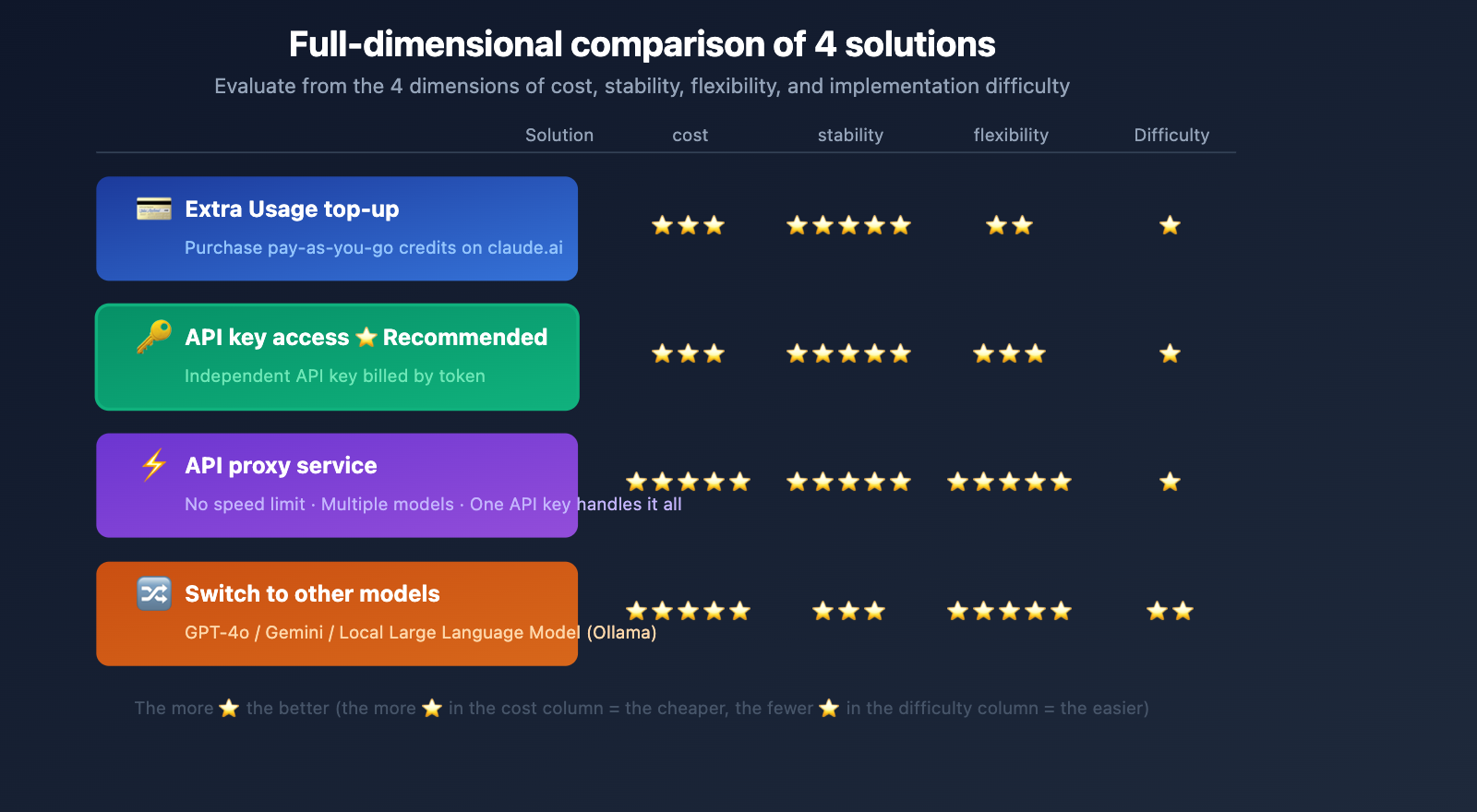
| Solution | Cost | Performance | Complexity | Recommended Use Case |
|---|---|---|---|---|
| Extra Usage Top-up | Pay-per-token | Continue using Claude | Lowest | Casual users, temporary fix |
| API Key Access | Pay-per-token | Most stable | Low | Production environments (Recommended) |
| API Proxy Service | Pay-per-use | Most flexible | Low | Multi-model users, high concurrency |
| Switch Model | Free to Paid | Model-dependent | Medium | Scenarios not dependent on Claude |
OpenClaw Error Troubleshooting Checklist
If you run into Claude-related errors in OpenClaw, follow these steps to troubleshoot:
Step 1: Identify the Error Type
You're out of extra usage→ Use the solutions in this article (subscription limits reached).invalid_api_key→ Verify your API key is correct.rate_limit_exceeded→ Wait a bit or switch to an API proxy service.model_not_found→ Check for typos in the model name.
Step 2: Check Your Current Authentication Method
- If using OAuth (Claude subscription login) → You'll need to switch to an API key or purchase Extra Usage.
- If using an API key → Check your balance and usage limits.
Step 3: Choose a Solution
- For temporary use → Purchase Extra Usage.
- For long-term use → Switch to an API key + API proxy service.
- To cut costs → Migrate to other models or local models.
FAQ
Q1: Does the “LLM request rejected” error in OpenClaw mean my account is banned?
No. This error isn't an account ban; it’s due to a policy change by Anthropic. As of April 4, 2026, Claude Pro/Max subscriptions no longer cover the use of third-party tools like OpenClaw. Your Claude account is perfectly fine and will continue to work normally on Claude.ai and in Claude Code. You simply need to purchase Extra Usage or switch to API key mode to use it within OpenClaw.
Q2: I’m already a Claude Max $200/month subscriber; why do I have to pay extra?
Anthropic found that some Max users were consuming far more than the $200 monthly fee through OpenClaw (some as high as $1,000–$5,000), placing "disproportionate pressure" on their systems. Consequently, Anthropic decided that third-party tools must be paid for based on actual usage. As compensation, Max users received a one-time $200 credit (valid until April 17). If you're looking to manage costs, we recommend optimizing your spending via an API proxy service like APIYI (apiyi.com).
Q3: Will OpenClaw’s features be affected if I switch from OAuth to an API key?
Not at all. All OpenClaw features work perfectly in API key mode, including conversation memory, tool invocation, and multi-model switching. In fact, the official OpenClaw documentation recommends using API key authentication rather than OAuth for production environments. By using APIYI (apiyi.com), you can even access all major models—including Claude, GPT, and Gemini—with a single key.
Summary
Key points for resolving the OpenClaw LLM request rejected: You're out of extra usage error:
- Root Cause: As of April 4, 2026, Anthropic prohibits the use of subscription OAuth tokens in third-party tools.
- Temporary Fix: Purchase Extra Usage credits at claude.ai/settings/usage.
- Recommended Solution: Switch to API key access mode, which doesn't rely on your subscription status.
- Optimal Solution: Use an API proxy service to access the entire model lineup with one key, avoiding rate-limiting issues.
- Compensation Credits: Don't forget to claim your compensation credits equal to your monthly fee (valid until April 17).
For developers using OpenClaw long-term, we recommend connecting via APIYI (apiyi.com). Simply update your base_url to manage your Claude, GPT, and Gemini model invocations with a single API key, saving you the headache of managing multiple platforms and accounts.
📚 References
-
OpenClaw Official Documentation: Gateway authentication guide
- Link:
docs.openclaw.ai/gateway/authentication - Description: The officially recommended method for configuring your API key.
- Link:
-
OpenClaw FAQ: Troubleshooting and common issues
- Link:
docs.openclaw.ai/help/faq - Description: Includes official answers regarding "LLM request rejected" errors.
- Link:
-
Anthropic Extra Usage Management: Setting up pay-as-you-go for Claude
- Link:
support.claude.com/en/articles/12429409-manage-extra-usage-for-paid-claude-plans - Description: How to enable and manage Extra Usage settings.
- Link:
-
VentureBeat Report: Anthropic ends Claude subscription support for OpenClaw
- Link:
venturebeat.com/technology/anthropic-cuts-off-the-ability-to-use-claude-subscriptions-with-openclaw-and - Description: Detailed coverage and background analysis of the policy changes.
- Link:
-
Claude API Pricing Page: Token pricing for various models
- Link:
platform.claude.com/docs/en/about-claude/pricing - Description: The latest API pricing for Claude models.
- Link:
Author: APIYI Technical Team
Technical Discussion: If you run into any OpenClaw configuration issues, feel free to discuss them in the comments. For more AI development resources, visit the APIYI documentation at docs.apiyi.com.