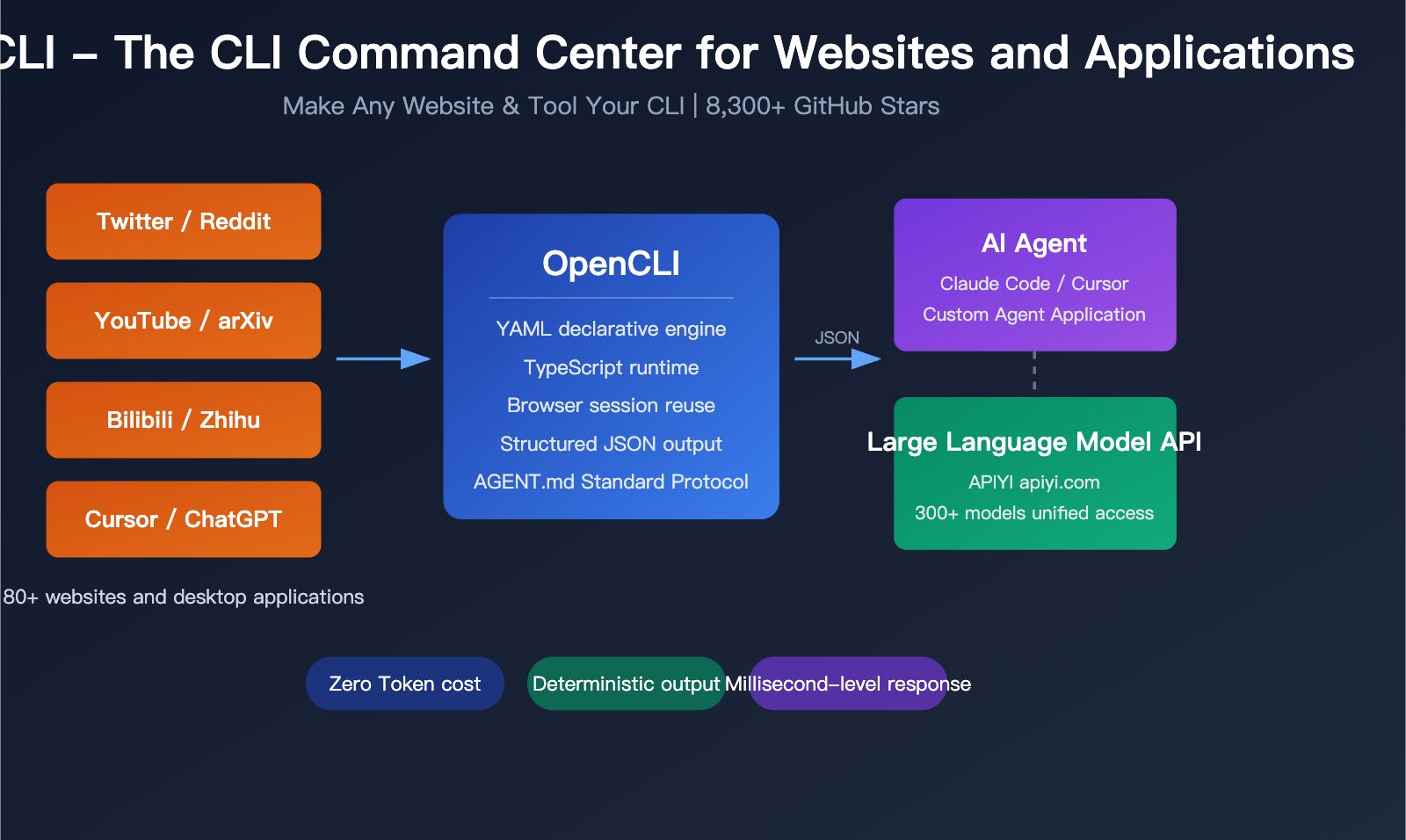
How can AI Agents automatically fetch web data and control desktop applications without consuming massive amounts of tokens? This is a question every AI developer is pondering. OpenCLI is the open-source project born to solve this exact pain point—it can transform 80+ websites and Electron desktop applications into standardized CLI command-line tools, allowing AI Agents to obtain structured data at zero token cost.
Core Value: By the end of this article, you'll understand OpenCLI's 5 core capabilities, practical application scenarios, and how to integrate it with Large Language Model APIs to build more powerful AI Agent workflows.
What is OpenCLI: A Unified CLI Entry Point for Websites and Apps
OpenCLI is an open-source project developed by jackwener, a PMC member of Apache Arrow/DataFusion. It's positioned as a universal CLI command hub and AI-native runtime. The project has over 8,300 stars on GitHub and is licensed under the Apache-2.0 open-source license.
In simple terms, OpenCLI's core philosophy is: Make Any Website & Tool Your CLI.
| Project Information | Details |
|---|---|
| Project Name | OpenCLI |
| GitHub Address | github.com/jackwener/opencli |
| Star Count | 8,300+ |
| Development Language | TypeScript |
| Runtime Environment | Node.js 20+ / Bun 1.0+ |
| Open Source License | Apache-2.0 |
| Built-in Adapters | 80+ websites and applications |
| Commit Count | 565+ commits |
The Core Difference Between OpenCLI and Traditional Scraping Tools
Traditional web data scraping solutions (like Puppeteer, Selenium) require writing a lot of script code and are often fragile in the face of anti-scraping measures. OpenCLI takes a completely different technical approach:
- Declarative Adapters: Define data pipelines with YAML, no need to write complex selector code
- Browser Session Reuse: Directly uses your Chrome browser's login state, no separate authentication handling needed
- Built-in Anti-Detection: Automatically handles
navigator.webdriverfingerprinting, CDP trace cleanup, etc. - Structured Output: Supports multiple output formats like Table, JSON, YAML, Markdown, CSV
🎯 Technical Recommendation: OpenCLI's structured data output capability is perfect for use with Large Language Model APIs.
We recommend using the APIYI apiyi.com platform to call Large Language Models for analyzing and processing data obtained by OpenCLI,
building a complete AI Agent data collection and intelligent analysis pipeline.
Detailed Explanation of OpenCLI's 5 Core Capabilities
Capability One: 80+ Built-in Website Adapters
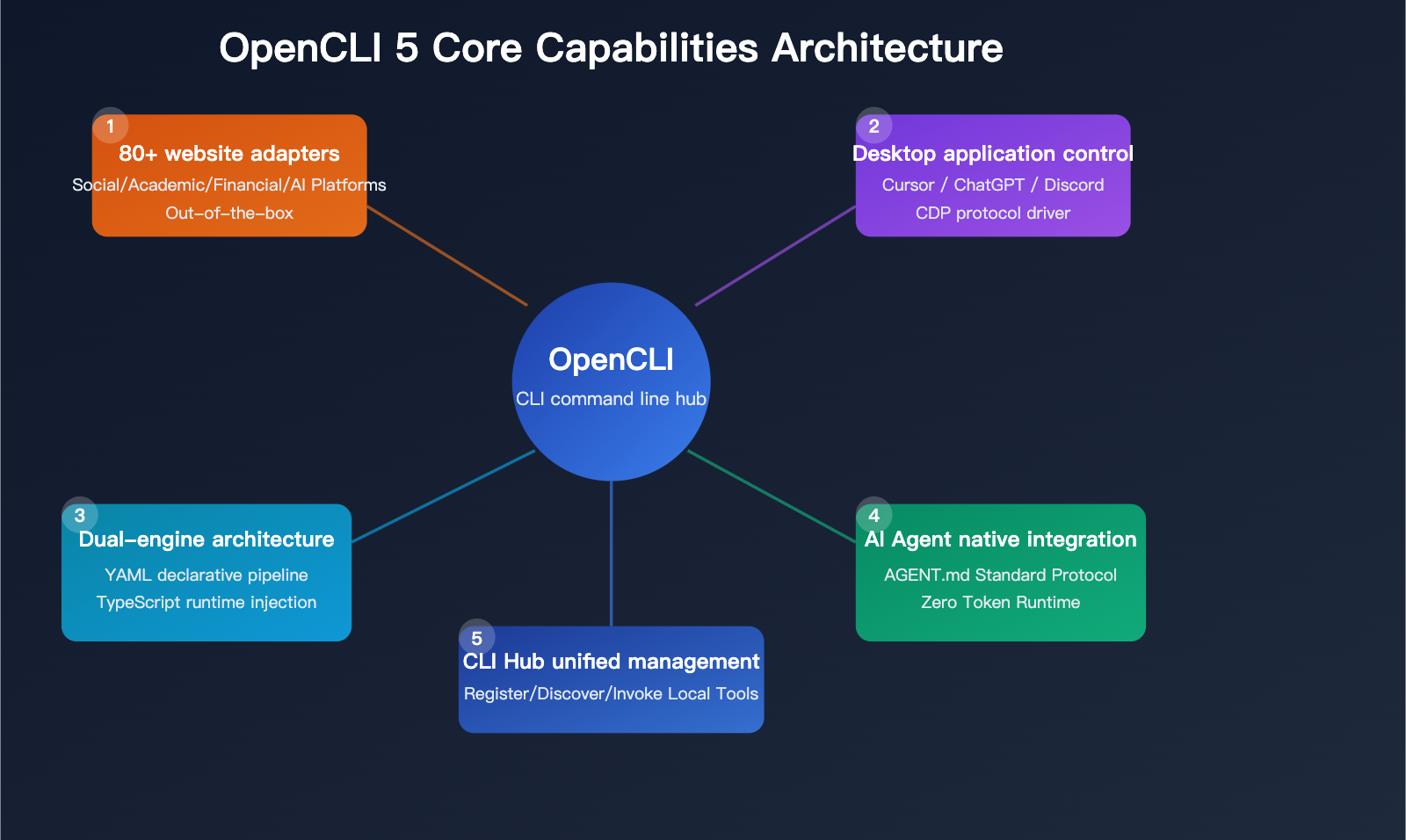
OpenCLI comes with built-in website adapters covering multiple domains, ready to use out of the box:
| Domain | Supported Platforms | Data Types |
|---|---|---|
| Social Media | Twitter/X, Reddit, LinkedIn, Instagram | Posts, comments, user info |
| Content Platforms | YouTube, TikTok, Medium, HackerNews | Video info, articles, discussions |
| Chinese Platforms | Bilibili, Zhihu, Xiaohongshu | Videos, answers, notes |
| Academic Research | arXiv, Stack Overflow | Papers, technical Q&A |
| Financial Data | Yahoo Finance, Bloomberg | Stocks, financial data |
| AI Platforms | HuggingFace, Grok | Model info, AI conversations |
Usage is very straightforward:
# Get HackerNews top posts
opencli hackernews top --limit 10 --format json

# Search arXiv papers
opencli arxiv search "large language model" --limit 5

# Get GitHub repository info
opencli github repo jackwener/opencli --format table
Capability Two: Electron Desktop App Control
OpenCLI can not only handle web pages but also control Electron desktop applications through the Chrome DevTools Protocol (CDP):
- Cursor IDE: Execute code editing operations via CLI
- ChatGPT Desktop: Send conversation requests from the command line
- Discord: Automate message management
- Notion: Export document data
# Control Cursor IDE
opencli cursor open /path/to/project

# Interact with ChatGPT Desktop via CLI
opencli chatgpt ask "Explain the Transformer architecture"
Capability Three: Dual-Engine Architecture
OpenCLI employs a dual-engine architecture: YAML declarative + TypeScript runtime injection:
| Engine Type | Use Case | Characteristics |
|---|---|---|
| YAML Declarative | Standard data scraping | Simple and intuitive, community-friendly for contributions |
| TypeScript Runtime | Complex browser automation | Flexible and powerful, supports dynamic interactions |
YAML adapter example:
# Concise declarative data pipeline
name: hackernews-top
source:
  url: "https://news.ycombinator.com"
  type: html
extract:
  selector: ".titleline > a"
  fields:
    - name: title
      attr: text
    - name: url
      attr: href
Capability Four: AI Agent Native Integration
This is OpenCLI's most forward-looking design—it's optimized for AI Agent tool invocation:
AGENT.md Standard Protocol: AI Agents (like Claude Code, Cursor Agent) can discover and invoke tools provided by OpenCLI through a standardized interface.
# AI Agent discovers available commands via Bash tool
opencli list

# AI Agent invokes specific commands to get data
opencli hackernews top --format json --limit 5
Zero Token Runtime Cost: Unlike solutions like Browser-Use that require LLMs to parse web pages, OpenCLI's adapters are deterministic—the same command always produces output with the same structure, consuming zero LLM Tokens.
💡 Development Recommendation: When building AI Agents, we recommend using OpenCLI as the data collection layer,
combined with the Large Language Model API provided by APIYI apiyi.com as the intelligent processing layer, to achieve efficient automated workflows.
Capability Five: CLI Hub Unified Management
OpenCLI can also serve as a unified registry for local CLI tools:
# Register custom CLI tools
opencli register mycli --path /usr/local/bin/mycli

# AI Agents can discover all registered tools
opencli list --all

# Automatically generate tool descriptions for Agent use
opencli describe mycli
This means you can integrate any local tool into an AI Agent's toolchain, achieving unified tool discovery and invocation.
OpenCLI Quick Start Guide
Installation and Configuration
# Install using npm
npm install -g opencli

# Or install using Bun
bun install -g opencli

# Verify installation
opencli --version
Browser Connection Setup
OpenCLI achieves zero-configuration browser connection through a lightweight Chrome extension:
# Install the browser bridge extension
opencli bridge install

# Verify browser connection
opencli bridge status
Basic Usage Example
# Example workflow combining OpenCLI and Large Language Model APIs in Python
import subprocess
import json
import openai

# Step 1: Get structured data using OpenCLI
result = subprocess.run(
    ["opencli", "hackernews", "top", "--limit", "5", "--format", "json"],
    capture_output=True, text=True
)
news_data = json.loads(result.stdout)

# Step 2: Analyze data using Large Language Model API
client = openai.OpenAI(
    api_key="YOUR_API_KEY",
    base_url="https://api.apiyi.com/v1"  # Using APIYI unified interface
)

response = client.chat.completions.create(
    model="claude-sonnet-4-20250514",
    messages=[{
        "role": "user",
        "content": f"Analyze the technology trends in these HackerNews top posts:\n{json.dumps(news_data, indent=2)}"
    }]
)
print(response.choices[0].message.content)
View Complete AI Agent Workflow Code
import subprocess
import json
import openai
from typing import List, Dict

class OpenCLIAgent:
    """AI Agent combining OpenCLI data collection and Large Language Model analysis"""

    def __init__(self, api_key: str):
        self.client = openai.OpenAI(
            api_key=api_key,
            base_url="https://api.apiyi.com/v1"
        )

    def fetch_data(self, source: str, command: str, **kwargs) -> Dict:
        """Get structured data through OpenCLI"""
        cmd = ["opencli", source, command, "--format", "json"]
        for key, value in kwargs.items():
            cmd.extend([f"--{key}", str(value)])

        result = subprocess.run(cmd, capture_output=True, text=True)
        return json.loads(result.stdout)

    def analyze(self, data: Dict, prompt: str, model: str = "claude-sonnet-4-20250514") -> str:
        """Analyze data using Large Language Model"""
        response = self.client.chat.completions.create(
            model=model,
            messages=[{
                "role": "user",
                "content": f"{prompt}\n\nData:\n{json.dumps(data, indent=2, ensure_ascii=False)}"
            }]
        )
        return response.choices[0].message.content

    def run_workflow(self, source: str, command: str, analysis_prompt: str, **kwargs) -> str:
        """Execute complete data collection + analysis workflow"""
        data = self.fetch_data(source, command, **kwargs)
        return self.analyze(data, analysis_prompt)

# Usage example
agent = OpenCLIAgent(api_key="your-apiyi-key")
result = agent.run_workflow(
    source="arxiv",
    command="search",
    analysis_prompt="Summarize the core contributions and technology trends in these papers",
    query="AI agent tool use",
    limit=10
)
print(result)
🚀 Quick Start: We recommend using the APIYI apiyi.com platform to get your Large Language Model API Key,
then combine it with OpenCLI to quickly build AI Agent data collection and analysis prototypes. You can complete integration in just 5 minutes.
OpenCLI + Large Language Model APIs: The Perfect Combination for AI Agent Toolchains
To understand OpenCLI's position in the AI Agent ecosystem, you need to see the layered structure of the entire toolchain:
Three-Layer Architecture of AI Agent Toolchains
| Layer | Function | Representative Tools | Description |
|---|---|---|---|
| Intelligent Decision Layer | AI reasoning and decision-making | Large Language Models like Claude, GPT, Gemini | Unified access through APIYI apiyi.com |
| Tool Execution Layer | Data collection and operations | OpenCLI, MCP tools | Deterministic execution, zero Token consumption |
| Data Storage Layer | Data persistence | Databases, file systems | Result persistence and caching |
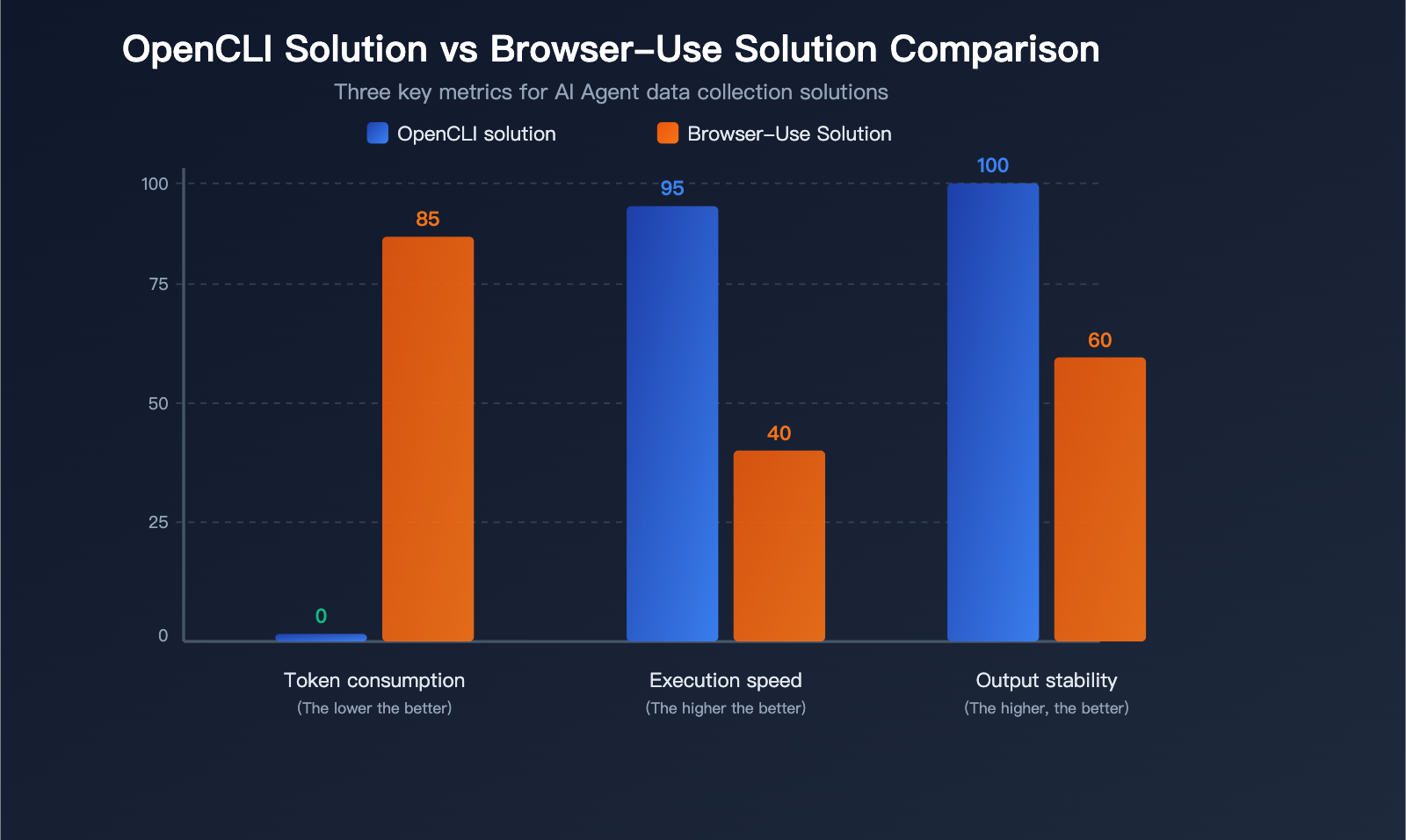
OpenCLI Solution vs Browser-Use Solution Comparison
| Comparison Dimension | OpenCLI Solution | Browser-Use Solution | Advantage |
|---|---|---|---|
| Token Consumption | Zero consumption (deterministic execution) | Token consumption per interaction | OpenCLI |
| Execution Speed | Millisecond response | Seconds (waiting for LLM parsing) | OpenCLI |
| Output Stability | Completely consistent structure | Depends on LLM parsing quality | OpenCLI |
| Adaptation Scope | 80+ pre-built adapters | Theoretically adapts to all websites | Browser-Use |
| New Website Support | Requires writing adapters | Instant support | Browser-Use |
| Complex Interactions | Limited (defined by adapters) | Flexible (LLM understands pages) | Browser-Use |
Best Practice: Use OpenCLI for high-frequency, structured data collection tasks; use Browser-Use solution for low-frequency, complex web interactions. Both can coexist in the same AI Agent.
Practical Application Scenarios
Scenario 1: Technology Trend Monitoring Agent
OpenCLI(collect HackerNews/arXiv/GitHub data)
    ↓ Structured data
Large Language Model API(analyze trends via APIYI calling Claude/GPT)
    ↓ Analysis report
Automated email/Slack notifications
Scenario 2: Competitive Analysis Agent
OpenCLI(collect product reviews/social media discussions)
    ↓ Review data
Large Language Model API(sentiment analysis + competitor comparison summary)
    ↓ Competitive report
Store to database + visualization display
Scenario 3: Content Creation Assistant Agent
OpenCLI(collect industry trends/user questions)
    ↓ Topic materials
Large Language Model API(generate outline + draft writing)
    ↓ Article content
WordPress publishing system
🎯 Selection Advice: When building AI Agent toolchains, we recommend using OpenCLI for the data collection layer,
and accessing mainstream Large Language Models through APIYI apiyi.com for the intelligent analysis layer. This platform supports unified API calls for 300+ models including Claude, GPT, Gemini, etc.
You can switch between different models with one Key, making it easy to quickly validate the best solution.
OpenCLI Plugin Development and Community Ecosystem
Custom Adapter Development
OpenCLI provides convenient plugin development tools:
# Automatically explore website API interfaces
opencli explore https://example.com

# Automatically generate YAML adapters
opencli synthesize https://example.com

# Detect authentication strategies
opencli cascade https://example.com

# Generate commands from URLs
opencli generate https://example.com/page
OpenCLI's five-level authentication strategy covers most website login methods:
| Level | Type | Description |
|---|---|---|
| Level 1 | PUBLIC | No authentication required, public data |
| Level 2 | COOKIE | Uses existing browser cookies |
| Level 3 | HEADER | Custom request header authentication |
| Level 4 | BEARER | Token authentication |
| Level 5 | ADVANCED | Complex multi-step authentication |
Community Contribution Methods
OpenCLI uses an open community plugin model:
# Install community plugins
opencli plugin install github-user/opencli-adapter-name

# Publish your own adapter
opencli plugin publish my-adapter
Frequently Asked Questions
Q1: What’s the difference between OpenCLI and AI coding tools like Claude Code and Aider?
OpenCLI isn't an AI coding tool—it's a website/application CLI-ization tool. Claude Code, Aider, and OpenCode are tools that use Large Language Models to assist with writing code, and they consume LLM tokens. OpenCLI transforms website data and desktop application operations into standard CLI commands—it's the "hands and eyes" of an AI Agent, not the "brain." They're complementary: Large Language Models accessed through APIYI (apiyi.com) serve as the Agent's "brain," while OpenCLI is the "tool" the Agent uses to gather external information.
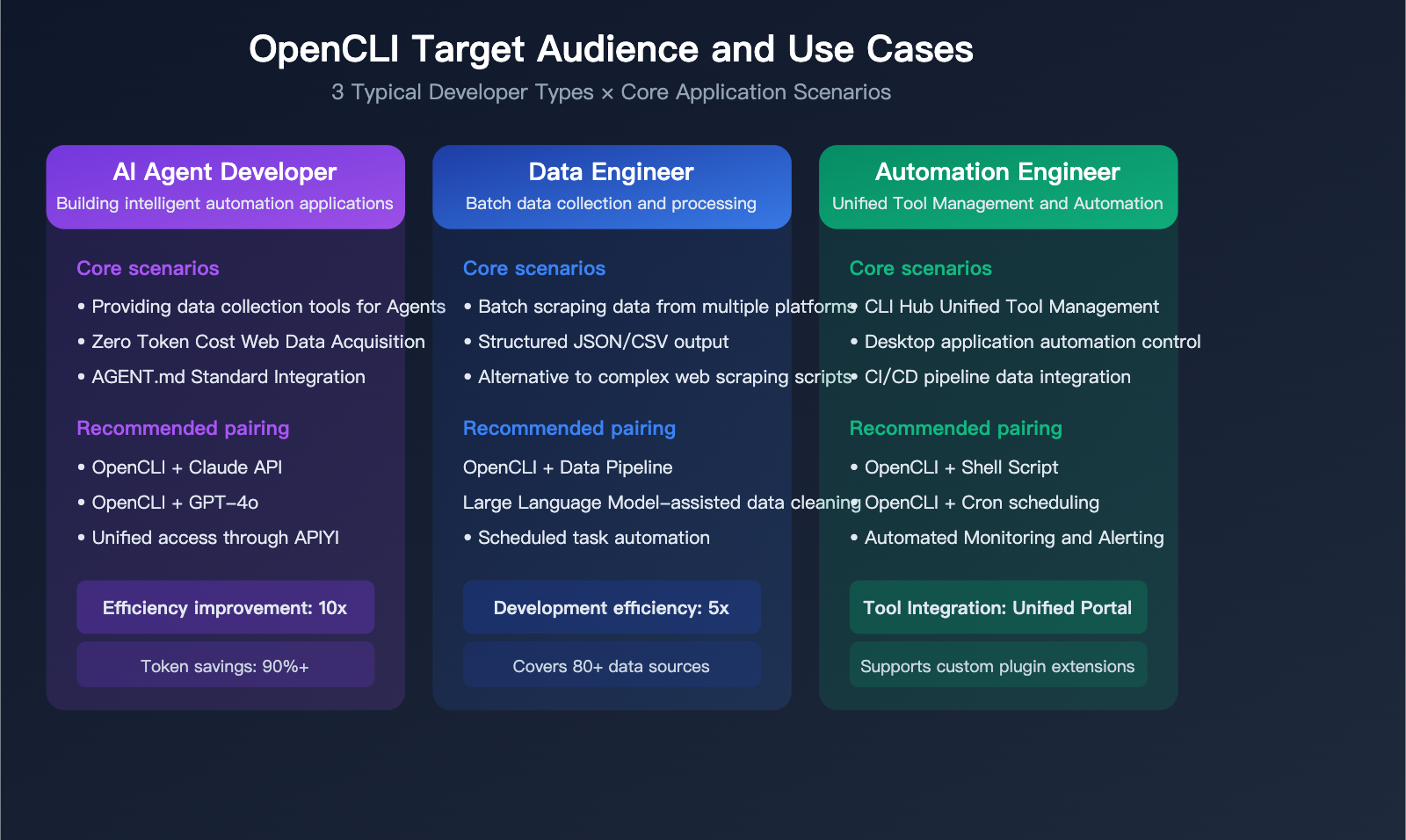
Q2: What kind of developers is OpenCLI suitable for?
OpenCLI is suitable for developers in the following scenarios: those who need to batch-fetch website data, build AI Agent toolchains, automate desktop application operations, or need to manage multiple CLI tools in a unified way. It's particularly well-suited for developers using Large Language Model API platforms like APIYI (apiyi.com) to build Agent applications, as OpenCLI can significantly reduce development costs and token consumption in the data collection phase.
Q3: Are OpenCLI’s 80+ adapters stable? What happens when a website gets redesigned?
OpenCLI's adapters are maintained by the community. When a target website undergoes a redesign, the adapter may need updating. The project is quite active (565+ commits), and the community response time is reasonable. Additionally, OpenCLI provides automated tools like opencli synthesize and opencli explore to quickly generate and update adapters.
Q4: Does OpenCLI support OpenAI-compatible API formats?
OpenCLI itself isn't an API service; it's a CLI tool. However, its output (in JSON/YAML formats) can be directly used as input for Large Language Model APIs. Combined with APIYI's (apiyi.com) OpenAI-compatible interface, you can easily build an automated pipeline of "OpenCLI collection → Large Language Model analysis."
Summary: OpenCLI Empowers AI Agents with Enhanced Tool Capabilities
OpenCLI represents a significant technical direction in the AI Agent ecosystem: decoupling tool execution from intelligent decision-making. By turning websites and desktop applications into CLIs, AI Agents can gather data in a deterministic way, reserving valuable LLM tokens for tasks that genuinely require intelligent reasoning.
Key Takeaways:
- OpenCLI provides 80+ built-in adapters, covering social media, academia, finance, and more
- Dual-engine architecture (YAML + TypeScript) balances simplicity and flexibility
- The AGENT.md standard enables seamless tool discovery and invocation for AI Agents
- Zero-token runtime cost, complementing Browser-Use solutions
- CLI Hub functionality for unified tool management
We recommend integrating mainstream Large Language Models like Claude, GPT, and Gemini through APIYI (apiyi.com). Combined with OpenCLI's data collection capabilities, you can build highly efficient and cost-effective AI Agent applications.
📝 Author: APIYI Technical Team | APIYI apiyi.com – Unified Access Platform for 300+ AI Model APIs
References
-
OpenCLI GitHub Repository: Official source code and documentation
- Link:
github.com/jackwener/opencli - Description: Contains complete installation guides and adapter lists
- Link:
-
OpenCLI AGENT.md Integration Standard: AI Agent tool discovery protocol
- Link:
github.com/jackwener/opencli/blob/main/AGENT.md - Description: Defines how AI Agents discover and use OpenCLI tools
- Link:
-
APIYI Official Documentation: Large Language Model API Integration Guide
- Link:
apiyi.com - Description: Unified API access documentation for 300+ models
- Link: