title: Why Image Generation APIs Use RPM Instead of QPS: A Deep Dive
description: Understanding why image generation APIs like Nano Banana Pro use RPM instead of QPS, and how the synchronous blocking nature of model invocation changes the game.
tags: [AI, API, Technical Deep Dive, Image Generation]
Author's Note: This is a deep dive into why image generation APIs like Nano Banana Pro and Nano Banana 2 use RPM (Requests Per Minute) instead of QPS (Queries Per Second) as their rate-limiting metric. By examining the blocking nature of synchronous calls in models like Gemini, we can better understand the fundamental differences in how these metrics apply.
If you’ve worked with text-based Large Language Model APIs, you’re likely used to the QPS (Queries Per Second) metric. However, when you move to image generation APIs like Nano Banana Pro and Nano Banana 2, the official documentation focuses entirely on RPM (Requests Per Minute)—why don't image generation APIs talk about QPS? This isn't just a naming preference; it's because the synchronous blocking call pattern of image generation makes QPS almost meaningless in this context. This article breaks down the technical differences behind this.
Core Value: After reading this, you’ll understand the fundamental differences between RPM and QPS across various API scenarios, and why the synchronous call pattern of Gemini’s image API makes QPS a moot point.
Core Points: RPM vs. QPS
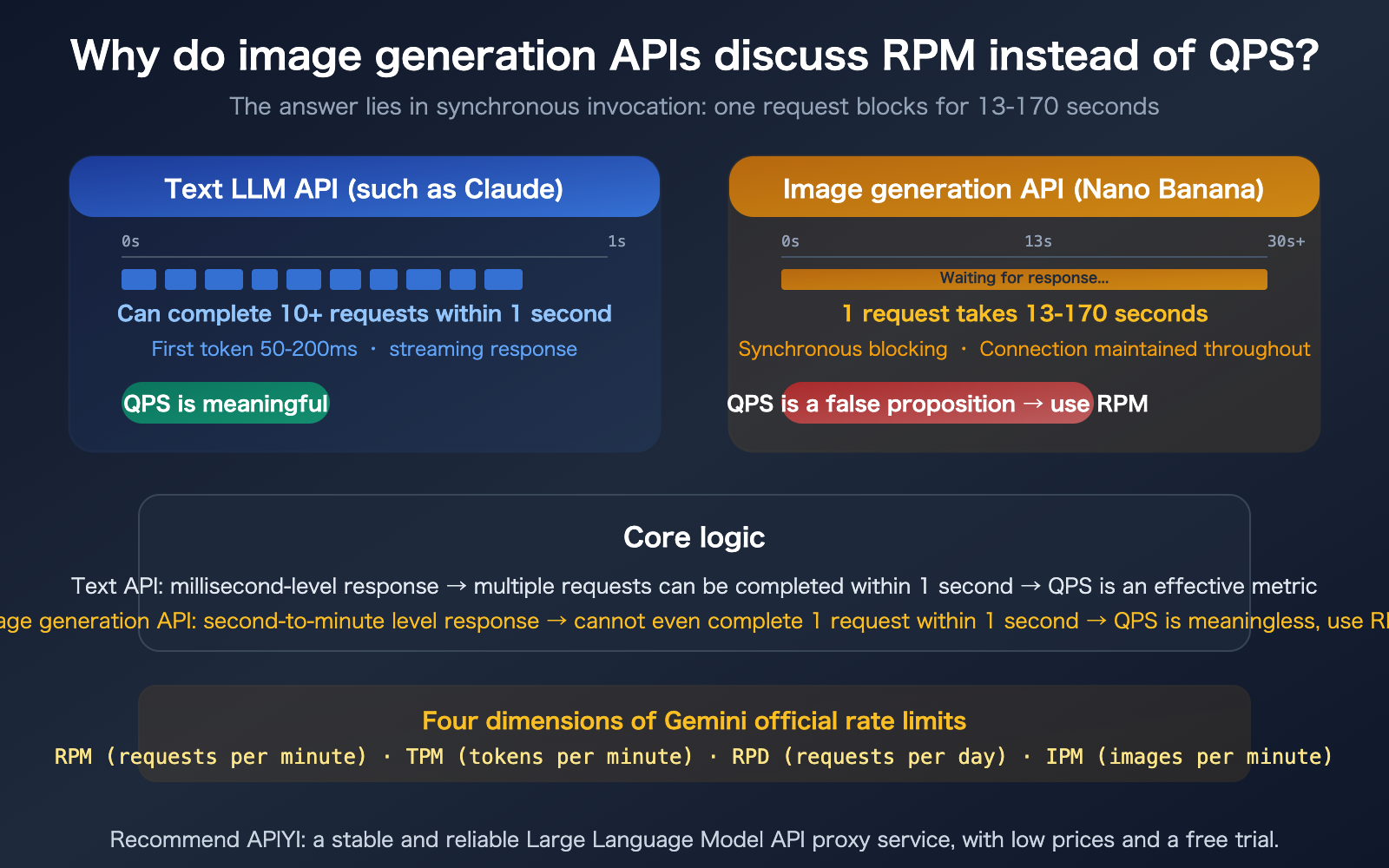
Let's get straight to the point: Image generation APIs use RPM instead of QPS because the blocking time for synchronous calls is so long that QPS becomes meaningless.
| Concept | Definition | Use Case | Suitable for Image APIs? |
|---|---|---|---|
| QPS | Queries Per Second | High-frequency services with millisecond responses | No |
| RPS | Requests Per Second | Basically equivalent to QPS | No |
| RPM | Requests Per Minute | Slow services with second-to-minute responses | Yes |
| IPM | Images Per Minute | Dedicated to image generation | Most suitable |
| RPD | Requests Per Day | Quota management | Yes |
Why QPS is a Misnomer for Image Generation APIs
The key to understanding this issue lies in the synchronous call nature of the Gemini image generation API.
When you call Nano Banana 2 to generate an image, the API is synchronously blocking. Once you send the request, the HTTP connection stays open, and the client waits until the image generation is complete (13–170 seconds) before receiving a response. During this entire time, the connection is just sitting there, waiting.
Let's compare:
- Claude API (Text): The first token returns within 50–200ms; it's streamed, so you get useful results within a second.
- Nano Banana 2 (1K image): It takes at least 13 seconds to return, with the connection blocked the entire time.
Therefore, for image generation APIs, the question of "how many requests can be processed per second" (QPS) doesn't hold up—because a single request can tie up your connection for over 13 seconds. RPM is the only logical unit of measurement.
🎯 Analogy: QPS is like measuring how many fast-food meals a restaurant can serve per second. RPM is like measuring how many tables a fine-dining restaurant can serve per hour. You wouldn't use "dishes served per second" to measure the efficiency of a French restaurant, because a single dish takes 30 minutes to prepare.
By using APIYI (apiyi.com) to call Nano Banana 2, RPM is not restricted by official limits, allowing you to handle more concurrent requests.
Technical Details of Synchronous Calls in Gemini Image Generation API
This is the fundamental basis for understanding RPM vs. QPS.
The Blocking Process of Nano Banana 2 Synchronous Calls
Client sends request
    │
    ▼
TCP connection established ────────────────────┐
    │                                          │
    ▼                                          │
Server receives prompt                         │ Connection stays open
    │                                          │ Client blocked/waiting
    ▼                                          │
Diffusion model inference (13-170 seconds)     │
    │                                          │
    ▼                                          │
Image encoded to base64                        │
    │                                          │
    ▼                                          │
Response returned (contains image data) ───────┘
    │
    ▼
Client receives image
During this process, the client's thread/process is completely occupied. If you use single-threaded synchronous calls, you can only send 60 / generation time requests per minute. For a 13-second 1K image, the single-threaded QPS is approximately 0.077 (0.077 requests per second), which translates to an RPM of only 4.6.
Blocking Times for Nano Banana 2 by Resolution
| Resolution | Typical Gen Time | Single-thread RPM Limit | Single-thread "QPS" |
|---|---|---|---|
| 0.5K | ~8 seconds | ~7.5 RPM | 0.125 |
| 1K | ~13 seconds | ~4.6 RPM | 0.077 |
| 2K | ~30 seconds | ~2 RPM | 0.033 |
| 4K | ~90-170 seconds | ~0.4-0.7 RPM | 0.006-0.011 |
See that? At 4K resolution, the single-threaded "QPS" is only 0.006—meaning it takes an average of 170 seconds to complete a single request. At this scale, discussing QPS is meaningless; RPM is the only effective metric.
When to Use RPM vs. QPS
Scenarios for QPS
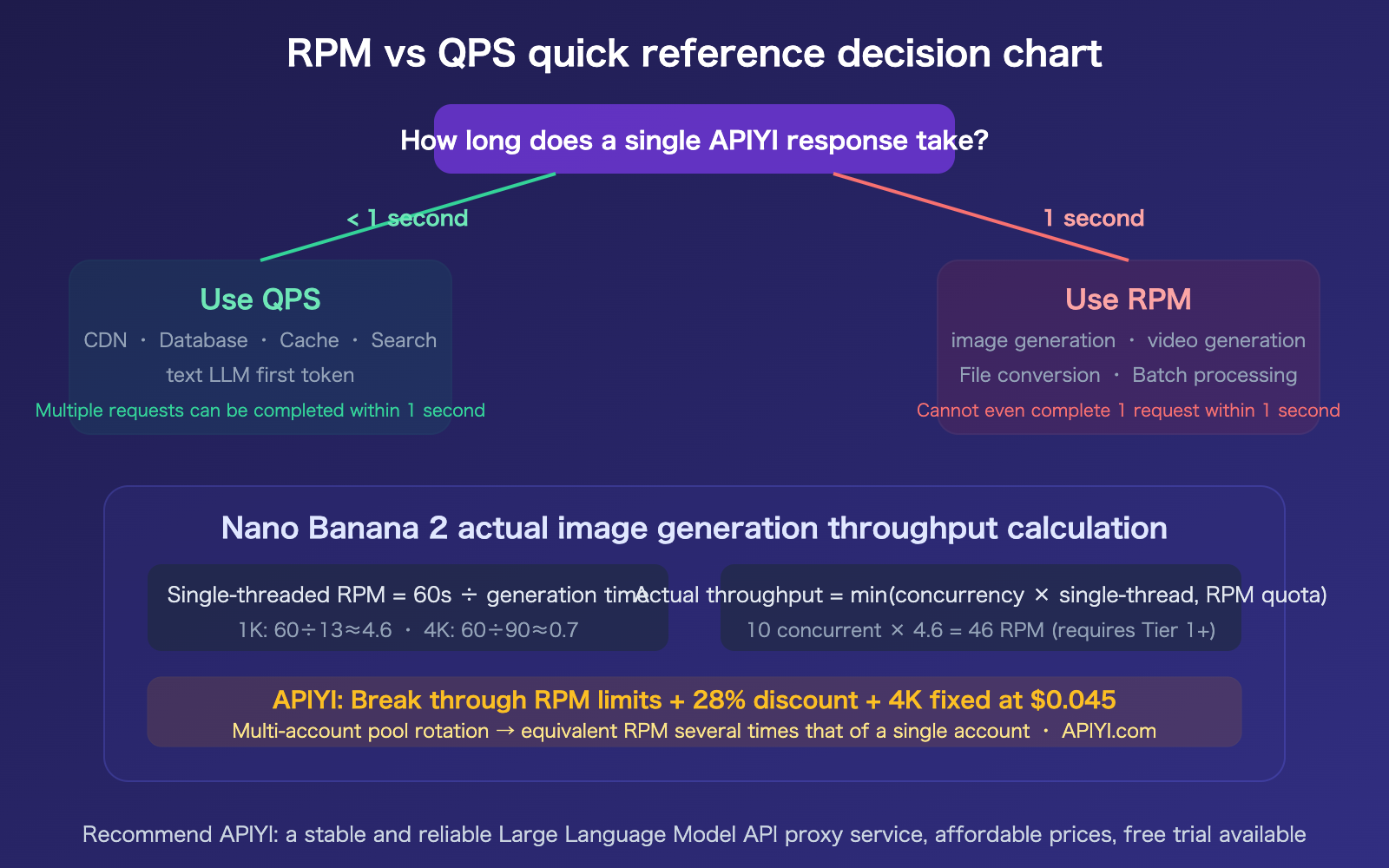
QPS (Queries Per Second) is a meaningful rate metric only when the response time for a single request is significantly less than 1 second.
| Service Type | Typical Response Time | Is QPS Meaningful? | Reason |
|---|---|---|---|
| CDN / Caching | 1-10ms | Highly meaningful | Can handle thousands of requests per second |
| Database Query | 5-50ms | Meaningful | Can handle hundreds of requests per second |
| Text LLM First Token | 50-200ms | Meaningful | Can initiate 5-20 requests per second |
| Search API | 100-500ms | Meaningful | Can complete 2-10 requests per second |
Scenarios for RPM
RPM (Requests Per Minute) is a more reasonable rate metric when single request response times range from seconds to minutes.
| Service Type | Typical Response Time | Why use RPM? | Official Gemini Limits |
|---|---|---|---|
| Image Generation | 8-170 seconds | Cannot complete 1 request in 1 second | RPM + IPM |
| Video Generation | 30-300 seconds | Single request takes minutes | RPM |
| Batch Data Processing | Minutes | Task granularity is larger than seconds | RPM + RPD |
| File Conversion | 5-60 seconds | Long processing time per request | RPM |
The Four-Dimensional Rate Limits of Gemini Image APIs
Google has designed four dimensions of rate limits for Gemini image generation APIs. Triggering any one of these will result in rate limiting:
| Dimension | Meaning | Free Tier | Tier 1 (Paid) |
|---|---|---|---|
| RPM | Requests Per Minute | 5-15 | 150-300 |
| TPM | Tokens Per Minute | Limited | Higher |
| RPD | Requests Per Day | 20-100 | 1,000+ |
| IPM | Images Per Minute | Limited | Higher |
Note IPM (Images Per Minute)—this is a metric specifically designed for image generation. Since a single request can generate multiple images, RPM and IPM do not have a simple one-to-one relationship.
How to Boost Real-World Throughput for Image Generation APIs
Now that you've got a handle on what RPM really means, the next logical question is: how do you maximize your image generation efficiency while staying within those RPM limits?
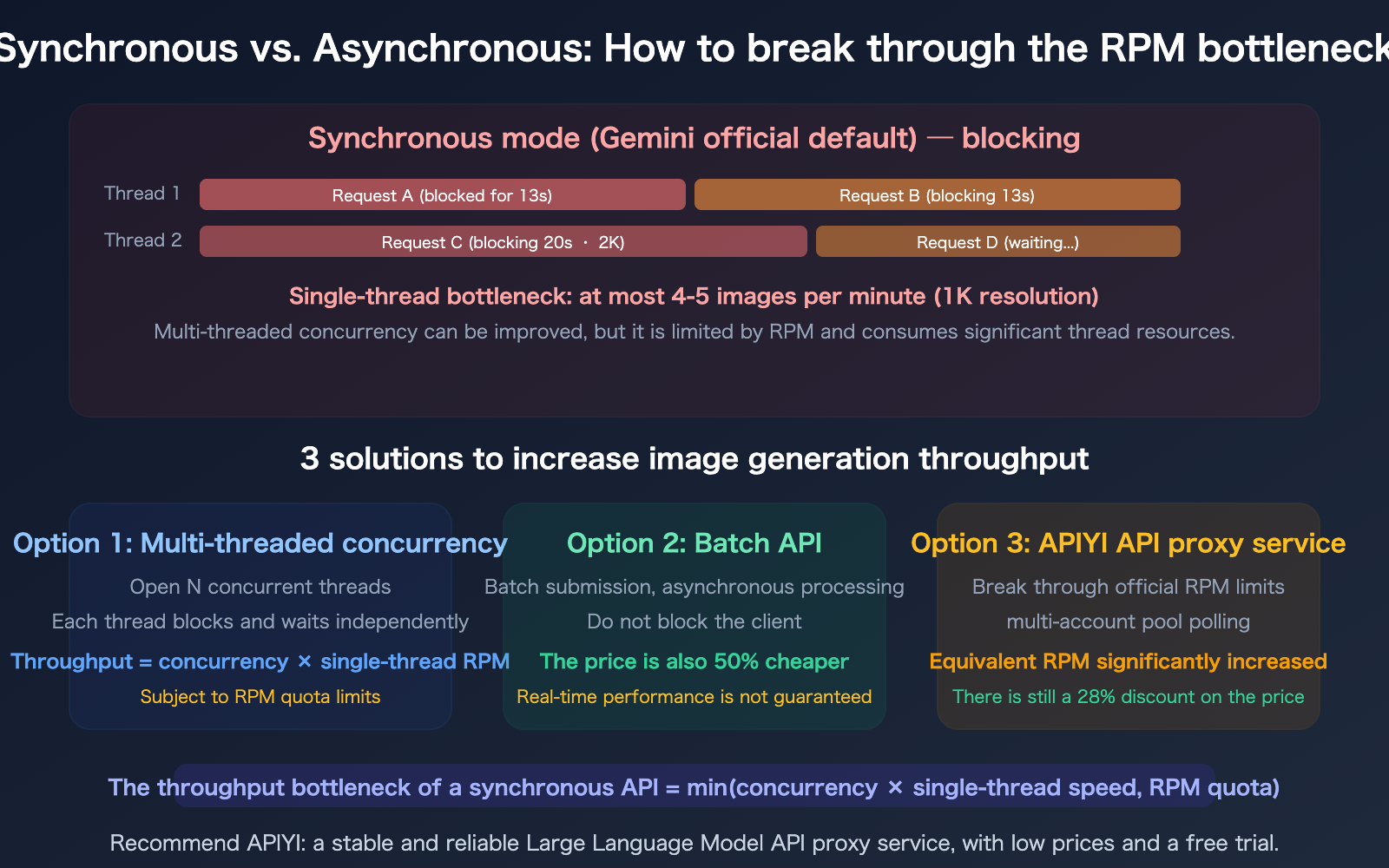
Calculating Multi-threaded Concurrency vs. RPM Limits
Let's say you need to generate 20 images (1K resolution) per minute:
Single-thread RPM = 60 seconds / 13 seconds ≈ 4.6 images/minute
Required threads = 20 / 4.6 ≈ 5 concurrent threads
However, you also need to ensure that the total RPM of these 5 concurrent threads (roughly 23 RPM) doesn't exceed your account's quota. Free tiers usually offer only 5-15 RPM, while Tier 1 paid accounts get 150-300 RPM.
Optimization Tips for Image Generation APIs
| Optimization Strategy | Impact | Best For |
|---|---|---|
| Multi-threading/Async | Linear boost (capped by RPM) | Real-time generation |
| Batch API (Async) | Non-blocking + 50% off | Bulk tasks with latency tolerance |
| Lower Resolution | Faster per-image time → Higher RPM | Previews, thumbnails |
| APIYI Proxy | Bypass official RPM limits | High-concurrency production |
| Client Timeout Settings | Avoid wasted waiting | All scenarios (1K: 300s, 4K: 600s) |
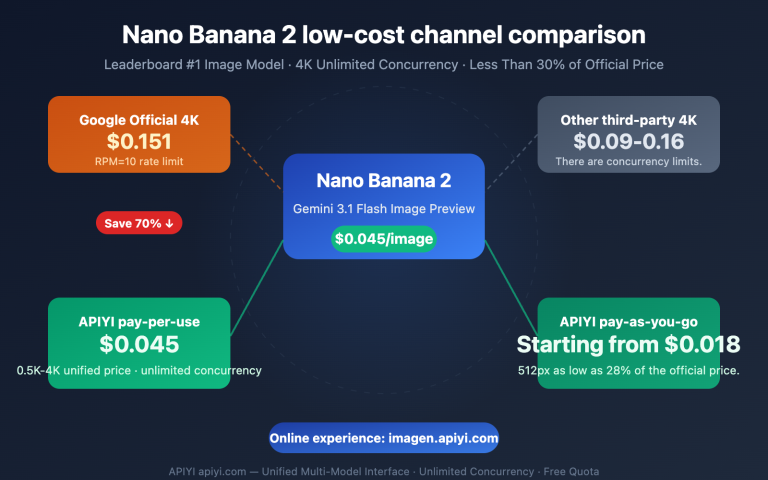
🎯 Pro Tip: If you need high-concurrency image generation, using APIYI (apiyi.com) to call Nano Banana 2 is the simplest route—it bypasses official RPM limits, offers a 28% discount, and provides a fixed price of just $0.045 for 4K images.
FAQ
Q1: If I send 10 requests using async concurrency, what is my RPM?
It counts as 10. RPM measures the number of requests you send within a 1-minute window, regardless of whether they've returned yet. Even if you fire off 10 requests simultaneously using async concurrency, they will each block for 13 seconds before returning, and all 10 will count toward that same minute's RPM. So, while multi-threading boosts throughput, it doesn't bypass your RPM quota.
Q2: Is the Gemini Batch API asynchronous? Can it bypass RPM limits?
Yes. The Gemini Batch API uses an asynchronous model—you submit a batch of requests and immediately receive a task ID without blocking your client. The task processes in the background, and you're notified when the results are ready. The Batch API has its own separate quota (based on tokens), doesn't consume your real-time RPM quota, and is 50% cheaper. The trade-off is that it doesn't guarantee real-time performance, making it perfect for bulk tasks where you aren't in a rush.
Q3: Is OpenAI’s chatgpt-image-latest also synchronously blocking?
Yes. chatgpt-image-latest is a synchronous call with a response time of about 44-60 seconds. The developer community has reported frequent timeout issues with gpt-image-1, so we recommend setting a timeout of at least 300 seconds. OpenAI's image API also uses RPM as its rate-limiting metric, following the same logic as Gemini—because the synchronous response time is so long, QPS (Queries Per Second) isn't a useful metric here.
Q4: How does APIYI bypass official RPM limits?
APIYI uses a multi-account pool rotation mechanism. The platform maintains multiple Gemini API accounts, and your requests are automatically distributed across them, with each account having its own independent RPM quota. For you as a developer, this effectively results in a massive RPM boost without the headache of managing multiple API keys. Plus, you get the added benefits of a 28% discount and a fixed $0.045 price for 4K images.
Summary
The core reason why the Nano Banana image generation API uses RPM instead of QPS is as follows:
- Synchronous blocking dictates the metric: The Gemini image generation API is a synchronous call. Since a single request blocks for 13–170 seconds, you can't even complete one request per second. In this context, a "per second" metric like QPS is meaningless, making RPM (requests per minute) the only logical measurement.
- RPM for slow services, QPS for fast ones: A simple rule of thumb: if a single response takes less than 1 second, use QPS; if it takes more than 1 second, use RPM. Tasks like image generation, video processing, and file conversion all fall into the RPM category.
- Concurrency and quotas are key to throughput: While multi-threaded concurrency can linearly increase throughput, it's still constrained by RPM quotas. You can bypass the RPM limits of a single account by using the APIYI multi-account polling pool.
We recommend calling Nano Banana 2 via APIYI (apiyi.com) to bypass official RPM limits, enjoy a 28% discount, and access a flat rate of $0.045 for 4K images.
📚 References
-
Gemini API Rate Limits: Official rate limit documentation.
- Link:
ai.google.dev/gemini-api/docs/rate-limits - Description: A comprehensive guide covering RPM, TPM, RPD, and IPM limits.
- Link:
-
Nano Banana Pro Sync vs. Async API Comparison: Technical differences between the two invocation modes.
- Link:
help.apiyi.com/en/nano-banana-pro-sync-async-api-comparison-en.html - Description: Covers blocking times, timeout settings, and throughput calculations.
- Link:
-
OpenAI Rate Limits: OpenAI's rate limit documentation (RPM system).
- Link:
developers.openai.com/api/docs/guides/rate-limits - Description: Compares the rate limit design philosophies of Gemini and OpenAI.
- Link:
-
APIYI Documentation Center: Accessing image generation APIs while bypassing RPM limits.
- Link:
docs.apiyi.com - Description: High-concurrency access for Nano Banana 2 and discount pricing details.
- Link:
Author: APIYI Technical Team
Technical Discussion: Feel free to join the discussion in the comments. For more resources, visit the APIYI documentation center at docs.apiyi.com.