title: "Cut Nano Banana Pro Image Costs by 89% with the 3×3 Grid Trick: Generate 9 Images in One Call"
description: "Nano Banana Pro costs about $0.134 per 2K image. Learn how to use a 3×3 grid prompt to generate 9 images in a single call, cutting your costs by 89%."
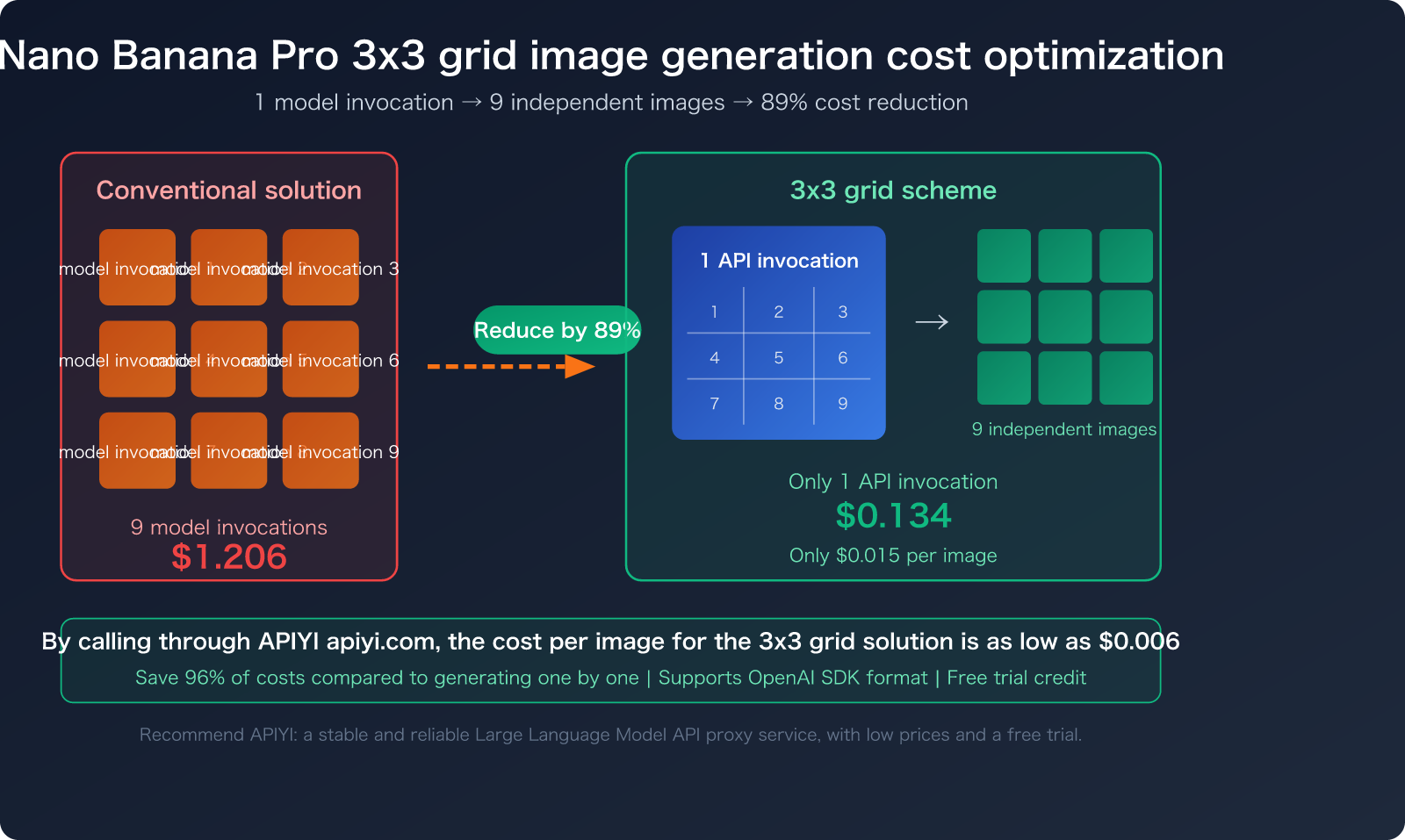
Nano Banana Pro only generates one image per API call, with each 2K image costing around $0.134. However, by using a 3×3 grid prompt technique, you can force the model to generate a single grid containing nine distinct images in one go. Once generated, you can use a simple tool to automatically slice them into nine individual files, effectively slashing your costs by 89%.
Why the Nano Banana Pro 3×3 Grid Method Drastically Cuts Costs
Nano Banana Pro is currently one of the most powerful AI image generation models available, offering top-tier image quality. However, it has a hard constraint: each API call can only output 1 image, and it doesn't support the n parameter for batch generation.
This means if you need 9 product photos or 9 social media assets, you'd have to make 9 separate API calls, causing your costs to skyrocket.
Core Cost Comparison: Nano Banana Pro 3×3 Grid Method
| Method | Number of Calls | Cost per Call (2K) | Total Cost | Savings |
|---|---|---|---|---|
| Standard: Generate one by one | 9 | $0.134 | $1.206 | — |
| Grid Method: 1 Generation + Crop | 1 | $0.134 | $0.134 | 89% |
| Official Batch API + Grid | 1 | $0.067 | $0.067 | 94% |
| APIYI Proxy + Grid | 1 | ~$0.05 | ~$0.05 | 96% |
🎯 Cost Optimization Tip: By using APIYI (apiyi.com) to invoke Nano Banana Pro, the cost per image using the grid method can be as low as $0.006, making it perfect for e-commerce, social media, and other scenarios requiring high-volume image output.
Technical Reasons Why Nano Banana Pro Doesn't Support Batch Parameters
Nano Banana Pro is based on Gemini's generateContent multimodal interface rather than a dedicated image generation endpoint. This architecture dictates that:
- It does not support the
nparameter (which DALL-E does). - Each request returns only 1 image.
- The official Batch API only provides asynchronous batch processing (completed within 24 hours), not real-time multi-image generation.
Therefore, the 3×3 grid prompt technique is currently the most practical "pseudo-batch" generation solution.
Complete Prompt Strategy for Nano Banana Pro 3×3 Grids
The key to grid generation lies in prompt engineering. You need to instruct the model to generate a 3×3 grid layout in a single image, with each cell containing an independent scene.
Basic 3×3 Grid Prompt Template
prompt = """Create a 3x3 grid image like a cinematic contact sheet.
The grid contains 9 distinct, high-quality shots of [Your Subject].
Each cell is clearly separated with thin white borders.
Professional lighting, consistent style across all 9 frames.
[Add style description here]"""
Grid Prompt Examples for Different Scenarios
| Use Case | Key Prompt Elements | Target Audience |
|---|---|---|
| E-commerce Product Photos | 9 product photography angles of [Product], white background, studio lighting |
E-commerce Ops |
| Social Media Avatars | 9 distinct avatar portraits, diverse expressions, [Style] |
Content Creators |
| UI Icon Design | 9 minimal flat icons for [Topic], consistent design language, clean grid |
UI Designers |
| Scene Illustrations | 9 scenes depicting [Scene], illustration style, vibrant colors |
Illustrators |
| Brand Assets | 9 brand visual elements for [Brand], cohesive color palette |
Brand Designers |
Complete Python Code for 3×3 Grid Generation
Here is the minimal code to generate a 3×3 grid image using Nano Banana Pro via APIYI:
from openai import OpenAI

client = OpenAI(
    api_key="your-apiyi-key",
    base_url="https://vip.apiyi.com/v1"
)

response = client.chat.completions.create(
    model="nano-banana-pro",
    messages=[{
        "role": "user",
        "content": "Create a 3x3 grid contact sheet with 9 distinct product photos of a modern wireless headphone. Each cell shows a different angle: front, side, top, back, detail of ear cushion, charging port, folded position, wearing position, and packaging. White background, studio lighting, thin white grid lines separating each frame."
    }]
)

# Get the URL of the generated grid image
image_url = response.choices[0].message.content
print(f"Grid Image: {image_url}")
📋 Click to expand: Full version with error handling and auto-saving
import os
import requests
from openai import OpenAI
from pathlib import Path

def generate_grid_image(prompt: str, output_path: str = "grid_output.png") -> str:
    """Invoke Nano Banana Pro via APIYI to generate a 3x3 grid image"""
    client = OpenAI(
        api_key=os.getenv("APIYI_API_KEY"),
        base_url="https://vip.apiyi.com/v1"
    )

    grid_prompt = f"""Create a 3x3 grid image like a cinematic contact sheet.
The grid contains 9 distinct, high-quality shots.
Each cell is clearly separated with thin white borders.
Professional lighting, consistent style across all 9 frames.
Content: {prompt}"""

    try:
        response = client.chat.completions.create(
            model="nano-banana-pro",
            messages=[{"role": "user", "content": grid_prompt}]
        )

        image_url = response.choices[0].message.content

        # Download and save the image
        img_data = requests.get(image_url).content
        Path(output_path).write_bytes(img_data)
        print(f"Grid image saved: {output_path}")
        return output_path

    except Exception as e:
        print(f"Generation failed: {e}")
        return None

# Usage example
generate_grid_image("modern wireless headphones from 9 different angles")
💡 Integration Tip: APIYI (apiyi.com) supports the OpenAI SDK format for direct Nano Banana Pro invocation. There's no need to change your existing code structure; simply replace the
base_urlandapi_key.
Grid Image Cropping: 3 Approaches from Simple to Professional
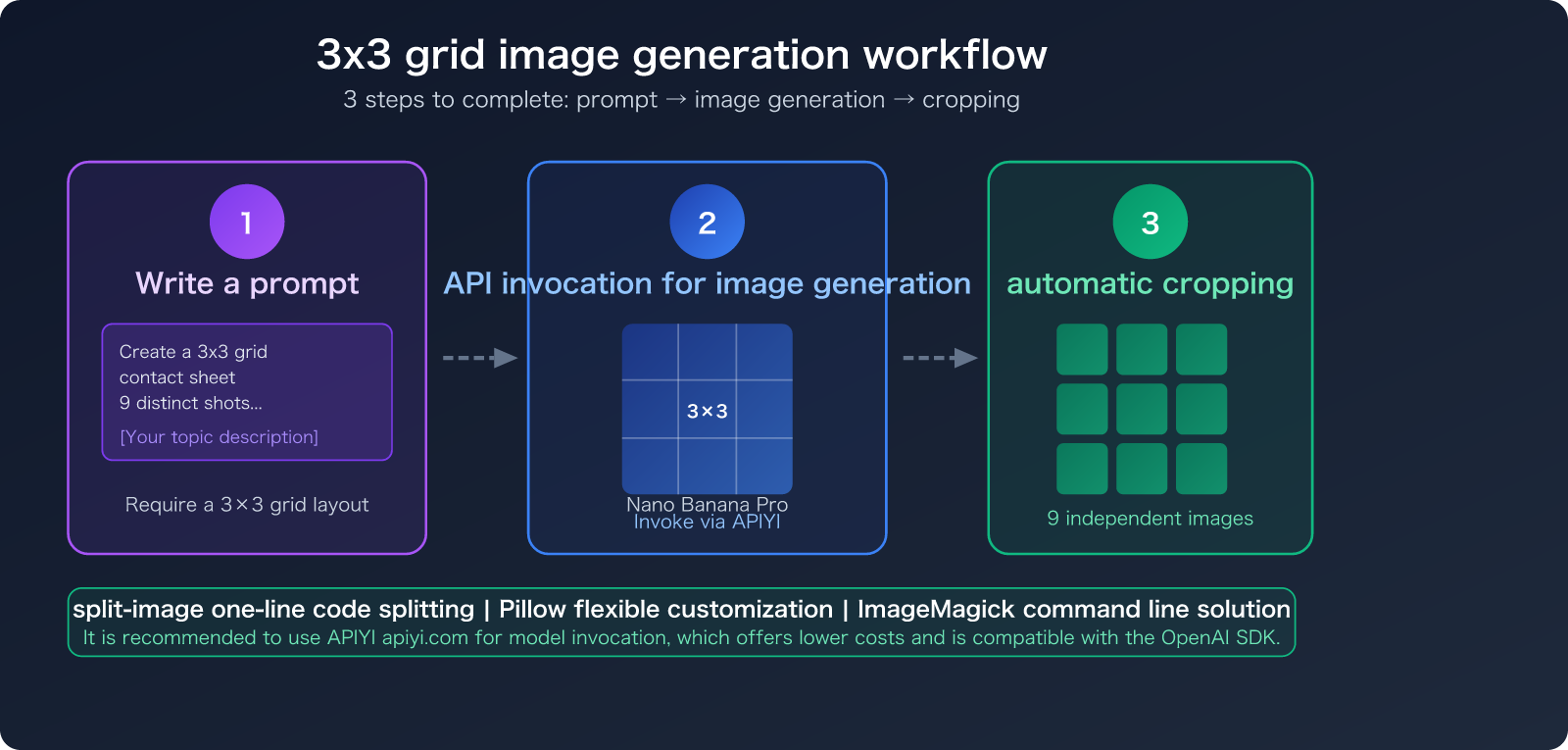
After generating a grid image, the next step is to slice it into 9 individual images. Here are three ways to do it, ranging from zero-code to professional-grade solutions.
Approach 1: Python split-image (One-liner, Recommended)
The easiest way to get the job done is with just a single line of code:
pip install split-image
from split_image import split_image

# Slice the grid image into 3 rows x 3 columns = 9 images
split_image("grid_output.png", 3, 3)
# Output: grid_output_0.png ~ grid_output_8.png
Approach 2: Pillow Manual Cropping (More Flexible)
If you need to customize output formats, filenames, or perform post-processing, use Pillow:
from PIL import Image
import os

def split_grid(image_path, rows=3, cols=3, output_dir="output"):
    img = Image.open(image_path)
    w, h = img.size
    tile_w, tile_h = w // cols, h // rows

    os.makedirs(output_dir, exist_ok=True)

    for row in range(rows):
        for col in range(cols):
            box = (col * tile_w, row * tile_h,
                   (col + 1) * tile_w, (row + 1) * tile_h)
            tile = img.crop(box)
            tile.save(f"{output_dir}/image_{row * cols + col + 1}.png")

    print(f"Successfully sliced into {rows * cols} images, saved in {output_dir}/")

split_grid("grid_output.png")
Approach 3: ImageMagick Command Line (No Coding Required)
For those who prefer not to write Python, ImageMagick offers a command-line solution:
# Installation (macOS)
brew install imagemagick

# Slice the grid with a single command
convert grid_output.png -crop 33.333%x33.333% +repage tile_%d.png
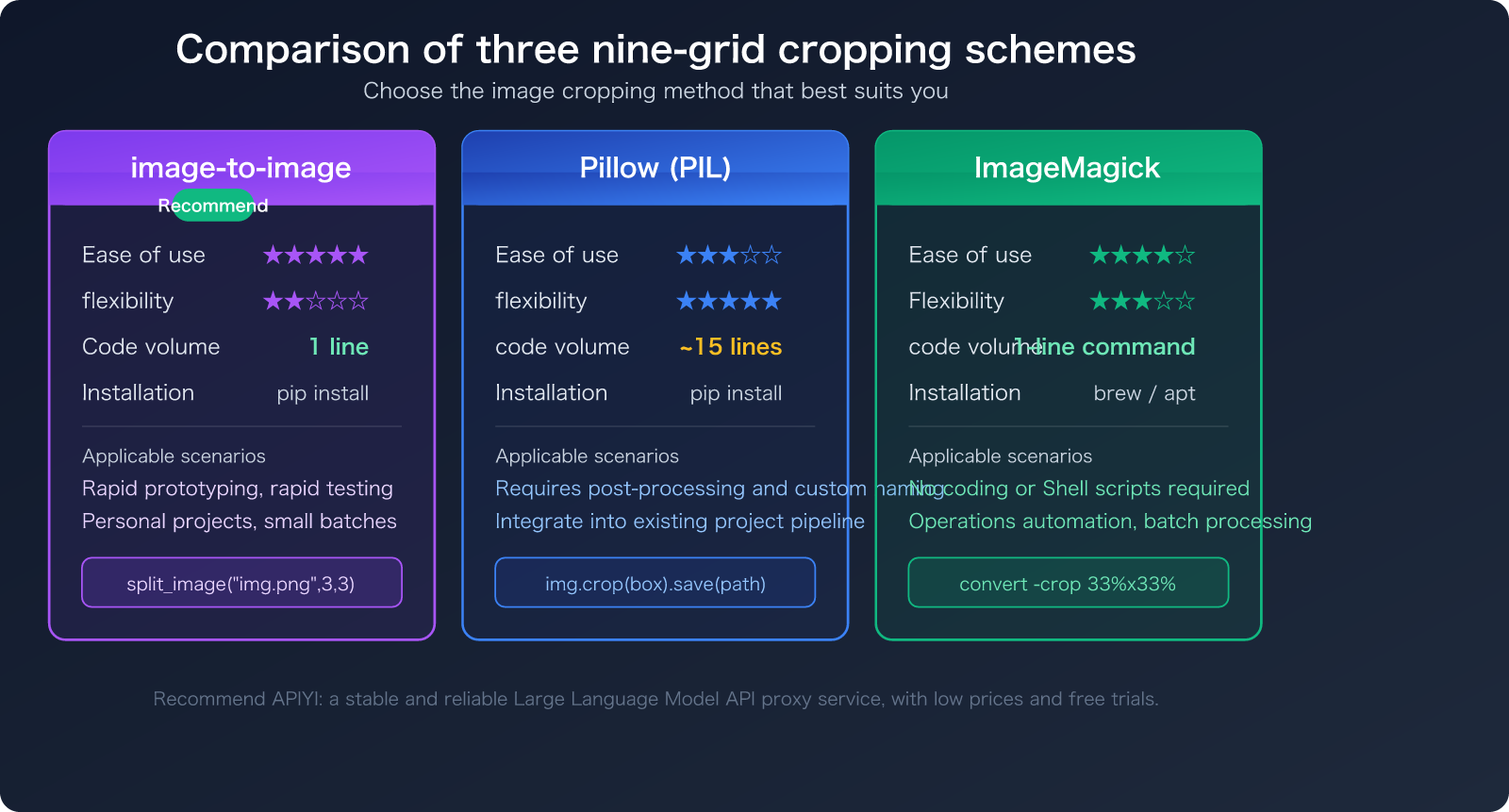
Comparison of the Three Grid Cropping Approaches
| Comparison Dimension | split-image (Recommended) | Pillow | ImageMagick |
|---|---|---|---|
| Code Volume | 1 line | 15 lines | 1 command |
| Installation | pip install | pip install | brew / apt |
| Customization | Low | High | Medium |
| Batch Support | No | Easily extensible | Supports wildcards |
| Target Audience | Quick use | Developer integration | Ops/Script users |
| Output Format | Same as source | Customizable | Customizable |
🎯 Recommendation: If you are using APIYI (apiyi.com) to perform batch model invocations for Nano Banana Pro to generate grid images, pairing it with the
split-imagepackage is the most efficient workflow—completing the cropping in just one line of code.
Recommended Online Tools for 3×3 Grid Splitting
If you'd rather not write code, there are plenty of online tools that can handle 3×3 grid splitting for you:
Comparison of Professional Online Splitting Tools
| Tool Name | Key Features | Free? | URL |
|---|---|---|---|
| promptoMANIA Grid Splitter | Designed specifically for AI grid images | Free | promptomania.com/grid-splitter |
| GridSplitter AI | AI auto-grid detection + HD upscaling | Free basic version | gridpuller.com |
| Media.io Grid Generator | Integrated generation + splitting | Partially free | media.io |
| insMind Grid Generator | Chinese interface, simple operation | Free | insmind.com |
The workflow for these tools is generally the same: upload your grid image → select the grid dimensions (3×3) → download the 9 individual images with one click.
Advanced Optimization Strategies for Nano Banana Pro Grid Generation
Once you've mastered the basics, these advanced tips can help you further improve the quality and efficiency of your output.
Optimization 1: Specify Dividers in Your Prompt
Adding clear descriptions of the dividers in your prompt can help ensure more precise cuts:
Each of the 9 frames is separated by exactly 2px white borders.
All frames have identical dimensions.
No overlap between adjacent frames.
Optimization 2: Control Resolution for Higher Quality
| Resolution Setting | Cost per Generation | Size After Splitting | Best For |
|---|---|---|---|
| 1K (1024×1024) | ~$0.067 | ~341×341 px | Social media thumbnails |
| 2K (2048×2048) | $0.134 | ~682×682 px | Web display, product photos |
| 4K (3840×2160) | $0.24 | ~1280×720 px | HD printing, large displays |
💡 Best Value: We recommend generating grids at 2K resolution. After splitting, each image is approximately 682×682 pixels, which is perfect for most web and social media use cases. Using APIYI (apiyi.com) to trigger 2K mode is even more cost-effective.
Optimization 3: Combine with Batch API to Further Reduce Costs
If you need a large volume of grid images, you can leverage the official Google Batch API:
- Batch API handles requests asynchronously, cutting costs by another 50%.
- Grid + Batch API = Cost per image as low as $0.0074.
- Ideal for large-scale e-commerce promotions and bulk asset production.
Optimization 4: One-Shot Generation with Automated Pipelines
import os
from split_image import split_image

def batch_grid_pipeline(prompts: list, output_base: str = "output"):
    """Batch grid generation + splitting pipeline"""
    for i, prompt in enumerate(prompts):
        # Generate grid image
        grid_path = f"{output_base}/grid_{i}.png"
        generate_grid_image(prompt, grid_path)

        # Auto-split
        split_image(grid_path, 3, 3, output_dir=f"{output_base}/set_{i}")
        print(f"Set {i+1}: 9 images ready")

# Batch generate 5 sets of grids = 45 images, with only 5 API calls
prompts = [
    "wireless headphones from 9 angles, white background",
    "smart watch from 9 angles, minimalist style",
    "laptop from 9 angles, studio lighting",
    "mechanical keyboard from 9 angles, RGB lighting",
    "portable speaker from 9 angles, lifestyle setting",
]
batch_grid_pipeline(prompts)
🎯 For Bulk Scenarios: APIYI (apiyi.com) supports high-concurrency calls for Nano Banana Pro. When combined with the pipeline code above, you can rapidly produce product assets in bulk. The platform offers free trial credits, making it easy to test the results before scaling up.
Nano Banana Pro 3×3 Grid Generation FAQs
Q1: Does image quality drop after splitting the 3×3 grid?
Not significantly. If you generate at 2K resolution, each split image will be approximately 682×682 pixels, which is perfectly fine for web displays and social media. If you need higher quality, we recommend generating at 4K resolution, which results in roughly 1280×720 pixels per tile.
Q2: Are the 9 images in the grid consistent in style?
They are generally consistent. Nano Banana Pro maintains overall stylistic uniformity during a single generation. We recommend explicitly including consistent style across all 9 frames in your prompt to ensure the best results.
Q3: Can I generate grid layouts other than 3×3?
Yes, you can. Common options include:
- 2×2 grid: 4 images, great for four-view product shots.
- 3×3 grid: 9 images, the best balance for cost-effectiveness.
- 4×4 grid: 16 images, though individual image quality will decrease.
We suggest sticking to 3×3 as the "sweet spot." Any more than that, and the individual tiles become too small, leading to a loss of detail.
Q4: What if the grid lines in the generated output are uneven?
This is a common issue with AI generation. Here’s how to fix it:
- Emphasize
equal spacing, uniform grid, exact 3x3 layoutin your prompt. - Use smart cropping tools like GridSplitter AI, which can automatically detect and adjust for uneven grids.
- Use Pillow to fine-tune the cropping areas manually.
Q5: What are the extra advantages of using the APIYI platform?
Using Nano Banana Pro via APIYI (apiyi.com) offers several benefits:
- Lower cost per call (approx. $0.05).
- Full support for the OpenAI SDK format, so there's no need to change your code.
- Free trial credits available.
- High-concurrency support, perfect for batch production.
Nano Banana Pro Grid Generation Cost Calculator
Here’s a cost comparison for using the grid technique at different scales to help you evaluate your savings:
| Monthly Volume | Standard Per-Image Cost | Grid Method Cost (APIYI) | Monthly Savings | Annual Savings |
|---|---|---|---|---|
| 90 images | $12.06 | ~$0.50 (10 calls) | $11.56 | $138.72 |
| 450 images | $60.30 | ~$2.50 (50 calls) | $57.80 | $693.60 |
| 900 images | $120.60 | ~$5.00 (100 calls) | $115.60 | $1,387.20 |
| 4,500 images | $603.00 | ~$25.00 (500 calls) | $578.00 | $6,936.00 |
| 9,000 images | $1,206.00 | ~$50.00 (1000 calls) | $1,156.00 | $13,872.00 |
🎯 Clear Economies of Scale: For teams producing over 1,000 images per month, combining the grid technique with the competitive pricing at APIYI (apiyi.com) can save thousands of dollars annually. We recommend using the platform's free trial credits to verify the results first.
Summary: Best Practices for 3×3 Grid Image Generation with Nano Banana Pro
Generating images in a 3×3 grid is currently the most practical trick to slash your usage costs for Nano Banana Pro:
- Crafting Grid Prompts: Include instructions in your prompt for the model to generate images in a 3×3 grid layout.
- API Invocation: Use APIYI (apiyi.com) to call Nano Banana Pro and take advantage of more competitive pricing.
- Automatic Cropping: Use
split-imageto slice the 3×3 grid into 9 individual images with just one line of code. - Batch Scaling: Build an automated pipeline to mass-produce assets at scale.
This approach can reduce the cost per image from $0.134 to approximately $0.006—a 96% reduction.
🎯 Get Started Now: Visit APIYI at apiyi.com to register and claim your free trial credits. The platform provides a unified interface for various mainstream AI models, including Nano Banana Pro. With a single API key, you can access all models, making it perfect for comparative testing and daily use.