Author's Note: A step-by-step guide to configuring both OpenAI-compatible mode and Claude native format in OpenClaw, including complete JSON configuration code, applicable model lists, and key differences.
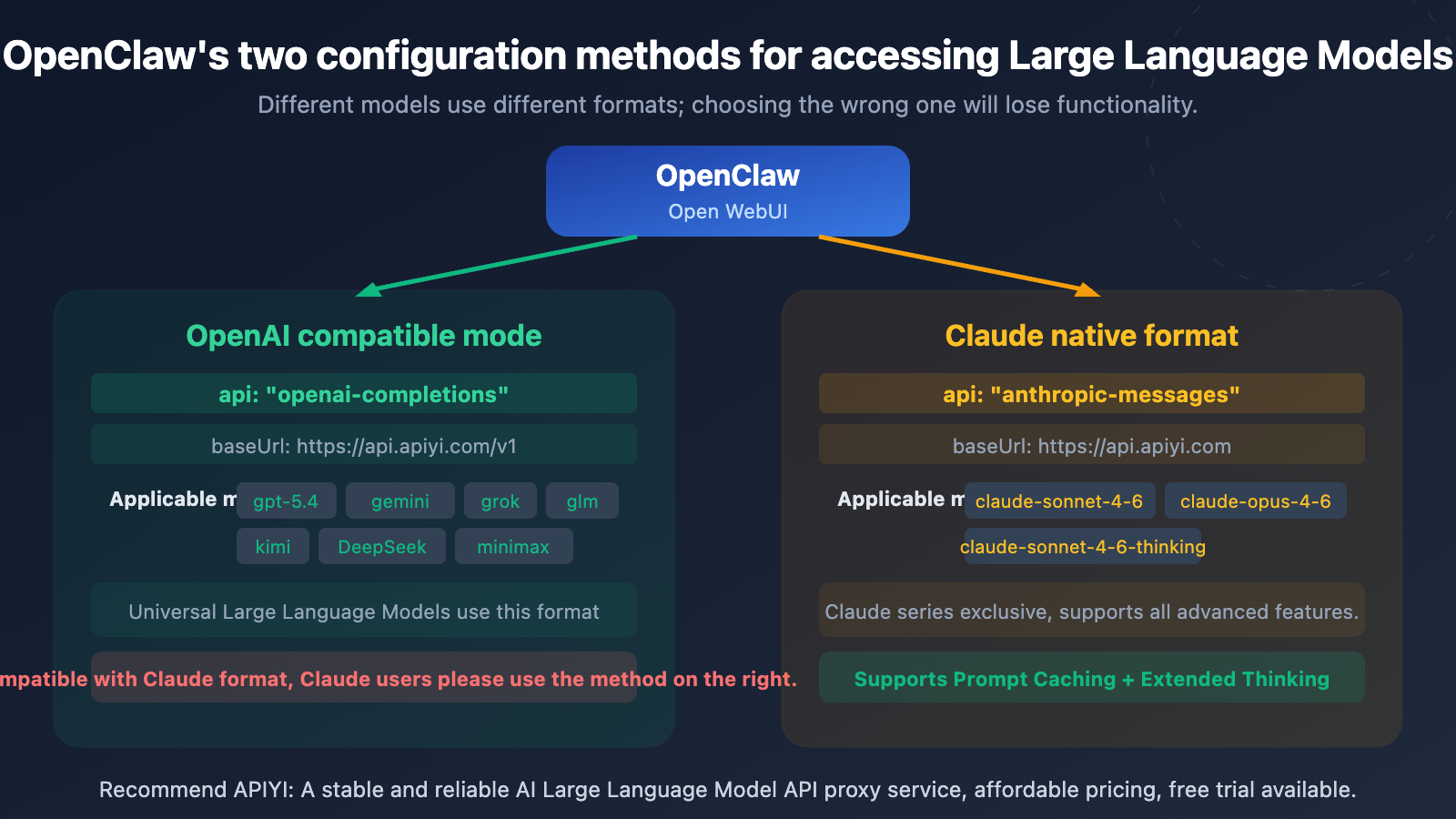
In OpenClaw (Open WebUI), there are two ways to connect to Large Language Models: OpenAI-compatible mode (openai-completions) and Claude native format (anthropic-messages). Many users aren't clear on the differences, leading to either using the wrong format for Claude models or missing out on advanced features like Prompt Caching that the native format offers.
Core Value: After reading this article, you'll master the complete configuration methods for both connection types in OpenClaw, know exactly which format to use for each model, and be able to directly copy and use the configuration code.
Core Comparison of Two Connection Methods in OpenClaw
| Comparison Dimension | OpenAI Compatible Mode | Claude Native Format |
|---|---|---|
| API Type | openai-completions |
anthropic-messages |
| baseUrl | https://api.apiyi.com/v1 |
https://api.apiyi.com |
| Applicable Models | GPT, Gemini, Grok, GLM, Kimi, DeepSeek, Minimax, etc. | Claude series (sonnet, opus, haiku) |
| Additional Headers Required? | No | Yes, requires anthropic-version |
| Prompt Caching | ✗ Not supported | ✓ Supported |
| Extended Thinking | ✗ Not supported | ✓ Supported (thinking models) |
| URL Path Difference | Ends with /v1 |
Does not end with /v1 |
One-Sentence Summary of the Two Connection Methods in OpenClaw
Remember a simple rule: Use anthropic-messages for Claude series models, and openai-completions for all other models. The most obvious difference between the two is the baseUrl—OpenAI compatible mode ends with /v1, while Claude native format doesn't.
OpenClaw OpenAI-Compatible Mode Configuration Tutorial
When to Use OpenAI-Compatible Mode
OpenAI-Compatible Mode (openai-completions) is the most versatile access method in OpenClaw, suitable for all non-Claude Large Language Models. Most API proxy services use this standardized OpenAI format.
Complete Configuration Code for OpenAI-Compatible Mode
Here's the full configuration for accessing GPT-5.4 via APIYI:
{
  "agents": {
    "defaults": {
      "model": { "primary": "apiyi/gpt-5.4" }
    }
  },
  "models": {
    "providers": {
      "apiyi": {
        "baseUrl": "https://api.apiyi.com/v1",
        "apiKey": "sk-your-api-key",
        "api": "openai-completions",
        "models": [
          { "id": "gpt-5.4", "name": "GPT-5.4" }
        ]
      }
    }
  }
}
View Multi-Model Extended Configuration
If you need to access multiple general models simultaneously, you can add more models to the models array:
{
  "models": {
    "providers": {
      "apiyi": {
        "baseUrl": "https://api.apiyi.com/v1",
        "apiKey": "sk-your-api-key",
        "api": "openai-completions",
        "models": [
          { "id": "gpt-5.4", "name": "GPT-5.4" },
          { "id": "gemini-3-flash-preview", "name": "Gemini 3 Flash" },
          { "id": "deepseek-v3.2", "name": "DeepSeek V3.2" },
          { "id": "glm-5", "name": "GLM-5" },
          { "id": "kimi-k2.5", "name": "Kimi K2.5" },
          { "id": "grok-4", "name": "Grok 4" },
          { "id": "Minimax-M2.5", "name": "Minimax M2.5" }
        ]
      }
    }
  }
}
All these models share the same API Key and baseUrl—that's the convenience of OpenAI-Compatible Mode: one configuration for all general models.
Key Configuration Points for OpenAI-Compatible Mode
| Configuration Item | Value | Description |
|---|---|---|
baseUrl |
https://api.apiyi.com/v1 |
Must include /v1 |
api |
openai-completions |
Specifies use of OpenAI-compatible protocol |
apiKey |
sk-your-key |
Obtain from APIYI at apiyi.com |
models[].id |
Model ID | Must match the model name supported by the API |
🎯 Configuration Reminder: Don't omit the
/v1at the end of the baseUrl—it's the standard path for the OpenAI-compatible protocol. Register at APIYI apiyi.com to get your API Key and free credits.
OpenClaw Claude Native Format Configuration Tutorial
When to Use Claude Native Format
Claude Native Format (anthropic-messages) is the exclusive access method for Claude series models. Using the native format gives you access to Claude's unique advanced features like Prompt Caching, Extended Thinking, and PDF processing.
Complete Configuration Code for Claude Native Format
Here's the full configuration for accessing Claude models via APIYI:
{
  "models": {
    "providers": {
      "apiyi-claude": {
        "baseUrl": "https://api.apiyi.com",
        "apiKey": "sk-your-api-key",
        "api": "anthropic-messages",
        "headers": {
          "anthropic-version": "2023-06-01",
          "anthropic-beta": ""
        },
        "models": [
          {
            "id": "claude-sonnet-4-6",
            "name": "Claude Sonnet 4.6",
            "reasoning": false,
            "input": ["text"],
            "contextWindow": 200000,
            "maxTokens": 16384
          },
          {
            "id": "claude-sonnet-4-6-thinking",
            "name": "Claude Sonnet 4.6 Thinking",
            "reasoning": false,
            "input": ["text"],
            "contextWindow": 200000,
            "maxTokens": 16384
          }
        ]
      }
    }
  }
}
View Complete Configuration Including Opus and Haiku
{
  "models": {
    "providers": {
      "apiyi-claude": {
        "baseUrl": "https://api.apiyi.com",
        "apiKey": "sk-your-api-key",
        "api": "anthropic-messages",
        "headers": {
          "anthropic-version": "2023-06-01",
          "anthropic-beta": ""
        },
        "models": [
          {
            "id": "claude-sonnet-4-6",
            "name": "Claude Sonnet 4.6",
            "reasoning": false,
            "input": ["text"],
            "contextWindow": 200000,
            "maxTokens": 16384
          },
          {
            "id": "claude-sonnet-4-6-thinking",
            "name": "Claude Sonnet 4.6 Thinking",
            "reasoning": false,
            "input": ["text"],
            "contextWindow": 200000,
            "maxTokens": 16384
          },
          {
            "id": "claude-opus-4-6",
            "name": "Claude Opus 4.6",
            "reasoning": false,
            "input": ["text"],
            "contextWindow": 200000,
            "maxTokens": 16384
          },
          {
            "id": "claude-haiku-4-5-20251001",
            "name": "Claude Haiku 4.5",
            "reasoning": false,
            "input": ["text"],
            "contextWindow": 200000,
            "maxTokens": 8192
          }
        ]
      }
    }
  }
}
Key Configuration Points for Claude Native Format
| Configuration Item | Value | Description |
|---|---|---|
baseUrl |
https://api.apiyi.com |
Without /v1—this is the key difference |
api |
anthropic-messages |
Specifies use of Claude native protocol |
headers.anthropic-version |
2023-06-01 |
Anthropic API version number, required |
headers.anthropic-beta |
"" |
Leave empty, used to enable Beta features |
contextWindow |
200000 |
Claude series supports 200K context |
maxTokens |
16384 |
Maximum output token count |
🎯 Critical Difference: The baseUrl for Claude Native Format does NOT include
/v1. This is the most common mistake for beginners—if Claude access fails, first check if you accidentally added/v1to the URL.
Configuring OpenClaw for Both Formats Simultaneously
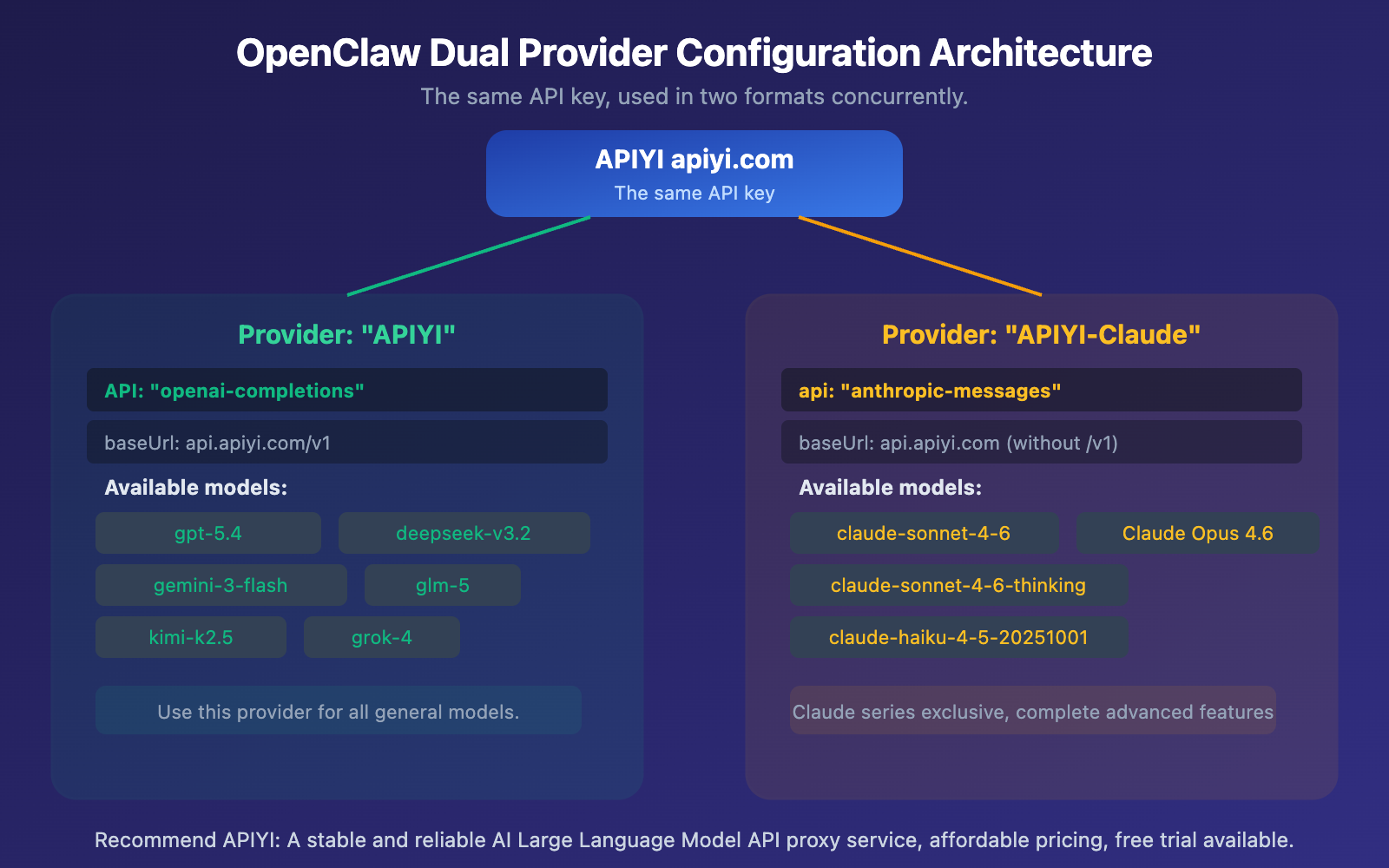
In real-world use, you'll likely need to use both general models and Claude models. This requires configuring two providers in OpenClaw:
Dual Provider Combined Configuration Code
Write both format providers in the same configuration file, and you'll be able to switch between models freely in OpenClaw:
{
  "agents": {
    "defaults": {
      "model": { "primary": "apiyi/gpt-5.4" }
    }
  },
  "models": {
    "providers": {
      "apiyi": {
        "baseUrl": "https://api.apiyi.com/v1",
        "apiKey": "sk-your-api-key",
        "api": "openai-completions",
        "models": [
          { "id": "gpt-5.4", "name": "GPT-5.4" },
          { "id": "deepseek-v3.2", "name": "DeepSeek V3.2" },
          { "id": "gemini-3-flash-preview", "name": "Gemini 3 Flash" },
          { "id": "glm-5", "name": "GLM-5" },
          { "id": "kimi-k2.5", "name": "Kimi K2.5" },
          { "id": "grok-4", "name": "Grok 4" },
          { "id": "Minimax-M2.5", "name": "Minimax M2.5" }
        ]
      },
      "apiyi-claude": {
        "baseUrl": "https://api.apiyi.com",
        "apiKey": "sk-your-api-key",
        "api": "anthropic-messages",
        "headers": {
          "anthropic-version": "2023-06-01",
          "anthropic-beta": ""
        },
        "models": [
          {
            "id": "claude-sonnet-4-6",
            "name": "Claude Sonnet 4.6",
            "reasoning": false,
            "input": ["text"],
            "contextWindow": 200000,
            "maxTokens": 16384
          },
          {
            "id": "claude-sonnet-4-6-thinking",
            "name": "Claude Sonnet 4.6 Thinking",
            "reasoning": false,
            "input": ["text"],
            "contextWindow": 200000,
            "maxTokens": 16384
          },
          {
            "id": "claude-opus-4-6",
            "name": "Claude Opus 4.6",
            "reasoning": false,
            "input": ["text"],
            "contextWindow": 200000,
            "maxTokens": 16384
          }
        ]
      }
    }
  }
}
🎯 Important Note: Both providers can use the same API Key. A single key from APIYI apiyi.com supports both the OpenAI-compatible format and the native Claude format—you don't need to apply for multiple keys.
Common Troubleshooting for Both Formats in OpenClaw
The most common mistakes during configuration involve mismatched baseUrl and api types. Here are the common errors and their solutions:
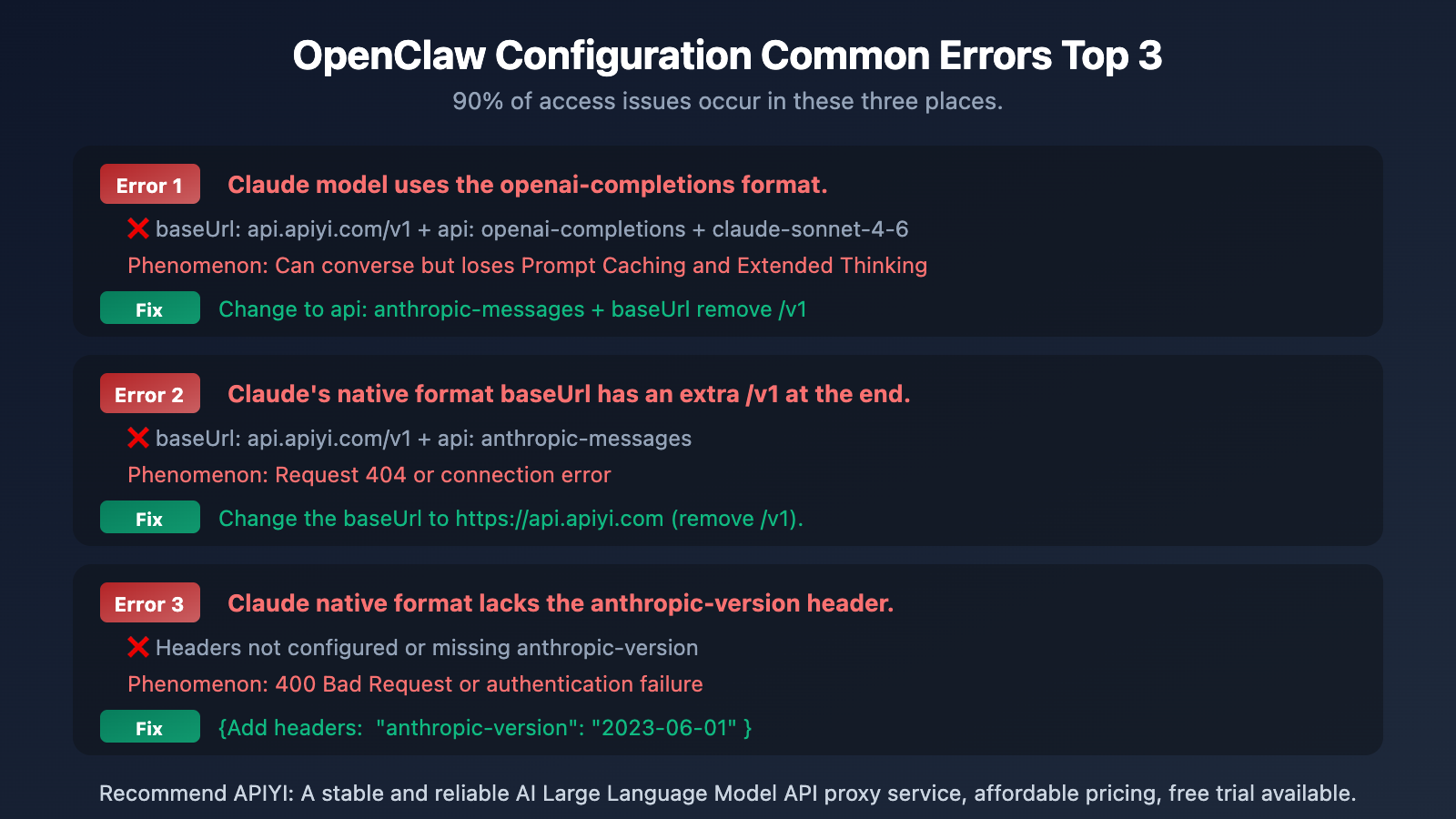
| Error Type | Incorrect Configuration | Correct Configuration | Error Symptom |
|---|---|---|---|
| Wrong Format for Claude | api: openai-completions |
api: anthropic-messages |
Can chat but loses advanced features |
| Extra /v1 in baseUrl | api.apiyi.com/v1 + anthropic |
api.apiyi.com + anthropic |
404 or connection error |
| Missing Headers | No anthropic-version | "2023-06-01" |
400 Bad Request |
| Missing /v1 for General Models | api.apiyi.com + openai |
api.apiyi.com/v1 + openai |
Path error |
| Wrong Model Name | claude-4-sonnet |
claude-sonnet-4-6 |
Model not found |
🎯 Quick Troubleshooting Tip: OpenAI format includes
/v1, Claude format doesn't. Remember this and you'll avoid 80% of configuration errors. If you encounter other issues, you can visit the APIYI apiyi.com documentation center for the complete integration guide.
Frequently Asked Questions
Q1: Why can’t I use OpenAI-compatible mode for Claude?
Technically, you can (Claude does have an OpenAI-compatible endpoint), but you'll lose important features like Prompt Caching (saves ~90% on input costs), Extended Thinking (deep reasoning output), PDF processing, and Citations. It won't affect casual chatting, but for production environments and long conversations, the cost difference becomes significant. Using the anthropic-messages native format in OpenClaw is the better choice.
Q2: Can two Providers use the same API Key?
Yes. A single API Key from APIYI (apiyi.com) supports both OpenAI-compatible and Claude native formats. In your configuration, you can use the same apiKey value for both the apiyi and apiyi-claude providers. You don't need to apply for two separate keys.
Q3: How do I switch between different models in OpenClaw?
Once you've configured both providers, you'll see all available models in the model selection dropdown within OpenClaw's chat interface. General models will appear as apiyi/gpt-5.4, etc., and Claude models will appear as apiyi-claude/claude-sonnet-4-6, etc. Just click to switch—no need to modify the config file.
Summary
Here are the key points for the two OpenClaw integration methods:
- Use
openai-completionsfor General Models: GPT, Gemini, DeepSeek, GLM, Kimi, Grok, Minimax, and all other non-Claude models. ThebaseUrlshould include/v1. - Use
anthropic-messagesfor Claude Models: claude-sonnet-4-6, claude-opus-4-6, claude-haiku, etc. ThebaseUrlshould NOT include/v1, and you need theanthropic-versionheader. - Having both Providers is the best practice: Configure two providers with the same API Key to freely switch between all models within OpenClaw.
We recommend getting your API Key from APIYI (apiyi.com). A single key gives you access to all major models like GPT, Claude, Gemini, and DeepSeek, supporting both OpenAI-compatible and Claude native formats.
📚 References
-
APIYI Help Center: Complete OpenClaw Integration Guide
- Link:
help.apiyi.com - Description: Contains detailed integration documentation and the latest model lists for all sites
- Link:
-
Anthropic API Documentation: Claude Native API Format Specifications
- Link:
platform.claude.com/docs/en/api/messages - Description: Complete parameters and response formats for the Messages API
- Link:
-
OpenAI SDK Compatibility Documentation: Which parameters are ignored on Claude
- Link:
platform.claude.com/docs/en/api/openai-sdk - Description: Full list of supported and unsupported parameters
- Link:
-
Open WebUI Documentation: OpenClaw Multi-Provider Configuration Guide
- Link:
docs.openwebui.com - Description: Provider configuration, model management, and Agent settings
- Link:
Author: APIYI Technical Team
Technical Discussion: Feel free to discuss in the comments. For more resources, visit the APIYI documentation center at docs.apiyi.com