Author's Note: A deep dive into the causes and solutions for the Seedream API error "output image may contain sensitive information," detailing content filtering mechanisms, trigger conditions, and prompt optimization techniques.
When using the Seedream API for image generation or editing, you might run into this error: "The request failed because the output image may contain sensitive information". This error means your prompt or input image has triggered Seedream's content safety filtering system.
Core Value: By the end of this article, you'll understand how Seedream's content filtering works and master 6 compliant solutions to avoid being blocked in legitimate commercial scenarios.
Key Takeaways for Seedream API "sensitive information" Error
| Key Point | Description | Solution Direction |
|---|---|---|
| Error Meaning | Output image may contain sensitive content | Prompt or input image triggered safety filters |
| Trigger Levels | Dual detection: Prompt filtering + Output image filtering | Even if the prompt is compliant, the generated result might be blocked |
| Filter Types | Covers NSFW, violence, body modification, etc. | Strategies vary depending on the category |
| False Positives | Some compliant scenarios are accidentally blocked | Optimize prompts to reduce false triggers |
Full Error Message for Seedream API
When content filtering is triggered, the Seedream API returns an error response like this:
{
  "error": {
    "message": "The request failed because the output image may contain sensitive information",
    "code": "content_filter"
  }
}
This error indicates that Seedream's safety system intercepted the request at one of two stages:
- Input Filtering: The prompt itself contains sensitive keywords or instructions.
- Output Filtering: The image generated by the model was judged to contain sensitive content.
Both trigger the same error message, but the solutions differ.
Technical Architecture of Seedream Content Filtering
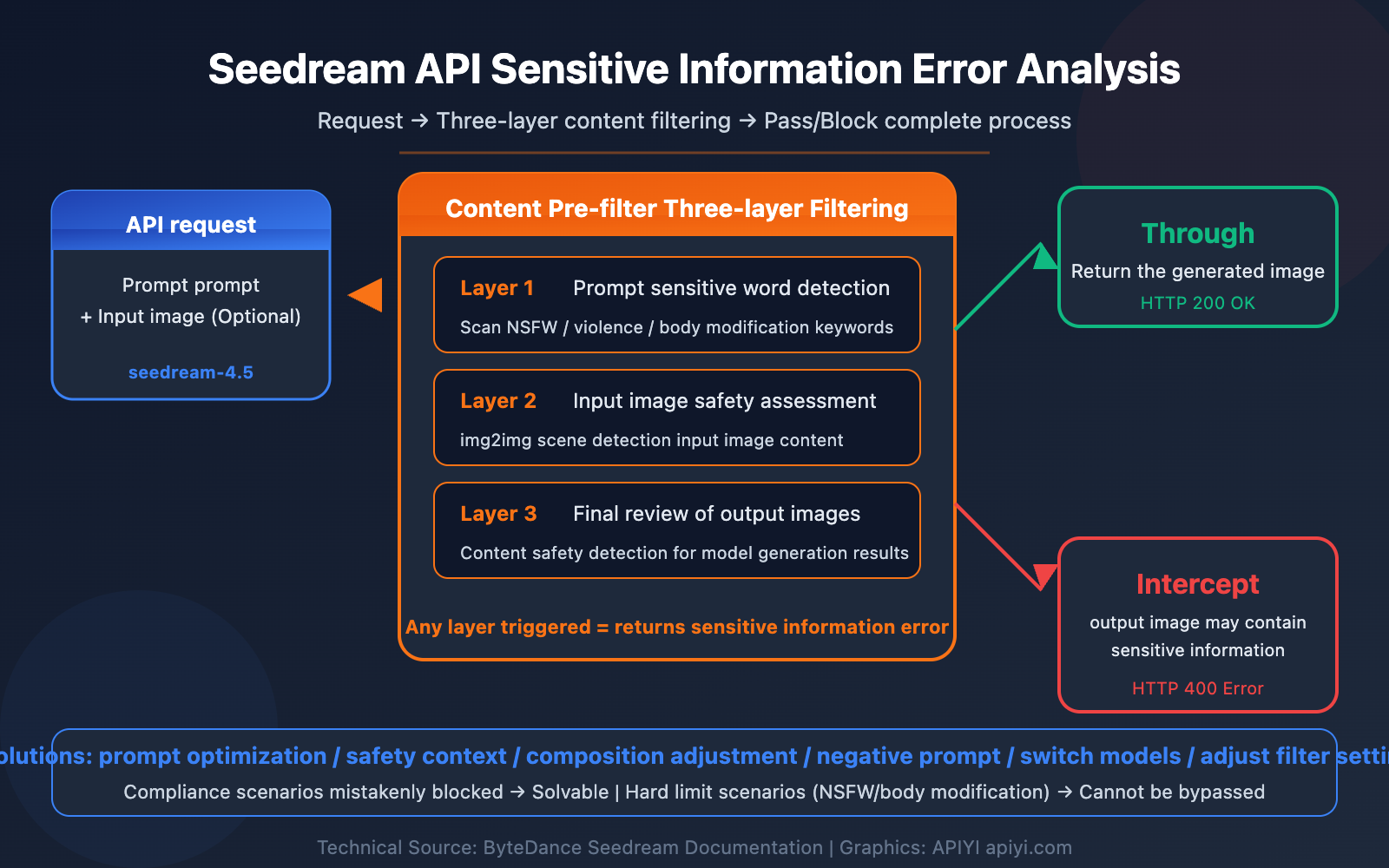
Seedream (developed by the ByteDance Seed team) features a built-in Content Pre-filter system, which is a multi-layered safety mechanism:
- Layer 1: Prompt Detection — Scans input text for sensitive vocabulary and intent before the model generates anything.
- Layer 2: Image Input Detection — Evaluates the safety of input images in image-to-image (img2img) scenarios.
- Layer 3: Output Image Detection — Performs a final safety audit on the resulting image generated by the model.
If any layer is triggered, the "sensitive information" error is returned.
8 Major Trigger Scenarios for Seedream API Errors
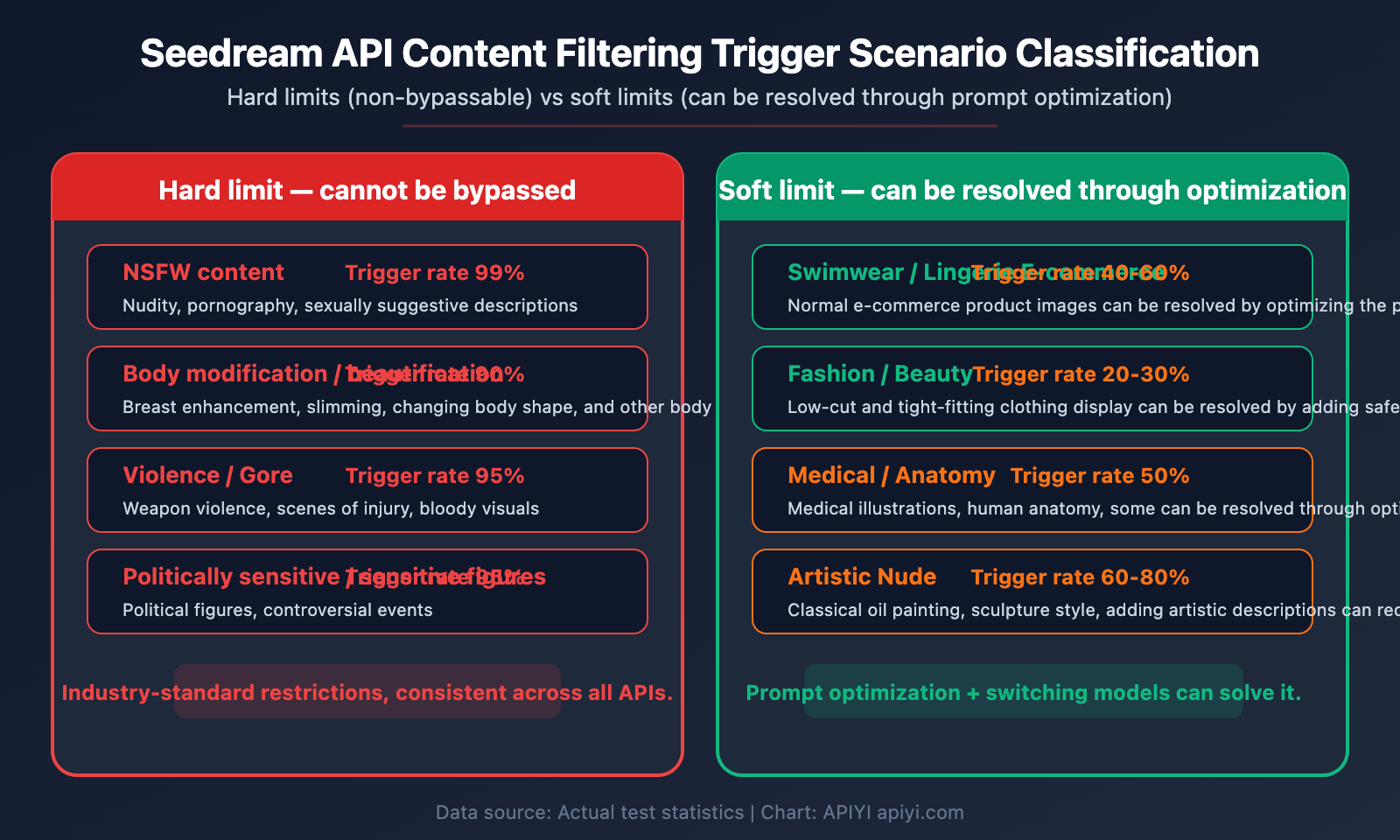
To solve problems effectively, you first need to understand what triggers them. Here are the most common scenarios that trigger errors in the Seedream API:
Scenario Categories and Trigger Probabilities
| Scenario Category | Trigger Probability | Typical Example | Solvable via Prompt Optimization? |
|---|---|---|---|
| Explicit NSFW Content | 99% | Nudity, pornographic descriptions | ❌ No, this is a hard limit |
| Body Modification/Enhancement | 90% | Breast enlargement, slimming, body reshaping | ❌ No, this is a hard limit |
| Violence/Gore | 95% | Weapons, wounds, blood | ❌ No |
| Political/Sensitive Figures | 95% | Political figures, controversial events | ❌ No |
| Swimwear/Lingerie E-commerce | 40-60% | Standard e-commerce product photos | ✅ Yes, can be reduced via prompt optimization |
| Medical/Anatomy | 50% | Medical illustrations, body structures | ⚠️ Partially |
| Artistic Nudes | 60-80% | Classical oil paintings, sculpture styles | ⚠️ Partially |
| Fashion/Beauty | 20-30% | Low-cut outfits, tight clothing displays | ✅ Yes, solvable via prompt optimization |
Real Case: Why Body Enhancement Requests Get Blocked
A typical user request is "make the person's chest larger in the photo." While wanting to look good is a common desire, this type of request is blocked by almost all mainstream AI image generation APIs for several reasons:
Technical Level:
- Body modification prompts (breast enlargement, body enhancement, etc.) are categorized as "sexualized body" content by safety systems.
- Even if the user's intent is a normal aesthetic preference, the safety system cannot accurately judge intent; it can only make rule-based judgments based on keywords and output content.
Compliance Level:
- Modifying photos of real people carries Deepfake risks.
- It could be used to create modified images without the subject's consent.
- Many countries have clear laws and regulations restricting AI-generated content involving body modifications.
Industry Consensus:
- It's not just Seedream; mainstream APIs like DALL-E, Midjourney, and Nano Banana also explicitly prohibit such content.
- This is a universal "hard limit" in the industry that cannot be bypassed with prompt tricks.
💡 Practical Tip: For legitimate portrait enhancement needs (like skin smoothing, lighting adjustments, or background replacement), we recommend using professional photo editing apps rather than AI image generation APIs. AI image APIs are positioned for "creation" rather than "retouching."
6 Solutions for Seedream API "Sensitive Information" Errors
Depending on your specific scenario, here are 6 practical solutions to resolve these errors:
Solution 1: Optimize Prompts to Avoid Sensitive Keywords
This is the most common and effective approach. Often, errors occur because your prompt contains keywords flagged by the safety system, even if your actual intent isn't a violation.
Sensitive Word Replacement Reference:
| Sensitive Expression | Safe Alternative | Applicable Scenario |
|---|---|---|
| sexy / seductive | elegant / stylish / confident | Fashion photography |
| tight clothing | fitted clothing / tailored outfit | Clothing display |
| showing skin | summer attire / casual wear | E-commerce shoots |
| body-hugging | form-fitting / silhouette | Design descriptions |
| revealing | contemporary / modern style | Fashion design |
| swimsuit model | beach lifestyle photography | Swimwear e-commerce |
| lingerie | intimate apparel / loungewear | Lingerie e-commerce |
| nude / naked | artistic figure study / classical painting | Artistic creation |
Practical Example:
import openai

client = openai.OpenAI(
    api_key="YOUR_API_KEY",
    base_url="https://vip.apiyi.com/v1"
)

# ❌ Prompt likely to trigger a sensitive information error
# "A woman in a tight sexy dress showing cleavage"

# ✅ Optimized safe prompt
response = client.images.generate(
    model="seedream-4.5",
    prompt="A woman in an elegant fitted evening gown, professional fashion photography, studio lighting, high-end magazine style",
    n=1,
    size="1024x1024"
)
View more prompt optimization examples
import openai

client = openai.OpenAI(
    api_key="YOUR_API_KEY",
    base_url="https://vip.apiyi.com/v1"
)

# Scenario 1: Swimwear E-commerce - Safe Prompt
response = client.images.generate(
    model="seedream-4.5",
    prompt="Professional e-commerce product photo of a summer beach outfit, clean white background, soft studio lighting, fashion catalog style, full body shot, natural pose",
    n=1,
    size="1024x1024"
)

# Scenario 2: Sportswear Display - Safe Prompt
response = client.images.generate(
    model="seedream-4.5",
    prompt="Athletic woman wearing professional sports apparel, fitness brand product photography, gym environment, dynamic action pose, commercial advertising style",
    n=1,
    size="1024x1024"
)

# Scenario 3: Fashion Magazine Style - Safe Prompt
response = client.images.generate(
    model="seedream-4.5",
    prompt="High fashion editorial photography, model wearing designer contemporary dress, Vogue magazine style, dramatic lighting, artistic composition",
    n=1,
    size="1024x1024"
)
🎯 Technical Tip: When performing a model invocation for the Seedream API on the APIYI (apiyi.com) platform, we recommend testing with simple, safe prompts first. Once you've confirmed the basic workflow is smooth, you can gradually add more descriptive details. The platform supports multiple image generation models, making it easy to compare different content filtering strategies.
Solution 2: Add Explicit Safety Context
Include explicit "safety signals" in your prompt to help the filtering system understand your legitimate intent:
"Professional e-commerce product photography, for commercial catalog use, clean and appropriate, suitable for all audiences"
Key phrases include:
professional photography— Indicates commercial usefor commercial use— Clarifies the business contextsuitable for all audiences— Explicitly states it's safe for all agesclean and appropriate— Emphasizes decencyeditorial style— Suggests a magazine/professional layout
Solution 3: Adjust Image Composition Descriptions
Sometimes the error isn't about the content itself, but because the composition suggests something sensitive:
- Avoid: close-up + body parts → This is often flagged as focusing on the body.
- Use: full body shot, medium shot, product flat lay.
- Avoid: Direct descriptions of physical body features → These easily trigger human body filters.
- Use: Describe the clothing, setting, lighting, and style → This presents the subject indirectly.
Solution 4: Use Negative Prompts
In interfaces that support negative prompts, explicitly exclude sensitive directions:
negative_prompt: "nsfw, nude, explicit, suggestive, inappropriate, violence, gore"
This tells the model to actively avoid sensitive outputs, reducing the chance of your result being filtered.
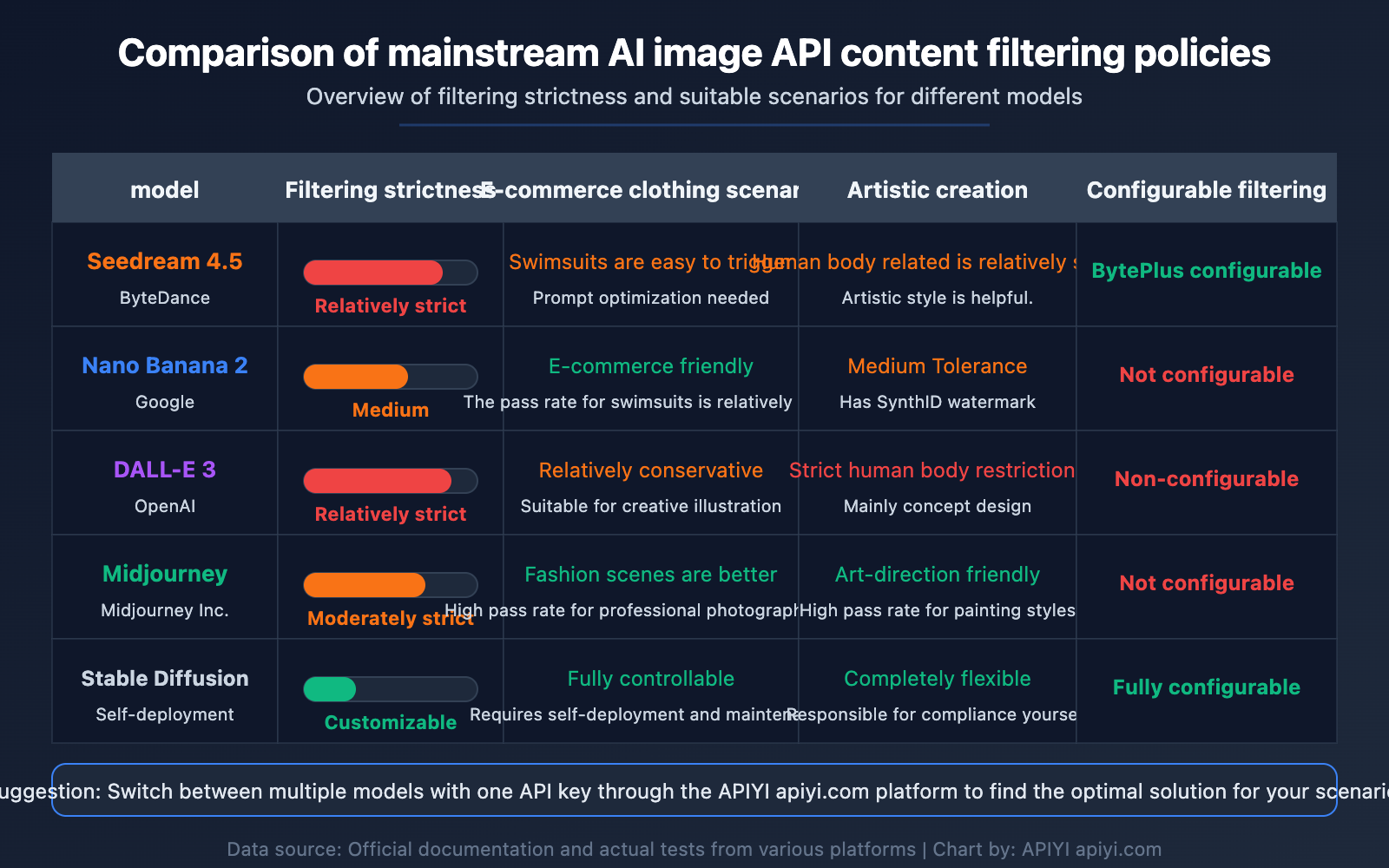
Solution 5: Switch to Other Image Generation Models
If your requests are consistently blocked on Seedream but your content is compliant (like standard e-commerce product shots), try other models. Safety filtering policies vary across different models:
| Model | Filtering Strictness | Best For | Available Platforms |
|---|---|---|---|
| Seedream 4.5 | High | General image generation, high-quality product shots | APIYI, etc. |
| Nano Banana 2 | Medium | General creativity, e-commerce images | APIYI, etc. |
| Nano Banana Pro | Medium | High-end product shots, artistic creation | APIYI, etc. |
| DALL-E 3 | High | Creative illustrations, conceptual design | APIYI, etc. |
| Stable Diffusion | Configurable | Scenarios requiring flexible control | Self-deployed |
💰 Cost Optimization Tip: You can quickly switch between different image generation models via the APIYI (apiyi.com) platform without needing to register for multiple separate accounts. The platform provides a unified API interface—one key allows you to call Seedream, Nano Banana, DALL-E, and more.
Solution 6: Adjust Content Pre-filter on BytePlus (Direct Users Only)
If you're using the Seedream API directly through BytePlus (the international version of Volcengine), you can adjust the content filtering settings in the console:
- Log in to the BytePlus console:
byteplus.com - Go to ModelArk → Online Inference
- Find the Content Pre-filter toggle
- Adjust the filtering level based on your business needs
Note: Disabling or lowering content filtering means you'll need to take full responsibility for compliance yourself. When calling through an API proxy service, this setting is usually controlled by the upstream provider.
Industry Context: Why Seedream API Uses Content Filtering
Why All AI Image APIs Have Content Filtering
This isn't a restriction unique to Seedream. The entire AI image generation industry is tightening its content safety policies for several key reasons:
Legal and Regulatory Pressure:
- The EU AI Act (fully effective August 2026) requires AI-generated content to have built-in safety safeguards.
- Governments worldwide are implementing stricter legal accountability for Deepfakes and inappropriate AI-generated content.
- As technology providers, platforms must exercise a "duty of care."
Brand Reputation:
- Companies like ByteDance, Google, and OpenAI don't want their models used to generate harmful or controversial content.
- A single negative incident can damage a brand and its business far more than losing a few users to strict filtering.
Technical Limitations:
- Safety systems can't always perfectly distinguish between "legitimate e-commerce needs" and "inappropriate content generation."
- A "better safe than sorry" strategy means even compliant content might occasionally get flagged.
- This remains a universal challenge for all current AI content safety systems.
The "Hard Restrictions" List for AI Image Generation
The following categories are considered "hard restrictions" across almost all major AI image APIs. You generally can't bypass these with clever prompt engineering:
- Body Modifications: Altering the physical traits of real people (e.g., breast enhancement, slimming, changing body shapes).
- Explicit NSFW: Nudity, pornographic, or sexually suggestive content.
- Deepfakes: Swapping a real person's face onto another body.
- Violence and Gore: Weapons, injury scenes, or bloody imagery.
- Child Safety: Any sensitive content involving minors.
- Hate Speech: Content involving racism, religious insults, etc.
🎯 Pro Tip: When you hit a hard restriction, don't keep trying different "bypass" prompts. You'll just waste model invocation credits (and money) and might get your account flagged. Instead, use the multi-model support on the APIYI (apiyi.com) platform to find a model better suited to your specific, legitimate needs.
FAQ
Q1: Does a “sensitive information” error mean my prompt is the problem or the generated image?
It could be either. Seedream's content filtering happens in two stages: input filtering and output filtering. If your prompt contains sensitive keywords, it's blocked immediately at the input stage (the response is very fast). If the prompt passes but the resulting image is flagged, it's blocked at the output stage (you'll see a slight generation delay before the error). You can usually tell which stage was triggered by the response time.
Q2: What if my legitimate e-commerce product photos (like swimwear) are being blocked?
This is a classic case of "over-sensitivity" in content filtering. We recommend: (1) Adding clear business context to your prompt, such as professional e-commerce, product catalog, or clean white background; (2) Avoiding words that might trigger body detection like model, wearing, or body, and using product-focused terms like product display or flat lay instead; (3) Trying other models like Nano Banana Pro via APIYI (apiyi.com) to compare how different models handle filtering for the same scene.
Q3: Does Seedream support “beautification” requests, like making people in photos look better?
Partially. Seedream's image-to-image (img2img) feature can handle stylistic edits (like changing lighting, backgrounds, or clothing styles). However, operations that involve changing physical body traits (slimming, changing facial features, etc.) will likely be blocked by content filters. This is an industry-wide restriction, not just a Seedream thing. For standard portrait retouching, we recommend using professional photo editing software like Lightroom or Snapseed.
Q4: Why does the same prompt work sometimes but error out other times?
This usually happens because of output filtering. AI image generation is inherently random; the same prompt won't produce the exact same image every time. Some results might land right on the "borderline" of the safety system—sometimes passing, sometimes failing. To fix this: (1) Add more safety constraints to your prompt to reduce the chance of borderline cases; (2) Use a seed parameter to keep results consistent; (3) If it happens often, tweak your prompt wording to move it further away from the filtering threshold.
Summary
Key takeaways for handling Seedream API "sensitive information" errors:
- Errors are triggered by content filtering on prompts or output images: Seedream uses a dual security mechanism that checks both the input prompt and the generated image.
- Body modification requests are a hard industry limit: Operations that alter physical characteristics, such as breast enhancement or weight loss, are strictly prohibited across Seedream, DALL-E, Nano Banana, and all other major image generation APIs.
- False positives in compliant scenarios can be fixed via prompt optimization: For legitimate needs like e-commerce product shots or fashion photography, you can reduce triggers by replacing sensitive keywords or adding "safe" context to your prompts.
- Switching models is an effective workaround: Filtering policies vary between models. Content blocked by one model might pass through another without issue.
We recommend using the APIYI (apiyi.com) platform to access Seedream and other image generation APIs. With a single API key, you can switch between multiple models to quickly find the best fit for your specific use case. The platform provides free test credits to help you verify how different models handle filtering in your scenarios.
References
-
Seedream 4.5 Official Documentation: Model introduction and API docs from the ByteDance Seed team.
- Link:
seed.bytedance.com/en/seedream4_5 - Description: Covers model capabilities, API parameters, and usage restrictions.
- Link:
-
BytePlus ModelArk Content Pre-filter Documentation: Official guide for the content filtering system.
- Link:
docs.byteplus.com/en/docs/ModelArk/Content_Pre-filter - Description: Details on Content Pre-filter configuration and filtering rules.
- Link:
-
Seedream 4.0-4.5 Prompt Guide: Official prompt optimization guide from BytePlus.
- Link:
docs.byteplus.com/en/docs/ModelArk/1829186 - Description: Best practices for writing prompts to avoid triggering content filters.
- Link:
-
Seedream 4.5 API Integration Guide: Full integration tutorial from the APIYI Help Center.
- Link:
help.apiyi.com/en/seedream-4-5-api-integration-guide-en.html - Description: Step-by-step guide for invoking Seedream via the APIYI platform.
- Link:
Author: APIYI Tech Team
Technical Discussion: Feel free to discuss Seedream API issues in the comments. For more AI image generation API tips and tricks, visit the APIYI documentation center at docs.apiyi.com.