Author's Note: A deep analysis of why Claude Sonnet 4.6 is the most cost-effective model choice for OpenClaw, including a performance comparison with Opus 4.6 and a configuration tutorial for the APIYI proxy service using the anthropic-messages format.
Choosing the right model for OpenClaw is the first critical decision every user faces. This article will use data to explain why Claude Sonnet 4.6 is the most cost-effective model choice for OpenClaw—it achieves 97-99% of Opus 4.6's programming capability at one-fifth the price, and includes a complete APIYI proxy service configuration tutorial.
Core Value: After reading this article, you'll understand Sonnet 4.6's cost-performance advantage over Opus 4.6 and master the complete method for configuring Claude models in OpenClaw via APIYI.
Claude Sonnet 4.6 vs. Opus 4.6: Core Performance Comparison
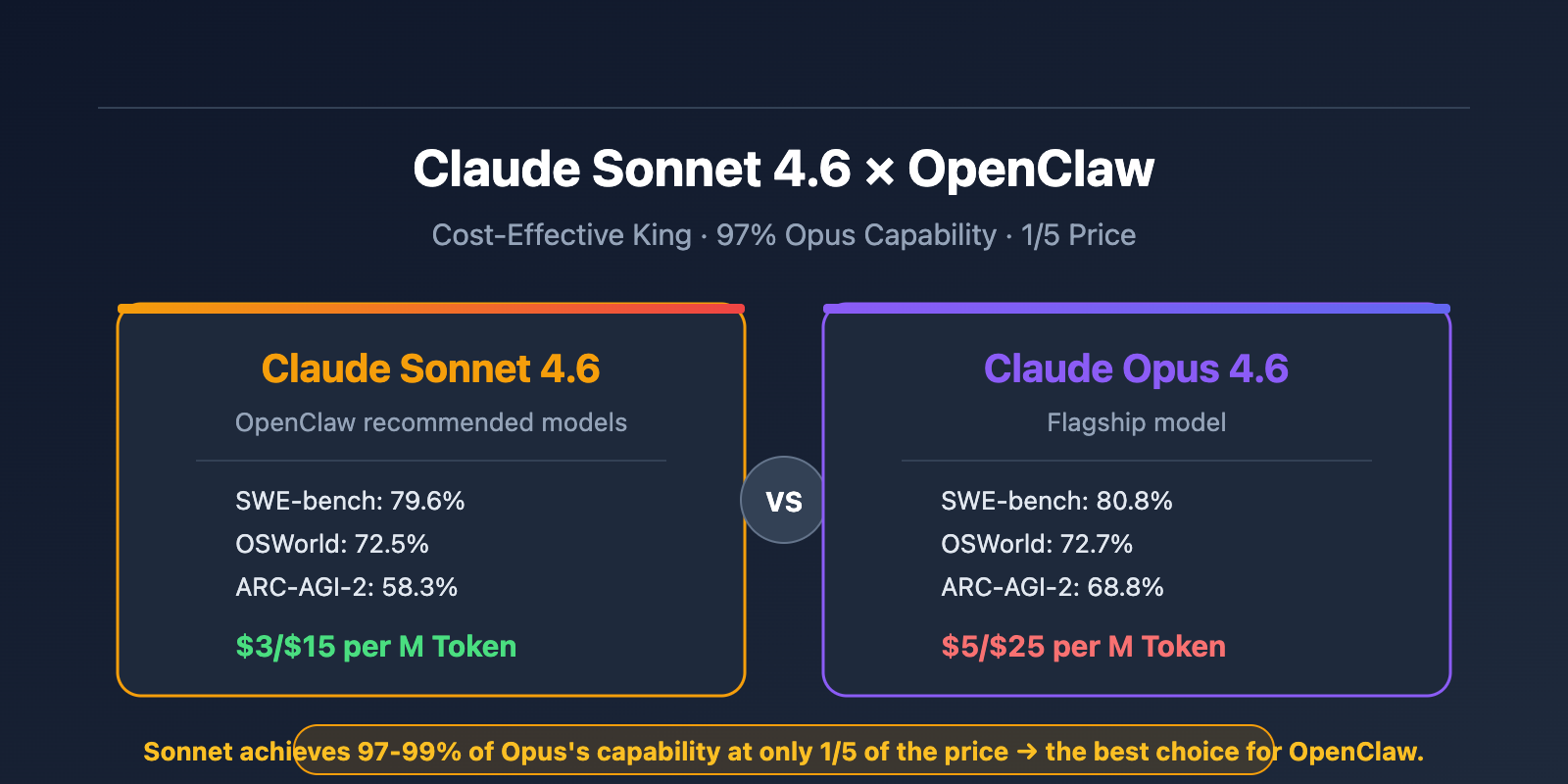
Before choosing a model, let's look at the data. Claude Sonnet 4.6, released on February 17, 2026, nearly matches the flagship Opus 4.6 in multiple benchmarks, all while costing just one-fifth of the price.
| Benchmark | Claude Sonnet 4.6 | Claude Opus 4.6 | Gap | Notes |
|---|---|---|---|---|
| SWE-bench Verified | 79.6% | 80.8% | -1.2% | Real-world software engineering programming capability |
| OSWorld-Verified | 72.5% | 72.7% | -0.2% | Computer operation tasks (almost identical) |
| ARC-AGI-2 | 58.3% | 68.8% | -10.5% | Novel problem-solving capability |
| Office Productivity | 1633 Elo | 1606 Elo | +27 | Sonnet surpasses Opus |
| Input Price | $3/M Token | $5/M Token | 40% cheaper | Daily conversation and code writing |
| Output Price | $15/M Token | $25/M Token | 40% cheaper | Long text and code generation |
Why Claude Sonnet 4.6 is Better Suited for OpenClaw
Near-Identical Programming Capability: On SWE-bench Verified (real-world software engineering tasks), Sonnet 4.6 scores 79.6%, just 1.2 percentage points behind Opus 4.6's 80.8%. On OSWorld (computer operation tasks), the gap is a mere 0.2%. This means that for OpenClaw's daily tasks like programming, debugging, and code review, you won't feel any practical difference in output quality between Sonnet and Opus.
Significant Speed Advantage: As an agent tool, a single OpenClaw task can involve dozens of model invocations. Sonnet 4.6's inference speed is noticeably faster than Opus 4.6's, and this latency advantage gets amplified in agent workflows. Faster responses mean a smoother interactive experience and higher task completion efficiency.
The Cost Difference is Decisive: Sonnet's input/output prices are $3/$15 per M Token, while Opus charges $5/$25. For agent tools like OpenClaw that require frequent model calls, daily consumption can easily reach millions of tokens. On a monthly basis, choosing Sonnet can save you 40% on costs—that's not a small amount.
🎯 Model Selection Advice: For over 90% of OpenClaw use cases, Claude Sonnet 4.6 is the optimal choice. Only when dealing with extremely complex multi-file refactoring or tasks requiring ultimate reasoning depth should you switch to Opus 4.6. By configuring both models via APIYI (apiyi.com), you can flexibly switch between them as needed.
OpenClaw Configuration for Claude Sonnet 4.6 via APIYI – Quick Start
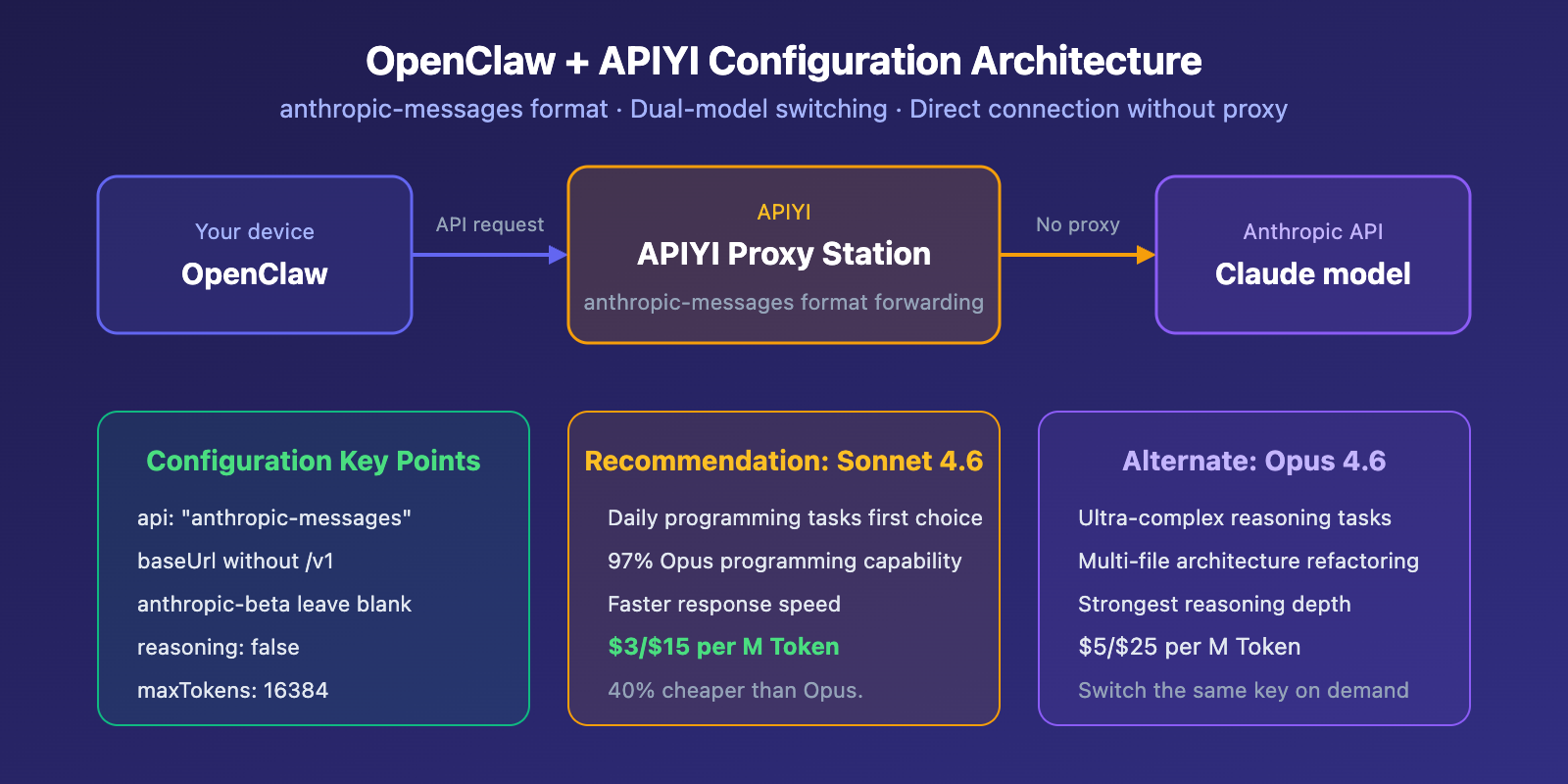
OpenClaw supports connecting to third-party API services through custom Providers. When using the APIYI proxy service, you need to use the anthropic-messages API format. Here's the complete configuration method.
OpenClaw APIYI Configuration Minimal Example
Add the following configuration to your OpenClaw config file (openclaw.json or via the management interface):
{
  "models": {
    "providers": {
      "apiyi": {
        "baseUrl": "https://api.apiyi.com",
        "apiKey": "sk-REPLACE_ME",
        "api": "anthropic-messages",
        "headers": {
          "anthropic-version": "2023-06-01",
          "anthropic-beta": ""
        },
        "models": [
          {
            "id": "claude-sonnet-4-6-thinking",
            "name": "claude-sonnet-4-6-thinking",
            "reasoning": false,
            "input": ["text"],
            "contextWindow": 200000,
            "maxTokens": 16384
          }
        ]
      }
    }
  }
}
View Full Configuration (with Opus 4.6 Dual Model Switching)
{
  "models": {
    "providers": {
      "apiyi": {
        "baseUrl": "https://api.apiyi.com",
        "apiKey": "sk-REPLACE_ME",
        "api": "anthropic-messages",
        "headers": {
          "anthropic-version": "2023-06-01",
          "anthropic-beta": ""
        },
        "models": [
          {
            "id": "claude-opus-4-6",
            "name": "claude-opus-4-6",
            "reasoning": false,
            "input": ["text"],
            "contextWindow": 200000,
            "maxTokens": 16384
          },
          {
            "id": "claude-sonnet-4-6-thinking",
            "name": "claude-sonnet-4-6-thinking",
            "reasoning": false,
            "input": ["text"],
            "contextWindow": 200000,
            "maxTokens": 16384
          }
        ]
      }
    }
  }
}
Configuration Notes:
- Adds both Opus and Sonnet models; use Sonnet for daily tasks and switch to Opus for complex reasoning
- Set
reasoningtofalse, letting the model control its own thinking depth - Leave
anthropic-betaempty to avoid compatibility issues
Recommendation: Register at APIYI (apiyi.com) to get an API Key. You'll receive $0.05 in free credits upon registration. Just replace
sk-REPLACE_MEin the config with your actual token to start using it.
Key Points for Configuring APIYI Claude Models in OpenClaw
When configuring OpenClaw to connect to the APIYI proxy service, there are a few key points that are easy to get wrong. Here's a detailed breakdown of the essential configuration settings:
| Configuration Item | Correct Setting | Explanation |
|---|---|---|
| api Format | "anthropic-messages" |
Must use this format, not openai-completions |
| baseUrl | "https://api.apiyi.com" |
Don't add /v1 at the end, different from OpenAI format |
| anthropic-version | "2023-06-01" |
Fixed version number ensures API compatibility |
| anthropic-beta | "" (leave empty) |
Leave empty to avoid triggering incompatible Beta features |
| reasoning | false |
Claude's adaptive thinking will work automatically |
| maxTokens | 16384 |
Maximum output tokens per response |
Common Issues with OpenClaw Claude Model Configuration
Why use anthropic-messages instead of openai-completions?
When OpenClaw calls Claude models, it involves tool calling (Tool Use) functionality. The anthropic-messages format natively supports Claude's tool calling protocol, while the openai-completions format can cause tool calls to fail or return malformed responses. This is crucial for configuration stability.
Why doesn't baseUrl include /v1?
The Anthropic Messages API endpoint path is different from OpenAI's. APIYI automatically handles path routing in anthropic-messages mode, so you only need to use the root domain https://api.apiyi.com for baseUrl.
Why recommend configuring two models simultaneously?
Use Sonnet 4.6 for daily programming tasks (better value, faster), and switch to Opus 4.6 for super complex reasoning tasks. With APIYI, you can call both models using the same API Key without extra configuration.
🎯 Configuration Reminder: After completing the setup, it's a good idea to send a simple message first to test connectivity. If you encounter tool calling errors, first check if
apiis set to"anthropic-messages"—this is the most common configuration issue.
Claude Sonnet 4.6 vs. Opus 4.6 Use Case Comparison in OpenClaw
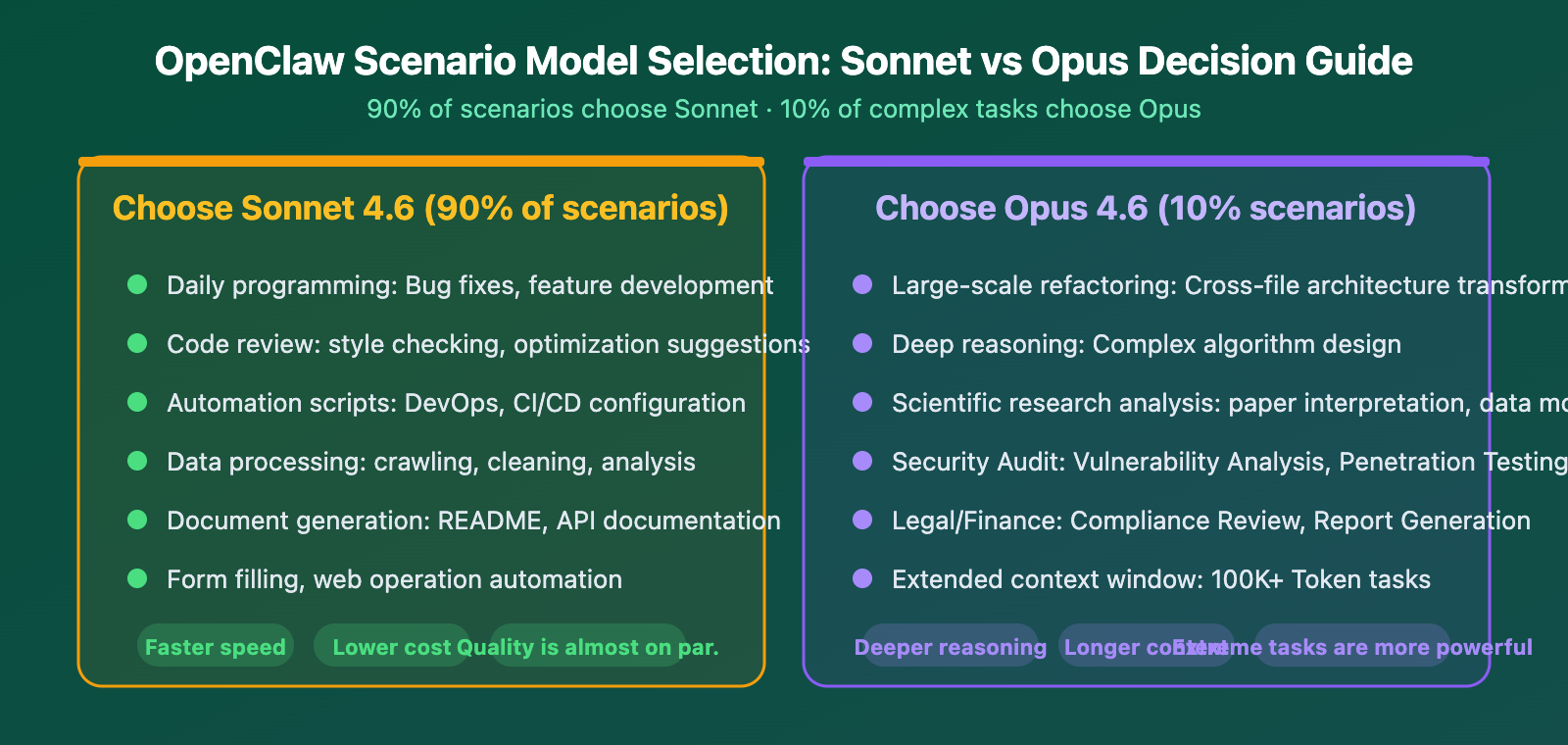
| Use Case | Recommended Model | Reason | Estimated Monthly Cost |
|---|---|---|---|
| Daily Coding Assistance | Sonnet 4.6 | 79.6% on SWE-bench, fast response | Lower |
| Automated Operations | Sonnet 4.6 | Stable tool calling, low latency | Lower |
| Code Review | Sonnet 4.6 | Fast response, quality is sufficient | Lower |
| Complex Architecture Refactoring | Opus 4.6 | Requires deeper reasoning capability | Higher |
| Research Paper Analysis | Opus 4.6 | Long context + deep reasoning | Higher |
Usage Suggestion: Configure both Sonnet and Opus models in OpenClaw. Use Sonnet 4.6 as the default for daily tasks, and manually switch to Opus 4.6 for complex scenarios. With APIYI apiyi.com, you can call both models with a single API Key—no need to purchase them separately.
Frequently Asked Questions
Q1: What if tool calling fails after configuring APIYI in OpenClaw?
The most common reason is that the api field isn't set to "anthropic-messages". OpenClaw's Claude tool calling relies on the native Anthropic message format; using "openai-completions" will cause tool calls to fail. Also, check that the baseUrl is https://api.apiyi.com (without /v1 at the end) and that the anthropic-beta field is left empty.
Q2: What’s the difference between Sonnet 4.6’s thinking model and the regular model?
claude-sonnet-4-6-thinking is the version with Adaptive Thinking capability. The model automatically decides whether to engage in deep reasoning based on the complexity of the problem. For OpenClaw's agent scenarios, we recommend using the thinking version because it automatically activates deeper reasoning chains for complex tasks while responding quickly to simple ones, balancing efficiency and quality.
Q3: How do I get an API Key from APIYI to start testing?
The steps are very simple:
- Visit APIYI apiyi.com to register an account
- You'll automatically receive a $0.05 free trial credit upon registration
- Go to "Token Management" to create an API Key
- Enter the Key into the
apiKeyfield in your OpenClaw configuration - Send a message to test connectivity
This single Key can call both Sonnet 4.6 and Opus 4.6—no separate configuration needed.
Summary
The core reasons why Claude Sonnet 4.6 is the best model for OpenClaw:
- Performance is nearly on par: SWE-bench 79.6% vs Opus 80.8%, OSWorld 72.5% vs 72.7%. For everyday coding tasks, you won't feel a difference.
- Cost is significantly lower: Input $3 vs $5, Output $15 vs $25, saving 40% on expenses. The savings are substantial for long-term use.
- It's faster: In the OpenClaw agent workflow, the model is called frequently. Sonnet's low-latency advantage is amplified in practical use.
By configuring both Sonnet 4.6 and Opus 4.6 models simultaneously via APIYI at apiyi.com, you can use Sonnet daily to save money and switch to Opus for complex tasks to ensure quality. This is the optimal strategy for OpenClaw users.
📚 References
-
Anthropic Claude Sonnet 4.6 Official Page: Model capabilities and benchmark data.
- Link:
anthropic.com/claude/sonnet - Description: View the full specifications and performance comparisons for Sonnet 4.6.
- Link:
-
OpenClaw Anthropic Provider Documentation: Official configuration guide.
- Link:
docs.openclaw.ai/providers/anthropic - Description: View the complete configuration instructions for the anthropic-messages format.
- Link:
-
OpenClaw Model Configuration Guide: Custom Provider settings.
- Link:
docs.openclaw.ai/concepts/model-providers - Description: Learn about OpenClaw's model provider configuration architecture.
- Link:
-
APIYI Documentation Center: APIYI platform API integration guide.
- Link:
docs.apiyi.com - Description: View the list of models supported by APIYI and access tutorials.
- Link:
Author: APIYI Technical Team
Technical Discussion: Feel free to discuss in the comments. For more resources, visit the APIYI documentation center at docs.apiyi.com.