Lovart AI's workflow is indeed impressive—conversational design, multi-agent collaboration, and one-click brand kit generation. These features have made it a favorite among many designers.
But the credit consumption is simply too fast.
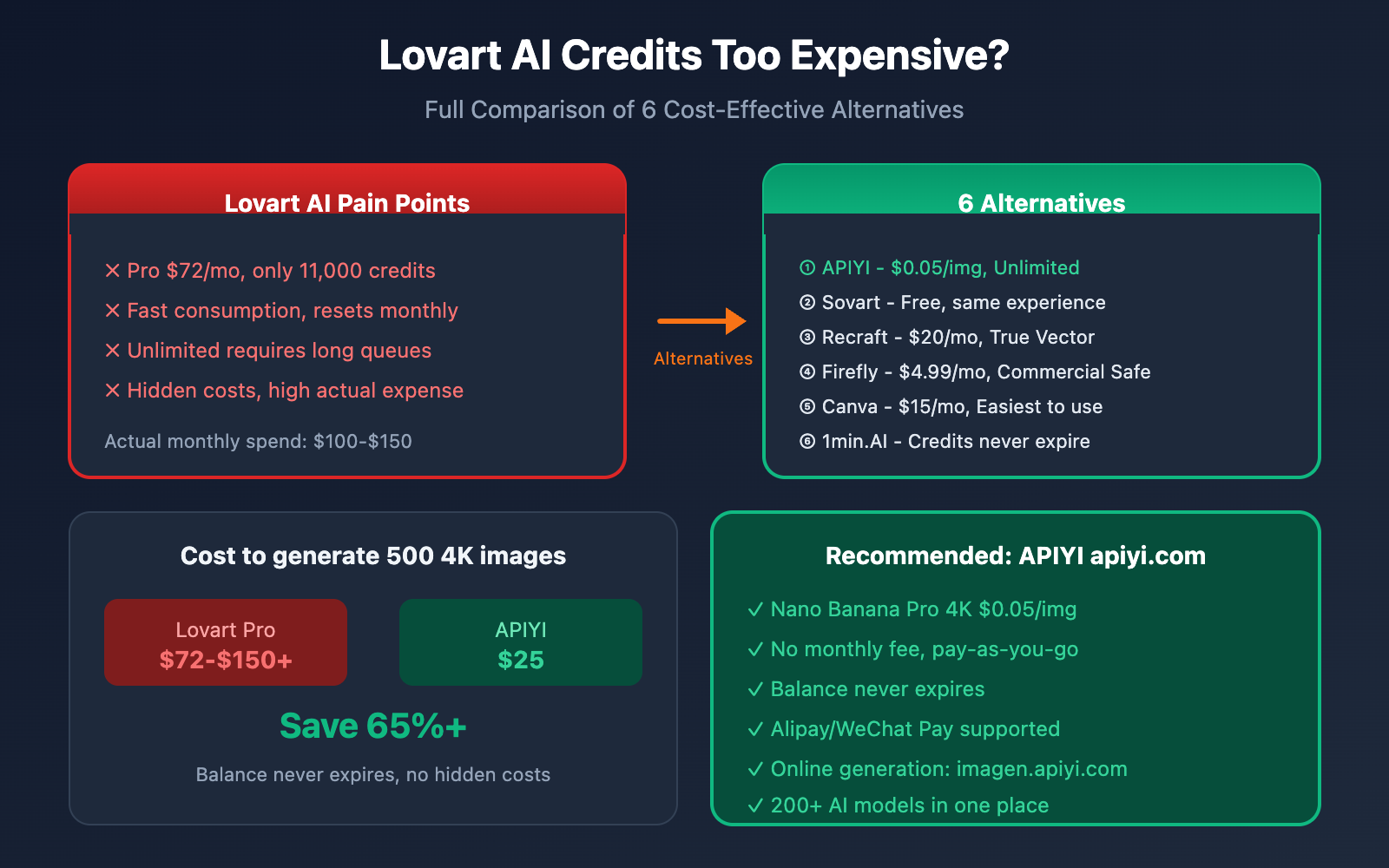
The Pro plan at $72/month only gives you 11,000 credits. A single complex brand design project can easily eat up 500+ credits, often leaving you empty-handed before the month is even over. Even more frustrating is that unused credits don't roll over; they reset to zero every month.
In this post, we'll take an objective look at Lovart AI's pricing issues and recommend 6 high-value alternatives to help you slash costs without sacrificing design quality.
Why Lovart AI Credits Are So Expensive
Analyzing Lovart AI's Pricing Structure
Lovart AI uses a dual billing model of "Monthly Fee + Credits":
| Plan | Monthly Fee | Fast Credits | Cost per Credit | Best For |
|---|---|---|---|---|
| Free | $0 | 100 | – | Trial users |
| Starter | $15 | 2,000 | $0.0075 | Casual users |
| Basic | $26 | 3,500 | $0.0074 | Solo designers |
| Pro | $72 | 11,000 | $0.0065 | Professional teams |
While the cost per credit looks low on paper, the real issue is the consumption speed:
| Operation Type | Credit Cost | Uses per Pro Plan |
|---|---|---|
| Simple Image Gen | 10-20 | ~700 times |
| High-Res 4K Output | 50-100 | ~150 times |
| Agent Design Chat | 50-200 | ~80 times |
| Full Brand Identity | 300-800 | ~20 times |
⚠️ Real-world Scenario: A moderately complex branding project (Logo + VI + Packaging) might require 5-10 iterations, totaling 2,000-5,000 credits. A Pro plan can only handle 2-5 such projects per month.
4 Major User Complaints
Based on feedback from Trustpilot and G2, users have flagged several pricing issues with Lovart AI:
| Issue | User Feedback | Impact |
|---|---|---|
| Credit Reset | Unused monthly credits don't roll over | Leads to waste or "panic using" |
| Hidden Costs | Thinking Mode is on by default and eats credits | Actual costs are higher than expected |
| "Unlimited" in Name Only | Relaxed mode has extremely long queues | Can't meet urgent deadlines |
| Third-party Markup | Some suspect it's just an API middleman | Questionable value for money |
Calculating the Real Cost of Use
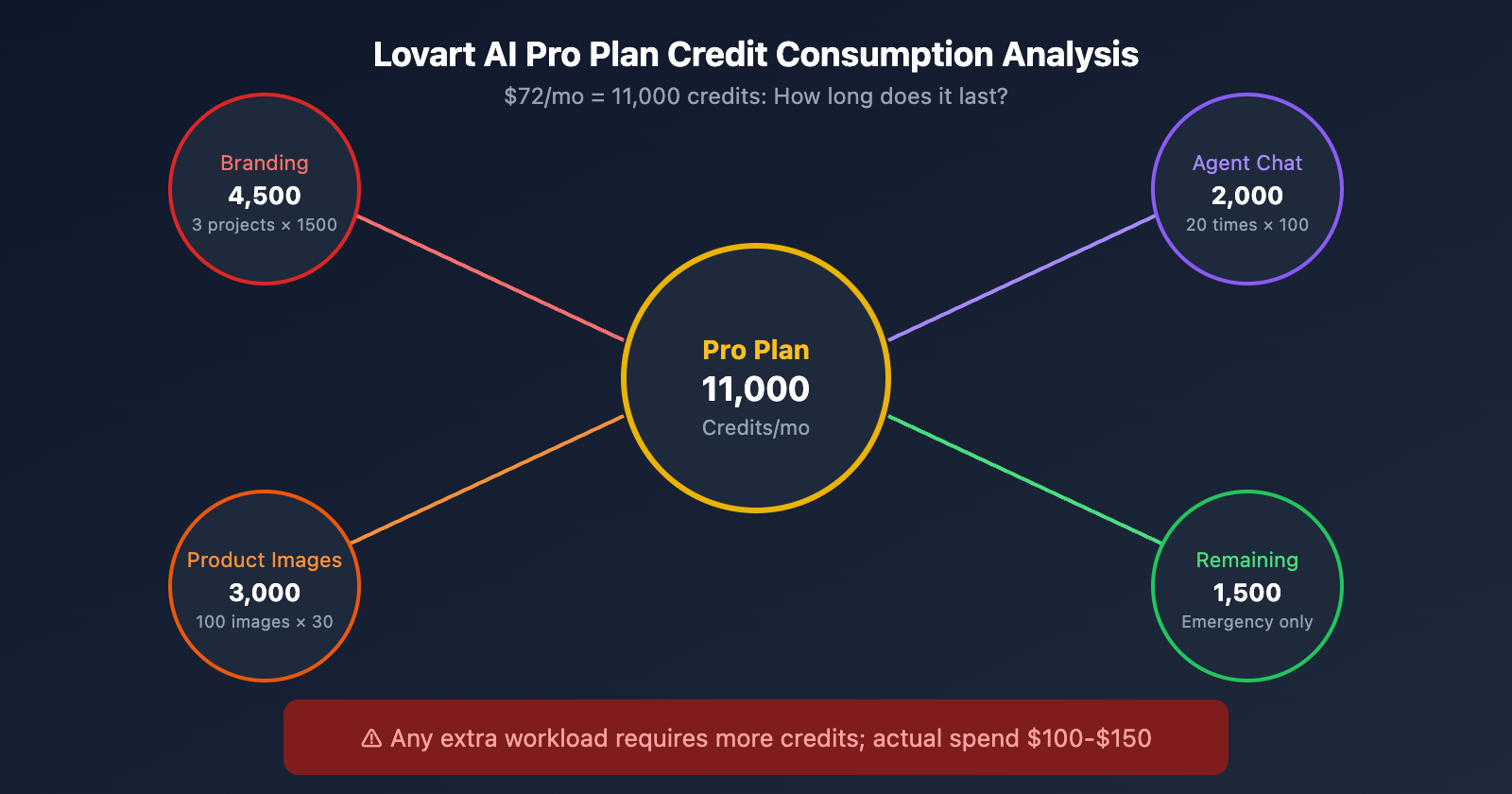
Imagine you're a freelance designer who needs to:
- Complete 3 brand identity projects
- Generate 100 product images
- Run 20 Agent design iterations
Branding: 3 × 1,500 credits = 4,500 credits
Product Images: 100 × 30 credits = 3,000 credits
Agent Chat: 20 × 100 credits = 2,000 credits
────────────────────────────────
Total: 9,500 credits

The Pro plan (11,000) barely covers this.
It leaves zero room for extra requests or experimentation.
If your workload increases even slightly, you'll need to buy extra credit packs, pushing your actual monthly spend to $100-$150.
6 Cost-Effective Alternatives to Lovart AI
Option 1: APIYI + Nano Banana Pro (Recommended)
🎯 Best Value Option: Call image generation APIs like Nano Banana Pro through apiyi.com. It's pay-as-you-go with no hidden limits.
Best for: Users who need high-volume image generation and want the absolute best price-to-performance ratio.
Core Advantages:
| Comparison | Lovart AI Pro | APIYI |
|---|---|---|
| Monthly Fee | $72 | $0 |
| Price per 4K Image | ~$0.24 (credit conversion) | $0.05 |
| Generation Limits | 11,000 credits/month | Unlimited |
| Unused Credits | Expires at month-end | Never expires |
| Payment Method | International Credit Card | Alipay/WeChat |
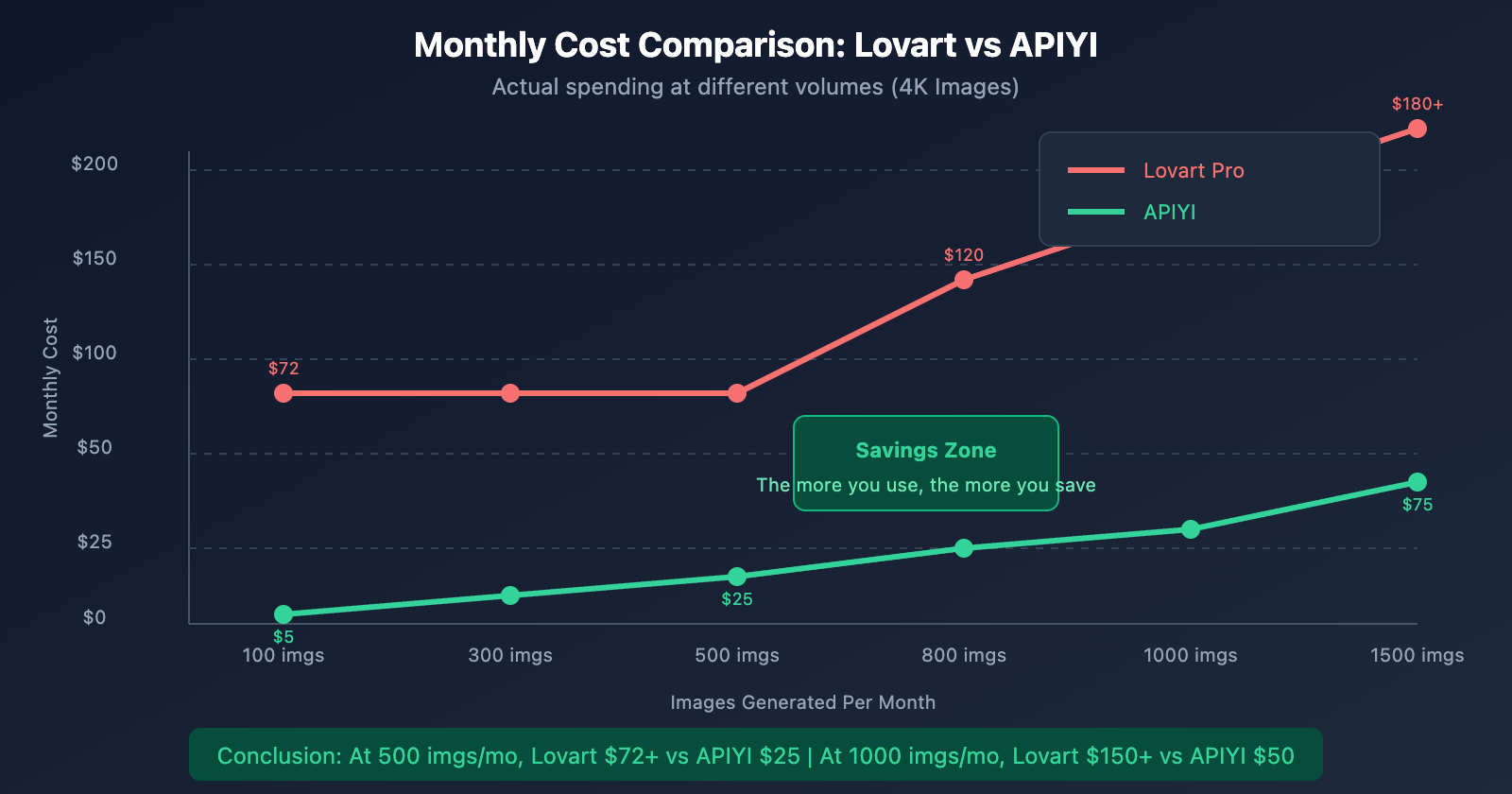
Cost Comparison (Generating 500 4K images):
- Lovart Pro: $72 monthly fee + might run out of credits
- APIYI: 500 × $0.05 = $25, saving you over 65%.
Quick Integration:
import openai

# APIYI Integration - Calling Nano Banana Pro
client = openai.OpenAI(
    api_key="your-apiyi-key",  # Get this at api.apiyi.com
    base_url="https://api.apiyi.com/v1"
)

response = client.images.generate(
    model="nano-banana-pro",
    prompt="Modern minimalist logo for coffee brand, vector style",
    size="1024x1024",
    quality="hd",
    n=1
)

print(response.data[0].url)
💡 Try it Online: Don't want to write code? Visit imagen.apiyi.com to generate images directly online. It supports various models including Nano Banana Pro and DALL-E 3.
Option 2: Sovart (SeaArt AI)
Best for: Users who want a workflow similar to Lovart but are on a tighter budget.
Sovart is an AI design Agent launched by SeaArt, and its features are very similar to Lovart:
| Feature | Lovart | Sovart |
|---|---|---|
| Conversational Design | ✅ | ✅ |
| Logo Design | ✅ | ✅ |
| Brand Identity (VI) | ✅ | ✅ |
| Product Packaging | ✅ | ✅ |
| Free Tier | 100 credits | Daily free credits |
| Entry Price | Starts at $15/mo | Free to use |
Pros:
- The free tier is enough for daily use.
- Interface and workflow are very similar to Lovart.
- Low learning curve.
Cons:
- Some advanced features require payment.
- The community ecosystem isn't as mature as Lovart's.
Option 3: Recraft AI
Best for: Users who specifically need vector graphics, logos, and icon designs.
Recraft's core advantage is true vector output, something Lovart can't do:
| Feature | Lovart | Recraft |
|---|---|---|
| Output Format | Raster (PNG/JPG) | Vector (SVG) |
| Infinite Scaling | ❌ Gets blurry | ✅ Stays sharp forever |
| Editability | Requires re-generation | Can edit paths directly |
| Free Tier | 100 credits | 50 credits |
| Pro Price | $72/mo | $20/mo |
Best Use Cases:
- Logo design
- Icon systems
- Illustration design
- Materials that need to be printed
Option 4: Adobe Firefly
Best for: Users who already subscribe to Adobe Creative Cloud.
| Plan | Price | Credits |
|---|---|---|
| Firefly Standalone | $4.99/mo | 100 credits |
| Creative Cloud All Apps | $59.99/mo | Includes Firefly |
Core Advantages:
- Commercially Safe: Trained only on licensed content, so there's no copyright risk.
- Deep Integration: Use it directly inside Photoshop and Illustrator.
- Adobe Ecosystem: Works seamlessly with other Adobe tools.
Cons:
- Relatively few credits provided.
- Creative freedom isn't as high as Lovart.
- No Agent-style conversational features.
Option 5: Canva AI
Best for: Non-professional designers, marketers, and content creators.
| Feature | Lovart | Canva |
|---|---|---|
| Target User | Pro Designers | Everyone |
| Learning Curve | Medium | Very Low |
| Template Count | Limited | Massive |
| Collaboration | Basic | Powerful |
| Free Version | Restricted | Fully Functional |
| Pro Price | $72/mo | $15/mo |
Best Use Cases:
- Social media graphics
- Presentations
- Marketing materials
- Team-based design collaboration
Option 6: 1min.AI
Best for: Users who need a variety of AI capabilities (image, video, audio, docs).
1min.AI features a unified credit pool + credit rollover:
| Feature | Lovart | 1min.AI |
|---|---|---|
| Credit Rollover | ❌ Reset at month-end | ✅ Permanent |
| Features Covered | Image Design | Image+Video+Audio+Docs |
| Model Count | ~10 models | 50+ |
| Overage Rate | High | $0.67/million credits |
Pros:
- Credits never expire, so there's no waste.
- One-stop shop for various AI needs.
- Extremely low cost for overage use.
Alternative Selection Guide
Selection by Use Case
| Your Needs | Recommended Solution | Reason |
|---|---|---|
| High-volume image generation | APIYI | Lowest unit price, no limits |
| Need a Lovart-like experience | Sovart | Similar features, free tier available |
| Logo/Icon design | Recraft | True vector output |
| Already using Adobe Creative Cloud | Firefly | No extra cost |
| Non-designers | Canva | Easiest to use |
| Diverse AI needs | 1min.AI | One-stop platform |
Selection by Budget
| Monthly Budget | Recommended Combination |
|---|---|
| $0 | Sovart Free + APIYI Trial |
| $10-30 | APIYI Pay-as-you-go + Canva Free |
| $30-50 | APIYI + Recraft Pro |
| $50-100 | APIYI + 1min.AI Pro |
| $100+ | Consider Lovart, but we suggest supplementing with APIYI |
Selection by Technical Ability
| Technical Level | Recommended Solution |
|---|---|
| No-code | Canva, Sovart, imagen.apiyi.com |
| Comfortable with APIs | APIYI, 1min.AI |
| Professional Developer | APIYI API + Custom Workflows |
Detailed Guide to APIYI
Why We Recommend APIYI as a Lovart Alternative
APIYI is a leading AI Large Language Model API relay platform, making it a perfect fit for replacing Lovart's image generation needs:
- Ranked #1 in Daily Nano Banana Pro Usage – Significant investment in O&M resources ensures stability for commercial use.
- Guaranteed Official Relay – Directly forwards Google's official API, ensuring results are identical to the source.
- Ultimate Cost-Effectiveness – 1K-4K resolution at the same price of $0.05/image, which is 80% off the official price.
- Zero Restrictions – No monthly credit caps and no waiting in queues.
Image Generation Models Supported by APIYI
| Model | Features | Unit Price |
|---|---|---|
| Nano Banana Pro | Google's latest, 4K Ultra HD | $0.05/image |
| DALL-E 3 | From OpenAI, highly creative | $0.04/image |
| Stable Diffusion 3 | Strongest open-source, diverse styles | $0.02/image |
| Flux Pro | Excellent detail, great for portraits | $0.03/image |
| Midjourney (API) | Strong artistic feel, active community | $0.05/image |
🎯 Recommendation: Use Nano Banana Pro for daily tasks for the best value; mix in other models when you need a specific style.
Two Ways to Use It
Method 1: Online Tool (No-Code)
Visit imagen.apiyi.com:
- Select a model (Nano Banana Pro is recommended).
- Enter your prompt.
- Choose the size and style.
- Click generate.
- Download your high-res image.
Best for: Designers, content creators, and quick image generation.
Method 2: API Integration
import openai

# Initialize the client
client = openai.OpenAI(
    api_key="your-apiyi-key",
    base_url="https://api.apiyi.com/v1"
)

# Batch generation example
prompts = [
    "Minimalist coffee shop logo, warm colors",
    "Modern tech startup logo, blue gradient",
    "Organic food brand logo, green leaves"
]

for i, prompt in enumerate(prompts):
    response = client.images.generate(
        model="nano-banana-pro",
        prompt=prompt,
        size="1024x1024",
        quality="hd",
        n=1
    )
    print(f"Logo {i+1}: {response.data[0].url}")
Best for: Developers, batch generation, and automated workflows.
Migrating from Lovart to APIYI
Migration Steps:
- Register for APIYI: Visit apiyi.com and sign up quickly with your phone number.
- Get your API Key: Create a Key in the console.
- Top up your balance: Use Alipay/WeChat to top up as needed.
- Replace the endpoint: Change your endpoint to
api.apiyi.com. - Start generating: Seamless migration with identical results.
Seamless Compatibility:
- Supports OpenAI format calls.
- Supports Google Gemini format calls.
- Official SDKs work directly—just change the endpoint.
Alternative Ideas for Lovart AI Workflow
Lovart's Core Workflow
Lovart's value isn't just in image generation; it's in its AI Agent workflow:
User input requirements → Agent understands intent → Deconstruct design tasks
    → Generate multiple options → User choice/feedback → Iterative optimization
How to Replicate with Alternatives
Option A: Sovart as a Direct Replacement
Sovart's workflow is almost identical to Lovart's, allowing for a seamless transition.
Option B: APIYI + Claude Custom Workflow
import openai
import anthropic

# Claude as the design Agent
claude = anthropic.Anthropic(api_key="your-key")

# APIYI for image generation
imagen = openai.OpenAI(
    api_key="your-apiyi-key",
    base_url="https://api.apiyi.com/v1"
)

# 1. Claude understands requirements and generates prompts
design_brief = "I need a logo for a coffee brand"
response = claude.messages.create(
    model="claude-sonnet-4-20250514",
    messages=[{
        "role": "user",
        "content": f"As a designer, generate 3 image generation prompts in different styles for the following requirement: {design_brief}"
    }]
)
prompts = parse_prompts(response.content)

# 2. APIYI batch generates images
for prompt in prompts:
    image = imagen.images.generate(
        model="nano-banana-pro",
        prompt=prompt,
        size="1024x1024"
    )
    save_image(image.data[0].url)
Option C: Canva + APIYI Combo
- Canva handles layout, templates, and collaboration
- APIYI generates creative image assets
- Combine the two = a complete design workflow
FAQ
Q1: Do other platforms have Lovart's Agent chat feature?
Sovart offers similar conversational design features. If you're used to how Lovart works, Sovart is the closest alternative.
If you only need image generation capabilities, APIYI (apiyi.com) offers better value for your money and can be paired with AI like Claude to achieve a similar workflow.
Q2: Is the image quality from APIYI the same as Lovart?
APIYI's Nano Banana Pro is an official redistribution of Google's official model. It's the same underlying model Lovart uses, so the image quality is identical.
The difference is that Lovart wraps it in an Agent workflow, while APIYI is a pure API—it's more flexible, but you'll need to organize the workflow yourself.
Q3: I'm a design beginner, which one should I choose?
I recommend Canva. It has a massive library of templates and a very low learning curve, making it perfect for getting started quickly.
If you occasionally need AI-generated creative images, you can use it alongside imagen.apiyi.com to generate high-quality images with zero code.
Q4: I need a vector logo, which option is best?
Recraft AI is the only solution that can directly output SVG vector graphics. Other options (including Lovart) only output bitmaps.
If you're on a budget, you can use APIYI to generate concept art and then convert it to vector manually or with AI.
Q5: What payment methods does APIYI support?
It supports Alipay and WeChat Pay, making it very friendly for users in China. No international credit card is needed; just top up and you're good to go.
Q6: Which option should I choose if my workload is inconsistent?
I highly recommend APIYI. Here's why:
- No monthly fees; you pay for what you use.
- Your balance never expires.
- There's no "end-of-month credit reset" issue.
The biggest problem with Lovart and other subscription-based platforms is that credits expire at the end of the month, which often leads to waste when your workload fluctuates.
Summary
Lovart AI's workflow is top-notch, but the fast credit burn, high costs, and "use-it-or-lose-it" monthly expiration policies have left many users frustrated.
6 alternatives, each with its own strengths:
| Solution | Core Advantage | Best For |
|---|---|---|
| APIYI | Lowest unit price, no restrictions | High-volume image needs |
| Sovart | Same experience as Lovart | Users who prefer conversational design |
| Recraft | True vector output | Logo/icon design |
| Firefly | Commercial safety | Adobe users |
| Canva | Easiest to get started | Non-professional designers |
| 1min.AI | Credits don't expire | Diverse AI needs |
Our Recommendations:
- Primary Image Generation Tool: APIYI (apiyi.com), $0.05 per 4K image, no restrictions whatsoever.
- Fast Online Image Generation: imagen.apiyi.com, zero-code and ready to use.
- Complete Design Workflow: A combination of Sovart or Canva + APIYI.
Don't be fooled by "unlimited" marketing; pay-as-you-go and transparent pricing are where the real value lies.
📝 Author: APIYI Team
🔗 APIYI Official Website: apiyi.com – 200+ AI models, prices as low as 20% of official rates
🖼️ Online Image Generation: imagen.apiyi.com – Nano Banana Pro Online Experience