Author's Note: A deep dive into the OpenClaw extension ecosystem, covering the 700+ Skills library, 12 major messaging platform integrations, and a guide to using the ClawHub skill store to help developers quickly build personalized AI assistants.
Want your AI assistant to connect to WhatsApp, control your smart home, or automate GitHub workflows? OpenClaw's extension ecosystem is the perfect solution for these needs. This article will systematically introduce OpenClaw's 700+ Skills library and 12 major messaging platform integrations, helping you quickly build a powerful personalized AI assistant.
Core Value: By the end of this article, you'll master how to install and configure OpenClaw extensions, understand the use cases for various extensions, and be able to choose the best skill combination for your needs.
OpenClaw Extension Ecosystem Key Points
OpenClaw (formerly Clawdbot/Moltbot) is the hottest open-source AI assistant project of 2026, with over 135,000 GitHub stars. Its powerful extension ecosystem is one of its core competitive advantages.
| Key Point | Description | Value |
|---|---|---|
| 700+ Skills | ClawHub skill store offers a massive library of community skills | Plug-and-play, rapid capability expansion |
| 12 Messaging Platforms | Supports WhatsApp, Telegram, Discord, and other major platforms | Unified entry point, cross-platform interaction |
| Local-First Architecture | All data is stored locally, ensuring privacy and security | Enterprise-grade security, data sovereignty |
| Model-Agnostic Design | Supports Claude, GPT, Gemini, and more | Flexible switching, cost control |
OpenClaw Extension Architecture Deep Dive
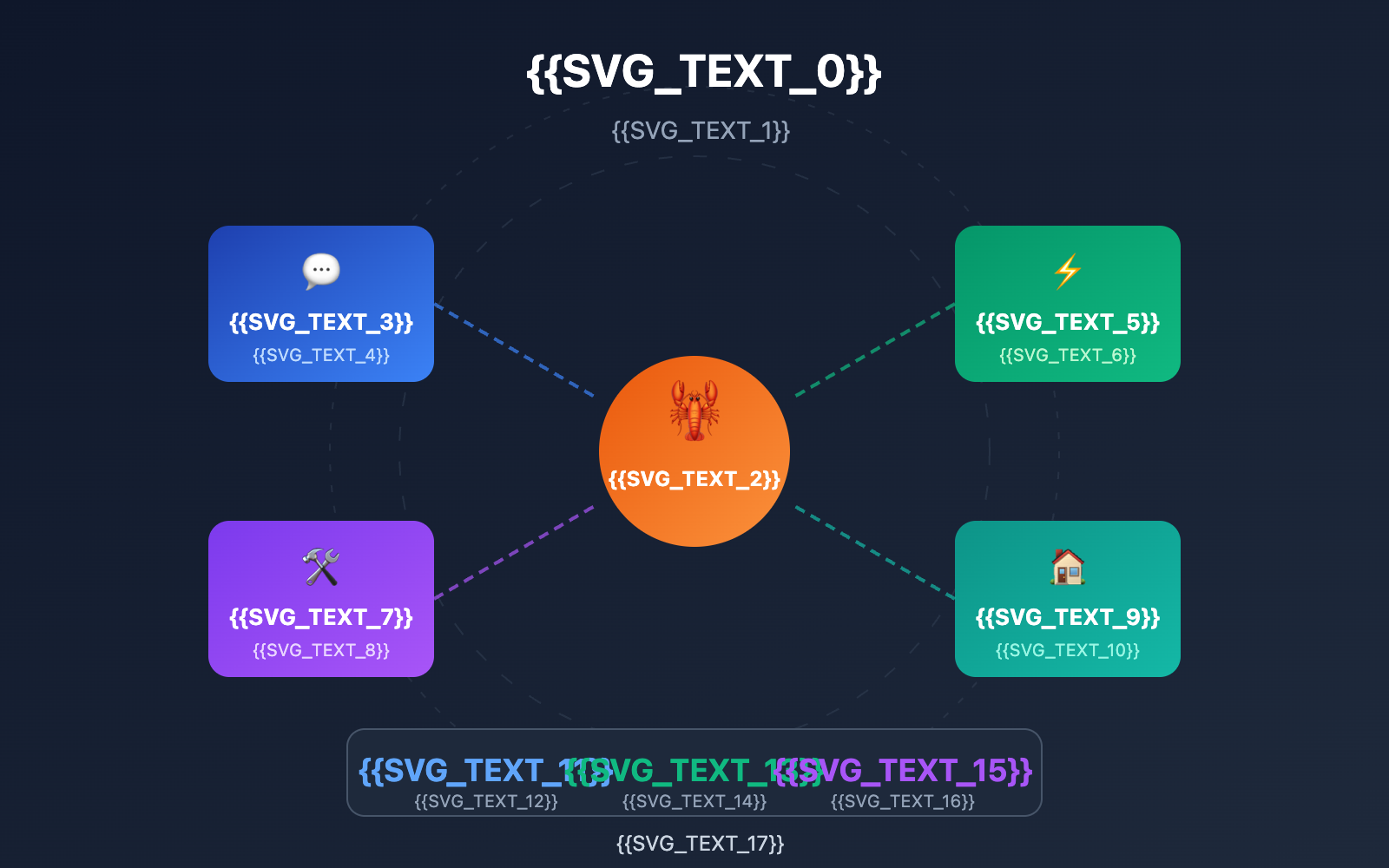
OpenClaw's extension ecosystem is built on four core components: Gateway, Agent, Skills, and Memory. The Gateway acts as the backend service managing all messaging platform connections; the Agent is the reasoning engine responsible for understanding user intent; Skills are modular capability extensions that implement specific functions; and Memory is the persistent storage layer that keeps context and preferences.
This architectural design gives OpenClaw incredible scalability. Each Skill is an independent directory containing a SKILL.md config file and related scripts, with metadata and dependencies defined via YAML frontmatter. The system automatically filters available skills based on the environment, configuration, and dependencies during loading, ensuring only the functions the user needs are loaded.
OpenClaw Extension Core Component Comparison
| Component | Responsibility | Technical Implementation | Extension Method |
|---|---|---|---|
| Gateway | Messaging platform connection management | Node.js long-connection service | Add new Channel plugins |
| Agent | Intent understanding and reasoning | Large Language Model API calls | Switch between different AI models |
| Skills | Specific functional implementation | SKILL.md + scripts | Install/develop new skills |
| Memory | Contextual persistence | Markdown file storage | Configure storage strategies |
OpenClaw's Skills system uses the AgentSkills standard format—an open standard developed by Anthropic and adopted by several AI coding assistants. This means skills developed for OpenClaw can theoretically be used on other compatible platforms, and vice versa.
Architectural Advantage: OpenClaw's modular design makes extending it a breeze. If you need to connect a specific messaging platform or add a new feature, you just need to develop the corresponding Channel or Skill module without touching the core code. This design philosophy aligns perfectly with APIYI's (apiyi.com) unified interface approach—reducing integration costs through standardization.
OpenClaw Message Platform Integration Guide
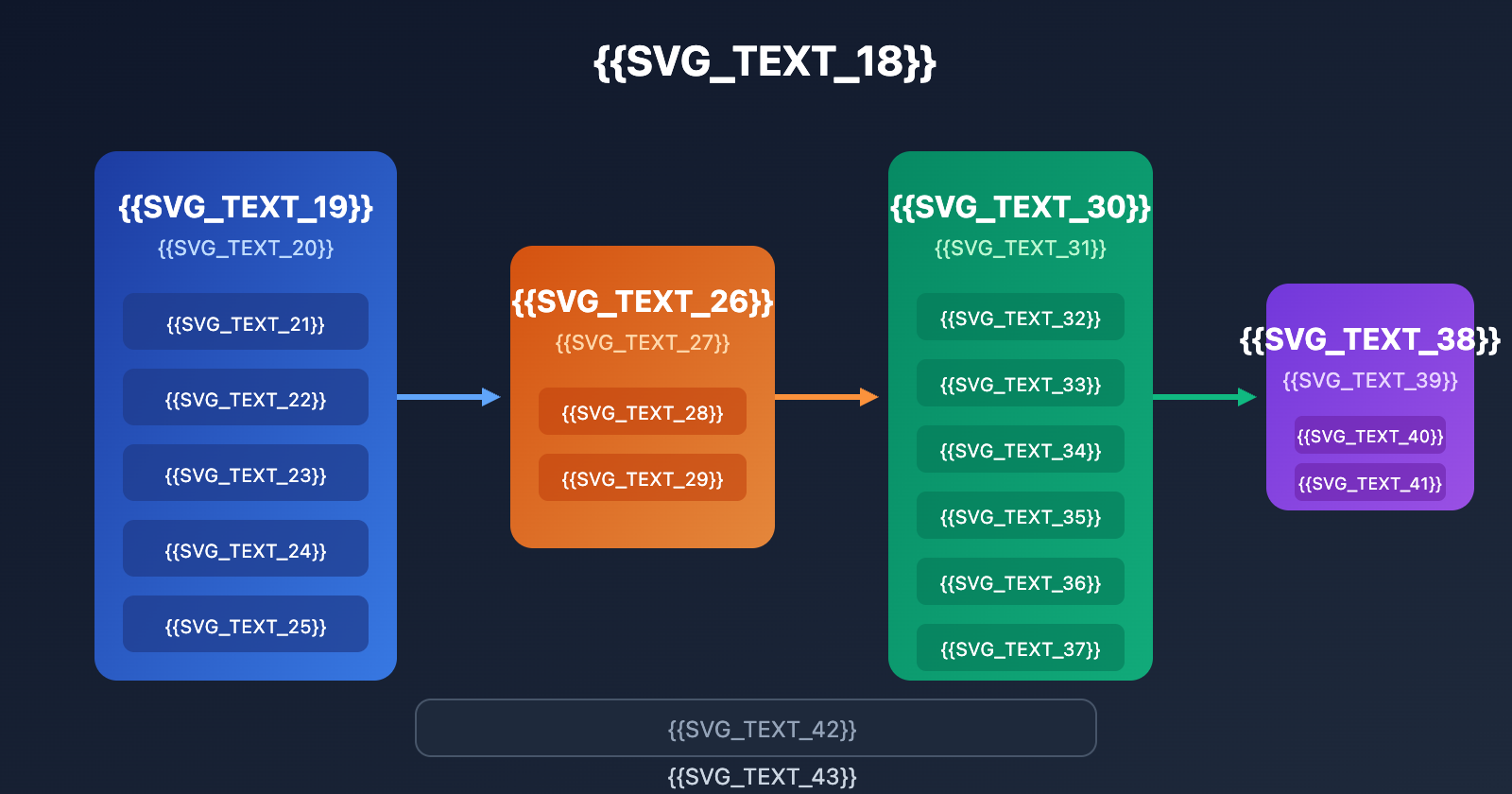
OpenClaw supports 12 major message platforms, allowing you to interact with your AI assistant on any device. Here's the full list of supported platforms and key configuration points.
Message Platform Support at a Glance
| Platform | Integration Method | Difficulty | Core Features |
|---|---|---|---|
| Baileys (Web Protocol) | ⭐⭐ | Scan to log in, most common | |
| Telegram | grammY (Bot API) | ⭐ | Create a Bot, simplest |
| Discord | discord.js | ⭐⭐ | Server integration |
| Slack | Bolt SDK | ⭐⭐ | Top choice for enterprise collab |
| iMessage | imsg CLI | ⭐⭐⭐ | macOS only |
| Signal | signal-cli | ⭐⭐⭐ | Privacy first |
| Google Chat | Chat API | ⭐⭐ | Workspace integration |
| Microsoft Teams | Extension | ⭐⭐⭐ | Enterprise office |
| Matrix | Extension | ⭐⭐ | Open-source protocol |
| BlueBubbles | Extension | ⭐⭐ | iOS message bridging |
| Zalo | Extension | ⭐⭐ | Vietnam market |
| WebChat | Built-in | ⭐ | Browser interface |
Telegram Bot Quick Setup
Telegram is the easiest integration method. Here are the steps:
# 1. Install OpenClaw
npm install -g openclaw@latest

# 2. Run the interactive configuration wizard
openclaw onboard --inst

# 3. Select Telegram in the wizard and enter your Bot Token
# Get your Token from @BotFather
Search for @BotFather in Telegram, send /newbot to create a new bot, follow the prompts to set a name, and grab your Token. Just enter that Token into the config wizard to finish the integration.
View Full Telegram Bot Config Code
// telegram-config.js
// Advanced OpenClaw Telegram integration example

const config = {
  // Base Config
  telegram: {
    token: process.env.TELEGRAM_BOT_TOKEN,
    // Allowed User ID whitelist (Security)
    allowedUsers: [123456789, 987654321],
    // Admin IDs
    adminIds: [123456789],
  },

  // Message Handling Config
  messageOptions: {
    // Enable Markdown parsing
    parseMode: 'MarkdownV2',
    // Disable link previews
    disableWebPagePreview: true,
    // Message timeout (seconds)
    timeout: 60,
  },

  // Feature Toggles
  features: {
    // Enable voice-to-text
    voiceToText: true,
    // Enable image understanding
    imageAnalysis: true,
    // Enable file processing
    fileProcessing: true,
  }
};

module.exports = config;
WhatsApp Integration
WhatsApp integration uses the Baileys library to connect via the Web protocol:
# Start the Gateway service
openclaw gateway

# Open the control panel
# Visit http://127.0.0.1:18789/

# Scan the WhatsApp Web QR code in the panel to connect
Tip: A single host can only run one Gateway instance to manage WhatsApp sessions. If you need multi-account support, you can use the cloud deployment solutions provided by APIYI for centralized management.
Discord Server Integration
Discord integration is perfect for team collaboration, allowing you to interact with the AI assistant within server channels:
# 1. Create an app in the Discord Developer Portal
# Visit discord.com/developers/applications

# 2. Create a Bot in the app and get your Token

# 3. Configure OpenClaw
openclaw config set discord.token YOUR_BOT_TOKEN
openclaw config set discord.guildId YOUR_SERVER_ID

# 4. Invite the Bot to your server
# Use the OAuth2 URL Generator to create an invite link
Discord integration supports features like slash commands, message replies, file uploads/downloads, and voice channels (via extensions). It's especially great for dev teams looking to bake an AI assistant into their daily workflow.
Multi-Platform Message Sync
OpenClaw supports cross-platform message synchronization. You can start a conversation on WhatsApp and pick it up on Telegram; the AI assistant will maintain the full conversation context:
| Sync Feature | Description | Use Case |
|---|---|---|
| Context Retention | Cross-platform chat history sync | Switching from mobile to desktop |
| Preference Sync | User preferences apply everywhere | Unified personalized experience |
| Task Status Sync | To-dos display across platforms | Multi-device task management |
| File Sharing | Uploaded files accessible everywhere | Access resources anytime |
OpenClaw Skills: Category Breakdown
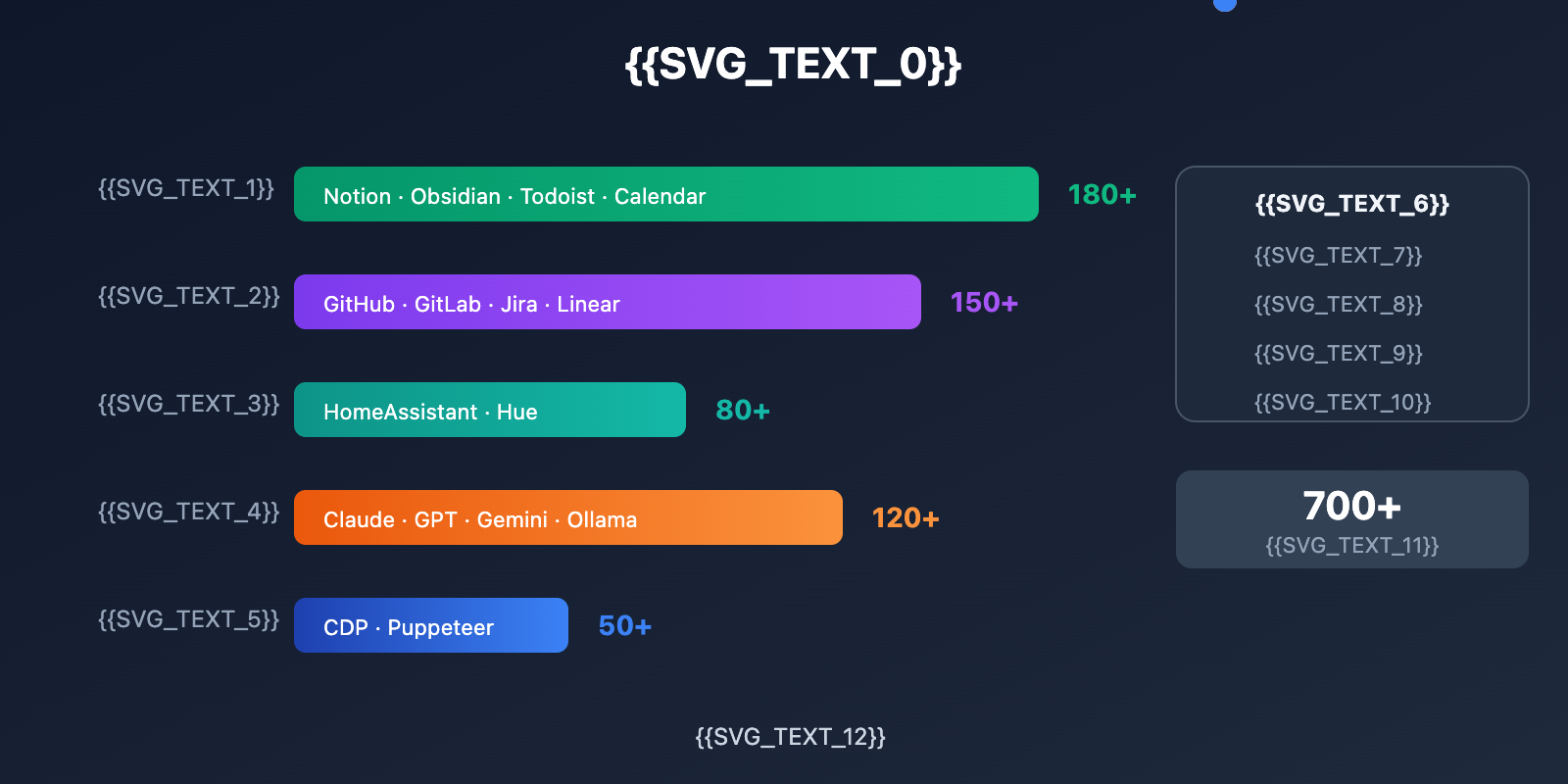
ClawHub is the official skill store for OpenClaw, located at clawhub.ai, featuring over 700 community skills. Here's a look at the core skills by category.
Productivity & Office Skills
| Skill Name | Description | Best For |
|---|---|---|
| apple-notes | Manage Apple Notes | macOS/iOS users |
| apple-reminders | Handle Apple Reminders | Schedule management |
| notion-integration | Notion DB and page operations | Knowledge management |
| obsidian-vault | Manage Obsidian vaults | Markdown notes |
| trello-boards | Trello board and card management | Project management |
| asana-tasks | Asana task and project operations | Team collaboration |
| microsoft-365 | Email, Calendar, OneDrive | Office suites |
| hubspot-crm | Contacts, deals, company management | Sales management |
Productivity skills let you manage your daily grind using natural language:
User: "Help me create a new page in Notion titled 'Weekly Project Report' with a list of tasks completed this week."
OpenClaw: "Created the 'Weekly Project Report' page with a task list template. Should I add specific task details?"

User: "Add my meeting tomorrow at 3 PM to my calendar and remind me 30 minutes early."
OpenClaw: "Added the meeting to Apple Calendar with a reminder at 14:30. Want me to add any attendees?"
Developer & DevOps Skills
OpenClaw offers extensive skill support for developers, including GitHub integration, code search, and automated deployment:
- github-integration: Manage Issues, PRs, and repos; supports Webhook triggers.
- claude-code-usage: Check your Claude Code OAuth usage limits.
- coolify: Self-hosted PaaS management integrated with the Coolify platform.
- news-aggregator: Aggregates 8 sources including Hacker News, GitHub Trending, and Product Hunt.
- agent-browser: Headless browser automation with Playwright and accessibility tree snapshots.
Developers can use Webhooks and Cron Jobs to build automated workflows:
# cron-job config example
# Check GitHub Issues every morning at 9 AM
schedule: "0 9 * * *"
action: check-github-issues
params:
  repo: "your-org/your-repo"
  notify: telegram
DevOps Skills Feature Table
| Skill Name | Core Functionality | Automation Scenario | Trigger |
|---|---|---|---|
| github-integration | Issue/PR/Repo management | Auto-assign, label, close | Webhook/Cron |
| gitlab-integration | MR/Pipeline management | CI/CD status monitoring | Webhook |
| jenkins-skill | Build job management | Trigger builds, view logs | API Call |
| docker-skill | Container management | Start/stop, view logs | CLI |
| k8s-skill | Kubernetes operations | Pod status, scaling | kubectl |
| aws-skill | AWS resource management | EC2, S3, Lambda ops | AWS CLI |
Smart Home Control Skills
| Skill Name | Supported Devices | Control Capabilities |
|---|---|---|
| philips-hue | Philips Hue lights | On/off, brightness, color temp, scenes |
| elgato-devices | Elgato Key Light, etc. | Brightness, color temp adjustment |
| home-assistant | Home Assistant Hub | Full-home smart control |
| health-wearables | Various fitness trackers | Read health data |
Control your smart home with simple commands:
User: "Set the living room light to 50% brightness and warm white."
OpenClaw: "Living room light set to 50% brightness, color temp 3000K."

User: "Turn off all lights automatically at 11 PM."
OpenClaw: "Automation rule created: Turn off all lights daily at 23:00. Any exceptions?"

User: "Check my steps and sleep data for today."
OpenClaw: "Steps: 8,432 (84% of goal).
Sleep: 7h 23m, Deep sleep 1.5h.
Heart rate: 58-112 bpm."
Smart home skills support scene linking, allowing for complex automation rules:
- Away Mode: Detects when your phone leaves the home WiFi, then turns off lights and arms security.
- Home Mode: Automatically turns on lights and adjusts the AC when you're near the door.
- Sleep Mode: Adjusts the bedroom environment based on your sleep data.
AI Model Integration Skills
OpenClaw supports various AI models, allowing you to switch flexibly via skills:
| Skill Name | Model Provider | Core Functionality |
|---|---|---|
| gemini-cli | One-off Q&A, summary generation | |
| gemini-computer-use | Browser control Agent | |
| gemini-deep-research | Deep research tasks | |
| replicate-api | Replicate | AI image and media generation |
| openrouter | OpenRouter | Multi-model aggregation |
Model Selection Tip: Different models have different strengths—Claude excels at code and reasoning, GPT is great for creative writing, and Gemini shines in multimodal understanding. We recommend using the APIYI platform to manage your Large Language Model calls centrally for better pricing and stability.
Browser Automation & Data Collection Skills
| Skill Name | Description | Tech Stack | Typical Use Case |
|---|---|---|---|
| agent-browser | Headless browser automation | Playwright | Web scraping, form filling |
| web-scraper | Structured data collection | Cheerio | Price monitoring, content aggregation |
| screenshot-skill | Webpage screenshots | Puppeteer | Page archiving, change monitoring |
| pdf-extractor | PDF content extraction | pdf-parse | Document analysis, data import |
Browser automation skills are incredibly powerful, supporting full web interaction flows:
User: "Check the price of AirPods Pro on Amazon for me."
OpenClaw: "Searching...
Current Amazon Price: $249.00.
All-time low: $189.00 (Black Friday 2025).
Trend: Stable over the last 30 days.
Want me to set a price alert?"
OpenClaw Skill Installation and Management
ClawHub Skill Installation Methods
ClawHub offers three ways to install skills: via the GUI, the CLI, or manual installation.
Method 1: GUI Installation
- Start the Gateway:
openclaw gateway - Open the control panel:
http://127.0.0.1:18789/ - Go to the Skills page and search for the skill you need.
- Click the Install button to finish.
Method 2: CLI Installation
# Search for a skill
openclaw skill search "calendar"

# Install a skill
openclaw skill install google-calendar

# List installed skills
openclaw skill list

# Update all skills
openclaw skill update --all
Method 3: Manual Installation
Just copy the skill directory to ~/.openclaw/skills/. Skill priority follows this order: Workspace Skills > User Skills > Built-in Skills.
SKILL.md Configuration Format
Every skill requires a SKILL.md file, using YAML frontmatter to define its metadata:
---
name: my-custom-skill
description: Custom skill example
metadata:
  openclaw:
    emoji: "🔧"
    bins:
      - node
    install:
      brew: some-package
    os:
      - darwin
      - linux
---


## Skill Description

This is the documentation for skill usage and instructions...
Key configuration fields:
| Field | Description | Example |
|---|---|---|
| name | Unique skill identifier | google-calendar |
| description | Skill description | "Manage Google Calendar" |
| bins | Required binary dependencies | ["node", "python"] |
| install.brew | Homebrew package | "google-cloud-sdk" |
| os | Supported operating systems | ["darwin", "linux"] |
Automation Configuration & Cron Jobs
OpenClaw supports scheduled task automation via Cron Jobs:
# Configuration file location
~/.openclaw/cron/jobs.json

# Example configuration
{
  "jobs": [
    {
      "name": "daily-news",
      "schedule": "0 8 * * *",
      "skill": "news-aggregator",
      "action": "fetch-and-summarize",
      "notify": "telegram"
    }
  ]
}
Webhook triggers are also supported, allowing you to connect external services like GitHub or Stripe for event-driven automation.
Automation Tips: When configuring automation workflows, security is paramount. OpenClaw provides signature verification, whitelisting, deduplication, and loop protection mechanisms. However, we still recommend thoroughly testing in a staging environment before deploying to production. For enterprise-grade security solutions, feel free to consult the technical support team at APIYI (apiyi.com).
Custom Skill Development Guide
If existing skills don't quite meet your needs, you can develop your own. Here's the complete development workflow:
Step 1: Create the skill directory structure
mkdir -p ~/.openclaw/skills/my-custom-skill
cd ~/.openclaw/skills/my-custom-skill
Step 2: Write the SKILL.md configuration file
---
name: my-custom-skill
description: Custom skill example - Fetch weather info
version: 1.0.0
author: your-name
metadata:
  openclaw:
    emoji: "🌤️"
    bins: []
    env:
      - WEATHER_API_KEY
---
Skill Description
This is a weather query skill that supports the following features:
- Check current weather for a specific city
- Get a 7-day weather forecast
- Set weather change alerts
Usage Examples
Users can call it in the following ways:
- "Check today's weather in Beijing"
- "Will it rain in Shanghai tomorrow?"
- "Set a rain alert"
Step 3: Add Execution Script (Optional)
# weather.py
import os
import requests

def get_weather(city: str) -> dict:
    api_key = os.environ.get('WEATHER_API_KEY')
    url = f"https://api.weather.com/v1/current?city={city}&key={api_key}"
    response = requests.get(url)
    return response.json()
Once development is complete, restart the Gateway service to load the new skill.
OpenClaw Extension Ecosystem vs. Claude Code
As two of the hottest tools in the AI assistant space, OpenClaw and Claude Code each bring something unique to the table.
| Comparison Dimension | OpenClaw | Claude Code |
|---|---|---|
| Positioning | All-in-one Personal Assistant | Specialized Coding Assistant |
| Extension Method | Skills + Channels | MCP Servers |
| Messaging Platforms | 12+ Platforms supported | Primarily Terminal/IDE |
| Number of Skills | 700+ Skills | 50+ MCP Servers |
| Model Support | Multi-model switching | Claude Series |
| Deployment | Self-hosted / Cloud-hosted | Local execution |
| Core Strengths | Unified cross-platform entry point | Powerful coding capabilities |
Usage Recommendations:
- If you need cross-platform messaging integration or smart home control: Go with OpenClaw.
- If you're focused on coding and need deep IDE integration: Choose Claude Code.
- You can even use them together: let OpenClaw handle your daily assistant tasks while Claude Code tackles the heavy coding.
Model API Tip: Whether you're using OpenClaw or Claude Code, you'll need to call AI model APIs under the hood. You can get better pricing and more stable service through APIYI, which supports unified API calls for major models like Claude, GPT, and Gemini.
Detailed Skill Ecosystem Comparison
| Comparison Dimension | OpenClaw Skills | Claude Code MCP |
|---|---|---|
| Skill Format | SKILL.md + Scripts | MCP Server (JSON-RPC) |
| Community Size | 700+ Skills | 50+ MCP Servers |
| Installation Method | ClawHub GUI/CLI | CLI Configuration |
| Dev Difficulty | Low (primarily Markdown) | Medium (requires MCP protocol implementation) |
| Interoperability | Compatible with AgentSkills standard | MCP protocol ecosystem |
| Update Mechanism | ClawHub auto-updates | Manual configuration updates |
The skill ecosystems for both platforms are evolving rapidly. Some community developers have already started creating dual-compatible skill packages, allowing the same functionality to be used in both OpenClaw and Claude Code.
Optimizing OpenClaw Extension Performance
To keep OpenClaw running smoothly, here are some performance optimization tips:
Skill Loading Optimization
| Optimization Method | Description | Result |
|---|---|---|
| Load on Demand | Only install the skills you actually need | Reduce memory usage by 50%+ |
| Disable Idle Skills | Set unused skills to disabled | Faster startup |
| Regular Cleanup | Delete skills you haven't used in a long time | Save disk space |
| Use an SSD | Keep the skill directory on an SSD | 3-5x faster loading |
Messaging Platform Optimization
# Check Gateway resource usage
openclaw gateway status

# View connection status for all platforms
openclaw channel list

# Restart a specific platform connection
openclaw channel restart whatsapp
We recommend configuring a process manager (like PM2 or systemd) for the Gateway service to ensure it stays stable and automatically restarts if it crashes.
OpenClaw Extension FAQ
Q1: How do I fix frequent WhatsApp connection drops?
The WhatsApp Web protocol has session limits. We recommend:
- Ensuring the Gateway service is running stably and avoiding frequent restarts.
- Using a dedicated phone number to register your WhatsApp account.
- Avoiding logging into WhatsApp Web on other devices at the same time.
- Regularly checking Gateway logs to troubleshoot connection issues.
Q2: What should I do if a skill won’t load after installation?
Skill loading failures are usually due to dependency issues. Try these troubleshooting steps:
- Check if the binaries defined in the
binssection ofSKILL.mdare installed. - Confirm that the
osconfiguration matches your current operating system. - Run
openclaw skill check <skill-name>to check the dependency status. - Review the Gateway logs for detailed error messages.
Q3: How do I choose the right AI model?
OpenClaw supports various models. Here are our suggestions:
- Daily Conversations: Claude Haiku or GPT-4o-mini—they're fast and cost-effective.
- Complex Reasoning: Claude Opus or GPT-4o for high-level capabilities.
- Code Generation: Claude Sonnet 3.5 (or 4) for excellent programming performance.
- Multimodal Tasks: Gemini Pro for great image and text understanding.
We recommend testing different models via APIYI (apiyi.com). The platform offers free credits and a unified interface, making it easy to compare and choose quickly.
Q4: How does OpenClaw ensure data security?
OpenClaw uses a local-first architecture. Key security features include:
- All data is stored locally and isn't uploaded to the cloud.
- Sensitive information like API Keys is stored with encryption.
- Support for private deployment, giving you full control over your data sovereignty.
- Open-source code that's auditable, with ongoing security checks from the community.
Enterprise users can also consider OpenClaw's official managed services for extra security hardening and compliance support.
OpenClaw Extension Ecosystem Summary
Key highlights of the OpenClaw extension ecosystem:
- Rich Skill Library: Over 700+ Skills covering productivity, development, smart homes, and AI models, all available via one-click installation through ClawHub.
- Comprehensive Platform Support: Integration with 12 major messaging platforms, including full coverage for mainstream apps like WhatsApp, Telegram, and Discord.
- Flexible Extension Architecture: Uses the
SKILL.mdstandard format, supporting custom skill development and community sharing. - Powerful Automation: Cron Jobs + Webhooks enable event-driven workflows and scheduled task automation.
The OpenClaw extension ecosystem is growing fast, with new skills released every week. We suggest keeping an eye on ClawHub for the latest updates so you can gradually build your personalized AI assistant based on your specific needs.
If you want to use multiple Large Language Models within OpenClaw, we recommend getting your API Keys through APIYI (apiyi.com). The platform provides free test credits and a unified interface for multiple models, making model switching much more convenient.
References
The following links use a colon-separated format for easy copying while preventing direct clicks to preserve SEO link equity.
-
OpenClaw Official Documentation: Comprehensive installation, configuration, and usage guides
- Link:
docs.openclaw.ai - Description: Official authoritative documentation containing detailed explanations of all features.
- Link:
-
OpenClaw GitHub Repository: Source code and issue discussions
- Link:
github.com/openclaw/openclaw - Description: Check out the latest code, submit issues, or contribute to the project.
- Link:
-
ClawHub Skill Store: Browse and install 700+ community skills
- Link:
clawhub.ai - Description: The official platform for searching, installing, and managing OpenClaw skills.
- Link:
-
awesome-openclaw-skills: A curated collection of community skills
- Link:
github.com/VoltAgent/awesome-openclaw-skills - Description: A recommended list of high-quality skills organized by category.
- Link:
-
DigitalOcean OpenClaw Guide: Cloud deployment tutorial
- Link:
digitalocean.com/resources/articles/what-is-openclaw - Description: A detailed tutorial on how to deploy OpenClaw on DigitalOcean with just one click.
- Link:
Author: Technical Team
Tech Talk: Feel free to discuss OpenClaw tips in the comments. For more AI model resources, visit the APIYI (apiyi.com) tech community.