Want to use AI to generate long videos over 8 seconds, but finding that single generations have time limits? This is a common bottleneck for AI video creators. In this post, we'll deep dive into Google Veo 3.1's extend video capability, helping you master the complete technical solution for extending an 8-second short video into a 148-second long video via API.
Core Value: After reading this article, you'll learn how to use the Veo 3.1 extend API for video extension, understand the 7-second incremental extension mechanism, and be able to independently implement AI video generation up to 148 seconds long.
Core Points of the Veo 3.1 Video Extension API
Before we dive into the technical details, let's look at the key parameters and constraints of Veo 3.1's extend capability.
| Parameter | Value | Description |
|---|---|---|
| Single extension duration | 7 seconds | Each extend call adds a fixed 7-second video segment |
| Max extension count | 20 times | Up to 20 extensions from the original video |
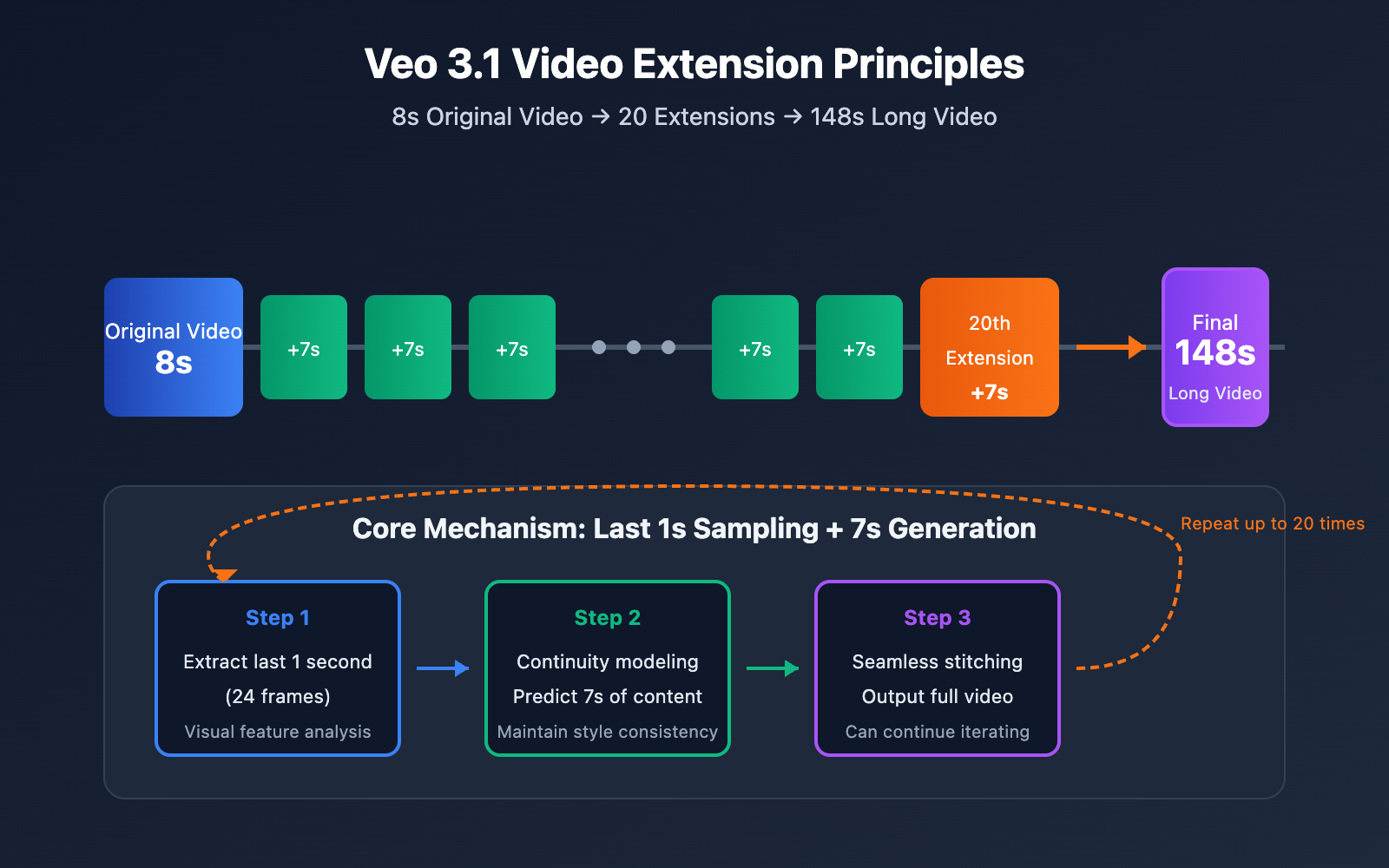
| Max output duration | 148 seconds | 8s original + 20 × 7s extensions = 148s |
| Input resolution | 720p / 1080p | Supports two resolution inputs |
| Output resolution | 720p | Extension output is currently limited to 720p |
| Supported aspect ratios | 16:9 / 9:16 | Both landscape and portrait are supported |
| Frame rate requirement | 24 fps | Input video must be 24 frames per second |
| File format | MP4 | Both input and output are in MP4 format |
Detailed Explanation of Veo 3.1 Video Extension Principles
Veo 3.1's Scene Extension feature uses a clever continuous generation mechanism:
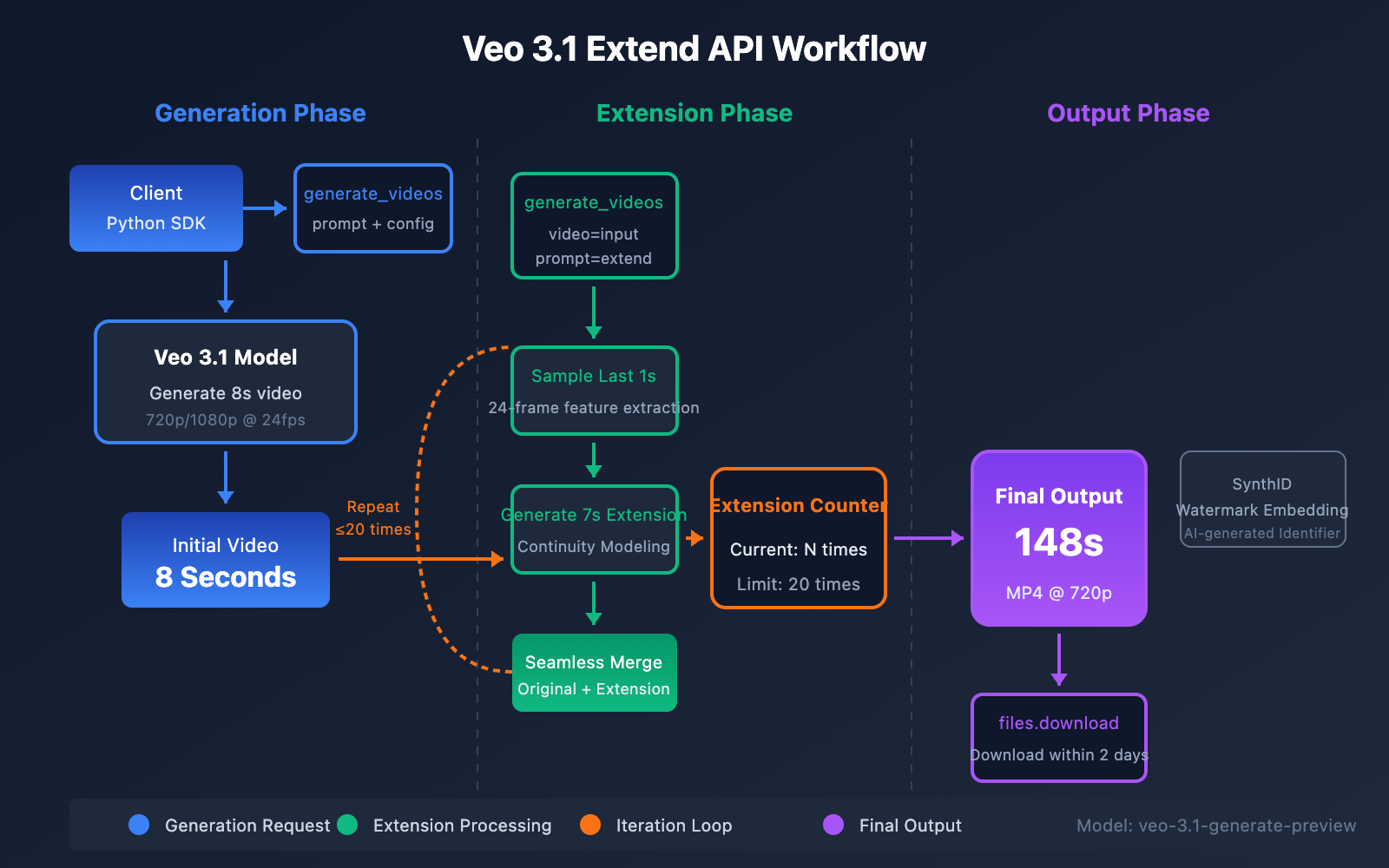
- Last 1-second sampling: The system extracts visual features from the last second (24 frames) of the input video.
- Continuity modeling: Predicts the next 7 seconds of video content based on these features.
- Seamless stitching: Merges the newly generated 7-second video with the original video into one complete file.
- Iterative accumulation: The output of each extension can serve as the input for the next extension.
This design ensures that the video maintains visual continuity even after multiple extensions, including:
- Smooth transition of character movements
- Natural transition of scene lighting
- Consistency of background elements
- Continuity of audio (if any)
🎯 Technical Tip: If you need to call the Veo 3.1 video extension API, you can get a unified interface through the APIYI platform, which supports convenient access to Google's suite of video generation models.
Veo 3.1 Extend API Technical Specifications
Input Constraints
Before calling the Veo 3.1 extend API, you've got to ensure your input video meets the following specifications:
| Constraint | Requirement | Behavior if Unmet |
|---|---|---|
| Source | Must be a Veo-generated video | Returns validation error |
| Format | MP4 | Returns unsupported format error |
| Duration | 1-30 seconds | Returns out-of-range error |
| Frame Rate | 24 fps | Returns frame rate mismatch error |
| Resolution | 720p or 1080p | Resolution validation fails |
| Aspect Ratio | 16:9 or 9:16 | Returns unsupported ratio error |
Important Note: The Gemini API's extend feature only supports videos generated by Veo as input. If you try to use videos from other sources (like phone recordings or other AI-generated videos), the API will throw a validation error.
Output Specifications
| Item | Specification |
|---|---|
| File Format | MP4 |
| Extension Duration | Fixed at 7 seconds |
| Resolution | 720p (current limit) |
| Frame Rate | 24 fps |
| Audio | Supports background sound continuation |
| Storage Period | Retained on server for 2 days |
Quick Start: Veo 3.1 Video Extension API
Setting Up Your Environment
Before we dive in, make sure you've got the following ready:
- A Google AI Studio or Vertex AI account.
- Access to the Gemini API.
- Python 3.8+ installed on your machine.
- The
google-genaiSDK installed.
pip install google-genai
Minimalist Code Example
Here's the most basic code you'll need to call the Veo 3.1 extend API:
from google import genai
import time

# 初始化客户端
client = genai.Client(
    api_key="YOUR_API_KEY"
    # 也可使用 APIYI apiyi.com 统一接口
)

# 步骤1: 先生成原始视频
print("正在生成原始视频...")
initial_operation = client.models.generate_videos(
    model="veo-3.1-generate-preview",
    prompt="一只金色的猎鹰在蓝天中翱翔,阳光穿透云层",
)

# 等待生成完成
while not initial_operation.done:
    time.sleep(30)
    initial_operation = client.operations.get(initial_operation)

initial_video = initial_operation.result.generated_videos[0]
print(f"原始视频生成完成,时长: 8秒")

# 步骤2: 扩展视频
print("正在扩展视频...")
extend_operation = client.models.generate_videos(
    model="veo-3.1-generate-preview",
    prompt="猎鹰继续在空中盘旋,俯冲捕捉猎物",
    video=initial_video
)

# 等待扩展完成
while not extend_operation.done:
    time.sleep(30)
    extend_operation = client.operations.get(extend_operation)

extended_video = extend_operation.result.generated_videos[0]
print(f"视频扩展完成,总时长: 15秒")
🚀 Quick Start: We recommend using the APIYI (apiyi.com) platform to quickly test the Veo 3.1 API. It provides an out-of-the-box interface, so you can get integrated without any complex configuration.
View Full Code: Generating Videos Up to 148 Seconds
from google import genai
import time
import os

class Veo31VideoExtender:
    """Veo 3.1 视频扩展器 - 支持最长 148 秒视频生成"""

    def __init__(self, api_key: str):
        self.client = genai.Client(api_key=api_key)
        self.model = "veo-3.1-generate-preview"
        self.max_extensions = 20  # 最大扩展次数
        self.extension_duration = 7  # 每次扩展 7 秒

    def generate_initial_video(self, prompt: str, aspect_ratio: str = "16:9"):
        """生成初始视频"""
        print(f"[1/2] 生成初始视频...")
        print(f"    提示词: {prompt[:50]}...")

        operation = self.client.models.generate_videos(
            model=self.model,
            prompt=prompt,
            config={
                "aspect_ratio": aspect_ratio,
                "number_of_videos": 1
            }
        )

        video = self._wait_for_completion(operation)
        print(f"    初始视频生成完成 (8秒)")
        return video

    def extend_video(self, video, prompt: str, target_duration: int = 148):
        """
        扩展视频到目标时长

        Args:
            video: 输入视频对象
            prompt: 扩展提示词
            target_duration: 目标时长(秒),最大 148 秒

        Returns:
            扩展后的视频对象
        """
        # 计算需要的扩展次数
        initial_duration = 8
        needed_duration = target_duration - initial_duration
        extensions_needed = min(
            (needed_duration + self.extension_duration - 1) // self.extension_duration,
            self.max_extensions
        )

        print(f"[2/2] 开始视频扩展...")
        print(f"    目标时长: {target_duration}秒")
        print(f"    需要扩展: {extensions_needed}次")

        current_video = video
        current_duration = initial_duration

        for i in range(extensions_needed):
            print(f"    扩展进度: {i+1}/{extensions_needed}")

            operation = self.client.models.generate_videos(
                model=self.model,
                prompt=prompt,
                video=current_video
            )

            current_video = self._wait_for_completion(operation)
            current_duration += self.extension_duration

            print(f"    当前时长: {current_duration}秒")

        final_duration = min(current_duration, 148)
        print(f"视频扩展完成! 最终时长: {final_duration}秒")
        return current_video

    def _wait_for_completion(self, operation, check_interval: int = 30):
        """等待操作完成"""
        while not operation.done:
            time.sleep(check_interval)
            operation = self.client.operations.get(operation)

        if operation.result.generated_videos:
            return operation.result.generated_videos[0]
        raise Exception("视频生成失败")

    def download_video(self, video, output_path: str):
        """下载视频到本地"""
        print(f"下载视频到: {output_path}")

        # 获取视频内容
        video_data = self.client.files.download(video.video)

        with open(output_path, 'wb') as f:
            f.write(video_data)

        print(f"下载完成! 文件大小: {os.path.getsize(output_path) / 1024 / 1024:.2f} MB")


# 使用示例
if __name__ == "__main__":
    # 初始化扩展器
    extender = Veo31VideoExtender(api_key="YOUR_API_KEY")

    # 生成初始视频
    initial_video = extender.generate_initial_video(
        prompt="夕阳下的海边,金色的阳光洒在波光粼粼的海面上,一艘帆船缓缓驶向远方",
        aspect_ratio="16:9"
    )

    # 扩展到 60 秒
    extended_video = extender.extend_video(
        video=initial_video,
        prompt="帆船继续前行,天空逐渐变成橙红色,海鸥在船边盘旋",
        target_duration=60
    )

    # 下载视频
    extender.download_video(extended_video, "extended_video_60s.mp4")
Advanced Tips for the Veo 3.1 Video Extension API
Prompt Strategies: Ensuring Video Continuity
When you're extending a video, how you write your prompt directly impacts the result. Here are some best practices to keep things smooth:
| Strategy | Description | Example |
|---|---|---|
| Action Continuation | Describe the next stage of an action | "The falcon continues its dive, nearing the ground." |
| Scene Progression | Describe natural changes in the environment | "The sky gradually darkens, and stars begin to emerge." |
| Keep the Subject Consistent | Ensure the main subject remains the same | "The same falcon circling over the forest." |
| Avoid Sudden Jumps | Don't switch scenes abruptly | ❌ "Switch to an indoor scene" |
Audio Processing Considerations
Veo 3.1 supports native audio generation, but there are a few limitations to keep in mind when using the extend feature:
- Background Sound Effects: It's quite good at continuing ambient sounds and background music.
- Dialogue/Vocals: If there's no vocal audio in the last second of the source video, the extension won't have it either.
- Audio Coherence: The system tries its best to maintain a consistent audio style.
💡 Pro-tip: If your video needs continuous dialogue, make sure the last second of the original video contains speech; otherwise, the extended portion will likely only have background sound effects.
Batch Extension and Cost Optimization
If you need to generate a lot of long-form content, consider these optimization strategies:
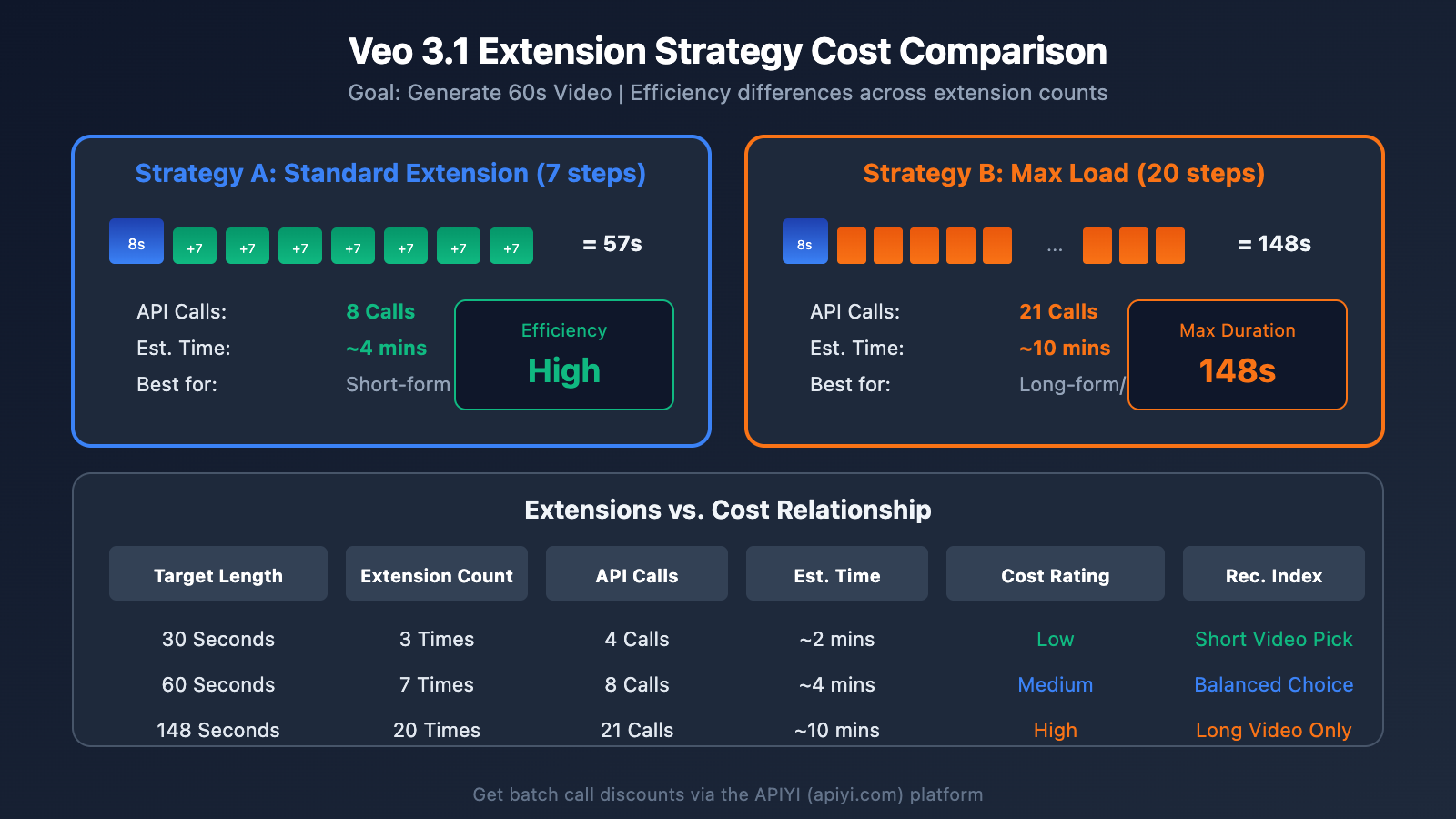
# 批量扩展优化示例
def batch_extend_videos(video_list, prompts, target_duration=60):
    """
    批量扩展视频
    通过 APIYI apiyi.com 平台可以获得更优惠的批量调用价格
    """
    results = []

    for i, (video, prompt) in enumerate(zip(video_list, prompts)):
        print(f"处理视频 {i+1}/{len(video_list)}")

        extended = extender.extend_video(
            video=video,
            prompt=prompt,
            target_duration=target_duration
        )
        results.append(extended)

        # 避免触发速率限制
        time.sleep(5)

    return results
Comparing Veo 3.1 Video Extension with Other Solutions
There are several AI video generation options on the market. Here's how Veo 3.1's extend capability stacks up against other mainstream solutions:
| Comparison Dimension | Veo 3.1 Extend | Sora | Kling | Runway Gen-3 |
|---|---|---|---|---|
| Max Duration | 148 seconds | 60 seconds | 120 seconds | 40 seconds |
| Extension Mechanism | 7s increments | No extension | 5s increments | No extension |
| Max Resolution | 4K (Gen) / 720p (Extend) | 1080p | 1080p | 1080p |
| Native Audio | Supported | Supported | Partially supported | Not supported |
| Vertical Support | 9:16 | 9:16 | 9:16 | 9:16 |
| API Availability | Gemini API | Limited | Open | Open |
| Available Platforms | APIYI (apiyi.com), Google AI Studio | Official | Official, APIYI | Official |
Our Recommendations
- If you need the longest duration: Go with Veo 3.1; it supports up to 148 seconds.
- If you prioritize visual consistency: Choose Veo 3.1; it offers the best continuity.
- If you're on a budget: You can get better pricing through the APIYI (apiyi.com) platform.
- If you need quick results: The Veo 3.1 Fast version provides a much snappier response.
Veo 3.1 Video Extension FAQ
Q1: Why can’t I extend my video? I keep getting a validation error.
This usually happens because the input video wasn't generated by Veo. The Gemini API's extend feature currently only supports videos generated by Veo as input.
Solution:
- Make sure you used Veo 3.1 to generate the original video.
- Check if the video format is MP4.
- Confirm the frame rate is 24fps and the resolution is 720p/1080p.
- You can get detailed error diagnostics and help through the APIYI (apiyi.com) platform.
Q2: How do I keep the style consistent after extending?
The key to maintaining style consistency lies in your prompt strategy:
- Stick to the original prompt: Use descriptions in your extension prompt that are similar to the original video.
- Avoid style jumps: Don't introduce brand new visual style descriptions during the extension.
- Maintain subject consistency: Clearly state that it's the "same" subject continuing the action.
- Gradual scene changes: If the scene needs to change, make sure it's a gradual transition rather than a sudden cut.
Example:
- Original: "A white cat playing on the grass."
- Extension: "The same white cat continues running on the grass, chasing a butterfly." ✅
- Extension: "A black dog appears in the frame." ❌
Q3: Will the video quality drop after 20 extensions?
Theoretically, after many extensions, the video might experience some degree of "quality drift." However, Veo 3.1 is specifically designed to optimize for this:
- Every extension references the original style features.
- Continuity modeling ensures smooth motion.
- Resolution remains stable at 720p for output.
Pro tip: If you have extremely high quality requirements, we recommend re-evaluating the results after 10-15 extensions. You can easily run multiple test comparisons on the APIYI (apiyi.com) platform.
Q4: How long are extended videos stored?
Generated videos are kept on Google's servers for 2 days. After 2 days, they're automatically deleted.
Important Reminders:
- Extended videos are treated as new generations, so they also only have a 2-day window.
- We recommend downloading them to your local storage immediately after generation.
- Using the
download_videomethod in the code can automate this process for you.
Q5: How do I get access to the Veo 3.1 API?
The Veo 3.1 API is currently in the Paid Preview stage. You can access it through:
- Google AI Studio: Developers can apply directly.
- Vertex AI: Enterprise users can enable it via the Google Cloud Console.
- APIYI (apiyi.com): Provides a unified API interface that supports Veo 3.1 calls—just register and you're ready to go.
Veo 3.1 Video Extension API Error Handling
In real-world use, you might run into various errors. Here are some common ones and their solutions:
| Error Type | Error Message | Reason | Solution |
|---|---|---|---|
| Validation Error | Video validation failed | Input video doesn't meet specifications | Check source, format, and resolution |
| Timeout Error | Operation timed out | Generation taking too long | Increase wait time and retry |
| Quota Error | Quota exceeded | API call limit exceeded | Wait for quota reset or upgrade your plan |
| Format Error | Unsupported format | Video format not supported | Convert to MP4 format |
| Frame Rate Error | Invalid frame rate | Frame rate isn't 24fps | Re-encode the video |
# 错误处理示例
def safe_extend_video(video, prompt, max_retries=3):
    """带重试机制的视频扩展"""
    for attempt in range(max_retries):
        try:
            operation = client.models.generate_videos(
                model="veo-3.1-generate-preview",
                prompt=prompt,
                video=video
            )

            while not operation.done:
                time.sleep(30)
                operation = client.operations.get(operation)

            return operation.result.generated_videos[0]

        except Exception as e:
            print(f"尝试 {attempt + 1} 失败: {e}")
            if attempt < max_retries - 1:
                time.sleep(60)  # 等待后重试
            else:
                raise
Veo 3.1 Video Extension API Use Cases
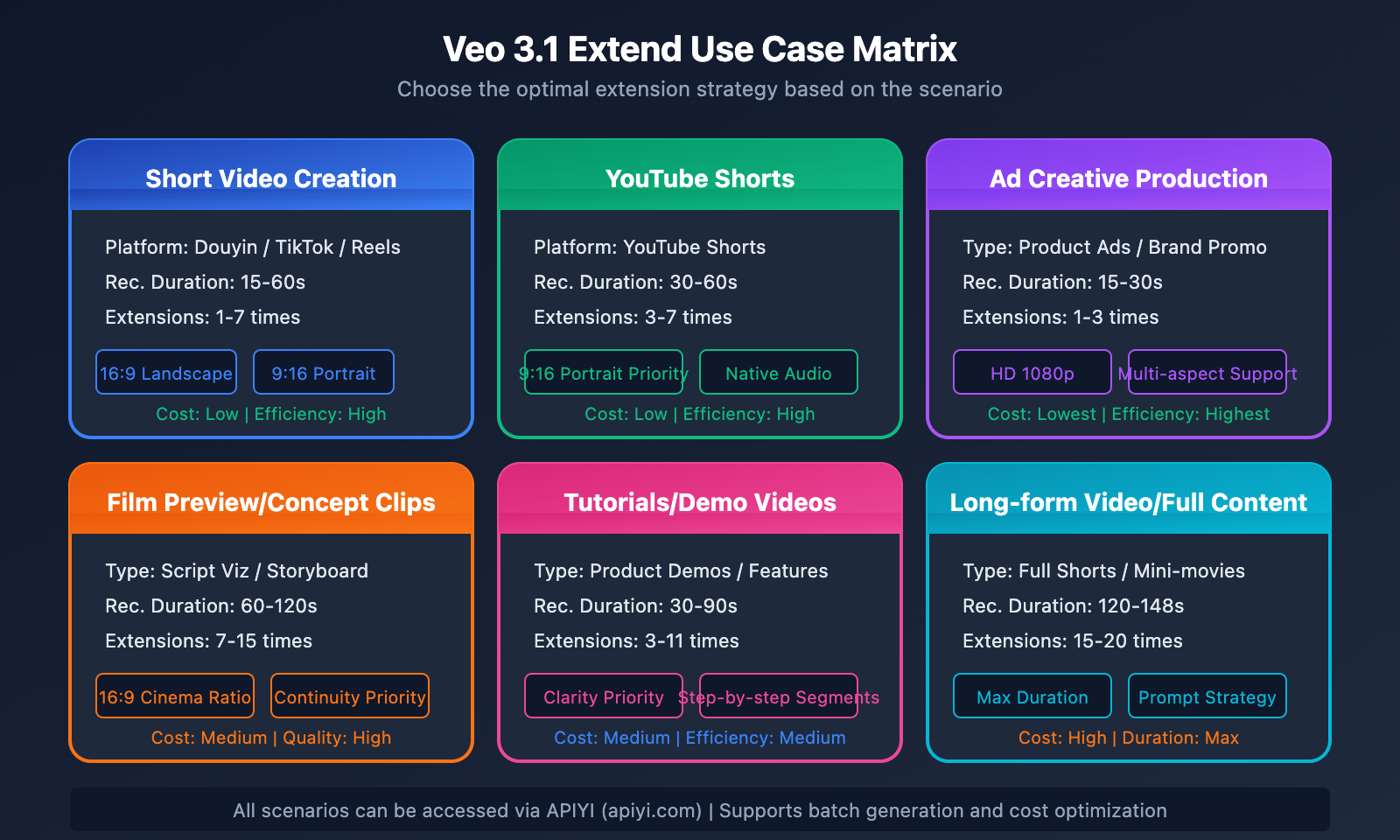
Short Video Creation
Extend an 8-second clip into a full short video of 60 seconds or more. This is perfect for:
- Douyin/TikTok content creation
- YouTube Shorts production
- Social media ad assets
Film & Video Previews
Quickly generate 1-2 minute concept videos for:
- Script visualization
- Storyboard animation
- Creative pitch presentations
Product Showcases
Create dynamic product showcase videos:
- 360° product rotations
- Usage scenario simulations
- Feature demo animations
Summary
Google Veo 3.1's video extension capability brings a breakthrough for AI video length:
- 7-Second Incremental Mechanism: Each extension adds a fixed 7 seconds, sampling from the final 1 second of the previous segment to ensure seamless continuity.
- 20-Iteration Limit: You can perform a maximum of 20 extension operations on a single project.
- 148-Second Maximum Output: 8s original + 140s extension = 148s total duration.
- Strict Input Requirements: It only supports MP4 videos generated by Veo at 24fps, with 720p or 1080p resolution.
If you're a developer or creator needing long-form video, mastering the Veo 3.1 extend API will seriously level up your production efficiency. We recommend checking out APIYI at apiyi.com to quickly test these effects and access reliable API services.
This article was written by the APIYI technical team. For more AI API tutorials, visit apiyi.com.