"Hey, I have a Google AI Studio account, but it says my free credits are exhausted. I want to keep using AI Studio to build models, but my free account won't let me top up. How can I add funds to that Google account, or is there another way to keep using it?"
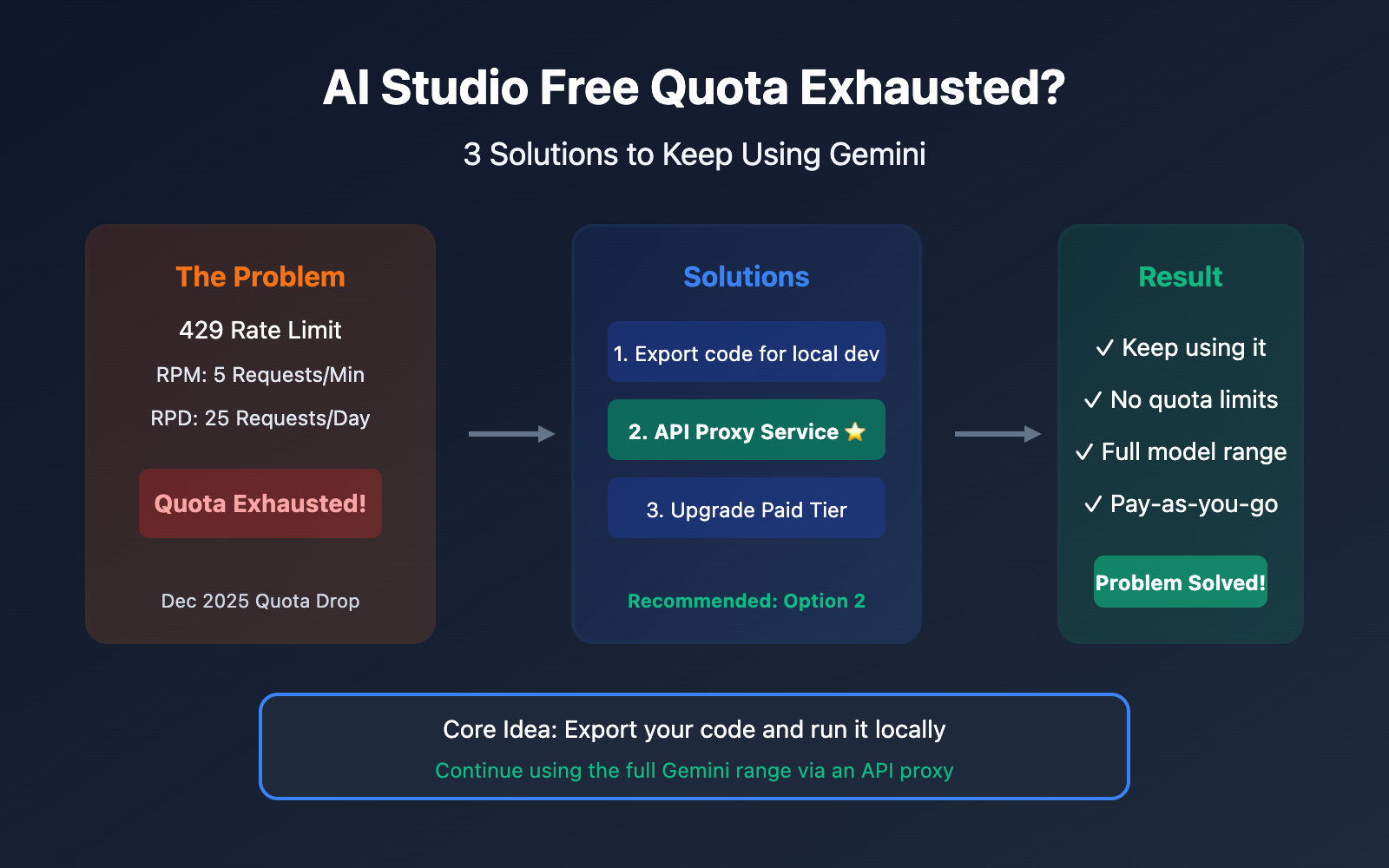
This is a question we hear from users every single day. Google AI Studio's free tier is indeed limited, and back in December 2025, Google significantly slashed the quotas for the free tier.
The good news is: You don't actually need to top up your Google account to keep using the full Gemini model range.
The core strategy is simple: Export your code and run it locally.
In this post, we'll dive into 3 solutions to help you keep using Gemini even after your free credits run dry.
Understanding AI Studio's Quota Limits
Current Free Tier Quotas (2026)
On December 7, 2025, Google made major adjustments to the Gemini Developer API quotas. Many developers suddenly found their apps throwing 429 errors:
| Model | Free Tier RPM | Free Tier RPD | Paid Tier RPM |
|---|---|---|---|
| Gemini 2.5 Pro | 5 | 25 | 1,000 |
| Gemini 2.5 Flash | 15 | 500 | 2,000 |
| Gemini 2.0 Flash | 15 | 1,500 | 4,000 |
Note: RPM = Requests Per Minute, RPD = Requests Per Day
Why You Might Suddenly Hit the Limit
| Reason | Explanation |
|---|---|
| RPM Limit Exceeded | Too many requests in a short window of time |
| RPD Limit Exceeded | Total daily requests reached the maximum limit |
| TPM Limit Exceeded | Long contexts consuming a massive number of tokens |
| Quota Reduction | Stricter limits following Google's Dec 2025 update |
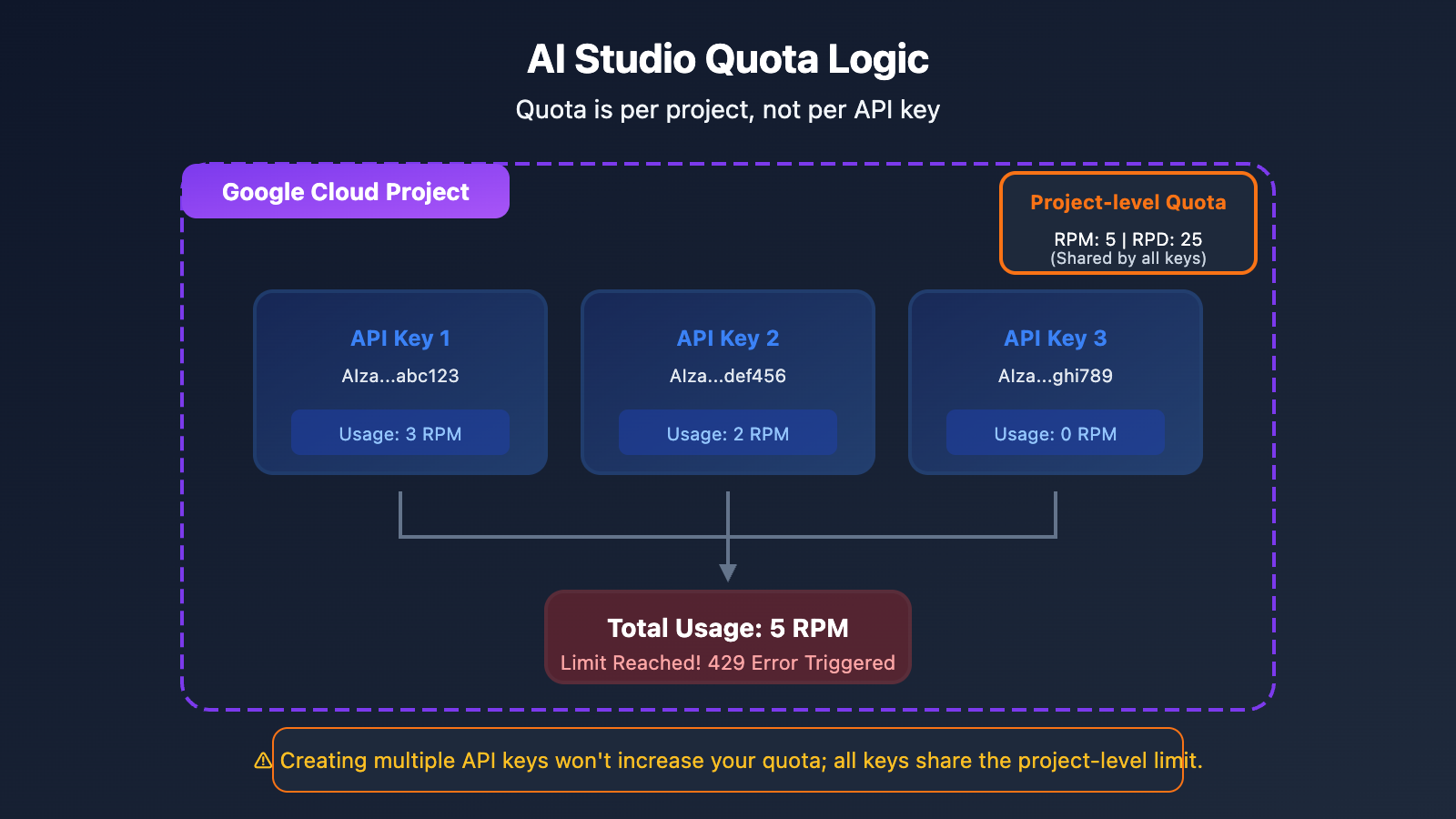
Important Reminder: Multiple API Keys Won't Increase Your Quota
A lot of users think they can just create more API keys to get more quota, but here's the reality:
Quota is calculated per Project, not per API key. Creating multiple API keys within the same project won't increase your limits.
Option 1: Export Code for Local Development (Recommended)
The Core Idea
Essentially, AI Studio is a visual prompt debugging tool. Any models you create or prompts you debug in AI Studio can be exported as code, allowing you to call them in your local environment using your own API Key.
Steps to Follow
Step 1: Finish prompt debugging in AI Studio
Use your AI Studio free credits to fine-tune your prompt, parameter configurations, and more.
Step 2: Export the code
AI Studio offers several ways to export your work:
- Download ZIP: Export the full code package to your machine.
- Push to GitHub: Send it straight to your code repository.
- Copy Code Snippets: Grab Python, JavaScript, or curl snippets.
Step 3: Configure your local API Key
# Set environment variables (recommended)
export GEMINI_API_KEY="your-api-key-here"

# Or
export GOOGLE_API_KEY="your-api-key-here"
Step 4: Run it locally
import google.generativeai as genai
import os

# Automatically read the API Key from environment variables
genai.configure(api_key=os.environ.get("GEMINI_API_KEY"))

model = genai.GenerativeModel('gemini-2.0-flash')
response = model.generate_content("Hello, please introduce yourself")
print(response.text)
Things to Note
| Point | Description |
|---|---|
| API Key Security | Don't hardcode your API Key in client-side code |
| Environment Variables | Use GEMINI_API_KEY or GOOGLE_API_KEY |
| Quotas Still Apply | Local calls are still subject to free-tier quota limits |
🎯 Technical Tip: Once you've exported your code, if the free quota still isn't enough, you might want to consider using a third-party API provider like APIYI (apiyi.com). These platforms offer higher quotas and more flexible billing options.
Option 2: Use a Third-Party API Proxy Service (Best Choice)
What is an API Proxy Service?
API proxy providers aggregate multiple API Keys and account resources to provide a unified API interface. All you'll need to do is:
- Sign up on the proxy platform to get your API Key.
- Change the API address in your code to the proxy's address.
- Keep working without worrying about quota issues.
Why Choose an API Proxy?
| Advantage | Description |
|---|---|
| No Quota Anxiety | The provider manages the quotas; you just focus on using them |
| Full Model Support | Full coverage for Gemini Pro, Flash, Nano Banana, and more |
| OpenAI Compatibility | No need to rewrite your existing code structure |
| Pay-as-you-go | Pay only for what you use, with no monthly fees |
| Better Stability | Multi-node load balancing helps avoid single-point rate limiting |
Code Migration Example
Before migration (direct Google API call):
import google.generativeai as genai

genai.configure(api_key="YOUR_GOOGLE_API_KEY")
model = genai.GenerativeModel('gemini-2.0-flash')
response = model.generate_content("Hello")
After migration (using an API proxy):
import openai

client = openai.OpenAI(
    api_key="YOUR_APIYI_KEY",
    base_url="https://api.apiyi.com/v1"  # APIYI unified interface
)

response = client.chat.completions.create(
    model="gemini-2.0-flash",
    messages=[{"role": "user", "content": "Hello"}]
)
print(response.choices[0].message.content)
Supported Model List
| Model Series | Specific Models | Description |
|---|---|---|
| Gemini 2.5 | gemini-2.5-pro, gemini-2.5-flash | Latest multimodal models |
| Gemini 2.0 | gemini-2.0-flash, gemini-2.0-flash-thinking | Fast reasoning models |
| Gemini 3 | gemini-3-pro-image-preview | Image generation models |
| Nano Banana | nano-banana-pro | Native image generation |
💡 Quick Start: We recommend using the APIYI (apiyi.com) platform for a quick setup. It supports the full Gemini model lineup and provides an OpenAI-compatible format, so you can finish your migration in about 5 minutes.
Option 3: Upgrade to Google's Paid Tier
Paid Tier Quota Comparison
If you'd like to stick with official Google services, you can consider upgrading to a paid tier:
| Tier | Trigger Condition | Gemini 2.5 Pro RPM | Gemini 2.5 Flash RPM |
|---|---|---|---|
| Free | Default | 5 | 15 |
| Tier 1 | Enable Billing | 150 | 1,000 |
| Tier 2 | Spend $50+ | 500 | 2,000 |
| Tier 3 | Spend $500+ | 1,000 | 4,000 |
Upgrade Steps
- Log in to the Google Cloud Console.
- Create or select a project.
- Enable Billing (link your credit card).
- Check your updated quotas in AI Studio.
Issues with Paid Tiers
| Issue | Description |
|---|---|
| Requires International Credit Card | Can be difficult for domestic users to obtain. |
| Requires Google Cloud Account | The configuration process is relatively complex. |
| Minimum Spend Threshold | You need to hit specific spending targets to reach higher tiers. |
| Still Has Quota Limits | The ceiling is higher, but it's not "unlimited" usage. |
Comparison of the Three Options
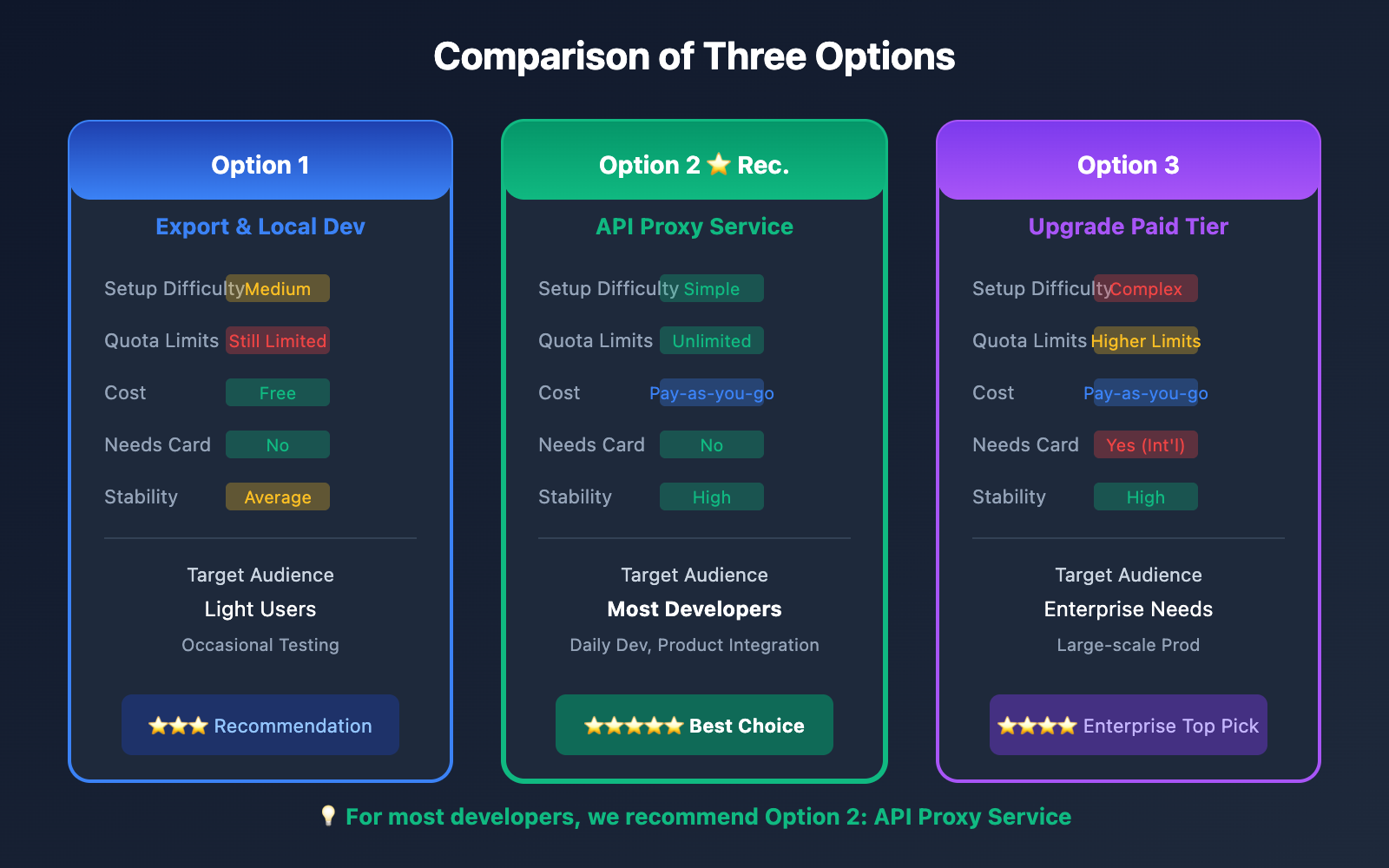
| Comparison Dimension | Export & Local Dev | API Proxy Service | Upgrade Paid Tier |
|---|---|---|---|
| Setup Difficulty | Medium | Simple | Complex |
| Quota Limits | Still Limited | Unlimited | Higher Limits |
| Cost | Free (Restricted) | Pay-as-you-go | Pay-as-you-go |
| Needs Credit Card | No | No | Yes (International) |
| Stability | Average | High | High |
| Best Use Case | Light usage | Recommended for most users | Enterprise-grade needs |
Step-by-Step Tutorial: Migrating from AI Studio to an API Proxy
Step 1: Register an Account on the API Proxy Platform
Visit APIYI at apiyi.com, register your account, and get your API Key.
Step 2: Install the OpenAI SDK
# Python
pip install openai

# Node.js
npm install openai
Step 3: Update Your Code Configuration
Python Example:
import openai

# 配置 API 代理
client = openai.OpenAI(
    api_key="YOUR_APIYI_KEY",
    base_url="https://api.apiyi.com/v1"  # APIYI统一接口
)

# 调用 Gemini 模型
def chat_with_gemini(prompt):
    response = client.chat.completions.create(
        model="gemini-2.5-flash",  # 可选其他 Gemini 模型
        messages=[
            {"role": "user", "content": prompt}
        ],
        temperature=0.7,
        max_tokens=2048
    )
    return response.choices[0].message.content

# 使用示例
result = chat_with_gemini("用 Python 写一个快速排序算法")
print(result)
Node.js Example:
import OpenAI from 'openai';

const client = new OpenAI({
    apiKey: 'YOUR_APIYI_KEY',
    baseURL: 'https://api.apiyi.com/v1'
});

async function chatWithGemini(prompt) {
    const response = await client.chat.completions.create({
        model: 'gemini-2.5-flash',
        messages: [
            { role: 'user', content: prompt }
        ]
    });
    return response.choices[0].message.content;
}

// 使用示例
const result = await chatWithGemini('解释什么是机器学习');
console.log(result);
Step 4: Testing and Verification
# 测试连接
try:
    response = client.chat.completions.create(
        model="gemini-2.5-flash",
        messages=[{"role": "user", "content": "Hello, 测试连接"}],
        max_tokens=50
    )
    print("连接成功:", response.choices[0].message.content)
except Exception as e:
    print("连接失败:", e)
Migrating Image Generation Models
Image Generation in AI Studio
If you're using Gemini's image generation features (Nano Banana Pro) in AI Studio, you can keep using them through the API proxy just as easily:
import openai

client = openai.OpenAI(
    api_key="YOUR_APIYI_KEY",
    base_url="https://api.apiyi.com/v1"
)

# 图像生成
response = client.images.generate(
    model="nano-banana-pro",
    prompt="一只可爱的橘猫在阳光下打盹,写实摄影风格",
    size="1024x1024",
    quality="hd"
)

image_url = response.data[0].url
print(f"生成的图像: {image_url}")
Multimodal Conversations (Text & Image)
import base64

def encode_image(image_path):
    with open(image_path, "rb") as f:
        return base64.b64encode(f.read()).decode()

image_base64 = encode_image("example.jpg")

response = client.chat.completions.create(
    model="gemini-2.5-flash",
    messages=[
        {
            "role": "user",
            "content": [
                {"type": "text", "text": "描述这张图片的内容"},
                {
                    "type": "image_url",
                    "image_url": {
                        "url": f"data:image/jpeg;base64,{image_base64}"
                    }
                }
            ]
        }
    ]
)
print(response.choices[0].message.content)
💰 Cost Optimization: For image generation needs, the APIYI (apiyi.com) platform offers flexible billing and supports various models like Nano Banana Pro, DALL-E, and Stable Diffusion, allowing you to choose the best solution for your needs.
Common Error Handling
Error 1: 429 Too Many Requests
import time
from tenacity import retry, stop_after_attempt, wait_exponential

@retry(stop=stop_after_attempt(3), wait=wait_exponential(multiplier=1, min=2, max=10))
def call_api_with_retry(prompt):
    return client.chat.completions.create(
        model="gemini-2.5-flash",
        messages=[{"role": "user", "content": prompt}]
    )
Error 2: API Key 无效
# 检查 API Key 配置
import os

api_key = os.environ.get("APIYI_KEY")
if not api_key:
    raise ValueError("请设置 APIYI_KEY 环境变量")

client = openai.OpenAI(
    api_key=api_key,
    base_url="https://api.apiyi.com/v1"
)
Error 3: 模型不存在
# 确认模型名称正确
SUPPORTED_MODELS = [
    "gemini-2.5-pro",
    "gemini-2.5-flash",
    "gemini-2.0-flash",
    "nano-banana-pro"
]

model_name = "gemini-2.5-flash"
if model_name not in SUPPORTED_MODELS:
    print(f"警告: {model_name} 可能不在支持列表中")
FAQ
Q1: When does the AI Studio free quota reset?
- RPM (Requests Per Minute): Rolling window, resets every minute.
- RPD (Requests Per Day): Resets at midnight Pacific Time.
- TPM (Tokens Per Minute): Rolling window, resets every minute.
If you're in a hurry, we recommend using the APIYI (apiyi.com) platform—you won't have to wait for your quota to reset.
Q2: Is it safe to use an API proxy?
It's safe as long as you choose a reputable API proxy provider. Just keep a few things in mind:
- Pick a trustworthy service provider.
- Never hardcode your API Key directly in your code.
- Use environment variables to manage your keys.
Q3: How much do API proxies cost?
Most API proxy services use a pay-as-you-go model and are often more affordable than official pricing. The APIYI (apiyi.com) platform offers transparent pricing, which you can check directly on their website.
Q4: Will I need to make major changes to my code after migrating?
If you're using an OpenAI-compatible API proxy, the changes are minimal:
- You just need to update the
api_keyandbase_url. - You might need to adjust the model name.
- The rest of your code logic stays exactly the same.
Q5: Can I use multiple API services at once?
Definitely. You can mix and match services based on your needs:
- Use the AI Studio free quota for light testing.
- Use an API proxy for your day-to-day development.
- Use official paid services for any specialized requirements.
Summary
When you run out of your free quota on Google AI Studio, you've got three options:
| Option | Best For | Key Actions |
|---|---|---|
| Export for Local Dev | Casual users | Export your code and run it locally |
| API Proxy Services | Most developers | Update the base_url and keep going |
| Upgrade to Paid Tier | Enterprise needs | Link a credit card to boost your quota |
Core Recommendations:
- Don't top up your Google account balance (unless you have an international credit card and specifically need enterprise-grade services).
- Export your code to your local development environment.
- Use an API proxy service to continue making calls to Gemini models.
- TL;DR: Export your code and move your development tasks to a local environment.
We recommend using APIYI (apiyi.com) to quickly restore your Gemini access. The platform supports the full range of Gemini models and provides an OpenAI-compatible format, making migration costs incredibly low.
Further Reading:
- Gemini API Rate Limits: ai.google.dev/gemini-api/docs/rate-limits
- AI Studio Build Mode: ai.google.dev/gemini-api/docs/aistudio-build-mode
- API Key Usage Guide: ai.google.dev/gemini-api/docs/api-key
📝 Author: APIYI Tech Team | Specialized in Large Language Model API integration and optimization
🔗 Technical Support: Visit APIYI (apiyi.com) for support across the entire Gemini model lineup