Author's Note: Detailed breakdown of the Sora 2 credits system, comparing ChatGPT Plus and Pro subscription credit consumption rules to help you calculate real costs and find the most cost-effective usage plan.
Confused by Sora 2's complex credits system when trying to generate videos? This article will thoroughly explain Sora 2 Credits costs and their calculation rules, helping you understand exactly how much each video costs.
Core Value: After reading this article, you'll fully understand Sora 2's credit consumption mechanism, be able to calculate video generation costs accurately, and choose the subscription plan that best fits your needs.
Sora 2 Credits Cost Key Points
| Key Point | Description | Practical Value |
|---|---|---|
| Credit Refresh | Refreshes monthly with subscription renewal, doesn't accumulate | Use it or lose it, no waste |
| Resolution Impact | 480p → 720p → 1080p cost increases | Choose the right resolution, save 80% |
| Duration Impact | 5s/10s/20s scales proportionally | Short videos are more cost-effective |
| Relaxed Mode | Pro users get unlimited use, no credit consumption | Essential for high-frequency users |
Understanding Sora 2's Credit System
Sora 2 uses a credits system for billing. Unlike a simple "N videos per month" limit, the credit system dynamically calculates consumption based on your video's resolution, duration, and aspect ratio.
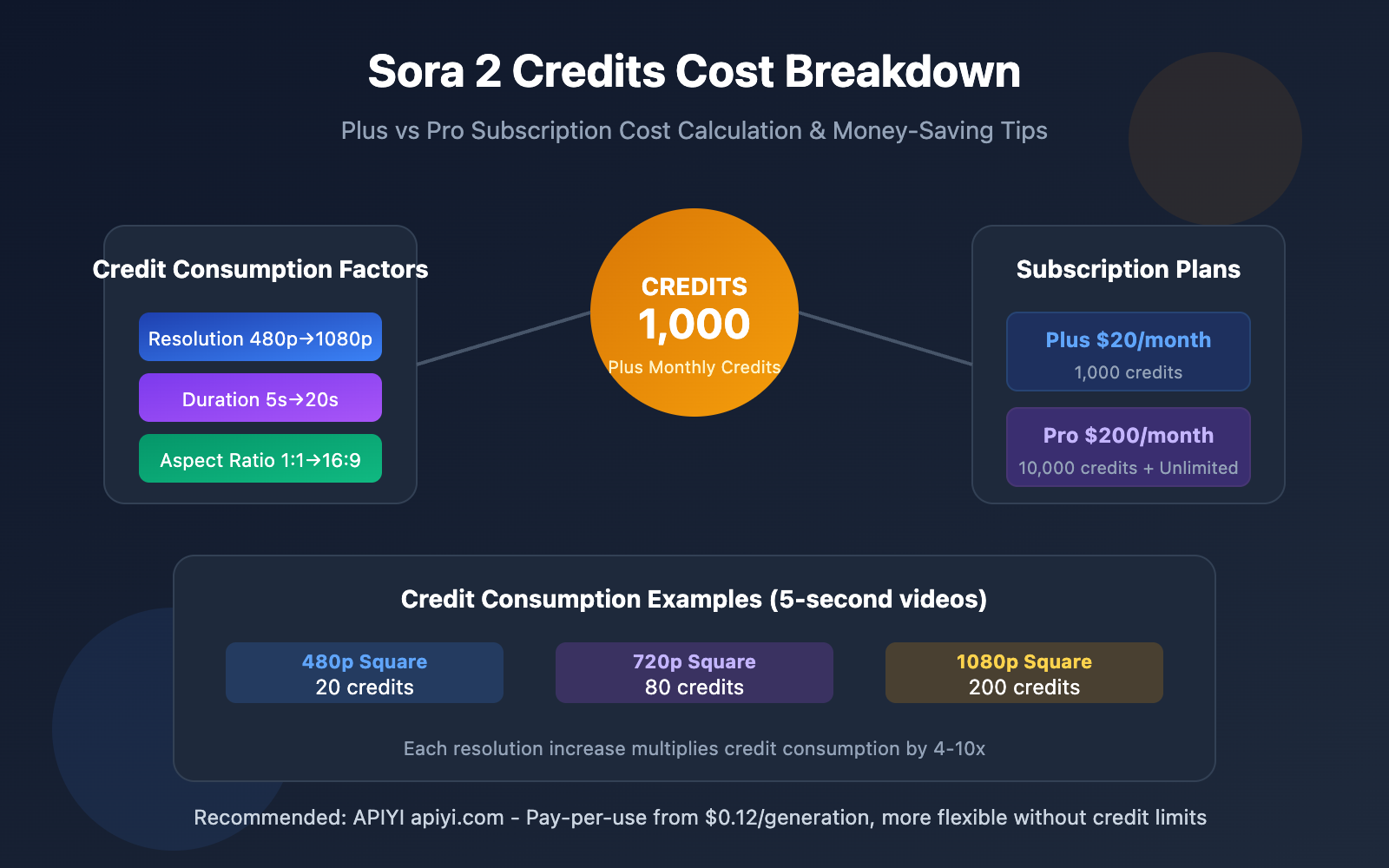
ChatGPT Plus users get 1,000 credits monthly, while Pro users receive 10,000 credits (10x more). Credits refresh monthly, and unused credits don't roll over to the next month.
Sora 2 Credit Consumption Baseline
The lowest consumption video configuration is: 5 seconds + 480p + Square (1:1) = 20 credits
This is Sora 2's "starting price." From this baseline, increasing any dimension will multiply credit consumption.

Sora 2 Credits Resolution Consumption Breakdown
Resolution is the biggest factor affecting credit consumption. Here's how different resolutions compare:
| Resolution | Per Second | 5-sec Video | 10-sec Video | 20-sec Video |
|---|---|---|---|---|
| 480p | 4 credits/sec | 20 credits | 40 credits | 80 credits |
| 720p | 16 credits/sec | 80 credits | 160 credits | 320 credits |
| 1080p | 40 credits/sec | 200 credits | 400 credits | 800 credits |
How Aspect Ratio Affects Sora 2 Credits
Beyond resolution, aspect ratio also impacts credit consumption:
- 1:1 Square: Baseline consumption
- 16:9 Landscape: About 1.5-2x consumption
- 9:16 Portrait: About 1.5-2x consumption
For example, the same 720p 5-second video:
- Square (720×720): 80 credits
- Landscape (1280×720): About 120-160 credits
Money-Saving Tip: If you don't have specific aspect ratio requirements, choosing square format can save you 30-50% on credit consumption.
Sora 2 Plus vs Pro Subscription Comparison
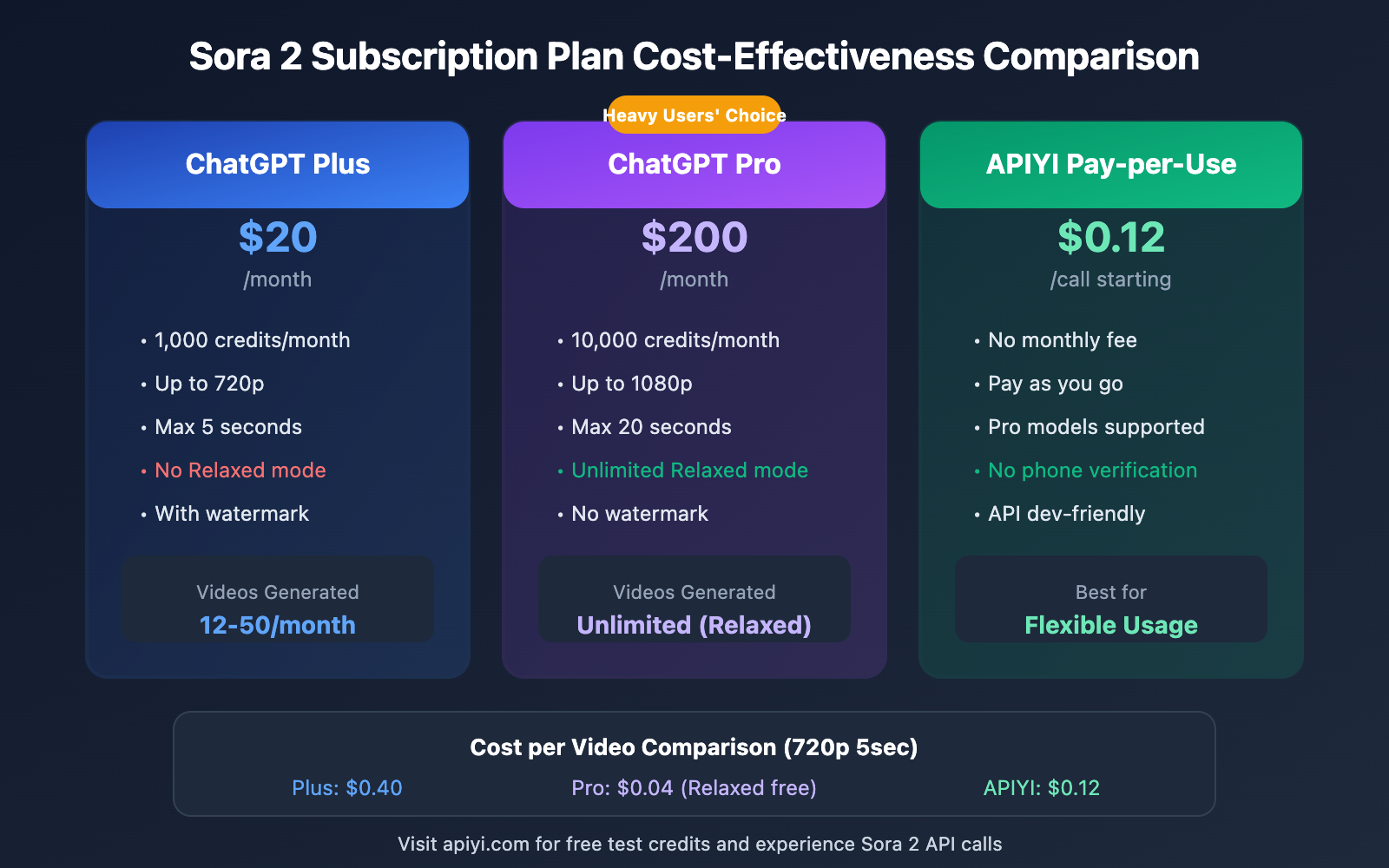
| Feature | ChatGPT Plus | ChatGPT Pro |
|---|---|---|
| Monthly Fee | $20 | $200 |
| Monthly Credits | 1,000 | 10,000 |
| Max Resolution | 720p | 1080p |
| Max Duration | 5 seconds | 20 seconds |
| Relaxed Mode | ❌ Not supported | ✅ Unlimited use |
| Concurrent Generations | 1 | 5 |
| Watermark | Yes | No |
| Portrait Animation | ❌ Limited | ✅ Supported |
How Many Videos Can Plus Users Generate?
With 1,000 credits, ChatGPT Plus users can generate per month:
| Configuration | Credit Cost | Quantity |
|---|---|---|
| 480p + 5sec + Square | 20 credits | 50 videos |
| 480p + 5sec + Landscape | ~50 credits | 20 videos |
| 720p + 5sec + Square | 80 credits | 12 videos |
| 720p + 5sec + Landscape | ~120 credits | 8 videos |
How Many Videos Can Pro Users Generate?
With 10,000 credits, ChatGPT Pro users can generate per month:
| Configuration | Credit Cost | Quantity |
|---|---|---|
| 480p + 5sec + Square | 20 credits | 500 videos |
| 720p + 10sec + Square | 160 credits | 62 videos |
| 1080p + 5sec + Square | 200 credits | 50 videos |
| 1080p + 20sec + Landscape | ~800 credits | 12 videos |
Important: Pro users also get Relaxed Mode with unlimited generations—you'll still be able to create after using up your 10,000 credits.
Sora 2 Relaxed Mode Explained
Relaxed mode is an exclusive feature of ChatGPT Pro ($200/month) and represents the biggest value proposition of the Pro subscription.
Relaxed Mode Features
| Feature | Description |
|---|---|
| Access Requirements | Pro users only |
| Credits Consumption | No credits used |
| Generation Limit | Unlimited |
| Video Quality | Same as Priority mode, up to 1080p |
| Wait Time | 3-15 minutes (3-5 minutes during off-peak) |
| Best Time Slots | 10PM – 6AM (local time) |
Relaxed Mode Usage Strategy
Priority Mode (consumes credits):
- Videos you need urgently
- Content requiring quick iterative adjustments
- Emergency needs during work hours
Relaxed Mode (no credits consumed):
- Batch generating materials
- Non-urgent creative exploration
- Overnight automated tasks
Money-Saving Tip: If you're a heavy user, Pro's Relaxed mode means unlimited generation. Calculating at 100 1080p videos per month, the cost drops to just $2 per video, far below market rates.
Sora 2 Credits Money-Saving Strategies
Strategy 1: Choose the Right Resolution
Not every scenario needs 1080p:
- Social media short videos: 720p is sufficient
- Proof of concept/drafts: 480p works fine
- Final work/commercial use: 1080p
Strategy 2: Control Video Duration
- Generate a 5-second version first to verify the effect
- Only generate longer versions when satisfied
- Avoid generating 20-second high-res videos in one go
Strategy 3: Make Good Use of Relaxed Mode
Pro users should definitely develop this habit:
- Use Relaxed mode for all non-urgent tasks
- Leverage overnight batch generation
- Save Priority credits for urgent scenarios
Strategy 4: Consider API Alternatives
If your needs are:
- Pay-as-you-go usage without subscriptions
- More flexible billing methods
- Programmatic integration rather than manual generation
You might consider calling Sora 2 API through APIYI apiyi.com:
| Plan | Billing Method | Unit Price |
|---|---|---|
| sora-2 (Standard) | Pay-per-use | $0.12/call |
| sora-2-pro (Pro) | Pay-per-use | $0.80/call |
import openai

client = openai.OpenAI(
    api_key="YOUR_API_KEY",
    base_url="https://vip.apiyi.com/v1"
)

# Pay-per-use, no subscription needed
response = client.chat.completions.create(
    model="sora-2",  # or sora-2-pro
    messages=[{
        "role": "user",
        "content": "A golden retriever playing in autumn leaves"
    }]
)
Cost Comparison: If you only need 10 videos per month, API pay-per-use ($1.2-$8) is more cost-effective than the Plus subscription ($20).
Purchasing Extra Sora 2 Credits
If you run out of your monthly credits, you can purchase additional ones:
| Credit Pack | Price | Unit Price |
|---|---|---|
| 1,000 credits | $10 | $0.01/credit |
| 5,000 credits | $40 | $0.008/credit |
| 10,000 credits | $70 | $0.007/credit |
Purchased credits are valid for 12 months, making them more flexible than subscription credits.
When should you buy extra credits?
- Plus users running low on credits at month-end
- Temporary spike in generation needs
- Don't want to upgrade to Pro but need more credits
Frequently Asked Questions
Q1: What happens when I run out of Sora 2 Credits?
You've got three options:
- Wait for refresh: Credits automatically renew when your subscription renews next month
- Buy credit packs: Starting at $10, valid for 12 months
- Upgrade to Pro: Get 10x credits + unlimited Relaxed mode
- Use the API: Pay-per-use through APIYI apiyi.com with no credit limits
Q2: Is Relaxed mode really unlimited?
Yes, Pro users get unlimited Relaxed mode with no quantity restrictions. The only "cost" is longer wait times (typically 3-15 minutes). For non-urgent needs, it's an incredibly cost-effective option.
Q3: How do I choose between Plus and Pro?
Here's what we'd recommend:
- Plus ($20): Casual use, 10-20 low-resolution videos per month is enough
- Pro ($200): Heavy user, need 1080p, 20-second videos, or want unlimited Relaxed mode
If your usage varies a lot, pay-per-use through APIYI apiyi.com might be more flexible for you.
Summary
Core points about Sora 2 Credits costs:
- Resolution is the biggest cost factor: 1080p consumes 10x more than 480p
- Plus 1,000 credits: ~12-50 videos/month, suitable for casual users
- Pro 10,000 credits + Relaxed: unlimited generation, perfect for heavy users
- API pay-per-use: $0.12-$0.80/generation, ideal for flexible needs
Choose based on your usage frequency. Go with Plus if you're a light user, Pro for heavy use, or try APIYI apiyi.com's pay-per-use if you're unsure about your volume.
References
⚠️ Link Format Note: All external links use
Resource Name: domain.comformat for easy copying but aren't clickable, avoiding SEO weight loss.
-
OpenAI Sora Billing FAQ: Official credit system documentation
- Link:
help.openai.com/en/articles/10245774-sora-billing-faq - Details: Learn about Sora's official billing rules and credit refresh mechanisms
- Link:
-
OpenAI Credits Usage Guide: Cross-feature credit usage documentation
- Link:
help.openai.com/en/articles/12642688-using-credits-for-flexible-usage-in-chatgpt-freegopluspro-sora - Details: Understand how credits work across Sora, Codex, and other features
- Link:
-
Sora 2 Pricing Calculator: Online cost estimation tool
- Link:
costgoat.com/pricing/sora - Details: Quickly calculate video generation costs for different configurations
- Link:
Author: Tech Team
Tech Discussion: Feel free to discuss in the comments, more resources available at APIYI apiyi.com tech community