
Summary: After switching from Qwen4-Max-Preview to the official qwen4-max release, long outputs start breaking off midway. This article explains how to figure out which layer the truncation is happening at, and how to allocate the output cap and the thinking budget.
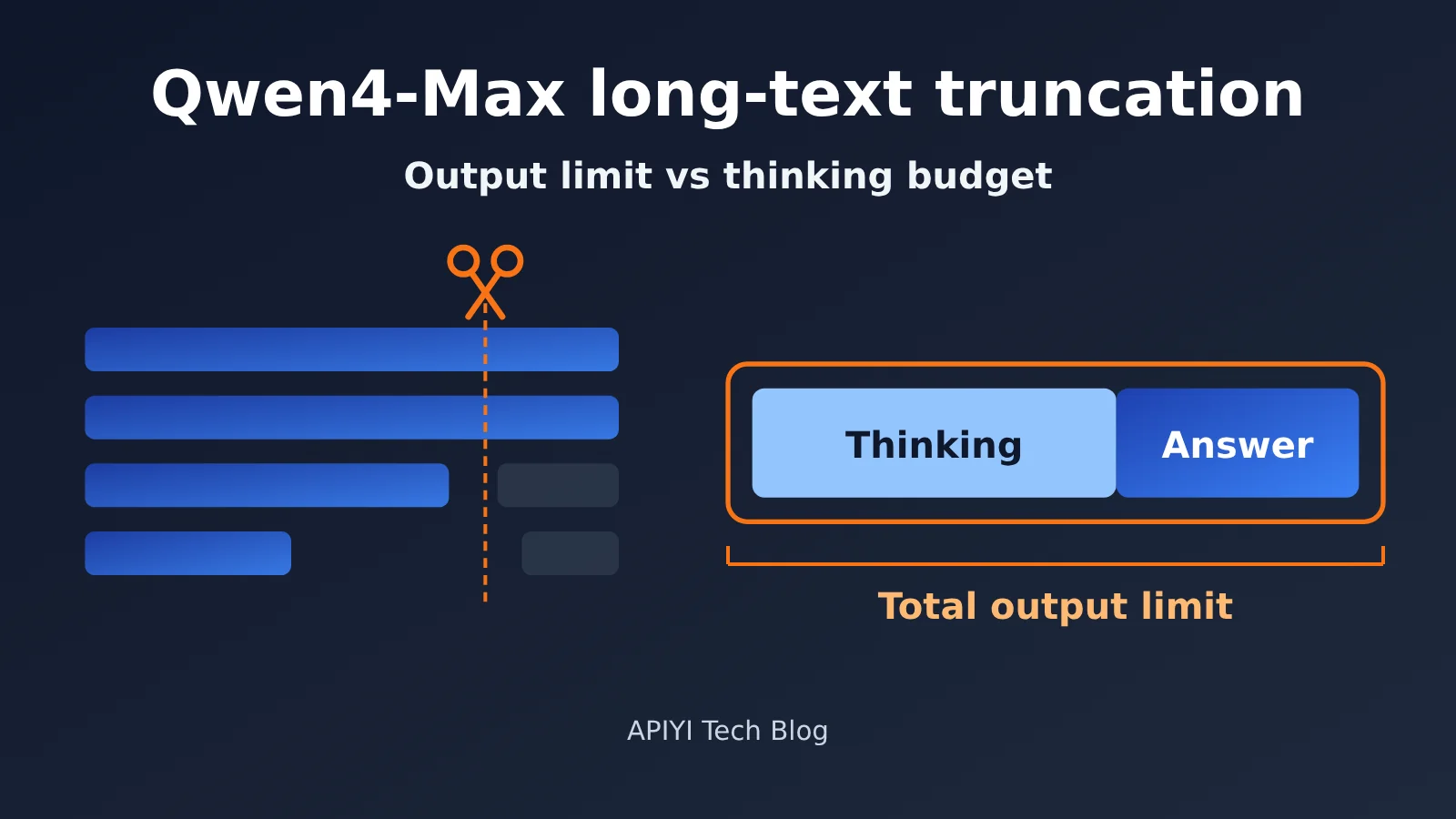
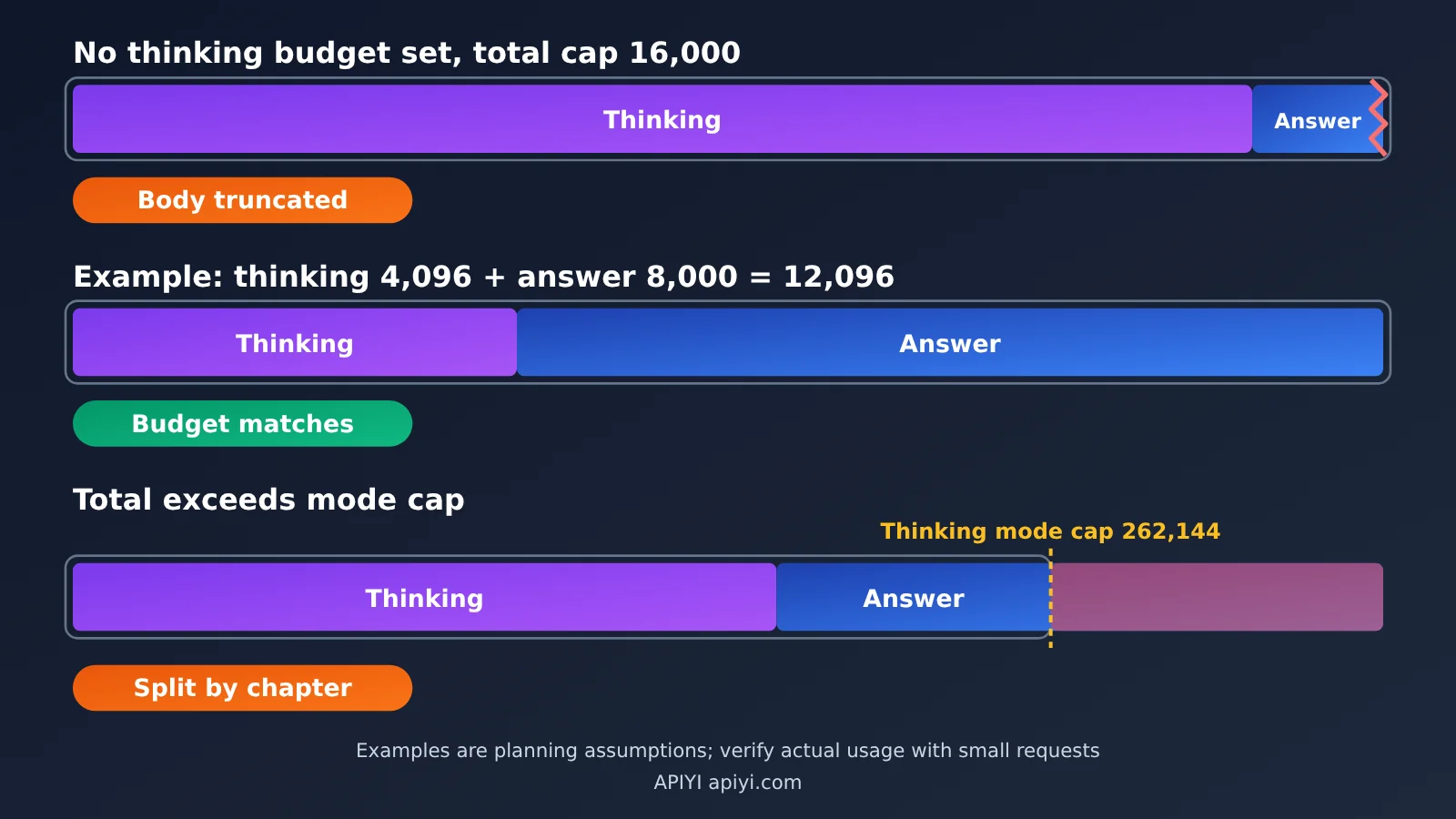
Here’s the conclusion up front: the official release’s max_completion_tokens (or the equivalent max_tokens) caps the combined total of thinking plus answer — the thinking budget is just one slice of it. Thinking is on by default in the official release, and if you don’t pass either of the two reasoning control parameters, it runs at the high tier with a thinking budget of 131,072 tokens. So when you set the total cap on the low side, thinking burns through most of the allowance first, and the body text naturally gets truncated.
The fix: first decide how many tokens the final answer needs, then decide the thinking budget, add the two together as the total cap, and make sure the sum doesn’t exceed the maximum output for the current mode (262,144 in thinking mode, 131,072 in non-thinking mode). Before any of that, also confirm that defaults in tools like Qwen Code aren’t already pinning the output at a lower value.
On the timing: the Alibaba Cloud Model Studio documentation lists the Qwen4-Max-Preview preview window as 2026-11-11 10:00 to 2026-11-25 10:00 (Beijing time, UTC+8), after which it goes offline. Those are the dates the docs give — when your particular account actually gets shut off, and what error it returns, depends on the runtime records of the channel you’re using. This article only covers text truncation after you’ve migrated to the official release.
Knowledge Map: Troubleshooting and Tuning Path for Qwen4-Max Long-Text Truncation
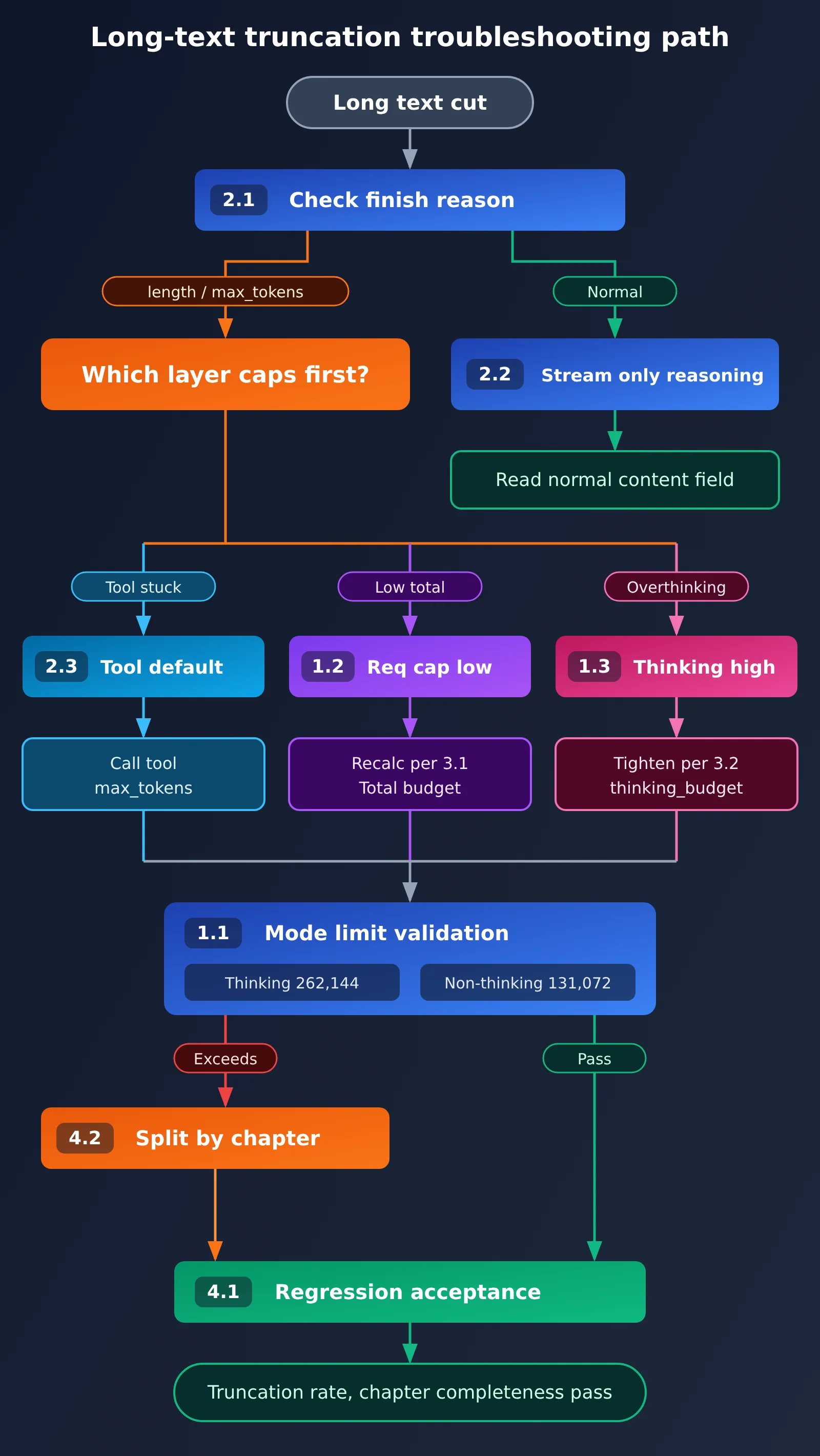
Figure notes: Follow this path to troubleshoot. Start with the finish reason to distinguish between “actually hit the limit” and “the client read the wrong field.” If you did hit the limit, rule out the three layers in order: tool defaults, the request’s total cap, and thinking usage. After adjusting, the total must pass the current mode’s limit check; for tasks that still don’t fit, split them by chapter. Finally, validate everything against the regression samples.
Index: the order to read about the Qwen4-Max truncation problem
- Section 1 Concepts: Start by clarifying the relationship between the output limit and the thinking budget. Every algorithm and field that follows is built on the premise that the total includes thinking.
- Section 2 Diagnosis: Use the finish reason and usage fields to figure out which layer the truncation belongs to, so you don’t tweak model parameters when you should be changing tool configuration.
- Section 3 Tuning: Gives you the budget algorithm, runnable code, and a field mapping across three protocols, so you can edit your config directly.
- Section 4 Validation: Confirm the change works on a fixed sample, then decide whether to scale up traffic.
If you’ve already confirmed it’s finish_reason=length, you can start from 3.1. If it’s just a streaming UI display glitch, jump straight to 2.2.
To Know: terms you need to understand Qwen4-Max truncation
| Term | Brief explanation |
|---|---|
| Output limit | The maximum number of tokens a single request is allowed to generate. In the GA version, it covers both the thinking and the answer |
| Thinking budget | The number of tokens the model is allowed to spend on thinking, controlled via thinking_budget or the reasoning tier |
| Reasoning tier | Three tiers: low, high, xhigh; the old medium maps to high |
finish_reason |
The finish reason for Chat Completions; a value of length means the output limit was hit |
stop_reason |
The finish reason for Anthropic Messages; a value of max_tokens means the cap was reached |
extra_body |
The parameter the Python OpenAI SDK uses to pass non-standard fields, such as thinking_budget |
1 How Qwen4-Max Output Limits Relate to the Thinking Budget
1.1 Qwen4-Max-Preview vs. GA Specs
Both versions publish a 1,000,000-token context length; the difference lies in the output limit and the default reasoning behavior. Preview shares a single 393,216-token output cap between thinking and answer, and defaults to the xhigh thinking tier. The GA release splits the cap by mode and has thinking turned on by default.
| Item | Qwen4-Max-Preview | qwen4-max non-thinking mode | qwen4-max thinking mode |
|---|---|---|---|
| Context length | 1,000,000 | 1,000,000 | 1,000,000 |
| Max input | Per the Preview spec page | 991,808 | 983,616 |
| Max output | 393,216 (shared by thinking and answer) | 131,072 | 262,144 |
| Default reasoning | xhigh |
— | Thinking on by default |
| Example channels | During the preview period | Model Studio and the APIYI (apiyi.com) public catalog already list it | Same as left |
This table captures the gap people commonly hit after migrating: the GA release’s thinking mode has a lower max output than Preview’s shared cap. Super-long content that Preview could finish in a single pass may already exceed the mode’s limit on the GA release. Validate input and output separately against the limits of the current mode — don’t just look at the 1,000,000 context length.
1.2 Output Cap: A Total Budget for Thinking Plus Answer
In its compatibility note dated 2026-11-02, Model Studio adjusted the semantics of Chat Completions and DashScope: starting with Preview and the GA release, max_tokens and max_completion_tokens are equivalent, and both bound the total of thinking plus answer. For new configurations, prefer max_completion_tokens. Keeping the old parameter is fine too, but read it as the same total budget.
A lot of people migrate with the old max_tokens=16000 and quietly assume all 16,000 goes to the body text. On the GA release, that number has to hold the thinking as well. If thinking eats a lot, only a sliver is left for the answer. Output usage on the bill includes thinking too, so a truncated request is not cheap either.
1.3 Thinking Budget: One Slice of the Total
The thinking budget decides how much of the total budget can go to thinking at most. In Model Studio’s Chat Completions, you can pass reasoning_effort or a positive integer thinking_budget — you must pick exactly one, and both the Chat Completions and DashScope docs for the GA release are explicit about this. Pass neither, and it runs at the high tier with a 131,072 budget.
If you pass only the budget, the number maps to the corresponding tier: 1–4,096 → low, 4,097–131,072 → high, 131,073–262,144 → xhigh. In other words, even if you don’t care about tiers, setting a budget value on its own also pins down the reasoning effort. How much the final answer actually gets depends on how much thinking really consumed, so leave room for the answer based on your use case — don’t assume thinking will always use its full budget or always be frugal.
2 Diagnosing Long-Text Truncation in Qwen4-Max
2.1 Check the Finish Reason and Usage Fields
To figure out whether you’ve hit the cap, start with the finish reason. For Chat Completions, check whether finish_reason is length; for Anthropic Messages, check whether stop_reason is max_tokens. If the finish reason looks normal but the text still seems incomplete, the problem is probably client-side parsing rather than the budget.
Once you’ve confirmed the cap was hit, compare the usage fields to see how much of the output went to reasoning versus the answer. Reasoning tokens are usually already included in the total output, so count them once using each endpoint’s usage fields—don’t add them twice. When diagnosing, keep the raw response, request ID, and timestamp so you can match each case against configuration changes.
2.2 Only Seeing Reasoning Content in Streaming
It’s common after migration for a streaming client to show only reasoning content and no actual answer. Usually the client is only reading the reasoning delta field, or the request hit the cap during the reasoning phase. The final answer comes from the regular content field, while reasoning content lives in fields like reasoning_content; concatenate the two separately.
According to the official Chat Completions documentation, you can use stream_options.include_usage to request streaming usage, and you should keep the final usage chunk in your logs. That way, even with streaming requests, you’ll get the full output total and can judge the reasoning share. If the final chunk’s finish reason is length and the actual answer is empty, the reasoning budget is too large relative to the overall cap.
2.3 Tool Defaults Take Effect Before Model Limits
When you use interactive coding tools like Qwen Code, the tool’s own defaults can take effect before the model’s limit. In the official Qwen Code configuration example, the default output limit for the production model entry is 32,768; you can set longer output through generationConfig.samplingParams.max_tokens.
If long documents or code written in the tool keep cutting off around the same point, check this default first, then consider adjusting model parameters. Also note that Token Plan only applies to interactive operations within designated tools. Self-built application backends, automation scripts, and non-interactive batch jobs should use usage-based products instead, and should explicitly set the total limit in the request rather than relying on tool defaults.
3 How to Tune Qwen4-Max Output Limit and Thinking Budget
3.1 Budget Algorithm: Answer First, Thinking Second
The recommended order is: first estimate how many tokens the final answer needs, then set the thinking budget based on task difficulty, add the two together as the total cap, and finally validate it against the maximum output for the current mode. Take the planning example from the Bailian documentation: if you want to reserve about 8,000 tokens for the final answer and at most 4,096 tokens for thinking, then the total cap for Chat Completions is 12,096, while you pass only 4,096 as the thinking budget.
| Scenario (hypothetical example) | Expected answer | Thinking budget | Corresponding level | Total cap configuration |
|---|---|---|---|---|
| Regular long answer (documentation example) | About 8,000 | 4,096 | low |
12,096 |
| Long report, light reasoning | About 30,000 | 4,096 | low |
34,096 |
| In-depth analysis report | About 20,000 | 32,768 | high |
52,768 |
| Extra-long content, deep reasoning | Depends on the task | ≤ 262,144 | xhigh |
Must not exceed 262,144; split if it doesn’t fit |
Only the first row in the table comes from the documentation; the rest are hypothetical values derived using the same algorithm. They haven’t been tested in practice, so you’ll need to calibrate them with your own samples before going live. To estimate answer tokens, you can refer to actual usage records from similar tasks during the Preview period, then leave some headroom.
3.2 Minimal Chat Completions Example
The example below calls qwen4-max through the OpenAI-compatible endpoint, sets the overall cap and the thinking budget separately, and prints the finish reason plus usage:
from openai import OpenAI

client = OpenAI(
    api_key="YOUR_API_KEY",
    base_url="https://api.apiyi.com/v1",  # APIYI OpenAI-compatible endpoint
)

resp = client.chat.completions.create(
    model="qwen4-max",
    messages=[{"role": "user", "content": "写一份约 6000 字的接口迁移报告,分 5 章。"}],
    max_completion_tokens=12096,        # total of thinking + answer
    extra_body={"thinking_budget": 4096},  # mutually exclusive with reasoning_effort
)

choice = resp.choices[0]
print("finish_reason:", choice.finish_reason)  # length means the cap was hit
print("model:", resp.model)
print("usage:", resp.usage)
print(choice.message.content[:300])
thinking_budget is a nonstandard field defined by Bailian, so it’s passed in through extra_body. Different channels may forward and validate this field differently. Confirm it actually takes effect with a short request first: check whether the thinking portion of the usage is capped within the budget, and confirm that the response’s model field is qwen4-max. Don’t rely on the model self-reporting its identity to determine the version.
View the full streaming version of the code (assembling reasoning and body separately while keeping the usage chunk)
from openai import OpenAI

client = OpenAI(
    api_key="YOUR_API_KEY",
    base_url="https://api.apiyi.com/v1",  # APIYI unified endpoint
)

def long_write(prompt: str, answer_budget: int = 8000, think_budget: int = 4096,
               mode_cap: int = 262144):
    total = answer_budget + think_budget
    if total > mode_cap:
        raise ValueError(f"总预算 {total} 超过模式上限 {mode_cap},请按章节拆分")

    stream = client.chat.completions.create(
        model="qwen4-max",
        messages=[{"role": "user", "content": prompt}],
        max_completion_tokens=total,
        stream=True,
        stream_options={"include_usage": True},
        extra_body={"thinking_budget": think_budget},
    )

    reasoning, content = [], []
    finish_reason, usage = None, None
    for chunk in stream:
        if chunk.usage:                      # the final usage chunk
            usage = chunk.usage
        if not chunk.choices:
            continue
        ch = chunk.choices[0]
        delta = ch.delta
        r = getattr(delta, "reasoning_content", None)
        if r:
            reasoning.append(r)
        if delta.content:                    # the final answer comes only from the regular content field
            content.append(delta.content)
        if ch.finish_reason:
            finish_reason = ch.finish_reason

    text = "".join(content)
    return {
        "finish_reason": finish_reason,
        "truncated": finish_reason == "length",
        "answer_chars": len(text),
        "reasoning_chars": len("".join(reasoning)),
        "usage": usage,
        "text": text,
    }

result = long_write("写一份分 5 章的迁移报告,每章以“## 第N章”开头。")
print(result["finish_reason"], result["truncated"], result["usage"])
Quick-start tip: Start with a few short requests using the trial quota at APIYI apiyi.com to confirm that
qwen4-maxis available under your account’s token group, thatthinking_budgettakes effect, and that the usage fields are all present. Only then should you open up the long-output samples. Change just one variable at a time — for example, only adjust the budget or only turn on streaming — so that problems are easy to trace back.
3.3 Field comparison: Responses vs. Messages
Across the three protocols, the GA release uses different fields for the total output limit, reasoning control, and truncation detection. When you mix protocols, these field names are the easiest to get wrong — and Bailian will return InvalidParameter because of it.
| Protocol | Total output limit field | Reasoning control field | Truncation detection |
|---|---|---|---|
| Chat Completions / DashScope | max_completion_tokens (equivalent to max_tokens) |
reasoning_effort or thinking_budget, pick one |
finish_reason=length |
| Responses | max_output_tokens |
reasoning.effort |
Check against response status and usage |
| Anthropic Messages | max_tokens |
output_config.effort |
stop_reason=max_tokens |
The effort levels are consistently low, high, and xhigh; medium in older configurations is treated as high. If you want precise control over the number of thinking tokens, Chat Completions’ thinking_budget gives you the finest granularity. The other two protocols control reasoning by effort level, and you still need to set the total limit as “thinking plus answer.”
3.4 Things to check when connecting through APIYI
APIYI’s public price list (data timestamp 2026-11-25 00:33, UTC+8) already lists qwen4-max as type text, with endpoints chat, responses, and messages, under the groups ClaudeCode, CodexResponses, Default, and SVIP. That’s just catalog information, though — before you connect, you also need to check whether your account token’s whitelist, groups, and endpoints cover the protocol you want to use.
Under that same catalog, you still fill in the total output limit fields for the three protocols according to the table in 3.3. The image, video, and extension fields on Bailian’s model page are the vendor’s native integration specs; which features actually work depends on the acceptance results for the endpoint you select. On billing: output usage includes thinking tokens, so you can verify it in the APIYI apiyi.com console by channel, group, and actual usage. When comparing costs before and after truncation, include failed retries in the calculation.
4 Qwen4-Max Long-Form Output Regression and Acceptance
4.1 Samples and Pass Criteria
Tuning only counts if you judge it against fixed samples. Treat the Preview-era records as your baseline, lock down task inputs, output structure, and acceptance scripts, and tag every sample with the mode, protocol, and date it used. That way, you don’t mistake configuration differences for model differences. Long-output samples need section checks and required-field checks—not just a check for whether the response finished.
Here’s a canary standard you can use:
- Required sections are present in long-text samples, and the share of
finish_reason=lengthstays below the truncation rate cap your business sets; - Streaming samples reassemble into a complete body, and the final usage block is retained in the logs;
- Structured samples pass validation for all required fields and types;
- Latency, tail latency, and cost per successful task stay within business limits.
4.2 Split by Section When You Exceed the Mode Limit
If the expected answer plus necessary thinking exceeds 262,144—or 131,072 in non-thinking mode—raising the budget further won’t help. Split the task instead. Make multiple requests by section, generate only one chapter per request, and include the outline plus summaries of completed chapters in the prompt. After merging, verify that chapter numbers are continuous and that no required content is missing.
Splitting has another benefit: it’s easier to estimate the budget for each request. If you hit the cap, you only rerun one chapter, not the whole piece. You can prove this out with a small sample set on APIYI apiyi.com first, then plug it into the batch pipeline.
Final check: Take a long-form sample that was truncated before. Recalculate its budget as in 3.1, rerun it with the streaming code from 3.2, and confirm three things: finish_reason is no longer length, all body sections are present, and the thinking portion in the usage data stays within budget. If all three hold, truncation at this layer is solved. If not, go back to the knowledge map and check tool defaults and mode limits. If you need to compare long-output performance across models, you can switch between them for testing through APIYI apiyi.com with the same API key.
References
- Alibaba Cloud Model Studio (Bailian) qwen4-max model page: official release specs, inference parameter mapping, and pricing
- Link:
help.aliyun.com/zh/model-studio/qwen4-max
- Link:
- Alibaba Cloud Model Studio Qwen4-Max-Preview model page: preview period dates and Preview specs
- Link:
help.aliyun.com/zh/model-studio/qwen4-max-preview
- Link:
- Model Studio API compatibility upgrade notes: the semantics of
max_tokensandmax_completion_tokens- Link:
help.aliyun.com/zh/model-studio/api-compatibility-upgrade-notice
- Link:
- Model Studio Chat Completions documentation: fields, streaming responses, and usage
- Link:
help.aliyun.com/zh/model-studio/qwen-api-via-openai-chat-completions/
- Link:
- Qwen Code configuration guide: default output limits for tools
- Link:
help.aliyun.com/zh/model-studio/qwen-code
- Link:
- APIYI model price list: public catalog and endpoints
- Link:
docs.apiyi.com/models
- Link:
Author: APIYI Technical Team
Technical discussion: For integration questions, feel free to reach us through the APIYI apiyi.com homepage. For more resources, check out the docs.apiyi.com documentation center.