Summary: When an API call reports cloudflare_challenge, you can look at three pieces of raw evidence: the response headers, the media type, and the error body. Use them to determine whether the failure is a web verification issue, an API permission issue, or a request URL issue, then hand the organized material to the appropriate service provider.
Bottom line: cloudflare_challenge is just a string that shows up in logs or exception messages, and it alone doesn’t tell you the cause. To diagnose it, look at the raw response from the most recent failed request. There are three rules:
- If the raw response headers include
cf-mitigated: challenge, you got a Cloudflare challenge page this time. - If the response body matches the JSON error format described in the service provider’s docs, the request reached the API layer. Check the account, API key, and model permissions against the error code.
- If an endpoint that should return JSON or an event stream returns
text/htmland has no challenge header, check the Base URL, path concatenation, HTTP method, and redirects first.
This article only covers configuring authorized endpoints according to the official docs, understanding responses, and contacting official support. When you hit a challenge page, the program should stop automatic retries, hand the information to the service provider for confirmation, and avoid any attempt to bypass or automatically pass verification.
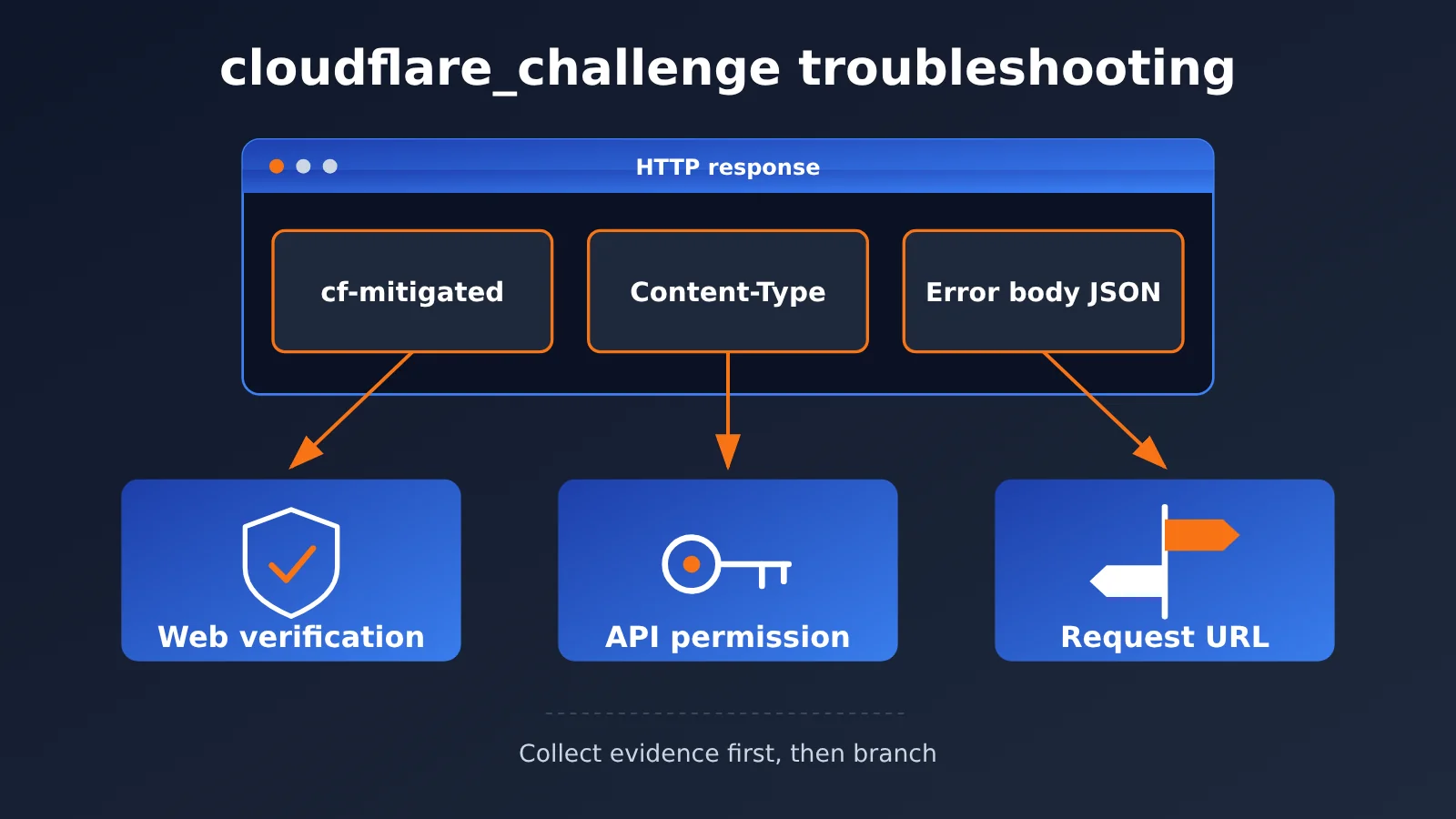
Knowledge Map: cloudflare_challenge Troubleshooting Overview
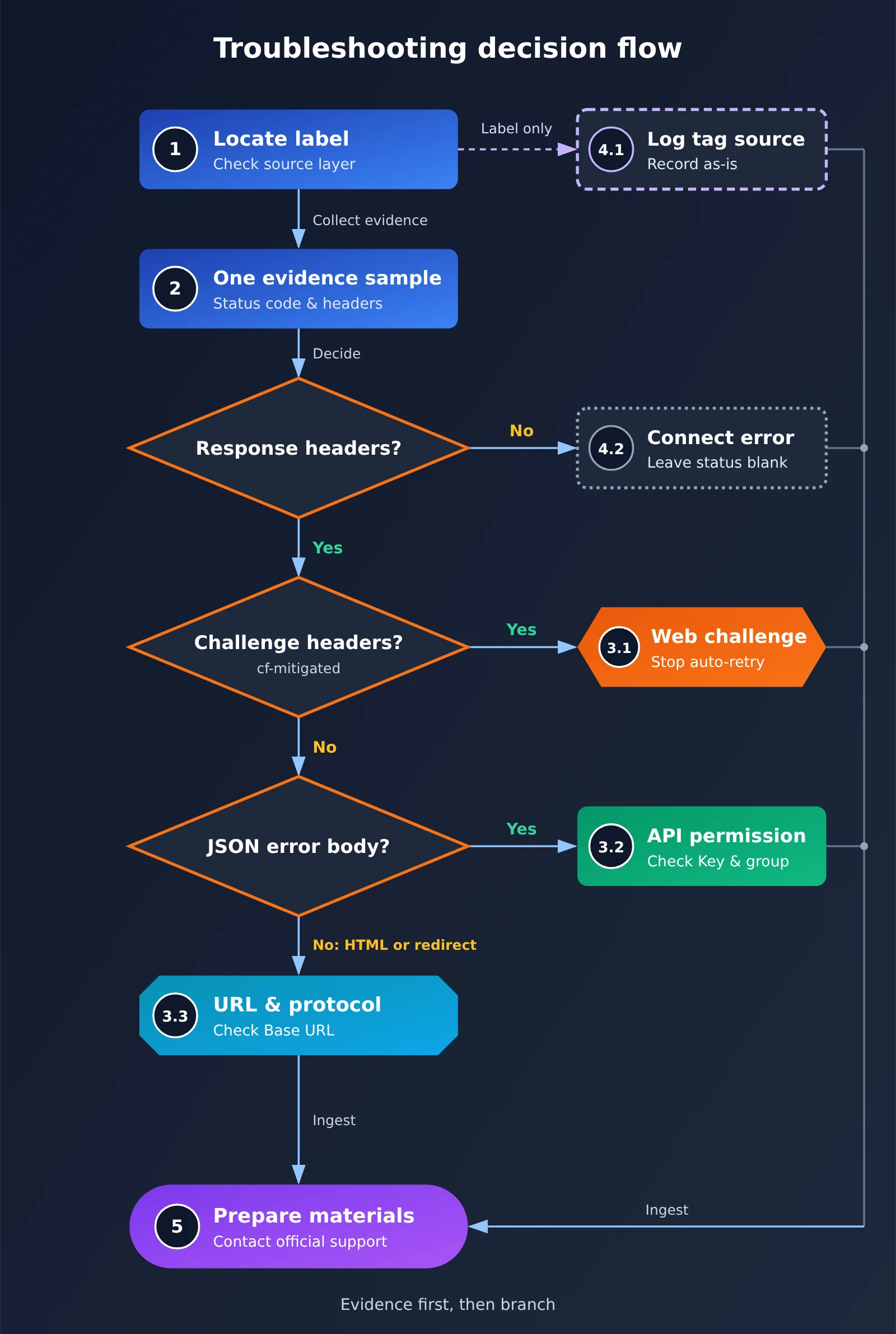
Figure caption: This diagram starts with “where the tag appears.” After collecting evidence, it answers three decision questions in order: is there a challenge header, is it the provider’s JSON error, and was unexpected HTML returned? Each result node gives the next action, and all branches ultimately converge on the ticket materials in Section 5. If you only have the tag thrown by the SDK and no underlying response, follow the dashed line to 4.1 and record the information source truthfully.
Index: cloudflare_challenge troubleshooting order
| No. | Section | What it gives the next step |
|---|---|---|
| 1 | The three places the tag can show up | Figure out which layer’s text you’re actually looking at |
| 2 | Capture one complete set of evidence | Line up the fields you need for branch decisions — all branches share them |
| 3 | Three branches (3.1 / 3.2 / 3.3) | Parallel sections — match your evidence to the right case, read as needed |
| 4 | Keep the original meaning on the client | Let the program classify things automatically, and verify with a mock response |
| 5 | Contact official support | Turn the earlier records into a support ticket |
I’d suggest working through 1 → 2 → 3 first. Section 4 is best folded into your code after you’ve fixed the issue, so the same kind of problem doesn’t get mixed up again. Section 5 applies whenever a branch confirms you need help from the service provider.
To Know: terms to understand before digging into cloudflare_challenge
| Term | Brief explanation |
|---|---|
| Challenge Page | The verification page Cloudflare returns at the edge layer; its media type is text/html |
cf-mitigated |
A Cloudflare response header — a value of challenge is a strong signal that you’re looking at a challenge page |
cf-ray / Ray ID |
The tracking ID for requests that pass through Cloudflare; include it along with the timestamp when you file a ticket |
| Media type | The base type in Content-Type before the semicolon, such as text/html or application/json |
| Preflight request | The OPTIONS request a browser sends automatically before a cross-origin call |
| HAR | A file exported from browser network logs; always redact it before sharing |
1. Which Layer cloudflare_challenge Comes From
The same term can show up in three different places, and it means something different in each one. Before you start digging, first figure out which one you’re dealing with.
1.1 cloudflare_challenge as an Application Label
cloudflare_challenge often appears as a literal string in SDK exceptions, gateway-wrapped JSON, or status fields in application logs. The official OpenAI Codex repository has a public user issue where the reporter’s redacted desktop logs show this spelling in the errorCode field, along with HTTP 403. That evidence only reflects the reporter’s own desktop scenario. When troubleshooting your own API calls, go back to the actual response headers and docs for the service you’re calling; use the raw record to determine which layer generated the label.
1.2 Identifying Signals of a Cloudflare Challenge Page
Cloudflare’s detection docs say the strong signal is the raw response header cf-mitigated: challenge. The docs also note that even when the original request is for API data, the challenge page response still has a media type of text/html. So read this header before JSON deserialization or SSE parsing; otherwise the HTML will trigger a decoding error first and obscure the real clue. Once you’ve confirmed you got a challenge page, describe it as “this request got a challenge page.” To find out which rule triggered it, the provider managing that domain needs to check its own logs.
1.3 Generic Proxy, Site, or API Errors
cf-ray, server: cloudflare, HTTP 403, and HTML page titles are just clues when they appear on their own. Cloudflare’s 403 documentation lists several cases, including edge blocks and origin rejections, and some edge 403s don’t even have branded styling. Cloudflare also provides structured responses for standard 1xxx errors and some 5xx errors, and the media type may be JSON. When a response includes cloudflare_error, interpret the specific error according to that format documentation and assess it separately from Challenge Page signals. Also, a single Ray ID can sometimes map to multiple requests; including the exact time when you report it will make it easier to pinpoint.
2. Collect a complete evidence set for cloudflare_challenge
2.1 Fields to record
In your app’s HTTP client, or in log locations you have permission to view, record the fields below for the most recent failed request. Redact query strings and request payloads proactively, and for response bodies keep only a small amount of visible text from the beginning that contains no sensitive information.
| Field | What to record | Purpose |
|---|---|---|
| Method | GET / POST / OPTIONS | check whether the method and endpoint match |
| Initial host and path | First-hop request URL (redacted) | determine whether the request went to the entry point specified in the docs |
| Final host and path | Destination URL after redirects | detect whether you were sent to a login page, docs page, or homepage |
| Timestamp and timezone | Absolute time with timezone | let the provider search within the time window |
| Status code | 401 / 403 / 404 / 405 / 200, etc. | distinguish authentication, denial, and routing issues |
Content-Type |
Base media type | determine whether it’s HTML or JSON |
cf-mitigated |
Whether it’s challenge |
strong signal that you’re on the web verification branch |
cf-ray and request ID |
Tracking number | for ticket correlation |
2.2 Evidence collection tips for redirects and SDK exceptions
When a request follows an automatic redirect, look at both the first hop and the final destination, because the destination may be a login page, docs page, or site homepage. If all you have is an SDK exception, first check whether the exception object stores the underlying response. If the underlying response is missing, state honestly in the error report that “the upper layer threw a cloudflare_challenge tag,” then use gateway logs and provider records to locate the corresponding request.
3. Distinguishing the three branches of cloudflare_challenge
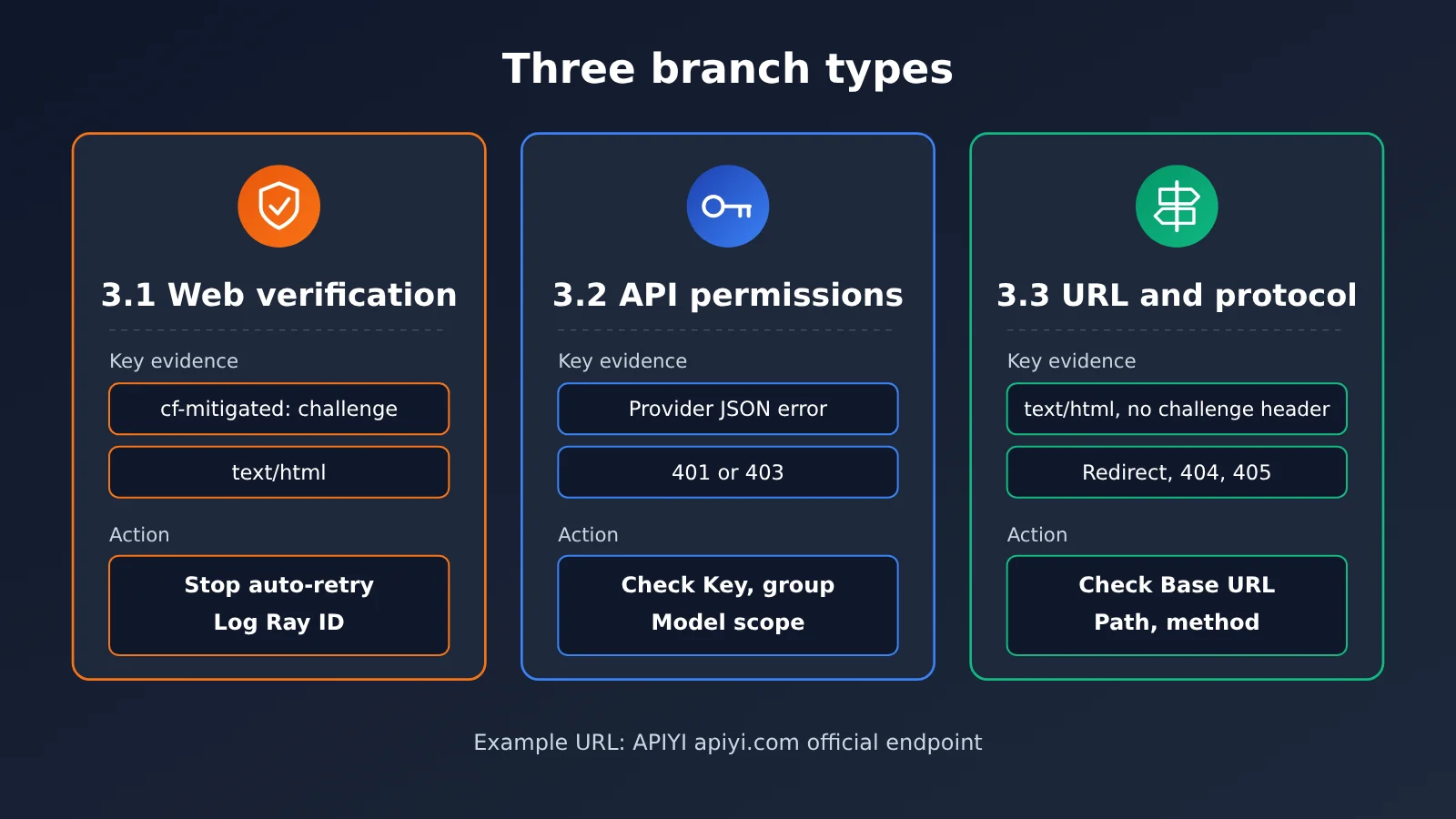
| Branch | Key evidence | What it tells you | Next step |
|---|---|---|---|
| 3.1 Web verification | cf-mitigated: challenge |
You got the verification page this time | Stop retrying and ask the provider to confirm the access method |
| 3.2 API permissions | A JSON error body in the provider’s format | The request reached the API layer | Check credentials and permissions against the error code |
| 3.3 Address and protocol | HTML with no challenge header, or an unexpected redirect | The request likely never reached the API route | Check the Base URL, path, and method |
3.1 The Web Verification Branch of cloudflare_challenge
When the raw response carries cf-mitigated: challenge, record the cf-ray and the request host, then confirm whether this request was sent to an API endpoint listed in the provider’s documentation. The program should treat it as a recognizable integration error, stop automatic retries for this request, and show the user the ID they’ll need for a support ticket. If the user originally intended to visit an interactive web page, hand it off to the regular web flow and let the user complete it themselves. If the program is calling the API path according to the documentation and hits a challenge, then the API provider should confirm which access methods are permitted and check the logs on their side.
3.2 The cloudflare_challenge and API Permission Branch
When the raw response is in the API error format described in the provider’s documentation, check the following in order according to the specific error code: account, API key status, project or workspace, account role, resource permissions, and model access scope. The two status codes have different meanings:
- HTTP 401: The target resource is missing valid authentication. The standard
WWW-Authenticateheader is used to indicate the HTTP authentication scheme. - HTTP 403: The responder understood the request but refuses to execute it. It may appear after authentication, or it may appear at the access policy layer.
Before checking permissions, first confirm that the request was sent to the host specified by the key issuer, and then compare it against the error body and the console. Take APIYI as an example: the documentation (docs.apiyi.com) lists items to check, including token enabled status, validity period, quota, model allowlist, group, and invocation logs. For other platforms, follow their own documentation; don’t copy these fields over.
3.3 cloudflare_challenge and request URL branching
A sync endpoint should be returning JSON and a streaming endpoint should be returning an event stream, yet what you get back is text/html, with no challenge header to boot. When that happens, first double-check the Base URL, the final assembled path, the HTTP method, the deployment environment, and the version prefix. Take the official endpoint in the APIYI quick start docs as an example: the Base URL for OpenAI-compatible clients is https://api.apiyi.com/v1, and the final Chat Completions request is POST https://api.apiyi.com/v1/chat/completions.
SDKs usually assemble the endpoint path automatically, so inspect the actual outgoing request log. Common culprits are a duplicated /v1, a help-site domain filled in by mistake, and similar configuration errors. If a request jumps straight to a web page or comes back with the homepage HTML, troubleshoot through the routing configuration. A 404 is sometimes used to conceal resources that shouldn’t be visible. For a 405, cross-check the allowed methods against the Allow header in the response.
4. Let the client preserve the original meaning of cloudflare_challenge
4.1 Classification Codes and Tag Logging
The client should keep the HTTP status, media type, provider error code, and request tracking ID separately. When comparing response headers, ignore field-name casing. When identifying the media type, use only the base type—for example, treat text/html; charset=UTF-8 as HTML. The following example only reads and classifies; it does not replay:
import requests

BASE_URL = "https://api.apiyi.com/v1"  # APIYI OpenAI-compatible API
API_KEY = "YOUR_API_KEY"

def classify(resp):
    h = {k.lower(): v for k, v in resp.headers.items()}
    media = h.get("content-type", "").split(";")[0].strip().lower()
    info = {"status": resp.status_code, "media": media,
            "cf_ray": h.get("cf-ray"),
            "hops": [r.url.split("?")[0] for r in resp.history] + [resp.url.split("?")[0]]}
    if h.get("cf-mitigated", "").strip().lower() == "challenge":
        return "web_challenge", info          # 3.1: stop automatic retries
    if media == "application/json":
        if resp.status_code >= 400:
            info["error_body"] = resp.json()  # 3.2: preserve the provider's actual error code
            return "api_error", info
        return "ok", info
    if media == "text/html":
        return "unexpected_html", info        # 3.3: verify the URL and routing
    return "unknown", info

try:
    resp = requests.post(f"{BASE_URL}/chat/completions",
                         headers={"Authorization": f"Bearer {API_KEY}"},
                         json={"model": "gpt-4o-mini",
                               "messages": [{"role": "user", "content": "Hello"}]},
                         timeout=60)
    kind, info = classify(resp)
    print(kind, info)   # Show only kind and cf_ray to users; write the full sanitized summary to internal logs
except requests.exceptions.RequestException as e:
    print("connection_stage", type(e).__name__)  # 4.2: no status code; log by connection stage
Requests expected to be streamed should also go through this check before event parsing, so HTML isn’t passed downstream as model output. For model-generation POST requests like this that may incur costs or side effects, whether to replay should be decided jointly by the business’s idempotency policy, the provider’s API rules, and diagnostic conclusions—don’t make it a default retry. If the upper layer only throws cloudflare_challenge without a response object, log “tag source: upstream exception” along with any fields available at the time.
Recommendation: You can first get test credits through APIYI apiyi.com, send one request with an API key you’ve confirmed is correct, and then check this record in the console’s invocation logs. That gives you a “normal sample” to compare against abnormal samples later, which will make troubleshooting much faster.
4.2 Browser Cross-Origin and Connection Exceptions
During cross-origin calls from a browser, a web page script may only be able to read response headers that are allowed to be exposed. As a result, DevTools network logs and application exceptions provide different levels of evidence. First, determine whether what you’re seeing is the browser’s OPTIONS preflight or the actual request itself. If the preflight fails, the main request may never have been sent, so the ticket should state which method you observed. If the HTTP client only gets a timeout, certificate, or connection exception, record the exception type and the stage where it occurred. Leave the Status Code and Response Headers fields blank, and don’t classify it under the error-body label.
4.3 Validate Branches with Local Fake Responses
The following four groups all use locally constructed responses and don’t send any real requests. These are acceptance examples; adjust them as needed for your service.
| Group | Fake input | Acceptance result |
|---|---|---|
| A | 403 + HTML + cf-mitigated: challenge |
Displays the “verification page”, records the fake Ray ID, and ends the automatic retry for this attempt |
| B | 403 + JSON in the tested service’s format, no challenge header | Takes the permission branch, preserves the real code from the error body |
| C | 200 + HTML after redirect to the login page | Reports a content-type anomaly; the first hop and final destination can be traced |
| D | Upper layer only throws cloudflare_challenge |
Faithfully records the label source and available fields |
View fake-response acceptance code
class Hop:
    def __init__(self, url): self.url = url

class FakeResp:
    def __init__(self, status, headers, url, body=None, history=()):
        self.status_code, self.headers, self.url = status, headers, url
        self._body, self.history = body, list(history)
    def json(self): return self._body

API = "https://api.example.test/v1/chat/completions"  # Fake address; no request is sent

cases = {
    "A": FakeResp(403, {"Content-Type": "text/html; charset=UTF-8",
                        "CF-Mitigated": "challenge", "cf-ray": "test-ray-0001"}, API),
    "B": FakeResp(403, {"content-type": "application/json"}, API,
                  body={"error": {"code": "model_not_allowed"}}),
    "C": FakeResp(200, {"Content-Type": "text/html"}, "https://login.example.test/",
                  history=[Hop(API)]),
}

for name, resp in cases.items():
    kind, info = classify(resp)
    assert "Authorization" not in str(info)      # All four groups check that credentials are not written to logs
    print(name, kind, info)

# Group D: only upper-layer label, no response object
print("D", {"label": "cloudflare_challenge", "source": "upper_layer_exception",
            "status": None, "media": None})
5. Contacting Official Support About cloudflare_challenge
5.1 What to Include in the Ticket
In the first paragraph of the ticket, clearly state the UTC time or an absolute time with a time zone, the scope of impact, how often it occurs, and the expected versus actual response. Then include the following information, all redacted as needed:
- Request method, initial and final hosts and paths.
- Client and SDK versions, runtime environment type.
- Actual status code, media type, and raw short error message.
- Ray ID and provider request ID.
Which header field to use for the request ID depends on each platform’s documentation; for example, the OpenAI API records x-request-id. Label your own correlation ID in your logs separately from the ID returned by the provider so it’s easier to cross-check across layers. Regular API users should contact the API provider they’re calling. Developers using APIYI can submit the above materials through the contact channel on the official apiyi.com website.
5.2 Redacting HAR Files and Normal vs. Abnormal Comparison
If you have browser network records, you can provide a HAR file, but review it manually before sharing and remove Authorization, API key, Cookie, session identifiers, signed query strings, request bodies, and customer data. People with site admin permissions can query Cloudflare Security Events by time window and Ray ID, then compare them with internal service logs and request paths. Security events may be displayed as samples; if you can’t find a particular Ray ID, use more complete logs you have access to together with the records from that incident to make a judgment.
When submitting both a normal record and an abnormal record, specify the time, environment, request host, and endpoint for each, and describe only the differences actually observed in the records. In the ticket, you can ask the provider to confirm the official way to access that endpoint and the permissions required for the account, and attach your existing investigation notes to avoid making another request with side effects.
Final check: Take your most recent failed record and answer three questions in order: Is there a cf-mitigated: challenge? Is the response body JSON in the provider’s format? Is there any unexpected HTML or redirect? If you can answer all three using fields in the record, you’ve correctly narrowed down the branch. If you can’t answer one of them, go back to Section 2, complete the evidence, and then submit the ticket.
References
- Cloudflare Challenge Page Detection Docs:
cf-mitigatedand challenge page media types- Link:
developers.cloudflare.com/cloudflare-challenges/challenge-types/challenge-pages/detect-response/
- Link:
- Cloudflare Ray ID and HTTP Headers: how to use the tracking identifier
- Link:
developers.cloudflare.com/fundamentals/reference/cloudflare-ray-id/
- Link:
- Cloudflare 403 and Structured Error Responses: edge blocking vs. origin rejection
- Link:
developers.cloudflare.com/fundamentals/reference/error-responses/
- Link:
- RFC 9110: semantics of 401, 403, 404, and 405, media types, and idempotency
- Link:
datatracker.ietf.org/doc/html/rfc9110
- Link:
- Fetch Standard: cross-origin protocol and preflight handling
- Link:
fetch.spec.whatwg.org/#http-cors-protocol
- Link:
- APIYI Quick Start: official Base URL and endpoint paths
- Link:
docs.apiyi.com/getting-started
- Link:
- APIYI Tokens and Groups: token status, model allowlist, and invocation logs
- Link:
docs.apiyi.com/faq/token-and-groups
- Link:
Author: APIYI Technical Team
Technical Contact: If you run into any issues during troubleshooting, feel free to contact us through the APIYI official website homepage. For more integration instructions, see the docs.apiyi.com documentation center.