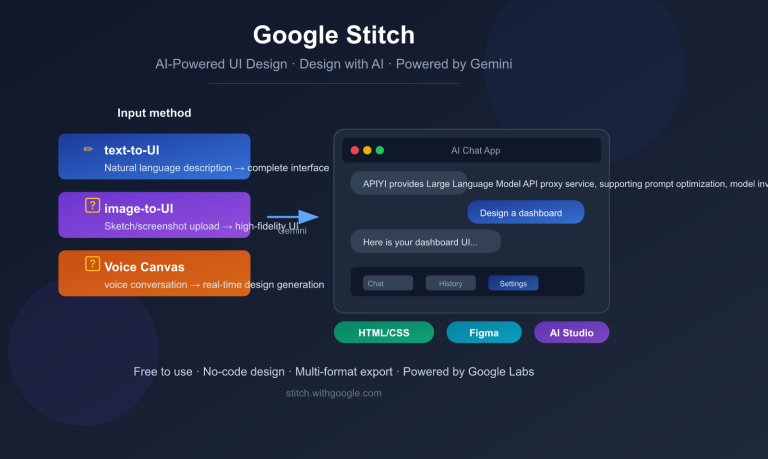
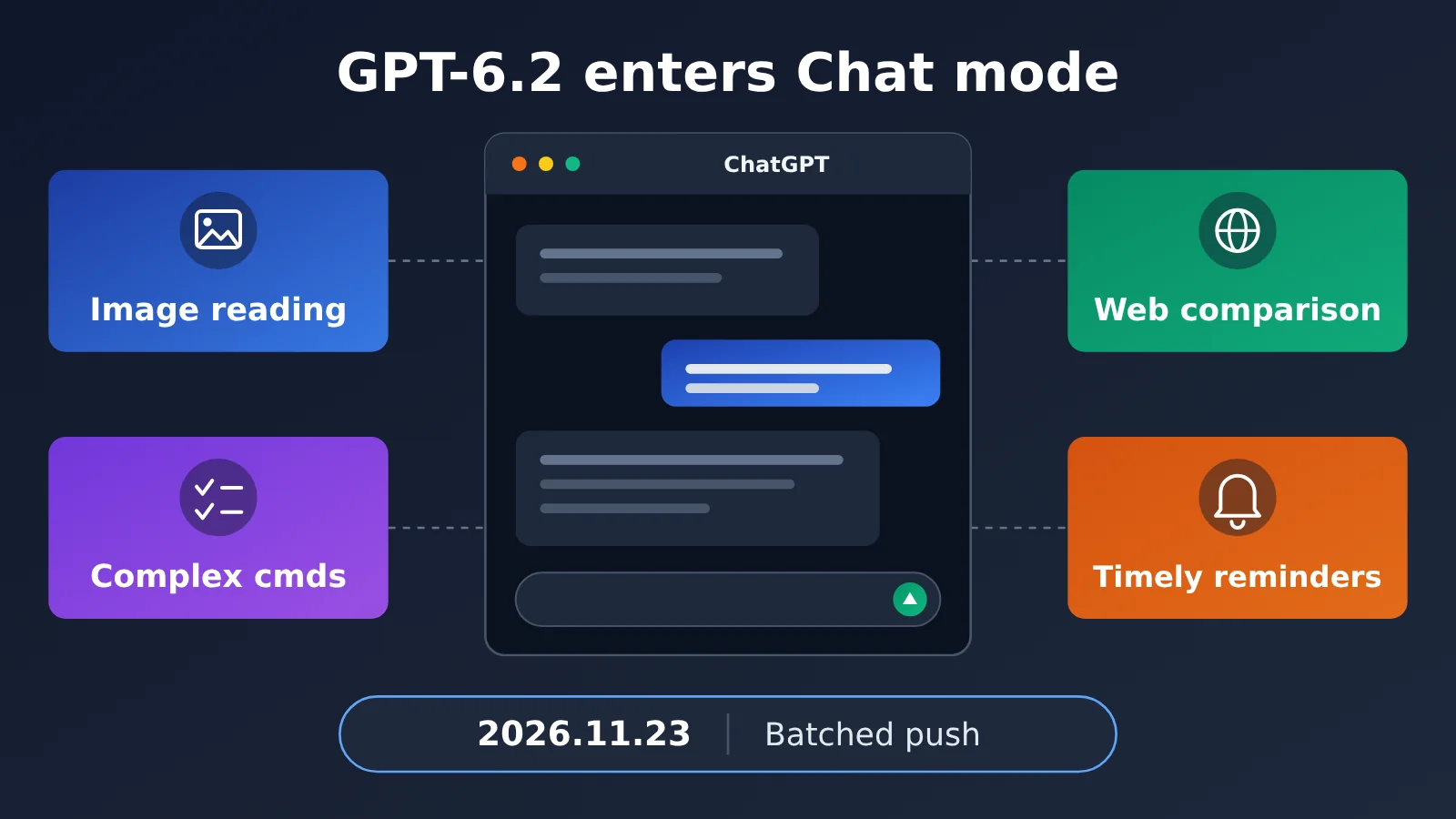
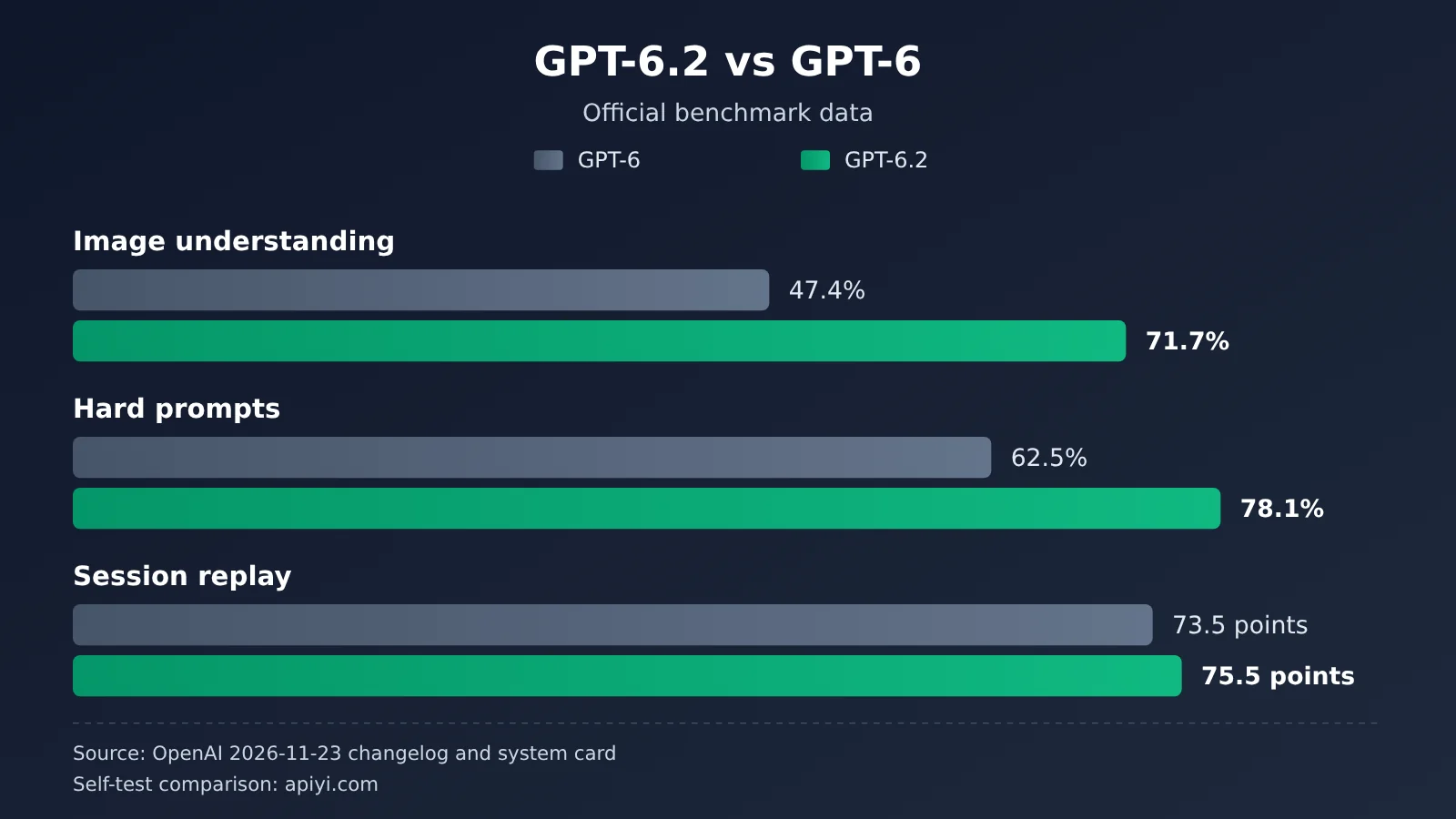
GPT-6.2 has started rolling into ChatGPT’s Chat mode. The changes ordinary users will notice most come down to four areas: more accurate answers about images, fewer omissions on complex requests, online comparisons that better reflect personal trade-offs, and proactive suggestions for the next step when appropriate. OpenAI announced on November 23, 2026 that this version would begin a phased global rollout. The official internal evaluations show that image understanding scores in Chat rose from 47.4% to 71.7%, and instruction following on difficult prompts rose from 62.5% to 78.1%. These are official benchmark results, not subjective impressions — real-world results will still depend on image clarity, task type, and tool status.
What will you learn from this article?
- When GPT-6.2 enters Chat mode, its rollout plan, and which accounts it applies to.
- Which official figures and examples correspond to each of the four upgrades: image reading, complex instructions, online comparison, and timely follow-up.
- What specifically changes around teen conversation protections in the official system card.
- How to design a few small tests you can verify yourself, so you can feel the difference between the old and new versions firsthand.
- How developers can reproduce similar multi-condition tests using an OpenAI-compatible interface.
Index: We’ll start with a “To Know” table explaining a few specialized concepts in the article, then use “Impact at a Glance” to show how different groups are affected. The “Objective Facts” section goes through the officially announced rollout scope, benchmark data, and cases item by item, including its timeline relationship to October’s GPT-6 and Intelligent UI. The “Analysis and Judgment” section provides hands-on experience methods and API reproduction code, and explains which conclusions shouldn’t be over-interpreted. The FAQ at the end answers a few common questions.
GPT-6.2 Chat Mode: Key Concepts to Know
Before we get into the specific upgrades, a few terms come up again and again. Most of them come from OpenAI’s changelog and system card, and understanding them will help you read the official numbers correctly.
| Concept | Quick explanation |
|---|---|
| Chat Mode (Chat tab) | The entry point in ChatGPT for everyday conversation — this GPT-6.2 release was tuned specifically for it |
| GPT-6.2 Sol | The GPT-6.2 version that official documentation says powers everyday Chat conversations |
| Staged rollout | New models don’t go live for everyone at once; they’re opened up gradually by region and account |
| System Card | The model safety and evaluation documentation OpenAI publishes — several figures in this article come from the November 23 version |
| Instruction following | Whether the model fully carries out the conditions, ordering, and formatting a user specifies |
| Session replay evaluation | An evaluation method that re-runs real conversation scenarios through both old and new models to compare output quality |
| BrowseComp | A benchmark measuring how well a model can track down hard-to-find information on the web; this round used an internal build |
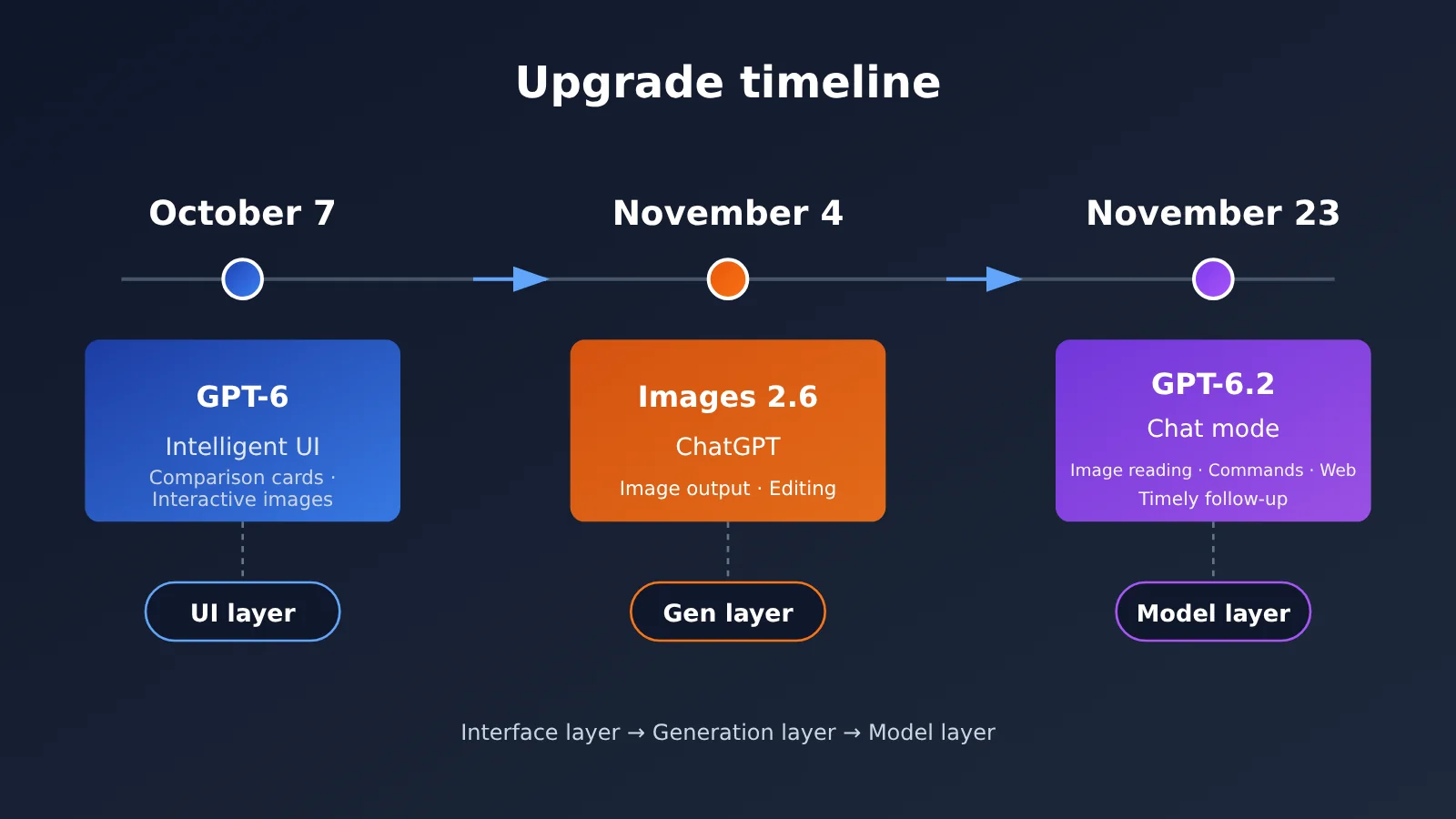
| Intelligent UI | An interface capability launched alongside GPT-6 in October that lets answers combine text, visual elements, and interactive content |
| Scheduled (scheduled tasks) | The place in ChatGPT where you manage timed tasks and reminders, with push or email notifications |
| ChatGPT Images 2.6 | The image output update announced on November 4 — that’s image generation, and it’s a separate thing from the image-reading improvements covered here |
GPT-6.2 Upgrade Impact at a Glance
Different types of users won’t feel the changes the same way. The table below lists only substantive impacts backed by official sources — no broad speculation.
| Audience | Main impact | Basis |
|---|---|---|
| Individual Plus / Pro users | Screenshot Q&A, multi-condition planning, and price-comparison queries are more likely to return usable results | The four capability notes in the November 23 changelog |
| Business / Enterprise users | Also included in the rollout plan, but whether enterprise seats can use it depends on admin settings | Scope notes in the changelog |
| Users who frequently organize documents and spreadsheets | Rewrites better preserve factual state and spreadsheet error messages | The session replay subsection of the system card |
| Underage users and parents | When the under-18 protection is enabled, policy compliance on difficult conversations improves noticeably | Section 4 of the system card |
| Developers | Can borrow from the official testing approach to design regression tests with multiple conditions and multi-turn constraints | Official evaluation examples |
The Facts About GPT-6.2 Arriving in Chat Mode
GPT-6.2 Release Date and Rollout Scope
OpenAI announced in the ChatGPT changelog on November 23, 2026, that GPT-6.2—tuned specifically for the Chat tab—has begun a staged global rollout. This round covers four account types: Plus, Pro, Business, and Enterprise; enterprise seats also depend on admin configuration. OpenAI explicitly states that this experience is provided by the GPT-6.2 Sol version designed for everyday conversation.
| Item | Details |
|---|---|
| Release date | Announced November 23, 2026; staged global rollout begins |
| Announced by | OpenAI (changelog + same-day system card) |
| Available entry point | ChatGPT Chat tab |
| Version provided | GPT-6.2 Sol |
| Rollout plan | Plus, Pro, Business, Enterprise |
| Special condition | Enterprise seats depend on admin settings |
| Officially highlighted upgrades | Complex requests, web search, image reading, timely follow-ups |
Note that other plans that already have access to Chat still need to use this rollout scope to understand which model they’re currently using—don’t assume you’ve already been switched to GPT-6.2.
GPT-6.2 Image Reading: From “Seeing” to “Answering the Specific Part You Care About”
When users send an image, what they really want to ask is often about how a particular part of the image relates to their task. OpenAI reports that in the “ask about image content after sharing an image” evaluation, Chat’s image understanding score rose from 47.4% for GPT-6 to 71.7% for GPT-6.2. This is the largest gain among the four upgrades in this round.
Image entry points remain the same: upload via the add button in the input area, or paste or drag an image directly in supported interfaces. The help docs list the formats and input requirements for static images and recommend using annotations to direct the model’s attention to the relevant area. If you want to ask about another region of the same image, you can keep asking in the same conversation.
One distinction: this improvement is about image “understanding.” The image generation, preserving editing details, and looping animations announced on November 4 are updates to ChatGPT Images 2.6 and are not the same thing as GPT-6.2’s image-reading improvement.
GPT-6.2 Complex Instruction Following: Fewer Constraints to Restate
On especially challenging prompts, OpenAI measured instruction-following rising from 62.5% to 78.1%. This metric covers requests with multiple conditions and a defined priority order — it doesn’t capture how very short casual chat feels. The publicly released chart doesn’t break single-turn and multi-turn out as two separate results, so 78.1% should be read as the overall score for responses to these difficult prompts.
The same-day system card also included a real-conversation replay evaluation, where the total score rose from 73.5 to 75.5. OpenAI gave two examples:
- Auto repair record rewrite: The older model recorded two services the user had “agreed to” as “completed”; the new version keeps them as “agreed to.” These two states directly affect how the repair gets scheduled afterward.
- Spreadsheet forecast revision: The formula the new version produced kept the error notice in place, so readers can tell “calculation failed” apart from “the forecast value is zero.”
These two examples show that preserving factual status and spreadsheet feedback during rewriting are details ordinary users can notice directly.
GPT-6.2 Web Browsing Comparison: Organizing Answers Around the User’s Trade-offs
The official example is a weekend hotel comparison. OpenAI says GPT-6.2 is better at finding information online and handling this kind of complex request; across the four tested reasoning settings in the internal BrowseComp version, GPT-6.2 beat GPT-6 every time. No specific scores for this were published, and this article won’t speculate.
Search itself is already a tool in Chat. The Help Center states that ChatGPT may search automatically when a question needs current information, and users can also pick Search manually from the tools menu. Search answers can carry citations, and expanding the sources lets you visit the pages that back them up. The search entry point is available to other plans and conversation models too — what improved here is how GPT-6.2 uses online information on difficult tasks.
The system card also records a related behavior: under test conditions with search disabled, the new version more often states plainly that it can’t verify the latest situation, instead of giving a vague affirmative answer.
GPT-6.2 Timely Follow-ups: Asking Whether You Want a Reminder at the Right Moment
Using the example of checking whether a product is on sale, OpenAI says the model is better at judging when it’s appropriate to ask the user “Should I let you know when the price drops?” You can think of this as a follow-up action suggestion offered after the current answer.
The whole flow has three steps: the suggestion in chat, the user confirming task creation, and the notification afterward. Availability of scheduled tasks depends on the account, client, and version; once a task is created successfully, ChatGPT shows a confirmation, and users can manage tasks in Scheduled and set push or email notifications as needed.
GPT-6.2 Changes to Teen Conversation Protections
The system card also lists difficult-conversation tests run with under-18 protections enabled, using the October 7 GPT-6 Sol as the baseline:
- Emotional dependence: 77.1% to 94.3%
- Eating disorder-related content: 77.2% to 92.9%
- Age-restricted goods, services, and dangerous activities: 80.0% to 90.8%
The denominators for these figures are tested responses or conversations, measuring policy compliance in specific challenge scenarios. Parental controls and long-conversation break reminders are product-layer capabilities documented elsewhere and shouldn’t be attributed to this model update.
Timeline with October’s GPT-6 and Intelligent UI
The GPT-6 and Intelligent UI launched on October 7 can already combine text, visual elements, and interactive content based on the question, and can also give a preliminary answer first before continuing to search for supplements. So the comparison cards, interactive charts, or step-by-step presentations that show up in everyday conversations originate from that October product launch, not from this GPT-6.2 update. The interface elements across different clients and reasoning tiers depend on support conditions, and the web settings also offer a toggle to reduce layout and visual elements.
Analysis and Assessment of the GPT-6.2 Upgrade
How Everyday Users Can Verify GPT-6.2’s Upgrades for Themselves
Official benchmark scores show the direction of change. To really judge “is this useful to me,” it’s best to design a few small tests you can verify yourself. The key principle is to keep the same input, the same tool state, and the same model tier, then compare item by item against the text in the image or the terms on the webpage. The checklist below is based on scenarios provided in official materials and is ready to try as-is.
| Upgrade area | Scenario you can test yourself | What to check |
|---|---|---|
| Image reading | Take a screenshot of a clearly legible event schedule; ask only whether the two interactive sessions on Saturday afternoon overlap, and require it to point out the lines where they appear | Does it look only at the specified area, and can the line numbers be checked against the original image? |
| Image reading | Send a photo of product specifications, ask which column shows accessory length, and require it to separate visible numbers from inferences | Are visible information and inferences clearly separated? |
| Complex instructions | Provide several events; first filter out those requiring an extra ticket, then sort by arrival time, list only two, and list missing information separately | Are any conditions missed, is the order correct, and is the format easy to act on? |
| Multi-turn constraints | First write a gathering plan, then change the start time, and require that headcount, budget cap, and accessibility requirements remain in effect | Are old constraints retained, and can it list the affected items? |
| Web comparison | Specify dates, budget, neighborhood preferences, transportation requirements, and what you’re flexible on; compare weekend hotels | Are they listed on the same basis using tax-inclusive total price, route, and cancellation deadline, and do the citations support specific terms? |
| Timely follow-up | Ask whether a product is on promotion | Does it ask at an appropriate moment whether you want to set a price-drop alert? |
Our assessment is that image reading and multi-condition requests are the two scenarios where differences are easiest to notice, because official data shows the largest gains and results can be checked directly against the original image or original conditions. Improvements in web comparison depend more on whether the search tool is enabled and whether evidence is accessible; prices, inventory, and terms themselves still depend on the source page and the time of the query.
When verifying web answers, the number of citations doesn’t indicate quality. What matters more is whether the citations truly support specific dates, locations, rates, and conditions. For readers, three explicit statements—“evidence found,” “evidence supports only a certain date,” and “currently cannot confirm online”—are all more helpful than a blanket affirmative sentence when deciding what to do next.
Developer’s Perspective: Reproducing GPT-6.2-style Multi-Constraint Tests Through the API
For developers, the most useful takeaway from this official evaluation is the testing approach itself: multiple constraints, explicit priorities, constraints that survive across turns, and a clear split between visible facts and inference. All of that can be turned into regression tests for your own product. As for whether — and when — the GPT-6.2 Chat version will be available in the API, the reference materials don’t say. The code below uses placeholder model names, so always check the platform’s model list for the real ones.
Here’s a minimal multi-constraint request example:
from openai import OpenAI

client = OpenAI(
    api_key="YOUR_API_KEY",
    base_url="https://api.apiyi.com/v1"  # APIYI OpenAI-compatible endpoint
)

prompt = """Here's a list of weekend activities: ……
Requirements: 1. First filter out activities that require buying an extra ticket;
2. Sort the remaining activities by arrival time;
3. List only two alternatives;
4. List separately any activities whose location isn't given in the material."""

resp = client.chat.completions.create(
    model="YOUR_MODEL_ID",  # Replace with a model actually available in the platform's model list
    messages=[{"role": "user", "content": prompt}]
)
print(resp.choices[0].message.content)
View the full code: multiple models + multi-turn constraints + image-reading comparison test
import base64
from openai import OpenAI

client = OpenAI(
    api_key="YOUR_API_KEY",
    base_url="https://api.apiyi.com/v1"  # One key, many models
)

# Models to compare; replace with models actually available on the platform
MODELS = ["MODEL_A", "MODEL_B"]

def encode_image(path: str) -> str:
    with open(path, "rb") as f:
        return base64.b64encode(f.read()).decode("utf-8")

def multi_turn_test(model: str) -> str:
    """Multi-turn constraint test: after changing the time, are the earlier constraints preserved?"""
    messages = [
        {"role": "user", "content": "Write me a party plan: 12 people, budget cap of 2000 yuan, "
                                    "step-free access required, start time Saturday 18:00."}
    ]
    first = client.chat.completions.create(model=model, messages=messages)
    messages.append({"role": "assistant",
                     "content": first.choices[0].message.content})
    messages.append({"role": "user",
                     "content": "Change the start time to Saturday 14:00; the headcount, budget cap, "
                                "and step-free requirement stay the same. "
                                "Please list the two items affected by the time change."})
    second = client.chat.completions.create(model=model, messages=messages)
    return second.choices[0].message.content

def image_test(model: str, image_path: str) -> str:
    """Image-reading test: look only at the specified area, and separate visible facts from inference"""
    b64 = encode_image(image_path)
    resp = client.chat.completions.create(
        model=model,
        messages=[{
            "role": "user",
            "content": [
                {"type": "text",
                 "text": "Focus only on Saturday afternoon: do the two interactive sessions overlap? "
                         "Point out the row each one is on, and write what's visible in the image "
                         "separately from what you infer."},
                {"type": "image_url",
                 "image_url": {"url": f"data:image/png;base64,{b64}"}}
            ]
        }]
    )
    return resp.choices[0].message.content

if __name__ == "__main__":
    for m in MODELS:
        print(f"===== {m} multi-turn constraints =====")
        print(multi_turn_test(m))
        print(f"===== {m} image reading =====")
        print(image_test(m, "schedule.png"))
Tip: You can sign up at APIYI apiyi.com and claim free testing credits, then run the same prompt across several mainstream models for a side-by-side comparison. The platform provides an OpenAI-compatible interface, so switching models is just a matter of swapping the base_url and the model name.
When testing, it’s a good idea to score the results across four columns: “whether any conditions were missed,” “whether the order is correct,” “whether constraints are retained across turns,” and “whether visible facts are kept separate from inferences.” That gives you data from your own business context, which is more useful for decision-making than looking only at official percentages. If you need to batch-run multiple models, using APIYI apiyi.com as a unified gateway saves you the work of integrating each provider’s SDK separately.
Which conclusions to avoid overinterpreting
The official data is clear, and so is the measurement scope. A few points are worth noting:
- The percentages are scores on specific evaluations: 71.7% and 78.1% both come from official internal evaluations. If you switch to blurry screenshots or very short casual chats, the perceived difference may not scale proportionally.
- Not all UI changes come from GPT-6.2: The comparison cards and interactive diagrams come from the October Intelligent UI.
- Image generation capability is outside this scope: That was an update in ChatGPT Images 2.6.
- Web-search results still need verification: Prices, inventory, and change/refund terms should be checked on the source page.
- Rollouts happen in batches: Even if you’re a Plus user, you may not have been switched to the new model yet.
What’s worth watching next: when the rollout will reach more plans, whether the specific BrowseComp score will be published, and whether the API side will offer a corresponding version. There’s no official information on any of these yet, so they remain open questions.
GPT-6.2 Chat Mode FAQ
Q1: What is GPT-6.2, and how does it relate to GPT-6?
GPT-6.2 is a model OpenAI began rolling out in batches to the ChatGPT Chat tab on November 23, 2026, powered by GPT-6.2 Sol, a version built for everyday conversation. In official evaluations, it outperforms GPT-6, which launched in October, on image reading, following complex instructions, and web search.
Q2: Who can actually use GPT-6.2?
This rollout covers Plus, Pro, Business, and Enterprise. Access for business seats also depends on admin settings. Because the release is staged globally, users on the same plan may come online at different times.
Q3: Can GPT-6.2 help me generate better images?
Not quite. What improved here is image understanding — the ability to look at an image and answer questions about it. Image generation, preserving edit details, and looping animations are part of the ChatGPT Images 2.6 update announced on November 4.
Q4: Can I trust the prices GPT-6.2 finds on the web?
Expand the citations and verify them. OpenAI says the new version is better at finding information and handling complex comparisons, but prices, stock, and terms should be judged against the source page and the moment you queried. Check especially whether the citation actually supports the specific date, location, and rate.
Q5: Can developers test similar multi-condition capabilities through the API?
You can borrow the official testing approach and build your own test cases. The reference materials don’t say whether an API offering of the GPT-6.2 Chat version exists, so check the model list. With APIYI apiyi.com, you can call multiple mainstream models with a single key, which makes it easy to compare them side by side using the same prompt.
Q6: What are the known limitations of GPT-6.2?
Official numbers are scores from specific evaluations — image clarity, task type, and tool status all affect real-world results. Availability of scheduled task reminders also depends on your account, client, and version. If you want to verify how different models perform in your own scenarios at low cost, start with a small test using free credits on APIYI apiyi.com.
How GPT-6.2 Changes Your Everyday Habits
Looking back at this update, GPT-6.2 didn’t introduce any brand-new entry point. What it did was make the existing image reading, search, and reminder features more reliable. For regular users, the habit worth adjusting is how you ask questions: spell out the region you care about, the priority of your conditions, and where you’re willing to compromise — then check the results against the original image or the cited source. That’s how the new model’s improvements actually land in your daily tasks. For developers, the official testing approach — multiple conditions, constraints across turns, separating facts from inferences — is worth reusing as-is. With APIYI apiyi.com’s unified interface, you can quickly turn it into the model-selection basis for your own product.
📚 References
-
ChatGPT release notes: the November 23 GPT-6.2 Chat update and the November 4 Images 2.6 entry
- Link:
help.openai.com/en/articles/6825453-chatgpt-release-notes - Details: source for the rollout scope, image-reading and instruction-following data, and the price-drop reminder example
- Link:
-
GPT-6.2 ChatGPT system card: the safety and evaluation notes published the same day
- Link:
deploymentsafety.openai.com/gpt-6-2-chatgpt - Details: conversation replay evaluation, behavior when search is disabled, teen protection data
- Link:
-
ChatGPT image inputs help: how to upload images and input conditions
- Link:
help.openai.com/en/articles/8400551-chatgpt-image-inputs-faq - Details: uploading, pasting, and dragging in images, plus annotation tips
- Link:
-
ChatGPT web search help: notes on the search tool and source citations
- Link:
help.openai.com/en/articles/9237897-searching-the-web-with-chatgpt - Details: automatic search, manually selecting Search, and viewing citations
- Link:
-
ChatGPT scheduled tasks help: notes on the Scheduled feature
- Link:
help.openai.com/en/articles/10291617-scheduled-tasks-in-chatgpt - Details: creating and managing tasks, and notification settings
- Link:
-
GPT-6 and Intelligent UI announcement: the October 7 product launch
- Link:
openai.com/index/gpt-6-for-everyone - Details: source for interface capabilities such as comparison cards and interactive images
- Link:
Author: APIYI Tech Team
Technical discussion: If you need multi-model comparison testing or integration consulting, feel free to visit APIYI apiyi.com and get in touch with us.