Summary: After DeepSeek Harness switches from DeepSeek V4.1 Flash to LongCat 2.5, the model can answer ordinary questions, but the system prompt and the plugins that depend on it don’t take effect. This article explains why, which configuration item needs to change, and how to verify that the change actually took effect.
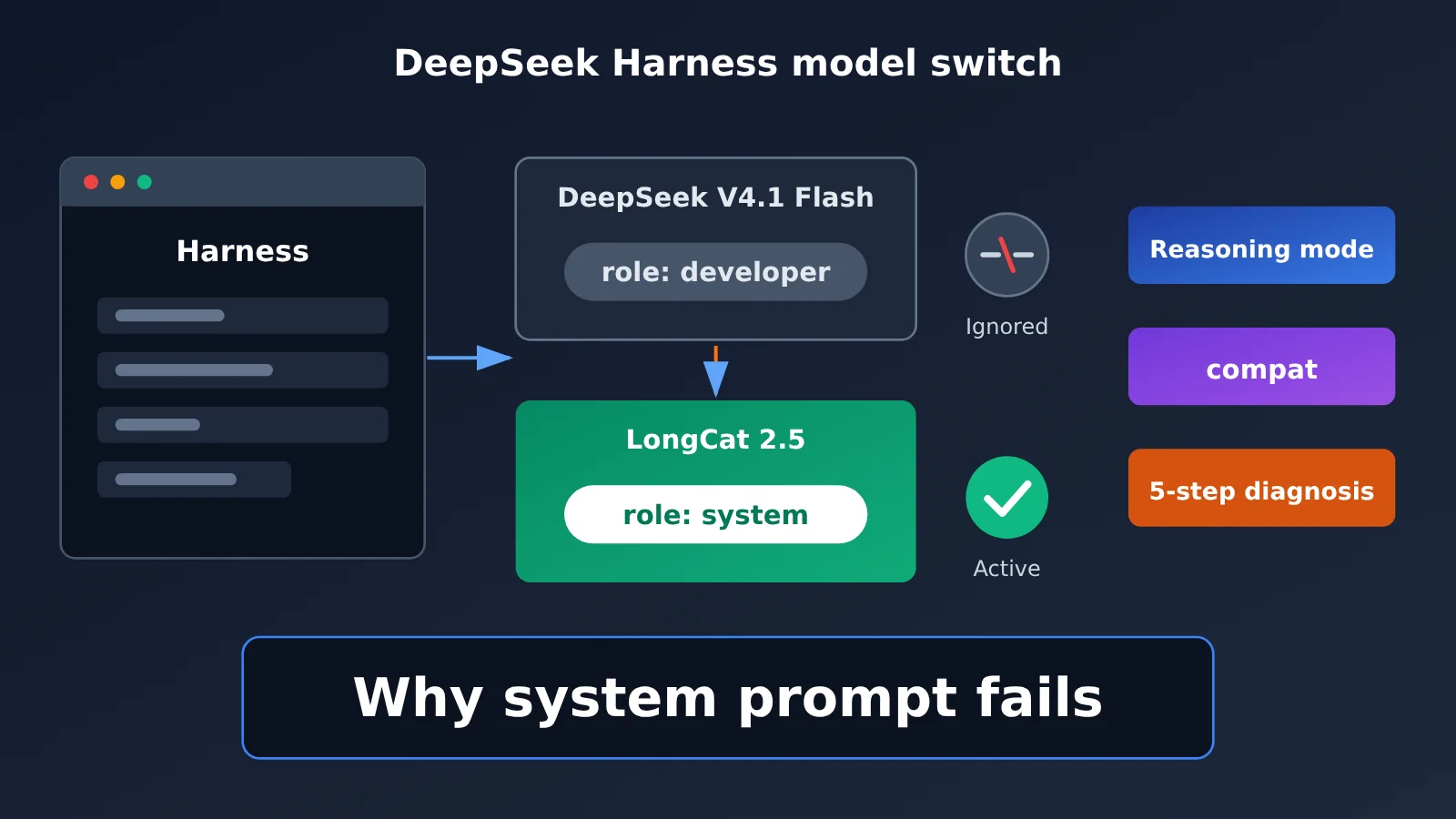
Bottom line up front: The most common cause of this issue has a single, definite trigger condition. When DeepSeek Harness connects to the LongCat first-party endpoint over the OpenAI Chat Completions protocol and turns on the reasoning toggle for LongCat 2.5, Harness sends the system prompt with the developer role. LongCat’s Chat Completions adapter silently ignores that role and still returns the response body, so it looks like the model is working normally.
The fix in the LongCat integration guide is to add supportsDeveloperRole: false to compat in the custom longcat provider, so the same prompt is sent with the system role instead. This conclusion depends on two preconditions. First, the route is openai-completions; the rules for the Responses path are different. Second, the change must go into the same provider entry in the active desktop profile, with the existing fields preserved. For validation, use the message role in the outbound request as the source of truth; the expected marker appearing in the model’s reply is only supporting evidence.
The verification date for this article is 2026-11-25 (Beijing time). The configuration fields come from LongCat’s DeepSeek Harness integration guide and the official DeepSeek Harness documentation. The diagnostic example is a local simulation, not a live test result. The official DeepSeek project labels Harness as a developer preview, so later versions may introduce compatibility changes.
Knowledge Map: Troubleshooting Path for System Prompts After Switching DeepSeek Harness to LongCat 2.5
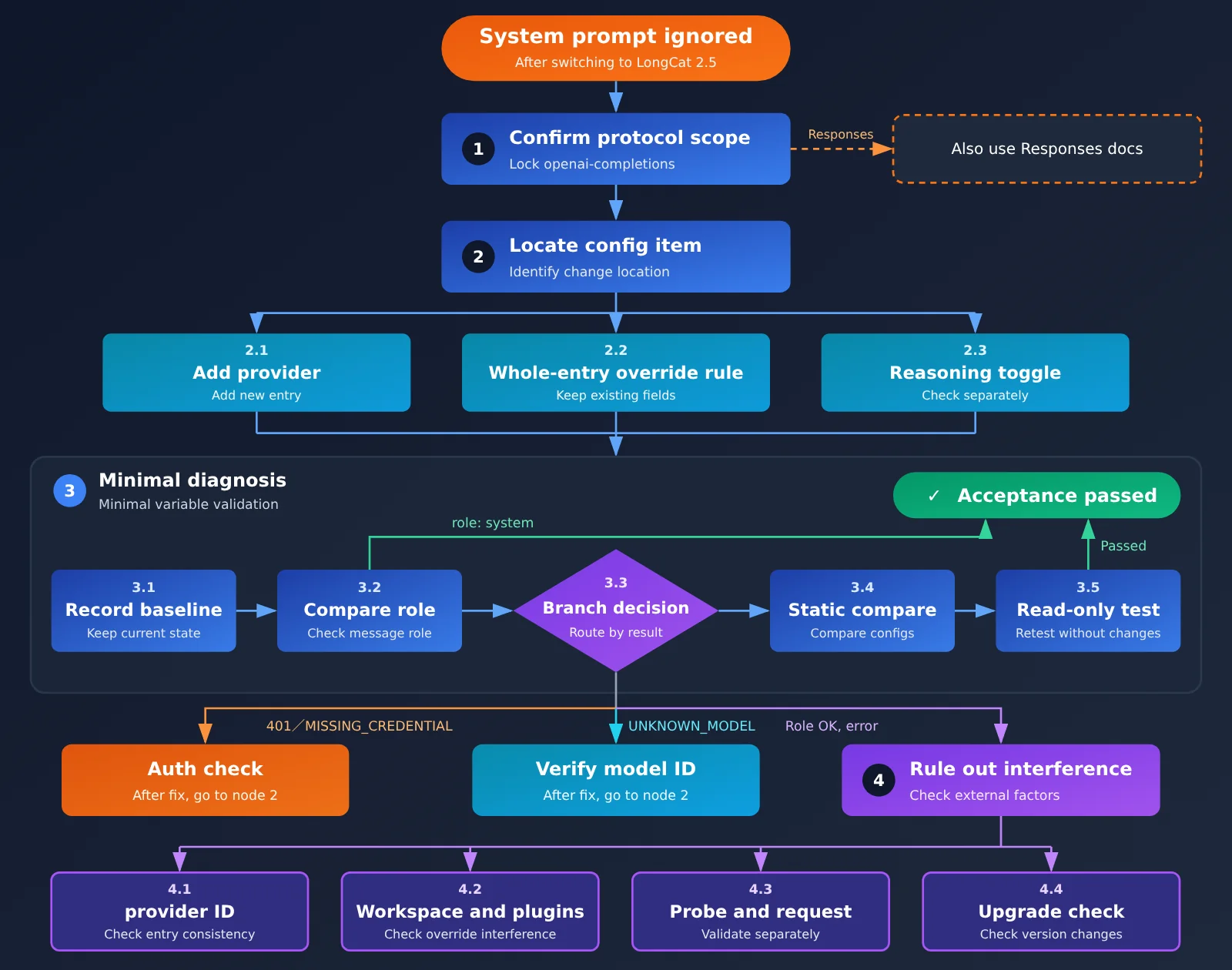
Diagram note: The main line is “boundary → configuration → diagnosis → ruling out interference”. Node 3.3 is the key fork. Authentication and model errors send you back to the configuration check; when the outbound role is already correct but the behavior is still abnormal, the problem moves to the workspace and plugin layer.
Index and reading order:
| No. | Section short name | What it gives you downstream | How to read |
|---|---|---|---|
| 1 | Symptoms and protocol boundary | Confirms the problem falls within the scope of this article | Required, start here |
| 2 | Locating the configuration items | Know where to change things, and how to change them without losing fields | Required |
| 3 | Minimal diagnosis and acceptance | Determine whether your change took effect | Required, follow the steps in order |
| 4 | Ruling out interference | Handles the case where the role is correct but behavior is still abnormal | Consult as needed |
Read section 1 first so you don’t apply the rules of the Responses path to Chat Completions. Section 2 explains where the configuration lives, and section 3 verifies the result with as few variables as possible. Section 4 is only needed if section 3 lands on the “role is already system but still abnormal” branch.
To Know
| Term | Brief explanation |
|---|---|
| DeepSeek Harness | DeepSeek’s official desktop development tool that can connect to custom model providers; currently a developer preview |
| provider | A model source configuration in Harness, containing the protocol, address, key reference, and model list; each entry has a fixed ID |
developer role |
A message role that carries system-layer instructions in some OpenAI-compatible protocols, existing alongside system |
compat |
A set of compatibility switches on a provider or model entry, used to adjust outbound request fields |
| profile override | A patch layer in the desktop configuration file that replaces the corresponding provider entry as a whole |
| thinking | The reasoning mode of LongCat 2.5, toggled between enabled and disabled via thinking.type |
1. LongCat 2.5 System Prompts Not Taking Effect: Symptoms and Protocol Boundaries
1.1 Silent Ignoring of the developer Role in the DeepSeek Harness
The LongCat integration docs describe this chain of behavior: after you turn on the reasoning toggle for LongCat 2.5 in the DeepSeek Harness, the Harness puts the system prompt into a role: "developer" message. LongCat’s Chat Completions adapter silently ignores that role. The API doesn’t throw an error and still returns a normal response body, so what you see on the surface is “ordinary questions work, but system-level rules and plugin behavior stop working.”
Failures like this get mistaken for badly written prompts. The way to tell them apart is to write a system instruction with an unambiguous result, something like “return only ROLE_CHECK_OK every time.” If the model doesn’t comply at all, and you also check the role in the outbound request, you can conclude that the system message never reached the model — it’s not that the instruction was unclear.
1.2 The Protocol Boundary Between Chat Completions and Responses
This conclusion only applies to the openai-completions route. LongCat’s Responses API reference lists developer separately among message inputs. DeepSeek’s Responses docs also note that Flash treats developer as system. Both of these statements belong to their respective Responses paths, and you can’t use them to infer how the Chat Completions path behaves.
That also explains why everything worked before the switch: on the DeepSeek side, the same role was handled compatibly. When comparing before and after a switch, record at least the provider ID and the protocol type. Without those two pieces of information, there’s no way to tell whether the difference comes from the backend or from the route.
1.3 The Model the Current Session Is Actually Using
DeepSeek’s own deepseek-flash alias currently serves DeepSeek-V4.1-Flash-1017, and the alias itself hasn’t changed. When troubleshooting, record the model the session is actually using. Changing the default model on the settings page and actually switching the current session are two different things — the former won’t affect a session that’s already running. The place to verify this is the model selector next to the input box.
2. Locating the Configuration Items for LongCat 2.5 in DeepSeek Harness
2.1 Adding a LongCat provider
Following LongCat’s official guide, open Models in Harness settings and add LongCat through the custom model API. The key fields from the official example are:
| Field | Official example value | Notes |
|---|---|---|
| provider identifier | longcat |
Used for the current session, the default model, and credential references |
| Protocol | OpenAI Chat Completions (openai-completions) |
Determines the boundaries described in section 1.2 |
| Base URL | https://api.longcat.chat/openai/v1 |
First-party endpoint |
| Model ID | LongCat-2.5 |
You can fetch it with Fetch available models; if the probe fails, enter the exact model name manually |
| API key | Environment variable LONGCAT_API_KEY |
Write only the variable name in the config — never the plaintext key |
Select the workspace before creating a new session, then confirm in the model picker that the current session really is LongCat-2.5.
2.2 Config file location and the whole-entry override rule
The settings page can open the desktop config file directly. The default path given in the official guide is ~/.dsh/profiles/desktop/cordis.patch.yml. This is where things go wrong most often: the override at this layer replaces the corresponding provider entry wholesale. If you paste in only a snippet containing compat, the base URL, protocol, and model list can all disappear along with it — and the symptom shifts from “the system prompt isn’t taking effect” to a 401 or an unknown model.
The right move is to merge the compatibility fields into the existing longcat entry and keep the original fields. Below are the minimum identifying elements under the official key names; keep any other fields you already have exactly as they are:
- id: llm-pi-ai
  name: "@deepseek-ai/dsh-llm-pi-ai"
  config:
    providers:
      longcat:
        api: openai-completions
        apiKeyEnv: LONGCAT_API_KEY
        baseURL: https://api.longcat.chat/openai/v1
        compat:
          supportsDeveloperRole: false   # system prompt goes out via the system role
          maxTokensField: max_tokens     # budget field-name adaptation, unrelated to roles
        models:
          - id: LongCat-2.5
Changes take effect starting with the next request — no restart needed. So you can change one item at a time and immediately send a new request to see the result.
2.3 Check the reasoning toggle and the system role separately
LongCat’s docs state that LongCat-2.5 has thinking enabled by default, and the first-party API toggles it via thinking.type set to enabled or disabled. In this integration, reasoning_effort has no effect on LongCat’s reasoning level. Don’t interpret the low/medium/high options in the UI the same way you would DeepSeek’s options of the same name.
If you want the UI’s off selection to emit thinking: {"type":"disabled"}, set thinkingFormat: deepseek in the model entry’s compat, while keeping the keys you already have:
        models:
          - id: LongCat-2.5
            compat:
              thinkingFormat: deepseek   # controls the outbound field when thinking is turned off
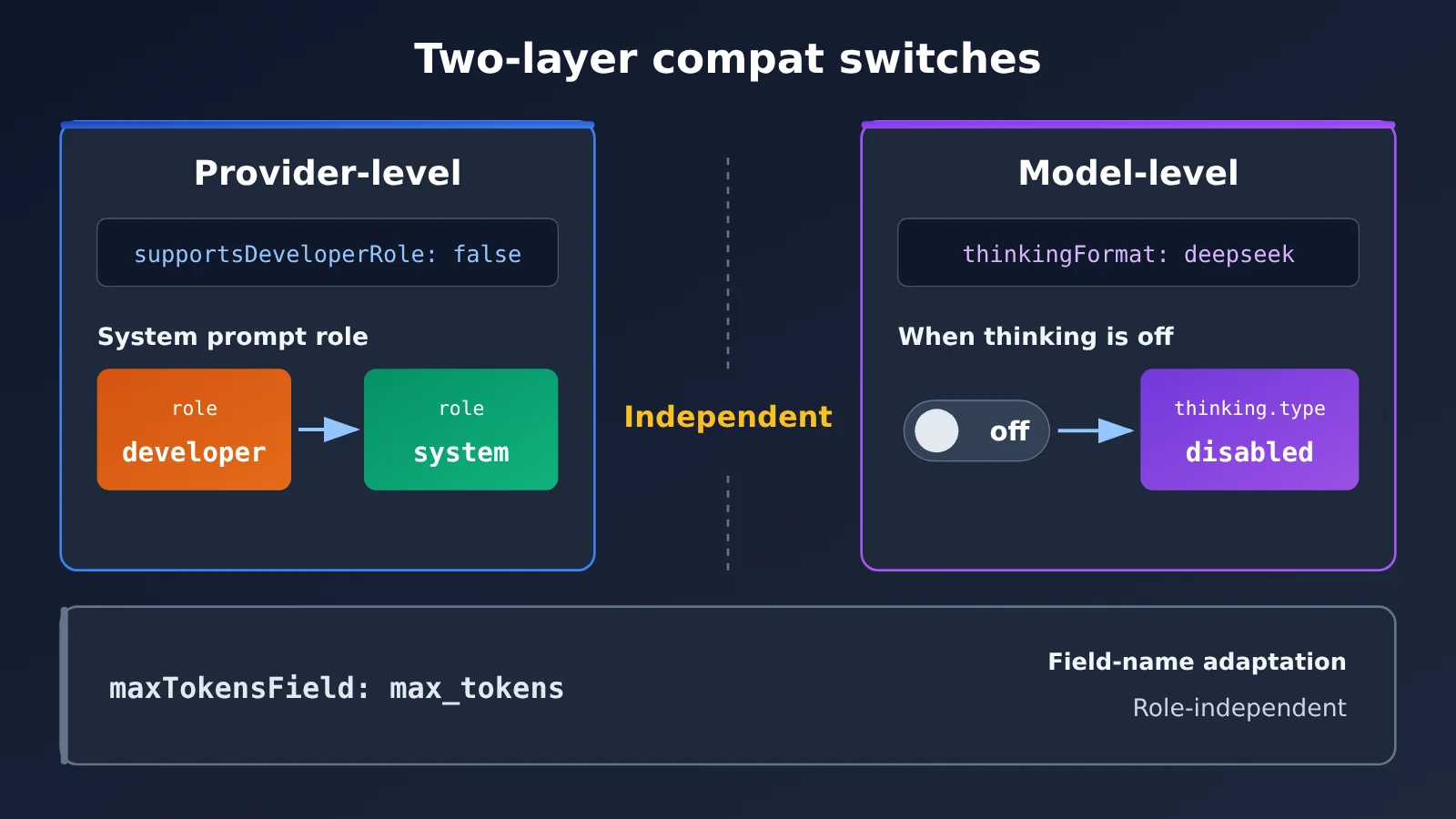
The two switches sit at different levels and do different things. The provider-level supportsDeveloperRole decides which role the system prompt is sent with, while the model-level thinkingFormat decides which field is emitted when thinking is turned off. Changing just one won’t automatically fix the other.
3. Minimal Diagnostics and Acceptance After Switching DeepSeek Harness to LongCat 2.5
3.1 Record the Baseline
Start a new session in a blank test workspace, and keep shared variables like project instructions, plugin injections, and model selection to a minimum. Design the test cases like this:
- System prompt: return only
ROLE_CHECK_OKeach time - User message: please report status
- Baseline record: app version, protocol, provider ID, model ID, and reasoning-tier toggle state
If you have a local transport fixture, you can record the roles and count of the outbound messages. Don’t save credentials or the full message bodies.
3.2 Compare Message Roles Before and After the Change
Use the same set of inputs to compare the message structure before and after the change. First confirm that the system prompt has been generated, then confirm that it made it into messages. If developer appears before the change, that tells you the issue matches the known symptom. Once the compatibility configuration takes effect, the message corresponding to the system prompt should show role: "system".
Below is an example local helper script that reads a request body captured by a local fixture and prints only the role sequence, not the content. The filename and capture method depend on your own fixture:
import json
import sys

def summarize_roles(path: str) -> None:
    """Read a locally captured Chat Completions request body and print only the roles and model name."""
    with open(path, encoding="utf-8") as f:
        body = json.load(f)

    roles = [m.get("role") for m in body.get("messages", [])]
    print("model:", body.get("model"))
    print("roles:", roles)
    print("thinking:", body.get("thinking"))

    if "developer" in roles:
        print("结论: 系统提示仍以 developer 发出,兼容配置未生效")
    elif roles and roles[0] == "system":
        print("结论: 系统提示已以 system 发出")
    else:
        print("结论: 未发现系统消息,检查提示是否被注入")

if __name__ == "__main__":
    summarize_roles(sys.argv[1])
A single response that happens to contain ROLE_CHECK_OK isn’t enough to count as acceptance. Acceptance depends on two things: the outbound role is correct, and a set of repeated local regression tests all pass. Keep these two records stored separately.
3.3 Branch decisions when changes still don’t take effect
| What you observe | Check first | Common causes (inferred) |
|---|---|---|
Still no marker; outbound requests still use developer |
Active profile, the same provider entry, session model | You edited the wrong file, or the session is still using the old provider |
MISSING_CREDENTIAL or 401 |
apiKeyEnv and environment variables |
The key reference was lost when the whole entry was overwritten |
UNKNOWN_MODEL |
models list and model ID |
The override snippet dropped the model entry, or the model name isn’t spelled exactly right |
Body is normal and the role is already system, but behavior is still off |
Project instructions and plugins | Content merging, missing injection, or a plugin entry point issue; go to Section 4 |
For the last case, restore project-level instructions and plugins one at a time. Check after each restore to determine whether prompt content is being merged, the system message isn’t being injected, or a plugin entry point has an issue.
3.4 Static comparison of configuration overrides
Compare the old and new longcat entries side by side: protocol, request URL, model list, and model-level compatibility switch—all four must be present. If a single test changes the provider, plugins, and reasoning switch at the same time, you won’t be able to tell which change caused the problem when something goes wrong. We recommend recording “system role” and “reasoning switch state” as two columns, keeping everything else unchanged, and then using the captured request structure to pinpoint the issue item by item.
3.5 Read-Only Regression Before Restoring the Workspace
Before restoring the real workspace, run two read-only test cases:
- The reply must follow the short format defined by the system.
- Read only the fictional information marked as public in the test project, and return a summary.
If both pass, the basic instruction pipeline is working. After that, restore the original plugins and configuration one at a time. Keep named workspaces and real credentials in the controlled environment only. For troubleshooting materials, retain only public fields, example paths, and blank test descriptions.
4. Ruling Out Distractors in the LongCat 2.5 System Prompt Issue
4.1 Judge by Provider ID, Not Display Name
The official DeepSeek Harness model configuration reference maps Chat Completions and Responses to different configuration values. Each provider corresponds to one protocol, and sessions, default models, and credential references all use fixed IDs. If you have multiple custom providers with the same name, check the ID, not just the display name.
Some compatibility settings live at the active profile layer. If the UI can save them but the request shape is still wrong, check in this order: edit the selected provider settings → reopen the profile and confirm the change was saved → check the next request in the same session.
4.2 Distinguish Workspace Overrides from Plugin Behavior
A situation that’s easy to misdiagnose is when plugin replies get shorter after a switch. If this change appears both before and after toggling the reasoning level, first compare the outbound role, then check whether the wrapper layer also changed the budget field. maxTokensField: max_tokens only adapts the field name; it has nothing to do with the prompt role.
If symptoms appear only in one workspace, prepare two blank test projects, load the same system prompt and read-only test cases, then restore that workspace’s settings one by one. Also note: copying the system prompt text into a user message sometimes makes the answer look normal, but it masks the real problem. The troubleshooting goal is always whether the system prompt generated by the configuration is sent with the correct role.
4.3 Distinguish Model-List Discovery from Actual Requests
A successful Fetch available models only proves the discovery endpoint is available. Requests after that may still go to another provider, or be sent with an incompatible role. If verification only performed a model-list probe, continue by checking the model name and message role in the next request.
4.4 Recheck After Upgrading the Desktop App
Harness is in developer preview, so keep a copy of a known-good configuration before upgrading. After upgrading, recheck with the same validation sample and record at least four things: the version number, the current profile name, the message role, and whether the output follows the fixed format. That way, different people can reproduce the same troubleshooting process.
Final Acceptance Check: Is the LongCat 2.5 System Prompt Actually Active in DeepSeek Harness?
If the following three conditions are met, you can consider the issue resolved: in the next outbound request of the same session, the message corresponding to the system prompt has role: "system"; the provider entry’s protocol, address, key reference, and model list are all complete; and both read-only regression runs in a blank workspace pass. If the outbound role is already correct but the real workspace still misbehaves, the problem isn’t in the transport layer — in that case, restore plugins and project instructions one by one per Section 4.2 to pin down the cause.
References
- LongCat’s DeepSeek Harness integration guide: config fields, whole-block override rules, and notes on the thinking switch
- Link:
longcat.chat/platform/docs/deepseek-harness
- Link:
- DeepSeek Harness official “Configure models”: provider ID, protocol mapping, active config layer
- Link:
deepseek-harness.github.io/deepseek-harness/en/guide/providers
- Link:
- DeepSeek Harness repository: developer preview status and compatibility change notices
- Link:
github.com/DeepSeek-ai/deepseek-harness
- Link:
- DeepSeek first call and Responses docs: the
deepseek-flashalias and role handling on the Responses path- Link:
api-docs.deepseek.com/en/,api-docs.deepseek.com/guides/responses_api/
- Link:
- LongCat Responses API reference: message role notes on the Responses path
- Link:
longcat.ai/platform/docs/api/responses
- Link:
Author: APIYI Technical Team