Author’s note: This article examines what “up to 5,000 people affected” really means in the Cursor extension poisoning incident. It breaks down the attack chain, confirmed cases, the scope of API key risks, and steps you can take to check your own systems—so you can tell which claims are supported by evidence and which are exaggerated.
On October 29, 2026, a tampered Claude Code extension appeared in the Cursor extension marketplace. Over the following days, headlines like “5,000 developers hacked” and “Claude API keys leaked on a massive scale” began to circulate. The reality is: 5,000 is the upper limit of potentially affected users reported by Cursor, not the number of confirmed successful compromises.
This isn’t about downplaying the risk. Cursor’s official announcement, Microsoft’s security research team, Phorion, Expel, and others have confirmed that the incident happened, and malicious activity has been observed on customer devices. This article walks through six stages—distribution, execution, file writes, exploitability, actual compromise, and data loss—to clarify which facts have been verified and which figures haven’t been publicly disclosed.
What you’ll get from this article: You’ll be able to assess the incident’s actual impact on you and your team, then follow the officially recommended steps to check your systems and rotate credentials.
Cursor Extension Poisoning: Key Facts at a Glance
Let’s start with the verified facts. The key distinction is that this was a software supply chain attack targeting a developer tool. It wasn’t a compromise of the Claude model or Anthropic’s internal systems.
| Item | Details |
|---|---|
| Date | October 29, 2026 (starting at 17:27 Beijing time) |
| Distribution channel | Cursor VS Code Extension Marketplace |
| Impersonated identity | anthropic.claude-code (Anthropic’s publisher identity and extension name) |
| Malicious versions | 2.1.312 and 2.1.313, two in total |
| Platforms listed officially | Windows x64 and macOS ARM64 (the code also contains Linux attack logic) |
| Public distribution period | Approximately 11 hours and 8 minutes |
| Official estimate of impact | Up to 5,000 users potentially affected |
| Unaffected channels | Microsoft Visual Studio Marketplace and the official npm package @anthropic-ai/claude-code |
Anthropic said it didn’t develop or publish the malicious builds, and that the incident didn’t involve its internal systems or employee computers. As of November 2, there was no publicly available investigation finding explaining how the attacker gained permission to publish builds to the Cursor marketplace.
Key Timeline of the Cursor Extension Poisoning
Two different timeframes are easy to confuse here: the window during which the malicious packages were available for download and when the malicious code actually ran on devices where they’d been installed. The latter could happen much later. Removing the extension from the marketplace didn’t mean devices were already safe.
| Beijing time | Event |
|---|---|
| October 29, 17:27 | The malicious extensions became available for download on the Cursor marketplace |
| October 30, 04:35 | Cursor stopped distribution, closing the marketplace exposure window |
| October 30 | Cursor published a security advisory; Phorion, OpenSourceMalware, and Microsoft subsequently published analyses |
| October 30, 12:45 | Expel first observed malicious activity on a customer’s Mac, after the extensions had been removed |
| October 31, 02:30 | Cursor updated its advisory to include 2.1.312 and revise the indicators of compromise |
| October 31 | Phorion revised its research, confirming that the affected version range was broader |
Early reports also claimed that Open VSX had been attacked. OpenSourceMalware later corrected that claim, and Socket found no corresponding malicious versions when it checked the Open VSX registry records. For now, the Cursor Marketplace is the only confirmed distribution channel targeted in the attack.
How Cursor Extension Poisoning Works: From a 66-Line Loader to a Reverse SSH Tunnel
According to analyses by Phorion and OpenSourceMalware, the attackers inserted roughly 66 lines of malicious JavaScript into the beginning of a legitimate extension’s extension.js, ahead of its normal code. The loader runs as soon as the extension module loads. Users don’t need to send Claude a message or authorize any coding task. Claude Code’s interface and features continue to work normally, and some errors are handled silently, making the attack hard to spot.
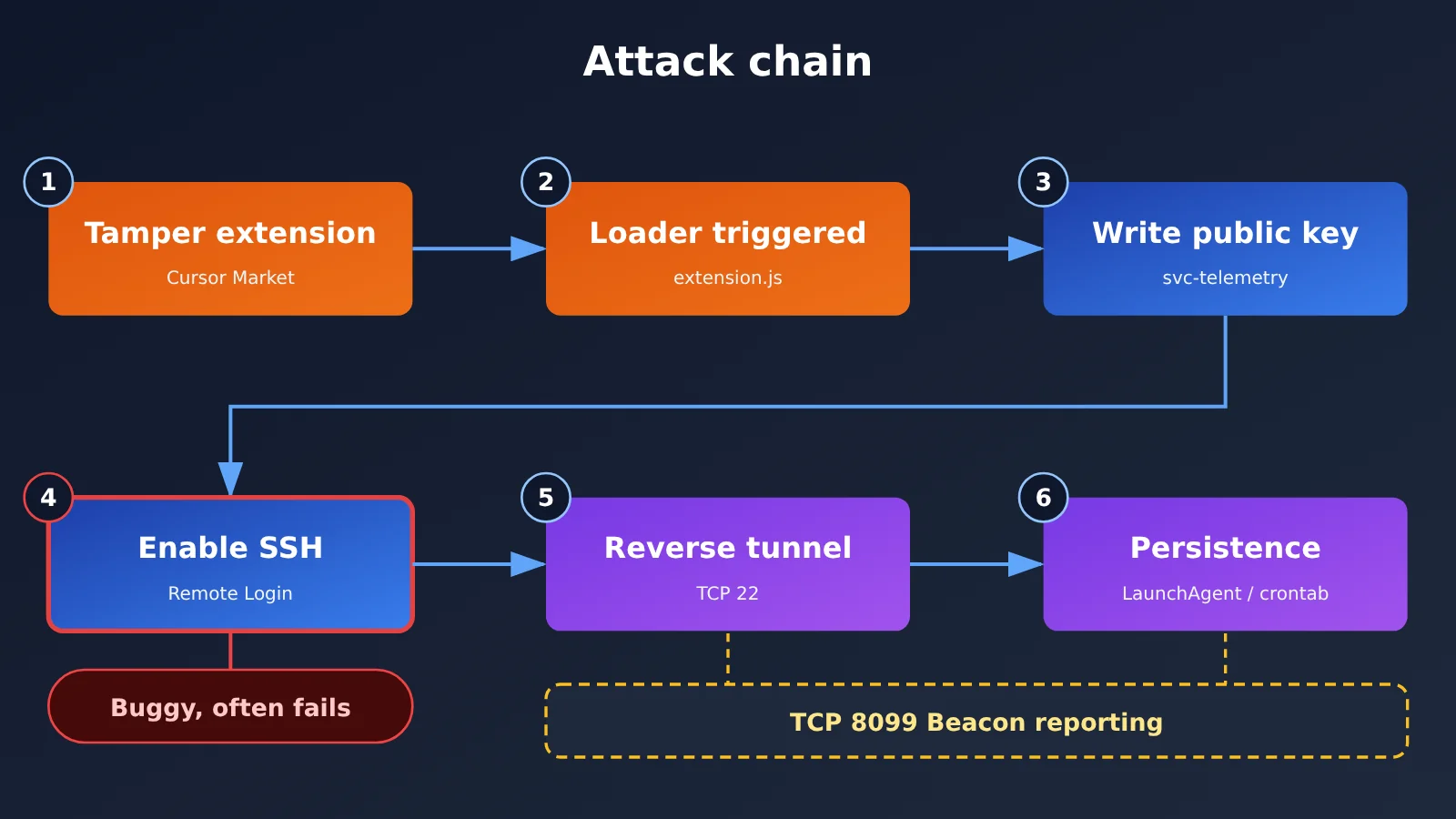
The attack chain can be summarized in six steps:
- Collect host information: Gather the hostname, username, operating system and CPU architecture, home directory, working directory, global Git email, public IP address, and more.
- Plant an authorized SSH key: Add an attacker-controlled public key to the user’s
authorized_keysfile, markedsvc-telemetry. - Try to enable the SSH service: If the device allows SSH logins, the attacker may be able to log in using the planted key.
- Establish a reverse SSH tunnel: Have the victim’s device connect to the attacker’s server over TCP port 22, then forward connections back to the local SSH service, bypassing some inbound restrictions.
- Set up persistence: Configure automatic reconnection after login on macOS and Windows, and use
crontab @rebooton Linux. This allows the backdoor to run independently of the extension. If the connection fails, it retries approximately every 60 seconds. - Report execution status: Send host information and the results of each step to the server through an HTTP beacon on TCP port 8099.
Why Cursor Extension Poisoning Isn’t Prompt Injection
When people hear that “Claude Code was compromised,” their first thought might be that someone manipulated the model with a malicious prompt. That’s not what happened here. This was a classic extension code execution attack: the malicious logic had nothing to do with the model’s output. The same principle would apply to any tampered IDE extension. So the security of the Claude model itself isn’t the issue in this incident. The real problem is that the trust chain can break when attackers impersonate a developer tool’s extension distribution channel.
Two Implementation Flaws in the Malicious Code
Coding errors reduced the effectiveness of this attack. On macOS, the malicious code checked the Remote Login status without administrator privileges. The system returned a permission error rather than “off.” Since the program only tried to enable SSH when it explicitly detected that it was off, this step failed on many Macs where SSH wasn’t already enabled. On Windows, it incorrectly called the Unix-style /bin/sh when installing OpenSSH Server—a path that doesn’t exist in a standard Windows environment.
Still, flawed doesn’t mean harmless. The malicious code could still write the public key, generate persistence scripts, initiate network connections, and report host information. Devices that already had SSH enabled faced a much greater risk. Phorion co-founder Calum Hall also told WIRED that, if implemented correctly, this could have been a very dangerous entry point for attackers.
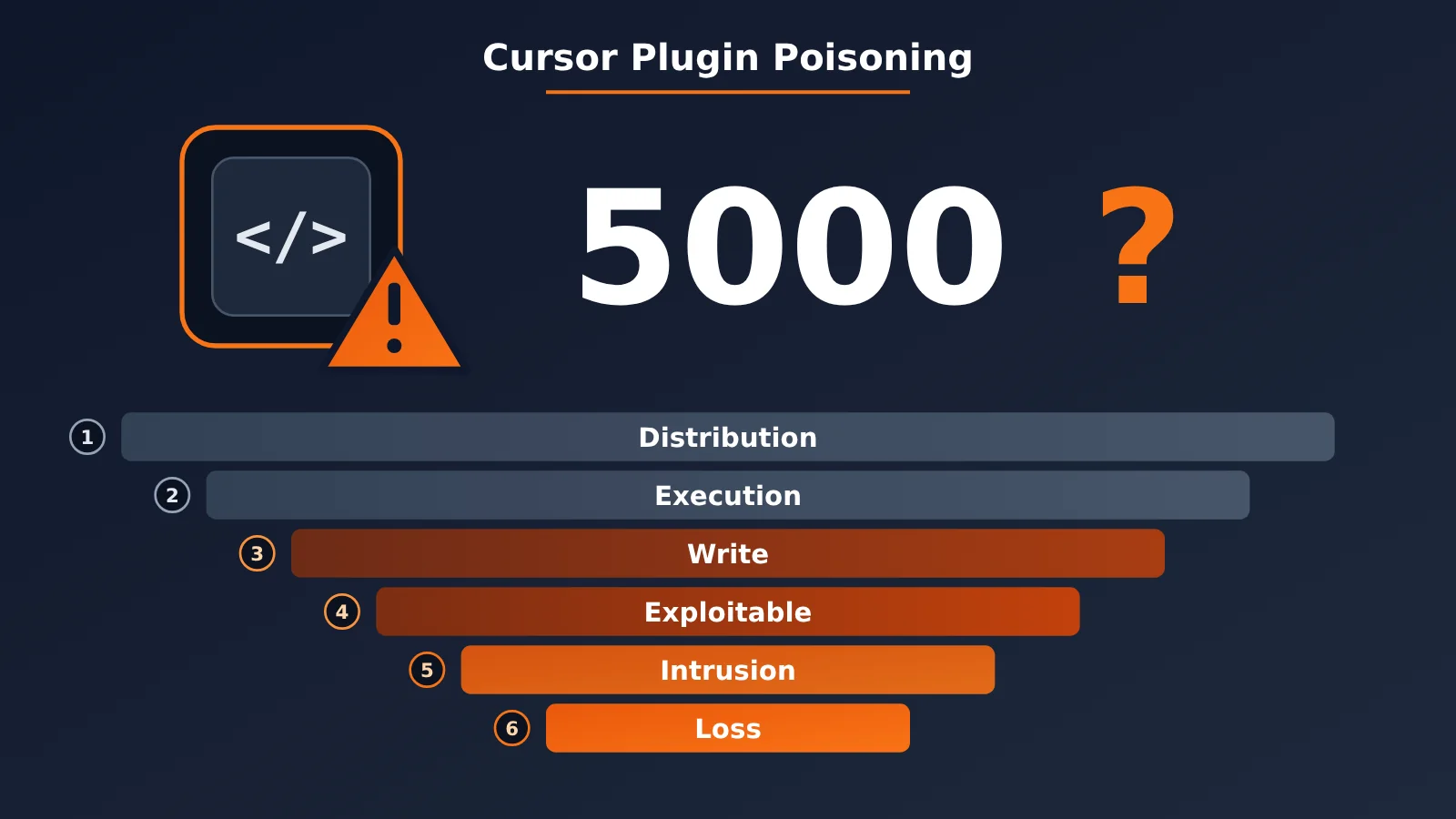
Were 5,000 Developers Hacked? Six Levels of Impact from the Cursor Plugin Poisoning Incident
The “5,000” figure comes from Cursor’s initial announcement on October 29: “At most 5,000 users were affected.” That’s an official upper bound, not a count of compromised users independently confirmed by a security organization. The initial announcement mentioned only 2.1.313; an update added 2.1.312. Cursor hasn’t disclosed how many users were on each version or provided a complete revised breakdown.
Breaking the impact down into six levels makes it easier to see what’s confirmed and what’s still speculation:
| Level | What it means | Current evidence |
|---|---|---|
| 1. Potential exposure | Used Cursor and may have installed the Claude Code extension | Number unknown; doesn’t mean all Cursor users |
| 2. Received a malicious build | Installed or automatically updated to a tampered version from the Cursor marketplace during the affected window | Official upper bound of 5,000; no breakdown by platform or version |
| 3. Malicious code executed | Loaded the tampered extension.js |
Expel and Phorion documented real cases; global total unknown |
| 4. Components successfully installed | SSH public keys, scripts, LaunchAgents, and other components were written to disk | Could happen even if Remote Login wasn’t enabled |
| 5. Attacker gained remote access | SSH login was available, authentication worked, and the tunnel was usable | Global number of successful accesses not disclosed |
| 6. Data theft or financial loss | Code repositories, real credentials, or internal files were accessed | No public figures |
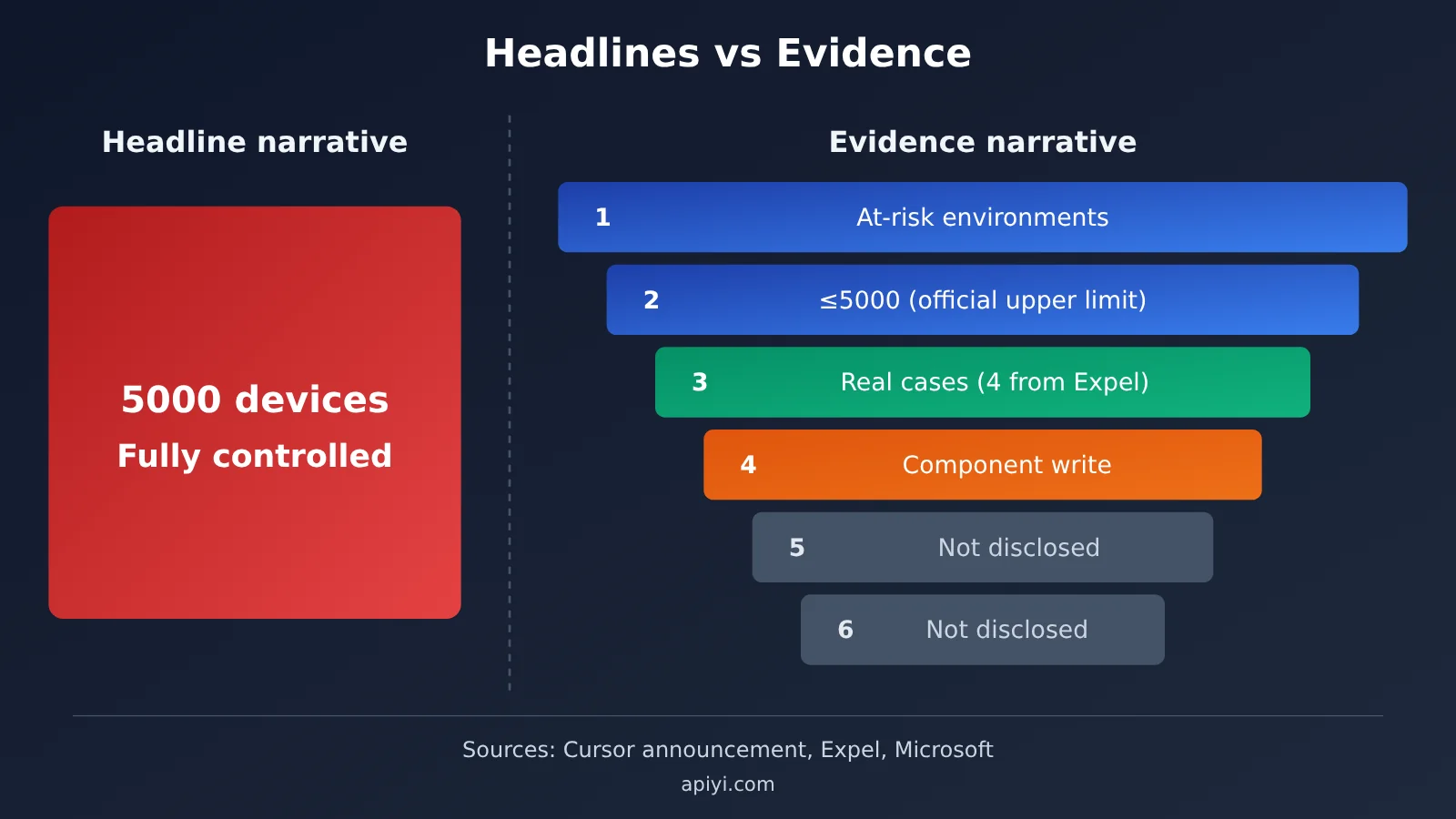
The gap between the two sides of the chart is the gap between headlines and evidence. The further down the funnel you go, the less public evidence there is. At this point, there’s no evidence to support either “5,000 computers were fully controlled” or “5,000 people’s API keys were stolen.”
What Expel’s 4 Real-World Cases Tell Us
On October 29 and 30, Expel handled 4 related incidents across 4 customers, with one Mac involved in each incident. Three Macs were running CrowdStrike Falcon, and one was running Microsoft Defender for Endpoint. All 4 had network connections to an attacker-controlled server IP. This shows that the incident had moved beyond laboratory code analysis.
The most noteworthy case involved delayed execution. The user logged in to their Mac and launched Cursor at 12:44 p.m. Beijing time on October 30. Malicious activity appeared one minute later, and connections to the attacker’s IP continued until 10:29 p.m.—nearly 10 hours in all. By then, the malicious package had long since been removed from the marketplace. A reasonable explanation is that it had already been downloaded while it was available and was triggered when the user reopened Cursor.
There are clear limits to what these numbers tell us: 4 incidents don’t mean only 4 devices were compromised worldwide, and you can’t calculate an infection rate by dividing 4 by 5,000. Detecting an SSH tunnel also doesn’t mean the attacker successfully logged in. Phorion found samples on customer Macs too, but it’s unclear whether those overlap with Expel’s cases, so the counts can’t simply be added together. Expel also found a malicious tunnel process on one machine without the svc-telemetry public-key marker, showing how easily a search for just one marker can miss an incident.
API Key Risks in the Cursor Extension Poisoning Incident
The malicious code looked for up to 40 environment variables whose names contained KEY, TOKEN, SECRET, PASS, AWS, or GCP. For example, if OPENAI_API_KEY was set on a machine, the attacker could learn that the machine used the corresponding service. But researchers confirmed that the initial report contained only the variable names, not their values.
The accurate takeaway is that the attack code could identify categories of sensitive configuration. If the backdoor were exploited, an attacker might then be able to read local credentials and source code. There’s no public data on how many API keys were actually stolen. Saying “all users’ API keys were stolen” confuses what the attack could do with what actually happened. Still, that uncertainty is precisely why credential rotation is a sensible precaution.
Impact of the Cursor Extension Poisoning
Impact on Developers
- Uninstalling the extension isn’t enough: The vendor explicitly warned that uninstalling or upgrading to
2.1.314might not remove SSH public keys, startup items, and background scripts that had already been installed. - The attack could still trigger after removal from the marketplace: Expel’s delayed case shows that users who didn’t open Cursor until after the extension was taken down should check their systems too.
- Machines with SSH always enabled face greater risk: Developers often leave Remote Login enabled for remote debugging, which bypassed an implementation flaw in the malicious code.
- Credential exposure may have been mapped: Even if the backdoor was never successfully exploited, the attacker may already know which cloud services and APIs you use.
Impact on Teams and the Industry
- Extension distribution has become another attack surface: Versions of the same extension may come from different sources across marketplaces. Check the installation source and file hash rather than relying on the version number alone.
- AI coding tools’ endpoint permissions need a fresh look: IDE extensions typically run with the user’s permissions. They can read and write files in the home directory and make network connections, so organizations should include them in endpoint controls.
- Incident response needs to cover the credential lifecycle: Assess the repositories, API keys, cloud credentials, and session tokens accessible from affected devices. The more widely distributed a project’s keys are, the more work rotation takes.
Checking for Cursor Extension Compromise and Rotating Credentials
Start with the macOS and Windows inspection and remediation scripts provided in Cursor’s official announcement. The indicators and commands below can help you understand and investigate the issue, but they don’t replace the official scripts or a review of the logs.
| Category | Indicator |
|---|---|
| Malicious server | 134.209.82[.]225 (TCP 22 tunnel, TCP 8099 beacon); Cursor says it has coordinated the server’s takedown |
| SSH public key marker | svc-telemetry, fingerprint SHA256:0Z6R+DF64Do2nwQic8a7kkfDLNNk4IiK+2U2Rci4htk |
| macOS artifacts | ~/.config/.smt, ~/.config/.smtk, ~/Library/LaunchAgents/com.apple.sysmond.plist |
| Windows artifacts | %USERPROFILE%\.config\smt.cmd, smtk, scheduled task SysMon, startup item sysmon.cmd |
| Linux artifacts | User crontab @reboot entry, .smt / .smtk files |
| General | Temporary file prefix .stk_ |
Step 1: Run a Quick Local Check (macOS Example)
# 1. Check authorized public keys for the attacker’s marker (no match doesn’t mean the system is safe; this check can miss indicators)
grep -n "svc-telemetry" ~/.ssh/authorized_keys

# 2. Check for persistence files and startup items
ls -la ~/.config/.smt ~/.config/.smtk ~/Library/LaunchAgents/com.apple.sysmond.plist 2>/dev/null

# 3. Check for connections to the malicious server
lsof -nP -i | grep "134.209.82.225"

# 4. Check Remote Login status (requires administrator privileges)
sudo systemsetup -getremotelogin
On Windows, use schtasks /query /tn SysMon to check for the scheduled task, then look for sysmon.cmd in the startup folder. If any check returns a match, preserve the evidence, isolate the device, and clean it using the official scripts. If you can’t restore the device to a trusted state, consider reinstalling the operating system and rotating credentials on another trusted device.
Step 2: Inventory Exposed Credential Variable Names
The script below filters environment variables using the same keywords as the malicious code. It prints only the names, not the values, helping you build a list of credentials to rotate. Once you’ve rotated them, run a simple API call to confirm the new key works:
import os, re, openai

# 与恶意代码相同的关键词,列出可能被“摸底”的变量名
pattern = re.compile(r"KEY|TOKEN|SECRET|PASS|AWS|GCP")
print([k for k in os.environ if pattern.search(k.upper())])

# 在可信设备上轮换后,用新 Key 验证调用
client = openai.OpenAI(
    api_key=os.environ["NEW_API_KEY"],
    base_url="https://api.apiyi.com/v1"  # APIYI OpenAI 兼容接口
)
r = client.chat.completions.create(
    model="gpt-4o-mini",
    messages=[{"role": "user", "content": "ping"}]
)
print(r.choices[0].message.content)
View the complete credential inventory and verification script
import os
import re
import openai
from typing import List

KEYWORDS = re.compile(r"KEY|TOKEN|SECRET|PASS|AWS|GCP")

def list_sensitive_env_names(limit: int = 40) -> List[str]:
    """只返回疑似凭证的环境变量名称,绝不输出值。
    limit 与恶意代码的筛选上限保持一致,用于还原攻击者可能看到的视图。"""
    names = [k for k in os.environ if KEYWORDS.search(k.upper())]
    return sorted(names)[:limit]

def verify_new_key(model: str = "gpt-4o-mini") -> bool:
    """轮换后验证新 Key 是否可正常调用"""
    client = openai.OpenAI(
        api_key=os.environ.get("NEW_API_KEY", ""),
        base_url="https://api.apiyi.com/v1"
    )
    try:
        resp = client.chat.completions.create(
            model=model,
            messages=[{"role": "user", "content": "ping"}],
            max_tokens=10
        )
        return bool(resp.choices[0].message.content)
    except Exception as e:
        print(f"验证失败: {e}")
        return False

if __name__ == "__main__":
    print("可能暴露给攻击者的变量名:")
    for name in list_sensitive_env_names():
        print("  -", name)
    print("新 Key 验证结果:", verify_new_key())
Step 3: Rotate Credentials in Order of Priority
| Credential type | Rotation priority | Recommended action |
|---|---|---|
| SSH private keys and authorized public keys | Highest | Remove suspicious public keys, generate new key pairs, and update them on all servers |
| Cloud credentials (AWS, GCP, etc.) | Highest | Revoke old credentials and check cloud audit logs for unusual calls |
| Git platform tokens and sessions | High | Revoke PATs, forcibly end sessions, and check repository access logs |
| Large Language Model API keys | High | Revoke and recreate keys on each platform. If you access multiple models through APIYI at apiyi.com, you only need to rotate one key |
Other TOKEN/SECRET variables |
Medium | Work through them one by one using the list generated by the script |
🎯 Technical recommendation: If your project connects directly to multiple platforms like OpenAI, Claude, and Gemini, you’ll need to log in to each platform separately to revoke and recreate keys after an incident. The official recommendation is to route model invocations through APIYI at apiyi.com. One key covers multiple major models, and the interface is OpenAI-compatible. That means you only need to update one configuration when rotating keys, and you can monitor usage centrally to spot unusual spending.
Frequently Asked Questions
Q1: What happened in the Cursor extension poisoning incident?
On October 29, 2026, the Cursor extension marketplace distributed tampered versions of the Claude Code extension (`2.1.312` and `2.1.313`) for about 11 hours. The malicious code attempted to install a persistent SSH backdoor. This was a supply chain attack on developer tools; the Claude model and Anthropic’s internal systems were not compromised.
Q2: Were 5,000 developers really hacked?
There’s no evidence to support that claim. The 5,000 figure is Cursor’s upper estimate of potentially affected users. No public figures are available for how many people actually ran the malicious code, had an exploitable backdoor, or had an attacker log in. What is confirmed is that organizations including Expel observed malicious activity on real customer devices.
Q3: Was my API key stolen? What should I do?
The initial report sent only environment variable names, not their values, so we can’t conclude that any keys were exposed. But if you installed or automatically updated the extension through the Cursor marketplace during the affected window, you should rotate all relevant keys from a trusted device. Centralized credentials are easier to manage in situations like this: teams that use APIYI at apiyi.com to manage model invocations across multiple models only need to rotate one key, then verify their systems using the script in this article.
Q4: Am I safe if I upgrade to 2.1.314 or uninstall the extension?
Not necessarily. The official guidance explicitly warns that uninstalling or upgrading may not remove persistence mechanisms already installed, such as SSH public keys, LaunchAgents, and scheduled tasks. Run the official inspection script and assess the results alongside running processes, network connections, and startup items.
Q5: Are Claude Code installations through VS Code or npm affected too?
Microsoft confirmed that the Microsoft Visual Studio Marketplace and the official npm package `@anthropic-ai/claude-code` were not affected by this incident. The same version number isn’t necessarily malicious in other distribution channels, so check both the installation source and the file hash.
Q6: How can I reduce credential risks in my development environment going forward?
Disable SSH remote login when you don’t need it, avoid storing long-lived keys in plaintext in global environment variables, and set spending limits for API keys. For model invocations, you can consolidate multiple providers behind a single entry point such as APIYI at apiyi.com. With pay-as-you-go billing and centralized usage monitoring, it’s easier to spot unusual spending promptly.
Cursor Extension Poisoning: Key Takeaways
- What happened: Cursor’s marketplace distributed a tampered extension. This was a supply chain attack, not a vulnerability in the Claude model.
- What 5,000 means: It’s the official upper limit for potentially affected users, not the number of confirmed compromises.
- What’s confirmed: An independent organization observed malicious activity and outbound connections on a real Mac.
- What hasn’t been disclosed: The number of successful remote logins, stolen API keys, or financial losses.
- Key risk: The malicious code could still be triggered after the extension was removed from the marketplace. Uninstalling it doesn’t guarantee the backdoor is gone.
- How to respond: Run the official script, rotate credentials on a trusted device, and use APIYI apiyi.com to reduce the number of API keys you manage.
Summary
The main takeaways from the Cursor extension poisoning incident:
- Separate headlines from evidence: “Up to 5,000 people potentially affected” is very different from “5,000 people hacked.” The public evidence currently confirms that the malicious code executed in at least one real-world case.
- The attack was real, but its effectiveness was limited: The malicious code had backdoor and persistence capabilities, but implementation flaws on macOS and Windows reduced the likelihood of successful remote logins.
- Don’t rely on a single check: Look at the installation source, file hashes, processes, network connections, and startup items. Searching only for
svc-telemetrycould miss an infection.
If you used the Claude Code extension from the Cursor marketplace between October 29 and 30, first follow the official instructions to check your system, then rotate your credentials in order of priority. For model APIs, you can use this opportunity to consolidate scattered API keys with APIYI apiyi.com. That’ll make emergency key rotation much easier next time.
📚 References
- Cursor Official Security Notice: Incident timeline, versions, malicious file hashes, and cleanup scripts
- Link:
cursor.com/blog/claude-code-extension-security-notice -
Note: Start here when checking your own system. The notice includes remediation scripts for macOS and Windows.
-
Microsoft Security Research: Analysis of the malicious Claude Code extension’s attack chain
- Link:
microsoft.com/en-us/security/blog/2026/10/30/inside-malicious-claude-code-branded-cursor-extension-persistent-ssh-backdoor/ -
Note: Covers the supply chain boundary, SSH mechanism, and persistence details.
-
Phorion: Official Claude Code Extension Compromise
- Link:
phorion.io/blog/offical-claude-code-vsx-compromise/ -
Note: Technical details on the 66-line loader, platform differences, and code flaws.
-
Expel: Fake Claude Code extensions in Cursor
- Link:
expel.com/blog/blog-fake-claude-code-extension-cursor-ssh-backdoor/ -
Note: Covers four real customer incidents and cases of delayed execution.
-
Socket: Cursor Removes Malicious Claude Code Extension
- Link:
socket.dev/blog/claude-code-extension-compromise - Note: Checks Open VSX and npm records and corrects early reports.
Author: APIYI Technical Team
Technical discussions: Contact us through the APIYI homepage at apiyi.com. For more integration resources, visit the documentation center at docs.apiyi.com.