Author’s note: This article breaks down the malicious Claude Code extension found in Cursor’s extension marketplace. It explains how the 66-line loader is triggered, how two sets of SSH keys work with a reverse tunnel, which findings are confirmed and unconfirmed, and how developers can investigate.
On October 29, 2026, a compromised anthropic.claude-code extension appeared in Cursor’s VS Code extension marketplace. Researchers found a roughly 66-line JavaScript loader at the beginning of its extension.js file. When the editor loads the module, the loader attempts to plant a persistent SSH backdoor on the developer’s computer.
This isn’t just a rumor. Cursor’s official security advisory, Microsoft Security Research, Phorion, StepSecurity, OpenSourceMalware, and Expel have all published analyses. Expel also investigated four real customer incidents. By November 1, StepSecurity had added a precise sample comparison, bringing the technical picture largely into focus.
What you’ll learn: In three minutes, understand what those 66 lines of code did, why users didn’t need to run any dangerous commands, and why uninstalling the extension doesn’t guarantee you’re safe.
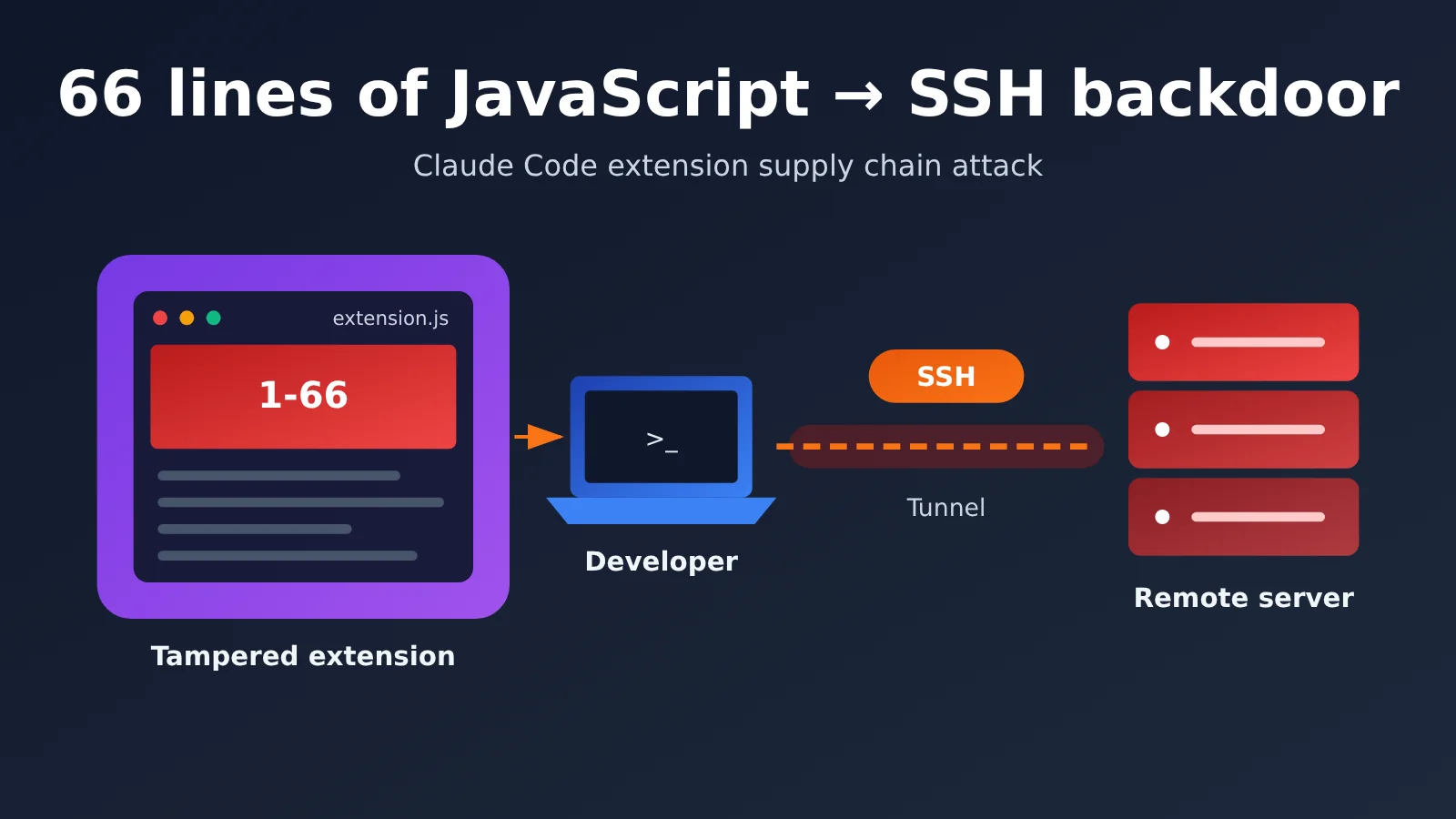
66-Line JavaScript Backdoor: Key Facts at a Glance
First, let’s define the scope. This was a developer-tool software supply chain attack involving Cursor’s extension distribution channel. The Claude model itself wasn’t compromised, and there’s no evidence that Anthropic’s internal systems were breached. Microsoft confirmed that neither the Microsoft Visual Studio Marketplace nor the official npm package @anthropic-ai/claude-code was affected.
| Item | Details |
|---|---|
| Date | October 29, 2026 |
| Distribution channel | Cursor VS Code Extension Marketplace |
| Impersonated identity | anthropic.claude-code (Anthropic didn’t build or publish these versions) |
| Malicious versions | 2.1.312, 2.1.313 |
| Platforms for malicious packages listed in the official disclosure | Windows x64, macOS ARM64 |
| Public distribution period | Approximately 11 hours and 8 minutes |
| Official upper bound on affected users | 5,000 (an upper bound, not 5,000 compromised machines) |
| Injected code | A prepended loader on lines 1–66 of extension.js |
| Subsequent fix | Anthropic released version 2.1.314 |
Timeline of the 66-Line JavaScript Backdoor
All times below are in Beijing time. There’s an important distinction between when a package was available for download and when a downloaded package actually ran. The latter could be much later.
| Beijing time | Event |
|---|---|
| October 29, 17:27 | The malicious extension became available for download on the Cursor marketplace |
| October 30, 04:35 | Cursor stopped distribution, closing the exposure window |
| October 30 | Cursor published a security advisory, followed by analyses from Phorion, OpenSourceMalware, and Microsoft |
| October 30, 12:45 | Expel observed the malicious code running for the first time on a customer’s Mac, approximately eight hours after the extension was removed |
| October 31, 02:30 | Cursor updated its advisory to list 2.1.312 as an affected version and revised the indicators of compromise |
| November 1 | StepSecurity completed a precise static comparison using a MalwareBazaar sample |
After the incident came to light, Cursor removed the malicious versions and temporarily shut down the entire extension marketplace. It also audited access logs, rotated keys, rebuilt the marketplace, and coordinated with cloud providers to take down the attacker’s servers. Public sources haven’t yet explained how the attacker gained permission to publish builds to the Cursor marketplace. Until the investigation concludes, we shouldn’t assume that an Anthropic account was stolen or that a specific Cursor vulnerability was responsible.
How 66 Lines of JavaScript Triggered a Claude Code Extension Backdoor
It’s easy to misread “66 lines” as meaning the entire extension was only 66 lines long. In reality, the legitimate extension.js was a large, minified file. The attacker inserted a malicious loader at the very beginning, spanning lines 1 through 66.
The code uses an immediately invoked function expression (IIFE). It doesn’t need to wait for a user to send Claude a message or for any other trigger. When Cursor loads the extension’s main file in its Node.js runtime, the malicious logic executes before the legitimate application code.
A 7,386-byte change: Comparing the samples
StepSecurity obtained the sample from MalwareBazaar on November 1, verified its SHA-256 hash, and performed a static comparison. The results show that the attacker had no need to rewrite the extension.
| Comparison | Value |
|---|---|
Legitimate extension.js |
3,685,536 bytes |
Malicious extension.js |
3,692,922 bytes |
| Added loader | 7,386 bytes |
| Added content as a percentage of the file | Approximately 0.20% |
| External manifest version | 2.1.313 |
| Version identified within the application code | 2.1.312 |
The last two rows are also worth noting. The attacker repackaged a legitimate 2.1.312 build and changed only the external version information. The displayed version number doesn’t necessarily match the code’s actual origin, so judging a package by its version number alone isn’t reliable. Another statement in StepSecurity’s report about the “remaining bytes” contains an arithmetic inconsistency; when citing the figures, use the total sizes and difference shown above.
Why users didn’t need to run any dangerous commands
This attack had nothing to do with prompt injection. Researchers confirmed that:
- The user didn’t need to start a Claude conversation, and the model didn’t need to agree to execute a high-risk instruction;
- The attack didn’t rely on a malicious prompt or npm install lifecycle scripts;
- The initial attack didn’t require downloading an additional executable.
The real risk came from the permissions an IDE extension has on a developer’s computer. An extension running in Node.js can access the file system, read system information, create subprocesses, execute system commands, make HTTP requests, and invoke local SSH tools.
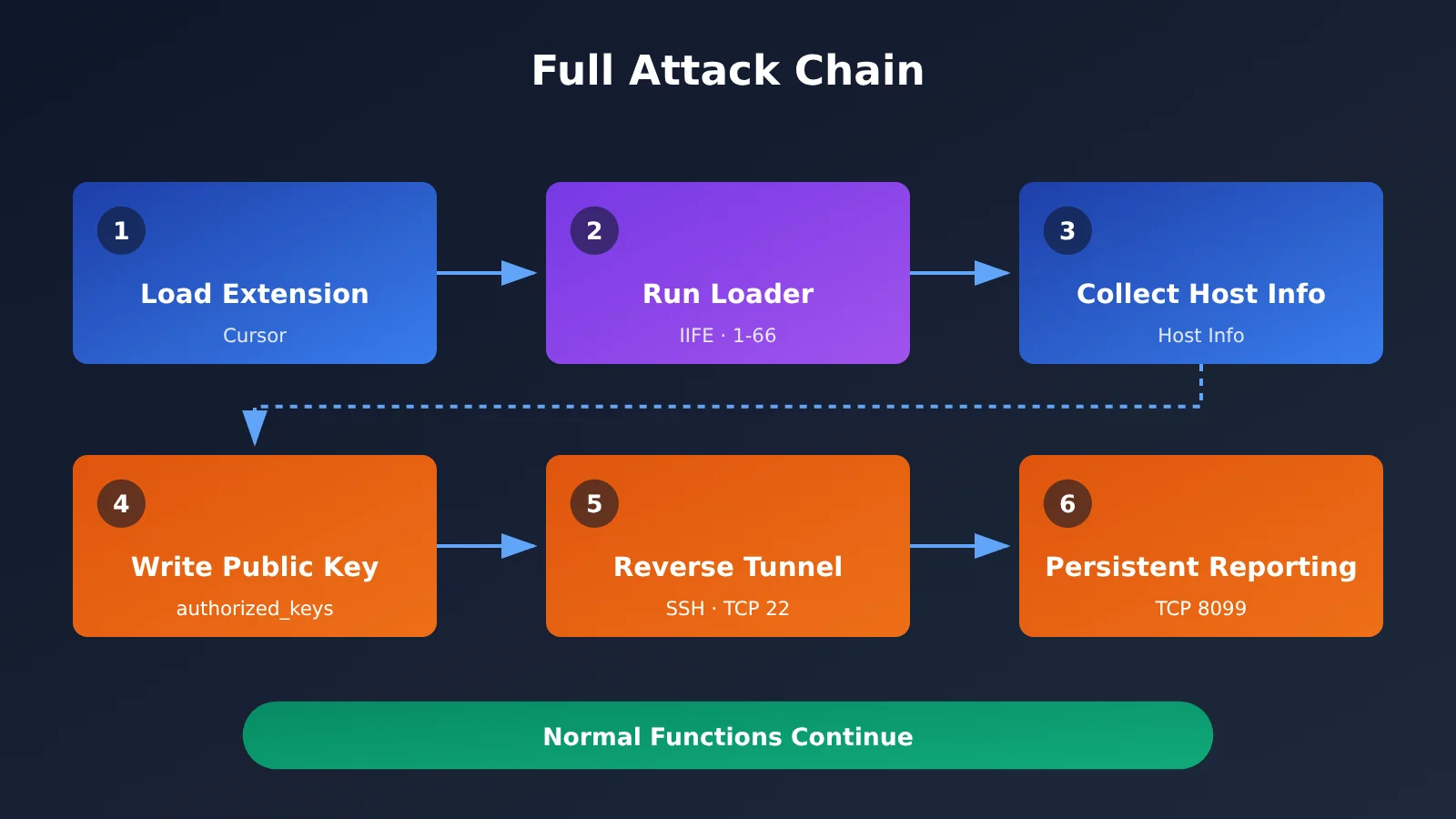
The Two-Key Design of the Claude Code Plugin’s SSH Backdoor
The cleverest part of these 66 lines of code is that the backdoor relies entirely on the system’s built-in SSH. The attacker doesn’t need to develop a custom remote-control program—just two SSH identities that serve different purposes.
The first is an authorized key on the victim’s computer. The malware appends the attacker’s public key to the user’s authorized_keys file, with the visible label svc-telemetry. If the local SSH service is running, anyone holding the corresponding private key may be able to log in as that user.
The second is an identity key for connecting to an external server. The malware stores a separate private key that lets the victim’s device initiate a connection to the attacker’s server. This isn’t one of the user’s existing private keys. Put simply, the first key determines whether the attacker can authenticate; the second determines whether the victim’s computer can connect out in the first place.
Why Reverse SSH Tunnels Are a Concern
Many corporate and home networks block direct access to personal computers from the public internet, but usually allow those computers to initiate outbound connections. A reverse tunnel takes advantage of this: the victim’s computer first connects to the attacker’s server, which then forwards access requests back to local port 22.
But an established connection doesn’t mean a successful login. Whether the attacker can ultimately log in depends on whether local SSH is running, whether the authentication configuration is in effect, and how forwarding is configured on the attacker’s server. If local SSH isn’t running, the tunnel may still be established, but the remote login won’t succeed.
How 66 Lines of Malicious Code Hid Their Activity—and Where They Fell Short
To reduce the chances of detection, the loader took several precautions:
- Normal Claude Code functionality continued to load.
- Each attack step caught its own exceptions, failing silently before execution continued.
- Persistence tasks used names that mimicked system components, such as
SysMonandcom.apple.sysmond. - Failed connections were retried roughly every 60 seconds.
- The loader attempted to report information about 1.5 seconds after startup.
Users might not have seen anything unusual in the interface.
The malicious code also had some clear flaws that reduced the chances of a successful remote login:
| Platform | Implementation flaw | Actual impact |
|---|---|---|
| macOS | The code checked the Remote Login status with standard user privileges, resulting in a permissions error. It only tried to enable the service when it explicitly detected an “off” state. | Remote login wouldn’t be automatically enabled on many Macs where SSH was already off. If SSH was already on, the risk remained. |
| Windows | The code used PowerShell to install OpenSSH Server, but ran it through a helper function that depended on /bin/sh. |
Standard Windows installations don’t have that path, so the step to enable the SSH service could fail. |
| Linux | The code used crontab @reboot for persistence, but Phorion found a flaw in its crontab check. |
Repeated execution could inadvertently damage a user’s existing scheduled tasks. The actual scale of Linux distribution hasn’t been confirmed. |
These flaws don’t mean the code was completely ineffective. Writing to a user’s own files and creating user-level startup entries often don’t require administrator privileges. So, remote login might not have started, but an authorized key could still have been written, a startup script generated, host information sent, and a background process left trying to connect out. The idea that “you’re completely safe without administrator privileges” doesn’t hold up.
How the Claude Code Plugin Backdoor Affects Developers
Impact on Developers
- The names of environment variables related to API keys may have been exposed: The loader selects up to 40 environment variables whose names contain
KEY,TOKEN,SECRET,PASS,AWS, orGCP. Its initial report includes names, not values, but attackers can use those names to identify the APIs or cloud platforms you use. Once the backdoor is active, local credentials could still be read later. - Uninstalling the plugin doesn’t remove the backdoor: Persistence files, startup entries, and SSH public keys don’t automatically disappear when the extension is uninstalled. In one case reported by Expel, a user opened Cursor only after the plugin had been taken down. Malicious activity began immediately and continued for nearly 10 hours.
- A single indicator can miss an infection: Expel found a machine with a malicious tunnel process but no
svc-telemetrypublic key marker. Investigations should check versions, file hashes, processes, network connections, and startup entries together.
Impact on the Industry
- IDE extensions have become a high-value attack surface: As AI coding tools become more popular, developers’ computers hold source code, cloud credentials, and model API keys. Inserting 7 KB of code at the beginning of a 3.6 MB compressed file was enough to change its security profile.
- Third-party extension marketplace publishing processes need another look: This incident occurred only in the Cursor marketplace; the extension with the same name was unaffected in other channels. A publisher name that looks official isn’t enough to establish trust.
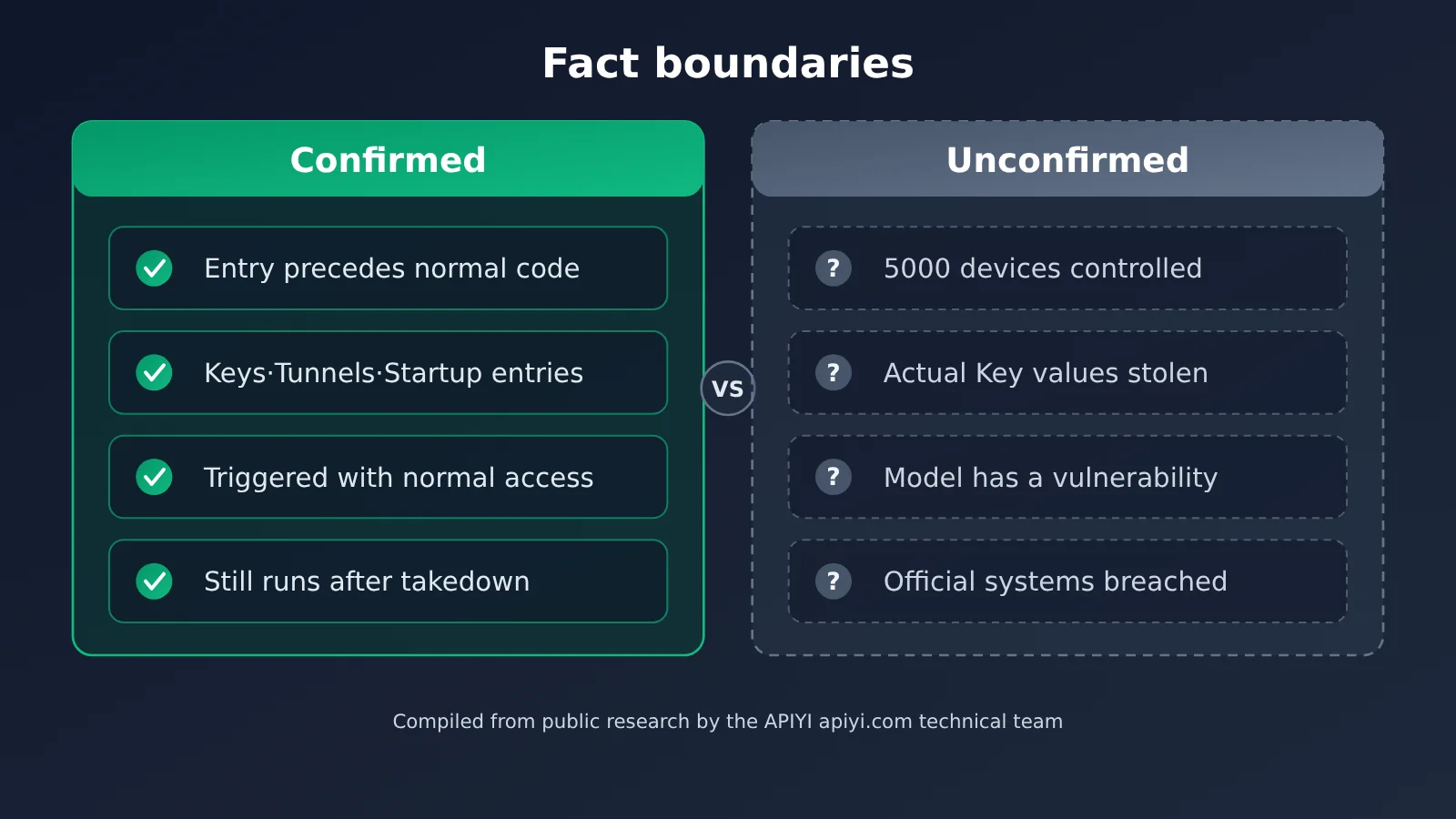
The chart above was compiled from public research by the APIYI apiyi.com technical team. The table below separates confirmed facts from unconfirmed claims—please keep the distinction in mind when citing or summarizing this incident:
| Conclusion | Status | Details |
|---|---|---|
| The Cursor marketplace distributed a tampered Claude Code extension | Confirmed | Confirmed by an official announcement |
| The malicious code could collect information, implant keys, create reverse tunnels, and establish persistence | Confirmed | Sample analyses by multiple organizations agree |
| Malicious activity occurred on actual customer devices | Confirmed | Expel handled four cases, all on Macs |
| 5,000 computers were fully controlled | Not confirmed | 5,000 is only the upper bound of potentially affected computers |
| Users’ actual API key values were stolen | Not confirmed | The initial report contained only variable names |
| Global number of successful intrusions and financial losses | Not disclosed | Shouldn’t be extrapolated |
How to Check for the Claude Code Extension SSH Backdoor
If you installed or automatically updated the Claude Code extension through the Cursor marketplace between October 29 and 30, it’s worth doing a quick check. The Node.js script below only reads publicly disclosed indicator paths; it doesn’t make any changes:
// Read-only check: look for publicly disclosed indicators of compromise (not conclusive on their own)
const fs = require("fs"), os = require("os"), path = require("path");
const home = os.homedir();
const checks = [
  path.join(home, ".ssh", "authorized_keys"),
  path.join(home, ".config", ".smt"),
  path.join(home, ".config", ".smtk"),
  path.join(home, "Library", "LaunchAgents", "com.apple.sysmond.plist"),
  path.join(home, ".config", "smt.cmd"),
  path.join(home, ".config", "smtk"),
];
for (const p of checks) {
  if (!fs.existsSync(p)) continue;
  const hit = p.endsWith("authorized_keys")
    ? fs.readFileSync(p, "utf8").includes("svc-telemetry")
    : true;
  if (hit) console.log("⚠️ 发现可疑痕迹:", p);
}
If the script flags anything, investigate further by checking file hashes, the SysMon scheduled task, processes, and network records. For example, look for connections to ports 22 or 8099 on 134.209.82[.]225. Cursor’s official announcement also provides inspection and remediation scripts for macOS and Windows. Make sure you understand the permissions they require before running them.
You can also use a Large Language Model to help review a suspicious extension file. Focus on whether the beginning of the file contains an IIFE that calls child_process, writes to authorized_keys, or establishes an SSH connection. Here’s a minimal example:
import openai

client = openai.OpenAI(
    api_key="YOUR_API_KEY",
    base_url="https://api.apiyi.com/v1"  # APIYI OpenAI-compatible endpoint
)

head = open("extension.js", encoding="utf-8", errors="ignore").read(10000)
resp = client.chat.completions.create(
    model="gpt-4o-mini",
    messages=[{"role": "user", "content": "请审查这段 JS 开头是否存在可疑的子进程、SSH、持久化或外连行为:\n" + head}]
)
print(resp.choices[0].message.content)
View the full review script (including hash comparison)
import hashlib
import sys
import openai

# 公开披露的恶意 extension.js SHA-256
KNOWN_BAD = {
    "ecb58cb29078d9646ad1dcdbe51526f2d9cfea06be5fb2ab183e8ecc3ab6bf15",
}
KEYWORDS = ["child_process", "authorized_keys", "svc-telemetry",
            "LaunchAgents", "schtasks", "crontab", "8099", "-R"]

client = openai.OpenAI(
    api_key="YOUR_API_KEY",
    base_url="https://api.apiyi.com/v1"  # 使用 APIYI 统一接口
)

def sha256(path: str) -> str:
    h = hashlib.sha256()
    with open(path, "rb") as f:
        for chunk in iter(lambda: f.read(1 << 20), b""):
            h.update(chunk)
    return h.hexdigest()

def review(path: str, head_size: int = 10000) -> None:
    digest = sha256(path)
    print("SHA-256:", digest)
    if digest in KNOWN_BAD:
        print("⚠️ 命中已公布的恶意哈希,请立即隔离设备并按官方指引处置")

    head = open(path, encoding="utf-8", errors="ignore").read(head_size)
    hits = [k for k in KEYWORDS if k in head]
    print("文件开头命中关键词:", hits or "无")

    prompt = (
        "你是安全审计助手。下面是一个 IDE 扩展入口文件的开头部分,"
        "请判断是否存在在模块加载时立即执行的代码,"
        "并列出涉及子进程、SSH 密钥、持久化、网络外连的可疑片段。\n\n" + head
    )
    resp = client.chat.completions.create(
        model="gpt-4o-mini",
        messages=[{"role": "user", "content": prompt}],
        max_tokens=1200,
    )
    print(resp.choices[0].message.content)

if __name__ == "__main__":
    review(sys.argv[1] if len(sys.argv) > 1 else "extension.js")
Recommendation: Model-based review is only a supplemental tool. It can’t replace checking EDR logs and comparing against official indicators. If you’d like to compare code review results across different models, you can use the same API key to switch between them through APIYI at apiyi.com. New users get free testing credits. Before submitting code for review, make sure it doesn’t contain sensitive business information.
Once you’ve confirmed that the malicious extension has executed, follow these steps in order:
- Preserve evidence for the investigation and isolate the device;
- Remove malicious files, startup entries, and SSH public keys;
- Assess whether repositories, cloud credentials, session tokens, and API keys accessible from the device are at further risk;
- If you can’t restore the system to a trusted state, rebuild it and rotate all credentials from a trusted device.
Frequently Asked Questions
Q1: Does the 66 lines of JavaScript refer to the entire Claude Code extension?
No. The 66 lines refer to the malicious loader inserted at the very beginning of `extension.js`, from line 1 to line 66, totaling about 7,386 bytes. The legitimate extension code is over 3.6MB and continues to run normally after it.
Q2: How is this different from a prompt injection attack?
Prompt injection tricks a model into producing dangerous output or performing dangerous actions. In this case, the extension code runs directly when the extension loads. The process doesn’t go through Claude, doesn’t require a conversation, and doesn’t need the model’s consent. Even if you’ve never used the extension’s AI features, the code could run as soon as the extension loads.
Q3: Is Claude Code affected if it was installed from the official npm registry or the VS Code marketplace?
Microsoft has confirmed that Visual Studio Marketplace and the official npm package `@anthropic-ai/claude-code` were not affected. No corresponding malicious versions were found on Open VSX either. Only versions 2.1.312 and 2.1.313 distributed through the Cursor marketplace were affected; you should also check the source and file hash when determining whether an installation is affected.
Q4: Should I rotate API keys stored in environment variables?
The initial report sent only variable names, not their values. But if you’ve confirmed that the malicious code ran on your device, the backdoor could have been used to read credentials. The safest approach is to rotate them from a trusted device. That includes keys stored in environment variables for platforms such as APIYI apiyi.com. You should also switch to a more secure way of managing secrets.
Q5: How can I reduce this kind of risk when developing AI applications?
A few good practices can help: don’t keep high-privilege keys in plaintext environment variables on your development machine long-term, use different keys for different projects, and audit your IDE extensions regularly. When making model invocations through an aggregation platform like APIYI apiyi.com, you can use one key for models from multiple providers. That reduces the number of credentials scattered across your machine and gives you just one key to rotate if something goes wrong.
66-Line JavaScript Backdoor: Key Takeaways
- Nature of the attack: The Cursor extension marketplace was targeted in a supply chain attack. The Claude model itself wasn’t compromised.
- Trigger: A 66-line IIFE loader ran automatically when the extension loaded, with no user action required.
- Backdoor design: Two sets of SSH keys and a reverse tunnel were used, relying entirely on tools already available on the system.
- What we know: 5,000 is the upper limit on potentially affected users. Theft of actual API key values hasn’t been confirmed.
- Response: Uninstalling the extension doesn’t necessarily remove the backdoor. Investigate multiple indicators and rotate credentials from a trusted device.
- Prevention: Reduce the number of plaintext keys stored locally. APIYI apiyi.com can help manage model invocation credentials in one place.
Summary
The 66-line JavaScript backdoor incident highlights three things:
- A small change can do serious damage: Adding code equivalent to just 0.2% of a 3.6 MB file can turn a trusted extension into a backdoor.
- Permissions determine the risk: IDE extensions have full Node.js execution capabilities. Even with standard user permissions, they can write keys and establish persistence.
- Removal from the marketplace isn’t the end: Installed malicious components may run later and continue making outbound connections, so they must be investigated and removed separately.
If you used the Claude Code extension from the Cursor marketplace during the exposure window, check your system against the official indicators and rotate any potentially affected credentials. In day-to-day development, consider reducing the number of credentials stored locally. For example, you can use APIYI apiyi.com to access models from multiple providers with a single key, reducing the potential impact of a leak.
📚 References
- Cursor Official Security Notice: Incident timeline, versions, hashes, and cleanup scripts
- Link:
cursor.com/blog/claude-code-extension-security-notice -
Notes: The primary source for investigation and remediation
-
Microsoft Security Research: Complete attack chain and MITRE ATT&CK mapping
- Link:
microsoft.com/en-us/security/blog/2026/10/30/inside-malicious-claude-code-branded-cursor-extension-persistent-ssh-backdoor/ -
Notes: Covers supply chain boundaries, SSH mechanisms, and persistence analysis
-
Phorion: The 66-line loader and implementation flaws across platforms
- Link:
phorion.io/blog/offical-claude-code-vsx-compromise/ -
Notes: Includes details on environment variable filtering and a Linux crontab flaw
-
StepSecurity: Precise comparison of November 1 samples
- Link:
stepsecurity.io/blog/claude-code-extension-trojanized -
Notes: Provides evidence of file size differences and disguised version identifiers
-
Expel: Investigation of four real customer incidents
- Link:
expel.com/blog/blog-fake-claude-code-extension-cursor-ssh-backdoor/ -
Notes: Documents delayed execution and missed detections
-
OpenSourceMalware: Analysis of the malicious extension’s internal structure
- Link:
opensourcemalware.com/blog/trojanized-claude-code-extension-plants-persistent-ssh-backdoor - Notes: Confirms the loader’s location and execution method
Author: APIYI Technical Team
Technical discussions: Contact us through the APIYI homepage at apiyi.com. For more resources, visit the documentation center at docs.apiyi.com.