
Author’s note: A breakdown of how Google Antigravity Orchestrator splits planning from execution, what the 24% quota and 19% speed figures from Google’s official test actually mean, and how it compares with standalone models and parallel agents.
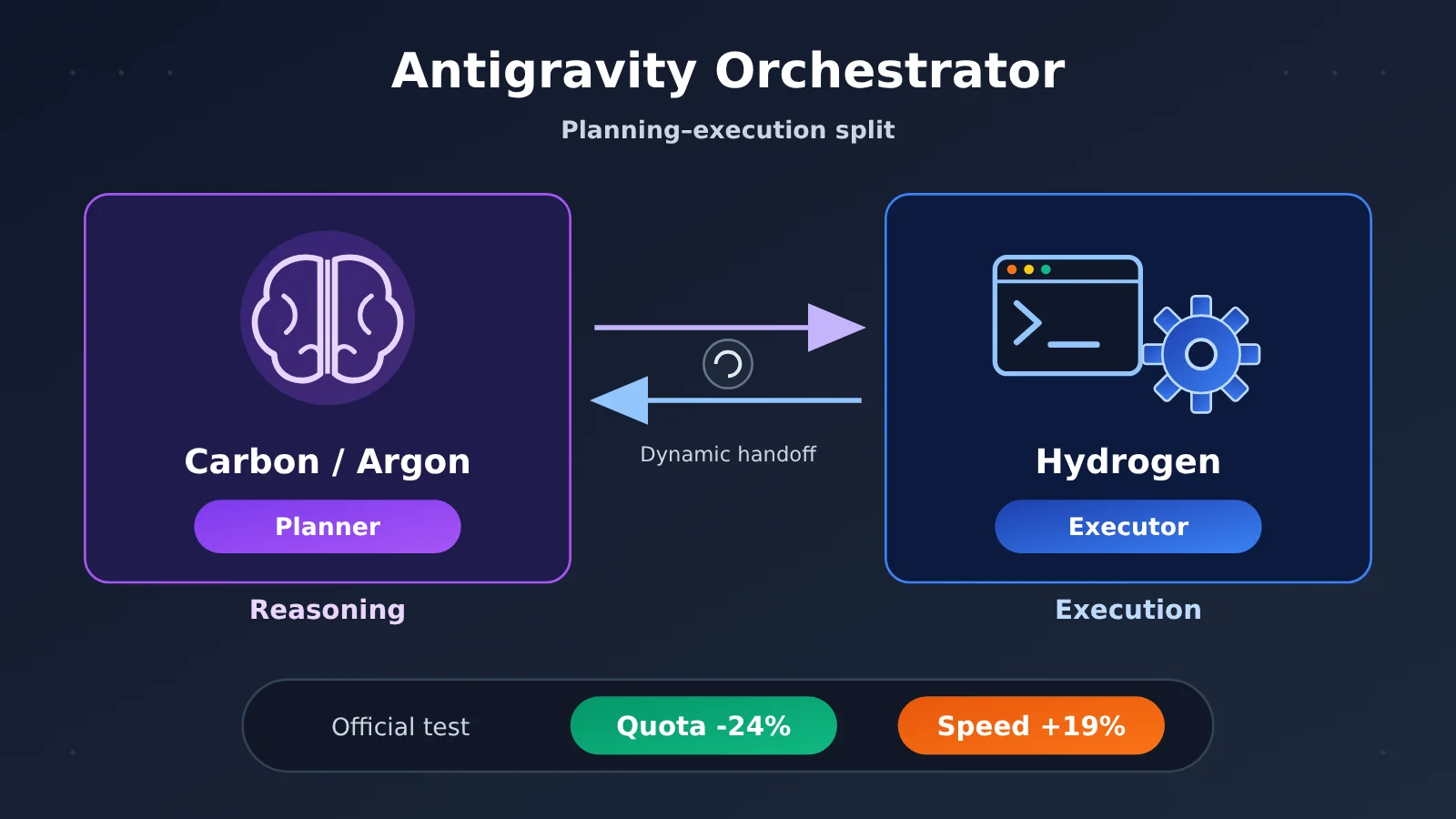
On November 12, 2026, Google released Gemini 4 Hydrogen and, at the same time, rolled out Orchestrator multi-model orchestration in Antigravity. The idea is simple: within a single development task, let Carbon or Argon handle planning and let Hydrogen handle execution. Google’s official side-by-side test shows that Orchestrator cuts quota consumption by an average of 24% compared with using Carbon alone, and finishes 19% faster.
This isn’t a rumor — Google Antigravity’s official blog, its model selection documentation, and the Google launch overview all confirm the feature. This article rounds up everything Google has made public about Antigravity Orchestrator so far: how the mechanism works, how to read the test data correctly, plans and entry points, and which kinds of tasks it suits.
The point: once you’ve read this, you’ll be able to decide whether your engineering task should use Orchestrator, standalone Hydrogen, or standalone Carbon / Argon.
One-line summary: Antigravity Orchestrator lets Carbon or Argon plan and Hydrogen execute inside a single agent session, and Google reports gains in both quota and speed.
Before you read: 5 terms worth knowing
- Planner: the model role that analyzes the task, drafts a plan, and re-plans when necessary. In Orchestrator, Carbon or Argon fills this role.
- Executor: the role that carries out the plan — editing code, running tools, verifying results. In Orchestrator, Hydrogen fills this role.
- Agent: a system in which a model plus a tool execution environment complete a multi-step task together. It isn’t the same thing as a single model.
- Quota: the allowance a platform uses to cap how much service you can consume. Lower quota consumption doesn’t automatically translate into a smaller actual bill.
- Harness: the test framework that organizes model inputs, tool execution, and task scoring. Drop the same model into a different harness and the score can change.
Google Antigravity Orchestrator: Key Information at a Glance
| Item | Details |
|---|---|
| Release date | November 12, 2026, launched alongside Gemini 4 Hydrogen |
| Released by | Google (Antigravity team, Google DeepMind models) |
| Core mechanism | Dynamic handoff between Planner and Executor within a single Agent session |
| Available modes | Orchestrator (Carbon) and Orchestrator (Argon), both executing on Hydrogen |
| Official test results | Compared with using Carbon alone: average quota consumption -24%, completion speed +19%, task success roughly on par with Carbon |
| Availability | Both modes on Google AI Ultra; Argon mode for eligible Google AI Pro users |
| Thinking settings | Fixed configuration — the thinking level can’t be adjusted separately |
Why Google Built Antigravity Orchestrator
A real software development task usually involves several kinds of work: first understanding the codebase and its dependencies, then deciding what to change and how, then editing files in bulk, running builds and tests, and finally checking the results. These steps place very different demands on reasoning ability. “Deciding what to change” needs deep judgment, while “apply the plan across ten files and run the tests” is more about speed, precise editing, and reliable tool invocation.
If you hand the entire task to a high-end reasoning model like Carbon, the many repetitive operations in the execution phase also burn quota at a high-end model’s pace, driving up both task time and cost. Use only a lightweight model, on the other hand, and you may get the plan design or a tricky error wrong, forcing rework.
Hydrogen fills exactly this gap. Google positions it as a high-efficiency model for everyday coding and Agent execution, emphasizing precise edits, multi-tool invocation, and the ability to adjust strategy when a tool fails — and it explicitly says the model can serve as an executor or verifier in multi-model systems. Orchestrator turns this division of labor into a product: the expensive model is used only where judgment matters most.
How the Antigravity Orchestrator Works: Carbon Thinks, Hydrogen Executes
According to Google Antigravity’s official documentation, the Orchestrator doesn’t just assess difficulty once when a request arrives and then pick a single model to carry the whole thing through. It switches back and forth between planning and execution models within the same task.
The Orchestrator’s five-step workflow
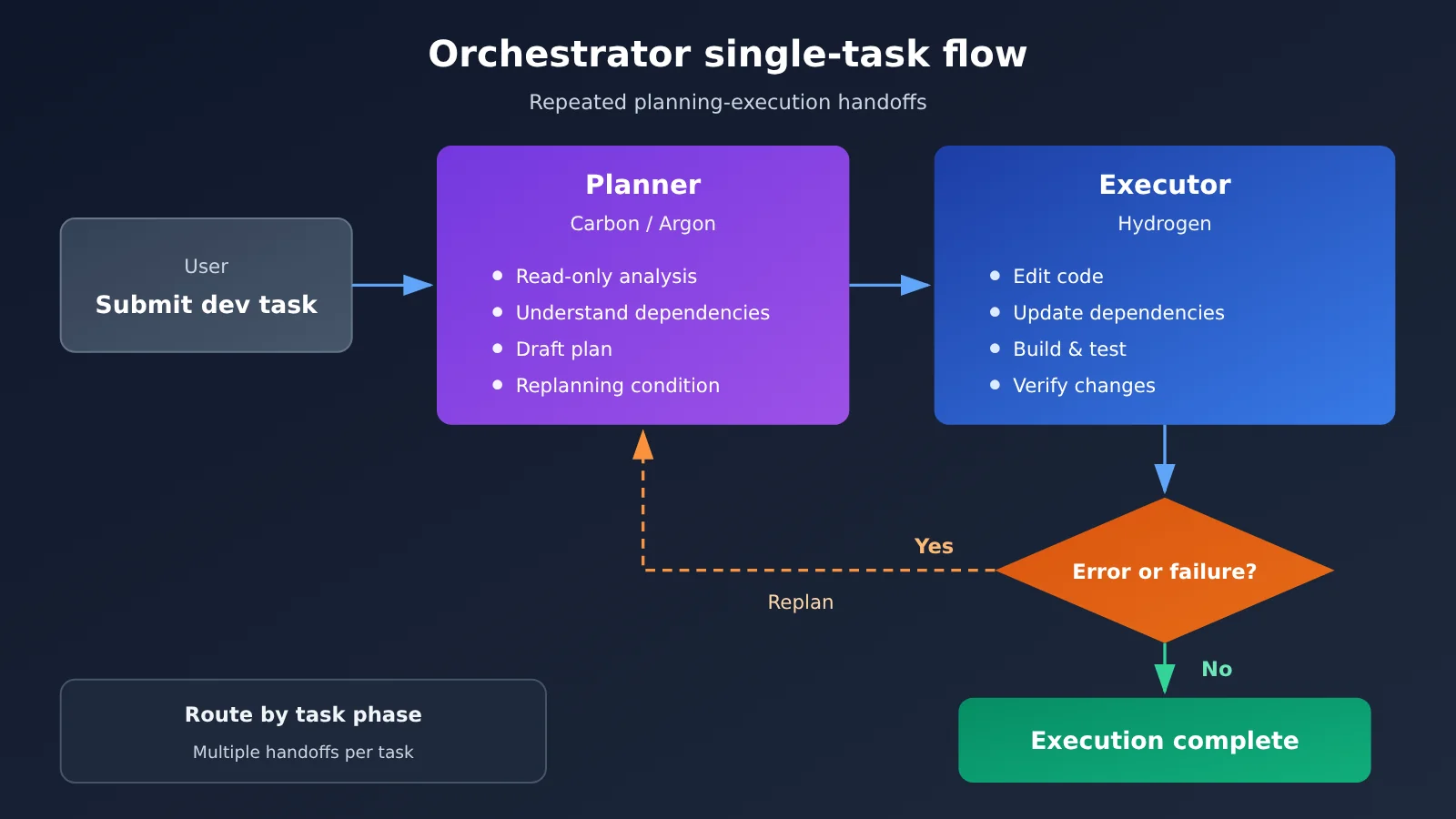
Take the dependency upgrade scenario from the official docs as an example. A full run looks roughly like this:
- Analyze the codebase: Carbon (or Argon) maps out the code structure and dependency relationships in read-only mode.
- Formulate a plan: The Planner determines the scope and steps for the changes, and also defines the conditions under which re-planning is needed.
- Modify the code: Hydrogen takes over the actual edits and dependency upgrades.
- Run tests: Hydrogen runs builds and tests to verify whether the changes take effect.
- Verify the results: Once everything passes, it checks the results and ends the task; if it hits a complex error, control goes back to the Planner.
What triggers the Orchestrator to re-plan
The official docs list a few situations that hand control back to the Planner: a verification step failing twice in a row, interface behavior diverging from expectations, and design choices that come up during implementation but weren’t covered by the original plan. After reassessing, the Planner adjusts the plan and hands it back to Hydrogen to continue with the remaining edits and verification.
This mechanism matters. The execution model doesn’t just retry blindly — it hands decision-making authority back up as soon as things go “beyond the original plan,” so the high-end model only steps in at the critical moments.
Dynamic handoff vs. one-shot model routing
The common form of “model routing” classifies a request once at the entry point: simple tasks go to a small model, complex tasks go to a Large Language Model, and that’s the end of it. The Orchestrator differs in that handoffs happen multiple times within a single task, planning and execution are handled by different models, and at any point during execution the work can return to the planning phase. What it routes is the task stage, not the entire request.
What Orchestrator’s Official Tests Really Mean: 24% Quota and 19% Speed
All the figures below come from Google’s official terminal-task comparison tests, which compare Orchestrator with using Carbon alone.
| Metric | Orchestrator vs. Carbon alone | How to read it |
|---|---|---|
| Task success performance | Close to using Carbon alone | It doesn’t claim to beat Carbon—only to be “close” |
| Quota consumption | 24% lower on average | This is a change in Antigravity quota, not a guaranteed 24% lower bill |
| Completion speed | 19% faster | An average across Google’s official test tasks, not a claim that every task is 19% faster |
Why multi-model division of labor saves quota
The gains mainly come from the execution phase. Steps like code editing, dependency updates, and repeated test runs involve many calls and long contexts. If Carbon handled all of them, the high-end model would be called repeatedly. Once those steps are handed to Hydrogen, Carbon only handles the initial planning and mid-course replanning, so high-end reasoning calls naturally decline. The API list prices also show the cost gap between the two: as of November 13, 2026, Google AI Studio’s official standard pricing lists Hydrogen at $1.50 and $7.50 per million tokens for input and output, respectively; Carbon is $2 and $10 per million tokens through November 30, 2026, and the official page notes that it will change to $4 and $20 starting December 1.
One thing to keep in mind: those are API prices, while Orchestrator runs inside Antigravity’s subscription quota system—the two are metered differently. You can’t use API prices to infer Orchestrator’s “real cost.”
What these numbers mean for development teams
When evaluating the efficiency of AI coding tools, teams shouldn’t look only at the quality of individual responses. They should also watch three dimensions at once: task success rate, quota consumption, and completion time. Orchestrator’s official results show that with the success rate basically unchanged, the latter two both improved. That gives teams a useful way to think about it: evaluate “planning quality” and “execution throughput” separately instead of fixating on the strongest model.
💡 Data note: The efficiency figures in this section all come from Google’s official comparison tests, and no independent third party has retested them yet. If you want to verify the effect of a “planning model + execution model” split in your own business, you can use APIYI apiyi.com to call models at different tiers with the same API key and design your own controlled experiment.
Orchestrator vs. Standalone Models and Parallel Agents
| Approach | Number of Agents | Model usage | Thinking level | Suitable engineering complexity |
|---|---|---|---|---|
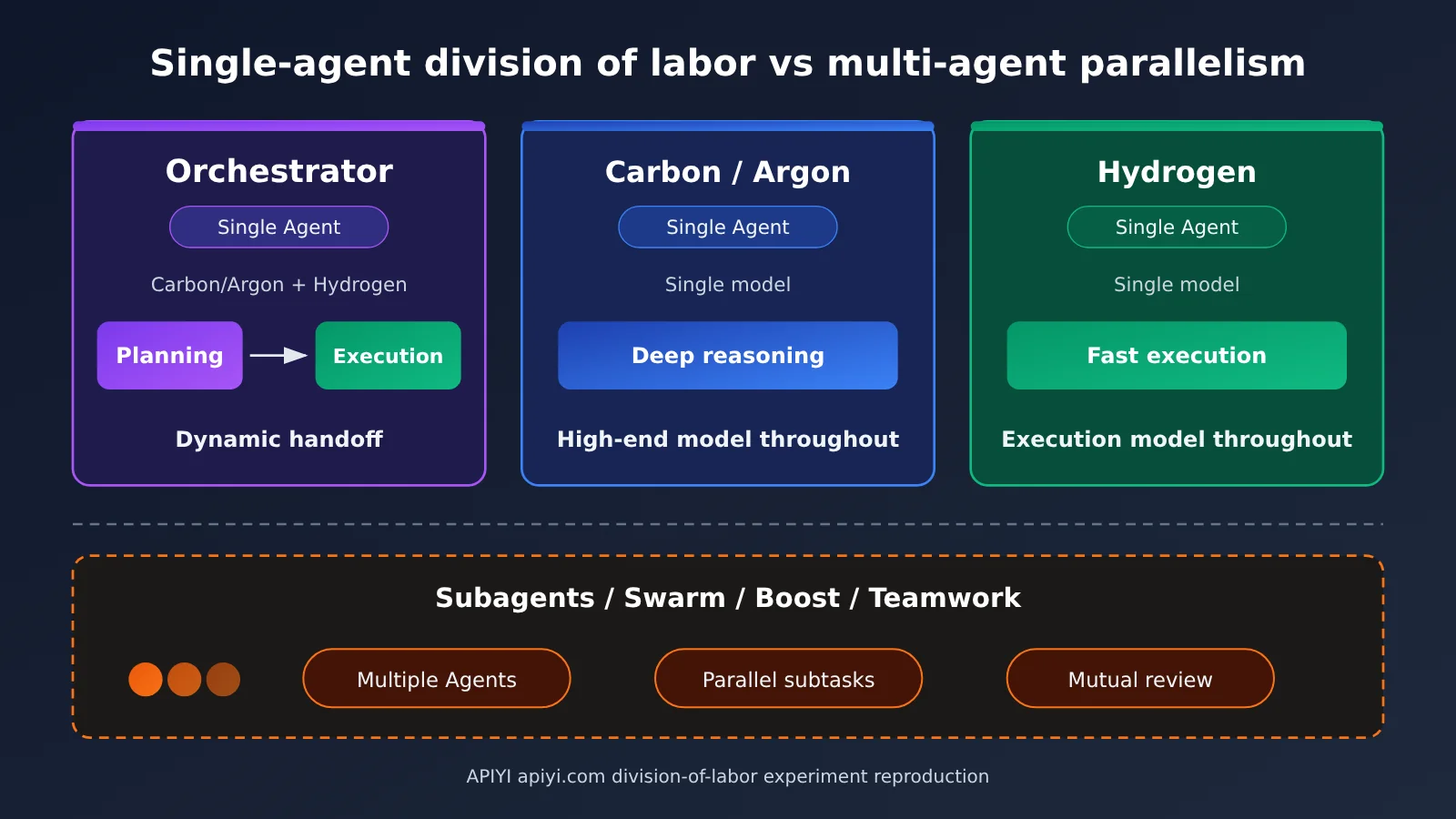
| Orchestrator | 1 | Carbon/Argon plan, Hydrogen executes, switches automatically | Fixed configuration | Medium complexity, multi-stage tasks |
| Standalone Carbon / Argon | 1 | A single high-end model handles the whole run | Customizable | Every step needs deep reasoning |
| Standalone Hydrogen | 1 | A single execution model handles the whole run | Customizable | Routine tasks with clear requirements |
| Subagents / Swarm, etc. | Multiple | Multiple Agents work in parallel or review one another | Depends on configuration | Large parallel work that can be split up |
Standalone Carbon comparison: Carbon still leads on complex judgment, but during execution, repetitive operations also consume high-end model quota and time. By comparison, Orchestrator delivers comparable success on most routine engineering tasks that combine planning and execution, at a lower quota cost.
Standalone Hydrogen comparison: Hydrogen is fast and edits precisely, but when a design choice falls outside the original plan, it has no stronger model to fall back on. For tasks with clear requirements and little repeated decision-making, it’s still the most straightforward choice.
Parallel multi-Agent comparison: Google states explicitly that Orchestrator keeps only one Agent per session and relies on multi-model handoffs to cover different stages. If you need multiple Agents to handle subtasks at the same time or review one another, choose Subagents, Swarm, Boost, or Teamwork. These solve different problems: one is “how to divide work inside a single task,” and the other is “whether to add more Agents.”
How to Use Orchestrator in Antigravity
Orchestrator Mode and Plan Mapping
| Mode | Planning Model | Execution Model | Available Plans |
|---|---|---|---|
| Orchestrator (Carbon) | Gemini 4 Carbon | Gemini 4 Hydrogen | Google AI Ultra |
| Orchestrator (Argon) | Gemini 4 Argon | Gemini 4 Hydrogen | Eligible Google AI Pro, Ultra |
| Hydrogen standalone model | — | Gemini 4 Hydrogen | Rolling out gradually to Pro and Ultra users |
In the Antigravity App, open the model selection menu near the chat input box and pick Orchestrator (Carbon) or Orchestrator (Argon). In the Antigravity CLI, here’s the official example (the syntax below is quoted from the official docs and hasn’t been tested locally for this article):
# List the models available to the current account
agy models

# After entering a session, use /model to select Orchestrator

# You can also specify it directly at launch
agy -p "Add input validation to the signup form and run the tests." --model "Orchestrator (Argon)"
One thing to keep in mind: Orchestrator uses a fixed thinking configuration, so you can’t set Low, Medium, High, or Extra levels for it separately. If you need custom thinking levels, switch to a standalone model. Also, on launch day some users reported that the model options were visible but invocations failed, and different accounts got access at different times — this is most likely tied to the gradual rollout, so if you run into it, just try again later.
Reproducing the Planning-Execution Split in Your Own Agent
Orchestrator is an Antigravity product feature, but the whole idea—strong model plans, fast model executes, and after two failures it’s handed back to the planner—is something you can absolutely implement in your own Agent. Here’s a minimal example built on an OpenAI-compatible interface; for model names, go by the model list of the platform you’re using:
from openai import OpenAI

client = OpenAI(api_key="YOUR_API_KEY", base_url="https://api.apiyi.com/v1")

PLANNER = "your-reasoning-model"   # Planning model; refer to the platform's model list
EXECUTOR = "your-fast-model"       # Execution model; refer to the platform's model list

def ask(model, system, user):
    r = client.chat.completions.create(model=model, messages=[
        {"role": "system", "content": system}, {"role": "user", "content": user}])
    return r.choices[0].message.content

plan = ask(PLANNER, "你是架构师,输出分步实施方案。", "为注册表单增加输入校验")
print(ask(EXECUTOR, "严格按方案执行,只输出代码改动。", plan))
View the full example with “re-plan after two failures”
from openai import OpenAI

client = OpenAI(
    api_key="YOUR_API_KEY",
    base_url="https://api.apiyi.com/v1"
)

PLANNER = "your-reasoning-model"
EXECUTOR = "your-fast-model"
MAX_FAILS = 2  # Per Antigravity docs: hand back to planning after two consecutive validation failures

def ask(model: str, system: str, user: str) -> str:
    r = client.chat.completions.create(
        model=model,
        messages=[{"role": "system", "content": system},
                  {"role": "user", "content": user}],
    )
    return r.choices[0].message.content

def run_tests(patch: str) -> tuple[bool, str]:
    """Replace with your own build and test logic; return (passed, log)"""
    raise NotImplementedError

def orchestrate(task: str, max_replans: int = 3) -> str:
    plan = ask(PLANNER, "你是规划者,输出分步方案及重新规划条件。", task)
    for _ in range(max_replans):
        fails, log = 0, ""
        while fails < MAX_FAILS:
            patch = ask(EXECUTOR, "你是执行者,严格按方案修改代码。",
                        f"方案:\n{plan}\n上次测试日志:\n{log}")
            ok, log = run_tests(patch)
            if ok:
                return patch
            fails += 1
        # Consecutive failures; hand back to the planning model to reassess
        plan = ask(PLANNER, "执行连续失败,请根据日志修订方案。",
                   f"原任务:{task}\n原方案:{plan}\n失败日志:{log}")
    raise RuntimeError("多次重新规划后仍未通过验证")
🚀 Quick-start tip: When building this kind of “planning + execution” prototype, it’s worth getting free trial credits through APIYI apiyi.com. A single API key lets you call mainstream models like OpenAI, Claude, and Gemini, and switching between PLANNER and EXECUTOR is just a one-string change—handy for quickly comparing different combinations.
Antigravity Orchestrator Impact Analysis: Which Development Tasks Fit Best
Impact on Developers
- Routine feature development: Planning, implementation, and testing each have a clear division of labor — the most typical Orchestrator scenario.
- Multi-file bug fixes: Planner pinpoints the root cause, Hydrogen edits multiple files, runs tests to verify, and hands it back for judgment if something fails.
- Medium-complexity refactoring: The planning model owns the approach, while the bulk of concrete changes goes to the execution model, keeping the high-end model from getting bogged down in mechanical editing.
- More proactive quota management: For subscribers, using Orchestrator for everyday tasks frees up more of your quota for work that genuinely needs deep reasoning.
Impact on the Industry
- “Planner + Executor” becomes a productized pattern: Model vendors are starting to build multi-model collaboration directly into development tools, rather than leaving orchestration entirely to users.
- Diversified evaluation metrics: Beyond success rate, quota consumption and completion time will show up more and more in comparisons of Agent tools.
Orchestrator Scenario Selection Guide
| Task Type | Recommended Mode | Rationale (based on Google’s official selection guidance) |
|---|---|---|
| Routine engineering with multi-stage planning, development, testing, and rework | Orchestrator | The high-end model only steps in at key decision points |
| Complex distributed system architecture, cross-repo migration | Carbon or Argon standalone mode | Every critical step requires deep reasoning |
| Dependency upgrades, test writing, simple refactoring, scripts and docs | Hydrogen standalone mode | Requirements are clear, execution efficiency comes first |
| Large work that can be split and parallelized, or needs mutual review | Subagents, Swarm, etc. | You need multiple Agents rather than multiple models |
Frequently Asked Questions (FAQ)
Q1: What is Google Antigravity Orchestrator?
It’s the multi-model orchestration feature in Antigravity. In a single Agent session, Carbon or Argon acts as the planner, Hydrogen acts as the executor, and they hand off dynamically based on how execution is going.
Q2: How is Orchestrator different from Swarm and Subagents?
Orchestrator always uses just one Agent; what changes is the model used at different stages. Features like Swarm and Subagents bring in multiple Agents to work on subtasks in parallel or review each other, which makes them a better fit for large jobs that can be split up.
Q3: Does a 24% quota savings mean a 24% savings on your bill?
No. The 24% figure is the average change in Antigravity quota consumption in Google’s official comparison test, measured against using Carbon alone. Actual costs depend on your subscription plan, task type, number of retries, and other factors—you can’t convert it directly into a bill reduction.
Q4: Did the official test use Terminal-Bench 4.0 or 4.1?
The two official announcements use different labels: Google’s overview and the Chinese official announcement say 4.0, while the Antigravity-specific announcement says 4.1. Both report the same improvement numbers, so this article refers to it uniformly as the “official terminal-task comparison test.”
Q5: Without an Antigravity subscription, how can I try a similar split between planning and execution?
You can implement it in your own Agent using the examples in this article. Sign up at APIYI apiyi.com to get free trial credits, use the OpenAI-compatible interface, set base_url to `https://api.apiyi.com/v1`, and then specify a planning model and an execution model separately.
Q6: What known limitations does Orchestrator have?
There are a few: the thinking level is fixed and can’t be adjusted separately; Pro users can currently only use Argon mode; the efficiency data comes from official tests and hasn’t been independently reproduced; and during the initial rollout, some accounts saw models listed but calls failed. If you want to compare model combinations in a controlled environment first, APIYI apiyi.com’s pay-as-you-go pricing makes small-scale experiments easy.
Google Antigravity Orchestrator Key Takeaways
- Core definition: Within a single Agent session, Carbon / Argon plan, Hydrogen executes, with dynamic handoff between them.
- Key mechanism: Cases like verification failing twice in a row get handed back to the planning model to re-evaluate.
- Official data: Compared to Carbon alone — quota -24%, speed +19%, and comparable success performance.
- The right interpretation: Quota consumption doesn’t equal billing, and the benchmark version labeling differs between the two announcements.
- Access requirements: Ultra users can use both modes; eligible Pro users can use Argon mode.
- Getting started: You can build your own Agent and reproduce this division-of-labor approach through the unified interface at APIYI apiyi.com.
Summary
The core points of Google Antigravity Orchestrator:
- Division of labor, not replacement: It’s not about swapping an expensive model for a cheap one — it’s about letting Carbon / Argon handle judgment and Hydrogen handle execution.
- Dynamic handoff: When something goes wrong during execution, it returns to the planning stage. That’s the key difference from one-shot model routing.
- Official gains: With success performance close to Carbon, official tests show 24% less quota and 19% faster.
- Choose by complexity: Use Orchestrator for routine multi-stage engineering, Carbon / Argon for deep architecture work, and Hydrogen for well-defined everyday tasks.
For most everyday development tasks, Orchestrator is a sensible default that balances quality and quota. If you want to apply the same approach to your own product, the fastest way to validate different model combinations is through APIYI apiyi.com — the platform offers free quota and a unified interface for multiple models.
📚 References
- Google Antigravity Official Blog: Gemini 4 Hydrogen and Orchestrator
- Link:
antigravity.google/blog/gemini-4-hydrogen-in-google-antigravity -
Notes: The Orchestrator announcement and the official 24% / 19% test data, with the benchmark labeled Terminal-Bench 4.1
-
Google Antigravity Docs: Choose a Model / Orchestrator
- Link:
antigravity.google/docs/models -
Notes: Planner / Executor mechanics, replanning conditions, CLI examples, and model selection guidance
-
Google Official Blog: Introducing Gemini 4 Hydrogen
- Link:
blog.google/innovation-and-ai/models-and-research/gemini-models/introducing-gemini-4-hydrogen -
Notes: Overview of the Hydrogen launch; the same comparison is labeled Terminal-Bench 4.0 here
-
Google Chinese Official Announcement: Gemini 4 Hydrogen
- Link:
china.googleblog.com/2026/11/gemini-4-hydrogen.html -
Notes: Chinese release information; the benchmark version is likewise labeled 4.0
-
Google AI Studio Pricing Page: Gemini Series API Pricing
- Link:
aistudio.google.com/docs/pricing -
Notes: Standard API pricing for Hydrogen, Carbon, and Argon, plus when the price changes take effect
-
Antigravity Plans and Shared Quota
- Link:
antigravity.google/blog/changes-to-antigravity-plans - Notes: Subscription plans and the quota system
Author: APIYI Technical Team
Technical inquiries: Feel free to reach us through the APIYI website homepage; more resources are available at the docs.apiyi.com documentation center


