Author’s note: This post breaks down the billing rules for Google’s Gemini Decisions API and gemini-decision-1: output is counted as $0, and shared input is billed only once. It also covers how to choose a model for routing and scoring workloads while APIYI’s price list doesn’t yet include this ID.
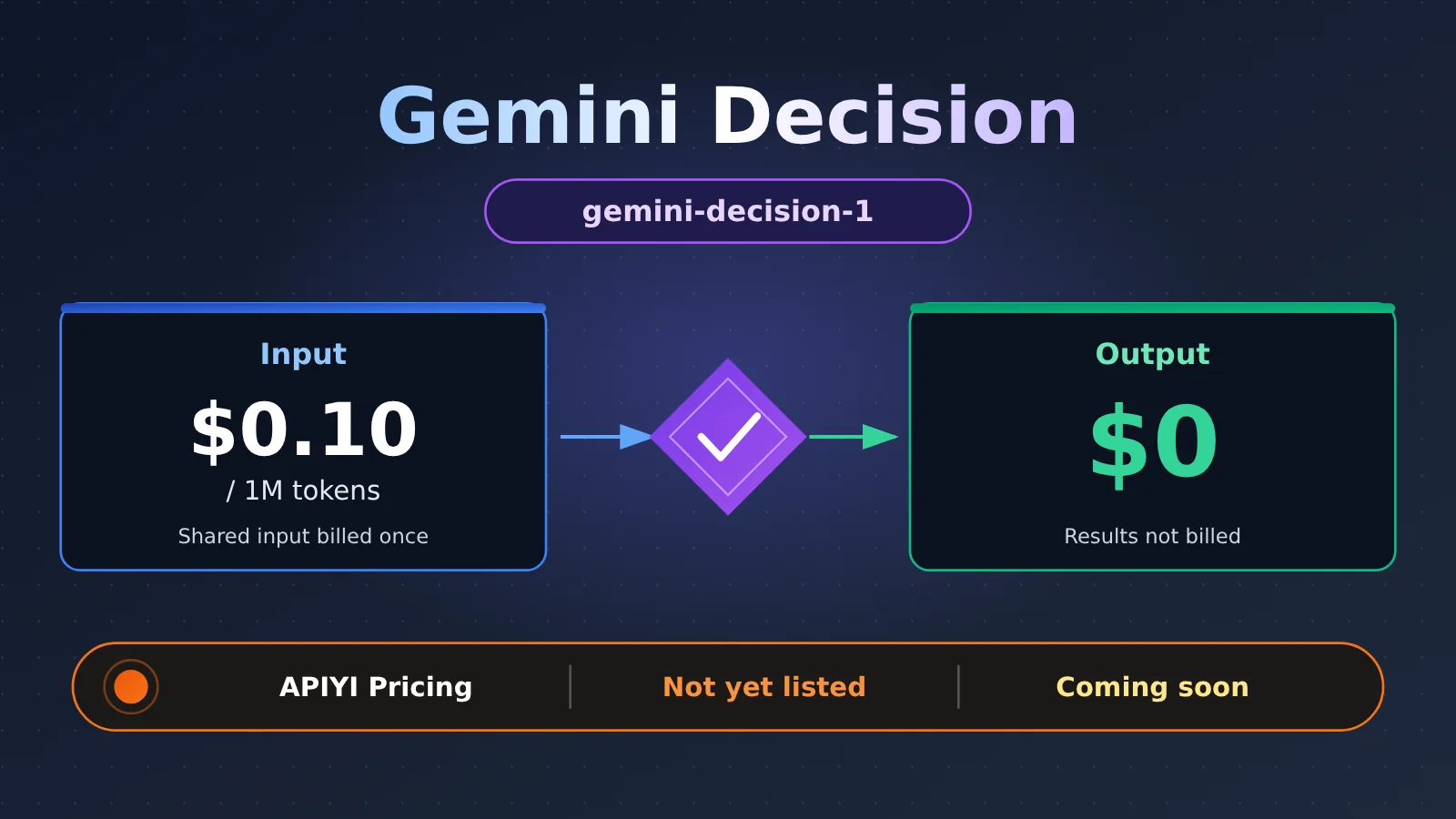
On 2026-11-11, Google released the Gemini Decisions API and its companion model, gemini-decision-1. In the official price list, the output price is $0, and shared input is billed only once no matter how many questions you ask against it. Teams that build routing, classification, judgment, and scoring pipelines have started paying attention, because those workloads are exactly the “lots of input, little output, many questions” pattern this model targets.
This isn’t a rumor. Google’s official blog and the AI Studio changelog both announced it. One caveat, though: as of 2026-11-12, the APIYI (apiyi.com) price list doesn’t include a gemini-decision-1 ID yet, so putting it directly into a request will just fail.
What you’ll get from this post: In about 3 minutes, you’ll understand why Gemini Decision counts output as $0, how its billing actually works, and which ID to call until it’s available on APIYI.
Gemini Decision: Key Facts at a Glance
Here are the facts Google has officially confirmed. The analysis below builds on this table.
| Item | Details |
|---|---|
| Release date | 2026-11-11 |
| Publisher | Google (official blog + AI Studio changelog) |
| Product name | Gemini Decisions API |
| Model ID | gemini-decision-1 |
| Questions per request | Up to 1,000 |
| Input modalities | Text, images, audio, video, PDF |
| Shared input limit | About 256K tokens |
| Official input price | $0.10 / 1M tokens |
| Official output price | $0 |
| Shared input billing | Billed once, regardless of how many questions you ask |
What gemini-decision-1 Can Take as Input
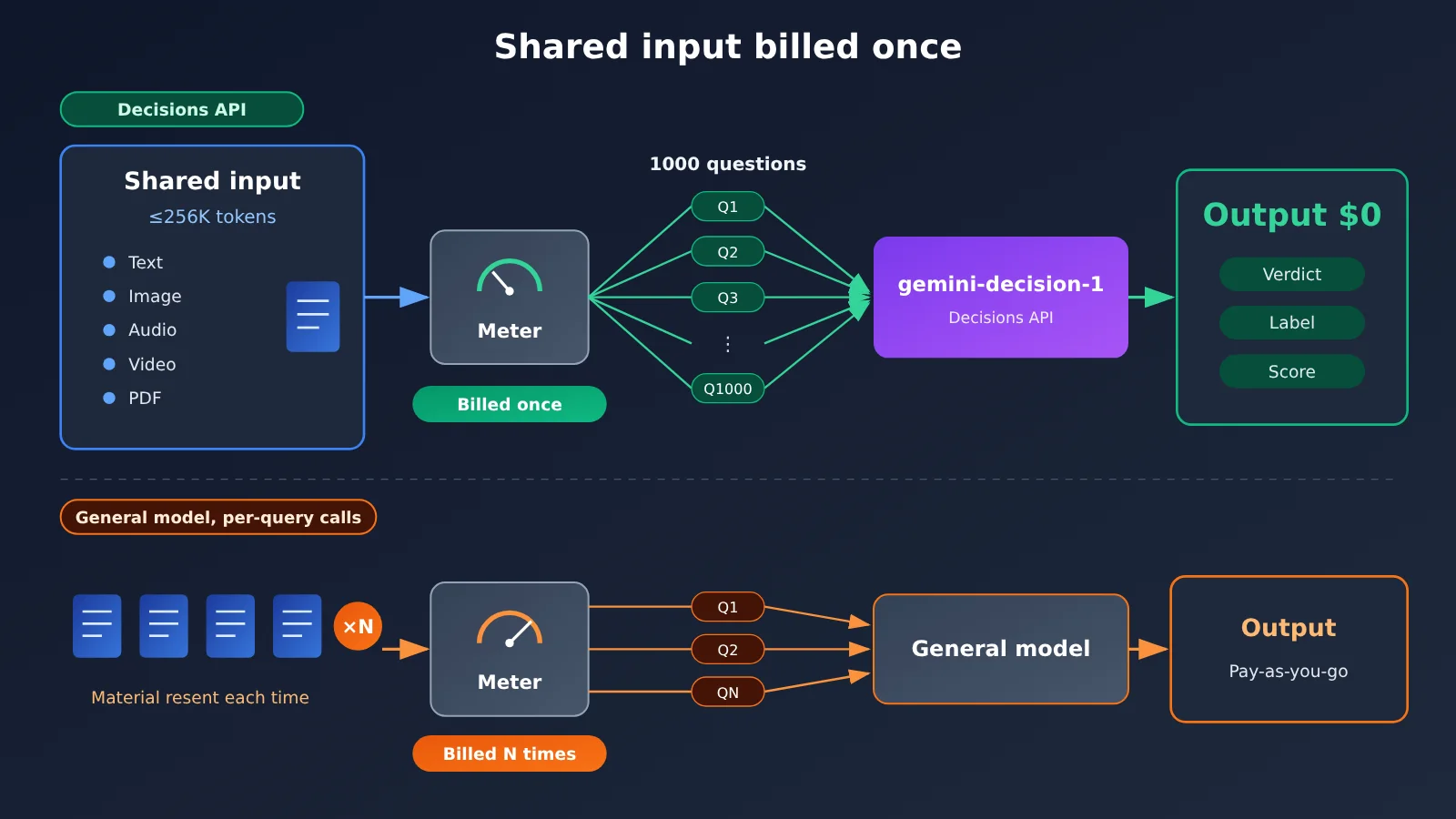
Judging by the specs, gemini-decision-1 isn’t built for writing long answers. It’s built for making lots of judgments about the same material in one go. A single request can carry roughly 256K tokens of shared input, such as a long contract, a meeting video, or a batch of product images. You can then ask up to 1,000 questions about it in that same request.
Because it’s multimodal, it can cover a lot of workflows that used to need a transcription step before any judgment could happen. Audio and video can go in directly as shared material, and PDFs don’t have to be extracted into plain text first. For moderation, quality inspection, and content tagging, that removes a whole preprocessing layer.
Why Gemini Decision Charges $0 for Output
Here’s what the official documentation states: input is billed at $0.10 / 1M tokens, and output is priced at $0. The docs don’t explain the reasoning behind this pricing, so the analysis below is inference based on the product’s design. Use it as a reference when choosing a model, not as Google’s official position.
Gemini Decision Billing Breakdown
| Billing item | Official rule | What it means for routing and scoring tasks |
|---|---|---|
| Shared input | $0.10 / 1M tokens, billed once regardless of how many questions you ask | Ask 1,000 questions about the same material and you only pay for the material once |
| The questions themselves | Check the official docs for the exact billing details | The more questions you have, the more you’ll want to evaluate this part of the cost separately |
| Output | $0 | Judgments, labels, and scores carry no extra charge |
| Question limit | Up to 1,000 per request | Anything beyond that needs to be split into multiple requests, and the shared input gets billed again |
One reasonable reading is that the output of decision-style tasks is naturally short: usually a yes/no, a category, or a score. The real compute goes into reading and understanding the input. Setting output to $0 and concentrating the cost on the input side matches the actual workload of these tasks more closely, and it means developers only need to think about input size when estimating costs.
The “shared input is billed once” rule has a more direct impact. At the official rate, a shared input of about 256K tokens costs roughly $0.0256 per request, and that cost doesn’t double when you go from 10 questions to 1,000. If you use a general-purpose chat model and ask questions one at a time, every request has to carry the same material again, so input tokens scale linearly with the number of questions.
Gemini Decision Availability on APIYI
This is the section you’ll actually need to act on. On 2026-11-12, we checked the APIYI pricing endpoint and couldn’t find gemini-decision-1. In other words, that model can’t be invoked through APIYI right now.
| Model ID | Official Status | APIYI Pricing Status (2026-11-12) | Recommendation |
|---|---|---|---|
gemini-decision-1 |
Released | Not yet listed | Don’t put it in requests; wait for it to be listed |
| Gemini models already listed in the platform’s model list | Per official sources | Listed (as shown in the list) | Current interim option |
The APIYI pricing list doesn’t include this ID yet. The exact model name and pricing are whatever the platform’s model list shows, and we’ll add it as soon as we can. Until it’s listed, this article won’t quote any APIYI-side Decision pricing. If you see a “Decision price” anywhere, treat the figure actually displayed in the platform list as the source of truth.
🎯 Technical tip: Before you write your routing configuration, check the model list at APIYI (apiyi.com) to confirm the target ID exists, then put the ID in your code. Sending a nonexistent model name in production requests usually just gets you an error and a pointless retry.
Which ID to Call on APIYI Right Now
If your routing, judgment, and scoring services are already connected to APIYI, here’s how to handle it:
- Don’t call:
gemini-decision-1. As of 2026-11-12, it hasn’t appeared in the APIYI pricing list. - Interim option: Pick a general-purpose Gemini model ID that’s already listed in the model list. Use
https://api.apiyi.com/v1as the endpoint and call it in the OpenAI-compatible way. - Configuration tip: Pull the model ID out into a config item, such as
DECISION_MODEL_ID. Once the model is listed, you only change the config, not the code. - Fallback strategy: Reserve a fallback ID in the routing layer, so that if the target model is unavailable, requests automatically switch back to a verified general-purpose model.
One caveat: the reference materials don’t say whether the Gemini Decisions API’s request structure, or the way it batches questions, matches the general chat interface. Once it’s listed, follow the platform docs and the official docs for the calling convention. We don’t recommend hardcoding anything based on a guessed format.
What Gemini Decision Means for Developers and the Industry
Impact on developers building routing, judgment, and scoring systems
- The cost model has changed. Before, estimating a batch judgment job meant counting both input and output. With
gemini-decision-1, the official pricing only involves input, and shared input is billed just once. - The way you structure requests has changed. Instead of firing off a thousand requests against the same material, you can fold the questions into a single request, with a cap of 1,000 questions per call.
- You may need less preprocessing. Audio, video, and PDFs can go straight in as shared input, which cuts out transcription and extraction steps.
- Your evaluation approach needs to keep up. You’ll want to test on your own sample set whether batched questions influence each other and whether the output format stays stable. Don’t decide on price alone.
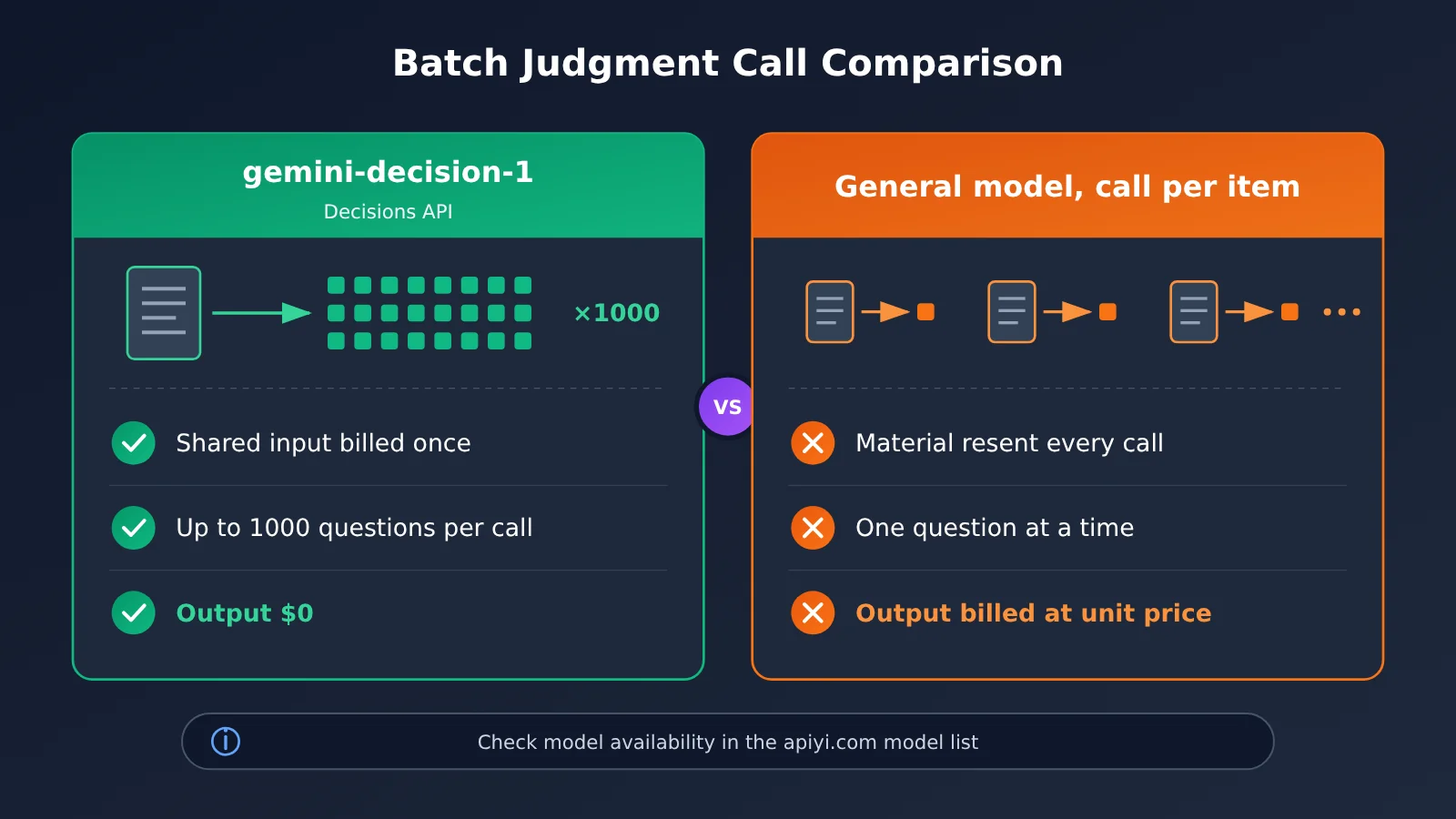
Gemini Decision vs. Calling a General-Purpose Model One Item at a Time
| Dimension | gemini-decision-1 (Decisions API) | General-purpose model, one call per item |
|---|---|---|
| Shared material billing | Billed once | Billed again on every request |
| Questions per request | Up to 1,000 | Usually one, or stitched together via the prompt |
| Output billing | $0 at the official price | Billed at the chosen model’s output rate |
| Input modalities | Text, images, audio, video, PDF | Depends on the specific model |
| Interface | Decisions API; see the official docs for details | OpenAI-compatible chat interface |
| Availability on APIYI | Not listed yet, coming soon | Check the model list |
Impact on the industry
- Dedicated decision models are emerging. Pulling “judgment” out of general chat and pricing it separately suggests batch decision-making is now treated as its own workload type.
- Billing is getting closer to the task itself. Charging for input comprehension and not for output will likely push other vendors to rethink how they price classification and scoring workloads.
- The value of an aggregation platform is switching speed. When a new model launches, whether your routing layer can swap model IDs without code changes matters more to your launch timeline than any single model’s price.
Pre-Integration Checklist for Gemini Decision
| Check | What to do | Why |
|---|---|---|
| Does the ID exist? | Check the platform’s model list | Avoid requesting a model that doesn’t exist |
| Is the price confirmed? | Go by what the platform list shows | Avoid misestimating costs from the official price |
| Is the question count within limits? | Keep each request to 1,000 questions or fewer | Prevent split requests from billing the shared input repeatedly |
| How big is the shared input? | Keep it within roughly 256K tokens | Stay within the official limit |
| Do you have a fallback? | Configure a general-purpose model ID that’s already listed | Keep the service running |
Frequently Asked Questions (FAQ)
Q1: What is Gemini Decision?
Gemini Decision refers to the Gemini Decisions API that Google released on 2026-11-11, along with its model, `gemini-decision-1`. It’s built for batch judgment tasks: a single request can ask up to 1000 questions about one shared piece of material, and it supports text, image, audio, video, and PDF input.
Q2: Is Gemini Decision output really free?
According to Google’s official pricing, `gemini-decision-1` charges $0 for output and $0.10 / 1M tokens for input. The shared input is billed only once, no matter how many questions you ask. The official documentation doesn’t explain why output is priced at 0. One reasonable guess is that decision-style outputs are very short, so most of the cost comes from understanding the input. For prices on other platforms, check that platform’s own price list.
Q3: Can I call gemini-decision-1 through APIYI right now?
Not yet. When we checked the APIYI price list on 2026-11-12, there was no `gemini-decision-1` ID. Model availability and pricing are subject to the model list on apiyi.com, and we’ll add it as soon as we can. Until it’s listed, please don’t put this ID in your requests.
Q4: How should I bridge the gap for routing and scoring before it’s listed?
We suggest picking a general-purpose Gemini model that’s already listed on the platform and making the model ID a configuration item. After you register at APIYI (apiyi.com), you can get test credits and use them to validate judgment accuracy on your own sample set. Once `gemini-decision-1` is listed, you only need to swap the config value to compare results.
Q5: What limitations of Gemini Decision should I watch out for?
A single request supports up to 1000 questions, and the shared input is capped at roughly 256K tokens. If you go over that, you’ll need to split the request, and the shared material gets billed again for each split. For the exact billing rules for the questions themselves, the request structure, and the output format, refer to the official documentation. Also, it’s designed for judgment tasks, so it isn’t a good fit for generating long-form content.
Gemini Decision Key Takeaways
- Release facts: Google released the Gemini Decisions API and
gemini-decision-1on 2026-11-11. - Pricing highlight: Official pricing is $0.10 / 1M input tokens and $0 for output, and shared input is only billed once.
- Batch capability: Up to 1,000 questions per request, with roughly 256K tokens of shared input, supporting five modalities.
- Best-fit scenarios: Routing, classification, moderation, scoring, and other judgment tasks with short outputs and shared material.
- Platform status: APIYI’s price list doesn’t include this ID yet. Check the model list on apiyi.com for the latest, as it will be added soon.
- Rollout advice: Make the model ID configurable, and use an already-listed general-purpose Gemini model as a stopgap until it goes live.
Summary
Gemini Decision boils down to three key points:
- Billing logic: Output is counted as 0 and shared input is billed only once, so the cost is concentrated in input comprehension. That makes it a good fit for high-frequency batch judgments.
- Capability limits: Up to 1,000 questions per request and roughly 256K tokens of shared input, covering text, images, audio, video, and PDF.
- Platform status: As of 2026-11-12,
gemini-decision-1isn’t in the APIYI price list yet, so don’t put a nonexistent ID in your requests.
If your team does routing, judgment, or scoring, the safest move right now is to pull the model ID out into a config and get your workflow and evaluation set running on an already-listed model first. Keep an eye on the model list at APIYI (apiyi.com), and once gemini-decision-1 goes live, you can switch over and validate it through the same unified interface.
📚 References
- Google Official Blog – Gemini Decisions API: Launch announcement
- Link:
blog.google/innovation-and-ai/technology/developers-tools/gemini-decisions-api/ -
Description: Introduces the positioning, input capabilities, and pricing of the Gemini Decisions API and gemini-decision-1
-
Google AI Studio Changelog: Official changelog
- Link:
aistudio.google.com/docs/changelog -
Description: Use it to verify model IDs, release dates, and later version changes
-
APIYI Pricing API: Platform models and pricing
- Link:
api.apiyi.com/api/pricing - Description: gemini-decision-1 wasn’t listed when we checked on 2026-11-12, so go by this endpoint for its availability
Author: APIYI Technical Team
Technical discussion: Feel free to reach out to us on the APIYI homepage. You’ll find more resources in the docs.apiyi.com documentation center.