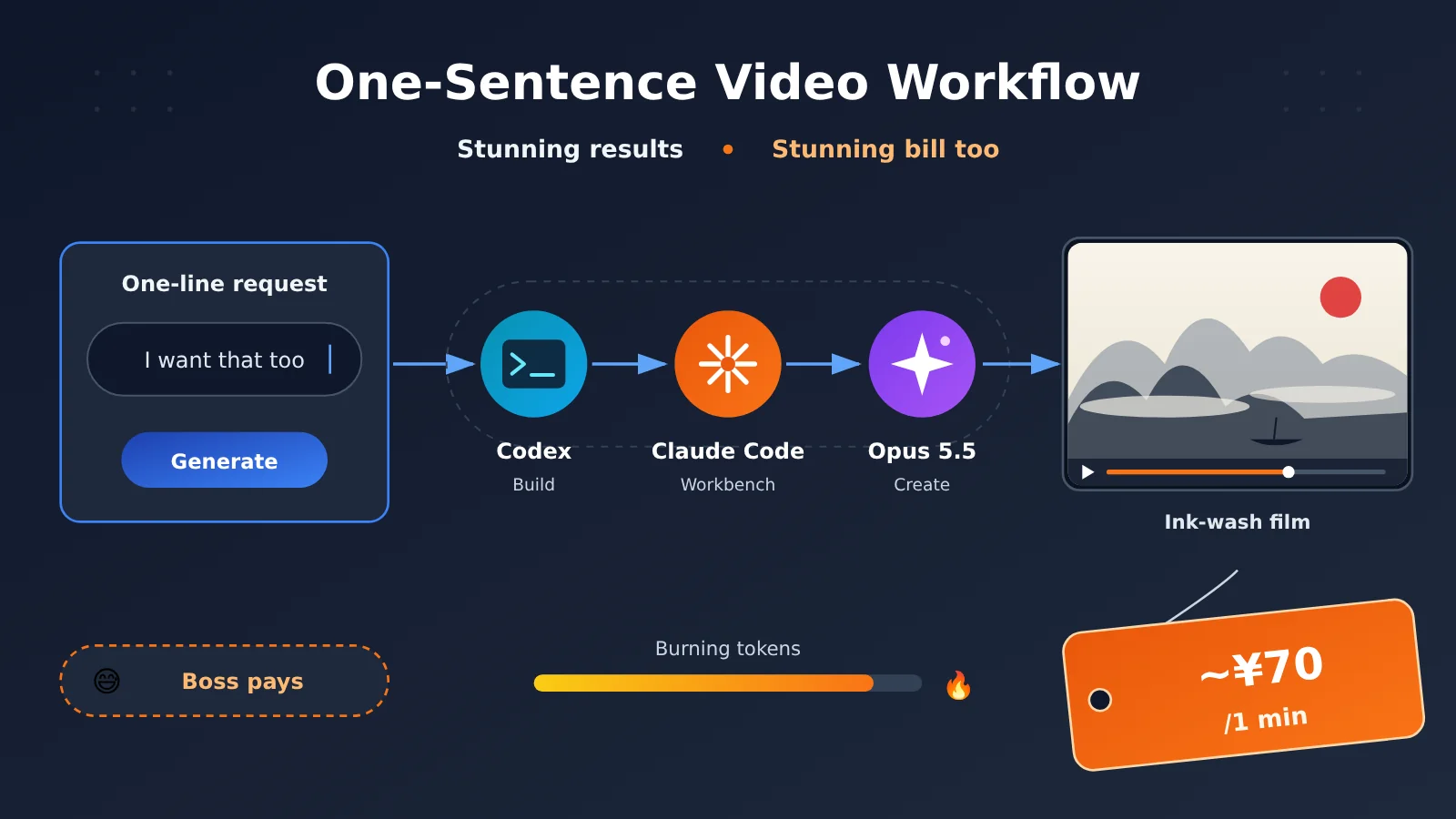
TL;DR: I didn’t write any code. I just gave Codex requirements, approved its actions, and corrected its course, and it built me an Opus 5.5 one-sentence video workflow. The results are genuinely impressive, and the bill is genuinely not cheap.
I did something pretty addictive. I had Codex recreate a video workflow: I type a single request, and Opus 5.5 plans the video, writes the animation code, composes the soundtrack, checks and revises its own work, and finally exports an MP4.
I was thrilled when the finished video came out. Then I looked at the cost. For a video of about 1 minute, my records show a model cost of $9.4943, which comes to roughly 70 RMB. The boss paid for it, though.
Everything below, including the setup process, quota usage, and costs, comes from a single run I actually did, and that includes the real story of Codex going in the wrong direction the first time.
Opus 5.5 Video Workflow Terminology Cheat Sheet (to know)
These terms will come up again and again below. Let’s get the wording straight up front so nothing trips you up halfway through.
| Term | One-line explanation | Role in this workflow |
|---|---|---|
| Agent | An AI assistant that can call tools, check results, and keep pushing a task forward toward a goal | Both Codex and Opus work as Agents |
| Codex | The AI assistant that researched the reference project, handled installation and configuration, and did the debugging | Only involved in the setup phase |
| Claude Code | A working environment that lets Claude read local files, run tools, and finish the production work | The workbench for video production |
| Claude Opus 5.5 | The model that handles planning, writes the visual code, and does the checking and revising | The actual creator of the video |
| Lemo-Opuscar | An open-source code animation project that provides production guides, visual styles, and tools | The foundation of the whole workflow |
| API | The interface that lets programs call a model service | Billed by usage through APIYI this time |
| Token | The unit of measurement a model uses when processing text and other content | Directly determines API cost |
| Frame-by-frame rendering | Generating one still image per point in time, then stringing them together into a continuous animation | How the visuals are generated |
| TTS | Technology that converts text into voiceover | Supported by the system, but the eight videos this time have no narration |
| FFmpeg | A tool that encodes, mixes, and combines visuals and audio into a video | The final compositing step |
01 I Saw an Opus 5.5 Video on Bilibili and Suddenly Wanted to Make One Myself
It started simply enough. A while back I came across a video on Bilibili that someone had made with Opus 5.5. The narrative was clear, the visuals were easy on the eyes, and the overall aesthetic was on point. It wasn’t like those early AI videos, which were just a pile of flashy shots. It was actually trying to explain something.
My first thought was that this format would be great for content marketing and personal branding. If AI can handle the planning, visuals, voiceover, and editing on its own, the barrier to making content drops a lot. That’s especially true for educational and niche professional content, where you need to explain things clearly but don’t want to appear on camera.
Once that idea hit, I couldn’t sit still: if they could do it, I wanted to build my own setup too.
02 All I Said to Codex Was: “I Want What They Have, Get It for Me”
I had no plans to dig into animation engines, rendering pipelines, or audio processing, and I certainly didn’t want to write a whole video system myself. I just handed the goal straight to Codex. What I said was roughly, “I want what they have, get it for me.”
From there, Codex did most of the work:
- Looked up tutorials and read the documentation and source code of reference projects
- Installed dependencies like Node.js, Python, and FFmpeg, and set up the local environment
- Wired together the rendering, audio, subtitle, and checking tools
- Ran tests and fixed errors on its own when they came up
My job was mostly to state requirements, confirm the direction, and click approve whenever it wanted to run a command. Calling it “building” is generous. I was more like a client who doesn’t understand the tech but knows exactly what they want.
Codex Got the Opus 5.5 Video Workflow Wrong the First Time
It didn’t go smoothly. What Codex built the first time was a workbench of “model-generated storyboards plus fixed animation templates,” where Opus could only fill text and parameters into preset templates. It ran, but it boxed in Opus’s creative space so tightly that the output was nothing like what I’d seen on Bilibili.
So I changed my approach. Instead of describing “that good-looking style I want” over and over, I had it work from a case that had already succeeded. Codex went back and looked up Ploto’s production log, picked the open-source project Lemo-Opuscar mentioned there as a base, and that finally put things on the right track.
💡 The biggest takeaway from this: When you’re asking an Agent to do a complex task, giving it a concrete, proven example often works better than explaining over and over what you want.
Setting Up the Opus 5.5 Video Workflow Ate 80% of My Codex Quota First
When the setup was done, I checked and found that Codex had used up about 80% of the quota in that five-hour window on my ChatGPT Plus plan.
03 What Is the Opus 5.5 Video Workflow We Ended Up With?
First, let’s be clear about the three roles. A lot of people see “Codex builds an Opus workflow” and assume two models make the video together. They actually show up at two different stages:
| Role | Responsibility | Stage | Analogy |
|---|---|---|---|
| Codex | Finding tutorials, installing dependencies, configuring the environment, debugging connections | Setup stage only | The renovation crew |
| Claude Code | Reading and writing local files, running commands, calling tools | Video production stage | The studio and equipment |
| Claude Opus 5.5 | Deciding the script, shots, animation, and sound, then reviewing and fixing its own work | Video production stage | Director and lead creator |
The foundation, Lemo-Opuscar, is a style toolkit for “making films with code.” It splits directing methods, technical implementation, and visual style into separate guides, and the Agent creates by following them. The project ships with a library of styles you can pick from, and you can also build your own. It states clearly that these styles are tuned for Claude Opus 5.5, so other models may not give you the same results. The notes in the version I installed locally also mention that a single film usually takes the Agent about 30–60 minutes and burns a fair amount of tokens. I didn’t pay much attention to that line at the time. It only clicked when I saw the bill.
The Opus 5.5 Video Workflow Isn’t “AI Generating Video Directly”
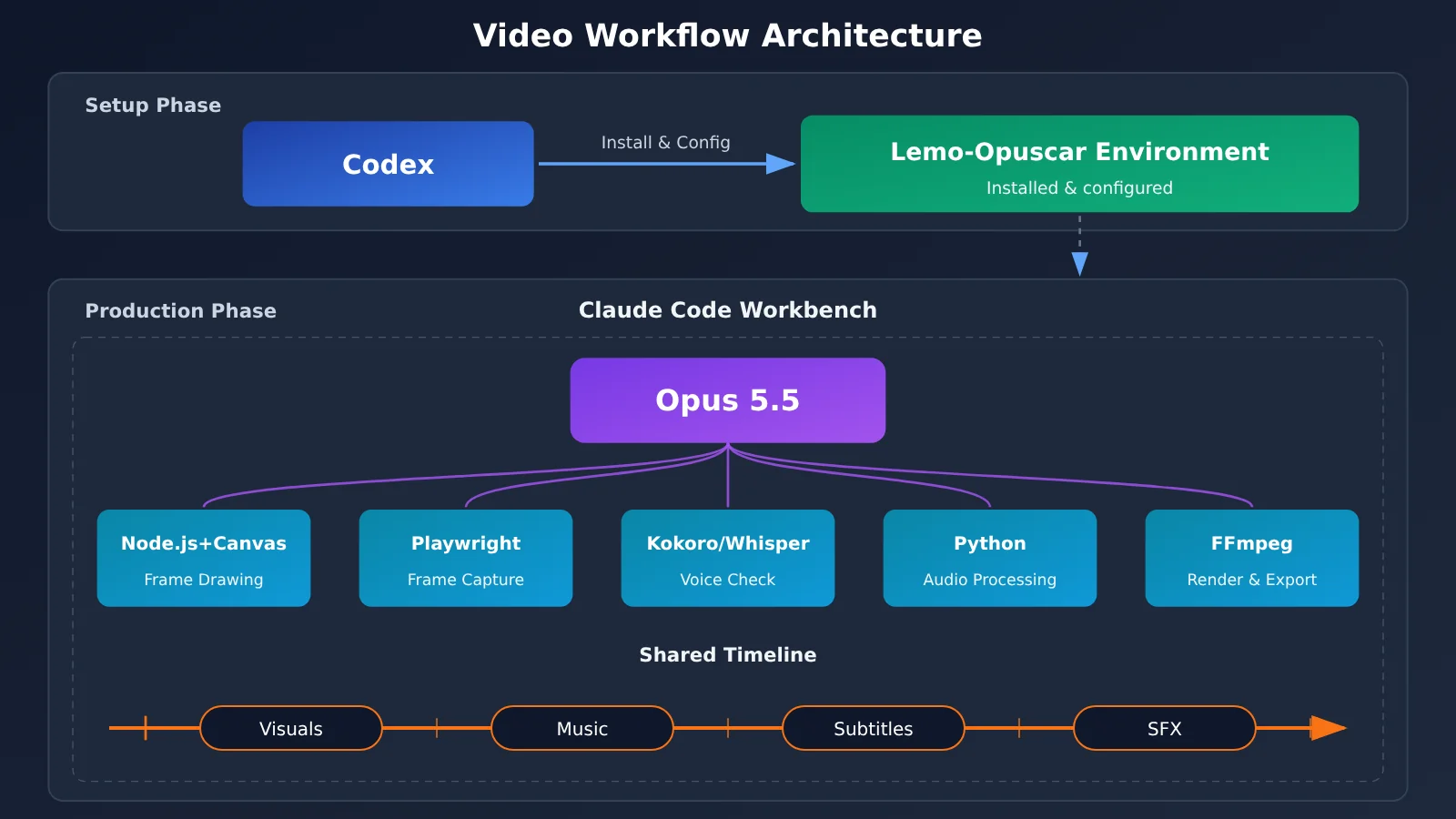
This is the part people misunderstand most. It doesn’t call some AI video model where you type a sentence and get a clip back. According to the project’s technical docs, the films are made with code, with no video generation model and no stock footage. Specifically, Opus writes the visuals and animation code for a web page, the browser takes a screenshot of every frame at each point in time, and finally the frames and audio are combined into a video.
Here’s a quick rundown of the toolchain:
- Node.js + Canvas/WebGL: Runs the visuals code Opus writes and draws the animation over time
- Playwright headless browser: Opens the animation page and captures it frame by frame
- Kokoro: Local Chinese voiceover capability (not used here, since this film has no narration)
- Whisper: When there’s narration, transcribes the voiceover back to text so each line can be checked
- Python: Handles voiceover, validation, sound effects, and music processing
- FFmpeg: Encoding, mixing, and compositing the final video
This approach has one nice benefit: visuals, music, subtitles, and sound effects all share the same timeline, so shot changes can line up with sound events. As for environment requirements, the project needs Node.js 20+, FFmpeg 7+, and Python 3.11+, with a default output of 1920×1080 at 24fps. My actual run used 30fps.
04 After One Sentence, the Opus 5.5 Video Workflow Starts Doing the Work Itself
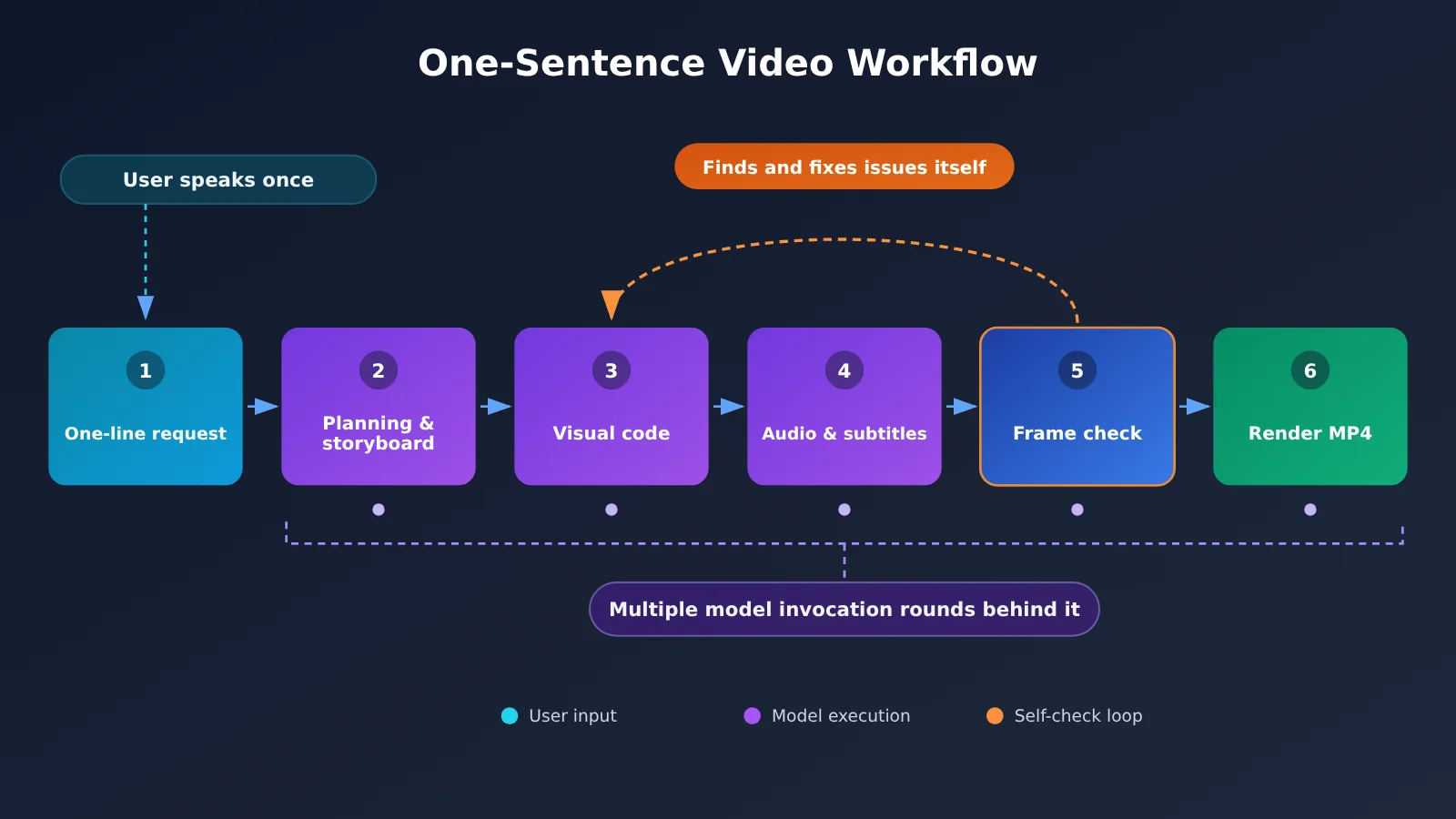
Once it’s set up, it’s simple to use. The whole process goes roughly like this:
- I type one sentence telling Opus what kind of video I want
- Opus plans the video, writes the script, and designs the shots on its own
- Visual production: it writes the animation code and builds the visual effects and camera moves
- Audio production: music, sound effects, and subtitles, plus voiceover when narration is needed
- It samples frames to check the picture and sound, and fixes any problems itself
- It renders frame by frame, then composites and exports the MP4
The voiceover part had a bit of a detour. The original project’s default offline Chinese interface could produce sound, but when I ran the output back through Whisper for recognition the first time, the transcript was far from the original text. Following the Chinese example from the Kokoro engine’s author, Codex added the v1.1 Chinese model and the Misaki Chinese pronunciation frontend. After the adjustment, both Chinese test sentences passed verification, and it didn’t switch to online voiceover either. The system has this capability, but the eight films I made this time didn’t use it.
The final workflow has two entry points:
| Entry Point | Best For | Adjustable Options | How It Runs |
|---|---|---|---|
| Conversational creation | You want to watch and tweak as you go, polishing slowly | Duration, aspect ratio, subtitles, voiceover, style | Multi-turn conversation with Opus |
| One-sentence auto production | Your requirements are clear and you want it to run straight through | Requirement description, cost estimate cap for each run | Opus runs continuously until export |
One thing to be clear about: “one sentence” is only a simplification at the interaction level. Behind the scenes it’s still multiple rounds of Opus calls, tool execution, and repeated revisions, so you don’t save a single token.
05 After Running the Opus 5.5 Video Workflow for Real, I Was a Little Surprised
The first time I actually used it, I picked a fairly tough topic: an introduction to the meaning of the Eight Gates in Qi Men Dun Jia, a traditional Chinese divination system. My requirements were about 1 minute, 1920×1080, 30 fps, and no voiceover. In its execution notes, Opus proposed “calligraphic-inscription-style subtitles plus a guqin soundtrack.” The credits file in the project directory also states that all of the audio was synthesized in code, with no recordings and no human voice.
The finished video genuinely surprised me. The most obvious thing was the Chinese characters: crisp, neat, and far better than I expected. When specialized elements like the palaces, flying stars, and hexagram symbols showed up, I was fully braced for the garbled, scrambled, warped text you’d see in early AI video. None of that happened. The layout was clean.
The aesthetics were solid too. A Chinese ink-wash base, inscription-style subtitles, and guqin music made the whole thing feel minimal and grand, and it suited the subject well. My takeaway wasn’t just “AI can generate visuals.” It felt like the model knew how this kind of content should be drawn.
06 Then I Checked the Cost of the Opus 5.5 Video Workflow: $9.4943 for One Minute
So I went and looked at the cost.
| Cost Item | Stage | Billing Channel | This Time |
|---|---|---|---|
| Setup cost | Codex research, installation, debugging | ChatGPT Plus subscription quota | About 80% of the five-hour quota used at the time |
| Video production cost | Opus 5.5 producing a ~1-minute video | APIYI (apiyi.com) pay-as-you-go billing | $9.4943 by my records (about $9.5) |
At an example exchange rate of roughly ¥7.3 to $1, that comes to about ¥70.
Here’s what I really think: the result is genuinely good, but ¥70 for one minute of video is definitely not cheap if you look at production cost alone. If you finish it, publish it, and it brings no traffic, no followers, and no business return, that money is a loss.
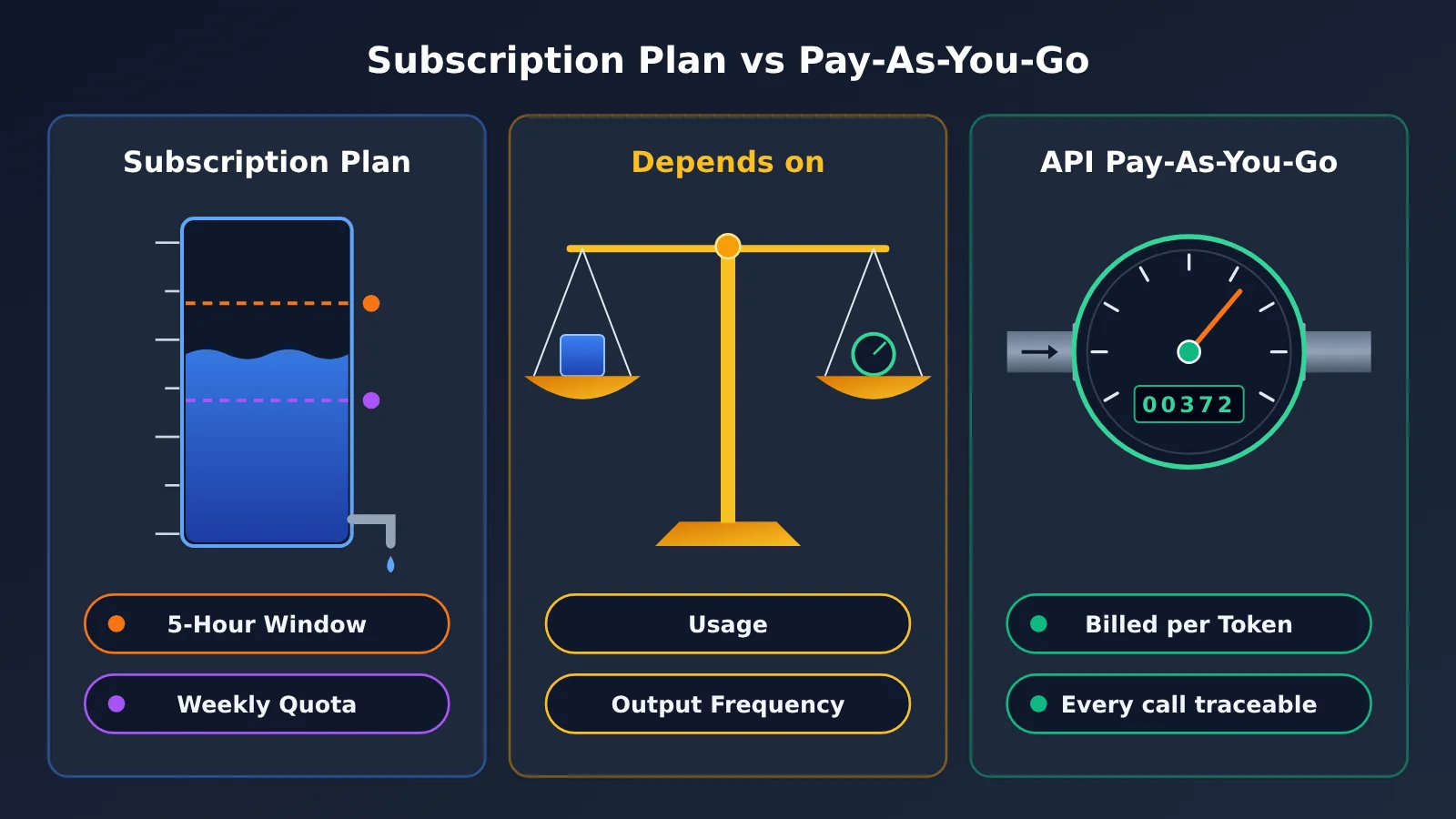
Claude Plans and API Pay-As-You-Go Are Two Different Cost Structures
I went back and checked Anthropic’s official documentation, and the two billing mechanisms really do work differently:
| Comparison | Claude Pro / Max / Ultra Plans | API Pay-As-You-Go |
|---|---|---|
| Billing method | Claude Code usage is included in the subscription | Charged by actual model token usage |
| Usage limits | The web app and Claude Code share the same quota. Pro and Max have a five-hour window and weekly limits | You pay for what you use, with no plan window |
| Cost profile | Fixed monthly fee, a good fit for sustained, high-frequency use | Every charge can be tracked precisely, a good fit for low-frequency use or per-project accounting |
| Common pitfall | Once you hit the limit, you have to wait for the window to reset | If ANTHROPIC_API_KEY is configured in Claude Code, it takes priority and you’re billed through the API |
So you can’t simply say the API is always more expensive than a plan, and you can’t say a plan lets you run unlimited workloads either. A plan may suit you better if you run large workflows continuously, while the upside of the API is that you know exactly what every single call cost. Which one is the better deal depends on your actual usage and how often you produce output, so it’s best to compare them using real data collected over a period of time.
💰 Reconciliation tip: If you go with pay-as-you-go billing, check the usage details in the APIYI apiyi.com console after finishing each video. Also record the topic and the number of revision rounds. After a few videos, you’ll be able to estimate your own per-video cost range.
Want to Test the Waters on the Cheap? Try Opus 5.5’s Planning Skills on Their Own First
If you haven’t decided whether to set up the whole pipeline, you can spend just a little to call Opus 5.5 once by itself, see how well it writes storyboards, and check the token usage at the same time:
from openai import OpenAI

client = OpenAI(
    api_key="YOUR_API_KEY",
    base_url="https://api.apiyi.com/v1"  # APIYI OpenAI-compatible endpoint
)

resp = client.chat.completions.create(
    model="claude-opus-5.5",  # Example name; use the actual name from the APIYI model list
    messages=[{"role": "user", "content": "为一条1分钟的奇门八门科普短片写6个镜头的分镜,水墨风格,无旁白"}],
)
print(resp.choices[0].message.content)
print(resp.usage)  # Input and output token usage for this call
See the full version with usage logging
import json
import time
from openai import OpenAI

client = OpenAI(
    api_key="YOUR_API_KEY",
    base_url="https://api.apiyi.com/v1"
)

LOG_PATH = "usage_log.jsonl"

def ask_with_log(prompt: str, model: str = "claude-opus-5.5", tag: str = "storyboard") -> str:
    """Call the model and append each call's token usage to a log file for easier reconciliation later"""
    resp = client.chat.completions.create(
        model=model,
        messages=[{"role": "user", "content": prompt}],
    )
    usage = resp.usage
    record = {
        "time": time.strftime("%Y-%m-%d %H:%M:%S"),
        "tag": tag,
        "model": model,
        "prompt_tokens": usage.prompt_tokens,
        "completion_tokens": usage.completion_tokens,
    }
    with open(LOG_PATH, "a", encoding="utf-8") as f:
        f.write(json.dumps(record, ensure_ascii=False) + "\n")
    return resp.choices[0].message.content

def summarize(log_path: str = LOG_PATH) -> dict:
    """Sum up cumulative token usage; convert to cost yourself using the actual prices in your console"""
    total_in, total_out = 0, 0
    with open(log_path, encoding="utf-8") as f:
        for line in f:
            r = json.loads(line)
            total_in += r["prompt_tokens"]
            total_out += r["completion_tokens"]
    return {"input_tokens": total_in, "output_tokens": total_out}

if __name__ == "__main__":
    print(ask_with_log("为一条1分钟的奇门八门短片设计镜头节奏和配乐思路"))
    print(summarize())
🚀 Quick test run: We suggest using the free trial credits for new users at APIYI (apiyi.com) to run a few storyboard tests first. Once you’re sure Opus 5.5’s creative style suits your taste, you can decide whether to invest in the full workflow.
07 I’m Happy With the Results, But the Opus 5.5 Video Workflow Math Needs a Second Look
This experiment showed me firsthand how far an Agent video workflow can go. For content operations, personal IP building, educational videos, and professional niche content, this kind of tool is worth digging into. But “technically possible” and “commercially worthwhile” are two different questions.
If these videos can eventually bring in traffic, followers, and conversions, then 70 yuan is a reasonable production investment. If you’re just making a one-minute video to watch yourself, 70 yuan is clearly not worth it. One more heads-up: Lemo-Opuscar’s code and documentation are MIT-licensed, while the sample films and still frames are CC BY 4.0, and videos made with it belong to the creator. But third-party assets, including some of the voiceovers, come with their own licenses, so it’s best to use your own materials for commercial work and check each one individually.
What I really got out of this was running a complete workflow end to end myself and figuring out exactly what it costs. This round was paid for in real money (though it was the boss who footed the bill). The results really are good, and the money really was spent. If you want to try it, first figure out whether you’re on a subscription plan quota or pay-as-you-go API billing. Otherwise the bill will show up before the video has earned any traffic.
Frequently Asked Questions (FAQ)
Q1: What is the Opus 5.5 one-sentence video workflow?
It’s a video production pipeline built on the open-source project Lemo-Opuscar, running inside Claude Code and driven creatively by Opus 5.5. You make your request once, and Opus handles the planning, animation code, sound, review and revisions, and export on its own.
Q2: How is it different from an AI video generation model?
AI video models generate pixels directly. This workflow has Opus write animation code, renders it frame by frame in a browser, and then stitches everything together with FFmpeg. That’s why the text stays sharp and you keep control over the visuals, which makes it a good fit for explainer-style content. It isn’t good at footage with a real-camera look and feel.
Q3: Does a 1-minute video always cost 70 RMB?
Not necessarily. The 70 RMB figure is a rough conversion of my Qimen Eight Gates video at an exchange rate of about 7.3. The original record was $9.4943. Topic complexity, the number of revision rounds, and context length all affect token consumption. I’d recommend checking per-call usage in the APIYI apiyi.com console to work out your own cost range.
Q4: Would switching to a Claude subscription plan be cheaper?
It depends on how often you use it. A plan means a fixed monthly fee plus usage windows, so it may work out cheaper if you use it heavily and consistently. But there are five-hour and weekly limits, so it isn’t unlimited. If you only make a few videos now and then and want to track costs per project, pay-as-you-go API billing is clearer. Keep in mind that if ANTHROPIC_API_KEY is configured in Claude Code, it will use API billing first.
Q5: How can I try Opus 5.5 through the API at low cost first?
You can follow these steps:
1. Sign up at APIYI apiyi.com to get your API key and free test credits
2. Set the base_url in this article’s code to `https://api.apiyi.com/v1`
3. Test only the storyboard and script first, check the results and token usage, then decide whether to set up the full workflow
Q6: What are the limitations of this workflow?
– **Time**: A single video usually takes the agent several dozen minutes to run
– **Model lock-in**: The style is tuned for Opus 5.5, so other models may not give the same results
– **Setup barrier**: It has quite a few dependencies, and even with Codex’s help I took a detour this time
– **Professional accuracy**: Good-looking visuals don’t guarantee the professional content is correct, so you’ll need to review it yourself
Key Takeaways: The Opus 5.5 Video Workflow
- Keep the roles straight: Codex does the building, Claude Code is the workbench, and Opus 5.5 handles the creative work
- It’s not a video model: Every frame is rendered by code, so text and symbols stay sharp and controllable
- Examples beat explanations: After Codex built the wrong thing, only a successful example got it back on track
- Don’t mix up the two costs: The 80% figure is your Codex subscription quota, while the $9.4943 is the API invocation fee
- 70 RMB isn’t a price tag: It’s just the cost of this one video, and the exchange rate is only an example
- Start small: You can use free credits on APIYI (apiyi.com) to test Opus’s storyboarding ability first
Conclusion
Here’s what I took away from this Opus 5.5 video workflow experiment:
- The capability is real: The Chinese characters, house positions, celestial bodies, hexagram imagery, and overall ink-wash aesthetic all exceeded my expectations
- So is the cost: A video of about one minute costs roughly 70 RMB, and that’s on top of the big chunk of Codex quota eaten up during setup. It isn’t cheap
- Whether it’s worth it depends on the return: If it brings in traffic, followers, and conversions, it’s an investment. If it doesn’t, it’s a loss
Just because you can build it technically doesn’t mean it makes business sense. Figure out what the video needs to earn you first, then choose between a subscription plan and pay-as-you-go. If you’d like to validate things at a low barrier to entry, you can use free credits on APIYI (apiyi.com) to test Opus 5.5’s planning ability on its own. Once you’re happy with the results, run the whole pipeline.
📚 References
- Lemo-Opuscar Project Repository: A style toolbox for generating videos with code
- Link:
github.com/lemomo-ai/lemo-opuscar -
Description: Includes three types of guides (directing, technique, and style) along with licensing information
-
Lemo-Opuscar Technical Documentation TECHNIQUE.md: An explanation of how the videos are produced
- Link:
github.com/lemomo-ai/lemo-opuscar/blob/main/TECHNIQUE.md -
Description: Covers code-driven visuals, frame-by-frame rendering, voiceover verification, subtitles, and the FFmpeg compositing workflow
-
Anthropic Help Center: Claude Code and the Pro, Max, and Ultra plans
- Link:
support.claude.com/en/articles/11145838-use-claude-code-with-your-pro-max-or-ultra-plan -
Description: How subscription quotas differ from API billing, and how ANTHROPIC_API_KEY takes priority
-
Ploto Production Notes: Lessons from making a long video with AI
- Link:
ploto.me/posts/how-i-made-a-long-video-with-ai - Description: The source of the success story Codex referenced when it corrected the direction of the setup
Author: APIYI Technical Team
Get in touch: Reach out to us on the APIYI website homepage. For more integration resources, visit the docs.apiyi.com documentation center.