Author’s note: When an image API returns HTTP 451 with the error code image_safety, the image being filtered is the one that was generated—not your API key being rejected. Based on APIYI’s documentation and retests, this article explains how 451 differs from 401 and 429, what you should change, and why you shouldn’t keep retrying.
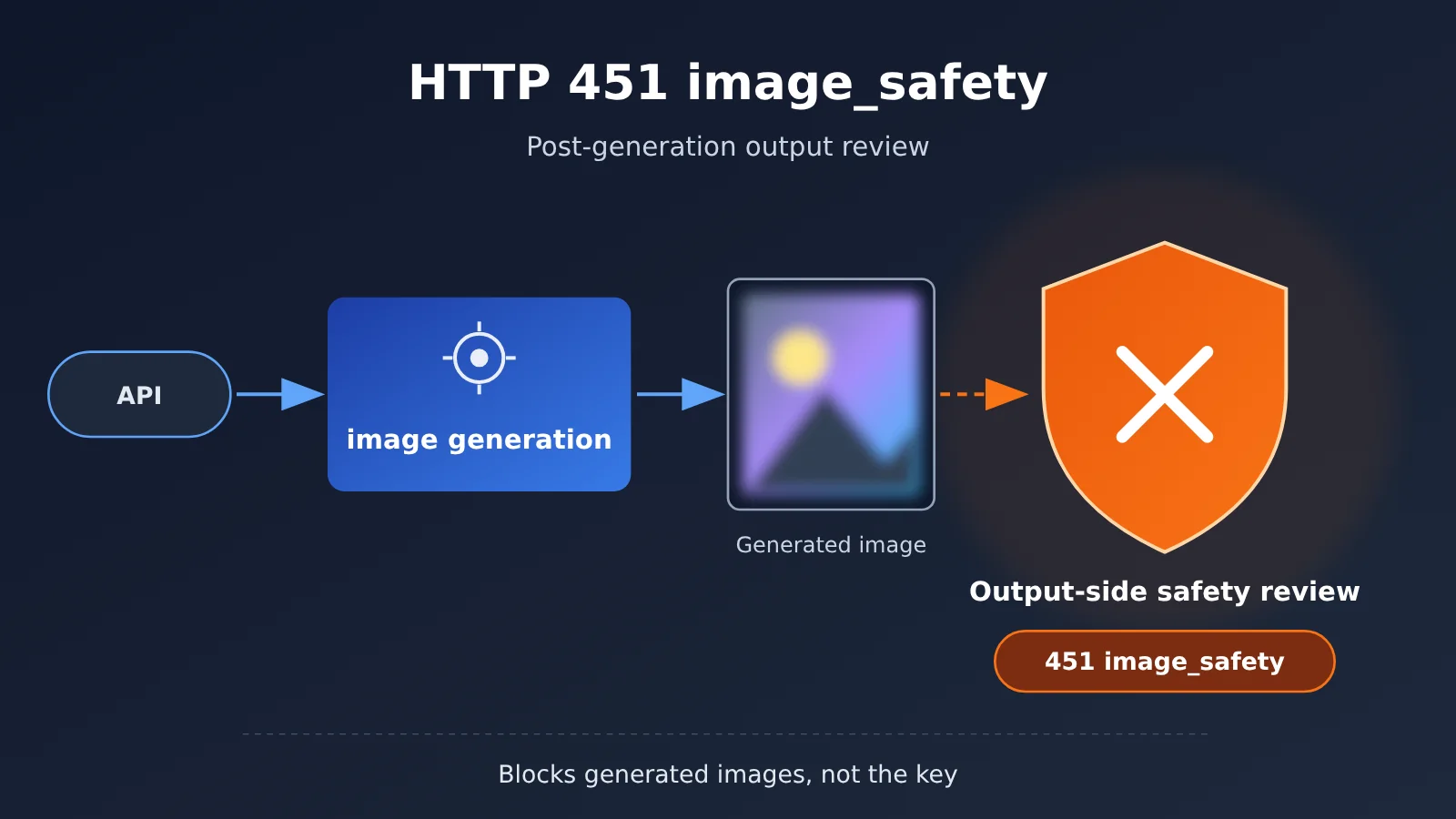
When calling an image API, you might suddenly get HTTP 451 with error.code set to image_safety. Many people’s first thought is that their API key has expired, they’re out of credits, or their prompt contains a sensitive word. So they switch keys, add funds, or keep retrying—only to get the same failure. Here’s the key point: 451 image_safety filters the generated image, and the review happens after image generation. That means you should focus on the image description, not your account.
This isn’t a generic “content safety explainer.” The information below comes from APIYI’s documentation on HTTP 451 and its published anonymized retests. No test data has been invented for this article.
What you’ll learn: In one minute, you’ll be able to tell 451 apart from 401 and 429, then get your request to generate an image again by changing one prompt variable at a time.
Key Takeaways: Image Generation Returns 451 image_safety
Start with the most important points. They’re all based on the error message and documentation, so there’s no need to guess.
| Key point | Explanation | Why it matters |
|---|---|---|
| The output image is being reviewed | The message says, “The generated image was filtered by the safety policy.” | You can stop suspecting your API key or balance. |
| The review happens after generation | The API may generate an image first, then run a safety check on the output. If it fails, the image isn’t returned. | This explains why a prompt that “looks fine” can still be blocked. |
| It doesn’t necessarily mean the input violated a rule | A failed post-generation review doesn’t mean the prompt or reference image contains an explicitly prohibited term. | You don’t need to broadly remove words or replace the reference image. |
| Change the image content | Clearly describing visual details such as clothing and composition is more effective than adding more negative prompts. | Make targeted changes and avoid unnecessary trial and error. |
| Don’t retry the exact same request | If the same combination keeps failing, another attempt will most likely return 451 too. | Save time and API costs. |
First, identify the error: How 451 image_safety differs from 401 and 429
When you get an error, first check the status code and error.code instead of changing your code right away. Here’s how the APIYI documentation describes 451 (it’s covered in the FAQ and updates in the apiyi.com documentation center): the response is HTTP 451, error.code is image_safety, and the message is The generated image was filtered by the safety policy. The key phrase is “generated image,” which means the image has already been generated and was then filtered by the safety policy.
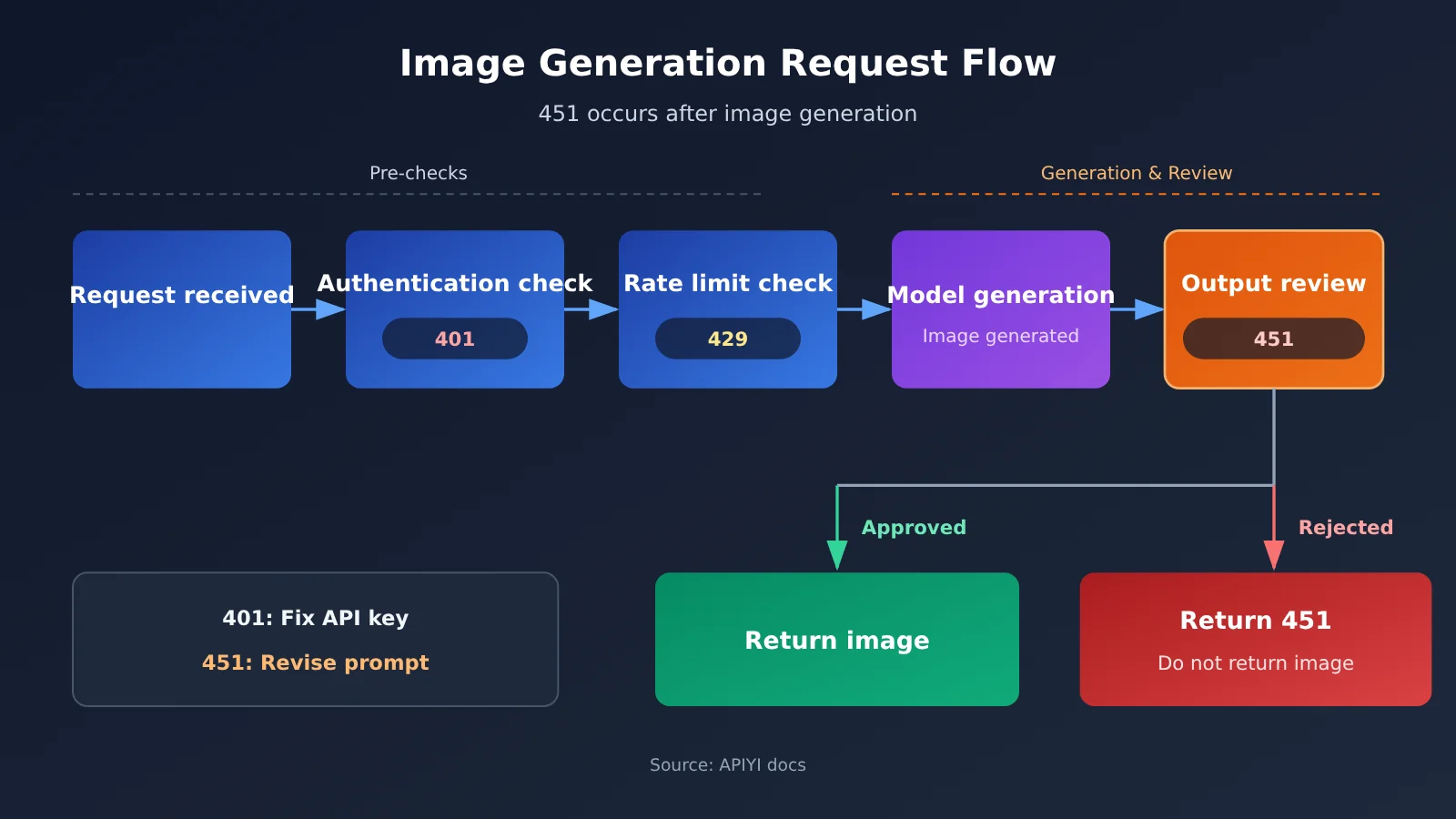
This is entirely different from authentication or rate limiting. A 401 usually means the request failed identity verification before reaching the model. A 429 means requests are coming too frequently or the channel is busy. Balance-related errors are about billing. None of these has to do with “what was drawn”; a 451 is specifically about “what was drawn.”
| Error | Common meaning | When it occurs | Correct response | Is retrying the exact same request appropriate? |
|---|---|---|---|---|
HTTP 451 image_safety |
The generated image failed the output-side safety review. | After image generation | Change the visual description and troubleshoot one variable at a time. | No. Don’t keep retrying the same combination. |
| HTTP 401 | The API key is invalid or wasn’t passed correctly. | At the request entry point | Check the API key and request headers. | No. Retrying won’t help if the key is wrong. |
| HTTP 429 | Rate limiting or a busy channel. | At the request entry point or while queued | Retry with backoff and switch channels if needed. | Yes, following a backoff strategy. |
| Balance-related error | Insufficient quota. | During billing validation | Add funds or adjust the quota. | No. |
One thing to keep in mind: 451 and 401 shouldn’t share the same retry logic. For a 401, fix the API key configuration. For a 451, change the prompt. Putting both into a generic “retry three times on failure” branch will only make troubleshooting more confusing.
Why Does 451 image_safety Appear Only After Image Generation?
The documentation calls this mechanism post-generation moderation, also known as output-side moderation. The flow is straightforward: the request passes authentication, the model generates an image based on the prompt and reference image, and the system then runs a safety check on that image. If it doesn’t pass, the image isn’t returned, and the system responds with a 451 error.
That’s why you might find that a request gets blocked even though the prompt doesn’t contain a single sensitive word. The issue isn’t any one word; it’s that the combination of conditions led the model to generate an image that triggered the filter. Once you understand this, troubleshooting shifts from “finding prohibited words” to “controlling the final image.”
Interpreting the 451 image_safety Documentation Retest
APIYI’s documentation reports an anonymized retest using the gpt-image-2.5-sunburst-vip model. The scenario combines a character reference image with a character-sheet request: a close-up of the face, plus full-body front, side, and back views on a white background. All the data below comes from the documentation retest; this article only interprets the results.
| Retest combination in the documentation | Result | Time | Notes |
|---|---|---|---|
| Original prompt + original reference image | 3/3 failed | 81.8–95.9 seconds | Baseline group; consistently returned 451 |
| Same reference image, changed to a half-body portrait in neutral everyday clothing | 1/1 succeeded | 35.7 seconds | Passed after removing the full-body views |
| Original prompt, reference image removed, switched to the text-to-image endpoint | 1/1 succeeded | 29.1 seconds | Passed without the reference image’s character features |
| Added only “fully clothed, opaque clothing, and no sexualization” | 1/1 still returned 451 | 216.8 seconds | Negative phrasing didn’t help |
| Explicitly specified an adult character, high-neck long-sleeved top, pants, and sneakers | 3/3 succeeded | 65.1–238.6 seconds | Consistently passed after the clothing was described positively |
What the documentation retest suggests about how 451 image_safety is triggered
The second and third groups are the most noteworthy: removing either the reference image’s character features or the full-body views was enough for the request to generate an image. Based on this, the documentation favors the explanation that the generated image triggered a filter when the reference image’s character features were combined with full-body views.
The documentation also makes clear what you can’t conclude: you can’t say the reference image violated any rules, or that a particular word was the trigger. This distinction matters. Many developers see a 451 and start swapping out the reference image or removing lots of words, only to discard details the image actually needs.
Why negative phrasing didn’t fix 451 image_safety
The fourth group only added “fully clothed, opaque clothing, and no sexualization,” but still returned 451. The fifth group switched to specific, positive descriptions: an adult character, a high-neck long-sleeved top, pants, and sneakers. All three attempts succeeded.
The reason is straightforward. Negative phrasing only tells the model what not to create; it doesn’t tell it what to create, so the final image is still unpredictable. Positive descriptions specify the top, bottoms, and shoes, making the result easier to control—and the output review easier to pass.
The documentation also cautions that generation time is only a secondary reference and can’t, by itself, tell you at which stage a review took place. The successful and failed runs had overlapping time ranges, so avoid logic like “if it takes more than X seconds, the request was blocked by review.”
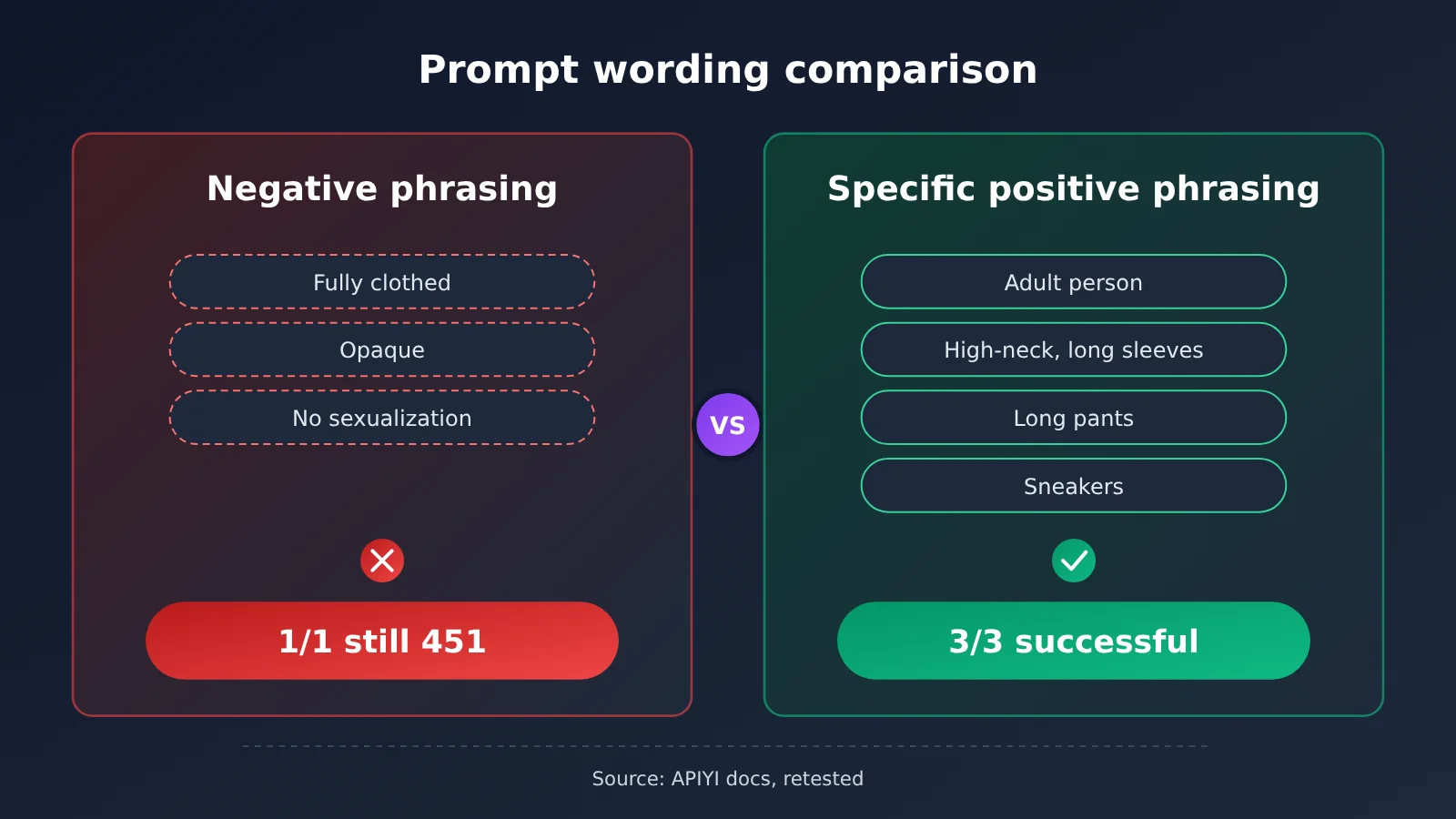
Comparison note: The data in the table and comparison graphic above comes from the APIYI documentation retest. You can find the original in the image output safety review FAQ in the documentation center at apiyi.com and compare it with your own errors.
Quick Troubleshooting: Image Generation Returns 451 image_safety
Next, Verify the Model ID: Make Sure You’re Calling the Correct gpt-image Model
Once you’ve confirmed the 451 error, the next step is to check the model ID. The documentation’s retest used gpt-image-2.5-sunburst-vip. To see which specific models are available in the gpt-image series and what they’re called, check the APIYI model list in the apiyi.com console.
There are two reasons to verify the model ID. First, keep the model unchanged while troubleshooting; otherwise, you won’t be able to tell which variable made a difference. Second, this helps prevent a typo in the model name from being mistaken for a moderation issue. An incorrect model name usually returns a different error, not image_safety.
451 image_safety: Request Parameters for Troubleshooting
This article skips the lengthy code and lists only the parameters you should keep fixed during troubleshooting. The endpoint uses the OpenAI-compatible format. Set base_url to https://api.apiyi.com/v1, and replace the SDK’s api_key with your own key.
| Parameter | Example value | Can it be changed during troubleshooting? |
|---|---|---|
base_url |
https://api.apiyi.com/v1 |
No |
model |
Use the model listed by APIYI, such as gpt-image-2.5-sunburst-vip, which was used to reproduce the issue in the docs |
No |
| Endpoint | Image editing (with a reference image) or text-to-image | No, unless you’re specifically testing the effect of a reference image |
| Reference image | The original reference image | No |
| Size, quantity, and other parameters | Keep the original values | No |
prompt |
The original prompt | Change only one variable at a time |
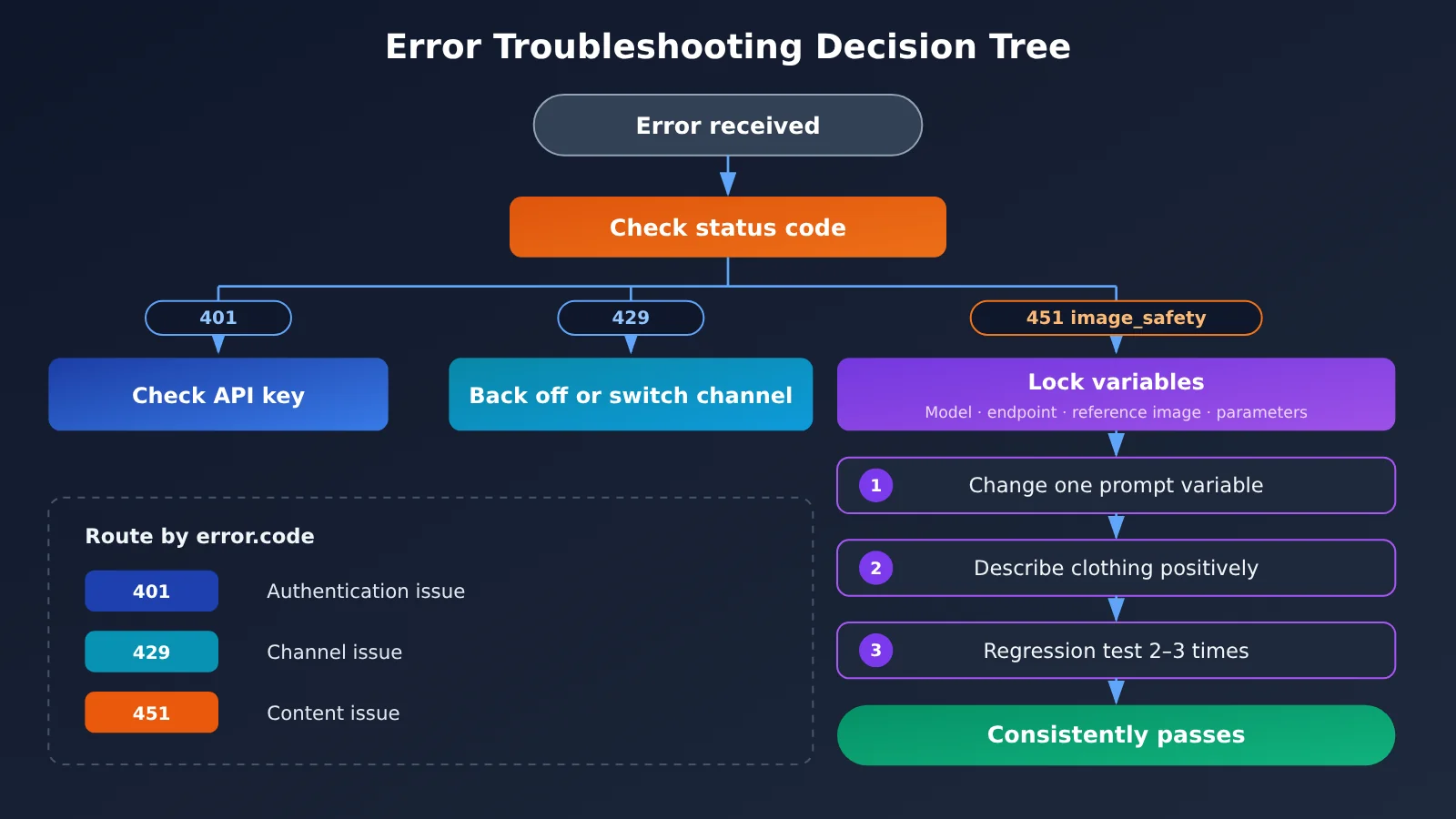
At the code level, it’s a good idea to add a separate branch for 451 responses: read the response status code and error.code. If the status is 451 and the code is image_safety, log the prompt used for that request and stop automatic retries. Then move to a manual or rule-based prompt revision workflow. Handle 401 responses through the API key check branch and 429 responses through the exponential backoff retry branch. Keep these three paths separate.
451 image_safety: Single-Variable Troubleshooting Steps
The troubleshooting method in the docs can be organized as follows:
- Keep all other conditions fixed: Leave the model, endpoint, reference image, and parameters unchanged. Only edit the prompt.
- Change one variable at a time: For example, change only the clothing or the number of views. Don’t change three things at once.
- Use positive descriptions instead of negative statements: Describe the top, bottoms, and shoes clearly—for example, “a long-sleeved turtleneck, trousers, and sneakers.” If needed, specify “an adult.”
- Repeat the test 2 to 3 times: One successful run doesn’t mean the result is stable. The combination that was stable in the docs succeeded 3/3 times.
- Stop retrying if the original combination keeps failing: If the baseline fails 3/3 times, retrying it unchanged won’t help.
- Break up the combination only when you need to isolate the cause: Test “remove the full-body multi-view” and “remove the reference image” separately to find out which combination triggers the filter.
🚀 Quick start: If you’d like to reproduce and validate the issue in a clean environment first, get free testing credits from APIYI at apiyi.com. Use the same key to keep the model and parameters fixed while comparing one variable at a time. Once validation is complete, you can integrate it into your production workflow.
451 image_safety Prompt Rewriting Examples
Here are some ways to rewrite prompts when retesting according to the documentation. Feel free to adapt them to your use case.
| Rewrite direction | Ineffective wording | Recommended wording |
|---|---|---|
| Clothing | Don’t make the outfit revealing; keep it fully covered | High-neck long-sleeve top, pants, and sneakers |
| Person | A model | Clearly state that the person is an adult |
| View | Generate a face close-up and full-body front, side, and back views all at once | Start with a half-body portrait, or generate each view in stages |
| Style | Don’t make it look sexy | Neutral everyday clothing and a natural standing pose |
The key is to reduce ambiguity. The more specific the description, the less room the model has to improvise—and the less likely the generated image is to be filtered.
Frequently Asked Questions (FAQ)
Q1: What does 451 image_safety mean?
It means the image was generated, but the output didn’t pass the safety review. The API therefore returns HTTP 451 instead of the image, with `error.code` set to `image_safety`. This is a post-generation review, also known as output-side moderation.
Q2: What’s the difference between 451 image_safety and 401? Should I retry both?
A 401 occurs at the request entry point and is related to whether the API key is valid. A 451 occurs after image generation and is related to the image content. They shouldn’t share the same retry logic: fix the API key configuration for a 401, and revise the image description for a 451. Retrying the unchanged request won’t help with either.
Q3: How can I tell 451 image_safety and 429 apart?
A 429 means you’ve hit a rate limit or the channel is busy. Retrying after a delay will usually work, and you can switch channels if needed. A 451 means the content was filtered; retrying the same combination will continue to fail. Check `error.code` to tell them apart: if it’s `image_safety`, treat it as a content issue.
Q4: Does receiving 451 image_safety mean my reference image violates the rules?
You can’t conclude that. In the tests documented here, the same reference image worked after the prompt was changed to depict a half-body portrait in neutral everyday clothing. The findings suggest that the generated image may have triggered the filter when the reference image’s subject features were combined with a full-body, multi-view composition. They don’t indicate that the reference image itself violated the rules, nor do they establish that any particular word was the trigger.
Q5: How can I confirm which gpt-image model I’m using and reproduce a 451 error?
We recommend following these steps:
1. Register at APIYI (apiyi.com) to get an API key and free testing quota.
2. Check the model list to confirm the exact model ID for the gpt-image series.
3. Set `base_url` to `https://api.apiyi.com/v1`, keep the model and parameters fixed, and follow the steps in this article to troubleshoot one variable at a time.
Q6: Can I tell whether a request was blocked by moderation based on how long it took?
We don’t recommend it. The documentation explicitly says that duration can only be used as a supporting signal; it can’t determine the moderation stage on its own. In the tests, successful and failed requests had overlapping duration ranges, so using a duration threshold in your logic can easily lead to false conclusions.
Q7: If my prompt worked once after I changed it, is it ready for production?
Not yet. The documentation recommends running two or three regression tests; a single successful attempt isn’t reliable. The stable combinations in the tests succeeded 3 out of 3 times. We recommend using the same standard for acceptance testing before going live.
451 image_safety Key Takeaways
- What’s being reviewed: The 451
image_safetyfilter checks the generated image, not your API key. - Check the error code first: 451, 401, and 429 indicate content review, authentication, and rate limiting, respectively. Each requires a different response.
- Don’t use the same retry strategy for every error: Fix your API key for 401, retry with backoff for 429, and revise the image description for 451.
- Troubleshoot one variable at a time: Keep the model, endpoint, reference image, and parameters fixed, and change just one part of the prompt per test.
- Positive descriptions work better: Clearly describe the top, bottoms, and shoes. This is more reliable than adding negative instructions.
- Run regression tests: Test your revised prompt 2 to 3 times, and deploy it only once it passes consistently.
- Getting started: Check the APIYI model list for model IDs, then use the free quota to run comparison tests.
Summary
Key points to remember when image generation returns a 451 image_safety error:
- Identify the issue: This is output-side content review. It flags the generated image and isn’t related to your API key, balance, or rate limits.
- Handle errors separately: Use the status code and
error.codeto distinguish 451 from 401 and 429. Don’t apply the same retry strategy to all three. - Revise your prompt: Keep other variables fixed. Replace negative instructions with specific, positive descriptions of clothing and composition, then run 2 to 3 regression tests.
If you get a 451, don’t rush to change your API key. Try describing the image more specifically instead. We recommend using APIYI at apiyi.com with the same API key and a fixed model to run controlled comparisons and quickly find a prompt that generates images reliably.
📚 References
- APIYI FAQ: Image Output Safety Review: Definition of and troubleshooting steps for
451 image_safety - Link:
docs.apiyi.com/faq/image-output-safety-review.md -
Details: Covers response formats, post-generation review, and recommendations for troubleshooting one variable at a time
-
APIYI Update: Image Output Safety Review (2026-11): Documentation retest record
- Link:
docs.apiyi.com/live/2026-11/image-output-safety-review.md - Details: Includes anonymized retesting and conclusions with limitations for
gpt-image-2.5-sunburst-vip
Author: APIYI Technical Team
Technical inquiries: Feel free to contact us from the APIYI homepage at apiyi.com. For more information about image API error codes, see the docs center at docs.apiyi.com.