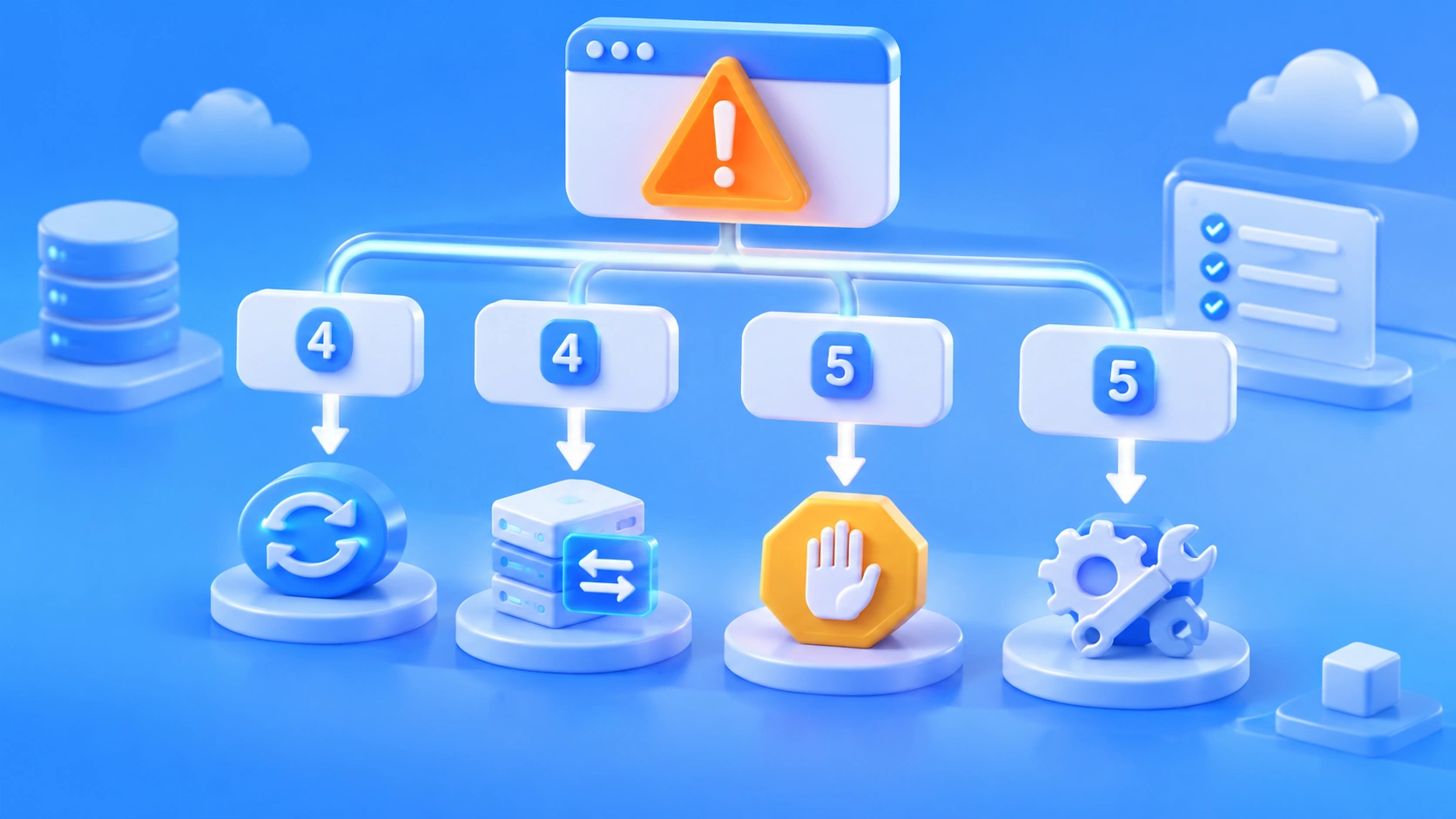
Author’s note: Triage model API errors by status code: when to retry, when to switch to a fallback model, and when to stop and fix the configuration. Includes an error-code triage table, a fallback-model checklist, and a launch checklist.
When a model API call fails, identify the type of error before deciding what to do. Most 4xx errors indicate a problem with the request or configuration, and retrying won’t fix it. For 5xx errors, 529 errors, and timeouts, use a limited number of retries; if those still fail, switch to a fallback model. Don’t automatically retry requests without an idempotency guarantee. Retrying isn’t the default, and switching models won’t solve everything. Many production incidents aren’t caused by a model outage at all: error-handling logic turns a minor failure into duplicate charges, duplicate database writes, and rate limiting across the entire pipeline.
This isn’t a translated error-code dictionary. It’s for developers who’ve already integrated model APIs into production or near-production environments, with a focus on avoiding a bad situation worse when something goes wrong. You’ll get an error-code triage table, a retry and fallback strategy, a fallback-model capability checklist, and a practical pre-launch checklist. The article comes down to one rule: Fix 4xx errors first, consider retries for 5xx errors, and stop before retrying non-idempotent requests.
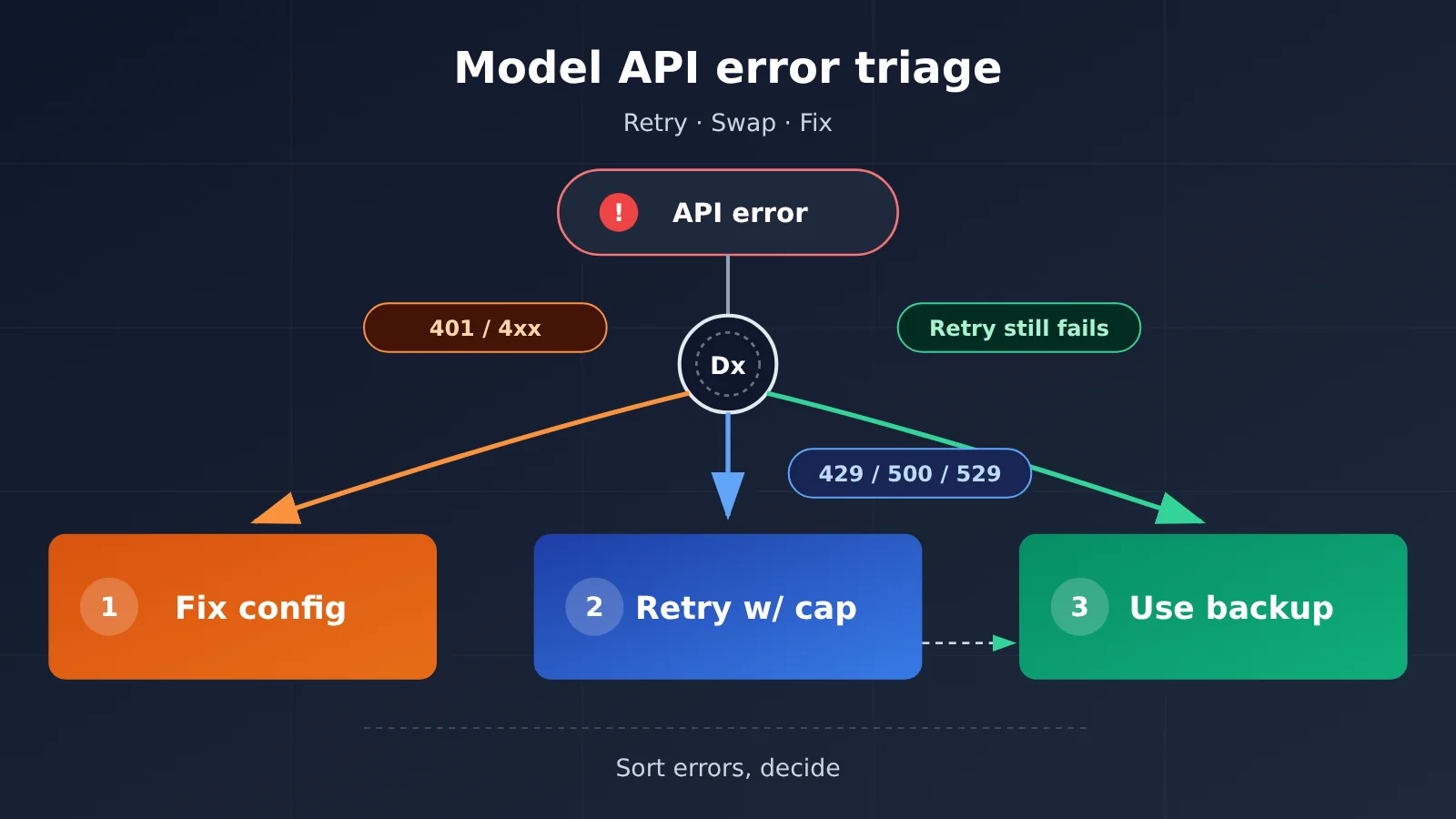
Triage Model API Errors in 5 Categories: Classify First, Then Retry or Switch
Here’s the short version: model API errors fall into five categories, each with a default response. Classify the error code first, and the retry and switching logic becomes much easier to manage.
| Error category | Typical status codes | Where to look for the cause | Default action |
|---|---|---|---|
| Request error | 400, 404, 409, 422 |
Your request body, parameters, model ID, or endpoint | Don’t retry; fix the request |
| Authentication or authorization error | 401, 403 |
API key, headers, permissions, region, or policy | Don’t retry; check the API key and permissions |
| Quota or rate limit | 402, 429 |
Balance, concurrency, rate, or model quota | Stop on 402; for 429, check the error body, then back off or switch |
| Upstream failure | 500, 502, 503, 529 |
Gateway, upstream service, or overload | Retry a limited number of times, then switch if retries fail |
| Timeout or stream interruption | 408, 504, network timeout, stream disconnection |
Connection, long output, or slow upstream response | First check whether the request has already been executed or billed; retry only if it’s idempotent |
The Key to Triage: Distinguishing “Retry” from “Switch”
A retry sends the request again using the same model and route. It’s useful for temporary glitches. Switching means changing the model or route, which helps when an upstream service remains unavailable. Each has a different cost: retries add latency and may result in duplicate charges, while switching can change output quality, tool-calling compatibility, and cost.
The triage sequence has three steps: identify the error category, determine whether the request is idempotent, and then decide whether to retry, switch, or stop. Skipping the second step is especially risky: executing a tool call twice can have consequences beyond just spending a little extra money.
Why “Retry Everything” Makes Model API Errors Worse
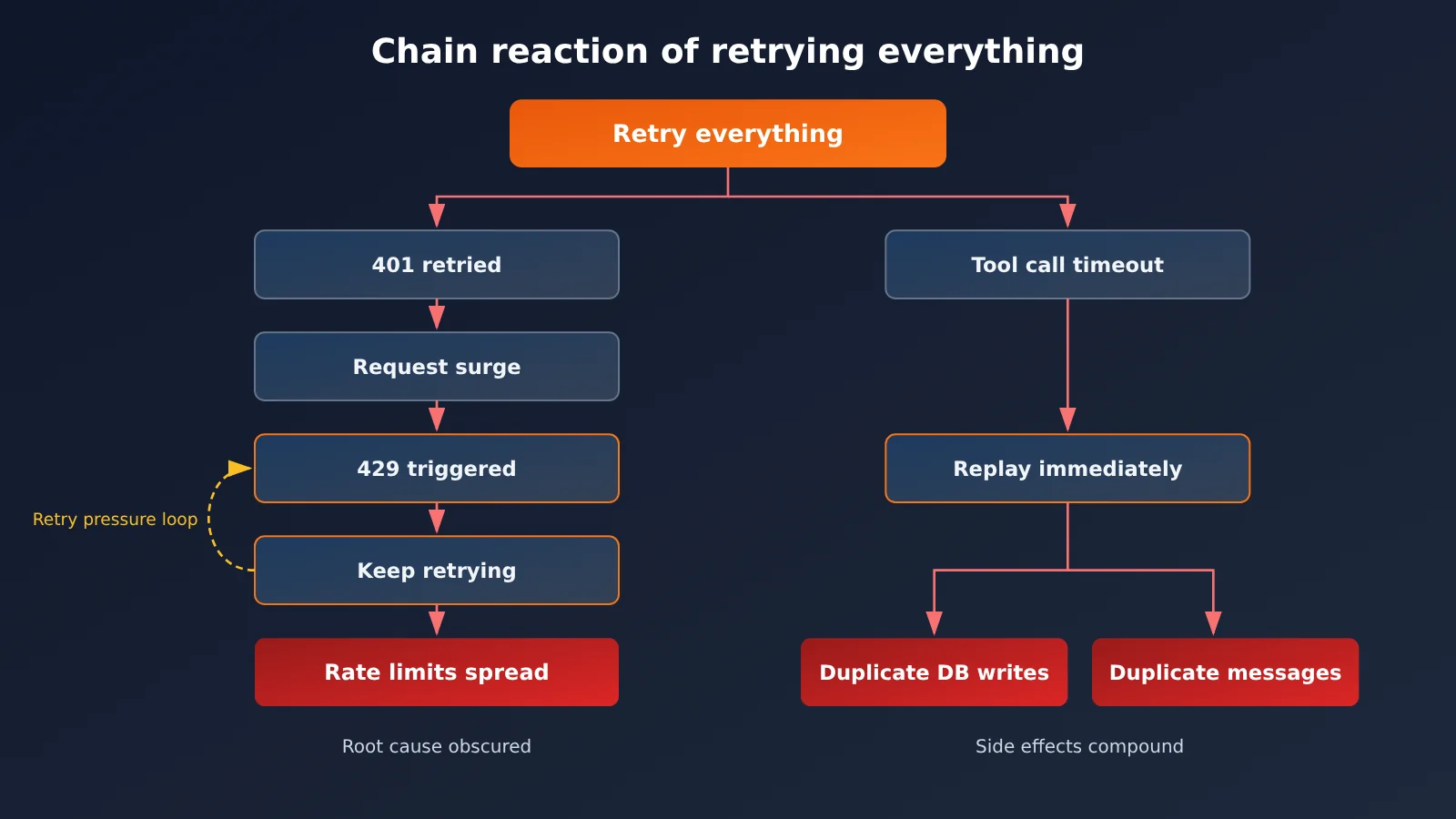
The bottom line: retrying every error may seem safe, but it can amplify costs, side effects, and rate limiting all at once. In production, incidents caused by this logic are often harder to diagnose than the original error.
The first problem is duplicate charges. An interrupted streaming response doesn’t necessarily mean the request failed. The upstream provider may have already generated some tokens and charged for them. Blindly replaying the request can mean paying twice for the same task, especially when the output is long.
The second problem is duplicate execution. In an agent workflow, a single model request can trigger database writes, messages, task creation, or even payments. If a tool call times out, you don’t know whether the tool has already executed. Replaying the entire request at that point can easily create two orders or send two emails.
The third problem is making rate limiting worse. A 429 is the upstream provider saying “slow down.” If the client immediately retries concurrently, it’s adding more pressure. Another common mistake is retrying every 4xx error: a 401 might mean the API key is wrong, but after several rounds of retries, the request volume hits the limit. The logs end up full of 429 errors, masking the real cause.
401, 429, 500, and 529 Error Code Triage: When to Retry and When to Switch
The takeaway: The table below covers 14 status codes commonly seen in production. Only a few are worth retrying, and you should switch only after confirming that retries haven’t worked. “Switch” means moving to a backup model or route; the specifics depend on the error body and each provider’s documentation.
| Status code | Common meaning | Retry? | Switch? | Action |
|---|---|---|---|---|
400 |
Invalid request format or parameters | No | No | Fix the request body; check fields and types |
401 |
Invalid API key or authentication failure | No | No | Check the API key, Authorization header, and Base URL |
402 |
Insufficient balance or exhausted quota | No | Switch routes if appropriate | Add funds or switch to a route with available quota, and send an alert |
403 |
Rejected due to permissions, region, or policy | No | No | Check account permissions, model access, and regional restrictions |
404 |
Model or endpoint doesn’t exist | No | No | Verify the model ID and endpoint path |
408 |
Request timeout | Limited retries if idempotent | Optional | Confirm the request wasn’t executed, then retry once |
409 |
Conflict or inconsistent state | No | No | Check application state and avoid concurrent writes |
422 |
Parameter validation failure | No | No | Fix the parameters; common with structured output schemas |
429 |
Rate limit, concurrency limit, or quota | Retry with backoff | Switch if retries fail | Read the error body and Retry-After first |
500 |
Upstream internal error | Limited retries | Switch after consecutive failures | Log the request ID and error body |
502 |
Gateway error | Limited retries | Yes | Distinguish gateway issues from upstream issues |
503 |
Service unavailable | Limited retries | Yes | Respect Retry-After and use a fallback if needed |
504 |
Gateway timeout | Only if idempotent | Yes | First check whether the task was already executed |
529 |
Upstream overloaded | Limited retries | Yes | Use backoff with jitter; switch if overload persists |
A 429 Doesn’t Always Mean a Rate Limit: Read the Error Body First
429 is easy to misdiagnose. It can mean a rate limit, but it can also indicate a concurrency limit or exhausted model quota. In some cases, it’s related to your balance. Rate limits usually clear after a few seconds of backoff. But if the quota is exhausted, no amount of retrying will help. Switching straight to the most expensive model may just double your costs without solving the problem.
Here’s how to handle a 429:
- Check the response headers for
Retry-Afterand wait as directed if it’s present. - Read the error type field in the error body to distinguish between rate limit, concurrency, and quota issues.
- For rate or concurrency issues, retry 1 to 2 times with backoff and reduce local concurrency.
- For quota issues, stop retrying, send an alert, and switch to a route with available quota.
The approach to 500 is similar. It doesn’t necessarily mean the model itself is broken; the issue could be with the gateway or the upstream provider. Start by recording the request ID and a summary of the error body—you’ll need them for troubleshooting and reconciliation.
Model API Retry Strategy: Retry Counts, Backoff, Retry-After, and Idempotency
Bottom line: Retry only transient errors, limit retries to 1 or 2, always use exponential backoff with random jitter, and automate retries only for idempotent requests. If any of these four conditions isn’t met, don’t retry automatically.
| Parameter | Recommended value | Notes |
|---|---|---|
| Retryable errors | 429, 500, 502, 503, 504, 529, network timeouts |
Among 4xx errors, only 408 and 429 are exceptions |
| Maximum retries | 1-2 | After that, switch or raise an alert instead of retrying indefinitely |
| Backoff intervals | 1s, 2s, 4s, increasing exponentially | Add random jitter each time to keep multiple instances from retrying simultaneously |
| Retry-After | Follow it when present | Takes priority over the local backoff algorithm |
| Idempotency requirement | Required | Don’t automatically retry write operations, tool calls, messages, or payments by default |
Steps to Implement a Retry Strategy
- Create an error classification function. Pass in the status code and error body, and return one of five categories. Base the rest of your logic on that result instead of checking status codes throughout your application code.
- Label requests by idempotency. Pure text generation, summarization, and translation can usually be treated as idempotent. If a request triggers a tool or performs an external write, mark it as non-idempotent.
- Check the status of non-idempotent requests first. After a tool call times out, check the task or database status and confirm it hasn’t executed before retrying. Use an application-level idempotency key for deduplication when needed.
- Set a total time limit. Cap the total time spent retrying each request. Otherwise, the client request may have timed out long before the backend stops retrying.
- Log every attempt. At a minimum, record the request id, model ID, status code, error category, latency, token usage, and retry count.
The last step is often overlooked, but it’s essential for reconciliation and troubleshooting. If you connect through APIYI apiyi.com, you can view usage and invocation logs by Key in the console. Match your locally recorded request id with the platform’s error details to determine whether a failure occurred at the gateway, upstream, or in your own request body.
Handle stream interruptions separately. When a streaming request disconnects, check how many tokens you’ve received and whether the content is usable before deciding to continue, discard, or replay it. Before replaying a long-output task, keep in mind that you may already have been charged for the previous generation.
🎯 Troubleshooting tip: For errors like
500and529, where the source isn’t always clear, save the original error body and request id first. Then check usage and logs for the same period in the APIYI apiyi.com console. Don’t draw conclusions based on the status code alone.
Fallback Model Strategy: Capability Tiers, Model Mapping, and Compatibility Checks
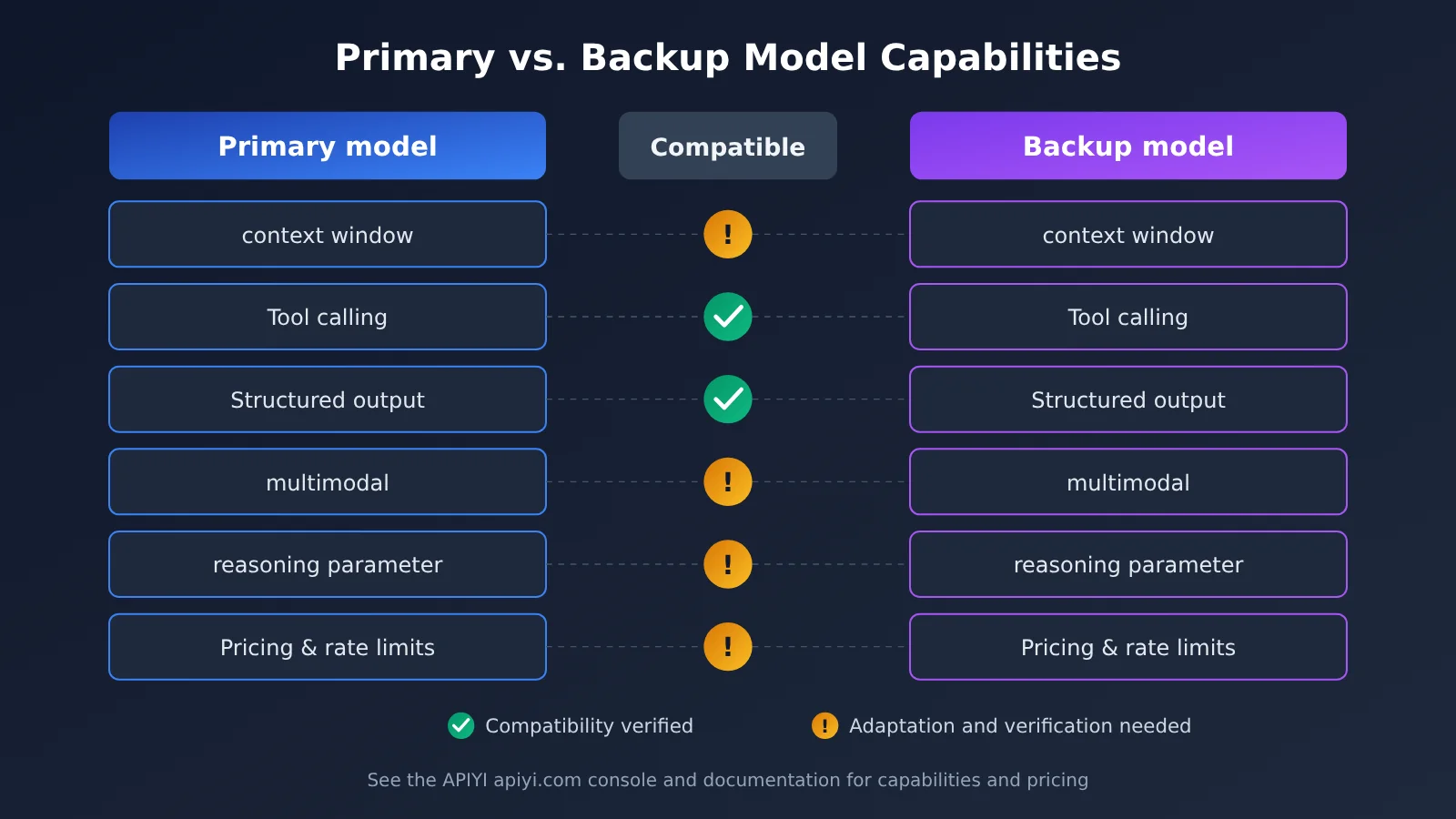
The bottom line: only switch to a fallback model that you’ve already verified can handle the same task. If an outage is the first time you test the fallback path, you’re likely to run into a second failure.
Start by grouping models into tiers: flagship, general-purpose, and lightweight. Map each task type to a primary model and a fallback in the same or an adjacent tier. Don’t route every fallback request to the most expensive model. A single upstream disruption could send your bill soaring, and many simple tasks won’t benefit from a flagship model anyway.
| Capability | Primary model | Fallback model | Compatible? | What to do before switching |
|---|---|---|---|---|
| Context window | Enter actual limit | Enter actual limit | To be verified | Make sure it can handle the longest real-world input; otherwise, establish a truncation strategy first |
| Tool calling | Tool schema, parallel calls | Same | To be verified | Verify the format for returning call IDs and the parameter structure |
| Structured output | JSON schema or strict JSON | Same | To be verified | Test pass rates with the same schema to prevent 422 errors |
| Multimodal input | Images, audio, video | Same | To be verified | Check input formats and size limits |
| reasoning parameters | Reasoning levels or thinking fields | Same | To be verified | Remove or map unsupported parameters when switching |
| Pricing and rate limits | Refer to the console | Refer to the console | To be verified | Estimate the cost after switching and confirm the limits are sufficient |
| Region and compliance | Allowed scope | Allowed scope | To be verified | Confirm the fallback route stays within the regions and compliance boundaries permitted for your business |
Fill out a separate table for each task type, and only enter verified results in the “Compatible?” column—don’t rely on memory. Reasoning parameters are especially prone to issues: a reasoning-level field supported by the primary model may cause the fallback model to return a 400 or 422 immediately. Your switching logic needs a parameter adaptation layer rather than forwarding everything unchanged.
Model Mapping: Check the Console for Model IDs
One common mistake is getting the model ID wrong and receiving a 404. Maintain a mapping table from logical model names to actual model IDs, and have your application code reference only the logical names. When making calls through APIYI apiyi.com, refer to the console and documentation for each model’s exact ID, availability, and pricing, and use https://api.apiyi.com/v1 as the base_url for all integrations. After changing the mapping table, run a canary request before deploying.
Backup Model Validation and Multi-Model Gateways: Canaries, Logs, and Automatic Failover
The takeaway: validate backup models on real tasks before deploying them, and check their output after a failover—not just whether the status code is 200. A multi-model gateway can make switching easier, but it can’t validate quality for you.
Three Steps to Validate a Backup Model
- Run canary requests. Pick a set of real business tasks and send the same prompt, tools, and input to both the primary and backup models.
- Compare results on the same tasks. Compare pass rates, latency, time to first token, token costs, and failure rates. For tasks involving tool calls, also check that call IDs, parameter structures, and return structures are compatible.
- Validate after failover. Once a real switch happens, automatically check the output—for example, whether JSON parses, required fields are present, and tool parameters are valid. Record the reason for the switch and the validation results.
Practice the failover path regularly. For example, you can manually route a small portion of traffic to the backup model each week to confirm the path still works and catch dependencies, parameters, or model IDs that have stopped working unnoticed.
Recommended log fields include at least:
- Request ID, model ID, endpoint, status code, error class, and error body summary
- Latency, time to first token, total duration, retry count, and failover target
- Input tokens, output tokens, cache hits, and estimated cost
- Tool call name, call ID, and whether execution succeeded
- Reason for the switch and whether post-failover validation passed
The Role of a Multi-Model Gateway in Disaster Recovery
If you integrate with multiple providers yourself for disaster recovery, you’ll need to maintain separate keys, SDKs, and error formats for each. With an aggregation gateway such as APIYI apiyi.com, one key can access mainstream models from OpenAI, Claude, Gemini, DeepSeek, Qwen, and others. The interface is compatible with the OpenAI standard and also supports native Claude and Gemini formats. You can put primary and backup models in the same integration code, so switching means changing the model ID rather than the entire integration.
The platform also provides multi-node deployment, intelligent routing, automatic failover, and load balancing, which can absorb some upstream instability. But gateway-level automatic failover can’t replace application-level checks: idempotency checks, tool call deduplication, and output validation still need to happen in your own code. A sensible division of responsibility is for the gateway to handle availability at the connection and node levels, while the application handles correctness at the task level.
💡 Disaster recovery tip: When designing your primary and backup setup, use the same key on APIYI apiyi.com to run the same set of canary tasks against both models. Then add the validated combinations to your model mapping table. New users can use the free test credits to get started.
Model API Error FAQ
Bottom line: These five questions cover some of the most debated production scenarios. Each answer follows the same principle: assess first, then act.
Q1: Should you retry a 401?
No. A `401` means authentication failed. Retrying only adds more requests and could turn the problem into a `429`. Check that the API key is valid, the `Authorization` header is formatted correctly, and the Base URL and key belong to the same platform. If you’re using APIYI apiyi.com, you can check the key’s status in the console.
Q2: Should you switch models immediately after a 429?
Not right away. First, read the error body and `Retry-After`: if it’s a rate or concurrency limit, retrying once or twice after a backoff will usually resolve it. Switch to a backup route only if the quota is exhausted. When switching, choose a backup model in the same tier rather than defaulting to the most expensive one.
Q3: Should you replay a request if streaming output is interrupted?
Don’t replay it just yet. An interrupted stream doesn’t necessarily mean the request failed—it may have already generated content and incurred charges. First, check how many tokens you’ve received and whether the content is usable. If it is, keep it or continue generating from it. If it isn’t and the request is idempotent, replay it once. Check the console usage for actual charges.
Q4: What should you do if a tool call executes more than once?
The fundamental fix is to make the tool layer idempotent. Use a business-side idempotency key or task ID to deduplicate calls, so each ID is executed only once. If a tool call times out, check the task status first and retry only after confirming it hasn’t executed. If duplicates have already occurred, trace the logs using the call ID and compensate for or undo the extra operations.
Q5: What if a backup model returns 200 but the result is wrong?
A 200 only means the request succeeded, not that the task succeeded. Validate the output automatically—for example, check the JSON structure, required fields, and tool parameter validity. Count validation failures toward the failure rate and trigger an alert or manual review. If a particular backup combination frequently fails validation, remove it from the mapping table and run canary validation again.
Pre-Launch Checklist and Summary: When to Retry, Switch, or Stop
Bottom line: checking each item before launch is far more reliable than patching in logic after an incident. Remember the rule: fix 4xx errors first, consider retries for 5xx errors, and stop before retrying non-idempotent requests.
| No. | Check | Pass Criteria |
|---|---|---|
| 1 | Identify the error type first | Every status code falls into one of five categories; unknown errors aren’t retried by default |
| 2 | Don’t automatically retry 4xx errors | 400, 401, 402, 403, 404, 409, and 422 trigger an alert or a fix |
| 3 | Then decide whether to retry or switch | Retry only transient errors, at most 1 to 2 times, with backoff and jitter |
| 4 | Respect Retry-After | When the response header is present, follow its wait time first |
| 5 | Check idempotency | Stop by default for tool calls, write operations, messages, and payments; check their status before deciding what to do |
| 6 | Handle interrupted streams | Check tokens already received and costs incurred; don’t blindly replay the request |
| 7 | Verify the backup model | The capability checklist has been completed and verified for each task type |
| 8 | Map models | The mapping from logical names to model IDs matches the console |
| 9 | Validate the final output | After switching, validate the structure and fields rather than just checking for a 200 response |
| 10 | Log and rehearse | Key fields are captured, and fallback paths are tested regularly |
Model API Error Handling: Key Takeaways
- When to retry: Retry
429,500,502,503,529, and timed-out idempotent requests a limited number of times with backoff. - When to switch: Switch when retries still fail, the upstream provider remains unavailable, or your quota is exhausted—and the backup model has been verified.
- When to stop: Stop for 4xx configuration errors such as
401, and for non-idempotent requests whose status is unknown. - Switching doesn’t mean success: Validate the backup model’s output even after it returns 200.
- Divide responsibilities between the gateway and application: Let the gateway handle route availability; keep task correctness in the application code.
Good error handling isn’t about retrying as aggressively as possible—it’s about making the right call each time an error occurs. Start by putting error categories, idempotency labels, and log fields in place, then gradually introduce backup models. For a backup route, consider APIYI apiyi.com: one key covers multiple major models, making it easier to verify and switch between primary and backup models using the same code. Check the console and documentation for current pricing and availability.
📚 References
- APIYI Documentation Center: Integration methods, model list, and billing information
- Link:
docs.apiyi.com -
Note: Check the documentation and console for current model IDs, pricing, and availability.
-
HTTP Status Code Reference: Meaning of standard response headers such as
Retry-After - Link:
developer.mozilla.org/docs/Web/HTTP/Status - Note: Use this to understand the general meaning of 4xx and 5xx codes. For specifics, refer to each model platform’s error response body.
Author: APIYI Technical Team
Technical discussions: Contact us through the APIYI homepage at apiyi.com. For more integration resources, visit the documentation center at docs.apiyi.com.