Author’s note: Two plans both labeled “10 million tokens” can differ by several times in how much work they actually get done. This article gives you a practical conversion method to help you decide between a subscription and pay-as-you-go.
When comparing token plan quotas, most developers’ first instinct is to look at “how many tokens per month, how much money per month,” then just calculate the unit price. That math looks reasonable, but it ignores differences in caching, output, model multipliers, and time windows. This article introduces the “single-task equivalent cost” conversion method to help you put different plans on the same yardstick.
This isn’t a vague piece about “subscriptions are more economical” or “pay-as-you-go is more flexible” — it’s a method that reaches a conclusion using your own usage data. The article doesn’t cite unverified prices; for APIYI’s model unit prices and billing conventions, refer to the actual data on the pricing page https://docs.apiyi.com/models.
Core value: After reading this article, you’ll know how to read token usage fields, break down billing conventions, calculate the break-even point, and make the choice that fits you.
Key Points About Token Package Quotas
A token is just a unit of measurement, not a uniform unit of value. Input, output, and cache-read tokens often have different unit prices, and some packages apply multipliers per model. So the same nominal quota doesn’t mean the same real-world value.
| Point | Description | Impact on Your Choice |
|---|---|---|
| Counting scope | Whether cache reads, cache writes, and reasoning tokens count toward the quota | Determines how much quota the same task consumes |
| Model weighting | Different models may deduct quota at different multipliers | Determines how long premium models actually last |
| Time window | Hourly, weekly, or monthly limits may apply | Determines whether you can use your quota during peak hours |
| Quota format | May be measured in tokens, requests, credits, or messages | Determines whether it can be compared directly with other options |
| Task structure | Context length, conversation turns, and cache hit rate all vary | Determines the final per-task cost |
Why the Numbers on Token Package Quotas Can Be Misleading
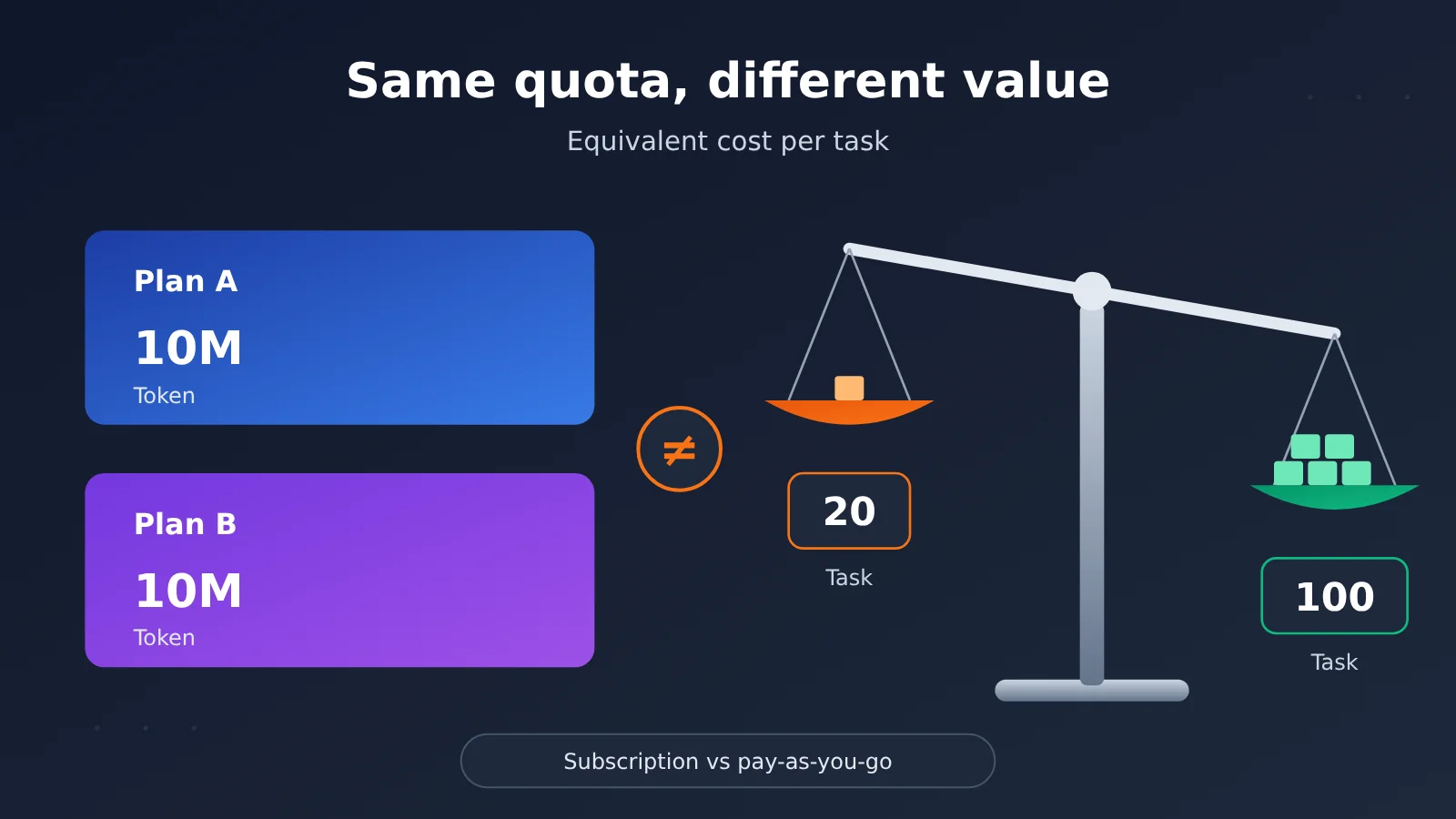
The same coding agent task might generate a huge number of cache-read tokens because it keeps resending context. Say a task produces 500,000 tokens in total: 400,000 cache reads, 60,000 uncached input, and 40,000 output. The data below is just an example to illustrate the method and doesn’t represent any real package.
If package A counts all tokens toward the quota, a 10 million quota can handle roughly 20 tasks like this. If package B doesn’t count cache reads, the same task only consumes 100,000 quota, so a 10 million quota can handle roughly 100 tasks. The nominal quotas are the same, but the actual number of tasks you can complete differs by 5x.
Common Billing Rules for Token Package Quotas
The table below lists the rules that are easiest to overlook when comparing. Definitions aren’t fully consistent across vendors, so check the official documentation item by item before buying rather than guessing from the name.
| Billing Item | Meaning | Common Pitfall | How to Verify |
|---|---|---|---|
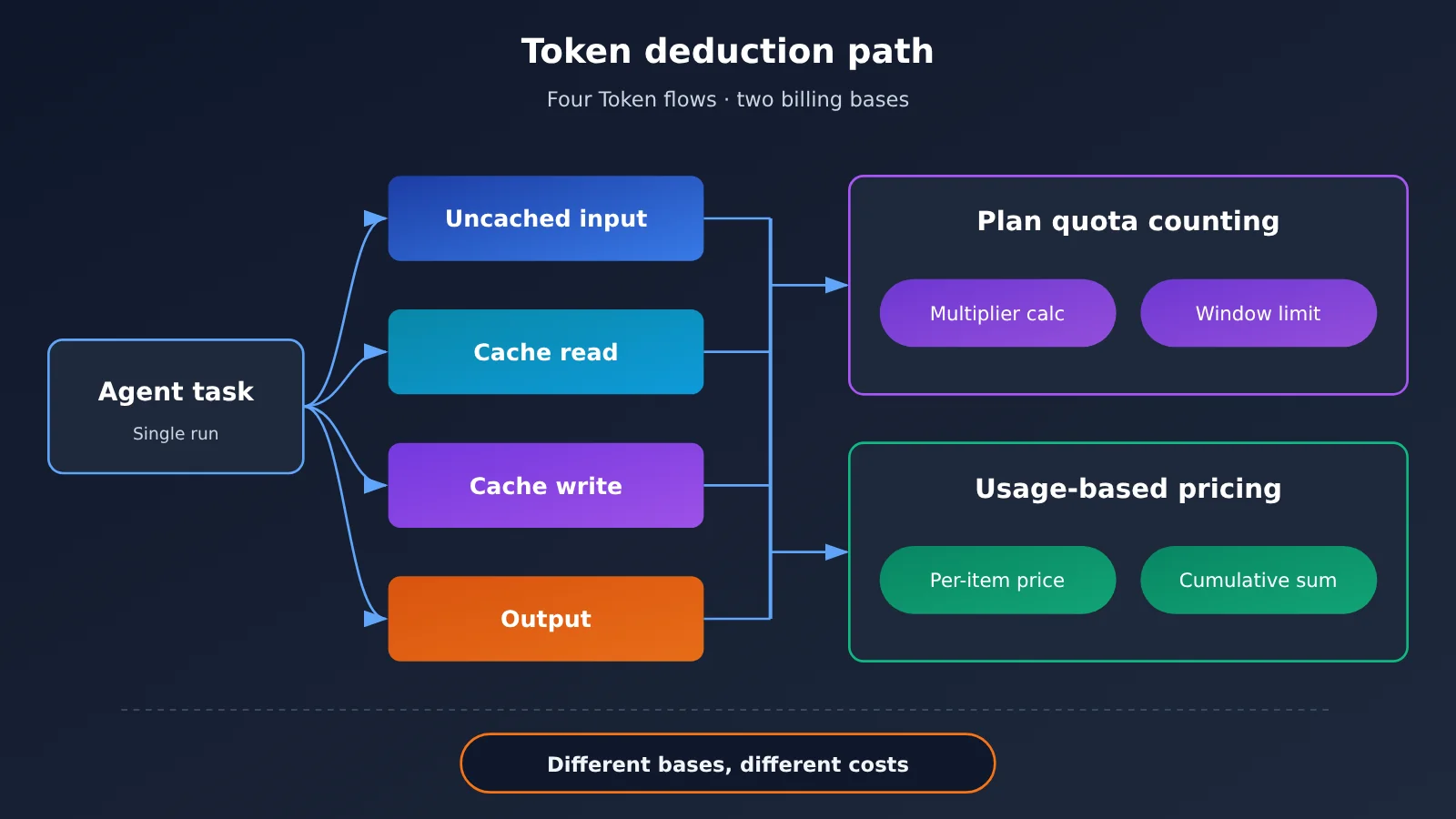
| Uncached input | Prompt content sent for the first time that misses the cache | Long contexts get counted multiple times | Check usage details |
| Cache read | Input content that hits the prompt cache | Can make up the bulk of the total, and inclusion rules vary widely | Check package rules and the pricing page |
| Cache write | Usage generated when content is written to the cache | Unit price may differ from regular input | Check the model pricing documentation |
| Output | Content generated by the model | Unit price is usually higher than input, and long outputs have a noticeable impact | Check the model pricing documentation |
| Reasoning tokens | Usage from the thinking process of reasoning models | You don’t see the body text, but it may be billed as output | Check the usage field in the response |
For APIYI pay-as-you-go billing data, always refer to the actual figures on the pricing page at https://docs.apiyi.com/models. Unit prices and cache rules can differ between models, so it’s best to verify each model you actually use.
Token Plan Quota Quick Start: 5 Steps to Figure Out Subscription vs. Pay-as-You-Go
The method below doesn’t require building complex tools—a spreadsheet is enough. The key is to use data from real tasks, not to estimate your monthly usage by gut feeling.
Step 1: Collect Token Usage from Real Tasks
Pick 3 to 5 of your most common task types—for example, fixing a bug, generating a weekly report, or handling a batch of customer support tickets. Record at least 5 to 10 runs of each task type to reduce the impact of random fluctuations. Complex and simple tasks can consume very different amounts, so don’t use a single result to represent everything.
If you already call models through an API, you can read usage from the usage object in the response. The field meanings differ between the two common API formats, so pay special attention when aggregating:
| Usage item | OpenAI format field | Anthropic format field | Aggregation notes |
|---|---|---|---|
| Input | prompt_tokens |
input_tokens |
The former usually already includes cache hits, while the latter usually excludes cache reads/writes |
| Cache read | prompt_tokens_details.cached_tokens |
cache_read_input_tokens |
For OpenAI format, subtract cached tokens from input before calculating the uncached portion |
| Cache write | Depends on the model and API response | cache_creation_input_tokens |
Record separately and calculate at the corresponding unit price |
| Output | completion_tokens |
output_tokens |
Watch the share of long-output tasks |
| Reasoning | completion_tokens_details.reasoning_tokens |
Depends on the model and API response | Avoid adding it to output twice |
Step 2: Calculate the equivalent per-task cost under pay-as-you-go
Average the usage data you collected, then look up the unit price for the target model. The formula is as follows:
Pay-as-you-go cost per task = uncached input × input unit price + cache read × cache read unit price + cache write × cache write unit price + output × output unit price
Every unit price in the formula should come from the pricing page — don’t reuse numbers from old screenshots or third-party reposts. If prices are listed per million tokens, remember to normalize the units before calculating. When you’re using APIYI, go by the model prices and billing rules shown at https://docs.apiyi.com/models.
Step 3: Convert subscription quota into the number of tasks you can complete
The key metric for a subscription plan isn’t total tokens — it’s “how many tasks can I finish within the limit.” First confirm the plan’s deduction rules, then estimate with the formula below:
Monthly task capacity = monthly effective quota ÷ (billed tokens per task × model multiplier)
If the plan is measured in requests or credits, swap the denominator for the average number of requests or credits a single task consumes. When the rules aren’t public, you can run a few standard tasks during the trial period, watch how the quota changes, and work backward from there. What you end up with is only an estimate, so mark it clearly in your table.
Step 4: Correcting Token Plan Quotas with Time Windows
Just because the monthly total is enough doesn’t mean peak hours are covered. If your plan has hourly or weekly windows, you also need to validate against peak usage:
Actual usable task count = min (monthly completable tasks, cumulative completable tasks across each time window)
For example, a developer might concentrate most of their usage during a sprint week, and the weekly limit gets hit early. The extra waiting time is a cost too, especially when tasks can’t be interrupted, so don’t skip this step.
Step 5: Calculating the Break-Even Point Between Subscription and Pay-As-You-Go
Finally, compare the two numbers. The first is the break-even task volume, and the second is how many tasks you actually need to complete each month:
Break-even task volume = monthly subscription fee ÷ per-task pay-as-you-go cost
The decision rule boils down to three points:
- Monthly task volume clearly above the break-even point, and the actual usable task count covers your needs: go with the subscription.
- Monthly task volume below the break-even point, or usage fluctuates a lot: go with pay-as-you-go.
- Monthly task volume close to the break-even point: pick the more flexible option, and recalculate in the next billing cycle.
Quick-start tip: To collect real usage data, you can test different models through APIYI apiyi.com with the same batch of prompts, then plug the
usagedata into the table. This cuts down the work of adapting to each API individually and makes side-by-side comparison easier.
How to Collect Token Usage Through APIYI
APIYI provides API access to the mainstream models discussed in this article, compatible with OpenAI and Anthropic API formats. Existing projects usually only need their integration settings adjusted before they can start collecting usage data. For whether a specific model is available, check the pricing page.
- Sign up for an account at APIYI apiyi.com and create an API key in the console.
- For the OpenAI-compatible format, set
base_urltohttps://api.apiyi.com/v1; for the Anthropic format, configure the endpoint and request headers as described in the docs. - Set
modelto a model name listed on the pricing page, send a standard task, and recordusagefrom the response. - Check the unit price for each model at
https://docs.apiyi.com/models, then plug it into the formula from step 2.
For complete integration instructions, see the APIYI docs: https://docs.apiyi.com.
Comparing Token Plan Quotas: Subscription, Pay-as-You-Go, and Hybrid
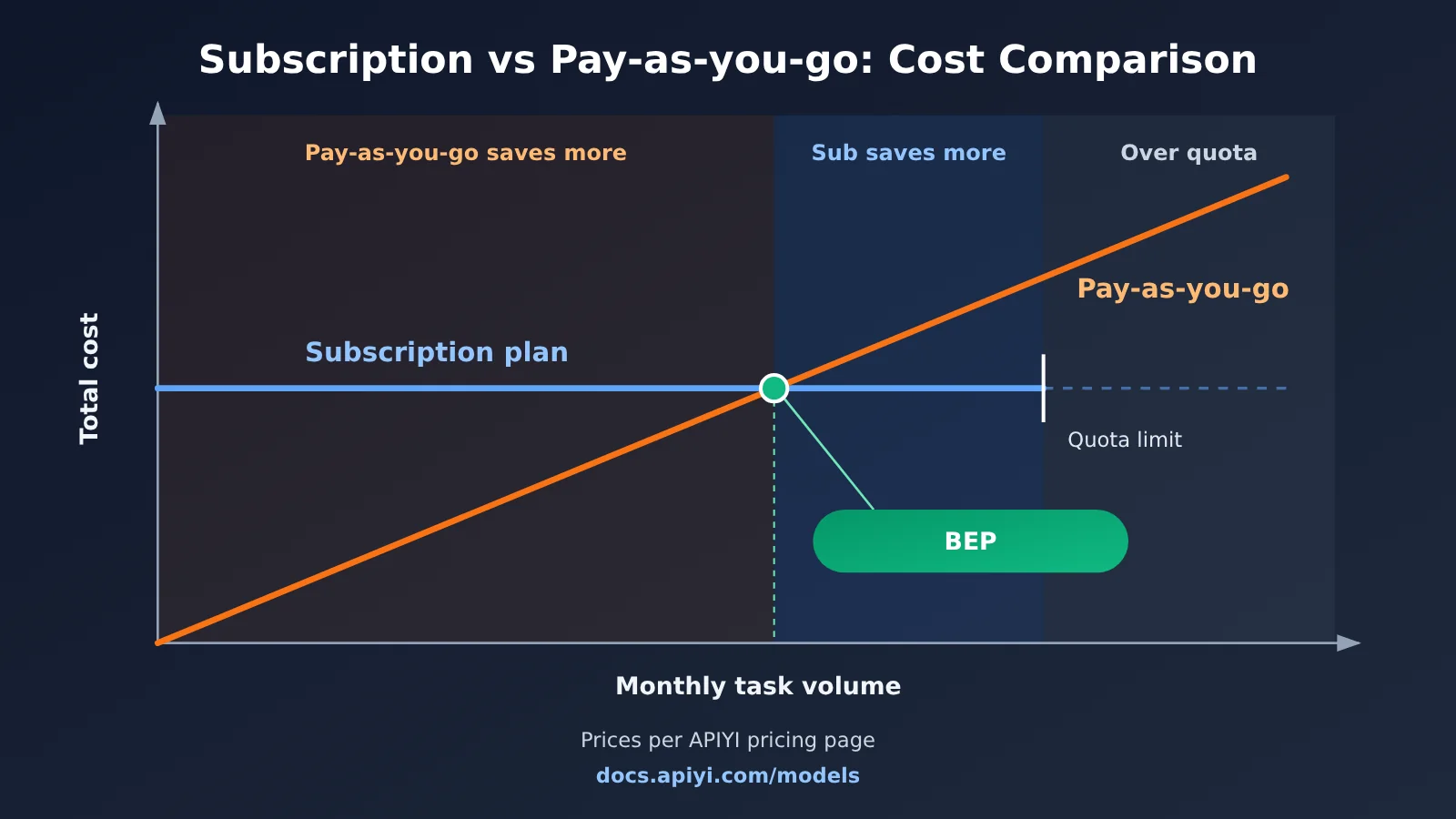
The intersection in the chart above varies from person to person—it depends on your task mix and the models you choose. The table below compares the three options across decision factors, without getting into specific prices.
| Comparison Dimension | Subscription Plan | Pay-as-You-Go | Hybrid Plan |
|---|---|---|---|
| Cost profile | Relatively fixed monthly fee | Varies with usage | Fixed spend plus flexible spend |
| Main risks | Quota sits idle or runs out early | A sudden usage spike drives up the bill | Two billing streams increase management overhead |
| Best suited for | High-frequency, steady day-to-day development | Low-frequency, variable, or programmatic calls | Steady daily usage with occasional peaks |
| Model switching | Limited by the models the plan supports | Usually more flexible | Main model fixed; others called on demand |
| Pricing basis | Based on the official plan page | When using APIYI, based on https://docs.apiyi.com/models |
Calculated separately based on the relevant pages |
How to choose between subscription and pay-as-you-go for different scenarios
High-frequency individual developer: If you spend most of your day working in a fixed set of tools and your usage is fairly steady, start by running the numbers on a subscription plan. But be sure to check whether the peak-hour window is sufficient and whether cache reads count toward the quota.
Products and backend services: User-facing online features are usually better suited to pay-as-you-go, because call volume is hard to predict and you need clear cost attribution. Also pay attention to subscription terms—some subscriptions don’t allow production use or resale.
Small teams: Start by measuring each member’s actual usage separately, and don’t assume everyone needs the same tier of subscription. High-frequency members can use subscriptions, while low-frequency members and automation scripts use pay-as-you-go; this setup usually maps more closely to real needs.
Model evaluation stage: At this stage, you haven’t settled into a stable usage pattern yet, so pay-as-you-go is better for small-scale validation. You can use APIYI to call multiple models through a unified interface, then decide on a long-term plan after testing.
FAQ
Q1: What is a token plan quota?
A token plan quota is the usage ceiling a provider offers within a given period. It may be counted directly in tokens, or converted into credits, request counts, or message counts. When comparing plans, confirm the deduction rules first — don’t just look at the nominal number.
Q2: How does a token plan quota differ from pay-as-you-go billing?
A plan usually means paying a fixed fee upfront and using within the limit; pay-as-you-go settles based on actual usage and the model’s unit price. The former makes budgeting easier but may leave capacity idle or hit the ceiling; the latter is more flexible but requires solid usage monitoring.
Q3: How often should I review the rules for a token plan quota?
We recommend reviewing once per renewal cycle, and recalculating immediately when models are upgraded, task structure changes, or the plan is adjusted. Model prices, multipliers, and limits can all change, so old conclusions may no longer hold. Always treat the current content on the official page as the source of truth for pricing.
Q4: If the cache hit rate is high, is a subscription always the better fit?
Not necessarily. The unit price for cache reads is usually different from regular input, and pay-as-you-go costs may drop noticeably; but if the plan also counts cache reads against your quota, the quota can drain surprisingly fast. Plug both options into the formula and calculate separately.
Q5: How can I quickly verify token costs through the API?
Prepare 3 to 5 types of standard tasks, invoke candidate models through APIYI apiyi.com, and record the `usage` field. The platform is compatible with OpenAI and Anthropic interface formats, making it easy to reuse your existing code. For integration details, see `https://docs.apiyi.com`.
Q6: Where can I look up APIYI model pricing?
Visit `https://docs.apiyi.com/models`. The input, output, and cache prices and billing basis for each model are all based on the actual data on that page. Before calculating, check the model name and price unit — don’t use numbers from reposted content.
Q7: What are the limitations of this token plan quota conversion method?
It depends on how representative your samples are; with too few samples, the error will be relatively large. Some plans’ multipliers and limits aren’t fully disclosed, so you can only infer them through testing. In addition, the formula doesn’t directly quantify model quality and rework costs — if a model requires repeated retries, include the retry consumption as well.
Q8: Can I use a subscription and pay-as-you-go at the same time?
Yes, and this is a common approach when usage has clear peaks. Steady day-to-day tasks are handled by the subscription, while automation scripts and tasks beyond the limit go through API pay-as-you-go. When implementing this, track the two cost streams separately and confirm your usage complies with the relevant terms of service.
Token Package Quota: Key Takeaways
- Nominal quota isn’t the same as actual value: The same number of tokens can correspond to wildly different amounts of work.
- Start by standardizing the billing unit: Check cache reads and writes, output tokens, reasoning tokens, and model multipliers item by item.
- Use tasks as your unit of comparison: Comparing how many tasks you can complete is more reliable than comparing price per million tokens.
- Time windows must factor into the calculation: A monthly total may look sufficient, yet peak hours can still hit the cap early.
- Use breakeven points to support your decision: Divide the monthly subscription fee by the per-task pay-as-you-go cost, then compare that with your real needs.
- Validate with real data: You can call models through a unified interface on APIYI and work out costs against its pricing page.
Summary
Token package quotas can’t be compared directly because the same number can hide different billing units, model weights, and usage limits. If you’re choosing between a subscription and pay-as-you-go, follow this order:
- Collect usage data: Record the input, cache, output, and reasoning tokens of real tasks.
- Calculate cost: Work out the per-task pay-as-you-go cost based on the current pricing page.
- Convert the quota: Turn the subscription quota into the number of completable tasks after accounting for multipliers and time windows.
- Compare against your needs: Use the breakeven task volume to weigh against your actual monthly demand, then choose a subscription, pay-as-you-go, or a hybrid approach.
I’d suggest running your first calculation using one week of real tasks, then updating the data each billing cycle. When you need to validate across models, you can test through a unified interface at APIYI apiyi.com, and refer to https://docs.apiyi.com/models for pricing.
📚 References
- APIYI Models and Pricing Page: Look up model prices and billing details
- Link:
docs.apiyi.com/models -
Note: Any pricing and billing details mentioned in this article are based on the actual data shown on this page
-
APIYI Documentation Center: API integration guide
- Link:
docs.apiyi.com -
Note: Covers setup configuration and usage instructions—worth reviewing before you start testing
-
OpenAI Official Docs: API and usage field reference
- Link:
platform.openai.com/docs -
Note: Use this to verify what the
usagefield means in OpenAI-format responses -
Anthropic Official Docs: Messages API and prompt caching reference
- Link:
docs.anthropic.com - Note: Use this to verify the cache read/write usage fields in Anthropic format
Author: APIYI Technical Team
Technical Discussion: Feel free to reach out via the APIYI apiyi.com homepage. For more resources, visit the docs.apiyi.com documentation center.