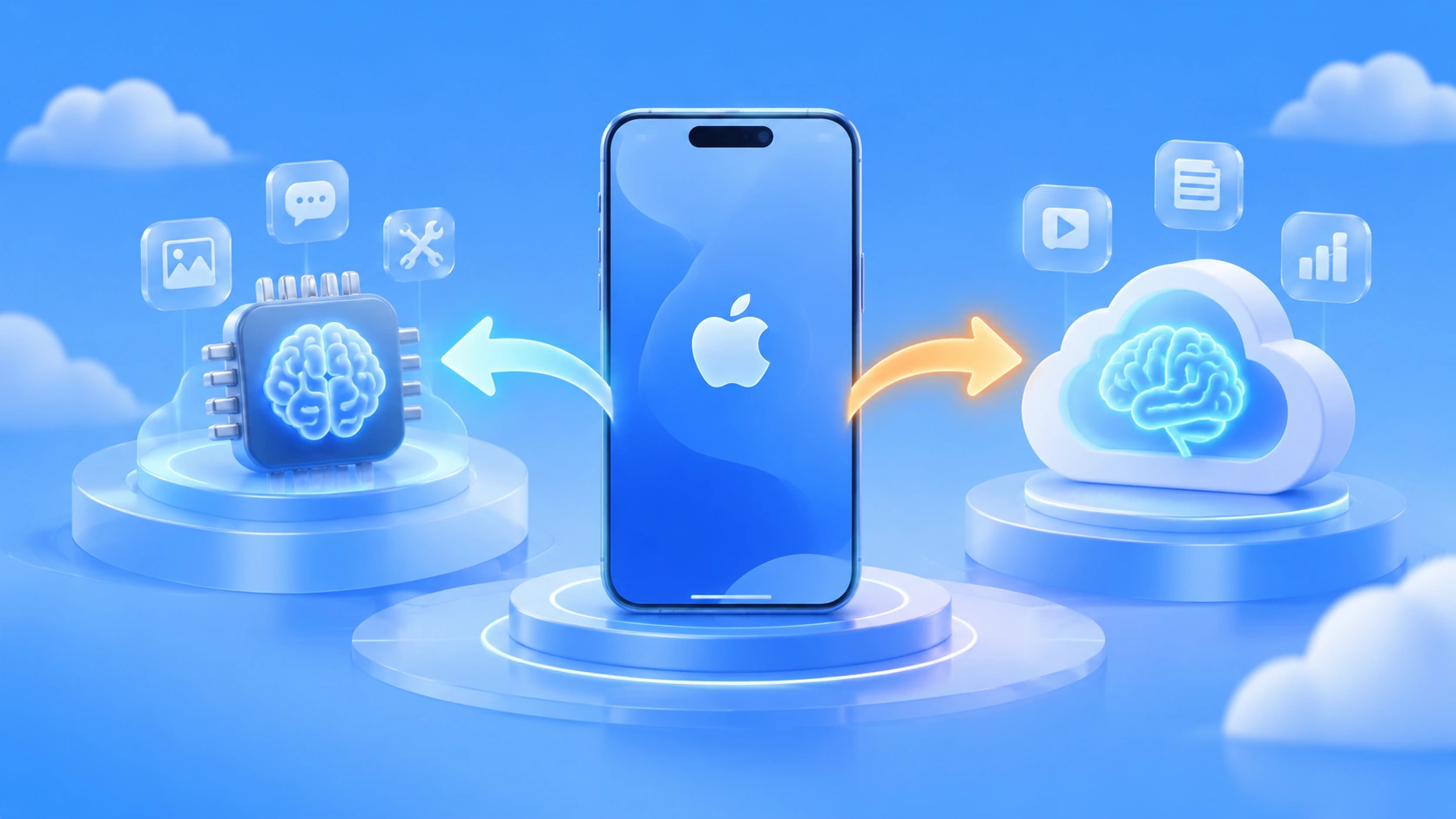
Author’s note: Based on hands-on testing of Apple Intelligence on China-region iOS 27.3, this piece breaks down how on-device models and cloud-based Large Language Models divide the work — and hands you a ready-to-use 5-dimension decision framework plus steps for shipping it in a real product.
With the iOS 27.3 developer beta rolling out, Apple Intelligence on China-region devices is finally open for testing. Under the hood it’s powered by a combination of Apple’s in-house models and Alibaba’s Qwen: photo cleanup, basic rewriting, and live translation run on-device, while long-running Siri tasks and the “Ask” feature in Visual Intelligence are handed off to Qwen in the cloud. This China rollout is a remarkably concrete sample of the on-device / cloud split.
This isn’t another feature roundup. Instead, we’re using this sample to unpack the design logic behind on-device / cloud division of labor: which AI tasks belong on-device, which have to go to a cloud Large Language Model, and how you should draw that line in your own product.
The core value: by the end of this article, you’ll have a 5-dimension framework for deciding where AI work should live, plus 4 steps to implement an “on-device fallback + cloud enhancement” hybrid architecture in your own app.
Key Points of the On-Device / Cloud Split in Apple Intelligence for Mainland China
Let me start with a table that lays out the divisions confirmed by hands-on testing. The “Where It Runs” and “Observed Performance” columns both come from publicly documented tests — and they show that Apple’s split isn’t arbitrary; there’s a clear pattern behind it.
| Feature | Where It Runs | Model Source | Observed Performance |
|---|---|---|---|
| Photo Cleanup | On-device | Apple’s in-house on-device model | Clean results on simple backgrounds; tends to leave low-resolution color blotches on complex textures |
| Live Translation | On-device | Apple’s on-device model, requires downloading language packs (about 2GB each) | Under 1 second of latency for everyday speech, with solid accuracy |
| Writing Tools (basic polishing) | Mostly on-device | Apple’s in-house model | Convenient system-level access, but Chinese rewrites feel stiff |
| Notification Summaries / Natural-Language Photo Search | On-device | Apple’s in-house model, requires building a local index | Right after upgrading, you’ll need to wait one to two days for indexing to finish |
| Siri complex tasks | Cloud | Alibaba’s Qwen; requires user authorization and a Qwen account login | Results in about 7–8 seconds, and the content tends to be brief |
| Visual Intelligence “Ask” / “Search” | Cloud | “Ask” connects to Qwen; “Search” defaults to Baidu’s visual model, with third-party apps supported | Once a third-party app is adapted, it can appear in the search services list |
Deep Dive into the Split: Why Cleanup and Translation Stay On-Device
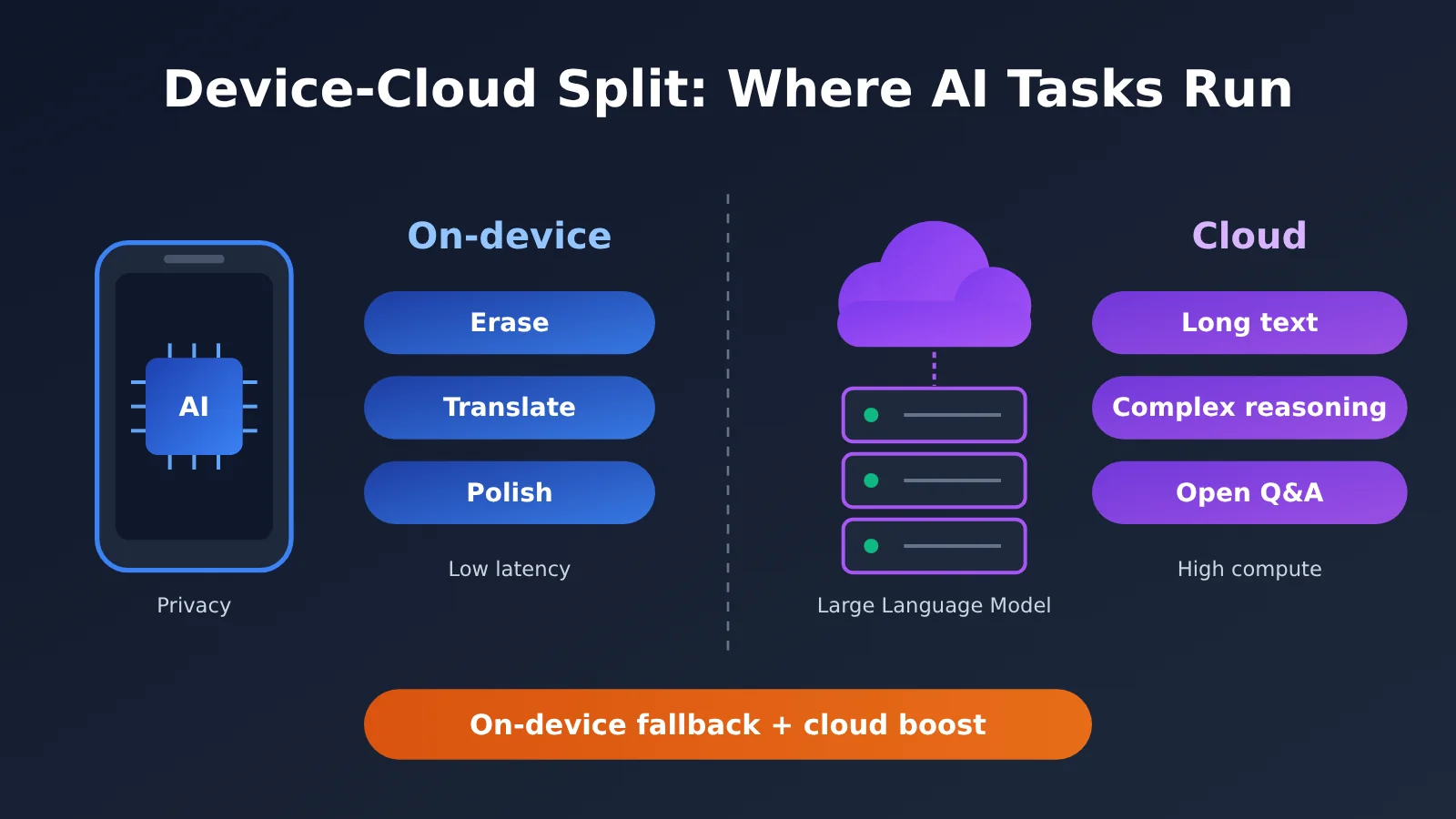
Photo Cleanup and Live Translation share three traits: the input is private user data (photos, call audio), latency is critical, and the task boundaries are well defined. Faces and location information in photos never leave the device, so privacy risk is minimized. Translation has to work while a conversation is happening — any network round trip breaks the rhythm, and the sub-one-second on-device latency is exactly what makes the experience work.
The trade-offs are obvious too. On-device model parameter counts are constrained by phone compute and storage, which is why Cleanup falls apart on large areas of grass, cobblestone, and other complex textures. And each translation language pack eats up about 2GB. This system update package is a hefty 12GB — essentially paying rent for the on-device models.
Deep Dive into the Split: Why Siri’s Long Tasks Go to the Cloud
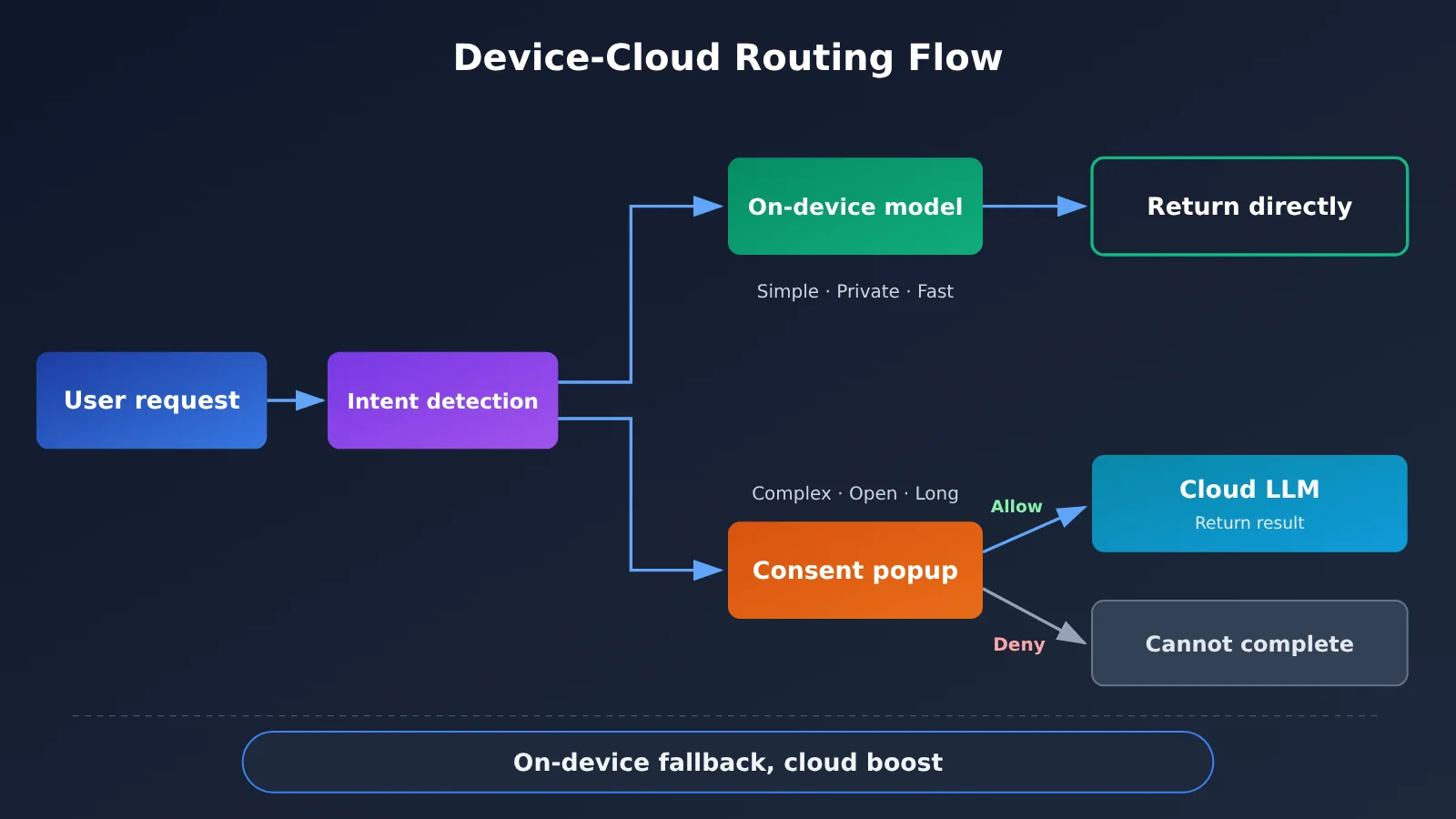
Requests like “help me plan a four-day trip to Jiuzhaigou” demand a huge amount of world knowledge, long-form text generation, and multi-step planning — things a small on-device model simply can’t handle. Apple’s approach: when Siri detects a question beyond its own capabilities, it pops up a dialog asking whether the user agrees to call Qwen. Decline, and Siri gives up on answering entirely.
That pop-up is well worth studying as a developer. It explicitly tells the user that “data will leave the device,” handing the privacy decision back to them. At the same time, the tests remind us that cloud result quality depends on the context and prompt design the system gives the model. Siri’s version of the itinerary is clearly worse than just asking inside the Qwen app directly — proof that “wiring up a Large Language Model” isn’t the same as “using a Large Language Model well.”
End-Cloud Division Decision Framework: 5 Dimensions That Decide Where a Task Belongs
From the way Apple Intelligence (China model) splits work, we can abstract 5 decision dimensions. When actually designing a solution, score each task against these 5 dimensions one by one — whichever side most dimensions lean toward is where the task should go.
| Decision Dimension | Traits Favoring On-Device | Traits Favoring Cloud | Example in Apple Intelligence |
|---|---|---|---|
| Data sensitivity | Private data like photos, contacts, chat history | Public knowledge, questions the user actively submits | Inpainting runs on-device, guide Q&A goes to the cloud |
| Latency requirement | Needs a response within 1 second; breaks if interrupted | Can tolerate a wait of several seconds | Translation on-device, Siri long tasks about 7 to 8 seconds |
| Task complexity | Clear boundaries, short output | Open-ended Q&A, multi-step planning, long-form generation | Basic polishing on-device, complex questions handed to Qwen |
| Knowledge freshness | Doesn’t depend on the latest external information | Needs world knowledge or real-time retrieval | Visual Intelligence “Search” connects to Baidu and third parties |
| Offline availability | Must work on weak or no network | Online by default | Real-time translation runs locally after downloading language packs |
Common Pitfalls in End-Cloud Division
When many teams divide work between end and cloud, they tend to fall into the following pitfalls — worth avoiding up front:
- Pitfall 1: Put everything on-device that can go on-device. On-device model capability has a ceiling; cramming complex tasks in only yields low-quality results like the inpainting failures, which actually hurts the experience.
- Pitfall 2: Once the cloud is connected, everything’s fine. The Siri guide example shows that system prompts, context organization, and output length control also determine quality.
- Pitfall 3: Ignoring authorization and fallback. Cloud calls must account for the fallback path when users refuse authorization or the network fails — you can’t let a feature simply “disappear.”
- Pitfall 4: Counting cost only once. On-device is a one-time storage and package-size cost; cloud is an ongoing pay-per-use invocation cost. The two need to be accounted for separately.
Device-Cloud Split Quick Start: 4 Steps to Ship It in Your Own App
Now let’s turn that decision framework into concrete, executable steps. Even if you’re not building a phone OS but a regular app, a mini program, or a desktop tool, the same thinking applies.
Step 1: Inventory your tasks and tag them for the device-cloud split
List every feature in your product that you plan to add AI to, and evaluate each one against the 5 dimensions from the previous section. I’d suggest producing a task list with at least these columns: task name, data sensitivity, latency requirement, complexity, target location — so it’s all clear at a glance during review.
Step 2: Pick lightweight options for on-device tasks
For on-device tasks, favor the platform’s built-in capabilities or lightweight models — for example, the system’s translation, OCR, and speech recognition APIs, or a quantized small-parameter model. Keep an eye on model size and the first-download experience. Follow Apple’s approach: pull large assets on demand, and show a clear notice the first time they’re used.
Step 3: Hook cloud tasks up to a Large Language Model API
Cloud tasks need a Large Language Model with enough capability behind them. If you want to use the Qwen family the way Apple Intelligence does in mainland China, or compare GPT, Claude, and others side by side, you can call them all through APIYI. APIYI offers model invocation for the mainstream Large Language Models covered in this article, and it’s compatible with both the OpenAI and Anthropic API formats — existing code usually just needs the interface address and API key swapped out to migrate. For the exact list of available models, go by the pricing page.
Here are the key configuration items to watch when integrating. For the interface address, go by what’s documented at docs.apiyi.com:
| Configuration item | What it does | Recommendation for device-cloud split scenarios |
|---|---|---|
| Interface address (base_url) | Specifies the server the request goes to | Fill it in per the APIYI docs at docs.apiyi.com; the OpenAI format and Anthropic format each have their own address instructions |
| API Key | Authentication and billing | Keep it server-side only — never bundle it into the client installer |
| model | Specifies which model to call | Use a strong reasoning model for complex planning tasks; a lightweight model is fine for simple rewrites |
| max_tokens | Controls output length | Loosen it a bit for guides and reports so you don’t end up with a Siri-style over-summarized answer |
| stream | Whether to stream output | Turn it on for long cloud tasks to offset the perceived delay from waiting several seconds |
| Timeouts and retries | Handling network errors | Set a sensible timeout; on failure, fall back to a simplified on-device result or a clear message |
Step 4: Design the consent dialog and the fallback path
Take a cue from the confirmation dialog Siri shows before calling Qwen: any feature that sends user data to the cloud should explain, on first invocation, what will be sent and who it’s going to. And when the user declines, don’t just give up like Siri does — fall back to on-device capabilities for a simplified result, or prompt the user to fill in the missing information themselves.
🚀 Quick start: I’d pick the most complex cloud task first and build a prototype to validate it. Sign up at APIYI apiyi.com to get test credits, then switch between models using the same OpenAI-compatible format and see which one delivers the best output quality in your scenario before committing to a final plan.
Comparing Edge-Cloud Architectures: Pure On-Device, Pure Cloud, and Edge-Cloud Collaboration
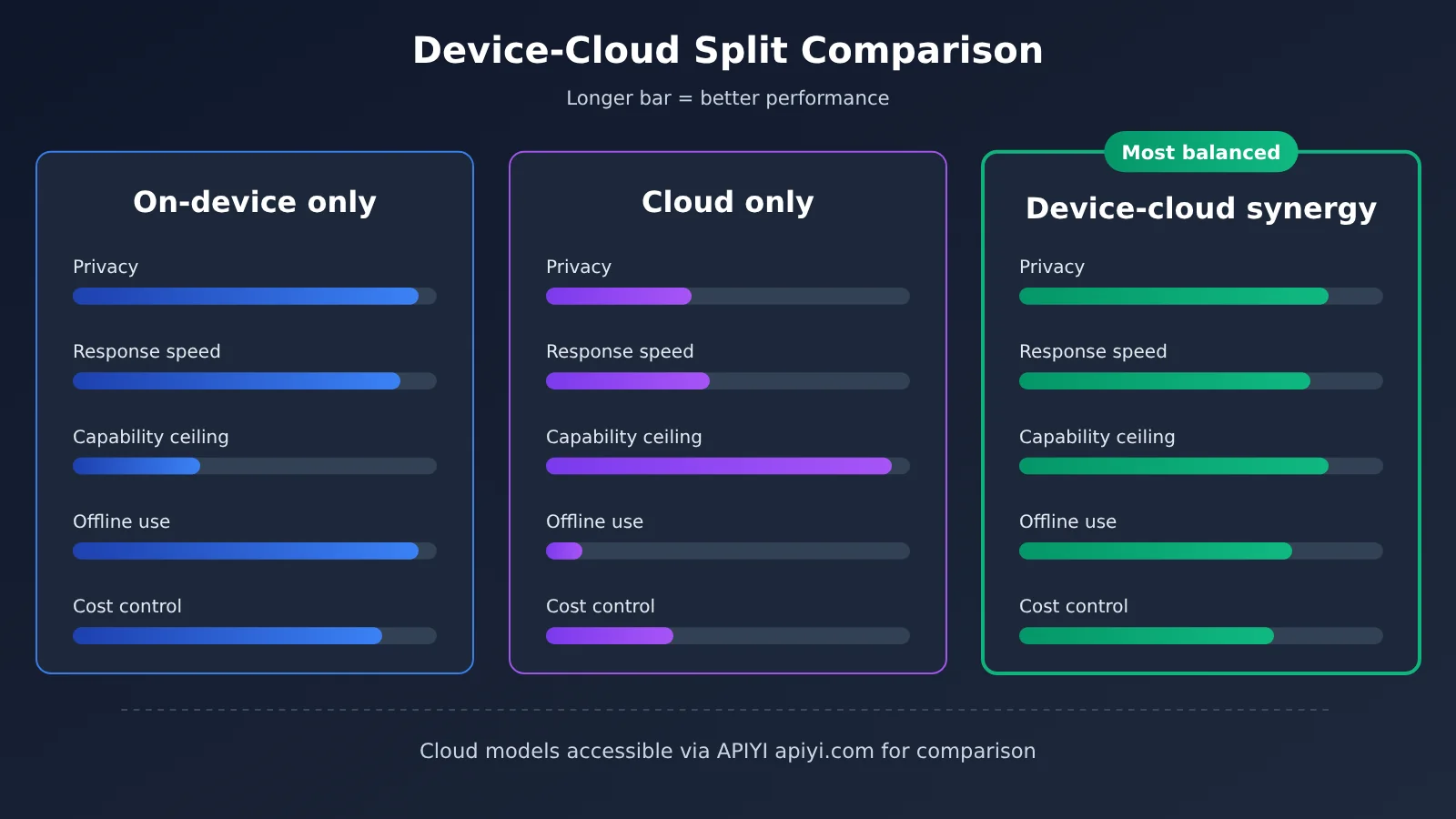
| Approach | Core characteristics | Best-fit scenarios | Main drawbacks | Platforms for cloud models |
|---|---|---|---|---|
| Pure on-device | Data never leaves the device, works offline | Well-bounded tasks like translation, object removal, and speech recognition | Low capability ceiling, heavy app size and storage pressure | Not applicable |
| Pure cloud | High capability ceiling, fast iteration | Open-ended Q&A, long text, multi-step planning | Network-dependent, privacy concerns, and ongoing invocation costs | APIYI apiyi.com, official APIs of each model |
| Edge-cloud collaboration | On-device fallback, cloud enhancement, task-based routing | The vast majority of consumer-facing AI products | Complex architecture; requires designing routing, authorization, and degradation paths | APIYI apiyi.com, official APIs of each model |
Benchmarking the Edge-Cloud Approaches
Pure on-device benchmark: Pure on-device leads on privacy and response speed—real-time translation with sub-second latency is the best proof of that. But on-device models are constrained by compute and storage, and quality drops noticeably on complex texture removal or complex Chinese rewriting. Edge-cloud collaboration, by contrast, can hand these hard problems off to the cloud, raising the capability ceiling while keeping the privacy floor intact.
Pure cloud benchmark: Pure cloud excels at breadth of knowledge and generation capability—after Siri integrated Qwen, it could finally answer travel-guide questions. But every invocation depends on the network and user authorization; if the user declines or the connection is weak, the feature simply stops working. For core features that need to be “available at any time,” edge-cloud collaboration is still the safer choice.
💡 Selection advice: The choice depends on your task mix. If the cloud portion requires weighing Qwen, GPT, Claude, and other models against each other, you can use APIYI apiyi.com to run same-prompt comparison tests through a unified interface, making decisions based on actual output quality rather than marketing specs.
The Cost Math of the Device–Cloud Split: One-Time on Device, Pay-as-You-Go in the Cloud
Cost is the part of the device–cloud split that gets underestimated most often. On the device side, costs show up mainly as app bundle size, storage taken from users, and the first-download experience — Apple’s 12GB update package this time, plus roughly 2GB per language pack, is a pretty direct illustration of that. Cloud costs, by contrast, are ongoing pay-per-call charges: the more active your users, the higher the bill.
Apple is running this math itself. On its earnings call, Apple management said that future features relying on cloud Large Language Models — Siri AI, advanced intelligent photo editing, and the like — will come with a base usage allowance, and heavy users will pay for more. In other words, “free base allowance + paid for heavy use” is likely to become the dominant business model for cloud AI features, and developers can borrow that same thinking when designing their own products.
When it comes to the actual cost of cloud model invocation, input pricing, output pricing, and cache billing rules vary a lot from model to model — and they change at any time. This article won’t quote any specific price figures. For all model prices, billing rules, input/output unit prices, and cache pricing, go by the actual data on the APIYI pricing page at https://docs.apiyi.com/models.
💰 Cost optimization: When estimating cloud costs, a good approach is “average input tokens per task × input unit price + average output tokens × output unit price,” with all unit prices taken from the APIYI pricing page at docs.apiyi.com/models. For system prompts that repeat at high frequency, check whether the pricing page lists cache billing — that can bring your ongoing costs down further.
FAQ
Q1: What is the device-cloud split?
The device-cloud split means breaking AI tasks apart by their characteristics — some go to the on-device model, and the rest get sent to a cloud-based Large Language Model. Apple Intelligence in mainland China is a textbook example: Clean Up and translation run on-device, while complex Siri tasks and Visual Intelligence “Ask” go to Qwen in the cloud.
Q2: What’s the core difference between an on-device model and a cloud-based Large Language Model?
On-device models still lead on privacy, latency, and offline availability, but their capability ceiling is capped by compute and storage. Cloud-based Large Language Models have broad knowledge and strong generation, but they depend on a network connection, require user authorization, and rack up ongoing invocation costs. It’s not a replacement relationship — it’s a complementary one.
Q3: When will Apple Intelligence in mainland China be officially available?
The mainland China version of Apple Intelligence opened for testing with the iOS 27.3 developer beta, which you can get through Software Update after signing in with the Apple Developer app. The first beta firmware has bugs, and according to public reports the official release is expected in December. If it’s your daily driver, wait for the stable release before upgrading.
Q4: Which AI tasks are best suited to run on-device?
Mainly these scenarios:
– **Private data processing**: photo Clean Up, natural-language search in the photo library, notification summaries
– **Ultra-low-latency interaction**: real-time voice translation, keyboard predictions
– **Must-work-offline features**: translation, speech recognition, and basic text proofreading on weak or no networks
Q5: How do I quickly call cloud-based Large Language Models like Qwen through an API?
Testing through a multi-model aggregation platform is the recommended route:
1. Visit APIYI apiyi.com to register an account and get an API key
2. Check the docs center at docs.apiyi.com for OpenAI-compatible or Anthropic-compatible integration instructions
3. Confirm available models and billing details on the pricing page at docs.apiyi.com/models, then swap in the endpoint and key to start calling
That way you can compare Qwen against other mainstream models on the same interface.
Q6: What happens if the user refuses authorization for a cloud call?
Siri’s approach is to simply give up on the answer, which feels a bit blunt. A better design is a fallback path: drop back to the on-device model for a simplified result, or guide the user to add more information and try again — while respecting their choice and not pestering them with repeated prompts.
Q7: What are the known limitations of the device-cloud split approach?
Objectively, there are three main ones:
– **Architectural complexity**: you need to maintain intent routing, authorization flows, and fallback logic on top of everything else
– **Experience consistency**: on-device and cloud outputs have different styles, which can feel disjointed to users
– **Ecosystem boundaries**: as hands-on testing has pointed out, system-level AI can’t reach into third-party apps like WeChat or Meituan, so personal context stays fragmented — the device-cloud split can’t solve the data silo problem
On-Device vs. Cloud: Key Takeaways
- The essence of the split: Private, low-latency, well-scoped tasks stay on-device; complex, open-ended, long-text tasks go to the cloud
- The China-market example: Apple’s in-house models handle voice isolation and translation, while Alibaba’s Qwen takes on Siri’s long-running tasks and visual queries
- A decision framework: Score each task across five dimensions — data sensitivity, latency, complexity, timeliness, and offline availability
- Consent is mandatory: Get explicit user approval before data leaves the device, and prepare a fallback path for when they decline
- Quality is the real challenge: Hooking up an LLM is just the starting point — prompts, context, and output length determine the final experience
- How to get started: Cloud models can be accessed through a single integration via APIYI at apiyi.com, compatible with both OpenAI and Anthropic formats
Conclusion
The rollout of Apple Intelligence in China gives us a clear reference answer for how to divide work between device and cloud:
- On-device protects privacy and speed: Voice isolation, translation, and notification summaries stay on the device — the trade-off is app size and storage
- The cloud fills in the capability ceiling: Complex Q&A and visual queries go to Qwen — the trade-offs are latency, consent, and ongoing cost
- Coordination is the norm: On-device fallback plus cloud enhancement, paired with consent prompts and degradation paths — that’s what a shippable product looks like
For developers, the most pragmatic path is to tag tasks using the decision framework first, then pick a single cloud task for prototype validation. We recommend using APIYI at apiyi.com to compare the real-world performance of different Large Language Models through a unified interface. For model pricing and billing details, refer to the pricing page at docs.apiyi.com/models.
📚 References
- ifanr: Hands-On with the Mainland China iPhone AI: A hands-on look at the first developer beta of Apple Intelligence in mainland China
- Link:
ifanr.com/1687733 -
Note: The source for facts in this article about how on-device and cloud features divide their work, plus real-world testing results
-
APIYI Documentation Center: Integration guide for OpenAI- and Anthropic-compatible formats
- Link:
docs.apiyi.com -
Note: Endpoint addresses, authentication methods, and invocation parameters are governed by this reference
-
APIYI Model Pricing Page: Available model list and billing details
- Link:
docs.apiyi.com/models - Note: Input/output unit prices, cache pricing, and other billing information are subject to the actual data on this page
Author: APIYI Technical Team
Technical Discussion: Reach out to us on the APIYI apiyi.com homepage — we’re happy to talk. More integration docs are available at the docs.apiyi.com documentation center.