Summary: The Claude Opus 4.5 API is going away soon. This article walks through what developers need to do before the retirement date so production traffic can move to a replacement model without hiccups.
Bottom line first: Anthropic announced the deprecation of Claude Opus 4.5 on November 23, 2026, with retirement from the Claude API scheduled for January 22, 2027. Once that date hits, requests using either the claude-opus-4-5-20251101 or claude-opus-4-5 model ID will fail. The officially recommended replacement is Claude Opus 5.5 (claude-opus-5-5). Developers have six things to take care of: confirm which schedule applies to your entry point, inventory every call path, validate the replacement model and capacity against real traffic, run regression tests with replayed samples, roll traffic over in stages, and finally complete a recovery drill and cleanup/reconciliation.
This schedule only covers endpoints operated by Anthropic. If you connect through Amazon Bedrock, Google-hosted Vertex, or a third-party aggregation platform, the retirement date follows that platform’s own announcement. There are only 60 calendar days between the announcement and the retirement date, so it’s worth setting your internal cutover date ahead of the retirement date to leave headroom for draining queues and handling exceptions.
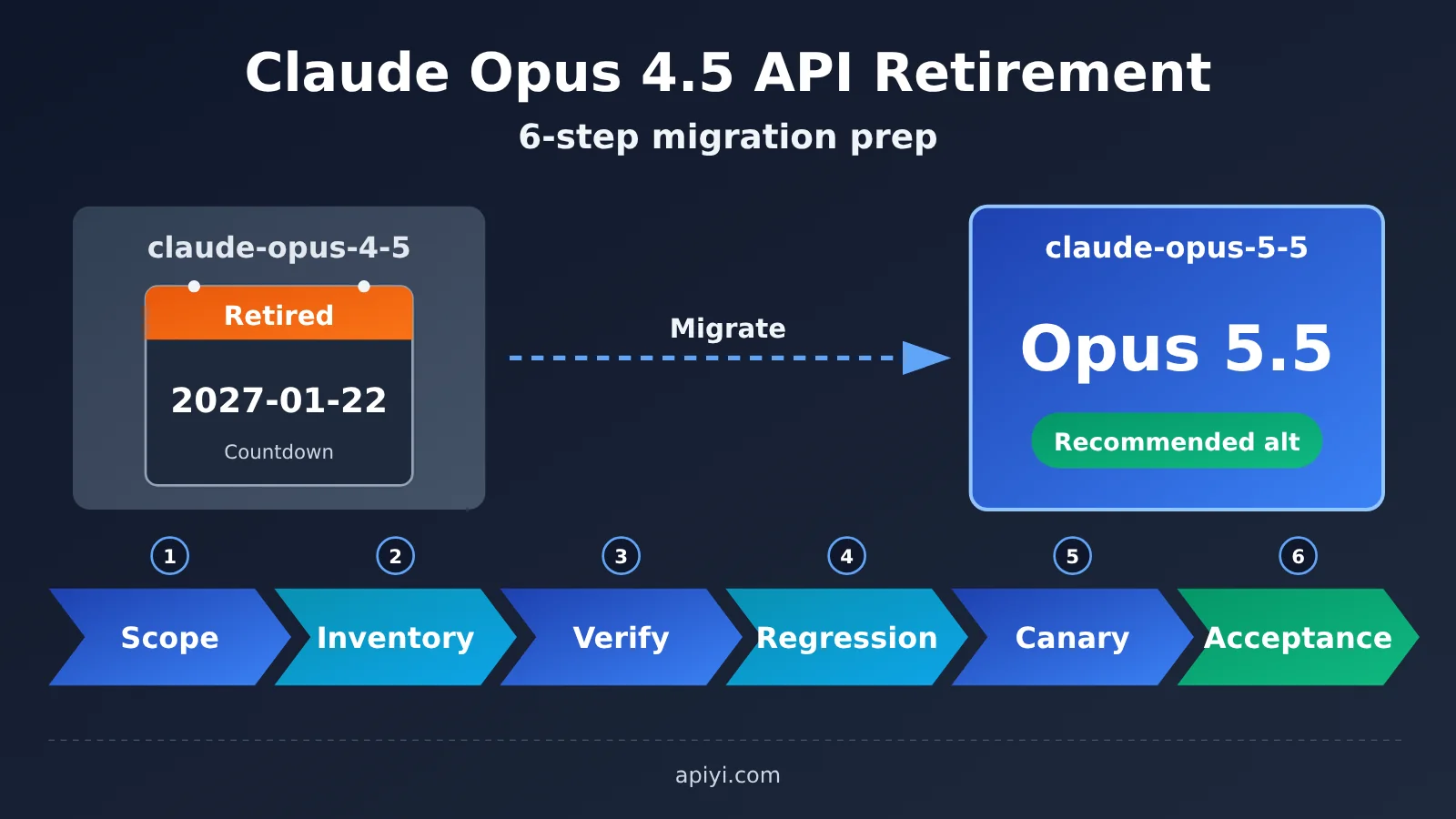
Knowledge Map: The Complete Claude Opus 4.5 API Retirement Migration Flow
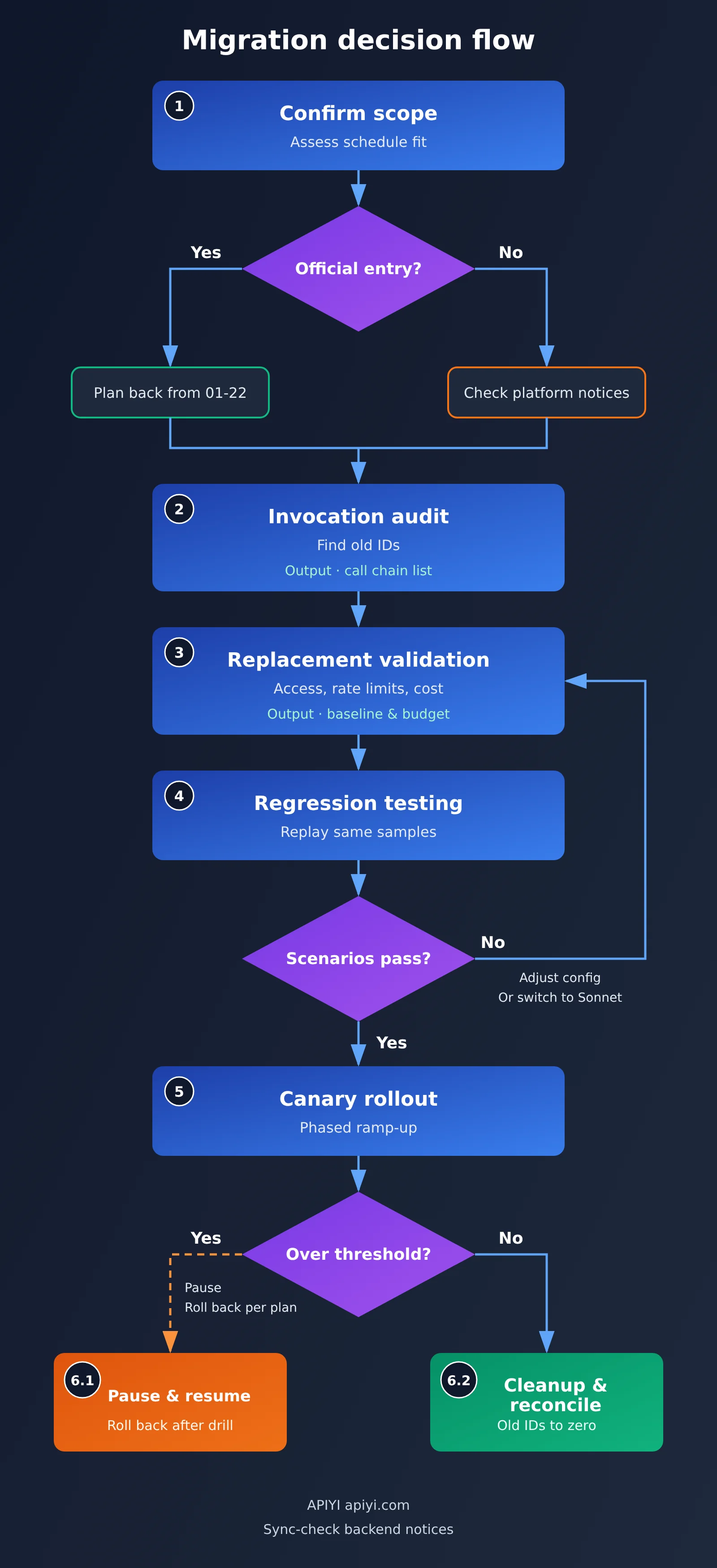
Figure notes: The whole flow starts with the scope decision in Section 1, which determines which date you count back from. Section 2 produces the call inventory, which is the source of samples for validation in Sections 3 and 4; if the regression in Section 4 doesn’t meet the bar, go back to Section 3 to adjust configuration or switch candidate models; during the canary in Section 5, once you cross the error threshold, move to Section 6.1 to pause and recover; once full traffic is stable, go to Section 6.2 to clean up legacy IDs and reconcile before closing out.
Index: Reading order for Claude Opus 4.5 API retirement preparation
| No. | Section | What it provides for the next step | Expected output |
|---|---|---|---|
| 1 | Confirm retirement scope and timeline | Applicable date and countdown starting point | Internal traffic cutover date |
| 2 | Build an invocation inventory | Links to migrate and owners | Invocation link inventory |
| 3 | Validate replacement models and capacity | Available replacement configurations and budget | Baselines, rate limits, and cost estimates |
| 4 | Regression testing | Basis for deciding whether traffic can be scaled up | Scenario-based acceptance report |
| 5 | Canary rollout and traffic cutover | Phased rollout path | Full traffic switch |
| 6 | Recovery drill and final acceptance | Fallback plan for failures and final confirmation | Release record |
Sections 1 through 5 need to be executed in order. The recovery drill in Section 6.1 should be completed before the canary rollout in Section 5 begins, and Section 6.2 should be executed after full traffic switch. Teams responsible for Claude Code can go directly to Section 2.4.
To Know: Key terms for understanding Claude Opus 4.5 API retirement
| Term | Brief explanation |
|---|---|
| Deprecation | The model is still callable, but the official recommendation is to migrate, and the retirement date has been announced |
| Retirement | The model is no longer available, and requests targeting that ID will fail directly |
| Shadow traffic | Copy real requests to a candidate model and compare results only, without letting the candidate results trigger actual business actions |
| Canary rollout | Switch traffic to the new model in batches by dimensions such as tenant or workspace |
| Ramp-up rate limiting | 429 rate limiting triggered by a sudden traffic surge; back off according to retry-after and then gradually increase volume |
| Idempotency key | A unique identifier used on the business side to recognize the “same task” and avoid duplicate writes during replays |
1 Confirm the Scope and Timeline of Claude Opus 4.5 API Retirement
1.1 Key Facts from the Claude Opus 4.5 Retirement Announcement
The key details from the announcement can be summarized in one table. Note that the two IDs — one with a date and one without — point to the same model, so you’ll need to search for both during your inventory.
| Item | Details |
|---|---|
| Deprecation announcement date | November 23, 2026 |
| Planned retirement date | January 22, 2027 (Claude API) |
| Affected IDs | claude-opus-4-5-20251101, claude-opus-4-5 |
| Officially recommended replacement | Claude Opus 5.5, ID claude-opus-5-5 |
| Optional candidate | Claude Sonnet 5.5, ID claude-sonnet-5-5 |
| Window length | 60 calendar days |
The official notice only gives dates, not an exact shutdown time. Your project should therefore set an earlier internal traffic cutover date so you don’t discover problems on the retirement date itself.
1.2 Which Endpoints Does the Claude Opus 4.5 Retirement Schedule Cover?
The official lifecycle documentation limits this schedule to Anthropic-operated endpoints, including Claude API, Claude Platform on AWS, Anthropic-managed Claude Models on Google Cloud, and Microsoft Foundry. Amazon Bedrock and Google-managed Claude Models on Google Cloud set their own lifecycles. Third-party aggregation services follow their own published information.
If you call through a gateway or aggregation platform, the first step is to figure out who actually operates the backend, then determine which schedule applies. For example, teams using the APIYI (apiyi.com) unified interface can watch both platform announcements and Anthropic’s official announcements to confirm the platform-side retirement plan for Opus 4.5 and the availability of claude-opus-5-5.
1.3 Claude Opus 4.5 Retirement Countdown Schedule (Project Example)
Below is an engineering example counting backward from January 22, 2027. These dates are project arrangements; the official notice only provides the deprecation date and retirement date:
- Late November 2026: Complete usage inventory and ownership assignment (Section 2)
- Mid-to-late December: Complete replacement validation and baseline regression (Sections 3 and 4)
- Early January 2027: Begin canary rollout (Section 5)
- Mid-January: Switch all traffic
- Final week: Drain queues and clean up (Section 6.2)
Teams should adjust the observation window around release freezes, billing cycles, and business peaks. Jobs that only run at month-end can rehearse ahead of time in an isolated environment using historical samples.
2 Build a Claude Opus 4.5 API Call Inventory
2.1 Export usage data
On the Usage page in Claude Console, select Export to download a CSV broken down by API key and model, then map key identifiers to service owners and deployment environments. Organizations with admin credentials can also use the beta Usage and Cost Analytics API to aggregate request counts, tokens, and costs by model, workspace, key, or calling principal.
Some calls are made by service accounts or federated identities, so the key dimension may be blank. In those cases, use workspace, calling principal, and application logs to fill in ownership.
2.2 Designing fields for the call inventory
The inventory uses one row per “call path.” Production sync endpoints, asynchronous queues, batch processing, month-end jobs, failure replays, fallback routing, and tenant-level overrides should all be tracked in the same table.
| Field | Description | Example |
|---|---|---|
| Business owner | Person who signs off on output quality | Contracts team |
| Traffic entry point | Sync API, queue, batch processing, etc. | Async queue |
| Actual provider | Claude API, Bedrock, aggregation platform, etc. | Claude API |
| Configuration source | Environment variables, feature flags, routing tables, etc. | Gateway routing table |
| Production model | Model ID in actual request logs | claude-opus-4-5 |
| Peak and service targets | Peak request volume, latency target | Fill in based on monitoring |
| Replacement batch | Canary batch it belongs to | Batch 2 |
| Recovery method | Fallback when it fails | Manual takeover |
Prioritization is simple: put call paths whose downtime would block the business, those that depend on multi-turn tool calls, and those whose peak traffic is close to quota limits at the top. After searching deployment manifests, environment configs, feature flags, model routing, and allowlists for the two retired IDs, also use actual request logs to catch cases where they’re referenced indirectly through aliases.
# Search code and config repos for the two retired IDs
grep -rnE "claude-opus-4-5(-20251101)?" \
  --include="*.py" --include="*.ts" --include="*.yaml" \
  --include="*.yml" --include="*.json" --include="*.env*" .
2.3 Check when the old value gets bound
Changing the default model in the gateway only affects requests that select a model afterward. Queue jobs that already have the model ID written into job data, audit replays, and historical session restores may still send requests with the old value.
For these paths, first determine whether the legacy model dependency comes from job data or current configuration, then handle each case separately: transform the data in the queue, rebuild the request, or switch at the session boundary. Also validate model permissions, API keys or federated identities, concurrency limits, and cost ownership environment by environment, so a successful result in a development workspace doesn’t overstate production availability.
2.4 Claude Opus 4.5 retirement checks for Claude Code teams
Teams using Claude Code with the Claude API as the backend also need an inventory. The official guidance is to update the client first, then check which model is actually selected. Project configs, command-line arguments, environment variables, org settings, and subagent definitions can each specify a model, so cover both administrator configuration and personal settings.
During validation, restart the session, run a real subtask, and record the result based on the model that actually takes effect. Looking only at what’s written in the config files makes it easy to miss settings overridden by higher-priority ones.
3 Validate Replacement Models and Capacity for Claude Opus 4.5
3.1 Establish an Opus 5.5 Baseline on the Real Endpoint
The official documentation supports migrating directly from Opus 4.5 to Opus 5.5. The migration guide requires you to read sequentially from the top of the page down to the relevant section, because changes accumulated across intermediate versions also apply. Run connectivity checks against the actual provider, deployment region, workspace, and permissions in your live environment.
On the Claude API, you can use GET /v1/models/{model_id} to look up a model or resolve an alias, then send a minimal request representative of real business usage to confirm that workspace, routing, tool calls, and response handling all work. When connecting through an OpenAI-compatible gateway, the approach is the same: first confirm that the gateway can see the target model, then run a minimal request.
from openai import OpenAI

client = OpenAI(
    api_key="YOUR_API_KEY",
    base_url="https://api.apiyi.com/v1",  # APIYI OpenAI-compatible endpoint
)

# 1) Confirm the models visible on the gateway side
ids = {m.id for m in client.models.list().data}
for mid in ["claude-opus-5-5", "claude-sonnet-5-5", "claude-opus-4-5"]:
    print(mid, "可用" if mid in ids else "不可见")

# 2) Send a minimal request that matches real business usage
resp = client.chat.completions.create(
    model="claude-opus-5-5",
    messages=[{"role": "user", "content": "从以下文本抽取合同金额:总价人民币 12 万元整。"}],
    max_tokens=200,
)
print(resp.model, resp.usage, resp.choices[0].message.content)
🚀 Quick start: If you need to compare Opus 4.5, Opus 5.5, and Sonnet 5.5 side by side in the same codebase, you can use one API key from APIYI apiyi.com and switch the model parameter to complete baseline testing. The free trial quota for new users is enough to get through the first round of connectivity validation.
If your business also needs a second candidate model, you can bring Claude Sonnet 5.5—already active on the Claude API—into the same validation workflow and compare it against the same criteria.
3.2 Recalculate peak capacity against actual rate limits
The Claude API’s Messages API meters requests per minute, input tokens, and output tokens by model category. Opus 5.5 has its own dedicated rate limits, while Opus 4.5 belongs to the Opus 4.x family, which shares a separate pool of quotas. That means the existing quotas for Opus 4.x won’t automatically carry over to the new model — you’ll need to recalculate peak capacity using your workspace’s actual limits.
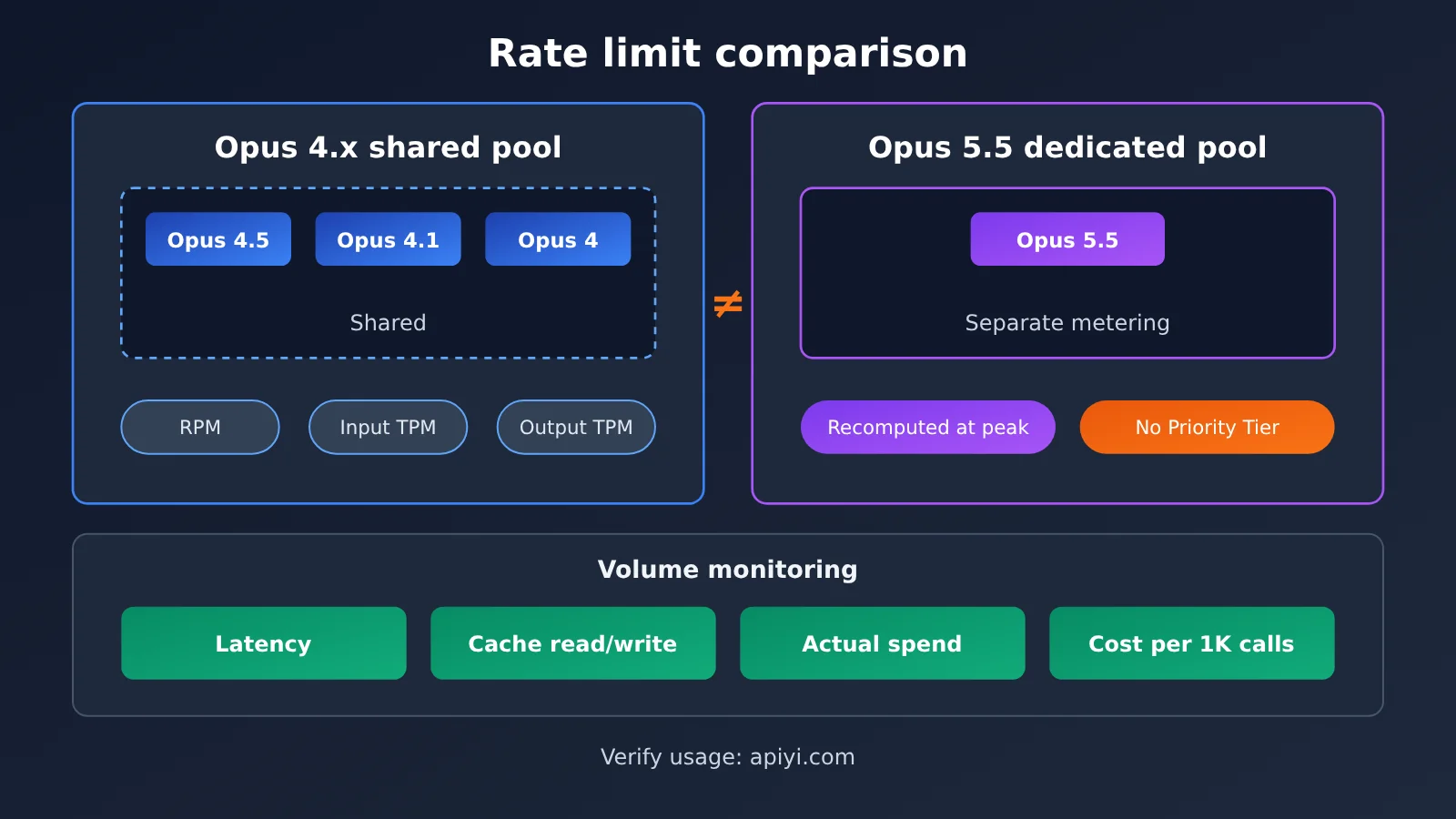
If your organization has purchased Anthropic’s Priority Tier, you’ll need separate capacity planning, because the migration guide states that Opus 5.5 doesn’t support Priority Tier. When scaling up, track latency, cache reads and writes, actual spend, and cost per thousand successful business tasks at the same time — and measure throughput under cold-cache conditions ahead of time.
3.3 Estimating Migration Costs
When estimating costs, first fix the traffic scale, the sample set, and the definition of “success,” then factor in failed retries, tool calls, and the volume of manual review. The acceptable budget should be confirmed in writing by finance or the platform owner, and then allocated by time period to regression testing and shadow traffic.
The migration guide calls for re-evaluating the updated tokenization, along with the end-to-end cost and latency under the new inference configuration. You can start by using the Token Counting API to estimate token counts for typical inputs, but your final conclusions should be based on the usage and billing from real responses.
💰 Cost optimization: Budget-sensitive teams can first run a small-sample estimate on APIYI apiyi.com with pay-as-you-go billing. Once you have the real cost per thousand successful tasks, you can then decide how to split traffic between the primary and fallback models.
4 Regression Testing Before Claude Opus 4.5 Retirement
4.1 Preparing Replay Samples
Use the same set of de-identified inputs and replay them with the valid configurations for each model generation, keeping the old outputs and business decisions as the baseline. The samples should cover common business scenarios, long inputs, null values, streaming interruptions, tool failures, truncation, refusals, and low-frequency but high-risk paths.
Take contract field extraction as an example (a hypothetical case). The acceptance design includes ground truth, key fields, and conditions that should trigger human handoff. Consistency rates for dates, amounts, and currencies should be tracked separately, and classification results for missing pages, scanned documents, and multi-currency samples should also be checked separately. Records that parse successfully but get key information wrong should count as critical defects. Shadow traffic should only compare candidate results; any flow that involves writes should run in a test environment or be validated with stubs to prevent duplicate writes or external sends.
4.2 Define Per-Scenario Acceptance Metrics
The program is responsible for checking structure and fields, while business reviewers verify facts, tone, and critical errors. Set a threshold for each scenario independently, and only allow traffic ramp-up after the critical path passes.
| Metric | Applicable scenario | Recording method |
|---|---|---|
| Field completeness rate | Structured output | Counted by field |
| Task completion rate | Multi-step workflows | Reported alongside per-step failure rates |
| Duplicate execution rate | Tasks with write actions | Counted by idempotency key |
| Time to first displayable content | Streaming endpoints | Milliseconds |
| End-to-end latency | All endpoints | Milliseconds, including the longest duration |
| Cost per 1,000 successful calls | All scenarios | USD, including retries |
Test reports should state the success and failure denominators by business stage. For synchronous endpoints, record three layers: normal completion, valid structure, and business validation passed, and flag calls that succeeded only after a retry. Multi-step workflows should also report the average number of tool turns. For incomplete task instances, confirm that the business side receives a recognizable failure status, and that records obtained through manual takeover, resend, or restart flows are complete.
View the full regression replay script
import json
import time
from openai import OpenAI

client = OpenAI(
    api_key="YOUR_API_KEY",
    base_url="https://api.apiyi.com/v1",  # APIYI unified endpoint; switch the model parameter to compare
)

MODELS = {
    "baseline": "claude-opus-4-5",   # Keep as the baseline before retirement
    "candidate": "claude-opus-5-5",  # Officially recommended replacement
}
REQUIRED_FIELDS = ["date", "amount", "currency"]


def call(model: str, prompt: str, retries: int = 2) -> dict:
    """Call the model and record latency, retry count, and usage."""
    for attempt in range(retries + 1):
        start = time.time()
        try:
            resp = client.chat.completions.create(
                model=model,
                messages=[
                    {"role": "system", "content": "只输出 JSON,字段为 date、amount、currency。"},
                    {"role": "user", "content": prompt},
                ],
                max_tokens=300,
            )
            return {
                "ok": True,
                "attempts": attempt + 1,
                "latency_ms": int((time.time() - start) * 1000),
                "text": resp.choices[0].message.content,
                "usage": resp.usage.model_dump() if resp.usage else None,
            }
        except Exception as e:  # In production, distinguish 429, overload, and configuration errors
            last_err = str(e)
            time.sleep(2 ** attempt)
    return {"ok": False, "attempts": retries + 1, "error": last_err}


def judge(output: dict, expected: dict) -> dict:
    """Three-layer check: normal completion / valid structure / business validation passed."""
    result = {"finished": output["ok"], "valid": False, "passed": False}
    if not output["ok"]:
        return result
    try:
        data = json.loads(output["text"])
        result["valid"] = all(k in data for k in REQUIRED_FIELDS)
        result["passed"] = result["valid"] and all(
            str(data[k]) == str(expected[k]) for k in REQUIRED_FIELDS
        )
    except (json.JSONDecodeError, TypeError):
        pass
    return result


def run(samples: list[dict]) -> None:
    for tag, model in MODELS.items():
        stats = {"finished": 0, "valid": 0, "passed": 0, "retried": 0}
        for s in samples:
            out = call(model, s["input"])
            j = judge(out, s["expected"])
            for k in ("finished", "valid", "passed"):
                stats[k] += int(j[k])
            stats["retried"] += int(out["attempts"] > 1)
        n = len(samples)
        print(f"[{tag}] {model} 样本数={n} " +
              " ".join(f"{k}={v / n:.1%}" for k, v in stats.items()))


if __name__ == "__main__":
    samples = [
        {"input": "本合同于 2026 年 12 月 1 日签订,总价 12 万美元。",
         "expected": {"date": "2026-12-01", "amount": "120000", "currency": "USD"}},
    ]
    run(samples)
5 Canary Rollout and Traffic Cutover Before Claude Opus 4.5 Retirement
5.1 Staged Cutover
You can roll out the cutover in four stages: internal traffic, a small amount of production traffic, primary business workloads, and full traffic. Put the primary model and its accompanying adapter configuration behind the same feature flag so they roll back together. Keep canary assignments stable by tenant or workspace, and try to keep consecutive steps of the same task in the same group so cross-request issues are easier to trace.
Compare control groups over the same time window, and document the minimum request volume and observation duration in advance. Run separate controlled drills for low-frequency paths. A sudden traffic spike can trigger ramp-up rate limiting. When you hit these 429s, back off according to retry-after, keep traffic at a level where requests succeed, and then scale up gradually. The release operator signs off on runtime metrics, and the business owner signs off on result quality. If any critical flow crosses the pre-agreed error threshold, pause the traffic ramp.
5.2 Long Sessions, Batch Jobs, and Streaming APIs
Switch long sessions at the start of a new session whenever possible. For batch processing, route new jobs to the new model first, then inventory old queues and in-flight tasks. Claude API Message Batches expire if they aren’t completed within 24 hours, and results are downloadable for 29 days from creation. Factor both time limits into your drain window planning.
Streaming APIs can still emit error events after returning HTTP 200, so the acceptance criterion should be “the stream completes normally and the business submission succeeds,” not the status code. During cutover, reserve a full business cycle to observe low-frequency tasks, and record request IDs, model IDs, batch identifiers, and failure types.
6 Recovery Drills and Final Acceptance for Claude Opus 4.5 Retirement
6.1 Set stop conditions and rehearse recovery
Write the conditions for halting the rollout down in advance—for example, critical task failures, worsening rate limiting, or budget overruns. If the old model is still callable in the early days of the cutover, you can briefly fall back to the old path using the plan you’ve already rehearsed, so you can pinpoint the problem. The long-term recovery goal should be one of three options: an active model that has passed the same acceptance checks, a stripped-down working process, or manual takeover.
A recovery drill includes: revoking a batch of canary configs, launching the alternative path, restoring queued tasks, and verifying write results. You can simulate an old ID becoming invalid in an isolated environment to confirm that the gateway routes these errors to the new path—or surfaces the failure clearly—while recording recovery time and remaining backlog. After retirement, failures caused by old IDs should be treated as configuration issues and fixed as such. Rate limiting, overload, and streaming interruptions each get their own retry policy with caps. For tasks that write to external systems, confirm which steps have already completed using the business idempotency key before replaying.
The handoff record should state: the on-call owner for the cutover, stop conditions, how to verify the config took effect, who owns streaming or batch errors, and who owns the manual processing queue.
6.2 Cleanup and reconciliation after the full rollout
Once the full switch is done, check the new model’s success rate, error feedback, and budget consumption entry by entry, then remove the two old IDs from defaults, overrides at every level, replay configs, and fallback routes. Confirm from application or gateway logs that old model invocation attempts are zero, then reconcile against usage reports, double-checking workspaces, low-frequency tasks, and restarted instances.
Data from the Usage and Cost Analytics API usually refreshes within four hours, with a possible delay of up to 24 hours. You can use the data_refreshed_at field to determine what time range the report covers. Teams connecting through aggregation platforms such as APIYI apiyi.com can also filter by model in the platform’s invocation logs to cross-confirm the old IDs have no traffic. Finally, write the final routing, acceptance results, degradation plan, and follow-up owner into the release record.
Final check method: If all four of the following can be answered with “yes,” the Claude Opus 4.5 API retirement preparation is complete:
- The two old IDs appear zero times across all configs, queue data, and logs;
- Every critical path has a scenario-specific acceptance report and sign-off record;
- The recovery drill has been run end to end, with recovery time recorded;
- The new model’s cost per thousand successes is within the written budget.
🎯 Technical tip: During migration, when you need to compare multiple models in parallel and quickly switch between candidates, you can use APIYI apiyi.com’s OpenAI-compatible interface to run acceptance tests for Opus 5.5 and Sonnet 5.5 with a single codebase, reducing switching costs.
References
-
Claude Model Deprecation and Retirement Records: Opus 4.5 retirement announcement and platform scope
- Link:
platform.claude.com/docs/en/about-claude/model-deprecations - Description: Retirement dates, affected IDs, applicable entry points, and usage audit methods
- Link:
-
Claude Opus 5.5 Migration Guide: Checklist for migrating from Opus 4.5
- Link:
platform.claude.com/docs/en/models/opus-5-5/migration-guide - Description: Changes to tokenization, reasoning configuration, Priority Tier, and more
- Link:
-
Claude API Rate Limit Rules: Quotas and ramp-up throttling measured by model category
- Link:
platform.claude.com/docs/en/api/rate-limits - Description: Reference for recalculating peak capacity and handling 429s
- Link:
-
Message Batches Batch Processing Docs: Batch processing time limits
- Link:
platform.claude.com/docs/en/build-with-claude/batch-processing - Description: 24-hour expiry and 29-day result retention rules
- Link:
-
Usage and Cost Analytics API: Usage and cost summary endpoints
- Link:
platform.claude.com/docs/en/manage-claude/usage-cost-analytics-api - Description: Inventorying invocations and closing reconciliation, including data freshness notes
- Link:
-
Claude Code Model Configuration: Sources and priority of model settings
- Link:
code.claude.com/docs/en/model-config - Description: Reference for the Claude Code team when inventorying the models actually in effect
- Link:
Author: APIYI Technical Team
Technical Exchange: If you run into model integration or comparison testing issues during migration, feel free to reach us through the APIYI apiyi.com homepage. More integration materials are available in the docs.apiyi.com documentation center.