
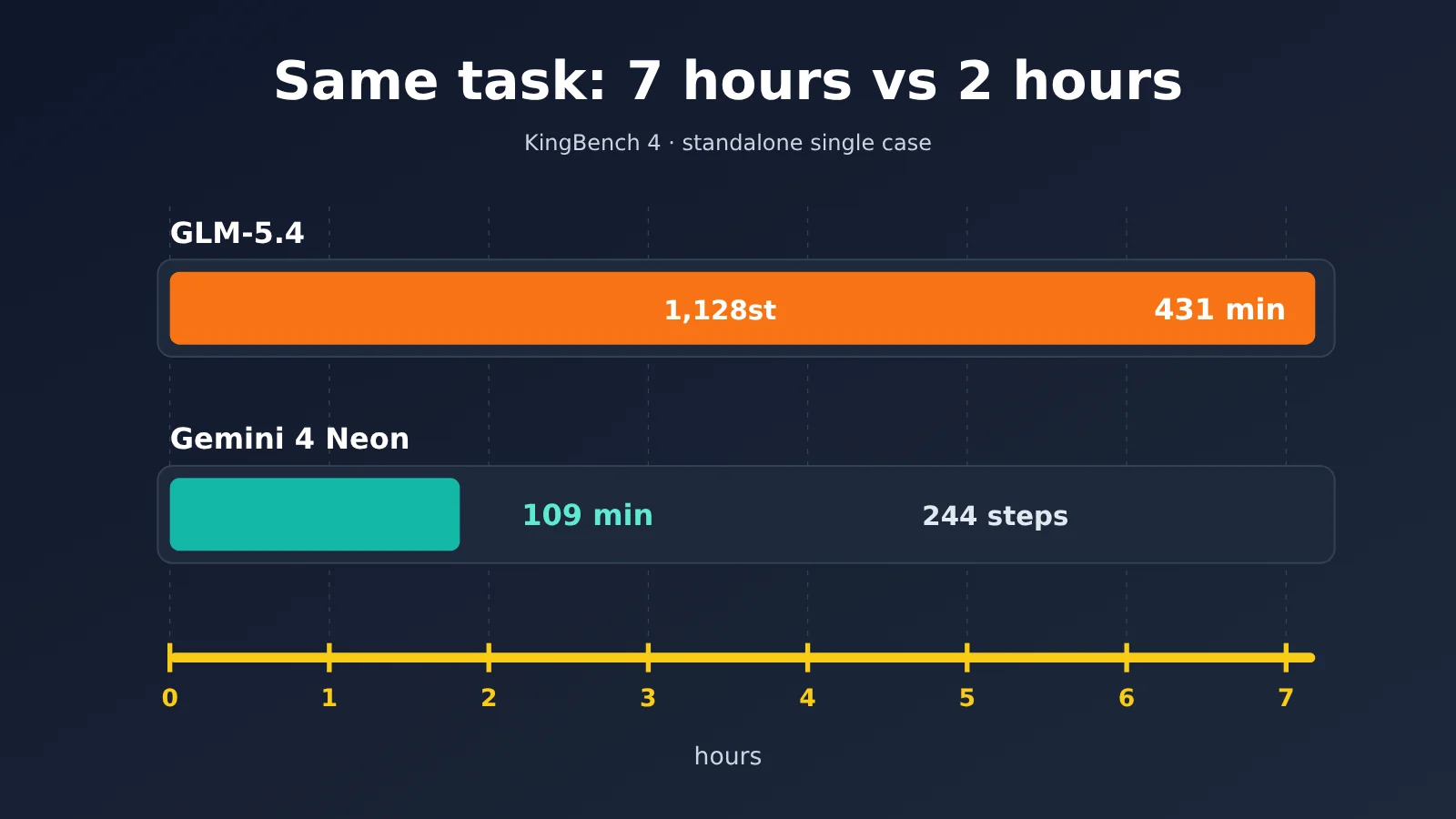
Author’s note: On the same KingBench 4 run, GLM-5.4 took 1,128 steps and 431 minutes, while Gemini 4 Neon took 244 steps and 109 minutes. This post breaks down the real differences between these two models across scores, step counts, per-step latency, price, and how you get access to them — and offers selection advice by task type.
GLM-5.4 and Gemini 4 Neon both have a 1M context window, and both can read an image and write code from it. On the spec sheet, they don’t look that far apart. What actually separates them is a number that’s easy to overlook: on the same independent benchmark task list, GLM-5.4 ran for about 7 hours, while Gemini 4 Neon finished in under 2 hours.
This isn’t a “each has its strengths” fence-sitting analysis. A 4x runtime doesn’t mean GLM-5.4 is useless, and Neon has a hard flaw of its own: at the high setting, its first response takes over 40 seconds. This post keeps vendor-reported numbers, independent third-party single-case results, and claims we can’t verify yet clearly separated — then gives concrete recommendations for scenarios like interactive development, batch long-running tasks, and visual coding.
Why this matters: By the end, you’ll know the gap between GLM-5.4 and Gemini 4 Neon isn’t just about scores. You’ll also know which model your task should go to, and when you shouldn’t switch models at all.
Core Differences Between GLM-5.4 and Gemini 4 Neon
Here’s a two-column comparison to start. Both the times and the scores come from AICodeKing’s KingBench 4 — a third-party, independent, single-sample run on a private test set. It isn’t a vendor’s final leaderboard, and it shouldn’t be read as a service level agreement (SLA).
| Dimension | GLM-5.4 | Gemini 4 Neon |
|---|---|---|
| KingBench 4 score (out of 60, independent single-sample run) | 33.2 (7th of 19 models; top open-weight model by the evaluator’s reckoning) | 37.9 (second only to Claude Fable 5.2 at 42.0) |
| Reasoning steps | 1,128 steps | 244 steps |
| Total time | 431 minutes (about 7.2 hours) | 109 minutes (about 1.8 hours) |
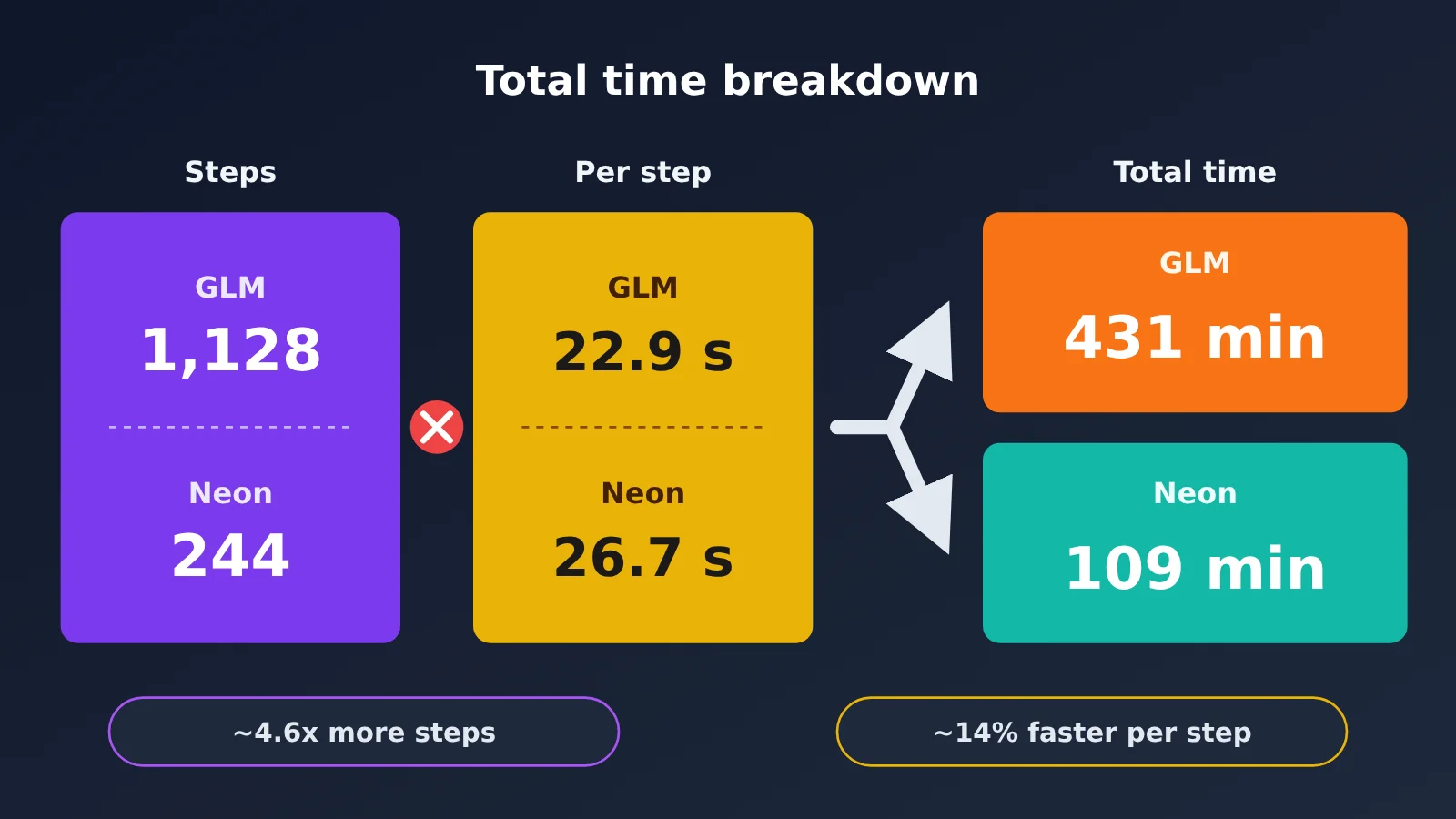
| Time per step | 22.9 seconds | 26.7 seconds |
| Price | Coding Plan subscription credits; API pricing not announced | $3 per 1M input tokens, $15 output, $0.15 cache read — standard pricing |
| Availability | GLM Coding Plan, ZCode, Z.ai Chat, and some coding tools; API opens after safety evaluation | GA on 2026-11-18, launch day; pay-as-you-go API available immediately |
The counterintuitive part: GLM-5.4 is faster per step — it loses on step count
Plenty of people see “431 minutes versus 109 minutes” and assume GLM-5.4’s inference is slow. The data doesn’t support that conclusion: GLM-5.4 averages 22.9 seconds per step, roughly 14% faster than Neon’s 26.7 seconds. The problem is step count — GLM-5.4 took 1,128 steps, about 4.6× Neon’s 244.
A quick multiplication check confirms it: 1,128 × 22.9 seconds ≈ 430 minutes, and 244 × 26.7 seconds ≈ 109 minutes, both essentially matching the recorded totals. So GLM-5.4’s issue isn’t slow steps — it’s overthinking. Neon does more work per step, but it converges earlier, so end to end it’s far shorter.
Why GLM-5.4 takes so many steps
According to Z.ai’s official technical blog, GLM-5.4 is Zhipu’s first flagship model built on the Loop Transformer. It turns 28 of the 78 layers in the GLM-5 base into shared-weight layers that run for two recurrent rounds: the parameter count stays the same, but the network becomes effectively deeper. The first round builds global context; the second refines it and gradually writes results back through per-token gating.
The blog openly acknowledges one limitation: the model can easily get stuck in excessively long “marathon thinking” loops. Repeated reflection and self-correction often push accuracy beyond what the parameter count would suggest, but it’s time-consuming. The 1,128 steps on KingBench 4 line up exactly with the behavior the team describes.
Reviewers also documented the effect of thinking levels. In a 180-second short-task probe, Low and Medium finished within the time limit, while High and Max timed out. On the long-task KingBench 4, Max scored 33.2 and High 28.8, clearly above Low’s 25.2 and Medium’s 24.1. In other words, GLM-5.4’s scores are largely bought with long thinking time. Lowering the level makes it faster, but the score drops along with it.
Gemini 4 Neon’s Weak Spot: First-Token Latency
Neon’s short total runtime doesn’t mean every response is fast. Artificial Analysis’s independent evaluation notes that Neon is on the slower side per task and its output is on the verbose side; at the default high setting, first-token latency already exceeds 40 seconds. That’s a poor fit for chat-style products and IDE inline completions—situations where users are staring at the screen waiting.
Neon has four thinking levels: low, medium, high, and xhigh, with high as the default. If your use case is sensitive to first-token latency, drop the level and run a test round first—don’t go live with the default.
Fact Layers for GLM-5.4 and Gemini 4 Neon
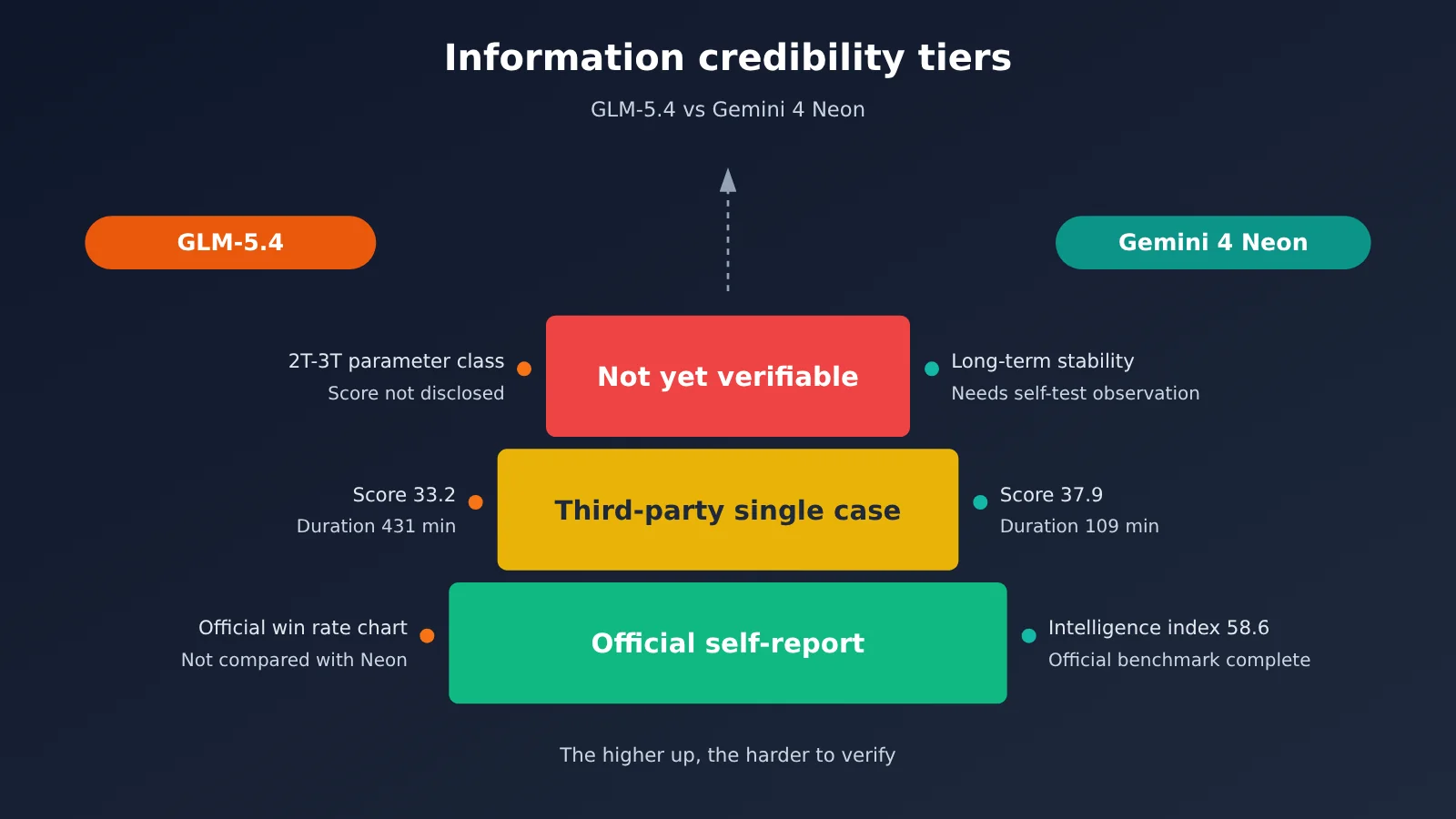
The two models’ information sources are very different: Neon has already launched officially and has plenty of official benchmarks; GLM-5.4 has just been released, its API isn’t open yet, and public scores are scarce. To avoid treating vendor marketing as settled fact, let’s divide the information into three layers by source.
| Information layer | GLM-5.4 | Gemini 4 Neon |
|---|---|---|
| Official claims | Loop Transformer architecture; in a 30B controlled experiment, AIME25 rose from 19.17 to 30.42, and GPQA-Diamond rose from 47.58 to 56.26; average output length dropped 10%–14%; 51.1% win rate against GLM-5.3 | About 3x faster than Gemini 4 Carbon, with 32% lower cost per task at the high setting; AA Intelligence Index 61 (xhigh); Terminal-Bench 4.1: 65.2%; AA Coding Agent Index 58.6 |
| Independent third-party single case | KingBench 4 score 33.2, 1,128 steps, 431 minutes; cache hit rate 98.4%; 31/31 parallel tool schema checks passed | KingBench 4 score 37.9, 244 steps, 109 minutes; AA says it’s slower per task, with first-token latency at high exceeding 40 seconds |
| Not yet verifiable | “Reaches the 2T–3T parameter model class”; ranked near the top in an internal evaluation across 200 real-world coding scenarios (scores not disclosed); timing for API availability and open-sourcing of weights | Long-term stability beyond official rankings—needs to be observed under your own workload |
Two points need special mention. First, GLM-5.4 currently has no public score on the Artificial Analysis Intelligence Index; its sibling GLM-5.3 Max scores 32, and that can’t be used as a substitute for GLM-5.4. Second, Z.ai’s official win-rate chart only compares GLM-5.3, Kimi K3.1 Pro, and DeepSeek-V4.1-Flash-1017—it doesn’t include a head-to-head comparison with Gemini 4 Neon. So all the direct “GLM-5.4 vs Neon” data in this article comes from just one independent single case: KingBench 4.
GLM-5.4 vs Gemini 4 Neon: Specification Comparison
Beyond latency, there are a few specification differences worth noting between the two models — especially output ceilings and throughput.
| Spec | GLM-5.4 | Gemini 4 Neon |
|---|---|---|
| Context window | 1M | 1M unified window |
| Max output | 128K | 64K synchronous; background long decoding can reach 1M |
| Input modalities | Video, image, text, files | Text, image, audio, video, documents |
| Thinking mode | Supported; the tier setting noticeably affects both score and latency | low / medium / high / xhigh, default high |
| Caching | Supports context caching | Implicit prefix caching, minimum 4,096 tokens |
| Throughput | Up to 200 token/s off-peak, 70-80 token/s at peak | Officially claimed to be about 3x faster than Carbon |
| Multi-turn notes | Function calling, structured output, and streaming all supported | Multi-turn conversations require passing thoughtSignature back verbatim |
GLM-5.4’s 128K synchronous output ceiling is more generous, making it a better fit for generating large blocks of code, a complete game project, or a long document in a single pass. The official blog has demoed 6-axis robotic arm CAD modeling in FreeCAD and an interactive 3D birdwatching scene generated with GLSL shaders — both textbook examples of “visual coding + long-horizon tasks.”
Neon’s advantage is broader input modality coverage plus a fully built-out API ecosystem. One thing to watch is thoughtSignature: if you assemble multi-turn messages yourself and drop the signature the model returns, reasoning continuity in later turns may suffer. When using an OpenAI-compatible interface, the safest approach is to keep the complete assistant message rather than trimming it yourself.
GLM-5.4 and Gemini 4 Neon: Scenario Recommendations
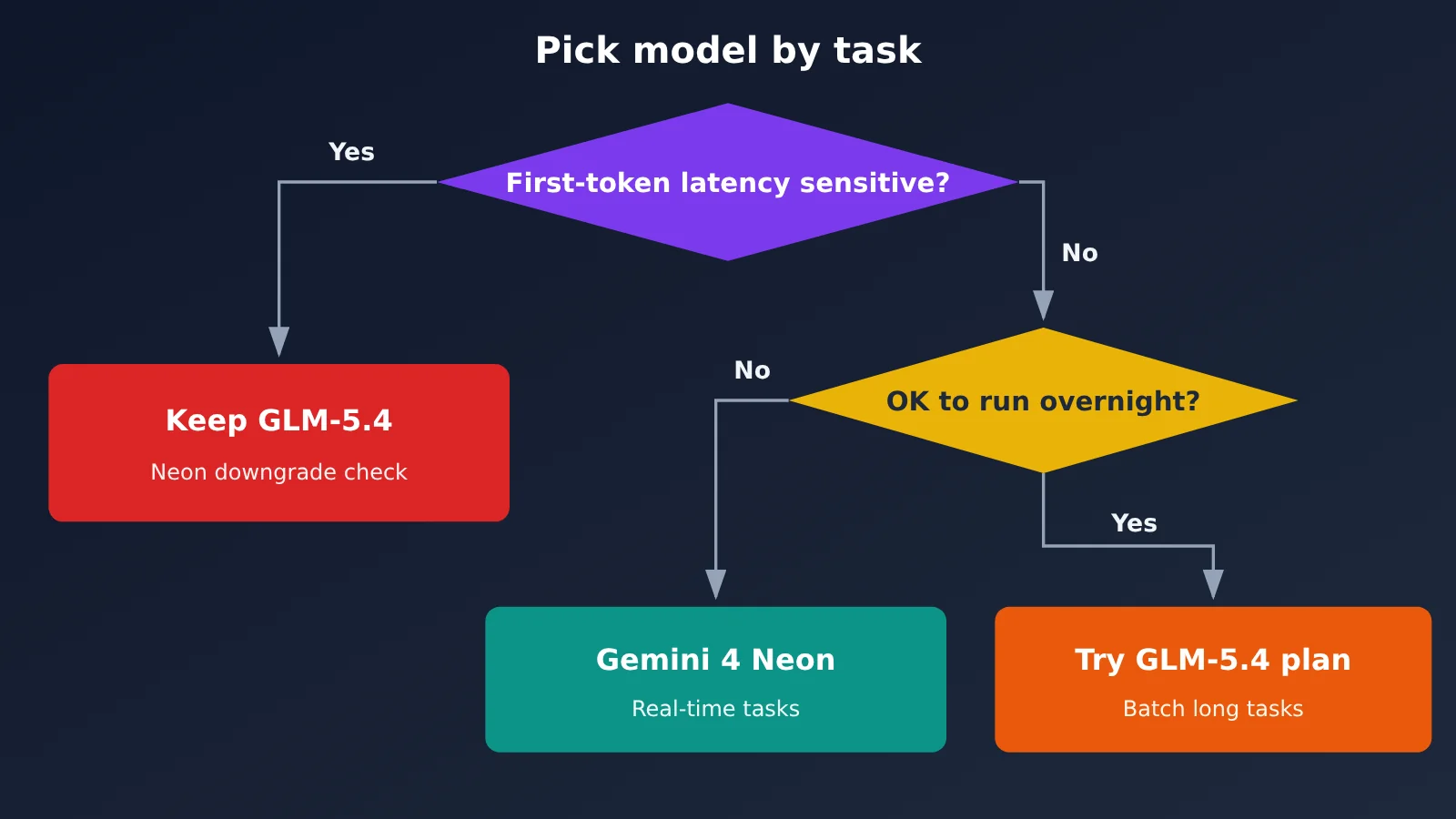
The recommendations here are based on the task, not on who’s “stronger.” The table below is the core decision aid for this article.
| Task type | Recommendation | Why |
|---|---|---|
| Interactive front-end development | Gemini 4 Neon | Faster end-to-end and a higher score; just remember to lower the thinking level to control first-answer latency |
| Production coding agent | Gemini 4 Neon | Already GA, standard pricing with no expiration date, and complete official benchmarks make risk assessment easier |
| Batch long-running tasks (can run overnight) | GLM-5.4 | Per-step speed isn’t slow; it takes longer but can be queued offline, and subscription quota costs are manageable |
| Visual coding, visual recreation | Try GLM-5.4 first | Official focus area; 128K output is suited to generating a large project in one go |
| Products sensitive to first-answer latency | Neither as a default configuration | Don’t use GLM-5.4; evaluate Neon only after lowering the thinking level |
When to choose Gemini 4 Neon
- Development that needs a human in the loop: You make a request, wait for the result, then revise. The gap between 109 minutes and 431 minutes directly determines how many iterations you can get through in a day.
- Pay-as-you-go billing and a need to calculate costs precisely: Neon’s $3 / $15 is standard pricing with no expiration date, so you can budget accurately ahead of time.
- Stable API integration: GLM-5.4’s API isn’t open yet, while Neon can be used in production pipelines right now.
When to choose GLM-5.4
- Batch long-running tasks: Submit a batch of visual recreation or game prototype tasks at once, let them run overnight, and check the results in the morning. A 7-hour runtime isn’t a major problem.
- You already have the GLM Coding Plan: All subscription users can use GLM-5.4, and weekly quota users get 1.5x the GLM-5.4 quota of GLM-5.3, so marginal cost is very low.
- You want to try visual coding at low cost: The official focus areas include video, games, 3D shaders, and CAD modeling, making subscription quota a good fit for exploration.
When not to switch
If your product is sensitive to first-answer latency—say, online customer service, inline editor autocomplete, or an agent that needs real-time feedback—don’t switch the model to GLM-5.4. At High and Max levels, it times out even on a 180-second short-task probe, and if you drop to Low or Medium, the KingBench 4 score falls to around 25, below the 27.5 of GLM-5.3 at Max. In that case, switching models brings no benefit—only extra risk.
How to Call GLM-5.4 and Gemini 4 Neon
Neon is already available on a pay-as-you-go basis. APIYI (apiyi.com) is an AI API aggregation platform for Large Language Models. With a single API key, you can call mainstream models such as Gemini, Claude, OpenAI, and GLM, and its API is compatible with the OpenAI format. Neon’s model ID on the platform is gemini-4-neon, and its pricing matches the official standard rates: $3 input, $15 output, and $0.15 cached read (per 1M tokens).
Minimal Invocation Steps
To call Neon with the official OpenAI SDK, you only need to change two parameters:
- Install the SDK:
pip install openai - When initializing the client, set
api_key="YOUR_API_KEY"andbase_url="https://api.apiyi.com/v1" - Call
client.chat.completions.create, passingmodel="gemini-4-neon"andmessages=[{"role": "user", "content": "..."}] - Read
response.choices[0].message.contentas the result
If you want multi-turn conversations, append the full assistant message returned in each turn to messages without removing any fields. This keeps reasoning state such as thoughtSignature intact. If you need to control first-response latency, test the low or medium tier first; refer to the platform documentation for the exact parameter syntax for each tier.
Visual Coding Calls with Image Input
Visual Coding calls work pretty much the same way. The difference is in the content field of messages: write it as an array, with one item being {"type": "text", "text": "按这张设计稿生成 React 组件"} and another being {"type": "image_url", "image_url": {"url": "data:image/png;base64,..."}}. It’s a good idea to also set max_tokens to leave room for long code output, and add timeout retries at the outer layer, since the first response in the high tier can take more than 40 seconds.
🚀 Quick start: If you’re not sure which model to use yet, sign up at APIYI (apiyi.com) and use the free trial credits for new users. Send the same request to
gemini-4-neonandglm-5.3, compare output quality and latency, and then decide whether to wait for GLM-5.4.
GLM Series Pricing on APIYI
The GLM-5.4 API won’t open up until Zhipu completes its safety assessment, and it isn’t listed on APIYI yet. We’ll list this model as soon as possible; model IDs and pricing are subject to the platform’s model list. In the meantime, you can use the available models from the same family to set up your invocation pipeline. Once GLM-5.4 goes live, you’ll only need to change the model parameter.
The table below lists the relevant models from the platform’s overall pricing table. Data as of 2026-11-23 10:23 (UTC+8); units are USD / 1M tokens:
| Model ID | Input | Output | Cached read | Available platforms |
|---|---|---|---|---|
gemini-4-neon |
$3 | $15 | $0.15 | APIYI, Google (official) |
glm-5.3 |
$1.4 | $4.396 | $0.259 | APIYI (ClaudeCode group, 0.95×) |
glm-5.3-flash |
$0.15 | $0.5 | $0.03 | APIYI |
claude-opus-5-5 |
$4 | $20 | $0.2 | APIYI |
gemini-4-carbon |
$2 | $10 | $0.1 | APIYI (limited-time price, expires 2026-11-30) |
On the Artificial Analysis Intelligence Index, glm-5.3 scores 32 in the Max tier and 27.5 on KingBench 4. It isn’t a replacement for GLM-5.4, but it’s well suited for validating the prompt style and tool-calling format of the GLM series in advance. glm-5.3-flash is cheaper and works well for lightweight tasks such as batch preprocessing or classification.
GLM-5.4 vs Gemini 4 Neon: Decision Recommendations
Boiling the earlier discussion down to three rules of thumb:
- Ask about latency first: If your product is sensitive to time-to-first-response, skip GLM-5.4; even Neon should be tested at a lower tier first.
- Then look at your time budget: If results need to land within an hour or two, go with Neon; if you can afford to let it run overnight, GLM-5.4’s subscription quota is the better deal.
- Finally, consider the task shape: Interactive frontends and production coding point to Neon; batch long-running jobs and visual coding exploration are worth a try with GLM-5.4.
💡 Recommendation: KingBench 4 is just a single sample on a private test set, and your business’s task distribution could be completely different. We’d suggest running a small-scale comparison using 5–10 of your own real tasks, tracking three metrics at once — score, step count, and end-to-end time — rather than looking at a single score alone. With APIYI’s unified interface, you can switch between models within the same codebase to complete the comparison.
FAQ
Q1: What kind of model is GLM-5.4?
GLM-5.4 is Z.ai’s (Zhipu) flagship model, released on 2026-11-23, and its first model built on Loop Transformer. It runs the 28 layers in the GLM-5 base through two recurrent rounds, keeping the parameter count unchanged while making the network effectively deeper. It also adds vision capabilities and targets video, games, 3D shaders, CAD modeling, and other general coding scenarios.
Q2: Is the difference between GLM-5.4 and Gemini 4 Neon just the score?
No, it’s more than the score. In KingBench 4, an independent single run, Neon scored 37.9 and GLM-5.4 scored 33.2 — a gap of less than 5 points — but the runtime differed by about 4x: GLM-5.4 took 431 minutes, while Neon took 109 minutes. The gap comes mainly from the number of steps (1,128 vs. 244), not per-step speed.
Q3: GLM-5.4 is faster per step. Why does it take longer overall?
GLM-5.4 averages 22.9 seconds per step, faster than Neon’s 26.7 seconds. But it repeatedly reflects and self-corrects — the official blog calls this “marathon thinking” — so it ends up taking more than 4x as many steps as Neon. Total time equals steps times per-step time, so once the step count gets high enough, the per-step advantage is canceled out.
Q4: Can the KingBench 4 timing data be treated as a performance commitment?
No. KingBench 4 is AICodeKing’s private test set, containing 6 one-sentence app tasks, using max thinking effort, and it’s a third-party independent single run. It can serve as a directional reference, but it’s not a vendor’s final leaderboard or any platform’s SLA. Actual runtime will vary with task type, thinking level, and peak-hour throughput.
Q5: Can I call GLM-5.4 through the API now?
Not yet. Zhipu says the API will open after the safety evaluation is completed, and the weights will be open-sourced after safety hardening; neither has a timeline. For now, GLM-5.4 is available through GLM Coding Plan, ZCode, and Z.ai Chat. On the API side, you can first set up the invocation chain with `glm-5.3` on APIYI (apiyi.com). GLM-5.4 isn’t listed yet, and we’ll add it as soon as possible. Model availability and pricing are subject to the platform’s model list.
Q6: What known shortcomings does Gemini 4 Neon have?
Artificial Analysis’s independent review notes that Neon is slow per task and overly verbose, and its default high tier’s time to first answer is already over 40 seconds. The synchronous output cap is 64K, tighter than GLM-5.4’s 128K; multi-turn conversations also require echoing `thoughtSignature` back unchanged. For latency-sensitive use cases, we recommend dropping to low or medium first and then evaluating.
Q7: We’re already using Neon. Is switching models expensive?
If you use an OpenAI-compatible API, switching models usually only requires changing the `model` parameter. On APIYI (apiyi.com), `gemini-4-neon`, `claude-opus-5-5`, `glm-5.3`, and other model IDs share one API key and the same `base_url`. You can start with a low-traffic canary comparison, confirm both quality and latency meet your requirements, and then switch — no need to rewrite your application code.
GLM-5.4 vs Gemini 4 Neon: Key Takeaways
- The time gap comes from step count: GLM-5.4 is faster per step at 22.9 seconds, but 1,128 steps push the total to 431 minutes.
- The scores are close: On KingBench 4, Neon scores 37.9 and GLM-5.4 scores 33.2 — an independent third-party single run.
- Neon’s first answer has a real drawback: The default high tier takes over 40 seconds for the first response, so interactive products should test a lower tier first.
- GLM-5.4 earns its score through long thinking: Its Low and Medium tiers only reach around 25 on KingBench 4.
- The task decides the choice: Pick Neon for interactive front ends and production coding; try GLM-5.4 for batch long-running jobs and visual coding.
- Build the pipeline first, wait for new models later: Get things running on APIYI apiyi.com with
gemini-4-neonorglm-5.3, and later you only need to change themodelparameter.
Summary
The core differences between GLM-5.4 and Gemini 4 Neon come down to three points:
- End-to-end speed: Neon finishes KingBench 4 in 244 steps and 109 minutes; GLM-5.4 takes 1,128 steps and 431 minutes. It’s slow because it overthinks, not because each step is slow.
- How you get it: Neon is GA and billed at the standard rate of $3 / $15; GLM-5.4 is currently only available through subscription channels like Coding Plan, and its API isn’t open yet.
- Where it fits: If you need interaction and production readiness, choose Neon; if you can live with an overnight run and want to try visual coding on a budget, choose the GLM-5.4 subscription. If first-response latency matters for your product, don’t switch to GLM-5.4.
One last reminder: a single benchmark can’t replace your own business data. Use the free test credits on APIYI apiyi.com to compare gemini-4-neon and glm-5.3 on your real tasks, and record the scores, step counts, and total time before you decide on your main model.
📚 References
-
Z.ai Official Tech Blog: GLM-5.4’s Loop Transformer architecture, controlled experiments, and official limitations notes
- Link:
z.ai/blog/glm-5.4 - Notes: The original source for understanding what causes “marathon thinking” and for the officially self-reported data
- Link:
-
Z.ai Official Docs: GLM-5.4 specifications
- Link:
docs.z.ai/guides/llm/glm-5.4 - Notes: Spec parameters such as context window, max output, input modalities, and throughput
- Link:
-
Zhipu Open Platform Chinese Documentation: GLM-5.4 model introduction
- Link:
docs.bigmodel.cn/cn/guide/models/glm-5.4 - Notes: Official positioning on visual coding and long-horizon tasks
- Link:
-
Artificial Analysis: Third-party intelligence index and latency benchmarks
- Link:
artificialanalysis.ai - Notes: Independent index scores and first-response latency data for Gemini 4 Neon
- Link:
-
APIYI Model Pricing Table: On-platform model IDs and pricing
- Link:
docs.apiyi.com/models.md - Notes: Latest pricing and availability for models such as
gemini-4-neonandglm-5.3
- Link:
Author: APIYI Technical Team
Technical contact: Feel free to reach out to us on the APIYI website homepage; more invocation docs are available at the docs.apiyi.com documentation center.