Summary: This article explains how Seedance 2.5 API pricing works across the four tiers—480p, 720p, 1080p, and 4K—and how to estimate the model cost of a single video from its parameters.
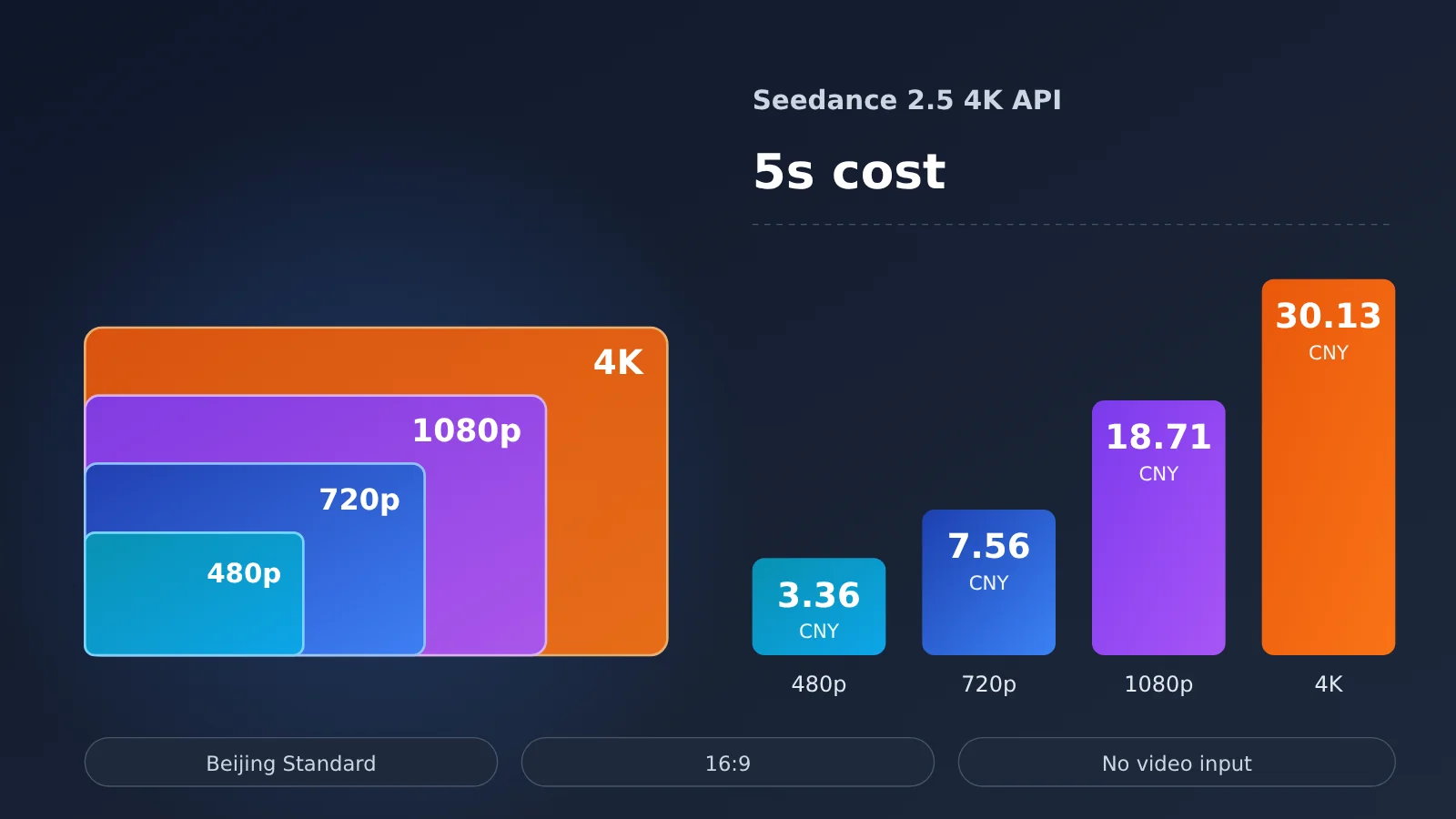
Generating a 16:9, 5-second video with no video input using Standard Edition Seedance 2.5 in the Volcano Ark Beijing Region costs roughly: 480p RMB 3.36, 720p RMB 7.56, 1080p RMB 18.71, 4K RMB 30.13. 4K has the lowest per-million-token unit price of the four tiers, but its usage is 4× that of 1080p, so the cost per video is about 1.61× that of 1080p. The answer changes with three conditions: output resolution, output duration, and whether the request includes video input. With video input, the official examples for a 5-second 4K final video range from RMB 33.24 to 129.28.
The prices above use the RMB list price for online inference with the Standard Edition in the Volcano Ark Beijing Region, with data current as of November 23, 2026. 4K output became fully available to API users on November 16. For overseas projects, see the BytePlus Singapore Region USD price list in Section 6.3.
Knowledge Map: The Complete Seedance 2.5 4K API Billing Flow
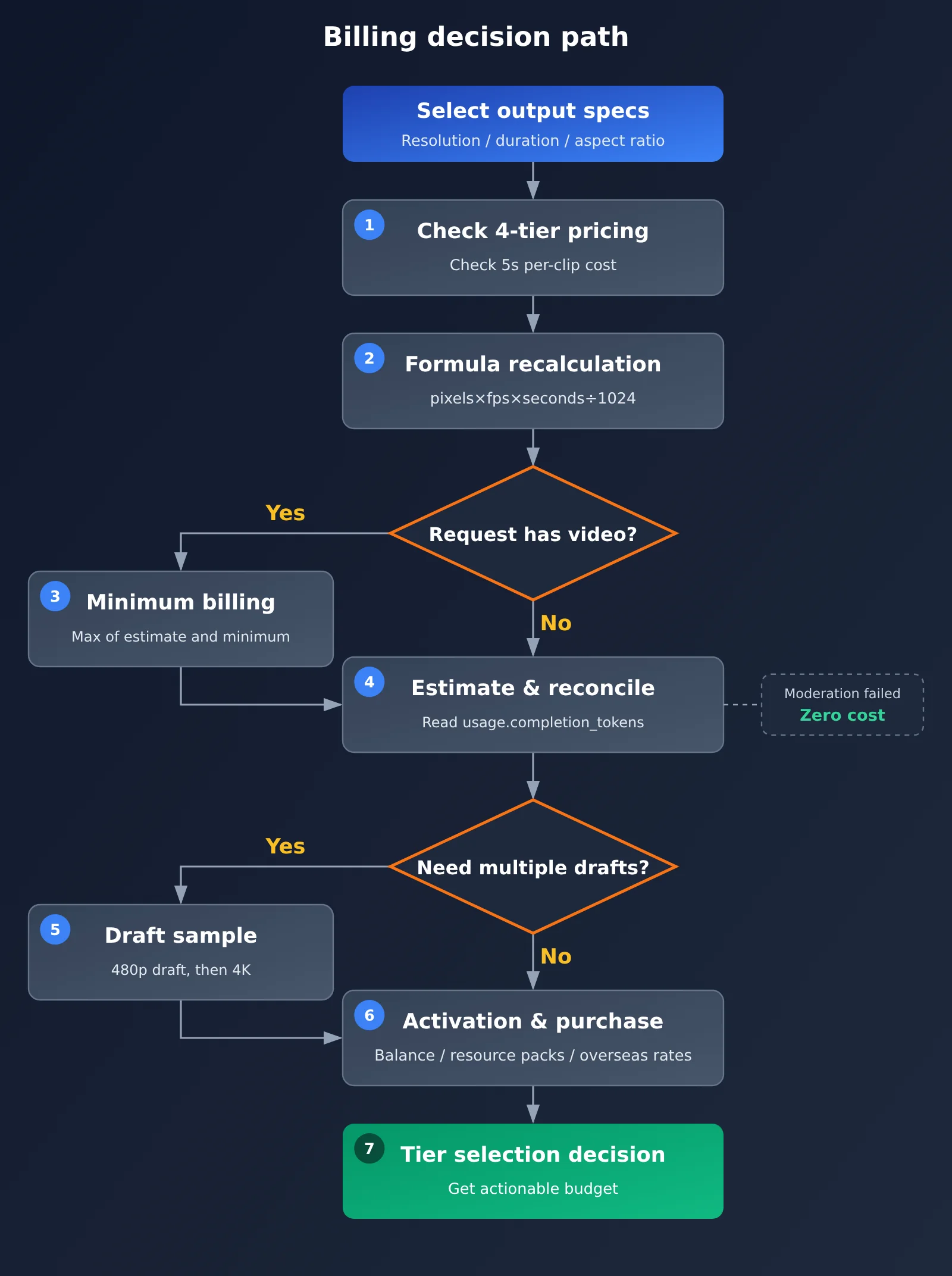
Figure note: The whole path starts at “Select output spec.” Sections 1 and 2 give you the price and the recomputation method. When a “request includes video”, you move into the minimum billing rules in Section 3; otherwise you go straight to Section 4 for estimation and reconciliation. Shots that need multiple drafts go through the Draft sample flow in Section 5. Finally, Section 6 confirms the activation method and the purchasing area, and Section 7 gives you the tier-selection conclusion.
Index
| No. | Section | What it provides for later sections | How to read it |
|---|---|---|---|
| 1 | Seedance 2.5 four-tier pricing quick reference | Per-unit prices for all four tiers and the cost of a single 5-second clip | Read first; the baseline for every calculation example |
| 2 | Recalculating the Seedance 2.5 billing formula | The formula, plus an explanation of why “4K has a lower unit price but costs more” | Follows Section 1; all later examples use it |
| 3 | Video input and minimum billable usage | Billing corrections for requests that include video | Required only when using reference video, editing, or extension |
| 4 | Estimating and reconciling Seedance 2.5 costs with Python | A reusable estimation script and fields for checking the bill | Read when you need to build an actual budget |
| 5 | Draft sample clips and 4K batch budgets | Rework costs and algorithms for batch scenarios | Read for multiple trial drafts or batch production |
| 6 | Activation, resource packs, and overseas pricing | Payment methods and regional differences | Check as needed before purchasing |
| 7 | Choosing a Seedance 2.5 4K tier | The final tier-selection rules | Wrap-up; ready to put into practice |
Sections 1 and 2 are the foundation. Sections 3, 5, and 6 are parallel, scenario-based references. Section 4 turns the earlier rules into code, and Section 7 gives you the decision criteria.
Things to Know
| Term | Quick explanation |
|---|---|
| Video token | Volcengine Ark’s unit of measurement for video generation usage, estimated from the output width and height, frame rate, and total seconds |
| List price | The platform’s publicly posted price, used to check the nominal cost of each task; what you actually pay is based on the billing center statement |
| Video input | The request contains video material, such as video reference, video extension, or video editing; text, reference images, and audio alone don’t count |
| Minimum billable usage | The billing floor that applies when video input is included; if the actual estimate falls below this value, you’re charged the floor |
| Draft sample | A 480p preview clip generated with draft: true, which you can upgrade to a 1080p or 4K final cut using the task ID |
| adaptive | One of the aspect ratio parameter values, where the model decides the output frame size itself |
1. Seedance 2.5 Four-Tier Pricing at a Glance
1.1 Seedance 2.5 Standard Edition List Prices for All Four Tiers
The domestic Standard Edition model ID is doubao-seedance-2-5-260628. When you create a task, use resolution to specify 480p, 720p, 1080p, or 4k; if you leave it out, it defaults to 720p. Output duration can usually be set from 4 to 30 seconds, and setting it to -1 lets the model choose based on the task.
The 5-second examples in the table below are all calculated at 16:9. In the “with video input” column, the lower bound corresponds to a 2–4 second input video and the upper bound corresponds to a 30-second input video. The per-second cost is derived from the single-item estimate and is for reference only.
| Output Spec | Without Video Input (CNY/million tokens) | With Video Input (CNY/million tokens) | Without Video Input, 5s (CNY/item) | Equivalent (CNY/second) | With Video Input, 5s (CNY/item) |
|---|---|---|---|---|---|
| 480p | 70.00 | 42.00 | 3.36 | 0.67 | 3.63–14.12 |
| 720p | 70.00 | 42.00 | 7.56 | 1.51 | 8.16–31.75 |
| 1080p | 77.00 | 46.00 | 18.71 | 3.74 | 20.12–78.25 |
| 4K | 31.00 | 19.00 | 30.13 | 6.03 | 33.24–129.28 |
The image quality specs also shift with the tier. 480p and 720p are 8-bit color depth; 1080p and 4K are 10-bit color depth and use H.265/HEVC encoding. If your downstream editing software or playback device doesn’t support HEVC, you’ll want to confirm compatibility before picking the higher tiers.
1.2 Seedance 2.5 Flash’s Lower-Priced Tiers
Seedance 2.5 Flash on the same platform only outputs 480p and 720p. For those two tiers, the rates without video input and with video input are 46 CNY and 28 CNY per million tokens respectively. Calculated on the same 5-second, 16:9, no-video-input basis, 480p comes to about 2.21 CNY and 720p about 4.97 CNY. Flash doesn’t offer 1080p or 4K, so it’s only a good fit for batch drafts or social media clips where image quality isn’t critical.
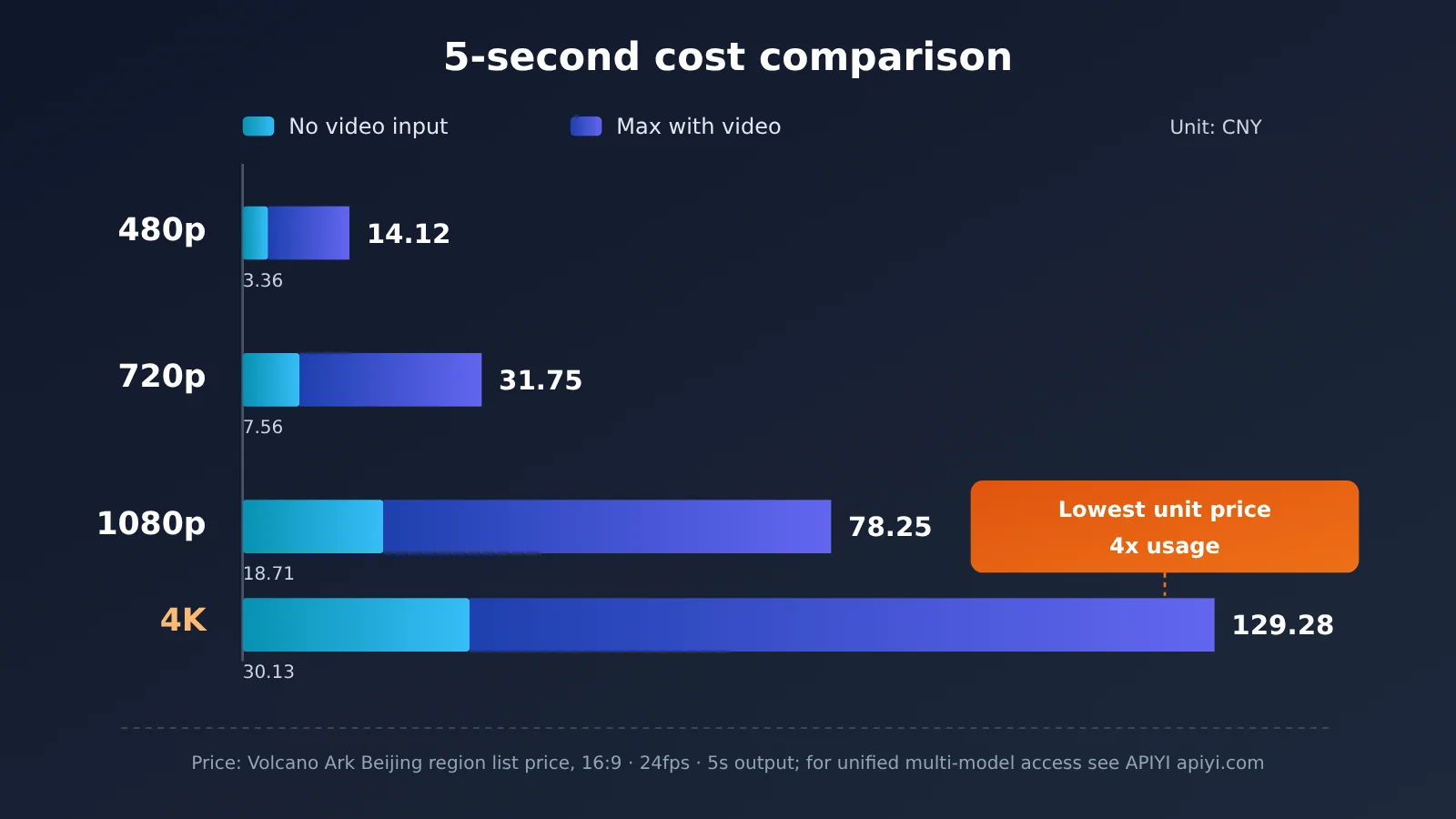
Chart note: the light bars are the baseline price without video input, and the dark extensions show the upper bound once a 30-second reference video is attached. 4K is the most expensive tier in both cases, and its price range with video input is also the widest.
2. Seedance 2.5 Billing Formula Recopied
2.1 Seedance 2.5 Video Token Estimation Formula
Volcano Ark estimates usage based on output width, height, frame rate, and duration. The formula looks like this:
Video tokens = (total input video seconds + output seconds) × output width × output height × output frame rate ÷ 1024
Cost (CNY) = billing usage ÷ 1,000,000 × corresponding rate
When a request contains only text, reference images, or standalone audio, the input video seconds are 0. When you submit a video reference, video extension, or video editing task, the input video’s duration also goes into this same formula. In other words, the reference video itself generates usage, and it’s converted at the output resolution.
2.2 Why 4K Has a Lower Unit Price but Costs More
Calculated at 16:9, 24 fps, no video input, and 5 seconds of output: 1080p is 1920×1080, giving 243,000 tokens of usage, which multiplied by 77 CNY per million comes to 18.711 CNY. 4K is 3840×2160, giving 972,000 tokens of usage, which multiplied by 31 CNY per million comes to 30.132 CNY.
4K doubles both width and height, so its usage is 4 times that of 1080p, but the rate is only about 40% of 1080p’s. Multiply the two together and you get a billing multiplier of 4×31÷77≈1.61, which is roughly 11.42 CNY more per video. 480p and 720p share the same rate, with a single 5-second video going from 3.36 CNY up to 7.56 CNY — the gap comes entirely from the total number of output pixels. When comparing tiers, you should look at “unit price × usage,” not just the unit price.
2.3 Aspect Ratio, adaptive, and Non-Integer Durations
16:9 4K is 3840×2160, while 9:16 is 2160×3840 — the total pixel count is the same. With frame rate and duration unchanged, the two are estimated identically, so landscape and portrait can share a single budget.
When you use adaptive, the output aspect ratio is decided by the model, so you can’t estimate it precisely up front. For tasks where parameters can be fixed, just calculate using explicit seconds and aspect ratio; for tasks that rely on auto-adaptation, it’s best to save the actual generated specs and usage, then backfill your budget.
When a video editing task uses duration: -1, the output duration is basically the same as the segment being edited, which may be a non-integer number of seconds — and the duration returned by task queries gets rounded down. For these tasks, reconcile against the returned billing usage to avoid errors from converting to whole seconds.
3. Video Input and Seedance 2.5 Minimum Billable Usage
3.1 How Minimum Usage Drives Up 4K Costs
When a video input is included, the billable usage is the larger of the formula-estimated value and the minimum usage. The minimum usage depends on resolution, output aspect ratio, and output duration. The documentation only gives official examples—it doesn’t provide a complete threshold table.
Take 5-second 4K at 16:9 and 24 fps again: with a 2-second input reference plus a 5-second output, the formula gives 7×194,400=1,360,800 tokens, which at 19 yuan per million works out to about 25.86 yuan. After applying the minimum billing from the official example, the actual cost is about 33.24 yuan. The table below shows the results for different reference durations:
| Input video duration | Calculation method | 4K 5-second cost (yuan) | vs. no-video baseline of 30.13 yuan |
|---|---|---|---|
| 2 seconds | Formula value below threshold, billed at minimum usage | ~33.24 | ~+3.11 |
| 10 seconds | 15 seconds total, about 2,916,000 tokens × 19 | ~55.40 | ~+25.27 |
| 30 seconds | Official example | 129.28 | ~+99.15 |
As you can see, short reference clips are mainly affected by the minimum usage, while the cost of long reference clips grows linearly with duration. Using a reference image to lock in a product’s appearance and using a video to demonstrate camera movement are two different budgeting situations, so you should quote them separately.
3.2 Reference Video Duration and Count Limits
In the Standard edition, a single non-editing reference video can be 2–30 seconds; when used as input for video editing, it needs to be 4–30 seconds. A single request can include up to 10 videos, and all input videos together must not exceed 30 seconds.
If you cut one reference into several clips and pass them all in the same task, the estimate is still based on the total seconds—splitting doesn’t lower the cost. When you launch multiple independent tasks, each successful task is billed separately, even if it reuses the same reference.
4. Estimating Seedance 2.5 Costs in Python and Reconciling the Bill
4.1 Estimation Script for Tasks with No Video Input
The script below implements the formula from Section 2 and can be used directly to quote tasks with no video input. The 480p pixel count is back-calculated from the list price (854×480) — check it against the official resolution table before relying on it in production.
# Seedance 2.5 standard tier estimate (Volcano Ark Beijing region list price, CNY per million tokens)
RATES = {  # (no video input, with video input)
    "480p": (70, 42), "720p": (70, 42),
    "1080p": (77, 46), "4k": (31, 19),
}
SIZES = {  # 16:9 dimensions; 9:16 has the same total pixel count
    "480p": (854, 480), "720p": (1280, 720),
    "1080p": (1920, 1080), "4k": (3840, 2160),
}

def estimate(res, out_sec, in_video_sec=0, fps=24):
    w, h = SIZES[res]
    tokens = (in_video_sec + out_sec) * w * h * fps / 1024
    rate = RATES[res][1 if in_video_sec else 0]
    return tokens, tokens / 1e6 * rate  # minimum usage is not accounted for when there's video input

for r in SIZES:
    t, cost = estimate(r, 5)
    print(f"{r:>5}: {t:,.0f} token, {cost:.2f} 元")
The output matches the table in Section 1: 3.36 CNY for 480p, 7.56 CNY for 720p, 18.71 CNY for 1080p, and 30.13 CNY for 4K. When video input is involved, the script only gives you the formula value. If that lands below the official minimum usage, your actual bill will be higher — so for that case, go by the official examples or the usage actually returned.
4.2 Reconcile the Bill with the usage Field
Once a task has been generated, read usage.completion_tokens from the task query endpoint. For tasks that qualify for the minimum usage where the actual value falls below the threshold, this field returns the minimum billable usage directly. On the video generation endpoint, usage.total_tokens and usage.completion_tokens carry the same value, and the duration of the input video is already counted in it.
def reconcile(task: dict, res: str, has_video_input: bool) -> float:
    tokens = task["usage"]["completion_tokens"]
    rate = RATES[res][1 if has_video_input else 0]
    return round(tokens / 1e6 * rate, 2)

# Example: 972,000 tokens returned, 4K, no video input → about 30.13 CNY
print(reconcile({"usage": {"completion_tokens": 972000}}, "4k", False))
The platform only charges model fees for videos that were generated successfully; tasks that fail content review cost nothing. Footage that was generated successfully but dropped during editing still incurs a charge.
4.3 Use APIYI to Cut Prompt Costs During the Draft Stage
The main expense of a video task is the finished footage, so before submitting to Seedance, you can rewrite the storyboard prompt into several candidate versions with a cheap text model — that keeps wasted video generations down. APIYI apiyi.com offers an OpenAI-compatible interface where a single key gives you access to OpenAI, Claude, Gemini and other text models, which makes it a good fit for this step.
from openai import OpenAI

client = OpenAI(
    api_key="YOUR_API_KEY",
    base_url="https://api.apiyi.com/v1",  # APIYI unified endpoint
)

brief = "新品耳机 5 秒横屏广告:桌面特写,镜头缓慢环绕,暖色晨光"
resp = client.chat.completions.create(
    model="gpt-4o-mini",
    messages=[
        {"role": "system", "content": "你是视频分镜师,输出 3 条差异明显的视频生成提示词,每条一行"},
        {"role": "user", "content": brief},
    ],
)
variants = resp.choices[0].message.content.strip().splitlines()
print(variants)  # Use each line as the prompt for a 480p Draft sample
🚀 Quick start: New users can claim free trial credits at APIYI apiyi.com to get the prompt rewriting flow running first. Whether Seedance 2.5 is available on APIYI, and how to set the model name and invocation path, is subject to the documentation at docs.apiyi.com and the model list in the console.
5. Draft Samples and 4K Batch Budgeting
5.1 How Draft Samples Cut 4K Rework Costs
With the standard version, you can first generate a 480p sample with draft: true, then use the task ID of the selected sample to launch a 1080p or 4K final render. Both steps are billed in full separately: the sample at 480p, and the final render at the target resolution.
The final render must use the same model ID. It automatically inherits the sample’s prompt, reference assets, duration, and aspect ratio—you only need to set the resolution and output format separately. The final render’s rate tier follows whether the sample stage included video input; for input video duration, only the portion in the original sample-stage input is counted. Sample task IDs created at or after 10:00 on October 28, 2026 (Beijing time) are valid for 14 days.
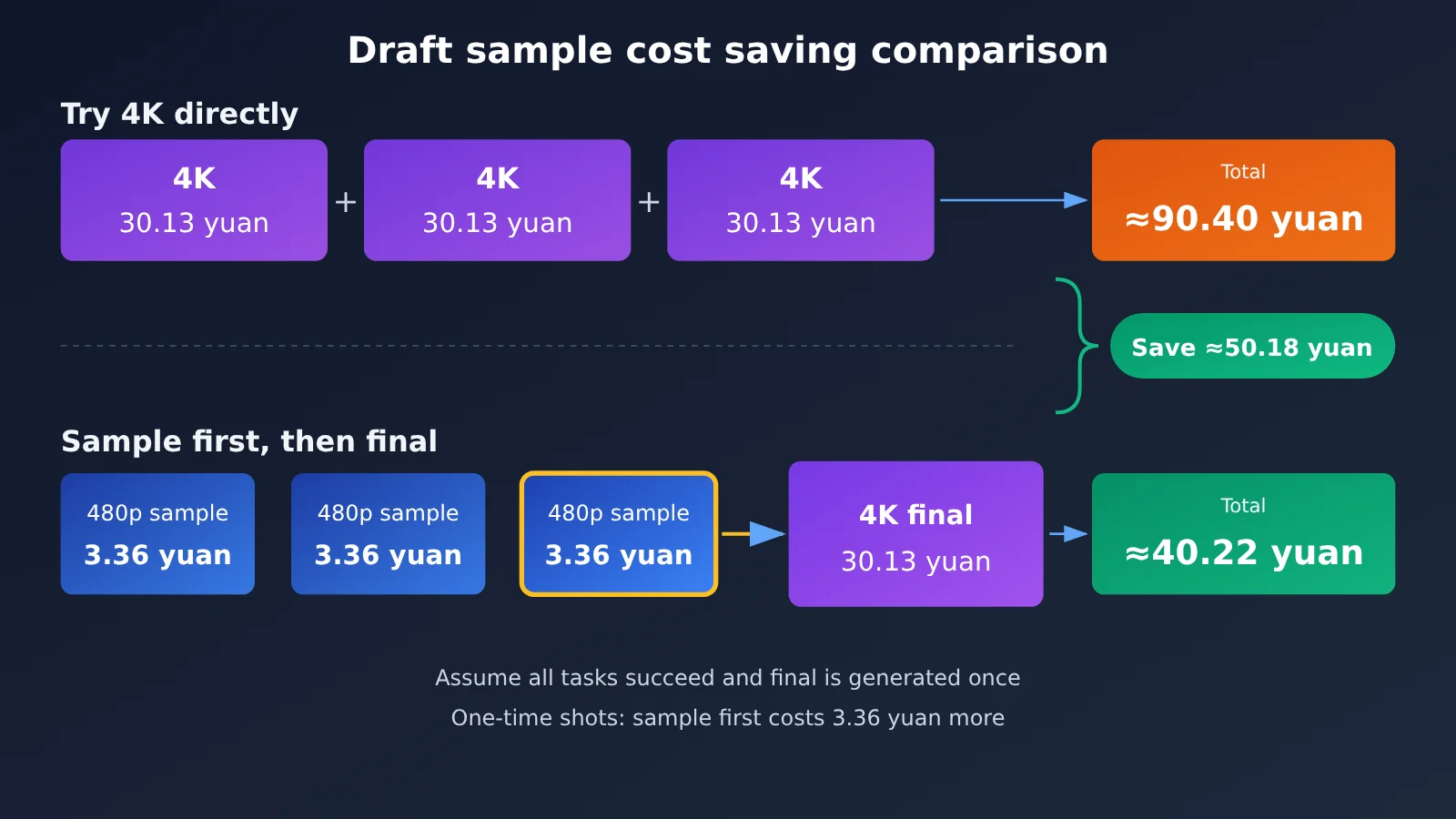
Calculated at 5 seconds, 16:9, 24 fps, and no video input, the formula yields CNY 3.362625 for 480p and CNY 30.132 for 4K. Totals are rounded to two decimal places after summing:
| Plan | Calculation | Total (CNY) |
|---|---|---|
| Generate 4K directly 3 times | 3 × 30.132 | About 90.40 |
| 3 480p samples + 1 4K final render | 3 × 3.362625 + 30.132 | About 40.22 |
| 1 sample + 1 final render (one-take) | 3.362625 + 30.132 | About 33.49 |
That difference rests on two assumptions: all tasks succeed, and the final render is generated only once. If a shot is usable on the first take, generating a sample first actually raises the total from about CNY 30.13 to CNY 33.49. So Draft is a good fit for shots that need repeated review and selection; for shots with high certainty, going straight to the final render is more cost-effective.
5.2 Seedance 2.5 Batch and Long-Form Budgets
Batch budgets are calculated by grouping successful tasks with the same specifications. For each of the four tiers of 5-second videos, generating 100 items means multiplying the formula value by 100 and rounding to two decimals, giving approximately 336.26, 756.00, 1,871.10, and 3,013.20 yuan respectively.
When lengthening the video, you also calculate by the second first and round the decimals at the end. For example, a 16:9, 30-second 4K video with no video input is estimated at 5,832,000 tokens, costing about 180.79 yuan.
Scheduling also needs to account for concurrency. The Ark tutorial specifies a 4K limit of 15 tasks created per minute, with 1 processed at a time, the same for both personal and enterprise accounts. When batch-producing 4K, throughput often becomes the bottleneck before budget does.
5.3 Tiered Summation for Mixed-Input Batches
When two types of input are mixed in the same batch, sum them separately by input tier. Suppose you’re generating 30 5-second landscape 4K candidates, of which 24 use only text, images, or audio, and 6 additionally include a 10-second reference video. Plugging in the unrounded estimated prices, the model cost is 24×30.132+6×55.404≈1,055.59 yuan.
If 10 are ultimately adopted, that works out to about 105.56 yuan per shot. This is just a budget scenario — the actual bill will vary with the real usage of each successful task. Quoting by “adopted shots” rather than “generation count” gets you closer to the project’s true cost.
6. Seedance 2.5 Activation, Resource Packages, and Overseas Pricing
6.1 Activation Conditions and Billing Deduction Order
According to Volcengine Ark’s activation rules, the usual approach is to have the account’s available balance reach 200 yuan, or you can choose a savings plan or model resource package that meets the threshold and still has remaining quota. Once activated, billing is settled based on invocation usage, and the deduction order is: applicable resource packages first, then savings plans, then account balance. The examples in this article use online list prices, which are suitable for verifying the nominal cost of a single task; the actual payment amount is subject to the bill in the Billing Center.
6.2 Standard Edition Resource Packages
The Standard Edition prepaid resource packages come in three quota tiers—5 million, 10 million, and 100 million—with list prices of 210 yuan, 420 yuan, and 4,200 yuan respectively, valid for 90 days. The in-package quota is converted per scenario; for example, at 1080p with no video input, each actual token used deducts about 1.8333 units of in-package quota.
From this, the unit price of in-package quota works out to 210 yuan ÷ 5 million, i.e., 42 yuan/million; 1.8333 × 42 ≈ 77, which exactly matches the 1080p list rate. The conversion coefficients for the other tiers can be derived as “list rate ÷ 42”, but that’s an inference—please refer to the official deduction rules before purchasing. Resource packages only apply to the corresponding model version, and for per-item cost, it’s still best to use the online list price for comparison.
6.3 BytePlus Singapore Region USD Pricing
The Standard Edition ID for the BytePlus ModelArk Singapore region is dreamina-seedance-2-5-260628, priced in USD, which differs from the domestic model ID.
| Output Specification | No/With Video Input (USD/million tokens) | No Video Input, 5 seconds (USD) | With 2–30 second video input, 5 seconds (USD) | Access Channel |
|---|---|---|---|---|
| 480p | 10.70/6.40 | 0.514 | 0.553~2.152 | BytePlus |
| 720p | 10.70/6.40 | 1.156 | 1.244~4.838 | BytePlus |
| 1080p | 11.70/7.00 | 2.843 | 3.062~11.907 | BytePlus |
| 4K | 4.70/2.90 | 4.568 | 5.074~19.732 | BytePlus |
Both regions share the same tier structure, and in both, 4K has the lowest unit price but the highest per-item cost. When integrating a project, use the model ID and pricing of the actual procurement region for your estimates, and don’t mix RMB prices and USD prices in a single budget.
💡 Selection Tip: If the project also needs to call text models to write prompts, run moderation, or generate subtitles, you can put this part under unified management at APIYI apiyi.com, billed by usage, and account for it separately from video generation costs.
7. Seedance 2.5: Deciding Whether to Go 4K
You can decide whether to use 4K by working through the following steps in order:
- Start with the delivery target: If the finished video will play in a mobile feed, 720p or 1080p is usually enough — each 4K video costs about CNY 11.42 more than 1080p (5 seconds, no video input). Consider the 10-bit HEVC 4K output only when you need large-screen display, secondary cropping, or post-production color grading.
- Then look at the input: If you genuinely need a reference video, keep that reference to the minimum necessary length. A 2-second reference triggers the minimum billable usage, and a 30-second reference pushes a 5-second 4K job up to CNY 129.28.
- Then look at how many drafts you need: When you need to choose among multiple versions, generate a 480p Draft sample first and then the 4K final. In a choose-1-of-3 scenario, this saves about CNY 50.18 per shot; for shots you’ll use on the first try, render the final version directly.
- Finally, reconcile the bill: Get a quote upfront using the script from Section 4.1, and verify it afterward using
usage.completion_tokens. For jobs withadaptiveaspect ratio andduration: -1, always backfill the budget from the returned usage.
The check is simple: pick a completed 4K job at random, multiply the returned usage by the corresponding rate, and the result should match the formula in Section 4.1. If it comes out high, it’s usually because a request that included video input triggered the minimum billable usage. For peripheral steps like prompt rewriting and multi-model comparison, you can validate them first with free credits on APIYI apiyi.com before connecting them to your production pipeline.
References
- Volcengine Ark model pricing: list prices for the four tiers, billing formulas, minimum usage, and sample billing
- Link:
console.volcengine.com/ark/region:cn-beijing/docs/model-pricing
- Link:
- Volcengine Ark Seedance 2.5 tutorial: resolution dimensions, color depth and encoding, Draft mode, Flash specs
- Link:
console.volcengine.com/ark/region:cn-beijing/docs/seedance-2-5
- Link:
- Volcengine Ark create and query task API: video input limits, usage field
- Link:
console.volcengine.com/ark/region:cn-beijing/docs/create-video-generation-task-api
- Link:
- Seedance resource pack purchase and deduction rules: resource pack quota and conversion
- Link:
docs.volcengine.com/docs/ark/seedance-2-0-model-resource-pack-rules
- Link:
- BytePlus ModelArk Singapore region pricing: USD price list
- Link:
ai.byteplus.com/ark/region:ap-southeast-1/docs/model-pricing
- Link:
Author: APIYI Technical Team
Technical discussion: Feel free to contact us via the APIYI apiyi.com homepage. For more integration materials, see the docs.apiyi.com documentation center.