
Author’s note: Using a customer service quality inspection request as an example, let’s break down output acceptance, session state preservation, and background result retrieval for GPT-6.2 Sol in the Responses API.
Bottom line first: To connect GPT-6.2 Sol to a production system, you need to split the same business task into four behaviors and define acceptance criteria for each. These four behaviors are immediate UI feedback, machine-storable results, cross-turn context, and final state. Streaming events are only responsible for display; before storing, you must obtain the complete response and pass Schema and business validation. For cross-turn information, you first need to determine who holds the state. Background tasks only recognize response IDs and terminal states; notifications may be duplicated, so writes must be idempotent.
There are two prerequisites for achieving these four points. First, when built-in or custom tools are needed, follow the GPT-6.2 migration guide and use the Responses API; this article also only discusses the runtime behavior of Responses. Second, if calling through an aggregation platform, whether capabilities such as background mode and Webhook are available depends on the platform’s current configuration. On APIYI apiyi.com, gpt-6.2-sol is already publicly listed under both the responses and chat entry points.
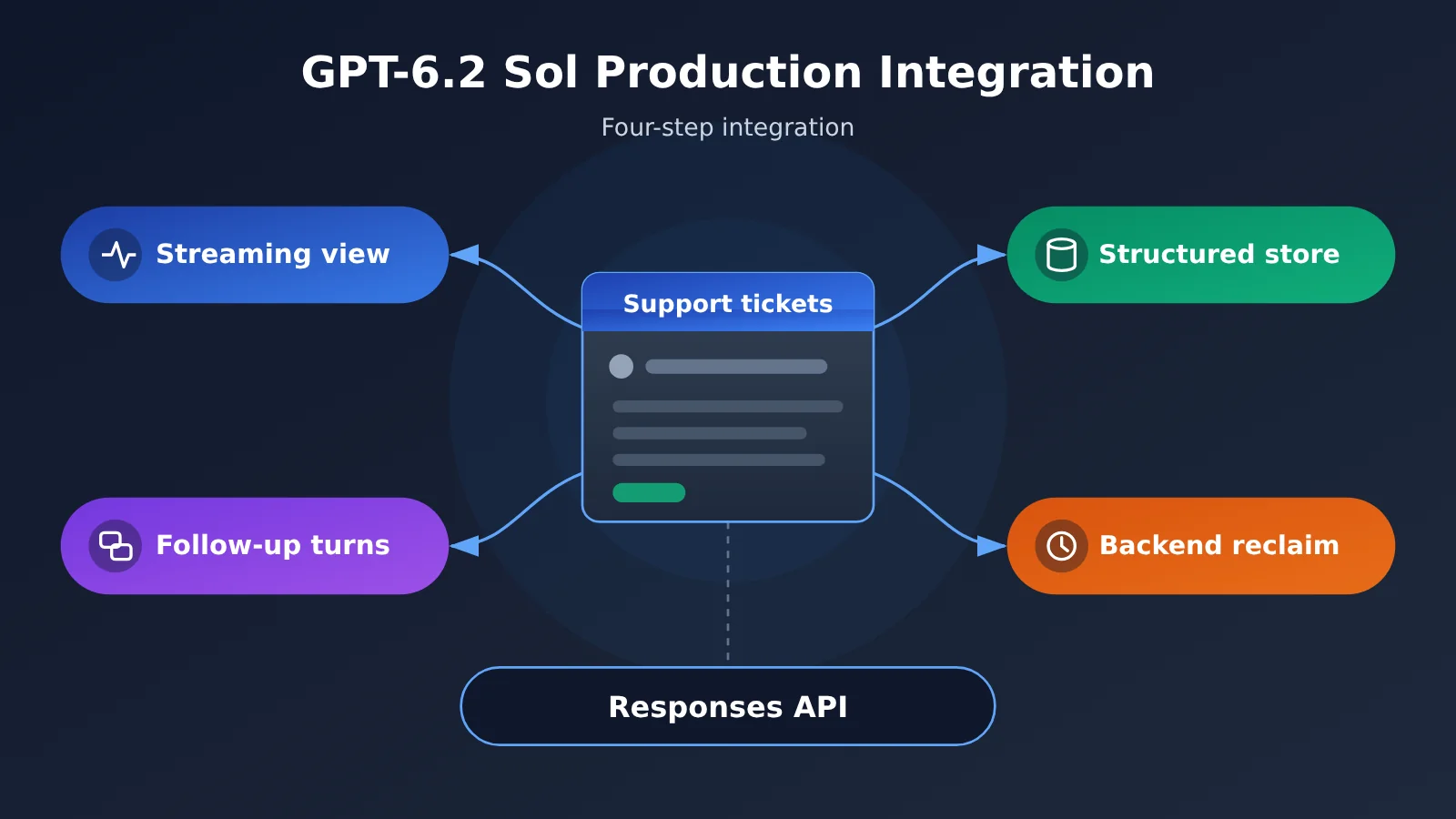
GPT-6.2 Sol Production Integration Knowledge Map
The whole article follows one flow: send the request → display → continue → read back → accept. The diagram below shows what each step produces and which section covers it.
Send request (model=gpt-6.2-sol, Responses API)
  │
  ├─▶ Display [Section 1]
  │     Incremental events → page shows QA comments in real time
  │     Terminal event → stop the loading state; full response → schema + business validation → write to database / manual review
  │
  ├─▶ Continue [Section 2]
  │     Self-managed history / previous_response_id / Conversation
  │     Standing rules (developer) kept separate from per-turn instructions (instructions)
  │
  ├─▶ Read back [Section 3]
  │     background submit → save response ID → Webhook signature check and dedupe → read back by ID → save terminal state
  │
  └─▶ Acceptance [Section 4]
        Success / incomplete / duplicate notification / client disconnect / schema change
GPT-6.2 Sol Integration Index
| Section | Question it answers | What it sets up for later sections | What you’ll be able to do |
|---|---|---|---|
| 1. Streaming and structured output | How the page reads the stream, how your backend receives the result | Defines what counts as “done” and “safe to persist” | Tell the display path apart from the persistence path |
| 2. Multi-turn state | How the next request picks up where the last turn left off | Pin down who holds the state and what gets retained | Change only the current turn’s focus without breaking the prefix |
| 3. Background tasks | How results reach the database after the user leaves the page | How response ID, task ID, and terminal state map to each other | Implement signature verification, dedupe, and idempotent writes |
| 4. Pre-launch acceptance | Which behaviors you must verify up front | Consolidates the acceptance criteria from the first three sections | Produce a traceable regression record |
Sections 1 through 3 each map to a single runtime path. If you’re only building one of them, jump straight to the one you need. Section 4 builds on the state defined in the first three, so it’s best read last.
GPT-6.2 Sol Terms to Know
| Term | Explanation |
|---|---|
| SSE | A protocol where the server pushes events to the client in order over a single HTTP connection. |
| Structured Outputs | An API feature that requires a successful structured response to conform to a supported JSON Schema. |
| Refusal response | A content item returned when the model explicitly declines the task; it needs its own handling path. |
| Conversation state | Context such as messages and tool results retained for later requests. |
| Encrypted reasoning item | An encrypted response item that carries reasoning state forward and can be sent back along with the context. |
| Prefix | The portion at the start of the current request whose context sequence is identical to the previous turn. |
| Completion window | The target time range the service sets for this response after accepting a background request. |
| Webhook | A signed notification the server sends proactively to a URL your app specifies. |
| Terminal state | The final state after a task has completed, failed, been marked incomplete, or been cancelled. |
| Idempotent | The same callback or task processed repeatedly still produces only one business effect. |
1. GPT-6.2 Sol Streaming Output and Structured Acceptance
1.1 The Two Output Paths of GPT-6.2 Sol
Let’s start with a customer service quality inspection scenario. An on-duty agent opens a ticket, and the page needs to immediately display the review comments generated by the model. The results of the same analysis also need to be written to the quality inspection database for end-of-day statistics. These two requirements define “completion” differently, so they need to be handled as two separate paths.
| Path | Consumer | Signal relied on | Condition for “completion” | Where it goes on failure |
|---|---|---|---|---|
| Display path | Agent page | response.output_text.delta incremental events |
Receives response.completed or a failure-type terminal event |
The page shows a notification and keeps the content already displayed |
| Storage path | Quality inspection database | Complete response object | Both schema validation and business validation pass | Rejected, incomplete, and malformed responses go to manual review respectively |
After setting stream=true for a streaming request, the server pushes events in sequence over HTTP SSE. The page only needs to append and display the text from response.output_text.delta. The loading state should end only when a terminal event arrives; text stopping doesn’t mean the task is complete.
1.2 GPT-6.2 Sol Streaming Example
The example below is only meant to show the mechanics. It hands incremental text to the front end and ends the wait when a terminal state arrives:
from openai import OpenAI

client = OpenAI(
    api_key="YOUR_API_KEY",
    base_url="https://api.apiyi.com/v1"  # APIYI OpenAI-compatible endpoint
)

stream = client.responses.create(
    model="gpt-6.2-sol",
    input=[
        {"role": "developer", "content": "你是客服质检督查员,只依据工单原文给出意见。"},
        {"role": "user", "content": "工单 #A1024:客户三次催单未获回复……"},
    ],
    stream=True,
)

for event in stream:
    if event.type == "response.output_text.delta":
        push_to_page(event.delta)          # append to the page in real time
    elif event.type == "response.completed":
        finish_loading(event.response.id)  # end loading on terminal state
    elif event.type in ("response.failed", "response.incomplete"):
        show_error(event.type)             # prompt failures and incompletes separately
Functions like push_to_page and finish_loading belong to your application code. For the full list of terminal events, refer to the official streaming response documentation.
1.3 Validation Order for GPT-6.2 Sol Structured Output
In the Responses API, structured output is declared in text.format, not inside the message. Once the storage path receives the complete response, evaluate it in this order:
- Check the response status. An incomplete response (
statusis incomplete) goes straight to manual review — don’t try to parse half a JSON document. - Check the content items. If a refusal-type content item shows up, follow the refusal flow; don’t treat it as a formatting error.
- Parse the JSON and run schema validation.
- Run business validation: the original ticket must exist, and missing fields must be clearly visible — never silently filled in.
View the complete code for GPT-6.2 Sol structured storage
import json
from openai import OpenAI

client = OpenAI(
    api_key="YOUR_API_KEY",
    base_url="https://api.apiyi.com/v1"
)

QA_SCHEMA = {
    "type": "object",
    "properties": {
        "ticket_id": {"type": "string"},
        "verdict": {"type": "string", "enum": ["合格", "需整改", "信息不足"]},
        "issues": {"type": "array", "items": {"type": "string"}},
        "missing_fields": {"type": "array", "items": {"type": "string"}},
    },
    "required": ["ticket_id", "verdict", "issues", "missing_fields"],
    "additionalProperties": False,
}

resp = client.responses.create(
    model="gpt-6.2-sol",
    input=[{"role": "user", "content": "请质检工单 #A1024:……"}],
    text={"format": {"type": "json_schema", "name": "qa_result",
                     "schema": QA_SCHEMA, "strict": True}},
)

def route(resp):
    if resp.status == "incomplete":
        return ("manual_review", "incomplete", resp.incomplete_details)
    for item in resp.output:
        for part in getattr(item, "content", []) or []:
            if part.type == "refusal":
                return ("manual_review", "refusal", part.refusal)
    try:
        data = json.loads(resp.output_text)
    except json.JSONDecodeError:
        return ("manual_review", "bad_json", None)
    if not ticket_exists(data["ticket_id"]):
        return ("manual_review", "unknown_ticket", data)
    return ("save", "ok", data)

print(route(resp), resp.id)
Keep in mind that passing schema validation only means the structure is correct — it doesn’t mean the content is. Whether the ticket number actually exists and whether missing fields are honestly flagged are checks that belong to the business layer.
🎯 Technical tip: In a test environment, you can fire both streaming and non-streaming requests through APIYI apiyi.com, then compare the terminal states and storage results for the same ticket across both paths. That way you can confirm up front that the front-end loading logic and the storage branches don’t interfere with each other.
2. Multi-Turn Session State Continuation with GPT-6.2 Sol
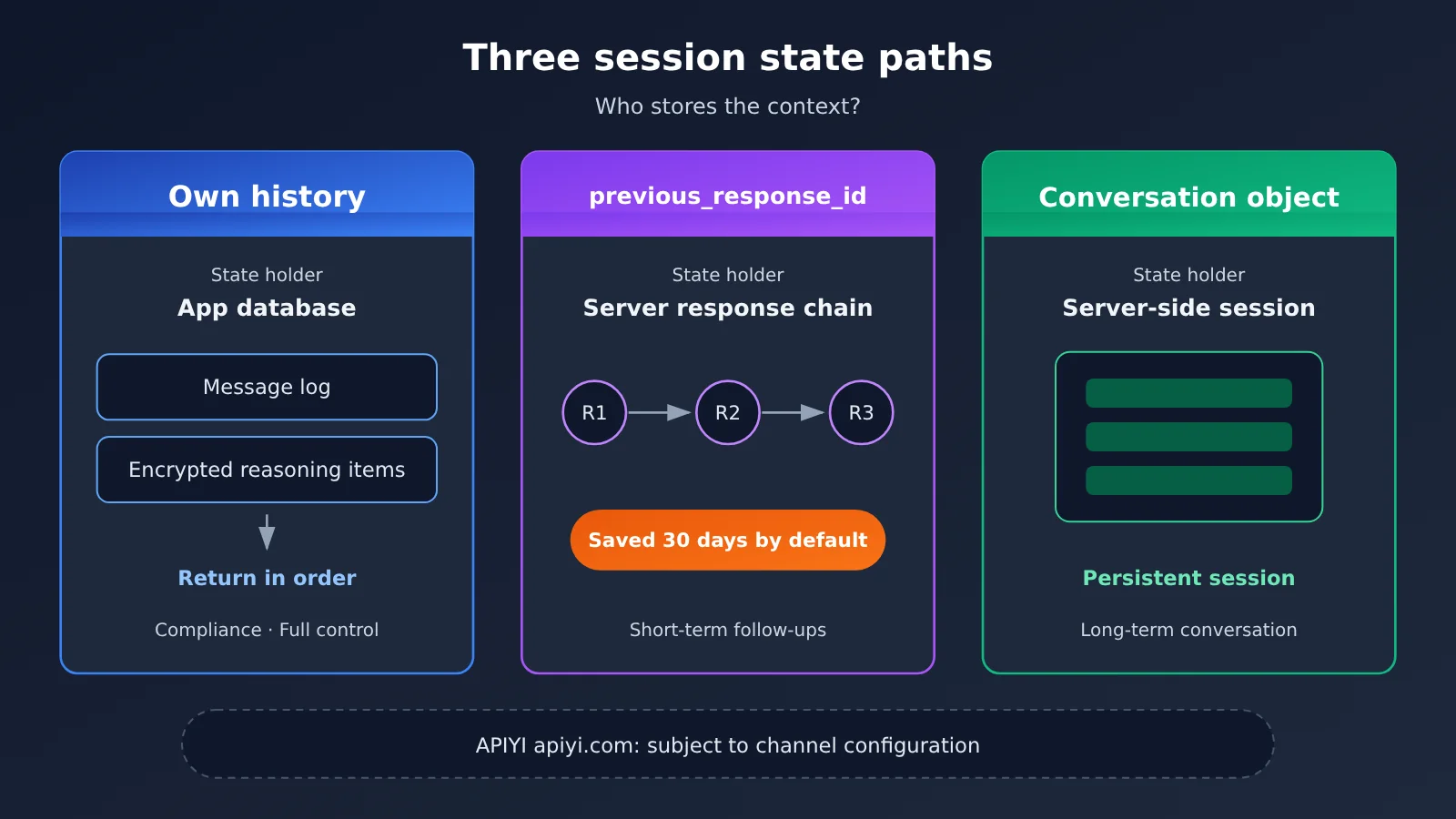
2.1 Comparing the Three State Paths for GPT-6.2 Sol
Say an agent adds new facts to the same ticket and wants the model to pick up where the last turn left off. The first question you have to answer is: who holds the state?
| Path | State holder | Retention conditions | Good for | Available platforms |
|---|---|---|---|---|
| Self-managed history | The application itself | Decided by the application; messages and required response items must be sent back in their original order | Compliance requirements, or when you need full control over context | Official API, APIYI apiyi.com |
previous_response_id |
Server-side response chain | Can only continue while the response is still available; response objects are kept for 30 days by default | Short-lived follow-up questions | Subject to the current channel configuration |
| Conversation object | Server-side conversation object | Items attached to a Conversation follow that object’s retention rules | Conversations that need longer persistence | Subject to the current channel configuration |
If you go with self-managed history but still want reasoning to stay continuous, you can’t just send back text. Every required response item has to be preserved and replayed in order — encrypted reasoning items included.
2.2 How to Change Only the Audit Focus in GPT-6.2 Sol
Suppose on the second turn you only want to shift the audit focus from “response timeliness” to “script compliance.” The right way to do it: put the general QC rules in the first developer message on the chain, and write this turn’s specific focus in the top-level instructions. The instructions field applies only to the request that supplies it and won’t bleed into later turns.
first = client.responses.create(
    model="gpt-6.2-sol",
    input=[
        {"role": "developer", "content": "通用质检规则:依据工单原文;缺项必须列出……"},
        {"role": "user", "content": "质检工单 #A1024,关注响应时效。"},
    ],
)

second = client.responses.create(
    model="gpt-6.2-sol",
    previous_response_id=first.id,
    instructions="本轮只审查话术合规,不重复时效结论。",  # applies only to this request
    input=[{"role": "user", "content": "补充:坐席第二次回复使用了模板话术。"}],
)
There’s another benefit to doing it this way: the first set of rules stays untouched, so the prefix stays stable too.
2.3 Prefix Change Risks in GPT-6.2 Sol
GPT-6.2 may drop the relevant reasoning items in a few situations: rewriting old history, doing a partial model switch (a downgrade, for example), and switching users or organizations. For a Standard single-agent session that needs to carry over, if you want to adjust the reasoning tier or the output schema, append an applicable configuration_update item instead of going back and editing the old configuration. For the exact fields on that item, check the GPT-6.2 migration guide.
When long-term rules need updating, append a new developer message at the end of the context rather than editing the old rules or touching the earlier tool and schema configuration. Even if the prefix stays stable, whether the cache hits still depends on the specific request and processing conditions — don’t treat it as a guaranteed outcome.
3. Persisting GPT-6.2 Sol Background Tasks
3.1 GPT-6.2 Sol: submitting in the background and completion windows
End-of-day summaries of tickets awaiting review can take a while, and agents won’t be sitting in front of the page the whole time. Submit these jobs with background: true. The moment the response comes back, persist the returned response ID and map it one-to-one to your business task ID.
Pick a completion window based on how long you’re willing to wait — the default is soonest. 2h and 8h are discounted windows under Standard; they’re currently in public beta, and you can’t enable streaming when you submit with them. For the exact parameter names of the completion windows and the storage requirements, defer to the background mode docs.
| Completion window | What it’s for | Streaming | Good fit for QA tasks like |
|---|---|---|---|
soonest (default) |
Finish as fast as possible | Per the background mode docs | Reviews someone needs to look at during the shift |
2h |
Standard discounted window, public beta | Do not enable | Post-shift rollups |
8h |
Standard discounted window, public beta | Do not enable | End-of-day batch summaries |
3.2 GPT-6.2 Sol: webhook signature verification, dedup, and read-back
While a task is queued or in progress, just keep polling the same ID. If a completion event arrives, handle it in this order:
- Verify the signature. If verification fails, drop it.
- Dedup on
webhook-id. The same notification can be re-delivered. - Read back the full response using
event.data.id. The notification itself is never used as the result. - Write the terminal state and result idempotently, keyed by task ID.
View the GPT-6.2 Sol background task recovery code
from openai import OpenAI

client = OpenAI(
    api_key="YOUR_API_KEY",
    base_url="https://api.apiyi.com/v1"
)

# Submit
job = client.responses.create(
    model="gpt-6.2-sol",
    background=True,
    input=[{"role": "user", "content": "汇总今日待审工单摘要:……"}],
)
db.save_task(task_id="QA-20261120-01", response_id=job.id, status=job.status)

# Webhook handling
def on_webhook(headers, raw_body):
    event = verify_and_parse(headers, raw_body)        # verify signature; raise on failure
    if db.seen_webhook(headers["webhook-id"]):         # dedup
        return 200
    db.mark_webhook(headers["webhook-id"])
    resp = client.responses.retrieve(event.data.id)    # read back the full response
    task_id = db.task_by_response(resp.id)
    db.upsert_result(task_id, status=resp.status,      # idempotent write keyed by task ID
                     body=resp.output_text if resp.status == "completed" else None)
    return 200
When a user closes the page and comes back later, the frontend only needs to query the local database with the business task ID. If the status hasn’t reached a terminal state yet, the server keeps polling with the stored response ID.
Pay extra attention to data retention. Background mode temporarily stores response data so it can support read-back. That holds true even when you set store: false or your organization has ZDR enabled, so check the data controls docs to confirm whether that’s acceptable for you.
💡 Integration tip: Webhook callback URLs and background mode need channel-side support. Before onboarding through APIYI apiyi.com, it’s worth checking whether your current account group has background mode and callback capabilities enabled. If they aren’t available yet, you can get the state machine working first by polling the response ID.
4. GPT-6.2 Sol Launch Acceptance Checklist
4.1 GPT-6.2 Sol Synthetic Acceptance Table
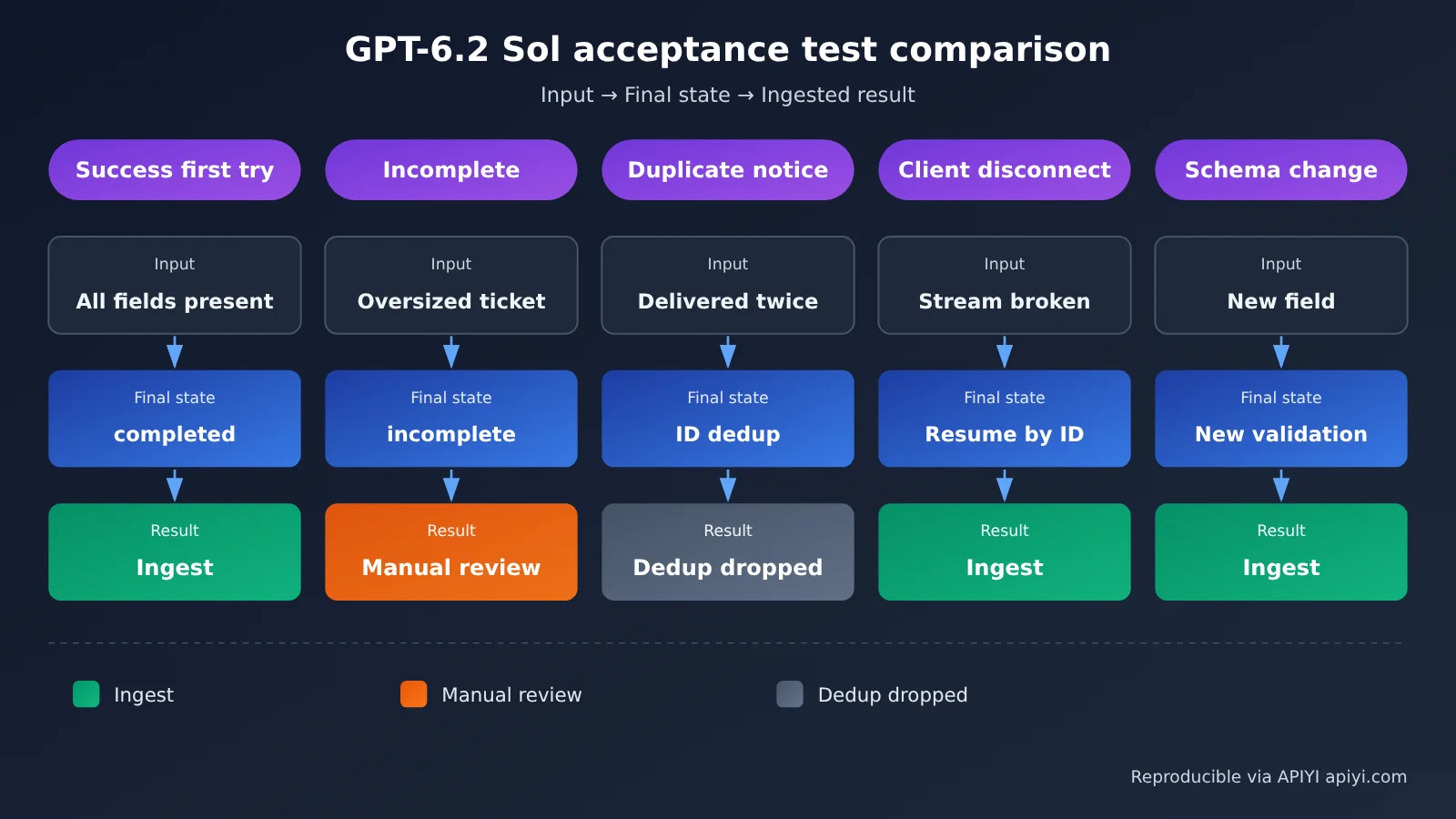
The acceptance table below continues with the customer service QA synthetic case, turning the pass/fail criteria from the previous three sections into executable test cases, one by one.
| Test case | Input condition | Expected status or result |
|---|---|---|
| First-attempt success | A real ticket with every field populated | Terminal state completed; schema and business validation pass; a single result written by task ID |
| First-attempt incomplete response | Output cap artificially lowered, or an extremely long ticket | Status incomplete; JSON is not parsed; routed to manual review with the reason logged |
| Duplicate notification | Same webhook-id delivered twice |
Second delivery deduplicated; only one record in the results table |
| Client disconnect | Browser connection dropped mid-stream | State recovered through the stored response ID; the persisted result is unaffected by the page |
| Schema change | A new required field added mid-session | Adjustment applied through an appended config update without rewriting the old config; new results validated against the new schema |
Every test case needs to persist four pieces of information: the model ID invoked (gpt-6.2-sol), the run parameters, the response ID, and the application-side config version. When something goes wrong, those four are enough to pin down exactly which request it was.
4.2 What to Record During GPT-6.2 Sol Regression
| Item | What to record | Notes |
|---|---|---|
| Model | gpt-6.2-sol |
Reference the public ID from the model card |
| Endpoint | Responses | Function calling and built-in tools take this path |
| Reasoning tier | The tier actually used | Neither Responses nor Chat Completions accepts none |
| Usage | usage.output_tokens and the reasoning token sub-item inside it |
Output billing already includes reasoning tokens |
| Billing tier break | Whether input in a single request exceeds 272K | APIYI’s public pricing interface breaks tiers at 272,000 input tokens; actual billing follows the invoice |
When migrating an old system, check the endpoint, request parameters, multi-turn input, reasoning context, and caching separately. Once that’s done, run the same batch of test cases against both the sample request and production requests.
🚀 Acceptance tip: The five test cases can live in CI and run automatically whenever you change the schema or switch channels. With the unified key from APIYI apiyi.com, you can compare behavioral differences across groups on the very same set of test cases.
Once all five test cases pass and each one can be traced back by its response ID, the QA pipeline is ready to ship.
References
- GPT-6.2 Sol model card: model IDs, context, and billing rules
- Link:
developers.openai.com/api/docs/models/gpt-6.2-sol
- Link:
- GPT-6.2 migration guide: endpoint selection, prefix changes, and configuration updates
- Link:
developers.openai.com/api/docs/guides/latest-model
- Link:
- Streaming responses and structured outputs: SSE events and
text.format- Link:
developers.openai.com/api/docs/guides/streaming-responses
- Link:
- Conversation state:
previous_response_idand Conversations- Link:
developers.openai.com/api/docs/guides/conversation-state
- Link:
- Background mode and Webhooks: completion window, signature verification, and deduplication
- Link:
developers.openai.com/api/docs/guides/background
- Link:
Author: APIYI Technical Team
Technical discussion: Want to get in touch? Reach us on the APIYI website homepage. For more integration resources, check out the docs.apiyi.com documentation center.