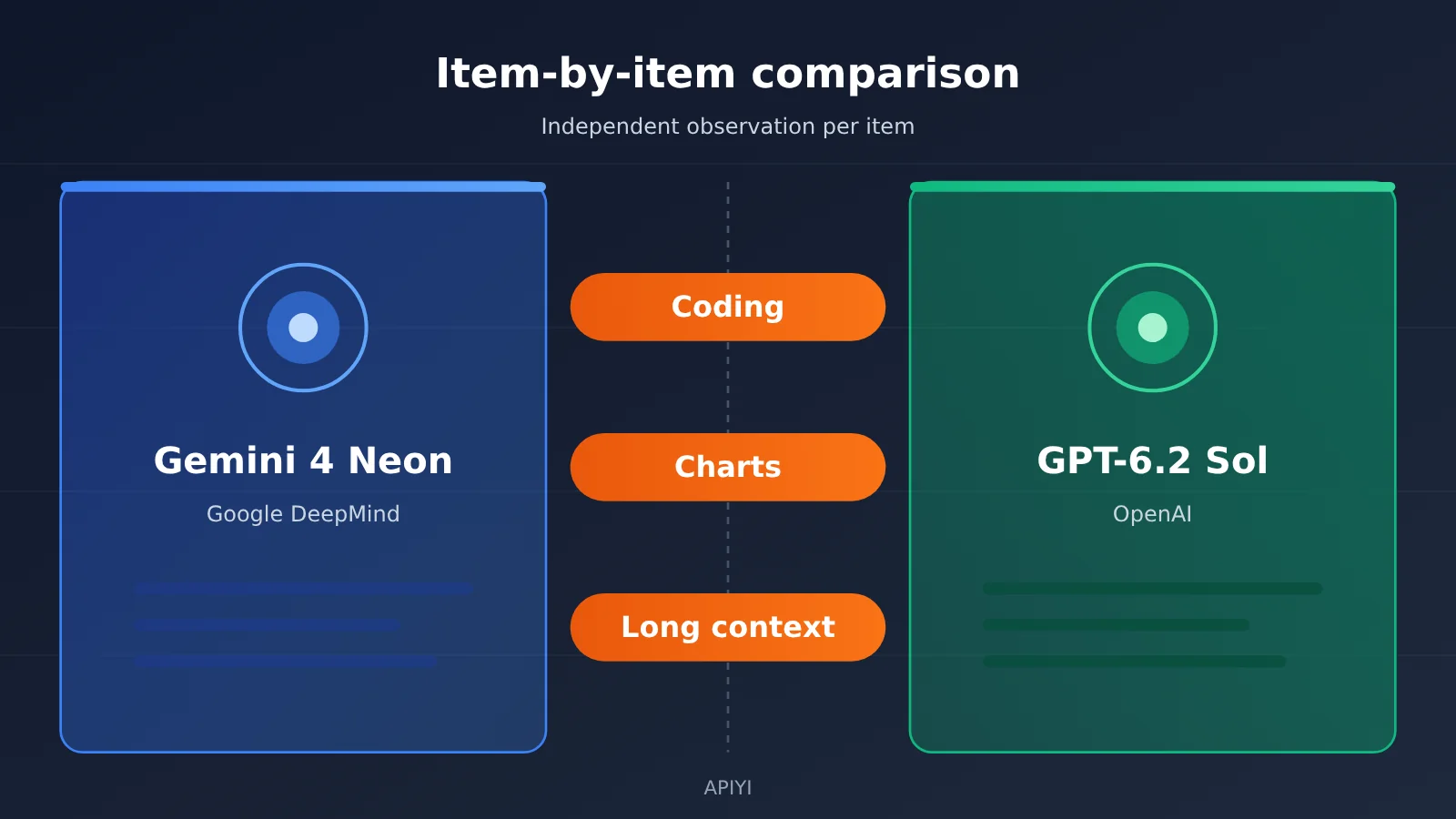
Author’s note: This piece breaks Gemini 4 Neon and GPT-6.2 Sol into three separate comparisons — coding, charts, and long context — then checks per-task cost, latency, official unit prices, and APIYI shelf prices, citing a source for every number.
A lot of teams treat GPT-6.2 Sol as the cheaper tier. Gemini 4 Neon launched on 2026-11-18, and the Artificial Analysis model page puts its intelligence score at 61, versus 57 for Sol. Where those 4 points actually land determines how much they’re worth for your workload. This article looks at coding, charts, and long context as three separate things, then splits per-task cost and unit price into two separate ledgers.
Every number here carries a source tag: official self-reported, model card, Artificial Analysis model page, Artificial Analysis article, APIYI master table, pricing API. Figures where the two sets of definitions don’t line up are kept side by side — we don’t average them, and we don’t synthesize new numbers.
The core takeaway: By the end you’ll be able to say exactly which tasks Neon’s extra points show up in, which one task Sol actually wins, how far apart the two are on per-task cost and latency, and how to call the already-listed gpt-6.2-sol on APIYI.
Quick Look at the Core Differences Between Gemini 4 Neon and GPT-6.2 Sol
Let’s put the seven most important rows together first. Pay attention to the settings: on the Artificial Analysis model pages, Neon’s score of 61 comes from the xhigh setting, while Sol’s score of 57 comes from the max setting. Both are the highest setting on their respective pages, but the setting names and what they mean are different.
| Comparison dimension | Gemini 4 Neon | GPT-6.2 Sol | Source |
|---|---|---|---|
| Overall intelligence score | 61 (xhigh) | 57 (max) | Artificial Analysis model pages |
| Coding: Terminal-bench 4.1 (accuracy after cheating adjustment) | 65.2% | 61.5% | Model card |
| Charting: Chartography | 73.5% | 75.1% | Model card |
| Long context: GraphWalks (256k to 1M, BFS F1) | 95.2% | 80.1% | Model card |
| Cost per task | $6.44 | $1.01 | Artificial Analysis model pages |
| Time per task | 21.5 minutes | 8.5 minutes | Artificial Analysis model pages |
| List price (input/output, per million tokens) | $3 / $15 | $2 / $10 | Official self-report / Artificial Analysis model pages |
Three Caveats Before Reading the Gemini 4 Neon vs GPT-6.2 Sol Comparison Table
The first is what the model card actually is. The comparison table in DeepMind’s model card has only three columns: Gemini 4 Neon, Claude Opus 5.5, and GPT-6.2 Sol. The accompanying evaluation methodology PDF states that non-Gemini results are, by default, self-reported by each vendor. So the Sol column in the model card is Google’s compilation of official numbers, not a same-day rerun by a single lab.
The second is consistency of the intelligence score. The number 61 is consistent across the Google blog (official self-report), the model card (the AA Index v5.0.1 row lists 61 / 59 / 57), and the Artificial Analysis model page. Sol’s 57 is also consistent between the model card and the Artificial Analysis model page. The coding-related indices are not nearly as tidy; I’ll cover them separately below.
The third is what the cost figure actually measures. Artificial Analysis’s cost per task is the amount from running the full suite, allocated across each task. It’s affected by both unit price and output token count. That figure and a platform’s per-token price for a single call are two separate accounting views and can’t substitute for each other.
Gemini 4 Neon vs GPT-6.2 Sol Coding Ability Comparison
For coding, among the five subcategories listed in the model card, Neon is higher than Sol on every item where data is available, but the size of the gap varies a lot. All figures in the table below come from the model card; per the evaluation notes, Sol’s numbers are self-reported by OpenAI.
| Coding subcategory (model card) | Gemini 4 Neon | GPT-6.2 Sol | Gap |
|---|---|---|---|
| CursorBench 4.1 | 65.4% | No data | Not comparable |
| Terminal-bench 4.1 (cheating-adjusted) | 65.2% | 61.5% | 3.7 percentage points |
| FrontierCode 2.0 | 46.2% | 43.8% | 2.4 percentage points |
| SWE-sweep (vendor harness) | 39.0% | 8.3% | 30.7 percentage points |
| SWE-sweep (mini-SWE harness) | 12.8% | 11.6% | 1.2 percentage points |
The two SWE-sweep harnesses need to be read separately
SWE-sweep is the row most likely to be misread. Neon’s 39.0% comes from Google Antigravity, a vendor harness; switching to the standardized mini-SWE harness gives 12.8%. The Google blog (official self-report) describes the gap from 12.8 to 39.0 as an unlock enabled by the harness, so these numbers reflect the combined effect of “model plus toolchain.”
Under the same mini-SWE harness, Neon is at 12.8% versus Sol at 11.6%, a gap of just 1.2 percentage points. Sol scores 8.3% under its own vendor harness, which is actually lower than its mini-SWE result. If your coding agent doesn’t run in Antigravity, the mini-SWE row is closer to the conditions you can reproduce.
The two numbers for the Coding Agent Index
The Google blog (official self-report) lists Neon’s Artificial Analysis Coding Agent Index at 58.6 and calls it #1 overall. The Artificial Analysis article says Neon xhigh on Antigravity CLI is 59. The two numbers come from different sources; this article keeps both and doesn’t merge them. The reference materials don’t include Sol’s score on this index, so this item can’t be compared between the two. Also, the 46.2% on FrontierCode 2.0 was, per the official self-report, measured at the default high setting.
Gemini 4 Neon vs GPT-6.2 Sol: Chart Capabilities Comparison
Chartography is the one of the three benchmarks where Sol comes out ahead. On the Chartography row of the model card, Neon sits at 73.5% and Sol at 75.1% — Sol leads by 1.6 percentage points. The Google blog (an official self-report) gives the same number for Neon, 73.5%, so both sources agree.
For LVBench, which also counts as multimodal understanding, the model card lists Neon at 89.0% and Sol at 87.6%, putting Neon ahead by 1.4 percentage points. The two results point in opposite directions and neither gap is big, so it’s hard to answer “who’s better at charts and vision tasks” in one sentence — it depends on whether your task looks more like reading charts or watching long videos.
On input modalities, the model card states that Neon accepts text, images, audio, and video. The reference materials don’t list Sol’s input modalities, so if your pipeline depends on audio or video input, check the OpenAI official documentation for Sol’s support first.
Gemini 4 Neon vs GPT-6.2 Sol: Long Context Comparison
For long context, this article relies only on the model card’s GraphWalks data. Running BFS traversal over the 256k to 1M token range, the F1 score comes out at 95.2% for Neon and 80.1% for Sol — a 15.1 percentage point gap, the largest of the three.
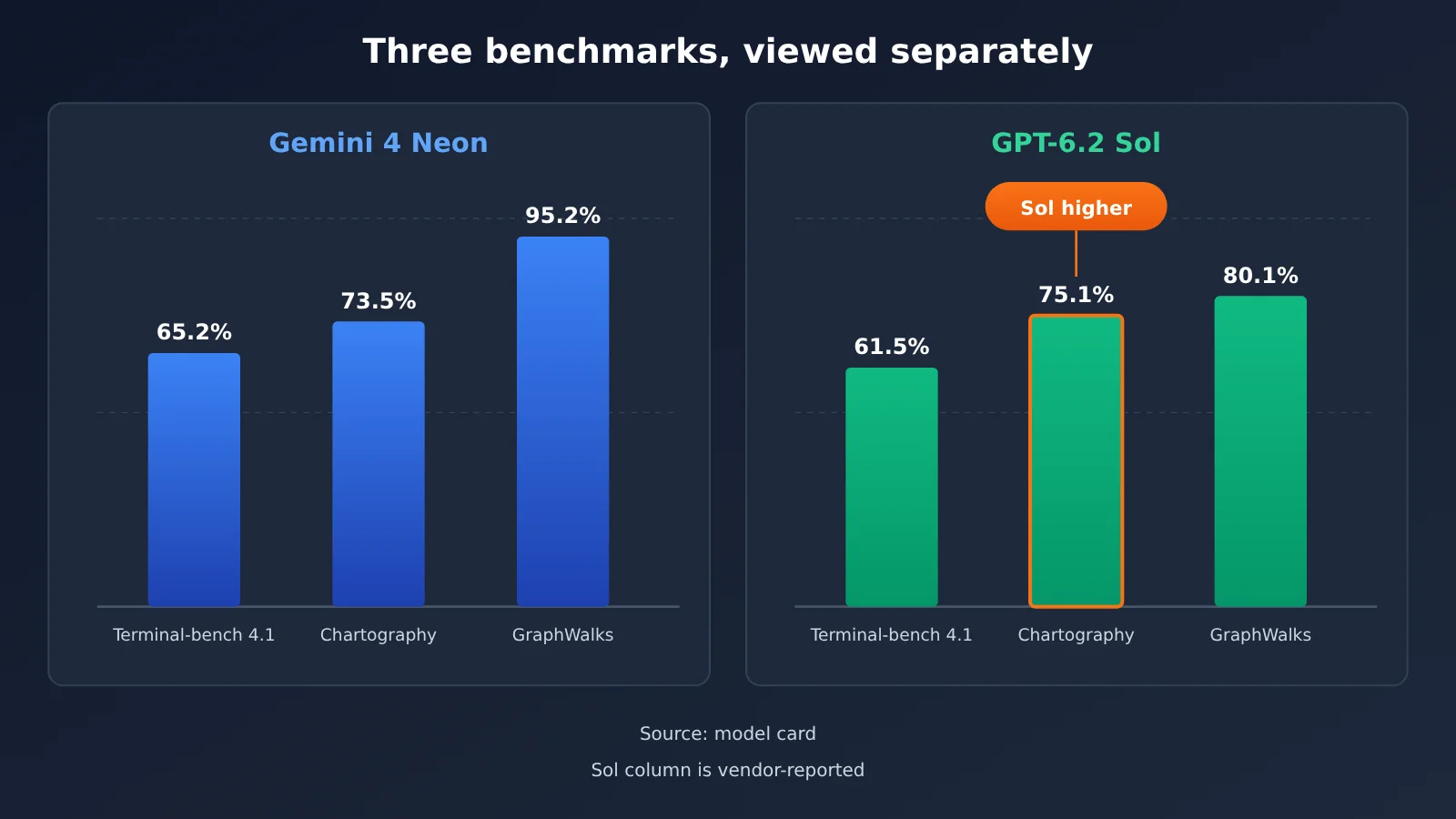
📊 Chart notes: All the numbers in the chart above come from the model card, and the Sol column is vendor-reported per the evaluation notes. If you want to check Sol’s performance on your own long documents, you can send a
gpt-6.2-solrequest directly through APIYI apiyi.com using the same API key.
Gemini 4 Neon’s Long Context Parameters
Neon’s window specs are fully documented. The model card says the unified window caps at 1 million tokens, default synchronous output at up to 64,000 tokens, and background long decoding at up to 1 million. The Google Cloud developer guide gives exact values: the unified cap is 1048576 tokens, covering both input and output, and output in turn includes thinking, function calls, and the final reply; a single default segment is capped at 65536, and long decoding can go up to 1048576 minus the input.
On caching, the developer guide states that Neon doesn’t support explicit context caching. Implicit caching kicks in automatically for shared prefixes above 4096 tokens, and persistent caching is on by default. For scenarios where you ask repeated questions over a long document, this means you need to keep the shared prefix stable to get the $0.15 cached price listed on the AI Studio pricing page.
GPT-6.2 Sol’s Long Context Info
The reference materials don’t give Sol’s maximum context window, so this article doesn’t compare window sizes. What we can confirm is the billing: the APIYI summary table shows that gpt-6.2-sol moves to a higher tier once input exceeds 272000 tokens — the pricing section below covers that in detail. In long-context tasks, this threshold directly shapes how your bill is structured.
Gemini 4 Neon vs GPT-6.2 Sol: Cost and Time Comparison
The gap in per-task cost is much bigger than the gap in list price. According to the Artificial Analysis model pages, Neon xhigh costs $6.44 per task, while Sol max costs $1.01—about 6.4x more. Yet their input list-price ratio is 3 to 2 and their output list-price ratio is 15 to 10, both 1.5x.
The extra comes from output volume. On the same page, Neon xhigh produced 283 million tokens on the index run, while Sol max produced 60.9 million—about 4.6x more. A unit price that’s 50% higher plus several times more output volume—put those together, and you get the $6.44 vs $1.01 result.
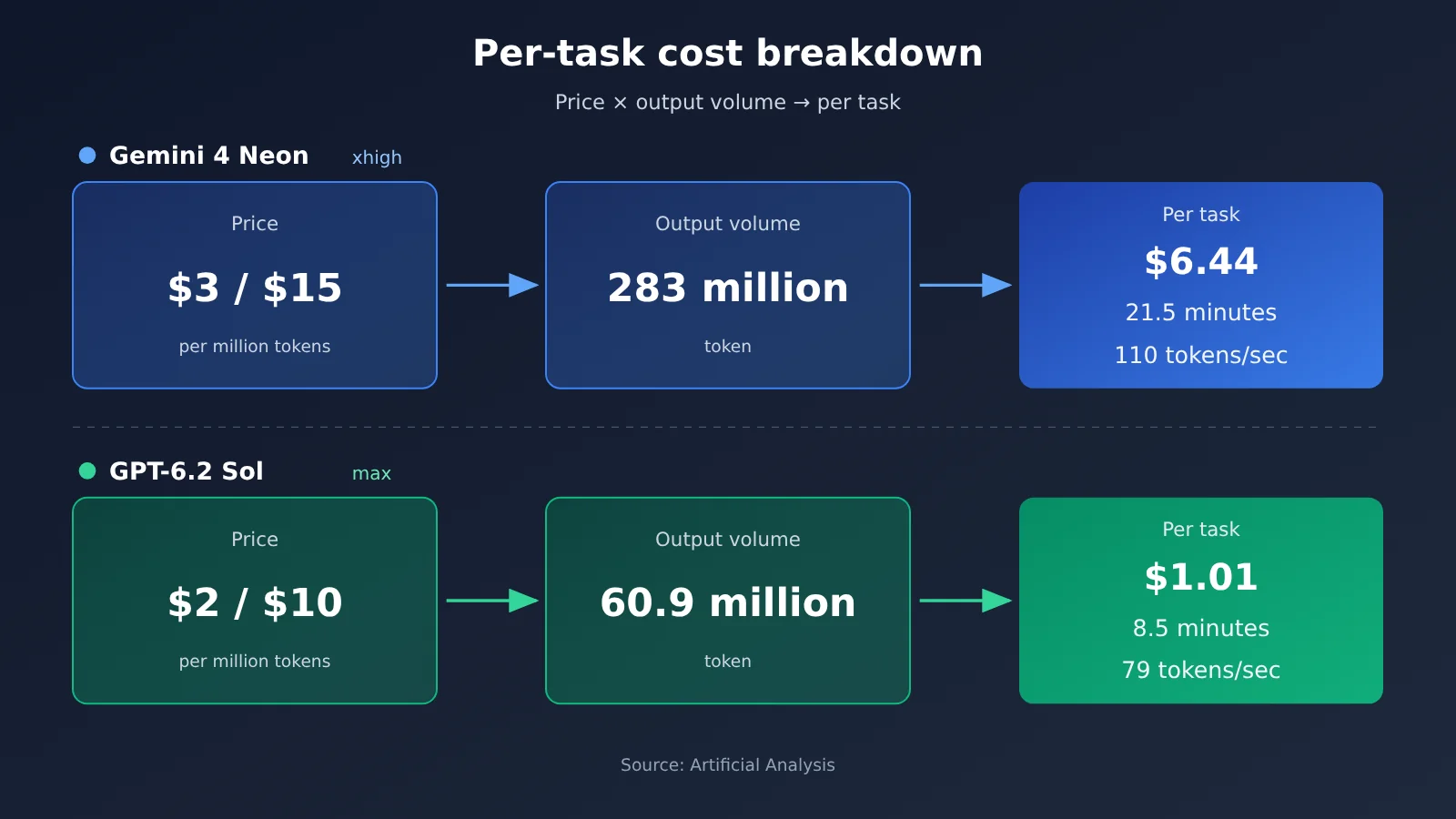
Time follows the same pattern. Neon xhigh outputs at about 110 tokens/sec, faster than Sol max at 79 tokens/sec, but it produces more output, so its per-task time is 21.5 minutes vs 8.5 minutes. Time to first answer token is 56.51 seconds for Neon xhigh and 75.06 seconds for Sol max—Neon is faster on that metric.
Intelligence Score and Per-Task Time by Tier
Both models have multiple reasoning tiers; the table below comes from the Artificial Analysis model page. Per-task cost is only reported on the highest-tier row in each model’s lineup; the other tiers show score, time, and speed.
| Tier | Neon intelligence score | Neon time per task | Neon output speed | Sol intelligence score | Sol time per task | Sol output speed |
|---|---|---|---|---|---|---|
| max | No such tier | — | — | 57 | 8.5 min | 79 tokens/sec |
| xhigh | 61 | 21.5 min | 110 tokens/sec | 56 | 5.3 min | 76 tokens/sec |
| high | 60 | 14.8 min | 101 tokens/sec | 55 | 4.6 min | 73 tokens/sec |
| medium | 55 | 8.3 min | 101 tokens/sec | 53 | 3.2 min | 70 tokens/sec |
| low | 44 | 3.7 min | 97 tokens/sec | 41 | 1.5 min | 65 tokens/sec |
There are two ways to read this table. Compare same-named tiers: at high, Neon scores 60 vs Sol’s 55, and takes 14.8 minutes vs 4.6 minutes. Compare by time: Neon medium at 8.3 minutes is close to Sol max at 8.5 minutes, with scores of 55 vs 57. Neon’s default tier is high (both the developer guide and the latest AI Studio model page say so), which is also the row many integrations will land on by default. The first-token times for Neon’s lower three tiers are recorded separately in the model page FAQ: high 40.64 seconds, medium 20.14 seconds, low 13.93 seconds. These figures aren’t in the same column as the summary table.
Gemini 4 Neon vs. GPT-6.2 Sol: price comparison, official list prices and APIYI shelf prices
Pricing breaks down into two layers: the list prices published by the model provider or a third-party page, and the shelf prices at APIYI (apiyi.com).
| Item | Gemini 4 Neon | GPT-6.2 Sol |
|---|---|---|
| Input list price (per million tokens) | $3.00 (official self-reported / AI Studio pricing page) | $2.00 (Artificial Analysis model page) |
| Output list price (per million tokens) | $15.00, including thinking tokens | $10.00 |
| Cache | $0.15, implicit cache only | 95% cache discount (Artificial Analysis model page) |
| Free tier | None (AI Studio pricing page) | Not mentioned in the reference material |
| APIYI model ID | Not listed yet | gpt-6.2-sol |
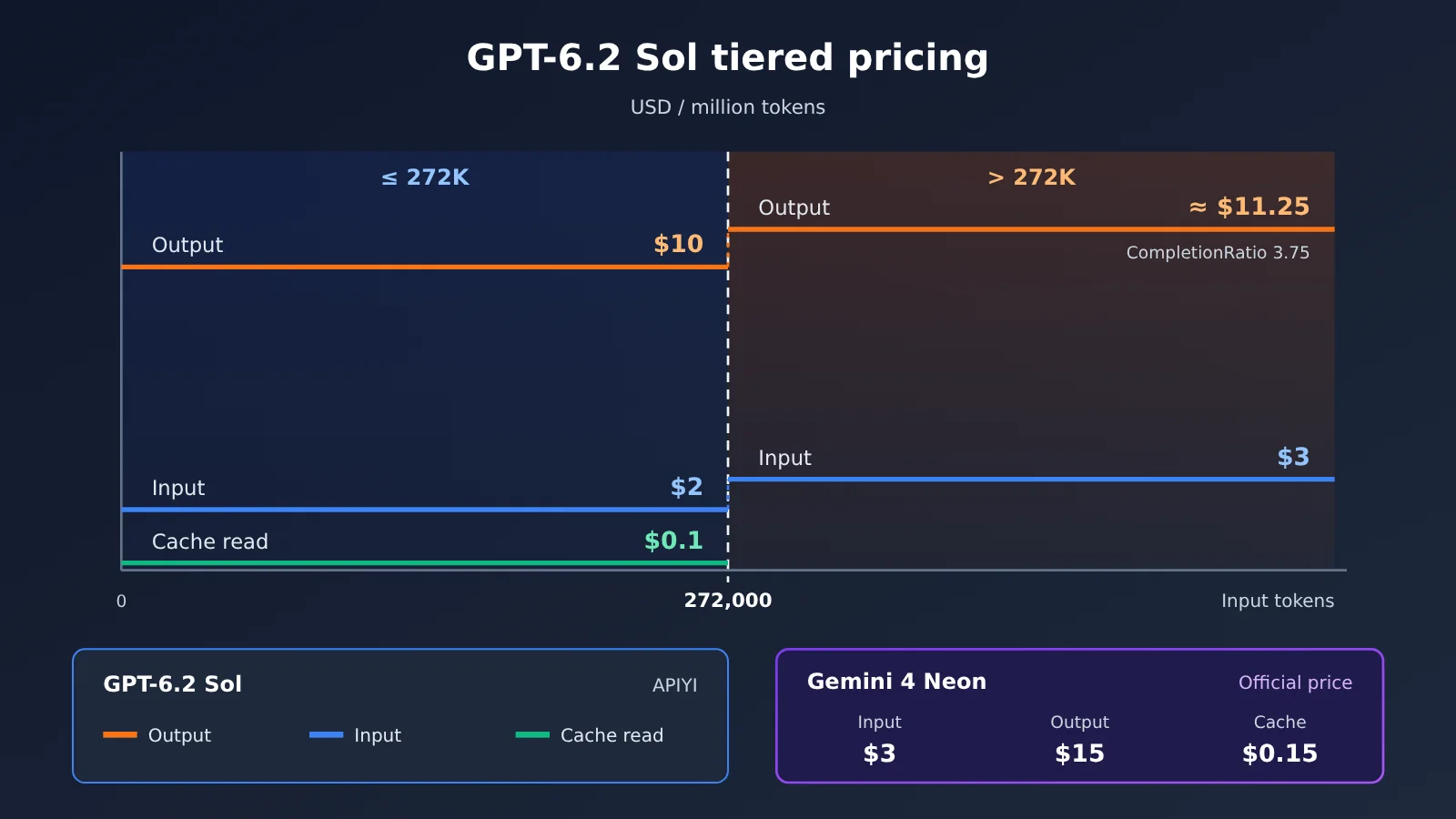
| APIYI first tier (0 to 272000 input tokens) | — | Input $2 / cache read $0.1 / output $10 |
| APIYI higher tier (over 272000 input tokens) | — | Input $3; pricing API output around $11.25 |
| APIYI endpoints | — | responses (recommended), chat |
| Available platforms | Official channels such as the Gemini API in Google AI Studio | APIYI apiyi.com and others |
gemini-4-neon isn’t in the APIYI master table or the pricing API yet — it’s not listed for now, and we’ll get it up as soon as we can. Model names and prices are subject to the platform’s model list.
Tier-jump details for gpt-6.2-sol on APIYI
The APIYI master table (page marked as updated 2026-11-16 09:39, UTC+8) lists gpt-6.2-sol at first-tier input $2, cache read $0.1, output $10, matching the 2/10 list price on the Artificial Analysis model page. For inputs over 272000 tokens, the master table body only says input jumps from $2 to $3.
The pricing API queried on 2026-11-19 (version shell-api-modelmak-v1, 285 models in total) gives a fuller picture. In the API, model_ratio of 1 corresponds to $2 per million input tokens, and completion_ratio of 5 means output is 5x input. Past 272000 tokens, CompletionRatio drops from 5 to 3.75, which at $3 input works out to roughly $11.25 per million output tokens — not a continued $10.
Group names are spelled slightly differently in the two places: the master table says CodexResponses, Codex_Reverse, Default, SVIP, while the pricing API says CodexResponses, CodexReverse, default, svip. Also worth repeating: Artificial Analysis’s $1.01 is the index cost amortized across each task, which is not the same thing as the actual token cost of a single call you make on the platform.
Gemini 4 Neon vs. GPT-6.2 Sol: Scenario Mapping
Below are the most relevant numbers for each task type, so you can match the benchmarks to your own workload. Which model is the better fit depends on your task mix and budget. This is just a comparison, not a verdict.
Numbers Relevant to Coding Agents
- Running inside Google Antigravity: Look at the SWE-sweep vendor harness row: Neon 39.0%, Sol 8.3%. Keep in mind that Google itself attributes this gap to the harness.
- Running in a general-purpose harness: Look at the mini-SWE row: 12.8% vs. 11.6%, plus Terminal-bench 4.1 at 65.2% vs. 61.5%.
- Frequent small changes: Per-task time matters more here, so compare the times for equivalent score bands in the tier table.
Numbers Relevant to Charts and Long Documents
- Earnings chart and dashboard screenshot Q&A: Chartography has Sol at 75.1% and Neon at 73.5%; this category points in the opposite direction from the composite score.
- Graph structure or document traversal at the hundreds-of-thousands-of-tokens level: GraphWalks has Neon at 95.2% and Sol at 80.1%. Also factor in the cost of Sol’s tier jump above 272000 tokens on APIYI.
- Long-video understanding: LVBench has Neon at 89.0% and Sol at 87.6%, and Neon’s model card states that it supports video input.
Gemini 4 Neon vs. GPT-6.2 Sol: Verify First, Then Choose
Before picking a model, it’s worth checking your own situation in the order below instead of jumping straight to the 61-vs-57 comparison.
- Work out what share of your tasks falls into coding, charts, and long context respectively, then cross-reference each against the three breakdown tables above.
- Estimate the average output volume per task. Artificial Analysis data shows that the per-task cost gap between the two models comes mainly from output volume — the longer your task outputs, the wider that gap becomes.
- Check whether your input length will cross 272,000 tokens. Once it does, both the input and output unit prices for
gpt-6.2-solon APIYI change. - Confirm your thinking level. Neon only supports four levels — low, medium, high, and xhigh. Passing
thinking_budgetorMINIMALreturns HTTP400(developer guide). - Run a small comparison batch on your own sample set, recording scores, latency, and token usage.
💡 Recommendation: Each model wins on different breakdown items, so the final call depends on your task distribution and budget. A good approach is to start with
gpt-6.2-sol, which is already available on APIYI (apiyi.com), log token usage and latency on your own samples, then run the same scripts as a comparison once Neon is listed.
How to Quickly Call GPT-6.2 Sol Through APIYI
APIYI’s recommended endpoint for gpt-6.2-sol is responses, and the OpenAI-compatible base_url is https://api.apiyi.com/v1. Getting connected takes just four steps:
- Prepare your key: Generate an API key in the platform console, store it in the environment variable
APIYI_API_KEY, and read it only from the environment in your code—never hardcode it in plaintext. - Set the request URL: The Responses endpoint is
POST https://api.apiyi.com/v1/responses. IncludeAuthorization: Bearer $APIYI_API_KEYandContent-Type: application/jsonin the request headers. - Build the request body: A minimal request body looks like
{"model": "gpt-6.2-sol", "input": "请总结这份季度报告里的三张图表"}. - Call it with the OpenAI SDK: Initialize
OpenAI(base_url="https://api.apiyi.com/v1", api_key=os.environ["APIYI_API_KEY"]), then callclient.responses.create(model="gpt-6.2-sol", input=...), and read the result from the returned object’soutput_text.
If your existing code is built on Chat Completions, you can also send the same model ID to the chat endpoint at /v1/chat/completions. For Gemini’s native protocol, use https://api.apiyi.com with the v1beta version; this applies to Gemini models already listed on the platform.
When running long-context tests, it’s a good idea to log the input token count for each request so you can tell whether you’ve crossed the 272000 threshold. For the exact values of the reasoning effort parameter, check OpenAI’s official documentation and the platform’s model page.
🚀 Quick start: New users can claim free trial credits at APIYI apiyi.com and use a single key to call OpenAI, Claude, Gemini, and other models available on the platform. Get the
gpt-6.2-solresponses flow working first—switching models later only requires changing themodelfield.
FAQ
Q1: What are the respective positioning of Gemini 4 Neon and GPT-6.2 Sol?
Neon is adapted from Gemini 4 Carbon (model card), and Google’s developer guide places it between Hydrogen (everyday fast loop) and Carbon (complex long-horizon). GPT-6.2 Sol is listed at $2/$10 on its Artificial Analysis model page, with a top max-tier intelligence score of 57.
Q2: Where do the 4 extra points Neon has over Sol mainly come from?
Looking at the sub-scores in the model card, the biggest gaps are long-context GraphWalks (95.2% vs 80.1%) and SWE-sweep under the vendor harness (39.0% vs 8.3%). Sol is higher on Chartography (75.1% vs 73.5%).
Q3: When was Gemini 4 Neon released, and on which channels is it available?
Google’s blog lists the release date as 2026-11-18. According to Sundar Pichai’s launch post, it launched that day in the Gemini API in Google AI Studio, Gemini for business, Google Antigravity for paid Google AI Pro and Ultra, and the Gemini App for Pro and Ultra. The model ID is `gemini-4-neon`.
Q4: Can Sol’s $1.01 per task be used as a call budget?
That figure is the cost per task after Artificial Analysis runs the full index suite; Sol max output 60.9 million tokens in that test. Your actual spend depends on your own input and output token counts and billing tier. We recommend estimating it yourself based on the first tier of the APIYI master table at $2 / $0.1 / $10, and keeping an eye on the tier jump above 272,000 tokens.
Q5: How can I quickly call these two models via API?
`gpt-6.2-sol` is already available on APIYI. Visit apiyi.com to sign up and claim trial credits, then set base_url to `https://api.apiyi.com/v1` and call the `responses` endpoint. `gemini-4-neon` is not yet in the master table or the pricing API and isn’t listed yet. We’ll get this model listed as soon as possible; model names and pricing are subject to the platform’s model list.
Q6: What are the limitations of these comparison data?
There are three main ones:
– **Basis**: Per the evaluation notes, Sol’s scores in the model card are vendor-reported and were not re-run on the same day.
– **Tiers**: On Artificial Analysis, Neon’s top tier is xhigh, while Sol’s is max, so the tiers aren’t fully equivalent.
– **Inconsistent numbers**: Coding Agent Index is 58.6 in the Google blog and 59 in the Artificial Analysis article; WebExploitBench v1.2 is 51.26% in the blog and 51.3% in the model card. This article keeps them as originally reported.
Gemini 4 Neon vs GPT-6.2 Sol: Key Takeaways
- Overall score: On the Artificial Analysis model page, Neon xhigh scores 61, Sol max scores 57.
- Coding: On the model card, Terminal-bench 4.1 shows 65.2% vs 61.5%; the SWE-sweep gap depends on which harness you use.
- Charts: Sol is higher on Chartography, 75.1% vs 73.5%.
- Long context: On GraphWalks from 256k to 1M, F1 is 95.2% vs 80.1% — the biggest gap.
- Cost and time: Per task, $6.44 vs $1.01 and 21.5 vs 8.5 minutes; the main driver is output volume differing severalfold.
- Unit price: Neon is $3/$15, Sol is $2/$10; on APIYI,
gpt-6.2-soljumps to a different tier once you exceed 272,000 input tokens.
Summary
Once you break down the differences between Gemini 4 Neon and GPT-6.2 Sol, they’re much clearer than the overall score suggests:
- Coding: Neon is higher on the sub-items where the model card has data, but on the same mini-SWE harness the gap is just 1.2 percentage points.
- Charts: Sol is higher on Chartography, while Neon is slightly higher on LVBench.
- Long context: On GraphWalks, Neon leads by 15.1 percentage points — the most pronounced gap of the three.
- Cost: Unit price differs by 1.5x, per-task cost by about 6.4x; the amplification in between comes from output token count.
Which one to pick comes down to your own task distribution and output length. My recommendation: start by connecting gpt-6.2-sol through APIYI (apiyi.com), log usage and latency on real samples, then run the same process once Neon is available to fill in the comparison.
📚 References
-
Google Blog: Introducing Gemini 4 Neon — official launch and self-reported benchmarks
- Link:
blog.google/innovation-and-ai/models-and-research/gemini-models/introducing-gemini-4-neon - Notes: Overall, coding, science, and price positioning are all self-reported by the vendor
- Link:
-
DeepMind Gemini 4 Neon Model Card — source for the three-column comparison table
- Link:
deepmind.google/models/model-cards/gemini-4-neon - Notes: Sub-item data such as Chartography, GraphWalks, and SWE-sweep
- Link:
-
Google Cloud Gemini 4 Neon Developer Guide — context window, thinking tiers, and caching rules
- Link:
docs.cloud.google.com/gemini-enterprise-agent-platform/models/guides/gemini-4-neon - Notes: 1048576-token unified cap, HTTP 400 rules, implicit caching details
- Link:
-
Google AI Studio Pricing Page — official Neon unit prices
- Link:
aistudio.google.com/docs/pricing - Notes: $3 input, $15 output, $0.15 cache per million tokens
- Link:
-
Artificial Analysis Model Pages — tier data for Neon and Sol
- Link:
artificialanalysis.ai/models/gemini-4-neon,artificialanalysis.ai/models/gpt-6-2-sol - Notes: Intelligence score, cost per task, time, output speed
- Link:
-
Artificial Analysis Article — interpretation of third-party measurements for Neon
- Link:
artificialanalysis.ai/articles/gemini-4-neon-intelligence-gain - Notes: Data such as Coding Agent Index 59
- Link:
-
APIYI Master Table and Pricing Endpoint — available models and tiered pricing
- Link:
docs.apiyi.com/models.md,api.apiyi.com/api/pricing - Notes: The first tier for
gpt-6.2-soland the 272000-token tier jump rule
- Link:
Author: APIYI Technical Team
Technical discussion: Feel free to contact us via the APIYI website homepage. For more models and integration guides, visit the docs.apiyi.com documentation center.