At Ignite on 2026-11-17, Microsoft released two coding models in one go, and MAI Code 2 showed up in GitHub Copilot’s model selector that same day. The other one is called MAI Code 2 Flash. The names look alike, but their positioning, pricing, and benchmarks are each tracked separately — this article only covers MAI Code 2.
This isn’t a rumor. Microsoft’s press release, the GitHub changelog, and the Copilot pricing page all spelled it out that same day. But the line in the press release about being “close to flagship performance at a fraction of the price” refers to task cost computed against specified benchmarks, not the per-token price — an easy thing to misread.
The key takeaway: by the end, you’ll know which everyday code-editing jobs to hand to MAI Code 2, which ones to keep away from it, and how to read the official numbers versus the Copilot price list.
MAI Code 2: Key Facts at a Glance
Bottom line: MAI Code 2 is built for everyday enterprise code changes, not for ultra-long tasks or scientific research.
| Item | Details |
|---|---|
| Release date | 2026-11-17, during Microsoft Ignite |
| Released by | Microsoft AI, launched simultaneously in GitHub Copilot |
| Model ID | MAI-Code-2 (as written in Microsoft and GitHub materials) |
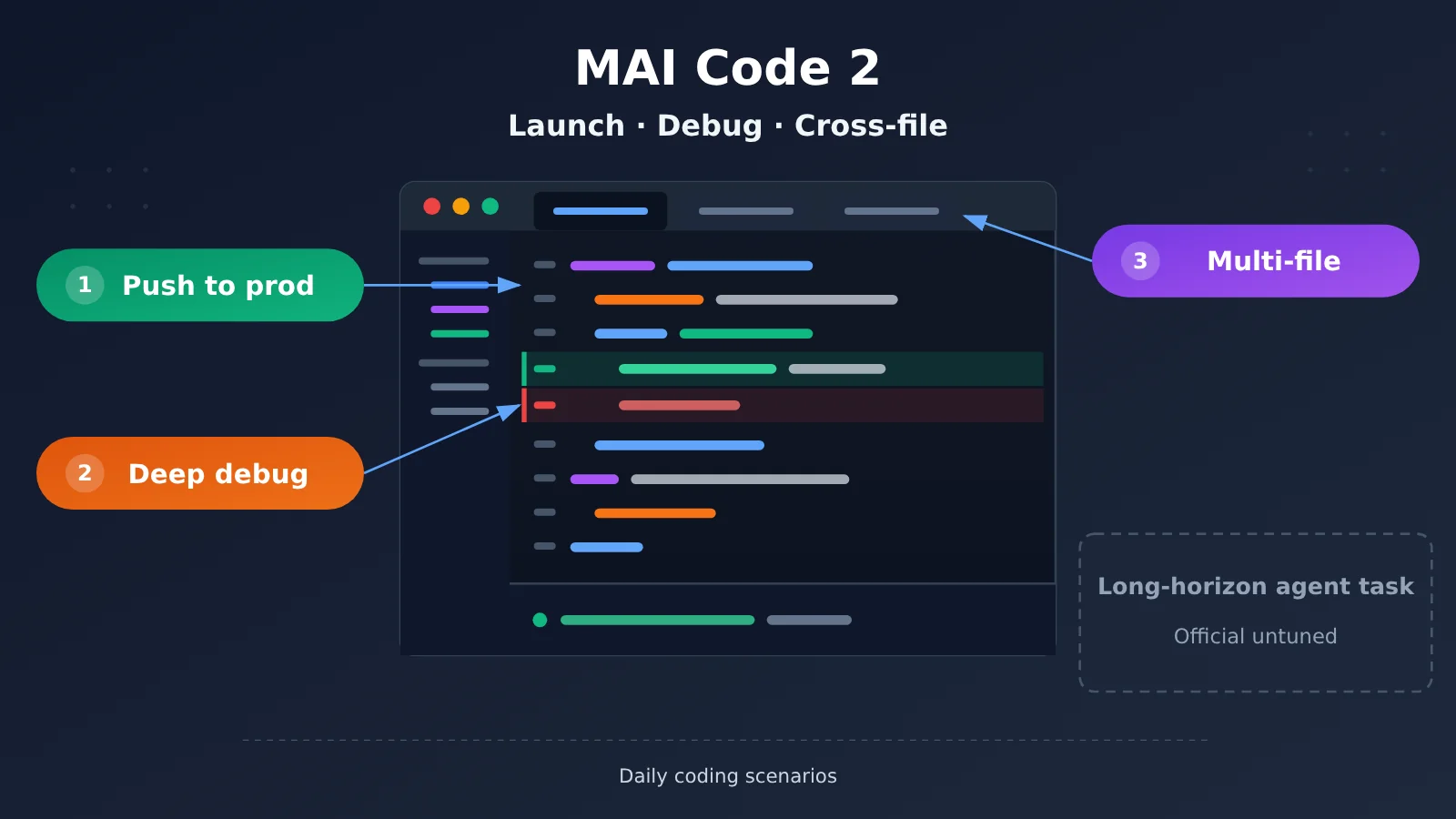
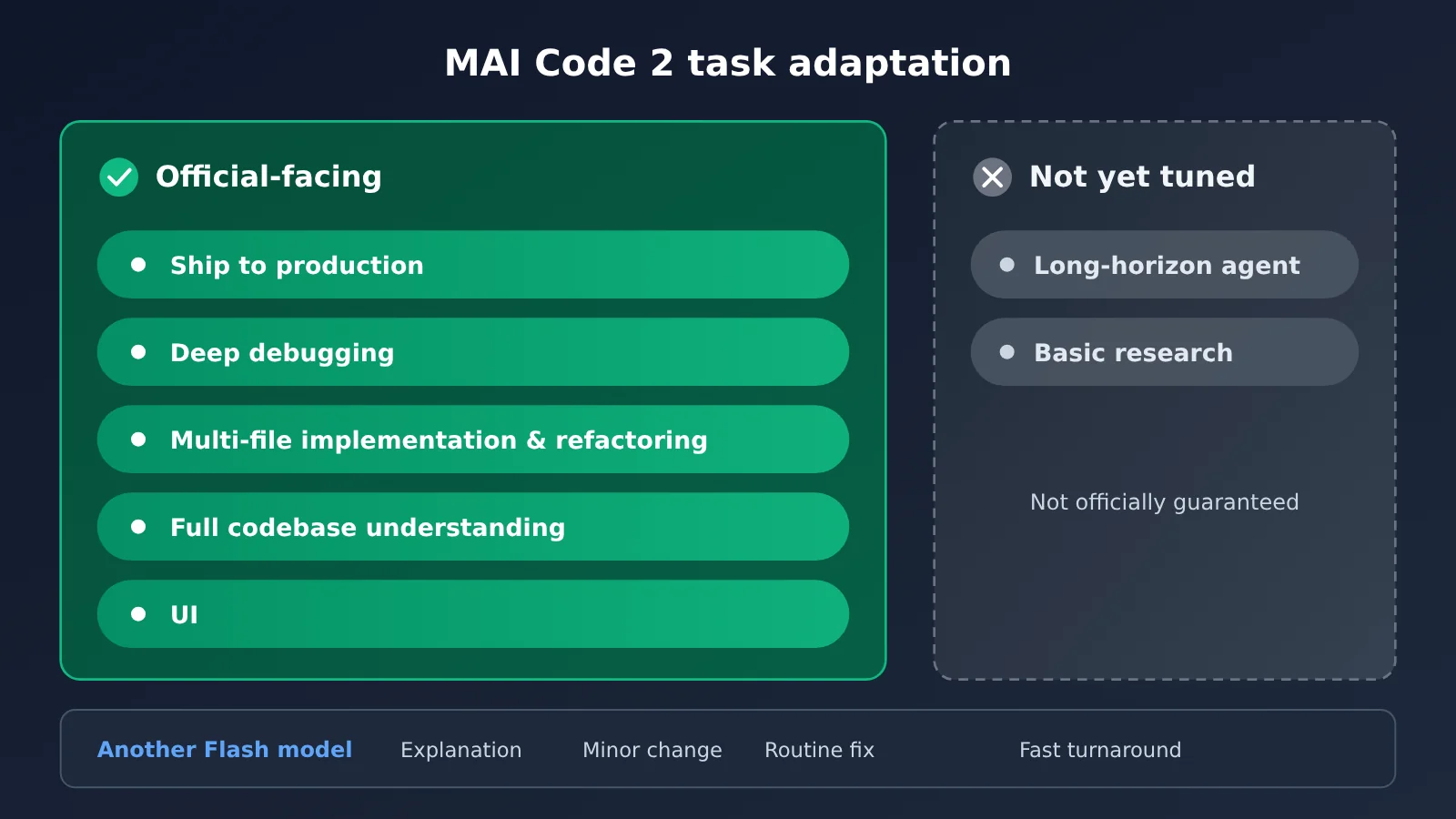
| Official positioning | Shipping changes to production, deep debugging, multi-file implementation, whole-codebase understanding, UI work |
| What Microsoft explicitly says it wasn’t tuned for | Harder problems — the examples given are basic scientific research and very long-horizon agentic tasks |
| Copilot billing | Usage-based billing, promotional pricing runs through 2027-05-17 |
| Who can use it | Eligible annual subscriptions among Copilot Pro, Pro+, Max, Business, and Enterprise |
| Don’t confuse it with | MAI Code 2 Flash is a separate model, aimed at explanations, small edits, routine fixes, and fast back-and-forth |
A few keywords from MAI Code 2’s official positioning
Microsoft’s press release describes MAI Code 2’s job quite concretely: shipping code to production, deep debugging, implementing features across multiple files, understanding an entire codebase, and doing UI work. The GitHub changelog says basically the same thing, just calling out “refactoring” separately as well. In plain terms, this is the kind of work that requires reading the surrounding context, touching several files, and still being shippable when you’re done.
The other side is spelled out just as clearly. The press release says neither model has been tuned for harder problems, citing basic scientific research and very long-horizon agentic tasks as examples. So “let it run for hours and plan the whole thing end to end” — Microsoft itself isn’t making that promise, so don’t throw those jobs at it.
MAI Code 2’s Officially Reported Benchmarks and Task Costs
The most eye-catching parts of the press release are a few percentages. Let’s be clear: all of the figures below are Microsoft’s own reported numbers—not independent third-party measurements, and not APIYI test results or pricing.
| Compared with | Vendor-reported performance | Vendor-reported task cost | Calculation basis |
|---|---|---|---|
| GPT-6.1 Sol | Reaches 98% of its performance | About 40% of its cost | Average across four benchmarks, max reasoning tier |
| Claude Opus 5.5 | Reaches 96% of its performance | About 5% of its cost | Average across four benchmarks, max reasoning tier |
| Blind UI evaluation vs GPT-6 Sol | 64% of annotations favored MAI Code 2 | No cost involved | 258 annotators; rated both appearance and usability |
How these MAI Code 2 percentages were calculated
The four benchmarks are DeepSWE 1.1, Terminal Bench 2.1, SWE-Atlas, and FrontierCode v1.1—all focused on everyday coding tasks. According to the press release footnotes, all models used the maximum reasoning tier; the first three benchmarks were run on Microsoft’s internal MSBench, using GitHub Copilot CLI with subagents disabled; the FrontierCode 1.1 scores and costs came from Artificial Analysis.
The most important part is the cost column: it’s the total cost of running the tasks on these benchmarks at MAI-Code-2’s 50%-off promotional price. In other words, the 40% and 5% figures fold in several factors—token unit price, how many tokens the model used, and the reasoning tier. Once the promotion ends and the unit price doubles, those two ratios won’t hold as-is.
The 64% UI result comes from a separate evaluation: 258 annotators looked at UI, game, visualization, 3D, and SVG tasks and judged both “does it look good” and “does it work.” In the end, 64% leaned toward MAI Code 2 rather than GPT-6 Sol. That shows it has some competitive edge in UI work, but this is also vendor-reported—and it’s not enough to claim it has comprehensively beaten Sol or Opus.
MAI Code 2’s per-token pricing in Copilot
The second set of numbers comes from GitHub Copilot’s pricing page and is measured in dollars per million tokens. That’s a completely different thing from the “share of task cost” above — don’t convert between the two.
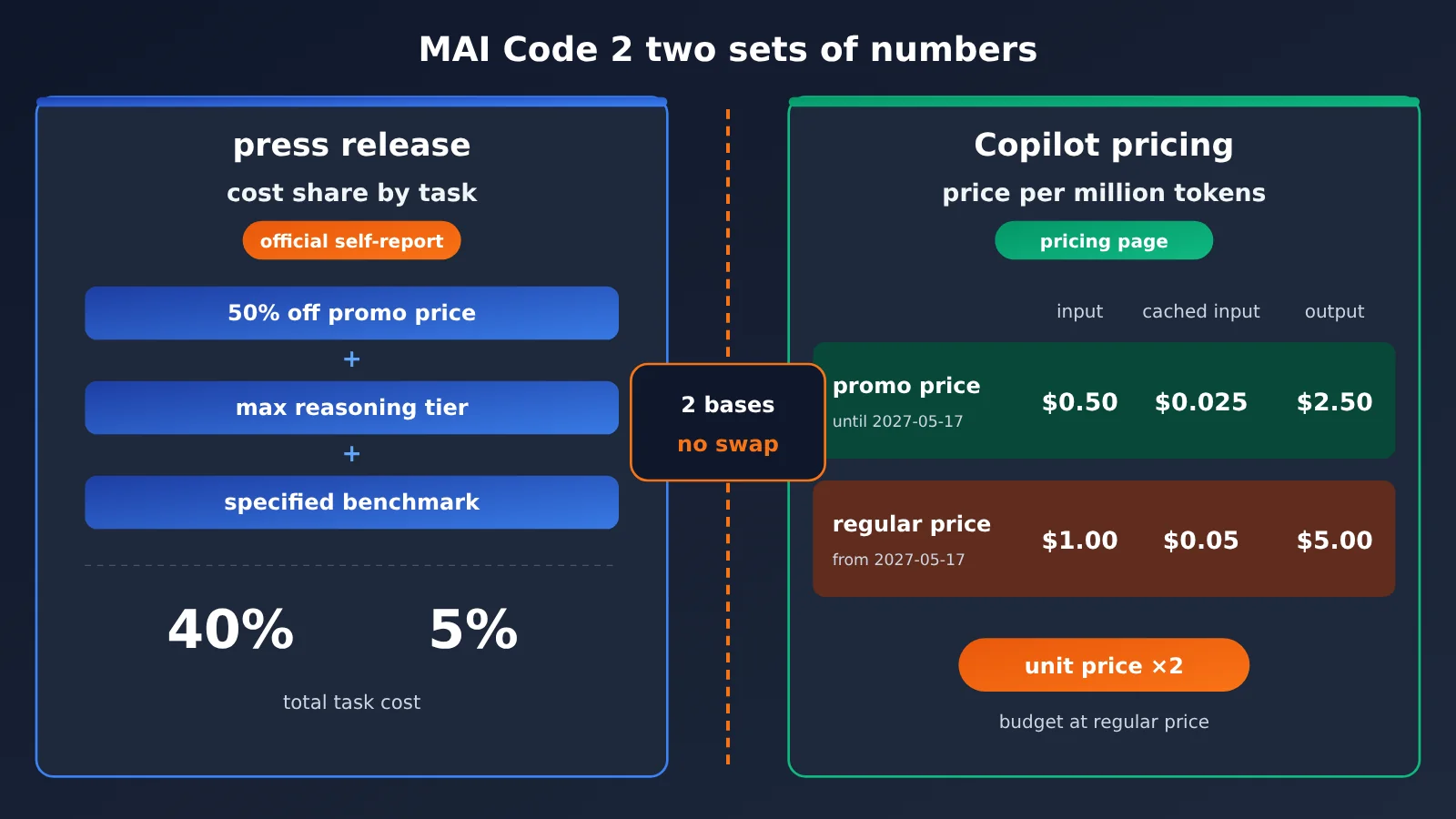
| Model (Copilot pricing) | Input | Cached input | Cache write | Output |
|---|---|---|---|---|
| MAI Code 2 promotional price (through 2027-05-17) | $0.50 | $0.025 | — | $2.50 |
| MAI Code 2 (from 2027-05-17) | $1.00 | $0.05 | — | $5.00 |
| GPT-6.1 Sol (input up to 272K) | $2.00 | $0.10 | — | $10.00 |
| GPT-6.1 Sol (input over 272K) | $4.00 | $0.20 | — | $15.00 |
| Claude Opus 5.5 | $4.00 | $0.20 | $5.00 | $20.00 |
This table shows Copilot’s prices, with Sol and Opus at their default tiers. The ratio between unit prices isn’t the same number as the 40% and 5% in the press release: task cost also depends on how many tokens a model burns solving a problem and how deep it reasons. When you read this, keep the two sets of numbers apart — and when you run your own numbers, only compare within the same measure.
One more date worth noting: the promotional price runs through 2027-05-17, and from that day on, input, cached input, and output all double. If you’re planning to make this your team’s workhorse, budget for the restored prices.
On 2026-11-18 we checked the model list and pricing API at APIYI (apiyi.com). There’s no model called MAI Code 2 right now — the only MAI models in the list are image models. It’s not listed yet, and we’ll get it up as soon as we can; model availability and pricing are subject to the platform’s model list.
MAI Code 2 Impact Analysis
For Copilot Users: How to Find MAI Code 2 in the Model Selector
GitHub’s changelog states that both models show up in the model selector in these places: VS Code, Visual Studio, Copilot CLI, cloud agents, Copilot app, github.com, GitHub Mobile, JetBrains, Xcode, and Eclipse. But whether you can actually select them comes down to three checks.
| Check | Details |
|---|---|
| Subscription tier | Copilot Pro, Pro+, Max, Business, Enterprise |
| Billing plan | Both models are only available to eligible annual subscribers. It’s normal not to see them on monthly plans. |
| Admin policy | Business and Enterprise admins can turn them on or off in model policies. If they’re missing from the selector, ask your admin first. |
| Model to select | Choose MAI Code 2, not the one with “Flash” in the name. |
Telling the two apart is simple: if you need to touch multiple files, track down a deeply hidden bug, or understand the whole repository before making changes, choose MAI Code 2. If you just need to explain a piece of code, make a small change, do a routine fix, or have a quick back-and-forth Q&A, that’s where Flash fits. Both are billed by usage; check the Copilot pricing page for exact per-unit pricing.
For developers connecting to coding models themselves: first get clear on “where it can be called”
Microsoft’s several documents from that day don’t say exactly the same thing about “where it’s available,” so here’s all of it. The press release says both models are in GitHub Copilot, Code 2 Flash is in limited preview on Foundry, and will only later be made available on Open Router, Vercel, Hermes, Open Code, and Kilo. The Book of News says both models are generally available in GitHub, with only Code-2-Flash in private preview on Foundry.
In other words, as of 2026-11-18, there’s no confirmable, public-facing MAI Code 2 API model ID. If you see claims elsewhere that you “can already call MAI-Code-2 directly,” find the source first—don’t rush to put it into your config.
If your editor plugin, CLI, or internal coding assistant already uses the OpenAI-compatible protocol, what you can do now is unify the integration layer first. For example, on APIYI apiyi.com, use a single API key to connect to existing coding models such as OpenAI, Claude, and Gemini, set the client’s base_url to https://api.apiyi.com/v1, and enter only model IDs that actually exist in the platform’s model list. When new models go live, you’ll only need to change the model name—no need to touch any other code.
For model selection: validate with your own repository, not just percentages
The official 98% and 96% come from four designated benchmarks, and they may not match your own repository, language stack, or testing habits. A safer approach is to pick a batch from your recent real tickets: a few cross-file changes, a few hard-to-debug bugs, one or two UI tasks, and record for each model whether the changes pass tests directly, how many times a human has to rework them, and how many tokens were used.
You can run this kind of comparison first among models that are already available—for example, call several main coding models through APIYI apiyi.com on a pay-as-you-go basis, and set up the evaluation scripts and scoring criteria first. For the MAI Code 2 group, you can first manually run the same batch of tasks in Copilot and record the same metrics on both sides. Once the criteria are aligned, you can then decide whether it’s worth replacing your current setup.
For the Industry: Coding Models Are Now Tiered by the “Job”
There’s a clear signal in this launch: Microsoft didn’t claim MAI Code 2 can do everything. Instead, it split the work into two tiers — Code 2 handles shipping to production, debugging, and cross-file work; Flash handles explanations and small edits. Ultra-long-horizon agents and basic scientific research are explicitly written off as “not yet tuned for.” This approach — tiering by task and stating the boundaries right in the press release — is actually friendlier to the people doing the model selection.
Another signal is that the pricing narrative has shifted from “what’s the unit price” to “how much does it cost to finish a task.” Per-task spend is closer to the real bill, but the measurement is also messier — promotional pricing, reasoning tiers, and whether a subagent is involved all change the result. When reading numbers like this, find the footnotes first, then draw your conclusions.
MAI Code 2 FAQ
Q1: Are MAI Code 2 and MAI Code 2 Flash the same model?
No. MAI Code 2 targets shipping to production, deep debugging, multi-file implementation, whole-codebase comprehension, and UI; Flash targets explanations, small edits, routine fixes, and quick back-and-forth. The two have independent pricing and independent benchmarks — you can’t lump them together.
Q2: The press release says the cost is only 5% of Opus — does that mean the unit price is 5% of Opus’s?
No. The 5% is the officially self-reported share of per-task spend, calculated using `MAI-Code-2` at its 50%-off promotional price, at the maximum reasoning tier, across four specified benchmarks. For per-token pricing, check the Copilot pricing page — that’s a separate set of numbers.
Q3: Can I call MAI Code 2 directly through an API right now?
As of 2026-11-18, Microsoft’s materials only confirm availability inside GitHub Copilot; the Foundry preview refers to Flash; other platforms are “later.” APIYI apiyi.com didn’t have this model that day either. You can start by using the coding models already on the platform and `https://api.apiyi.com/v1` to get your integration layer in place — check the platform’s model list for what’s actually available.
Q4: What isn’t MAI Code 2 suited for?
Officially, it hasn’t been tuned for harder problems — the examples given are basic scientific research and very long-horizon agentic tasks. For work that needs to run autonomously for a long stretch and plan all the way through, it’s better not to hand it the job first.
MAI Code 2 Key Takeaways
- Clear positioning: MAI Code 2 handles deployment, deep debugging, multi-file work, whole-repo understanding, and the interface.
- Clear boundaries: Microsoft says it hasn’t been tuned for ultra-long-horizon agents or basic research.
- The numbers are self-reported: 98%, 96%, 40%, 5%, and 64% all come straight from Microsoft’s own figures.
- Two sets of pricing: Task cost is calculated at the 50%-off promo price, while the Copilot per-token price comes from a separate table.
- The promo has a deadline: The Copilot promo price runs through 2027-05-17, after which the unit price doubles.
- Access requirements: Annual subscriptions only; admins can turn it off in model policies.
- Integration prep: Start by unifying access through APIYI apiyi.com, and check the platform’s model list for what’s actually available.
Summary
The core message around MAI Code 2 boils down to three sentences:
- What it’s meant for: Everyday code changes and debugging that require reading context, touching multiple files, and shipping once the fix is in.
- What it’s not meant for: Ultra-long-horizon agent tasks and basic research — Microsoft itself says it hasn’t been tuned for those.
- How to read the numbers: The percentages in the press release are task costs calculated at the promo price against specific benchmarks, while the Copilot price list is a per-million-token unit price. Keep the two separate.
If you have an annual Copilot subscription, start by picking a batch of real tasks from your own repo and giving it a try. If you’re building your own coding toolchain, I’d recommend first getting multi-model access and evaluation workflows up and running through APIYI apiyi.com, then folding new models into the same comparison setup once they hit the platform.
📚 References
-
Microsoft press release: MAI Code 2 and MAI Code 2 Flash release notes
- Link:
microsoft.ai/news/introducing-mai-code-2-and-mai-code-2-flash/ - Details: Official positioning, self-reported benchmarks, footnote wording, and third-party platform plans
- Link:
-
GitHub changelog: the two models land in GitHub Copilot
- Link:
github.blog/changelog/2026-11-17-mai-code-2-and-mai-code-2-flash-in-github-copilot/ - Details: Available subscription tiers, annual billing restrictions, model selector coverage, and admin policies
- Link:
-
GitHub Copilot models and pricing: per-million-token price table
- Link:
docs.github.com/en/copilot/reference/copilot-billing/models-and-pricing - Details: MAI Code 2 promotional price vs. standard price, along with comparison unit prices for GPT-6.1 Sol and Claude Opus 5.5
- Link:
-
Microsoft Ignite 2026 Book of News: release roundup
- Link:
news.microsoft.com/events/ignite/2026/book-of-news/ - Details: An alternative write-up of the GitHub general availability and Foundry private preview announcements
- Link:
-
APIYI model list and pricing endpoint: listing status check
- Link:
docs.apiyi.com/models.md,api.apiyi.com/api/pricing - Details: As of the 2026-11-18 check, no MAI Code 2 model was listed
- Link:
Author: APIYI Technical Team
Technical discussion: Feel free to reach out via the APIYI homepage — for more integration guidance, see the model list page in the docs center