Summary: DeepSeek is opening up the search, file parsing, URL reading, and voice capabilities in its app to developers, with key tool workflows executed on the API server side.
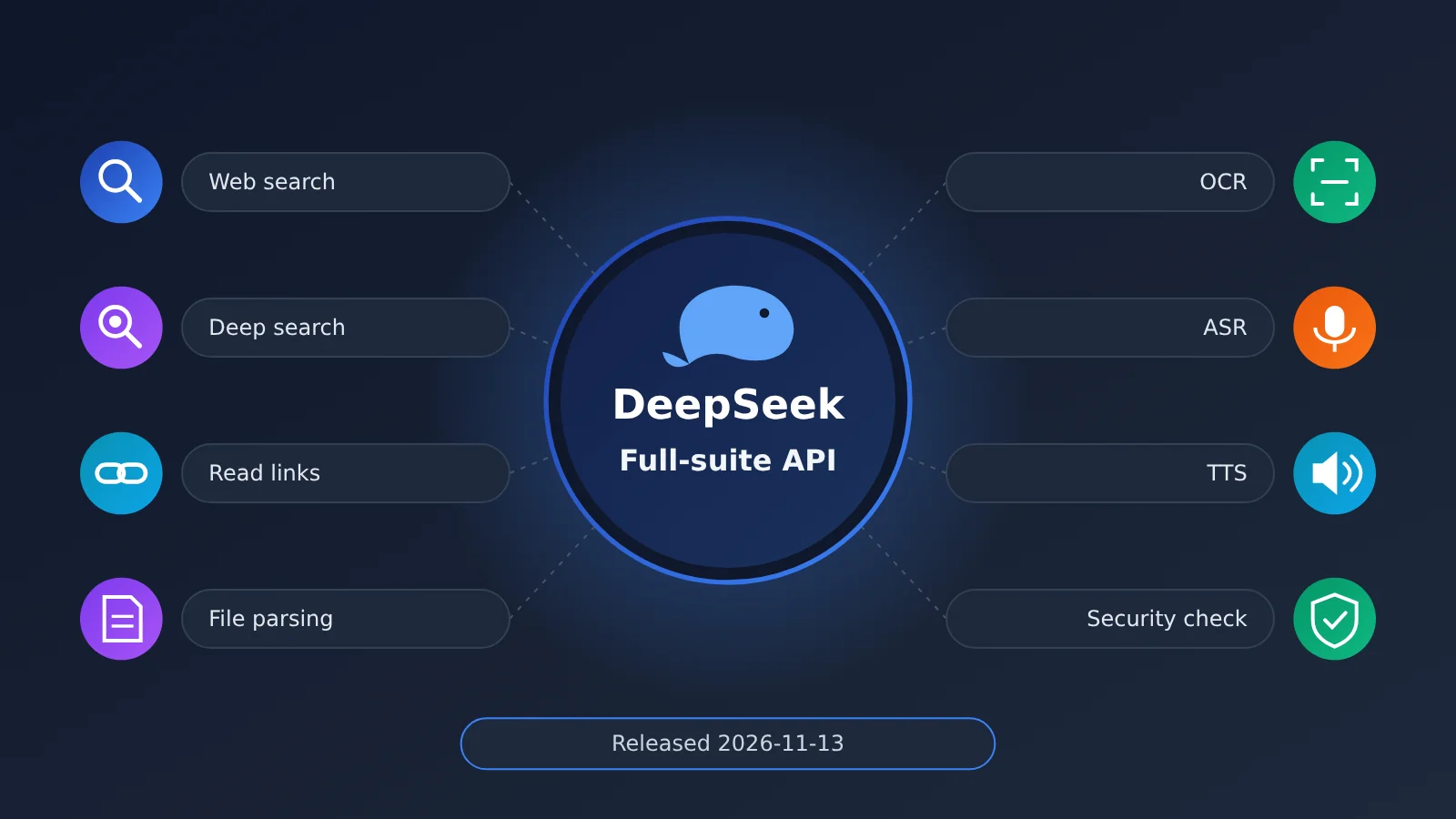
On November 13, 2026, DeepSeek officially launched the full-suite app API. Web search, deep-thinking search, URL reading, file input, and model safety checks—previously built into the DeepSeek app and web version—can now be called through the API, along with standalone Search, Fetch, OCR, ASR, and TTS endpoints. The core change in this update is this: after developers declare tools like deepseek_web_search and deepseek_read_url in a request, search, web reading, and context assembly are handled by the DeepSeek server. The client no longer has to orchestrate the “model → search → fetch → return → re-request” call chain itself. According to the official announcement, you can build features that are basically the same as those in the DeepSeek app with this API set.
Below, we’ll first explain what capabilities are now available and which models and protocols can use them. Then we’ll break down the technical workflows and limitations of web search, deep search, files and links, voice, and OCR one by one. After that, we’ll compare the old and new development approaches and clarify what the frontend still needs to handle. Finally, using three product types—news Q&A, financial report reading, and voice assistants—we’ll outline how to choose between the two integration paths: built-in tools and standalone tools.
Things to Know: DeepSeek Full-Suite API Terminology
| Term | Explanation |
|---|---|
| API | An interface through which software exchanges requests and results in an agreed-upon format |
| Harness | The runtime framework that manages an Agent’s execution flow, models, tools, and context |
| Server-side Tool | A tool executed on the model provider’s server side, with the client only receiving the execution result |
| Deep Thinking Search | The model searches multiple times, opens web pages, and looks up information during its reasoning process |
| Chat Completions | An OpenAI-style traditional chat completion interface |
| Responses API | An API that supports structured responses, tool calls, and multi-turn interaction |
| Messages API | An Anthropic-style messages interface |
| Files API | An API that uploads and parses files and returns a file_id for referencing in conversations |
| OCR | Recognizing text in images or documents into processable text |
| ASR | Converting speech into text |
| TTS | Converting text into speech |
| Citation | A citation mechanism that links content in an answer to a specific information source |
| tool_choice | A request parameter that controls how the model invokes tools |
1 DeepSeek Full Suite API Opens Up the App’s Core Capabilities to Developers
1.1 What DeepSeek’s Full Suite API Launched on November 13
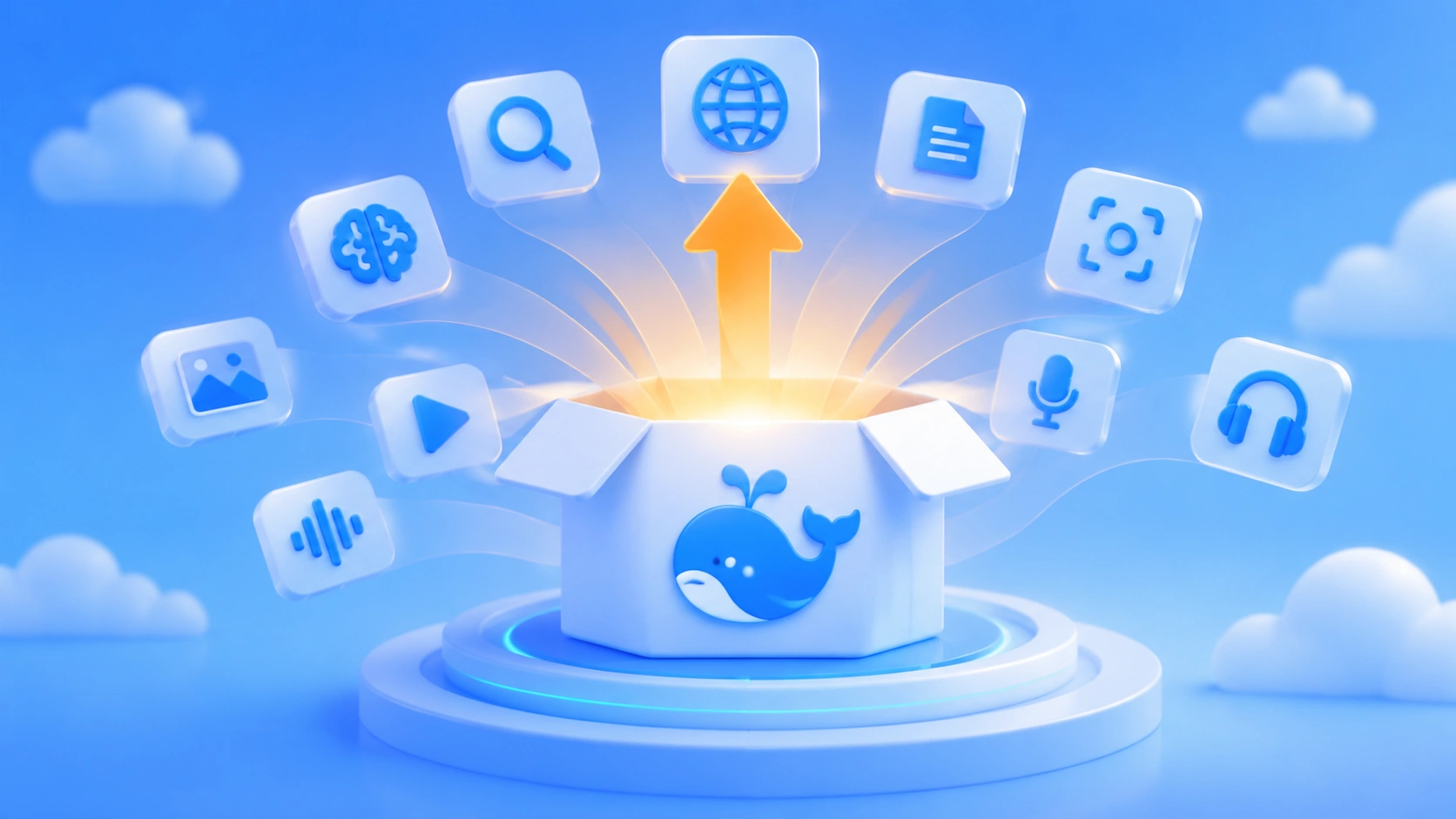
The capabilities released this time fall into two categories: one is server-side tools embedded in the conversation, which the model calls on its own while answering; the other is standalone tool endpoints that developers can call individually and combine freely.
| Capability | English Name | Invocation Form | What It Does |
|---|---|---|---|
| Web Search | Web Search | Built-in chat tool | The model decides on its own whether to search, and returns answers with citations |
| Deep Thinking Search | Deep Thinking Search | Built-in chat tool | Multi-step search, opening web pages, in-page lookup |
| Read URL | Read URL | Built-in chat tool | Reads the web links contained in user messages |
| File Input | File Input | Files API + chat | PDFs, Office files, and images are parsed and fed into context |
| Safety Check | Safety Check | Request parameter | Moderates inputs, tool results, and outputs |
| Search API | Search API | Standalone endpoint | Returns structured search results |
| Fetch API | Fetch API | Standalone endpoint | Extracts the body text of a web page |
| OCR | Optical Character Recognition | Standalone endpoint | Recognizes text and page positions in images and documents |
| ASR | Automatic Speech Recognition | Standalone endpoint | Converts audio to text |
| TTS | Text-to-Speech | Standalone endpoint | Converts text to speech, with WebSocket streaming support |
This update focuses on the model’s application capability layer. Beyond the model’s own reasoning ability, the search, document, voice, and risk-control components that App-level experiences depend on have all been opened up as a whole — what developers get is a set of infrastructure they can assemble directly into a product.
On the same day, DeepSeek also open-sourced a lightweight front-end Chat Demo as a reference implementation for reproducing the App experience. As background, DeepSeek open-sourced the agent runtime framework DeepSeek Harness on August 13; it and the full suite API sit at the framework layer and the interface layer respectively — two independent but interrelated product lines.
1.2 Which Models and Protocols Does the DeepSeek Full Suite API Support
The full tool integration at the conversation level is currently carried by deepseek-flash, corresponding to the official release DeepSeek-V4.1-Flash-1017. This model supports thinking and non-thinking modes, web search, deep thinking search, read URL, file parsing, image understanding, and safety checks, with a context length of 1M and a maximum output of 384K. The tool integration in the announcement is explicitly targeted at deepseek-flash; the scope of tool support for other models such as DeepSeek-V4-Pro is subject to official follow-up documentation.
| Protocol | Endpoint | Characteristics |
|---|---|---|
| OpenAI Chat Completions | POST api.deepseek.com/chat/completions |
Classic chat completion, lowest migration cost |
| OpenAI Responses | POST api.deepseek.com/responses |
Structured responses and multi-turn tool interaction |
| Anthropic Messages | POST api.deepseek.com/anthropic/v1/messages |
Anthropic-style message format |
All three protocols can use server-side search, read URL, and file capabilities, but their request parameters and response structures differ. Teams that already have OpenAI SDK code can go with Chat Completions or Responses first, while projects built on the Claude ecosystem can choose the Messages protocol.
2 How the DeepSeek Suite API Covers What Used to Be Separate Tasks
2.1 DeepSeek Web Search: The Model Decides When to Search
Once you declare deepseek_web_search in the request’s tools, the model decides whether to search the web based on the question, automatically generates search terms, lets the server run the search, and then organizes the information with source citations. The tool supports both web search and image search.
Take a tech-news query like “Which new API features has DeepSeek released recently?” as an example. The response includes the search query terms, structured search results, source URLs, titles, publish times, and citation information. The Chat Completions request body in the official docs looks like this. It enables thinking mode, web search, and link reading all at once:
{
  "model": "deepseek-flash",
  "thinking": { "type": "enabled" },
  "tools": [
    { "type": "deepseek_web_search" },
    { "type": "deepseek_read_url" }
  ],
  "messages": [
    { "role": "user", "content": "调查DeepSeek最近发布了哪些API新功能" }
  ],
  "stream": true
}
There are a few control rules for tool calls that you need to pay special attention to:
- Once a tool is declared in
tools, whether it gets called is up to the model. tool_choicecan’t forcedeepseek_web_searchordeepseek_read_url.tool_choice: nonedisables all tools.- The combination of web tools and other server-side tools has support limits. Anything outside that scope returns a 400 error.
2.2 DeepSeek Deep Search: From a Single Query to Multi-Step Research
Once thinking mode is on, web search levels up to deep-thinking search. During reasoning, the model alternates between three actions: search looks up keywords, open_page opens a page found in the results, and find_in_page looks up specific information inside that page.
Every step informs the next decision. Based on the first round of results, the model can add new keywords, open official announcements to verify details, then cross-check multiple sources — and after up to roughly 20 tool calls, it delivers an answer complete with citations. For research-style questions, this is basically a mini retrieval agent baked right into the API.
2.3 DeepSeek Files and Links: Letting the Model Read External Material Directly
deepseek_read_url is built specifically to read URLs supplied by the user, with these rules:
- Only URLs in the last user message are recognized; at most the first 10 distinct URLs are considered, and duplicates count as one.
- Which URLs actually get read is up to the model.
- When several long web pages are read in the same turn, the context available to each individual page shrinks.
- If thinking is enabled and
deepseek_web_searchis also declared, that turn switches to the deep-thinking search mechanism.
File capabilities come through the Files API: call POST /files to upload a file, the server parses it and returns a file_id, and you reference that ID in the conversation. You must specify a parsing purpose on upload — the two modes differ in whether the model can see charts:
- text_recognition: keeps plain text only, ideal for contracts, papers, and other text-heavy material; charts and figures are dropped.
- rich_layout_recognition: keeps the text and automatically crops images and charts, handing them to the model in their original positions — good for financial reports, PPTs, and mixed text-and-image reports, at the cost of extra image tokens.
Supported formats include PDF, DOC/DOCX, PPT/PPTX, plus images such as PNG, JPEG, WebP, GIF, BMP, and TIFF. Each file can be up to 100 MiB and 1000 pages, upload and parsing must each finish within 120 seconds, and a single request can reference at most 20 files. Files such as XLSX, CSV, and EPUB can be uploaded as user_data; the system converts them to Markdown and doesn’t charge a parsing fee.
Once parsing results enter the model’s context, the model can answer, summarize, or compare against the full text, and the content of historical files persists across multi-turn conversations. Re-referencing an already parsed file incurs no parsing fee, but you’re billed for the input tokens that actually make it into the context. Two engineering details to keep in mind: in multipart uploads, the purpose field has to come before the file field; and if a document is long enough to blow past the context limit, the request returns a 400 error.
2.4 DeepSeek Voice and OCR: Completing the Application’s Input/Output Capabilities
OCR, ASR, and TTS are all standalone interfaces, with paths /v1/tools/ocr, /v1/tools/asr, and /v1/tools/tts respectively.
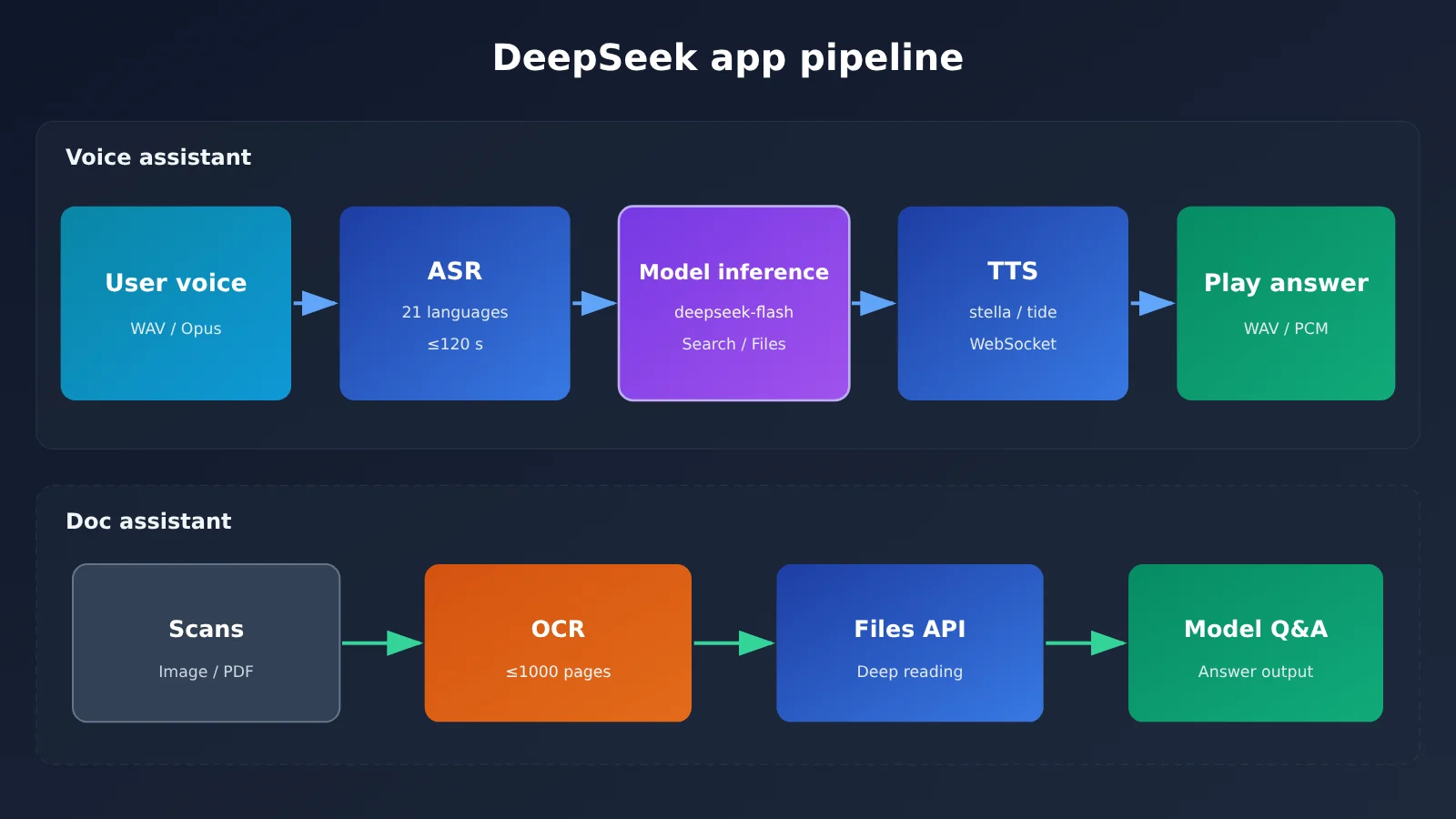
- OCR: Recognizes text and page positions in images, PDFs, Word, and PowerPoint files, with a limit of 100 MiB and 1,000 pages per file, and a processing timeout of 180 seconds. Its role differs from file parsing: OCR is responsible for independently extracting text, while file parsing is responsible for feeding content into the model’s context.
- ASR: Supports 21 languages including Mandarin, Cantonese, English, and Japanese, with automatic language detection. The input format is 16-bit PCM WAV or Ogg Opus, with a maximum of 8 MiB and 120 seconds per file, using non-streaming recognition via whole-file upload.
- TTS: Offers two voices — stella (Sea Star, female, default) and tide (Dark Tide, male) — supporting 10 languages including Mandarin, Cantonese, and English. Each request can take up to 10,000 billed characters and return up to 30 minutes of audio. Output formats are WAV and PCM, WebSocket streaming synthesis is supported, and speed adjustment is not yet available.
Chaining these three with a chat model gives you a complete voice assistant pipeline: ASR converts the user’s speech into text, deepseek-flash reasons and answers using search or files, and TTS then reads the answer aloud. A document assistant, on the other hand, can first use OCR to batch-extract text from scanned documents and build an index, then use the Files API to let the model read a single file in depth.
3 The DeepSeek Full Suite API Changes How Developers Integrate
3.1 How You Used to Build a Web-Connected AI Assistant
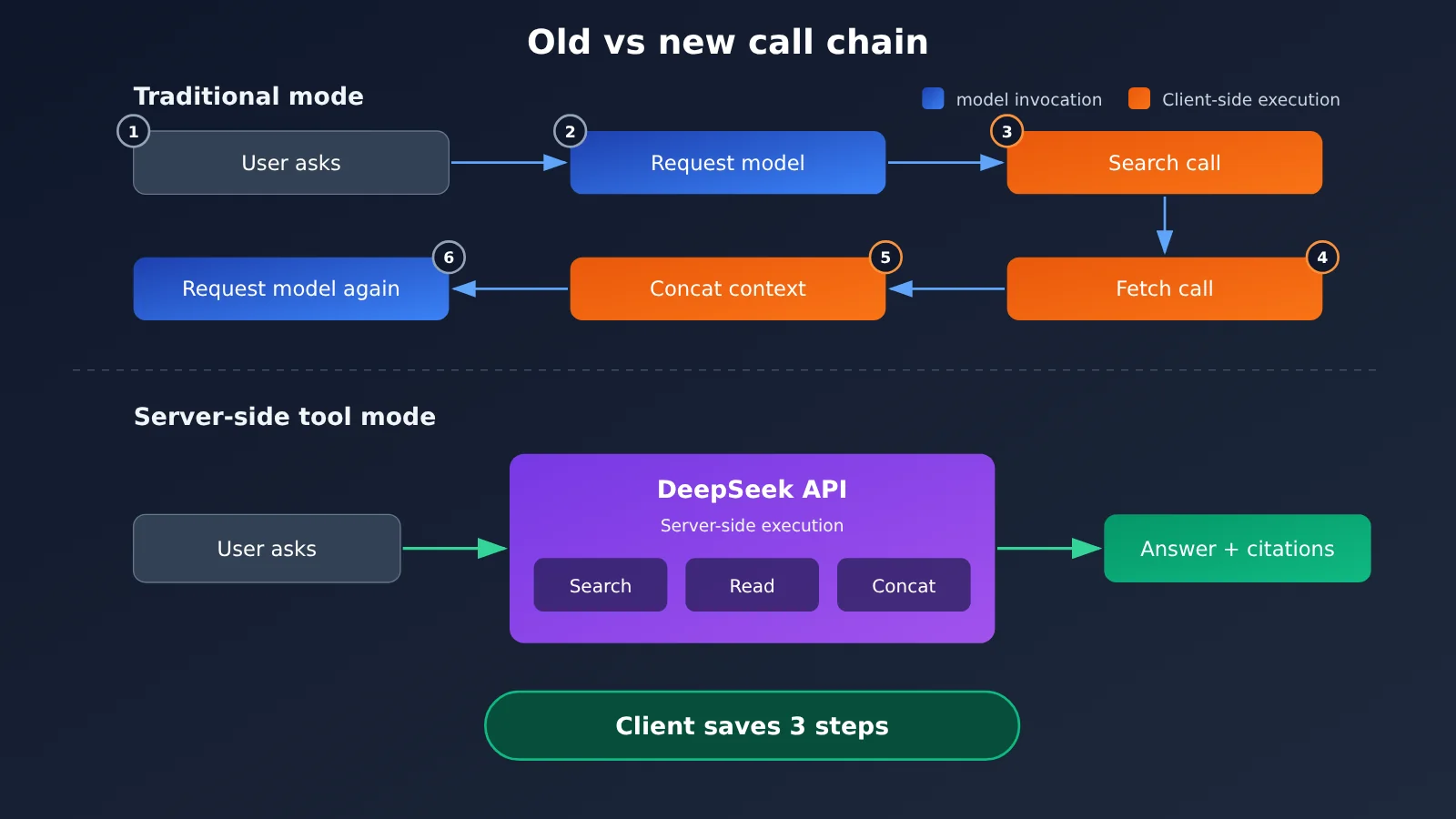
Before server-side tools existed, building an assistant that could reach the web meant the client had to manage the tool loop itself:
- The user asks a question, and you call the model API.
- The model decides it needs to search and returns a tool call request.
- The client calls a third-party search API.
- The client calls a scraping service to fetch the body text of the web pages.
- The client stitches the results into the context and calls the model again.
- The model produces the final answer.
Along this chain, search services, scraping services, file parsing, OCR, speech, and content moderation often come from different vendors. Each one needs its own separate integration for authentication, billing, error handling, and timeout policies.
3.2 How the DeepSeek Full-Suite API Shortens the Call Chain
In this new mode, developers only need to declare the tools in the request. The DeepSeek model decides on its own whether to search; the server runs the search and reads the pages, organizes the tool results and context, the model continues reasoning, and finally returns the answer along with source citations. Steps 2 through 5, which previously all fell to the client, now happen entirely on the server.
When the server takes over the execution flow, it also takes over some of the generation parameters. With built-in web search tools, safety checks, or conversation titles enabled, temperature, top_p, frequency_penalty, presence_penalty, stop, seed, n, and parallel_tool_calls in Chat Completions may be ignored. max_tokens still takes effect, but it caps the output length of each reasoning step. If you need strict control over sampling parameters, you should separately evaluate whether the built-in tool mode suits your use case.
Safety checks are enabled through the request parameter "safety_check": {"level": "high"}. They cover user input, tool return results, and the model’s final output; when a risk is detected, the API returns a 400 error or ends with a refusal. The official documentation explicitly notes that this capability provides baseline risk control, and application providers still need to fulfill their obligations around content moderation, Large Language Model registration, AI labeling, and other requirements.
3.3 What the Frontend Still Needs to Handle in the DeepSeek API Suite
DeepSeek handles tool execution and context organization, but the product experience still falls to the client. The key response fields you’ll need to handle include:
server_tool_use: which tool calls the server executed.web_search_tool_result,web_fetch_tool_result: search results and webpage fetch results.citations: source citations in the answer, delivered during streaming through events such ascitations_delta.signature: the signature required to preserve some tool context.
For multi-turn conversations, you must pass the relevant content blocks back exactly as received. The webpage body retrieved by deepseek_read_url is saved through an encrypted signature. If the client modifies or drops the signature, the webpage context can’t be restored in later turns. Citations should be displayed bound to the corresponding text block. There’s another streaming detail: some content may already have been shown before the final decision to refuse is made. In that case, the frontend needs to retract what it has already displayed and replace it with the refusal message.
The official open-source Chat Demo is a great reference. It implements automatic conversation title generation, message editing, regeneration, continued generation, import/export of conversation history, Markdown and Mermaid rendering, light and dark themes, image safety moderation, voice input, read-aloud, and more. The API key, conversation history, and images are all stored locally in the browser. A full commercial app still needs to add business-layer features on top of this, such as accounts, data management, payments, permissions, and safety moderation.
4 Which Product Types Are the Best Fit for the DeepSeek Full Suite API
4.1 News Q&A and AI Research Assistants
When users ask about recent model releases, industry news, and other real-time information, the model gathers material through web search, opens official announcements to verify the facts, and then returns an answer with citations. Deep-thinking search suits research-style questions that need multi-source cross-verification, while link reading fits scenarios where a user pastes a URL directly and asks for a summary or comparison.
4.2 PDF Financial Reports and Enterprise Knowledge Assistants
Financial reports, technical white papers, and internal PPT decks usually pack in a lot of charts. With rich_layout_recognition mode, the model understands both the body text and chart content like revenue trend graphs, so it can answer questions such as “which quarter grew fastest” that hinge on the charts. For plain-text contracts and policy documents, text_recognition is all you need, and it costs less.
4.3 Voice Interaction Applications
Combining ASR, deepseek-flash, and TTS covers voice Q&A, meeting recording cleanup, interview transcription, and read-aloud applications. One thing to keep in mind: ASR caps each audio segment at 120 seconds and is non-streaming, so long recordings need client-side slicing; TTS supports WebSocket streaming synthesis, so it can play while generating and cut the wait time before the first word.
DeepSeek’s official tool pricing is as follows, based on the official price document dated November 15, 2026:
| Capability | Billing unit | List price | Limited-time offer |
|---|---|---|---|
| Search | Per 1,000 successful requests | ¥5 | ¥5 |
| Fetch web scraping | Per 1,000 successful requests | ¥5 | ¥5 |
| File parsing | Per 1,000 pages | ¥1.5 | ¥1.5 |
| OCR | Per 1,000 pages | ¥1.5 | ¥1.5 |
| ASR | Per hour of audio | ¥0.78 | ¥0.39 |
| TTS | Per 10,000 billed characters | ¥3 | ¥1.5 |
Tool fees are billed separately from model token fees. For DeepSeek-V4.1-Flash, output costs ¥4 per million tokens during off-peak hours and ¥8 during peak hours; peak hours are 09:00—12:00 and 14:00—18:00 Beijing time on weekdays. Failed, empty-result, and timed-out tool requests aren’t charged. Built-in search is billed by the actual number of search query terms, web scraping is billed by the number of successfully scraped pages, and in-page lookups during deep search aren’t charged separately — so a single conversation can generate several search fees.
5 How DeepSeek’s Full-Suite APIs Turn Single-Model Calls into Complete AI Apps
The full-suite APIs lower the engineering barrier to combining capabilities: search, reading, documents, speech, and risk control all sit under one account and one billing system, so developers can focus their energy on product interaction and business logic. For web access, there are two integration paths available right now.
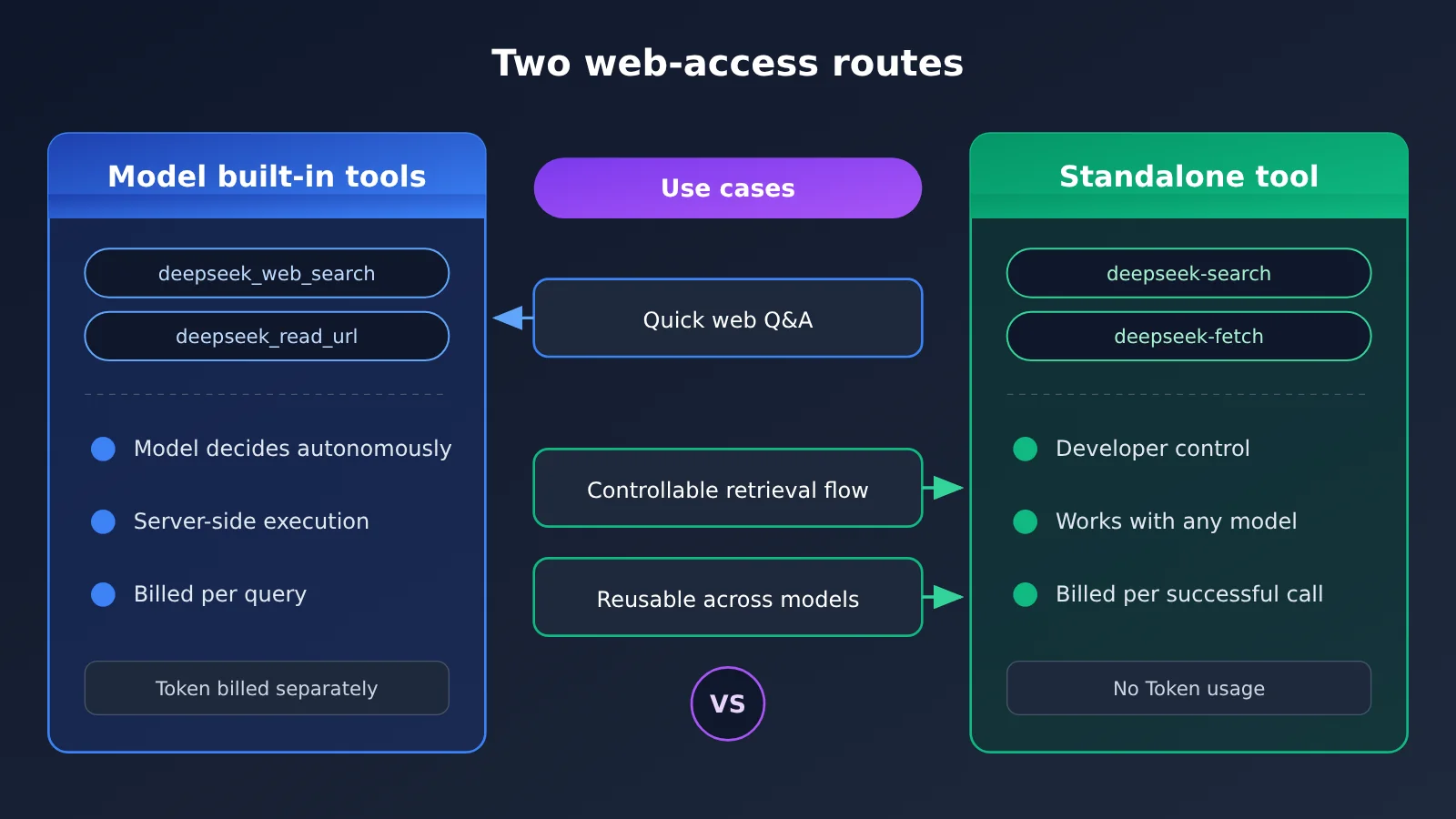
| Aspect | Model built-in server-side tools | Standalone Search / Fetch tools |
|---|---|---|
| Call method | Declare deepseek_web_search and deepseek_read_url in the chat request |
Call the search and fetch APIs separately |
| Flow control | The model decides when to search and which pages to read | The developer decides when to search, how to filter results, and how to combine them |
| Model scope | deepseek-flash |
Not tied to a model; can work with Agents, RAG, and any Large Language Model |
| Billing | Billed per query term and per page fetched, plus Tokens | Billed per successful invocation; does not consume model Tokens itself |
| Use cases | Quickly replicating app-style web Q&A | Controlled retrieval flows and reusing search results across models |
| Available platforms | DeepSeek official API | DeepSeek official API; APIYI apiyi.com has launched deepseek-search and deepseek-fetch |
APIYI launched the two standalone tool APIs deepseek-search and deepseek-fetch on October 21, available in the default and svip groups. For the model’s built-in search, which opened on November 13, APIYI lists compatibility work for clients calling the built-in search in its documentation as a future plan. So when using DeepSeek’s web access through APIYI, you currently take the standalone tool route: call search and fetch yourself, then pass the results to any model for reasoning.
5.1 Accessing DeepSeek Search Through a Standalone Tool
A minimal example: call Search to get structured results (the request field names follow the APIYI documentation):
import requests

BASE_URL = "https://api.apiyi.com/v1"  # APIYI's unified endpoint
headers = {"Authorization": "Bearer YOUR_API_KEY"}

resp = requests.post(f"{BASE_URL}/tools/search", headers=headers, json={
    "model": "deepseek-search",
    "query": "DeepSeek 全家桶应用 API",
    "count": 5,
})
print(resp.json())
View the full implementation: search + fetch + model summary
import requests
import openai

API_KEY = "YOUR_API_KEY"
BASE_URL = "https://api.apiyi.com/v1"  # Search, fetch, and model invocation share the same entry point
HEADERS = {"Authorization": f"Bearer {API_KEY}", "Content-Type": "application/json"}


def search(query: str, count: int = 5) -> dict:
    """Call deepseek-search and return structured search results (field names follow the docs)"""
    r = requests.post(f"{BASE_URL}/tools/search", headers=HEADERS, json={
        "model": "deepseek-search", "query": query, "count": count,
    }, timeout=30)
    r.raise_for_status()
    return r.json()


def fetch(url: str) -> dict:
    """Call deepseek-fetch and return the page body as Markdown; failed requests aren't billed"""
    r = requests.post(f"{BASE_URL}/tools/fetch", headers=HEADERS, json={
        "model": "deepseek-fetch", "url": url,
    }, timeout=60)
    r.raise_for_status()
    return r.json()


def answer(question: str, context: str, model: str = "your-model-id") -> str:
    """Hand the retrieved content to any model to generate an answer with sources"""
    client = openai.OpenAI(api_key=API_KEY, base_url=BASE_URL)
    resp = client.chat.completions.create(
        model=model,
        messages=[
            {"role": "system", "content": "根据提供的资料回答,并注明来源 URL。"},
            {"role": "user", "content": f"资料:\n{context}\n\n问题:{question}"},
        ],
    )
    return resp.choices[0].message.content


if __name__ == "__main__":
    q = "DeepSeek 11 月 13 日开放了哪些 API 能力?"
    results = search(q)
    # Pull the first few URLs from the actual response structure, then fetch the body and hand it to the model
    print(results)
🚀 Quick-start tip: if you want to validate retrieval quality first, sign up at APIYI apiyi.com to get test credits, then use a single API key to call deepseek-search, deepseek-fetch, and a mainstream chat model together — pass the search results to different models and compare how well they answer.
APIYI’s own testing shows that Search returns in about 1.8 seconds at count=5 and about 3 seconds at count=50, with 20 concurrent requests all finishing within roughly 2 seconds; Fetch returns about 6,400 characters of Markdown body from an ordinary web page in around 1.6 seconds. These are single-run results from a specific network environment — actual latency depends on the target site.
5.2 How to Choose a DeepSeek Web-Access Route
- Go with the built-in tool: when you want to replicate the DeepSeek App experience as fast as possible, you’re fine with the model deciding the retrieval path on its own, and you’re using
deepseek-flash. - Go with the standalone tools: when you need to control the query terms yourself, filter sources, cache results, or hand the same set of retrieval results to different models like Claude, GPT, or Gemini.
- Mix both: use the built-in tool for front-end Q&A, and the standalone Search / Fetch for background batch data collection and RAG ingestion.
FAQ
Q1: What is the DeepSeek full-stack API?
It’s a set of application-capability APIs DeepSeek opened up on November 13, 2026, covering web search, deep-thinking search, link reading, file input, safety checks, plus standalone Search, Fetch, OCR, ASR, and TTS endpoints — essentially the main capabilities behind the DeepSeek App.
Q2: What’s the difference between the DeepSeek full-stack API and DeepSeek Harness?
Harness is the Agent runtime framework open-sourced on August 13, responsible for managing models, tools, plugins, and context; the full-stack API is the service interface for models and tools. Developers can build an Agent with Harness, then plug in search, file, and voice capabilities through the API.
Q3: Which models can use the full-stack API’s built-in tools?
Full conversation-level tool integration is currently provided by `deepseek-flash` (DeepSeek-V4.1-Flash-1017), supporting three protocols: Chat Completions, Responses, and Anthropic Messages. OCR, ASR, TTS, Search, and Fetch are standalone endpoints that can be called independently.
Q4: Which DeepSeek full-stack API capabilities can I call through APIYI?
APIYI has already launched the standalone DeepSeek Search and Fetch tools (deepseek-search, deepseek-fetch), billed per successful call, available in the default and svip groups. Client compatibility for models’ built-in search is still in planning — check the APIYI apiyi.com docs for the latest support status.
Q5: How do I quickly test DeepSeek search combined with multiple models?
1. Register at APIYI apiyi.com and get an API key plus test credits.
2. Using the code in this article, set base_url to `https://api.apiyi.com/v1`.
3. Call deepseek-search first to get results, then use deepseek-fetch to read the full text, and finally hand it to any chat model to generate the answer.
Q6: What are the known limitations of the DeepSeek full-stack API?
– `tool_choice` can’t force a web tool call — the model decides whether to search.
– Once built-in tools are enabled, sampling parameters like `temperature` and `top_p` may be ignored.
– ASR supports a maximum of 120 seconds per segment and isn’t streaming; TTS doesn’t yet support speed adjustment.
– A single file is capped at 100 MiB and 1000 pages; exceeding the context returns a 400 error.
– Safety checks provide basic risk control, but the application still bears responsibility for content moderation.
DeepSeek Full-Suite API Key Takeaways
- Release timing: On November 13, 2026, ten application capabilities behind the App went live.
- Core change: Search and web page reading now run server-side, so the client only needs to declare the tools.
- Underlying model: Conversation-level tool integration is handled by
deepseek-flash, which supports three protocols. - Deep search: search, open_page, and find_in_page run alternately, with up to about 20 tool calls.
- File parsing: Two modes differ by whether charts and images are preserved; financial report documents use the image-and-text mode.
- Client responsibilities: Citation display, signature return, and retracting a streamed refusal are still handled by the client.
- Integration paths: When you need controllable retrieval, you can call standalone Search / Fetch through APIYI apiyi.com.
Summary
The key points of the DeepSeek full-suite API come down to three things:
- Open capability layer: Search, documents, voice, risk control, and models are unified into a single API set. The official team says you can rebuild the App experience on top of it.
- Shorter call chain: Server-side tools take over search, fetching, and context assembly, so developers can focus on interaction and business logic.
- Two paths coexist: Built-in tools are ideal for quickly building App-style Q&A, while standalone Search / Fetch work better for controllable retrieval and cross-model reuse.
When prototyping a web-connected Q&A feature, start with the built-in tools to validate the experience. If you need fine-grained control over the retrieval flow or want to combine multiple model providers, we recommend accessing the standalone search and fetch tools through APIYI apiyi.com, paired with a unified multi-model interface so you can compare results quickly.
📚 References
- DeepSeek releases the full suite of application APIs: Official announcement dated 2026-11-13
- Link:
api-docs.deepseek.com/zh-cn/news/news261113/ -
Description: The complete list of capabilities released this time
-
DeepSeek web tools documentation: Server-side search and link reading
- Link:
api-docs.deepseek.com/zh-cn/guides/web_tools/ -
Description: Tool declarations, invocation rules, and billing
-
DeepSeek document parsing documentation: Files API usage guide
- Link:
api-docs.deepseek.com/zh-cn/guides/document_parsing/ -
Description: The two parsing modes and file limits
-
DeepSeek Chatbot building guide: Key points for client development
- Link:
api-docs.deepseek.com/zh-cn/guides/build_a_chatbot/ -
Description: Response fields, multi-turn pass-back, and parameters handled by the client
-
DeepSeek models and pricing: Token and tool pricing
- Link:
api-docs.deepseek.com/zh-cn/quick_start/pricing/ -
Description: Peak and off-peak pricing
-
DeepSeek Chat Demo: Official open-source frontend example
- Link:
github.com/deepseek-ai/chat-demo -
Description: Reference implementation for citation display, file and voice interaction
-
APIYI DeepSeek Search & Fetch documentation: Standalone tool API reference
- Link:
docs.apiyi.com/api-capabilities/deepseek-search-fetch/overview - Description: Endpoint parameters, group availability, and pricing
Author: APIYI Technical Team
Technical contact: Feel free to reach us via the homepage of the APIYI website. For more integration resources, visit the docs.apiyi.com documentation center.