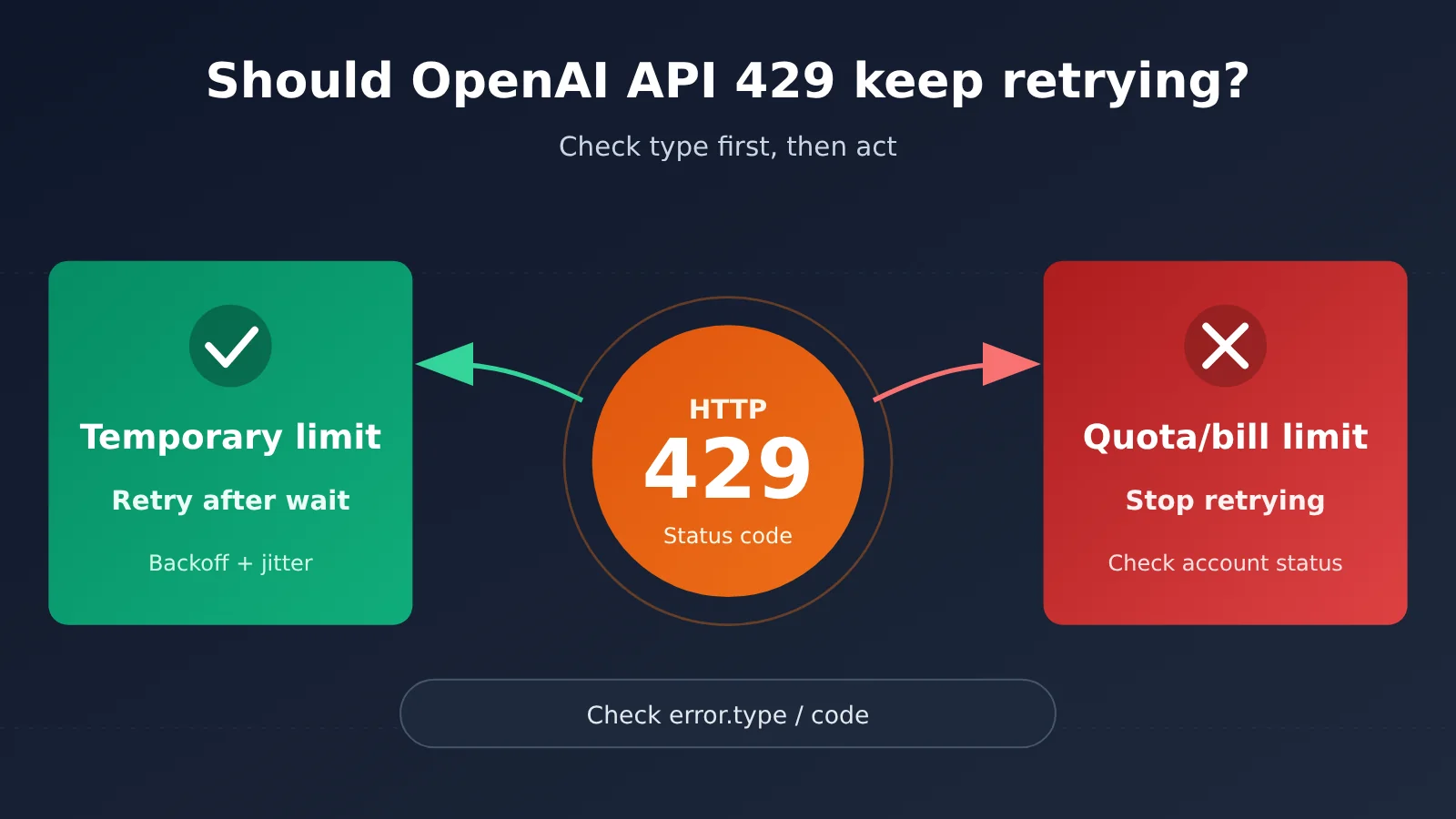
Don’t just keep retrying. An OpenAI API 429 doesn’t mean “just wait a moment and it’ll be fine.” Only transient rate limits are worth waiting out and retrying. Exhausted quotas, billing anomalies, or organization-level usage limits won’t recover no matter how many times you retry — and all you’ll do is clog up the queue.
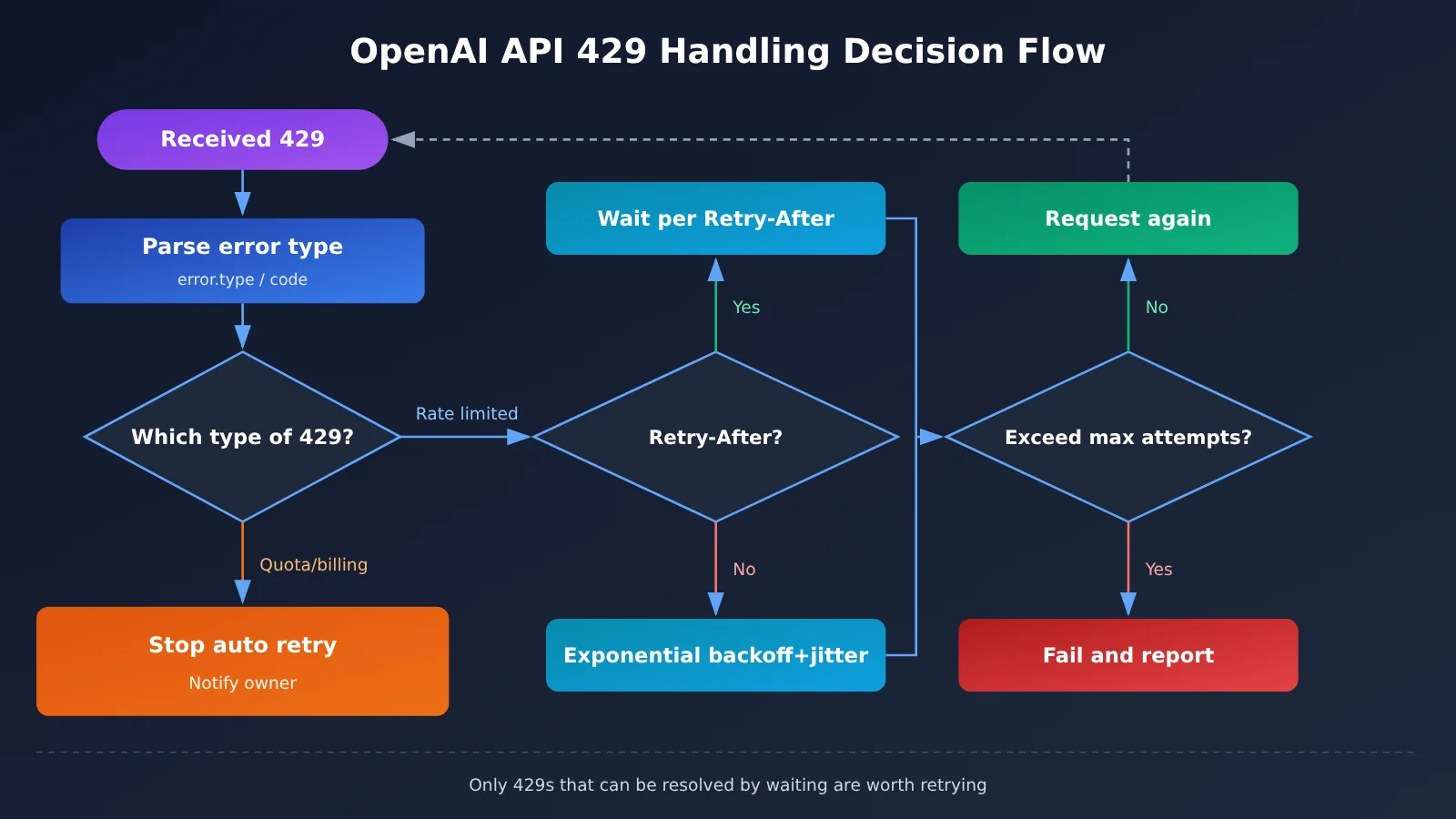
The right approach is to look at the error message, error.type, and any available error.code first, and figure out which kind of 429 you’re dealing with. If it’s a transient rate limit and there’s a valid Retry-After, wait as instructed; otherwise use exponential backoff with random jitter, and set a cap on the number of attempts.
What you’ll learn from this article:
- What categories OpenAI API 429s fall into, at minimum, and how to handle each one.
- How
Retry-After, exponential backoff, and random jitter relate to each other, and when to use which. - Why stacking the official SDK’s automatic retries, task queues, and a manual “retry” button amplifies 429s.
- Different approaches for request-count bottlenecks vs. token bottlenecks, and what to watch out for when a streaming request fails partway through.
Index: Before the main body, a concept table and an impact-at-a-glance table help you unify terminology and find the parts relevant to you. The “Objective Facts” section summarizes OpenAI’s official documentation on 429s, including error classification, retry rules, and SDK behavior. The “Analysis and Judgment” section digs into engineering implementation — adjusting strategy by bottleneck type, designing queue states, troubleshooting retry stacking, and semantic differences to watch for when migrating to other gateways.
To Know: Concepts for Understanding OpenAI API 429
| Concept | Brief explanation |
|---|---|
| HTTP 429 | The “Too Many Requests” status code. The OpenAI API uses it to indicate rate limits, as well as quota or usage limits. |
| Rate Limit | The maximum number of requests that can be made within a period. OpenAI tracks request counts and token counts separately. |
| RPM / TPM | Requests per minute and tokens per minute. Hitting either limit can trigger a 429. |
error.type / error.code |
Structured fields in the error response body used to distinguish the specific cause of a 429. They’re more reliable than looking at the status code alone. |
| Retry-After | A response header field indicating how long the server suggests waiting before retrying. When the value is valid, you should follow it first. |
| Exponential Backoff | After each failure, the wait time increases by a multiple, such as 1 second, 2 seconds, 4 seconds, with an upper limit. |
| Jitter | Adding a random amount to the backoff time so that many clients don’t all retry at the same moment. |
| Streaming | The model returns content as it generates it. Once output has started, an error midway can’t simply be replayed as a whole. |
| Retry amplification | When the SDK, business queue, and manual user actions each retry independently, actual request volume gets multiplied. |
Impact at a Glance: What OpenAI API 429 Means for Different Roles
| Role | Primary impact | What to watch for |
|---|---|---|
| Backend developers | Badly written retry logic can turn a brief rate limit into a sustained outage | Distinguish between 429 types and centralize retries in a single layer |
| Batch processing and data task owners | Large batch jobs can easily hit both the request limit and the token limit at the same time | Submission pacing, context size, queue state design |
| Product and frontend | Users repeatedly clicking “Retry” just creates more 429s | Tell users when to try again, or explain that it’s an account issue |
| Ops and account administrators | Quota- and billing-related 429s can’t fix themselves through code | Catch and resolve account status issues promptly instead of letting automatic retries run wild |
The Facts: How OpenAI’s Official Docs Describe 429
This section is based on OpenAI’s publicly maintained error code guide, rate limit guide, and Help Center 429 troubleshooting article, checked on 2026-11-17. These are continuously updated maintenance docs, and we can’t verify when the relevant content was first published, so we’re not treating it as breaking news—only as a currently valid explanation of the rules.
Where OpenAI API 429s Come From
The official docs take a clear stance: a 429 doesn’t always mean the same thing. You need to check the error message, error.type, and error.code when available to figure out what’s going on. Temporary rate limits and quota, billing, or organization usage limits aren’t handled the same way.
Temporary rate limits mean you’re sending requests too fast or too many within the current window, and things recover once the window resets. The latter has to do with the state of the account itself—running out of quota, payment issues, organization-level usage caps. Those issues don’t just go away with time.
| Type of 429 | Typical signal | Will waiting fix it? | Recommended action |
|---|---|---|---|
| Request rate limit | Error message points to a request-count cap, often with code set to rate_limit_exceeded |
Usually yes | Follow Retry-After, or use exponential backoff with jitter |
| Token-volume rate limit | Error message points to a token cap | Usually yes, but it can keep happening | Reduce the token count per request while backing off |
| Quota / billing / organization limit | Error message points to quota or billing, often with code set to insufficient_quota |
No | Stop automatic retries and notify the responsible person to handle the account |
One important caveat: the actual value of error.code depends on what the API returns and on the official docs. The codes in the table above are just common examples. Don’t rely only on hardcoded strings in your code—also keep the original error message for log troubleshooting.
Requests and tokens can be limited independently
The rate limit guide explains that limits are measured across several dimensions, and the two you’ll hit most often are request count and token volume. They apply independently. That means you can be nowhere near your request cap and still run into the token limit first, simply because every request carries a long context. The reverse is also true: a flood of tiny requests can exhaust your request count before anything else.
OpenAI exposes rate-limit information in the response headers, such as remaining requests, remaining tokens, and the reset time for each. These header fields help you figure out which limit you’re closer to before a 429 actually fires.
The officially recommended way to retry OpenAI API 429s
For temporary rate limits that are worth retrying, the official guidance comes down to two rules:
- If a valid Retry-After is present, follow it. It’s the most direct signal the server can give you, and it’s more accurate than anything the client can guess on its own.
- If there’s no Retry-After, use exponential backoff with jitter. Wait time grows with each failed attempt, plus a random amount on top, so all your clients don’t retry at the exact same moment.
Both rules assume the 429 is the kind that waiting can solve. If it’s a quota or billing problem, even the most precise backoff algorithm is just spinning its wheels.
Automatic retry behavior of the official SDK
The official OpenAI SDK automatically retries rate-limit errors that meet certain conditions, and the exact behavior depends on your client configuration. In the Python SDK, for example, you can tune this with the max_retries parameter, or set it to 0 to turn off automatic retries altogether.
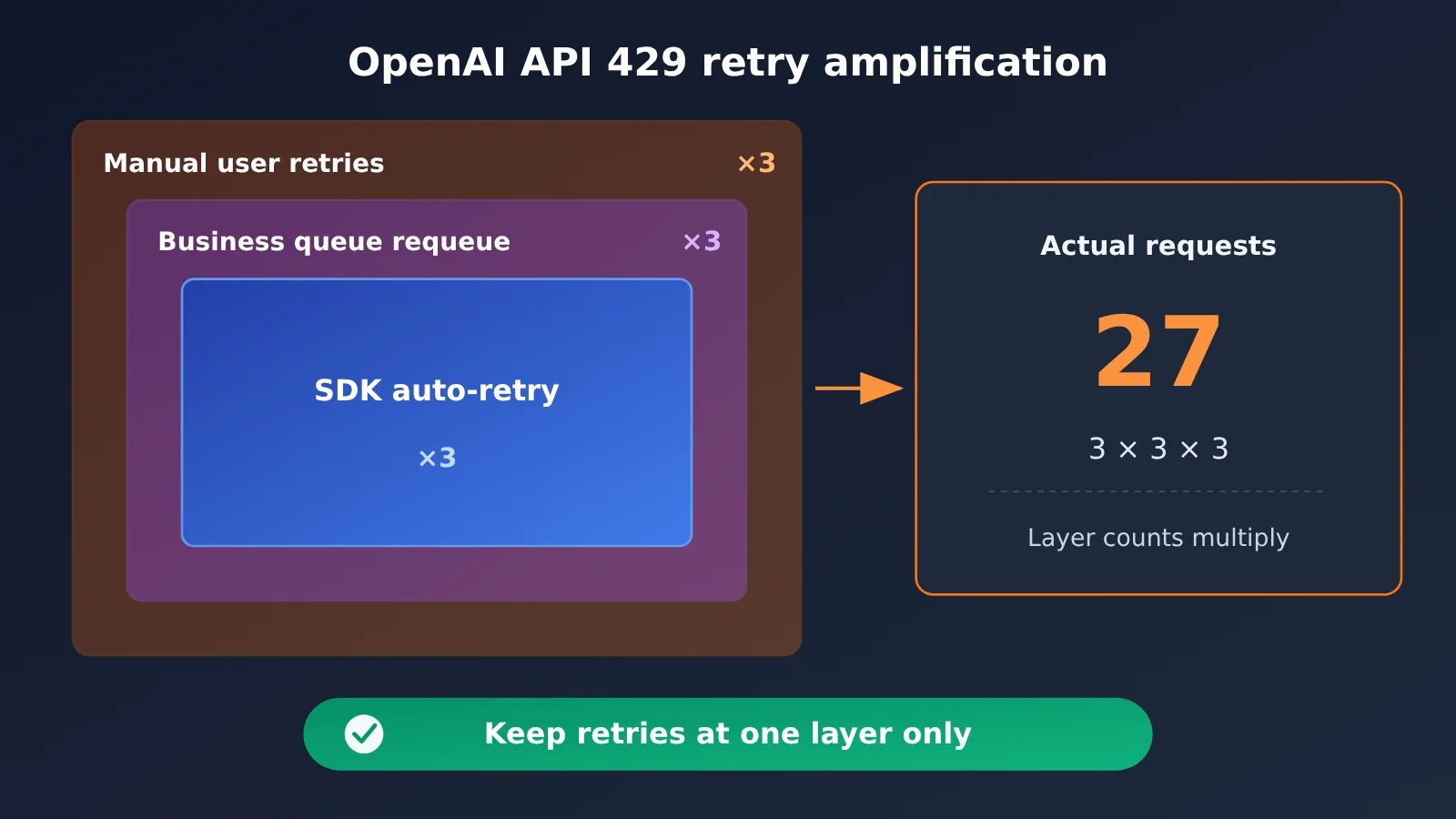
This means that even if your business logic doesn’t contain a single line of retry code, a request may already have been retried several times behind the scenes. If your business layer then wraps another retry on top, the actual number of requests is the two multiplied together.
Errors that occur mid-stream can’t always be replayed
The official docs also mention an easily overlooked edge case: once streaming output has already begun, errors that happen afterward can’t always be handled by replaying the entire request. Users may have already seen part of the content, and downstream systems may have already consumed some of the data. Replaying directly leads to duplicated content, inconsistencies between what came before and after, and wasted tokens.
Analysis and Judgment: How to Handle OpenAI API 429 in Engineering
The following is an engineering judgment based on the above facts, not an official statement from OpenAI.
A Ready-to-Adapt OpenAI API 429 Backoff Example
The example below reflects a few principles: disable SDK automatic retries and let the business layer handle retries centrally; throw quota-related errors directly; prioritize Retry-After; when it’s missing, use exponential backoff with full jitter; limit the maximum number of attempts.
import random
import time
from openai import OpenAI, RateLimitError

# Disable SDK automatic retries to avoid stacking with the custom retry logic below
client = OpenAI(max_retries=0)

# 429 types that waiting cannot resolve (subject to actual responses and official docs)
NON_RETRYABLE_CODES = {"insufficient_quota"}


def parse_retry_after(response):
    """Parse Retry-After seconds; return None if invalid. HTTP-date parsing can be added as needed."""
    if response is None:
        return None
    value = response.headers.get("retry-after")
    try:
        seconds = float(value)
        return seconds if seconds >= 0 else None
    except (TypeError, ValueError):
        return None


def call_with_backoff(messages, model, max_attempts=5, base=1.0, cap=60.0):
    for attempt in range(max_attempts):
        try:
            return client.chat.completions.create(model=model, messages=messages)
        except RateLimitError as e:
            if e.code in NON_RETRYABLE_CODES:
                raise  # Quota/billing issues; hand off to the account handling flow
            if attempt == max_attempts - 1:
                raise  # Exceeded the maximum; hand off to the queue or alerting
            wait = parse_retry_after(e.response)
            if wait is None:
                # Full jitter: pick a random value within [0, exponential cap]
                wait = random.uniform(0, min(cap, base * 2 ** attempt))
            time.sleep(wait)
In the example, max_attempts, base, and cap are only starting points, not recommended values. Different accounts have different rate limit tiers, and task shapes vary. There is no one-size-fits-all concurrency number or retry count that works for every account; adjust based on your own monitoring data.
Adjust by Bottleneck Type: Request-Count and Token Bottlenecks Need Different Fixes
Backoff only solves “how to wait this time”—it doesn’t answer “why do we keep hitting the ceiling?” To cut down on 429s, you first need to know which ceiling you’re hitting.
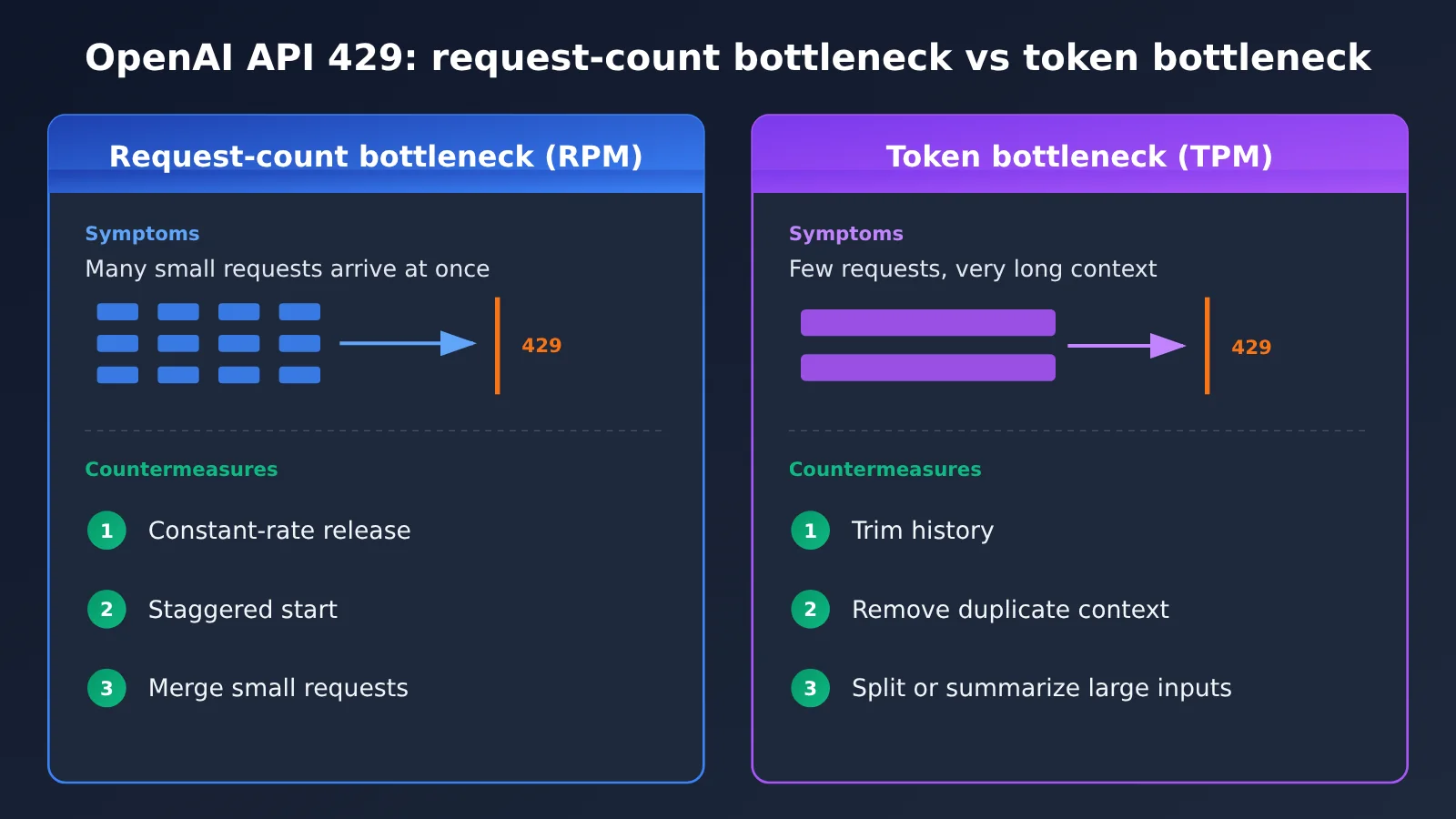
Request-count bottlenecks are all about pacing your submissions. Throttle evenly at the queue entrance—with a token bucket or fixed-interval release—so a pile of tasks doesn’t all burst out in the same second. Stagger batch job startup, too; don’t fire everything off on the hour.
Token bottlenecks come down to shrinking the size of each request. The usual culprits: sending a long system prompt plus the full history on every turn, passing the same large document in request after request, and cramming an entire corpus into the model when you really just need one section. Trimming, summarizing, or retrieving first and then submitting tends to work far better than bumping up the retry count.
Queue States Should Separate “Waiting to Retry” from “Account Blocked”
A lot of systems only have two states: “queued” and “failed.” When a 429 shows up, that leads to two kinds of misjudgment: a temporary rate limit gets treated as a failure and the task is thrown away, while a quota problem gets treated as “still queued” and you end up waiting forever.
A better approach is to split the two kinds of 429 into two distinct states and present them differently:
| Queue State | Trigger Condition | What to Display | What Happens Next |
|---|---|---|---|
| Waiting to Retry | Temporary rate limit | Estimated time of the next attempt, number of attempts so far | Auto-retry at that time; escalate to failed once the cap is reached |
| Account Blocked | Quota, billing, or organization usage limits | Reason for the block (e.g., insufficient quota) | Pause subsequent tasks under the same account; notify the owner |
| Failed | Retry cap exceeded or some other unrecoverable error | Error type and original message | Manual intervention or business fallback |
“Account Blocked” has a knock-on effect too. Other tasks under the same account will almost certainly run into the same 429, so you should pause them all together rather than letting each task slam into the wall on its own.
Tracing Retry Stacking: SDK, Queue, and the Manual Button
If you find that the more you retry, the more 429s you get, the first thing to check is whether multiple retry layers are active at the same time. A typical chain looks like this: the SDK auto-retries a few times, the business queue re-enqueues the task a few times after a failure, and then the user sees the error in the UI and clicks “Retry” manually. Multiply those three layers and one original request can turn into a dozen or more actual requests — and they tend to cluster inside the rate-limit window, which only makes the throttling worse.
When tracing, verify each layer one at a time:
- SDK layer: Check the actual value of
max_retries— don’t rely on the default you remember. - Queue layer: Confirm whether failed tasks are automatically re-enqueued, and whether the re-enqueue has backoff.
- Interaction layer: Confirm that the “Retry” button is disabled while waiting and shows the time of the next attempt.
- Log layer: Give every original task a unique ID and count how many requests it actually sent.
The principle is simple: keep only one layer responsible for retrying along any given chain, and let the other layers just pass state along.
Streaming Scenarios Need Their Own Recovery Strategy for OpenAI API 429
If a streaming request hits a 429 while establishing the connection and before anything has been output, you can handle it like an ordinary request. Once output has already started, though, whether to replay should be a business decision. For example, you can clearly tell the user that generation was interrupted and let them choose to regenerate, or discard the partial output and replace it wholesale. Don’t replay silently in the background — that just leaves two duplicated chunks of content on the screen.
Don’t Copy OpenAI’s 429 Semantics When Migrating to Other Platforms
The error classification, error.code values, Retry-After behavior, and response headers described in this article are all semantics of the official OpenAI API. If you invoke models through a third-party gateway, API proxy service, or aggregation platform (such as APIYI), the error codes, rate-limiting dimensions, and retry recommendations are governed by that platform’s own documentation — verify them separately; don’t just copy OpenAI’s behavior. The safer approach is to build an error normalization layer at the integration layer, mapping 429s from different sources into the three states described here — “wait and retry / account blocked / failure” — and then hand them off to a unified retry module.
Changes Worth Monitoring
OpenAI’s error code docs and rate limit docs are both actively maintained. Rate limit tiers, metering dimensions, and response header fields may all change. It’s worth keeping the raw error logs in your code and periodically re-checking your judgment logic against the official docs. Also, don’t write “all 429s can be solved by just waiting” into any default configuration. Once that assumption takes effect while your quota is exhausted, the cost is a task queue that spins idle all night long.
A 429 basically means the server is telling you to slow down—and sometimes it’s also saying, “this path is temporarily a dead end.” Figuring out which one it is, then deciding whether to wait, adjust, or stop, matters more than any clever retry algorithm. As the Analects (Book of Zilu) puts it:
“Do not be in a hurry, and do not seek small advantages. If you are in a hurry, you will not succeed; if you seek small advantages, you will not accomplish great things.”