

Summary: The DeepSeek full-suite API bills model tokens and tool calls separately. Your total cost has to be worked out item by item — per search, per file page, per unit of speech processed, and per cache hit rate.
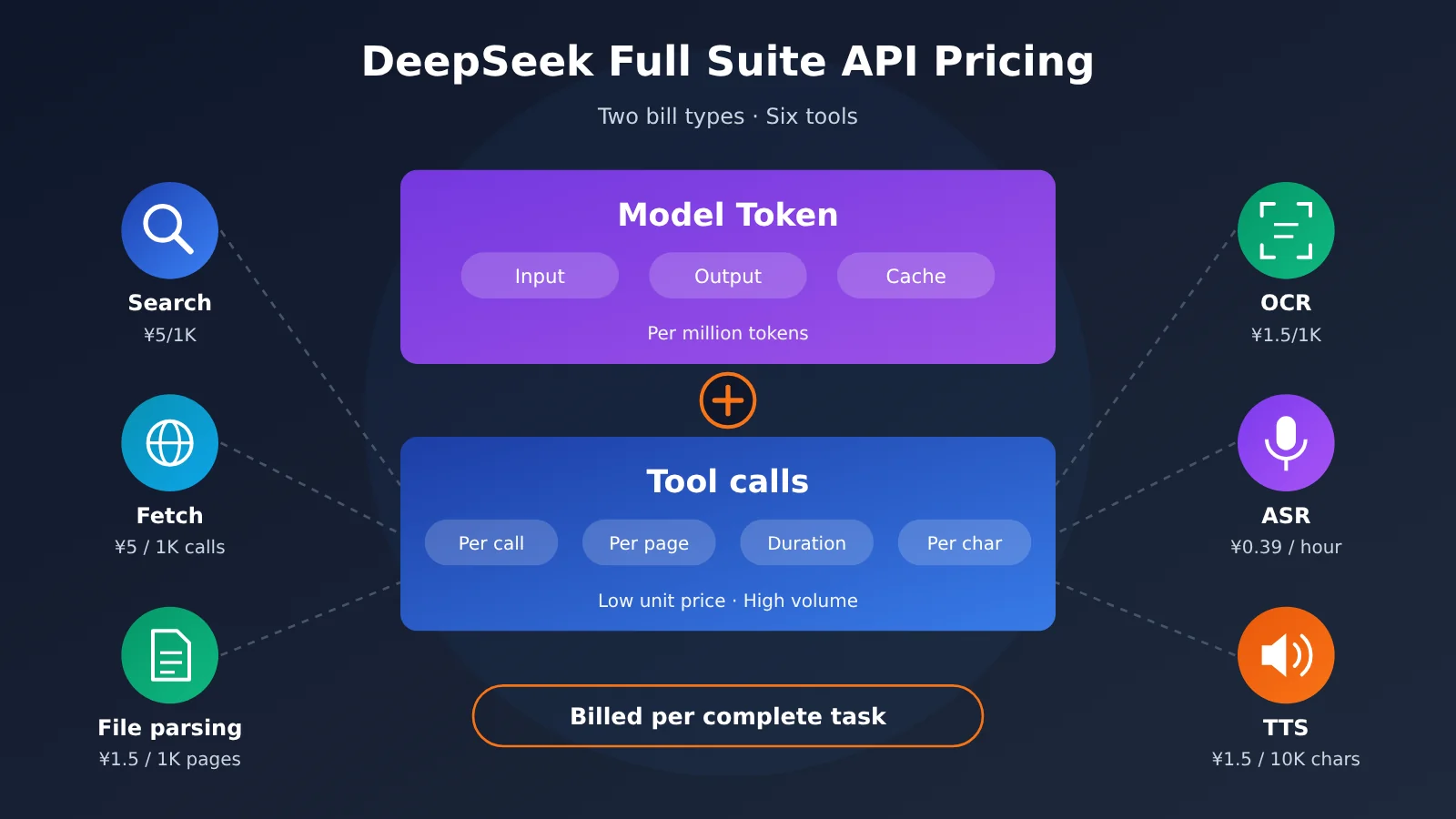
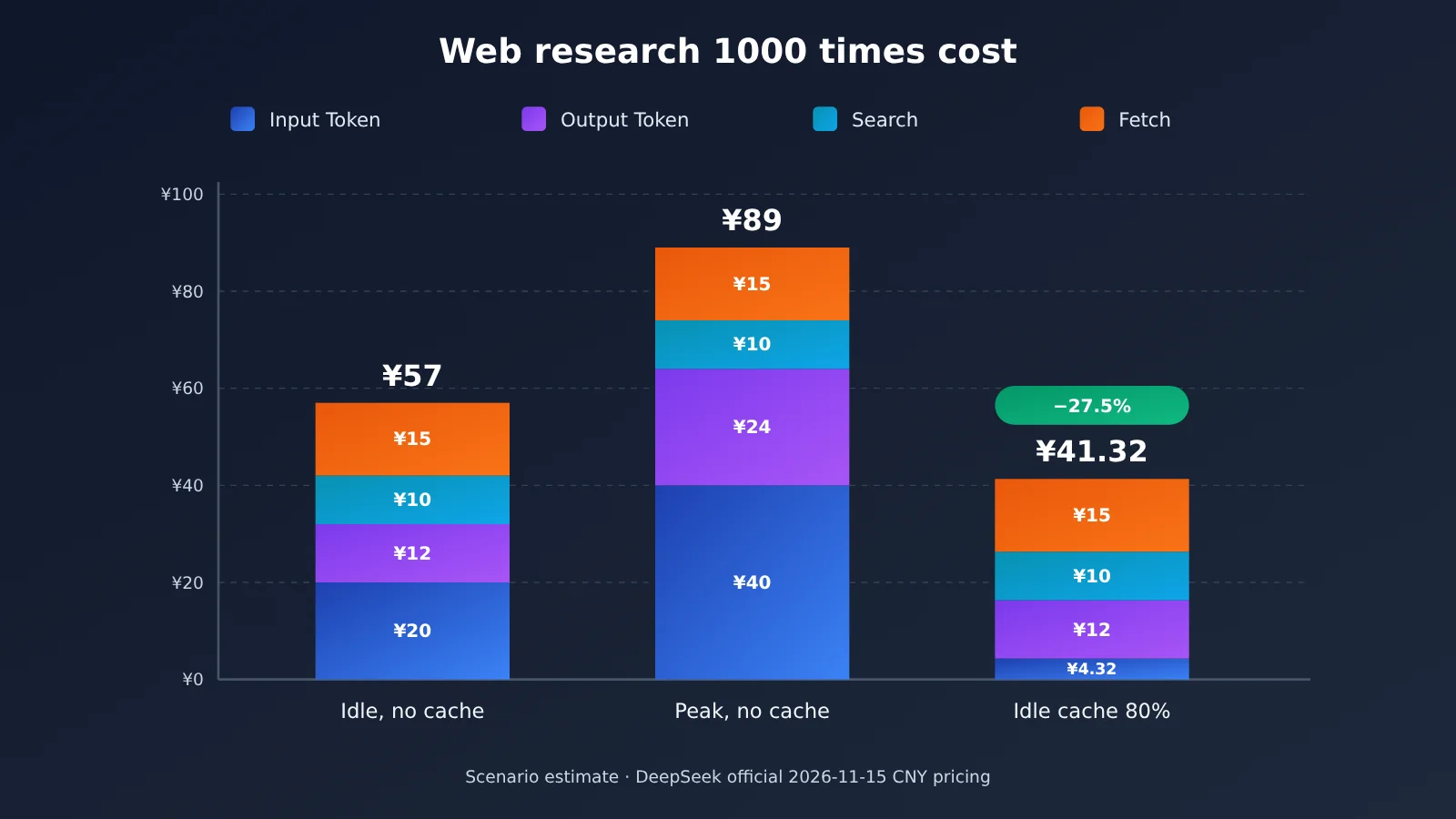
Bottom line first: According to DeepSeek’s official Chinese pricing doc dated November 15, 2026, Search and Fetch both cost ¥5 per 1,000 successful requests, file parsing and OCR both cost ¥1.5 per 1,000 pages, ASR is ¥0.39 per hour at the limited-time price, and TTS is ¥1.5 per 10,000 billable characters at the limited-time price. Tool unit prices are low, but a web-enabled agent task’s bill is usually dominated by model tokens. Take a research task with “2 searches, 3 fetches, 20,000 input tokens, and 3,000 output tokens”: 1,000 such tasks cost roughly ¥57 during off-peak hours and about ¥89 during peak hours; with an 80% input cache hit rate, off-peak drops to about ¥41.32. So when you budget, calculate per “complete task” — the price of a single API request is just one line item in it.
Below, I’ll first break apart the billing structure for model costs and tool costs, then list the unit price and billing unit for Search, Fetch, file parsing, OCR, ASR, and TTS one by one. After that, four scenarios built on fixed assumptions demonstrate the full calculation and show how deep search, long context, and rate limits affect the bill. Finally, I’ll give you a cost-logging code snippet you can reuse directly, and compare model built-in search against the standalone Search / Fetch APIs so you can choose between them.
Must-Know: DeepSeek Full Suite API Billing Terminology
| Term | Explanation |
|---|---|
| Token | The unit of measurement models use when processing text; model fees are priced per million tokens |
| Input Token | All content that enters the model’s context and participates in inference, including prompts, file contents, and search results |
| Output Token | Content generated by the model; the reasoning process in thinking mode is also counted as output |
| Context Cache | Reusing previously processed context to reduce the cost of repeated input |
| Cache Hit | Input content successfully reuses the cache and is billed at the lower “cache hit” unit price |
| Peak / Off-Peak Hours | DeepSeek has two price tiers based on Beijing time; the off-peak price is half the peak price |
| Search API | Queries the web by keyword and returns structured search results |
| Fetch API | Fetches a specified web page and returns the body content |
| Model Built-in Search | Declares a search tool in a chat request; the model decides when to search, and the server executes it on the model’s behalf |
| QPS | The number of requests allowed to be processed per second |
| OCR | Recognizes text from images or documents |
| ASR | Converts speech into text |
| TTS | Synthesizes text into speech |
| Billing Characters | The unit of measurement for TTS; Chinese characters count as 2 billing characters |
| Tool Usage | Billable usage generated when a model or program actually invokes an external tool |
1 How Does the DeepSeek Full-Suite API Actually Charge?
1.1 Two Kinds of Bills for the DeepSeek Full-Suite API: Model Fees and Tool Fees
On November 13, 2026, DeepSeek opened up the capabilities behind its app — web search, deep-thinking search, link reading, file input, OCR, ASR, TTS, safety checks, and more — as APIs. When it comes to billing, these capabilities and model inference are each counted separately. You can sum it up with one formula:
Total cost = model input cost (cache hit + cache miss)
           + model output cost (including thinking tokens)
           + tool invocation cost (Search / Fetch / image search)
           + file and speech processing cost (parsed pages / OCR pages / audio duration / TTS characters)
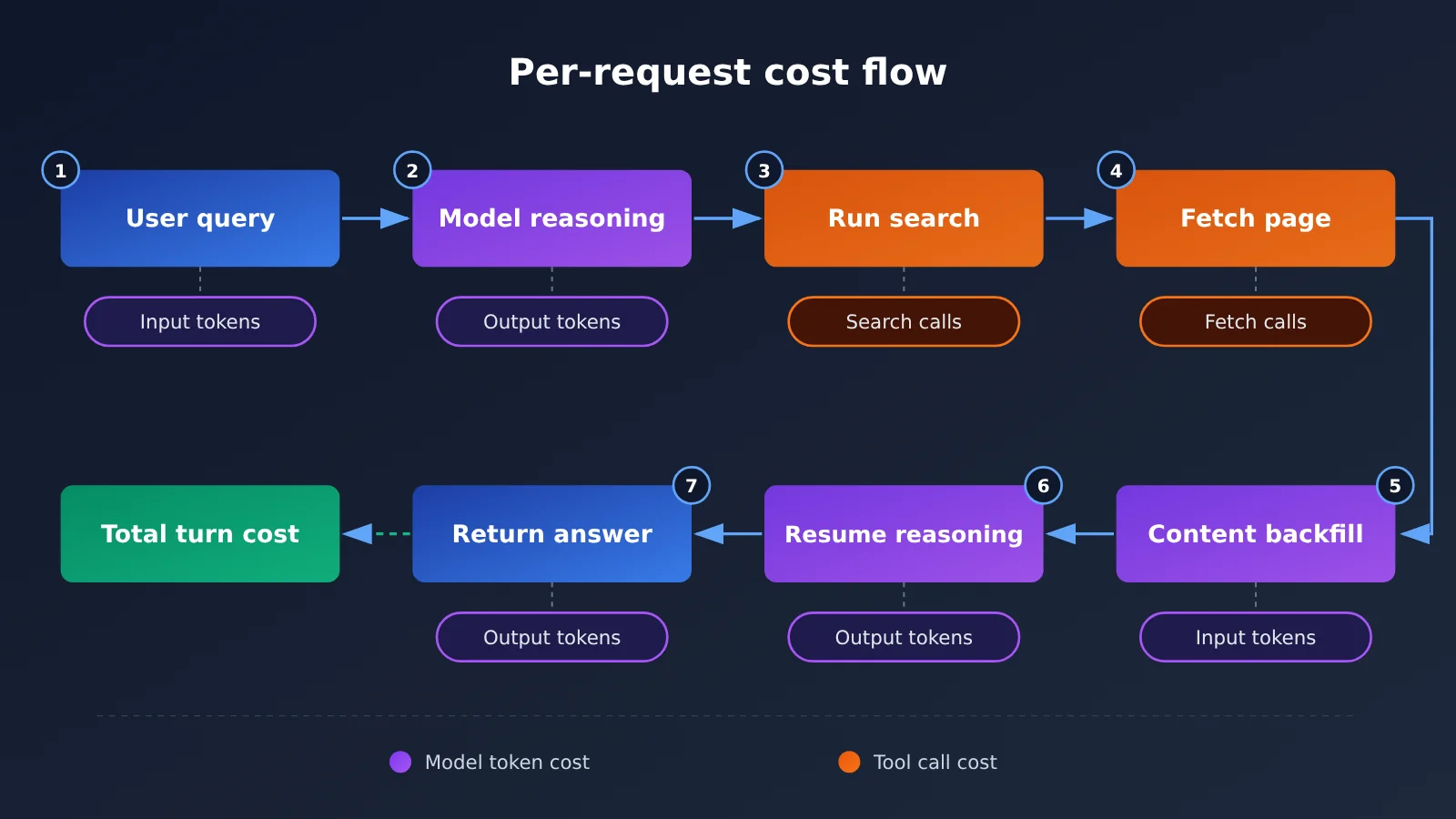
A single round of Q&A can generate every one of these charges at once. For example, once you turn on deep-thinking search in a conversation, the model generates search terms multiple times, opens several web pages, then stitches the page content into the context to keep reasoning. That single request racks up search and fetch fees, and because the full text of the pages lands in the context, it also produces a large number of input tokens — while the thinking process itself counts toward output tokens.
1.2 Model Pricing for DeepSeek Flash and Pro
Below are the prices published in DeepSeek’s official pricing documentation on November 15, 2026. Currency is RMB, and the unit is per million tokens.
| Model | Cache hit (off-peak / peak) | Cache miss (off-peak / peak) | Output (off-peak / peak) | Concurrency limit |
|---|---|---|---|---|
| DeepSeek-V4.1-Flash | ¥0.02 / ¥0.04 | ¥1 / ¥2 | ¥4 / ¥8 | 2500 |
| DeepSeek-V4-Pro | ¥0.15 / ¥0.30 | ¥4.5 / ¥9 | ¥13.5 / ¥27 | 500 |
Peak hours are 09:00–12:00 and 14:00–18:00 Beijing time, Monday through Friday, excluding Chinese statutory holidays; all other times (including weekends and statutory holidays all day) are off-peak. Both models have a context length of 1M and a maximum output length of 384K; Flash supports image understanding, while Pro doesn’t.
Model choice also affects which tools are available. In this announcement, the full conversation-level tool integration (web search, deep-thinking search, link reading, file parsing, image understanding, safety checks) is carried by deepseek-flash (DeepSeek-V4.1-Flash). If you’re planning an app with built-in tools, use Flash as your baseline when building the cost model.
2 DeepSeek Full Suite API Pricing: How Much Do Search, Fetch, OCR, ASR, and TTS Cost?
The table below lists DeepSeek’s official tool prices (as of November 15, 2026, in CNY). The “list price” and “limited-time offer” are listed separately—once the limited-time offer ends, you’ll need to budget at the list price again.
| Capability | Billing unit | List price | Limited-time offer | Converted to per call / unit |
|---|---|---|---|---|
| Search | 1,000 successful requests | ¥5 | ¥5 | ¥0.005 / request |
| Fetch web page | 1,000 successful requests | ¥5 | ¥5 | ¥0.005 / request |
| File parsing | 1,000 pages | ¥1.5 | ¥1.5 | ¥0.0015 / page |
| OCR | 1,000 pages | ¥1.5 | ¥1.5 | ¥0.0015 / page |
| ASR | 1 hour of audio | ¥0.78 | ¥0.39 | Anything under 1 second is counted as 1 second |
| TTS | 10,000 billable characters | ¥3 | ¥1.5 | Chinese characters count as 2 characters |
2.1 How DeepSeek Search and Fetch Are Billed
Standalone Search is billed per successful request: it only counts as successful when the HTTP status is 200 and the results array is non-empty. A single request can return 1–50 results (count defaults to 10). Returning 1 result and returning 50 results cost the same, so pulling more results in one request is cheaper than making several requests for a few results each. Standalone Fetch requires HTTP 200 and a successful return of the page body; failures, timeouts, and no results are not charged.
Built-in model search uses a different counting basis. Built-in text search is billed by the actual number of query terms executed—if one tool call carries 3 query terms, it counts as 3. Built-in image search is billed by the number of returned images and selected regions; built-in web fetch is billed by the number of successfully fetched pages. So when you enable search in a conversation, it’s normal for one round of Q&A to incur multiple search charges.
2.2 Per-Page Billing for DeepSeek File Parsing and OCR
File parsing is handled through the Files API: you upload a file, the service parses it server-side, and returns a file_id that you can reference in a conversation. Billing is based on the number of pages successfully parsed, at ¥1.5 per 1,000 pages. If you reference the same parsed file again later in a conversation, you won’t be charged a parsing fee again—but every time its content enters the context, it’s billed as input tokens.
The parsing mode also affects token usage. text_recognition gives the model plain text only. rich_layout_recognition crops charts and images and sends them to the model alongside the text. It’s a good fit for financial reports and slide decks, but it increases image tokens. Files such as XLSX, CSV, TXT, MD, JSON, and EPUB can be uploaded as user_data and converted to Markdown; these uploads don’t incur a parsing fee.
OCR is a separate endpoint (/v1/tools/ocr), also priced at ¥1.5 per 1,000 pages. It’s billed by pages successfully recognized; failures and timeouts aren’t charged. The two serve different purposes: OCR only extracts text and positional information, while file parsing sends the result directly into the model’s context for the model to understand.
2.3 Voice Billing for DeepSeek ASR and TTS
ASR (/v1/tools/asr) has a list price of ¥0.78 per hour of audio, currently 50% off for a limited time at ¥0.39, and bills any part of a second as a full second. It uses full-file upload and non-streaming recognition; a single audio file can be up to 120 seconds and 8 MiB, with support for 16-bit PCM WAV and Ogg Opus, and 50 concurrent requests per account. Long recordings need to be split first, and each segment’s trailing partial second rounds up separately—the more fragmented the split, the more those round-ups add up.
TTS (/v1/tools/tts, which also supports WebSocket streaming synthesis) has a list price of ¥3 per 10,000 billable characters, with a limited-time price of ¥1.5. Chinese characters count as 2 billable characters, while English letters, digits, and spaces count as 1 each; a single request can input up to 10,000 billable characters. In practice, 100,000 billable characters is roughly 50,000 Chinese characters, so you’ll want to multiply your budget for Chinese content by 2 first.
3 Cost Estimates for Four Scenarios with the DeepSeek Full-Suite API
The following four examples are calculated using published unit prices and fixed assumptions. The call counts and token usage are hypothetical values, so these are scenario estimates that illustrate the calculation method. Actual billing is subject to the billing fields returned by the server.
3.1 Scenario 1: 1000 Web Research Tasks (¥57 Off-Peak / ¥89 Peak)
Assumptions: Using DeepSeek-V4.1-Flash; each task has 2 successful search query terms, 3 successful web page fetches, 20000 cache-miss input tokens, and 3000 output tokens.
| Item | Formula | Off-peak (¥/call) | Peak (¥/call) |
|---|---|---|---|
| Input tokens | 20000 ÷ 1000000 × unit price | 0.020 | 0.040 |
| Output tokens | 3000 ÷ 1000000 × unit price | 0.012 | 0.024 |
| Search | 2 × ¥0.005 | 0.010 | 0.010 |
| Fetch | 3 × ¥0.005 | 0.015 | 0.015 |
| Total per call | — | 0.057 | 0.089 |
| Total for 1000 calls | Per call × 1000 | ¥57 | ¥89 |
During peak hours, model token costs double, while Search and Fetch prices stay the same. As a result, the total bill rises from ¥57 to ¥89, an increase of about 56%. In this task, model costs account for about 56% of the off-peak bill (¥32 / ¥57), which shows that tokens are still the biggest cost component for a web-connected Agent. Moving batch tasks that can be delayed to off-peak hours is the most direct way to cut costs.
3.2 Scenario 2: How Much Can You Save with an 80% Input Cache Hit Rate
Assumption: Same conditions as Scenario 1 (idle period), except that out of 20,000 input tokens, 16,000 hit the cache and 4,000 don’t.
- Cached input: 16000 ÷ 1000000 × ¥0.02 = ¥0.00032
- Uncached input: 4000 ÷ 1000000 × ¥1 = ¥0.004
- Output: 3000 ÷ 1000000 × ¥4 = ¥0.012
- Search + Fetch: ¥0.010 + ¥0.015 = ¥0.025
- Total per run ¥0.04132, total for 1,000 runs ¥41.32
Compared with ¥57 in Scenario 1, that’s a saving of ¥15.68, or about 27.5%. Caching only affects input costs: input drops from ¥0.020 to around ¥0.0043, while output and tool costs stay exactly the same. The higher the cache hit rate, the closer your bill gets to the “output + tools” floor — at that point, further cost savings have to come from fewer searches and shorter outputs.
3.3 Scenario 3: Batch processing 5,000 pages of enterprise documents
Assumptions: Flash off-peak hours; the 5,000 pages are parsed only once; downstream analysis accumulates 10 million cache-miss input tokens and 1 million output tokens.
- File parsing: 5000 ÷ 1000 × ¥1.5 = ¥7.50
- Model input: 10000000 ÷ 1000000 × ¥1 = ¥10.00
- Model output: 1000000 ÷ 1000000 × ¥4 = ¥4.00
- Total: ¥21.50
Parsing accounts for only about 35% of the cost. If you keep stuffing the same batch of files wholesale into the context across multiple conversation turns, input tokens multiply while parsing costs stay flat. In large-document scenarios, the key is controlling “how many times the file content enters the context.”
3.4 Scenario 4: 10 hours of speech recognition + 100,000 billed characters of TTS
Assumptions: Using the current limited-time 50%-off pricing; ASR on 10 hours of audio, TTS for 100,000 billed characters.
- ASR: 10 × ¥0.39 = ¥3.90
- TTS: 100000 ÷ 10000 × ¥1.5 = ¥15.00
- Total: ¥18.90
This cost covers the speech services only. When the transcribed text is handed to a chat model for summarization or Q&A, the model’s tokens are billed separately. At list price, the same usage comes to 10 × ¥0.78 + 10 × ¥3 = ¥37.80 — once the discount ends, your speech budget doubles. Also, with the 120-second cap, 10 hours of audio gets split into at least 300 segments, which you’ll need to schedule with 50-way concurrency.
4 What Drives Up the Bill for the Full DeepSeek Stack API
4.1 Deep Thinking Search Runs Multiple Query Terms in a Single Execution
Deep Thinking Search can call tools up to roughly 20 times before answering, and billing accumulates per actual action. A few key rules from the official billing details:
- One Search containing 3 query terms, all of which return results, counts as 3 searches
- An image search that returns 3 images counts as 3; if the model then selects 2 regions within those images, that adds 2 more
- Opening 1 web page that requires a network fetch counts as 1 Fetch; reopening the same page isn’t billed again
- Running
find_in_pageon a page that’s already open isn’t billed separately, and a Search with no results isn’t billed - When model content safety is enabled, some pages may display as
url_not_allowedorunavailableeven though the underlying fetch succeeded — and that can still be billed
When tallying costs, use the billing fields server_tool_use.tool_search, tool_fetch, and tool_image_search. web_search_requests and web_fetch_requests only show how many return blocks came back and may include failed requests, so calculating from them will overestimate your costs.
4.2 Long Context and Repeated File Inputs
Search results, page content, and parsed files all end up in the context. The reading-links tool considers at most the 10 distinct URLs in the final user message; when multiple pages are read at once, the context available per page shrinks, but the total input volume is still substantial. In a long session, every turn carries the history along, so input tokens keep accumulating as turns pile up.
There are three ways to cut costs: store summaries and key facts at the application layer and reference the summary in later turns; place system prompts, shared reference material, and workflow rules at the front of the context and keep them stable to improve the odds of cache hits; and only use rich_layout_recognition when you actually need to read charts.
4.3 Request Rate Limits for Batch Tasks
Standalone Search has an account-level limit of 100 QPS, and Fetch has 25 QPS. That’s the quota for the entire account, shared across multiple API keys. Fetch is also subject to per-target-domain QPS limits, so concentrated scraping of the same site makes 429s much more likely. Error handling suggestions:
- 408, 429, 5xx: retry with exponential backoff, and spread out requests to the same domain
- 402: insufficient balance — sort out the account balance first
- Other 4xx (such as bad parameters): fix the request before sending it again; retrying won’t help
Failed requests aren’t billed, so retries themselves don’t add tool costs — but they do stretch out how long the task takes. For large batch jobs, work backward from the 25 QPS Fetch ceiling to estimate completion time.
5 How to Design a Reasonable Cost Budget for a DeepSeek Agent
5.1 DeepSeek Full-Stack API Cost Logging: Quick Start
In production, you’ll want to log at minimum, separately: cache-hit input, cache-miss input, output tokens, Search calls, Fetch calls, image search calls, document parsing pages, audio duration, and TTS billed characters. The function below reads the usage field directly to calculate the cost of a single request, and you can hook it in after every request to write logs.
# DeepSeek full-stack cost estimation (CNY, official prices as of 2026-11-15)
FLASH = {"cache_hit": 0.02, "cache_miss": 1.0, "output": 4.0}  # Off-peak ¥ per million tokens
TOOL = {"search": 0.005, "fetch": 0.005, "image_search": 0.005}  # ¥ per call

def estimate_cost(usage: dict, peak: bool = False) -> dict:
    k = 2 if peak else 1  # Peak price is twice the off-peak price; tool prices stay the same
    stu = usage.get("server_tool_use", {})
    model = (usage.get("cache_read_input_tokens", 0) * FLASH["cache_hit"]
             + usage.get("input_tokens", 0) * FLASH["cache_miss"]
             + usage.get("output_tokens", 0) * FLASH["output"]) / 1e6 * k
    tools = (stu.get("tool_search", 0) * TOOL["search"]
             + stu.get("tool_fetch", 0) * TOOL["fetch"]
             + stu.get("tool_image_search", 0) * TOOL["image_search"])
    return {"model": round(model, 5), "tools": round(tools, 5),
            "total": round(model + tools, 5)}

# Reproducing scenario two: 16000 hits + 4000 misses + 3000 output + 2 searches + 3 fetches
print(estimate_cost({"cache_read_input_tokens": 16000, "input_tokens": 4000,
                     "output_tokens": 3000,
                     "server_tool_use": {"tool_search": 2, "tool_fetch": 3}}))
# {'model': 0.01632, 'tools': 0.025, 'total': 0.04132}
Here the image search unit price is treated the same as the Search unit price — check the official docs to confirm before going live. On the budgeting dimension: Q&A products work well with “per user request” accounting, while multi-step Agents, Deep Research, and batch automation are better suited to “per task lifecycle” accounting, aggregating all model invocations and tool calls within a single task under the same task_id.
5.2 When to Use DeepSeek’s Built-in Search vs. Standalone Search / Fetch APIs
| Dimension | Model built-in search (deepseek_web_search / read_url) | Standalone Search / Fetch API |
|---|---|---|
| Development complexity | Low: the server handles search, scraping, and context assembly | Higher: you have to orchestrate the tool loop yourself |
| Flow control | The model decides how many times to search and which pages to read | Developers control every call precisely |
| Billing basis | Per query term count, image count, and successfully scraped pages | Per successful HTTP request |
| Cost predictability | Highly variable; deep search can involve up to ~20 tool calls | High; the number of calls is determined by your code |
| Best for | Conversational assistants, quickly replicating an App experience | RAG, bulk collection, Agents with fixed workflows |
When you need to ship a conversational product fast, built-in search saves you a ton of engineering work. When you need to cap the cost per task within a fixed range, or want to filter first and scrape later, the standalone API is the better fit. You can also combine the two: use the built-in tool for the main conversation flow, and the standalone API for background batch data enrichment.
5.3 DeepSeek Search / Fetch Integration and Pricing on APIYI
APIYI launched DeepSeek’s standalone tool interfaces deepseek-search and deepseek-fetch on October 21, 2026. The endpoints are POST /v1/tools/search and POST /v1/tools/fetch. They don’t consume model tokens and are billed per successful call. They’re available in the default and svip groups, while tokens in the Claude Code group can’t call them directly. For built-in model search invoked by clients such as DeepSeek Harness and Claude Code, APIYI’s compatibility work is still planned for a later phase; the standalone Search / Fetch endpoints are what’s available now.
Below are the prices published in APIYI’s documentation, in USD:
| Item | Official price listed in docs | APIYI site price | Equivalent after 20% bonus | Equivalent after 10% bonus |
|---|---|---|---|---|
| Search / 1000 calls | $0.75 | $0.90 | $0.75 | approx. $0.82 |
| Fetch / 1000 calls | $0.75 | $0.90 | $0.75 | approx. $0.82 |
Using Scenario 1’s tool volume (1000 Search calls + 3000 Fetch calls): site billing is (1000 + 3000) ÷ 1000 × $0.90 = $3.60; if the 20% bonus applies to all spending, the equivalent is $3.60 ÷ 1.20 = $3.00; with the 10% bonus, it’s about $3.27. DeepSeek officially prices in RMB, so to compare actual costs you need to align currency, exchange rates, and top-up bonus conditions; the final price shown in the account console is authoritative.
Minimal invocation example (request fields are subject to the APIYI docs):
import requests

BASE_URL = "https://api.apiyi.com/v1"  # APIYI unified endpoint
headers = {"Authorization": "Bearer YOUR_API_KEY"}

resp = requests.post(f"{BASE_URL}/tools/search", headers=headers,
                     json={"model": "deepseek-search",
                           "query": "DeepSeek API 价格", "count": 10})
print(resp.json())
View the full implementation: search first, then fetch, with 429 backoff retry and call counting
import time
import requests

BASE_URL = "https://api.apiyi.com/v1"  # APIYI OpenAI-compatible endpoint
HEADERS = {"Authorization": "Bearer YOUR_API_KEY"}
RETRY_CODES = {408, 429, 500, 502, 503, 504}

def call_tool(path: str, payload: dict, max_retry: int = 4) -> dict | None:
    """Call the tool endpoint; retry retryable errors with exponential backoff, failed requests aren't billed"""
    for i in range(max_retry):
        r = requests.post(f"{BASE_URL}{path}", headers=HEADERS,
                          json=payload, timeout=60)
        if r.status_code == 200:
            return r.json()
        if r.status_code == 402:
            raise RuntimeError("余额不足,请先充值")
        if r.status_code in RETRY_CODES:
            time.sleep(2 ** i)  # 1s, 2s, 4s, 8s
            continue
        raise ValueError(f"请求参数错误: {r.status_code} {r.text}")
    return None

def research(query: str, fetch_top: int = 3) -> dict:
    stats = {"search": 0, "fetch": 0}
    result = call_tool("/tools/search",
                       {"model": "deepseek-search", "query": query, "count": 10})
    items = (result or {}).get("results", [])
    if items:
        stats["search"] += 1  # only bill for non-empty results
    pages = []
    for item in items[:fetch_top]:  # only fetch pages whose full text really needs to be read
        page = call_tool("/tools/fetch",
                         {"model": "deepseek-fetch", "url": item.get("url")})
        if page:
            stats["fetch"] += 1
            pages.append(page)
        time.sleep(0.05)  # throttle to avoid Fetch's 25 QPS and domain-level rate limiting
    return {"pages": pages, "billing": stats}

if __name__ == "__main__":
    out = research("DeepSeek 全家桶 API 计费规则")
    print(out["billing"])  # e.g. {'search': 1, 'fetch': 3}
🚀 Quick start: Sign up at APIYI apiyi.com to get test credits, then get Search / Fetch working with a small batch of requests, and estimate your production budget from the actual call counts in your logs.
FAQ
Q1: What billable items are included in the DeepSeek full-suite API?
It covers model tokens (cache-hit input, cache-miss input, output) plus tool fees (Search, Fetch, image search, file parsing, OCR, ASR, TTS). Security checks and in-page lookup (`find_in_page`) aren’t listed separately in the public price sheet.
Q2: How does billing differ between the standalone Search API and the model’s built-in search?
Standalone Search counts 1 call per successful HTTP request — returning 50 results still counts as 1. Built-in search bills by the actual number of query terms, so one call with 3 query terms counts as 3. The built-in route is less work to develop, while the standalone route gives you tighter cost control.
Q3: When were these prices captured, and can the limited-time discount change?
The prices here come from DeepSeek’s official Chinese pricing doc, as of November 15, 2026. ASR and TTS are currently at a limited-time 50% off and will return to ¥0.78 per hour and ¥3 per 10,000 billable characters respectively once it ends. For long-term budgets, leave some headroom based on list price.
Q4: Will my bill literally double during peak hours?
Only the model token portion doubles; tool prices don’t vary by time of day. In Scenario 1 the total bill goes from ¥57 to ¥89, roughly a 56% increase. The higher a task’s tool-cost share, the smaller the peak-hour increase.
Q5: How do I call DeepSeek Search and Fetch quickly via the API?
1. Sign up at APIYI apiyi.com and create a token in the `default` or `svip` group
2. Set `base_url` to `https://api.apiyi.com/v1`
3. Use the code in this article to call `/tools/search` and `/tools/fetch`, with model names `deepseek-search` and `deepseek-fetch`
The same API key also lets you call other mainstream models on the platform, which makes it easy to feed search results to different models and compare their outputs.
Q6: Will asking questions repeatedly after parsing a file incur repeat charges?
The parsing fee is charged once; referencing the same `file_id` again doesn’t incur another parsing fee. But every time the file content enters the context it’s billed as input tokens, so with large files the main cost of multi-turn questioning comes from input tokens.
Q7: What known limitations does the DeepSeek full-suite API have?
– Full conversation-level tool integration currently targets `deepseek-flash`
– Standalone Search is capped at 100 QPS at the account level, Fetch at 25 QPS, and both are subject to rate limits from the target domain
– ASR handles segments up to 120 seconds and is non-streaming; TTS accepts up to 10,000 billable characters per request and doesn’t support speech-rate adjustment yet
– File parsing accepts files up to 100 MiB and 1,000 pages, and a single request can reference up to 20 files
Q8: Can APIYI call all the built-in tools DeepSeek recently released?
APIYI currently offers the standalone `deepseek-search` and `deepseek-fetch`, which you can orchestrate yourself in agents and RAG pipelines. Compatibility work for built-in model search in clients like Harness and Claude Code is still in planning; check the official docs at APIYI apiyi.com for the latest progress.
DeepSeek Full Suite API Pricing: Key Takeaways
- Billing structure: Model tokens and tool calls are billed separately; a single task generates multiple charges at once.
- Tool unit pricing: Search and Fetch are ¥5 / 1,000 calls each; file parsing and OCR are ¥1.5 / 1,000 pages each.
- Voice pricing: ASR is ¥0.39 / hour for a limited time; TTS is ¥1.5 / 10,000 billable characters for a limited time, with Chinese characters counted as 2 characters.
- Biggest bill driver: In web-connected research tasks, model tokens usually account for more than half the cost; off-peak hours and caching deliver the biggest savings.
- Cache impact: When the input cache hit rate is 80%, the Scenario 1 bill drops from ¥57 to ¥41.32, saving about 27.5%.
- Accounting basis: Book charges using the
server_tool_usebilling field; display fields may include failed requests. - Getting started: Standalone Search / Fetch can be tested through APIYI apiyi.com with a single unified API key.
Summary
Core points about DeepSeek Full Suite API pricing:
- Cost by task: The cost of an Agent task = input + output + tools + file and voice; a single request price reflects only one of those components.
- Tokens dominate the bill: Tool unit prices are low; long contexts, repeated files, and reasoning output are the real drivers of cost growth.
- Billing basis determines controllability: Built-in search is billed by query term, which makes development easier; standalone APIs are billed by request, which keeps budgets stable.
In practice, start by using the cost function in this article to derive actual billing fields from a small sample, then multiply by your business volume to get a budget, and leave headroom for limited-time discounts when they expire. Teams that need to orchestrate their own search and fetch workflows can call the standalone DeepSeek Search / Fetch APIs through APIYI apiyi.com, and use actual console prices to make same-currency comparisons.
📚 References
- DeepSeek models and pricing: official real-time pricing documentation
- Link:
api-docs.deepseek.com/zh-cn/quick_start/pricing -
Description: model Token unit pricing, peak and idle periods, and tool pricing
-
DeepSeek web tools: technical documentation for built-in search and read-link
- Link:
api-docs.deepseek.com/zh-cn/guides/web_tools -
Description: Deep Search billing details and the
server_tool_usebilling field -
DeepSeek web search and fetching: standalone Search / Fetch documentation
- Link:
api-docs.deepseek.com/zh-cn/guides/search -
Description: definition of a successful request, QPS limits, and error code handling
-
DeepSeek document parsing / OCR / ASR / TTS: technical documentation for each tool
- Link:
api-docs.deepseek.com/zh-cn/guides/document_parsing -
Description: limits and billing units for ocr, asr, and tts can be found in the same directory
-
DeepSeek suite applications API announcement: released on November 13, 2026
- Link:
api-docs.deepseek.com/zh-cn/news/news261113 - Description: list of capabilities opened in this release and the supported model scope
Author: APIYI Technical Team
Technical contact: Feel free to reach out to us through the APIYI website homepage. You can find the DeepSeek Search / Fetch API parameters and latest pricing in the APIYI documentation center.


