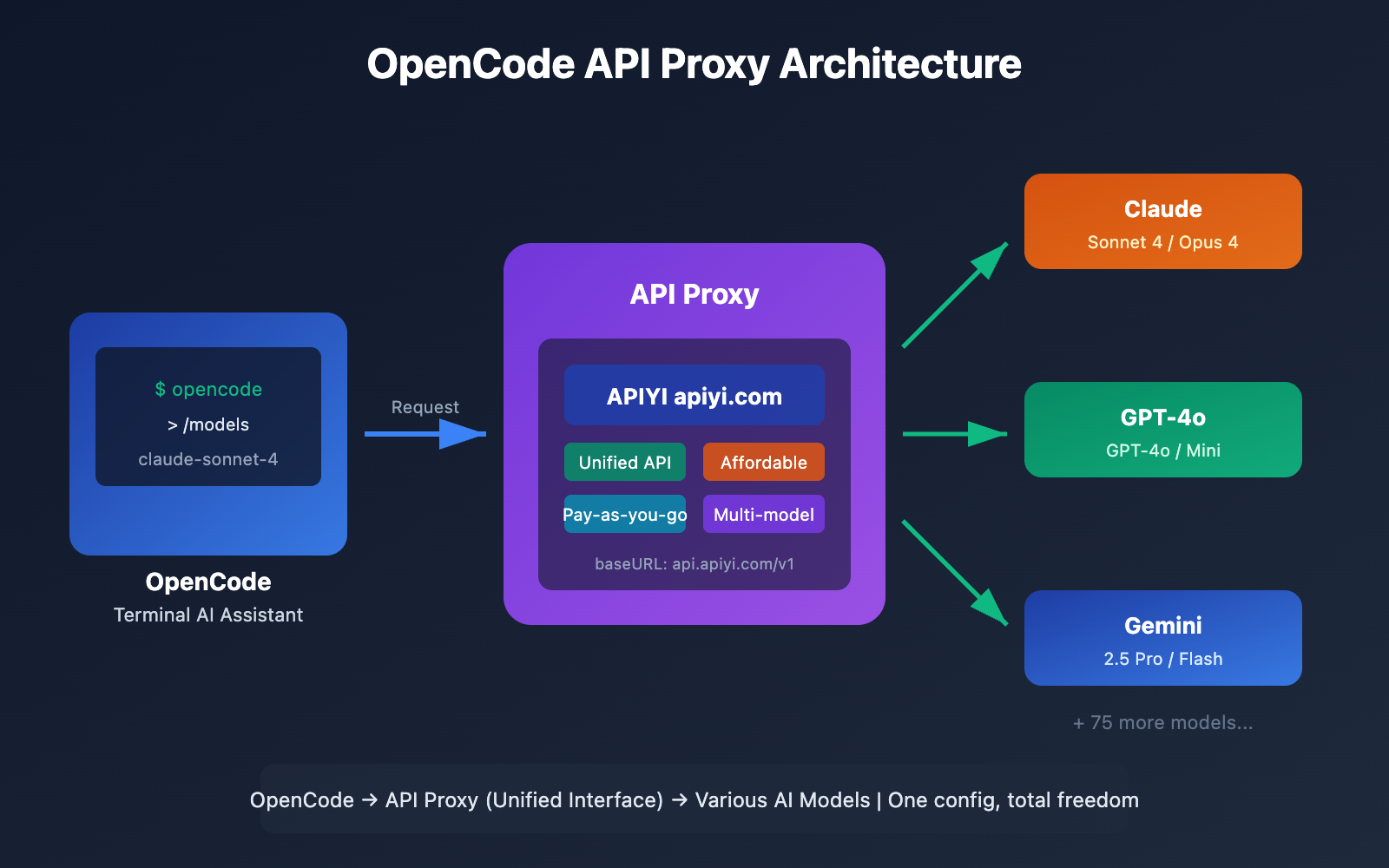
Want to use OpenCode, the open-source AI coding assistant, but find official API prices too steep or the connection unstable? An API proxy is your best bet. In this post, I'll walk you through 3 simple steps to connect OpenCode to proxies like APIYI or OpenRouter. You'll be able to access over 75 mainstream Large Language Models—including Claude, GPT-4, and Gemini—at a much lower cost.
Core Value: By the end of this guide, you'll know how to configure OpenCode to work with any OpenAI-compatible API, giving you the freedom to switch models and optimize your costs.
What is OpenCode? And Why Use an API Proxy?
OpenCode is an open-source terminal AI coding assistant, often called the open-source alternative to Claude Code. Built with Go, it features a sleek TUI (Terminal User Interface), multi-session management, LSP integration, and other professional-grade tools.
OpenCode Key Features at a Glance
| Feature | Description | Value |
|---|---|---|
| 75+ Model Support | Works with OpenAI, Claude, Gemini, Bedrock, etc. | No vendor lock-in |
| Terminal Native | A beautiful TUI built with Bubble Tea | Developer-friendly experience |
| Open Source & Free | Fully open source, no subscription fees | Pay per API call; predictable costs |
| LSP Integration | Automatically detects language servers | Smart code completion and diagnostics |
| Multi-session Management | Run multiple agents in parallel | Decompose and collaborate on complex tasks |
| Vim Mode | Built-in Vim-style editor | Seamless for terminal power users |
Why use an API Proxy?
Using official APIs directly can sometimes be a headache for a few reasons:
| The Problem | The API Proxy Solution |
|---|---|
| High Costs | Proxies offer better pricing, making them perfect for individual devs. |
| Unstable Network | Proxies optimize connection routes for better global access. |
| Complex Billing | A unified billing interface lets you manage all models in one place. |
| Rate Limits | Proxies can often provide more flexible quotas. |
| Registration Hurdles | No need for foreign phone numbers or specialized credit cards. |
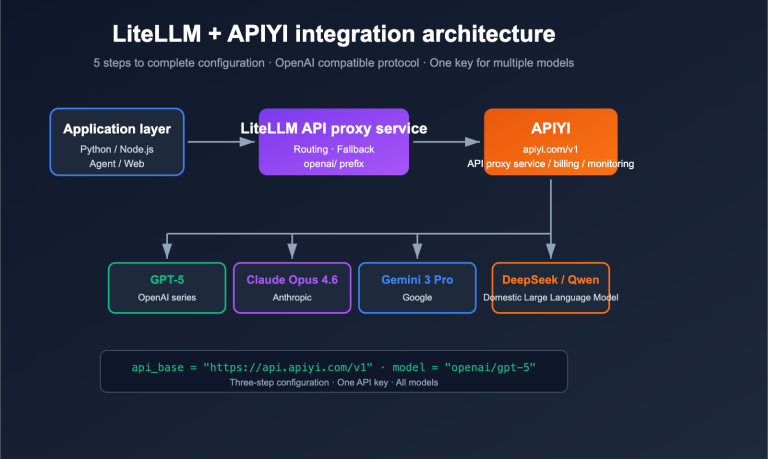
🚀 Quick Start: We recommend using APIYI (apiyi.com) as your proxy. It provides out-of-the-box OpenAI-compatible interfaces, and you'll get free testing credits just for signing up. You can have OpenCode configured in under 5 minutes.
Core Points for Connecting OpenCode to API Relay Stations
Before we start configuring, let's understand how OpenCode's API integration works:
Configuration Architecture Overview
OpenCode uses a unified configuration management system that supports multi-layered overrides:
| Config Level | File Location | Priority | Use Case |
|---|---|---|---|
| Remote Config | .well-known/opencode |
Lowest | Team-wide unified configuration |
| Global Config | ~/.config/opencode/opencode.json |
Medium | Personal default settings |
| Environment Variables | File pointed to by OPENCODE_CONFIG |
Medium-High | Temporary overrides |
| Project Config | Project root opencode.json |
High | Project-specific settings |
| Inline Config | OPENCODE_CONFIG_CONTENT |
Highest | CI/CD scenarios |
How API Relay Integration Works
OpenCode supports any OpenAI-compatible API via the @ai-sdk/openai-compatible adapter. The key configuration items are:
- baseURL: The interface address of your API relay station.
- apiKey: The API key provided by the relay station.
- models: A list of available models.
This means as long as the relay station provides a standard /v1/chat/completions endpoint, you can plug it directly into OpenCode.
OpenCode Quick Start Guide
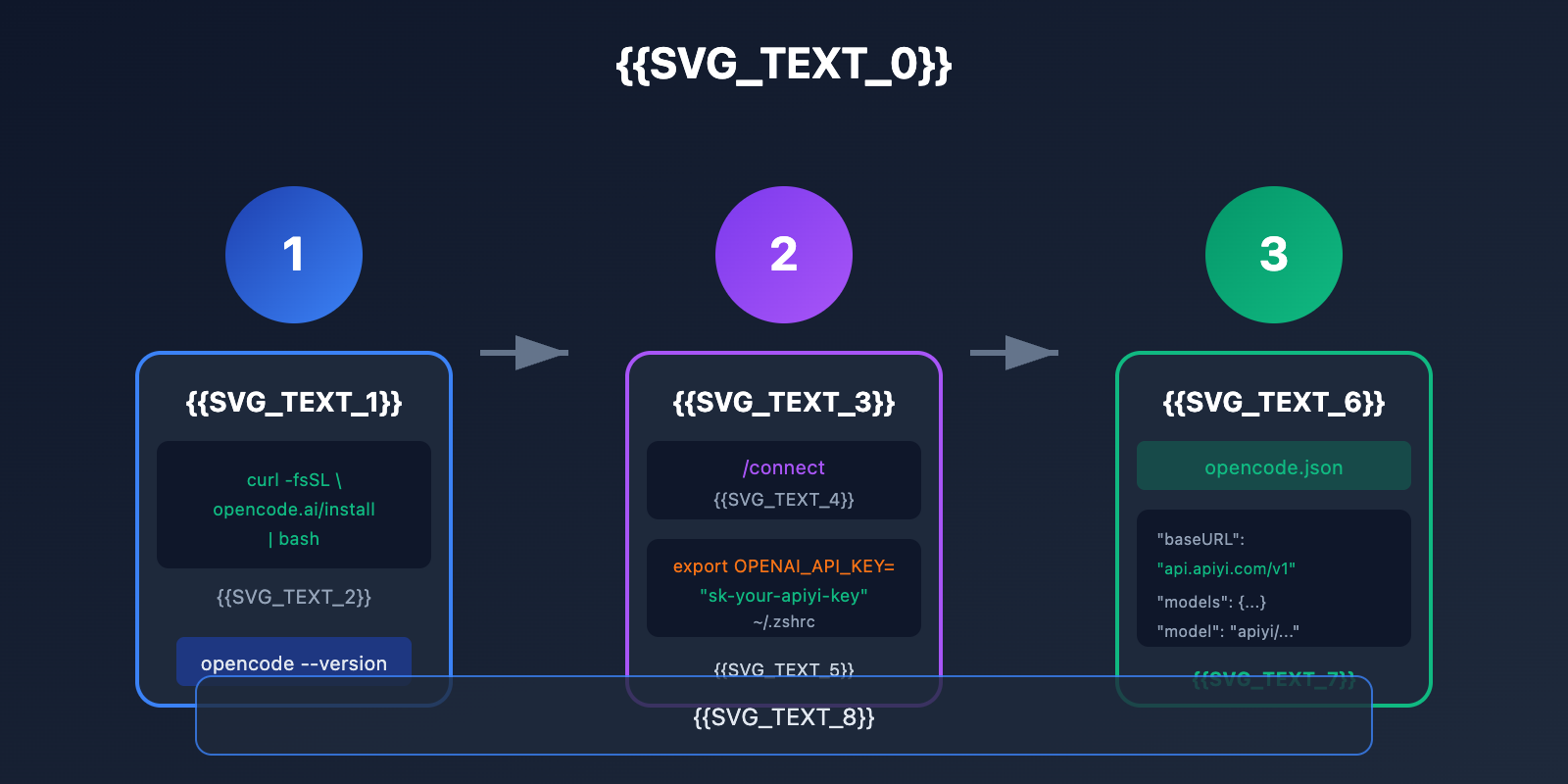
Step 1: Install OpenCode
OpenCode offers several installation methods; pick the one that works best for you:
One-click Installation Script (Recommended):
curl -fsSL https://opencode.ai/install | bash
Homebrew Installation (macOS/Linux):
brew install opencode-ai/tap/opencode
npm Installation:
npm i -g opencode-ai@latest
Go Installation:
go install github.com/opencode-ai/opencode@latest
Verify the installation:
opencode --version
Step 2: Configure Your API Relay Key
OpenCode supports two authentication methods:
Option 1: Use the /connect command (Recommended)
After starting OpenCode, enter the /connect command:
opencode
# Enter in the TUI interface
/connect
Select Other to add a custom Provider and enter your API key. The key will be securely stored in ~/.local/share/opencode/auth.json.
Option 2: Environment Variable Configuration
Add the following to your ~/.zshrc or ~/.bashrc:
# APIYI Relay Configuration
export OPENAI_API_KEY="sk-your-apiyi-key"
export OPENAI_BASE_URL="https://api.apiyi.com/v1"
Apply the changes:
source ~/.zshrc
Step 3: Create the opencode.json Config File
This is the most crucial step—creating a config file to specify your API relay station:
Global Configuration (Applies to all projects):
mkdir -p ~/.config/opencode
touch ~/.config/opencode/opencode.json
Project Configuration (Only for the current project):
touch opencode.json # In the project root
Minimal Config Example
{
  "$schema": "https://opencode.ai/config.json",
  "provider": {
    "apiyi": {
      "npm": "@ai-sdk/openai-compatible",
      "name": "APIYI",
      "options": {
        "baseURL": "https://api.apiyi.com/v1",
        "apiKey": "{env:OPENAI_API_KEY}"
      },
      "models": {
        "claude-sonnet-4-20250514": {
          "name": "Claude Sonnet 4"
        },
        "gpt-4o": {
          "name": "GPT-4o"
        }
      }
    }
  },
  "model": "apiyi/claude-sonnet-4-20250514"
}
Configuration Note: The
{env:OPENAI_API_KEY}syntax automatically reads environment variables, so you don't have to hardcode keys in your config file. API keys obtained from APIYI (apiyi.com) are OpenAI-compatible and work right out of the box.
View full configuration example (including multiple providers)
{
  "$schema": "https://opencode.ai/config.json",
  "provider": {
    "apiyi": {
      "npm": "@ai-sdk/openai-compatible",
      "name": "APIYI (推荐)",
      "options": {
        "baseURL": "https://api.apiyi.com/v1",
        "apiKey": "{env:APIYI_API_KEY}"
      },
      "models": {
        "claude-sonnet-4-20250514": {
          "name": "Claude Sonnet 4",
          "limit": {
            "context": 200000,
            "output": 65536
          }
        },
        "claude-opus-4-20250514": {
          "name": "Claude Opus 4",
          "limit": {
            "context": 200000,
            "output": 32000
          }
        },
        "gpt-4o": {
          "name": "GPT-4o",
          "limit": {
            "context": 128000,
            "output": 16384
          }
        },
        "gpt-4o-mini": {
          "name": "GPT-4o Mini",
          "limit": {
            "context": 128000,
            "output": 16384
          }
        },
        "gemini-2.5-pro": {
          "name": "Gemini 2.5 Pro",
          "limit": {
            "context": 1000000,
            "output": 65536
          }
        },
        "deepseek-chat": {
          "name": "DeepSeek V3",
          "limit": {
            "context": 64000,
            "output": 8192
          }
        }
      }
    },
    "openrouter": {
      "npm": "@ai-sdk/openai-compatible",
      "name": "OpenRouter",
      "options": {
        "baseURL": "https://openrouter.ai/api/v1",
        "apiKey": "{env:OPENROUTER_API_KEY}",
        "headers": {
          "HTTP-Referer": "https://your-site.com",
          "X-Title": "OpenCode Client"
        }
      },
      "models": {
        "anthropic/claude-sonnet-4": {
          "name": "Claude Sonnet 4 (OpenRouter)"
        },
        "openai/gpt-4o": {
          "name": "GPT-4o (OpenRouter)"
        }
      }
    }
  },
  "model": "apiyi/claude-sonnet-4-20250514",
  "small_model": "apiyi/gpt-4o-mini",
  "agent": {
    "coder": {
      "model": "apiyi/claude-sonnet-4-20250514",
      "maxTokens": 8000
    },
    "planner": {
      "model": "apiyi/gpt-4o",
      "maxTokens": 4000
    }
  },
  "tools": {
    "write": true,
    "bash": true,
    "glob": true,
    "grep": true
  }
}
Comparison of API Relays Supported by OpenCode
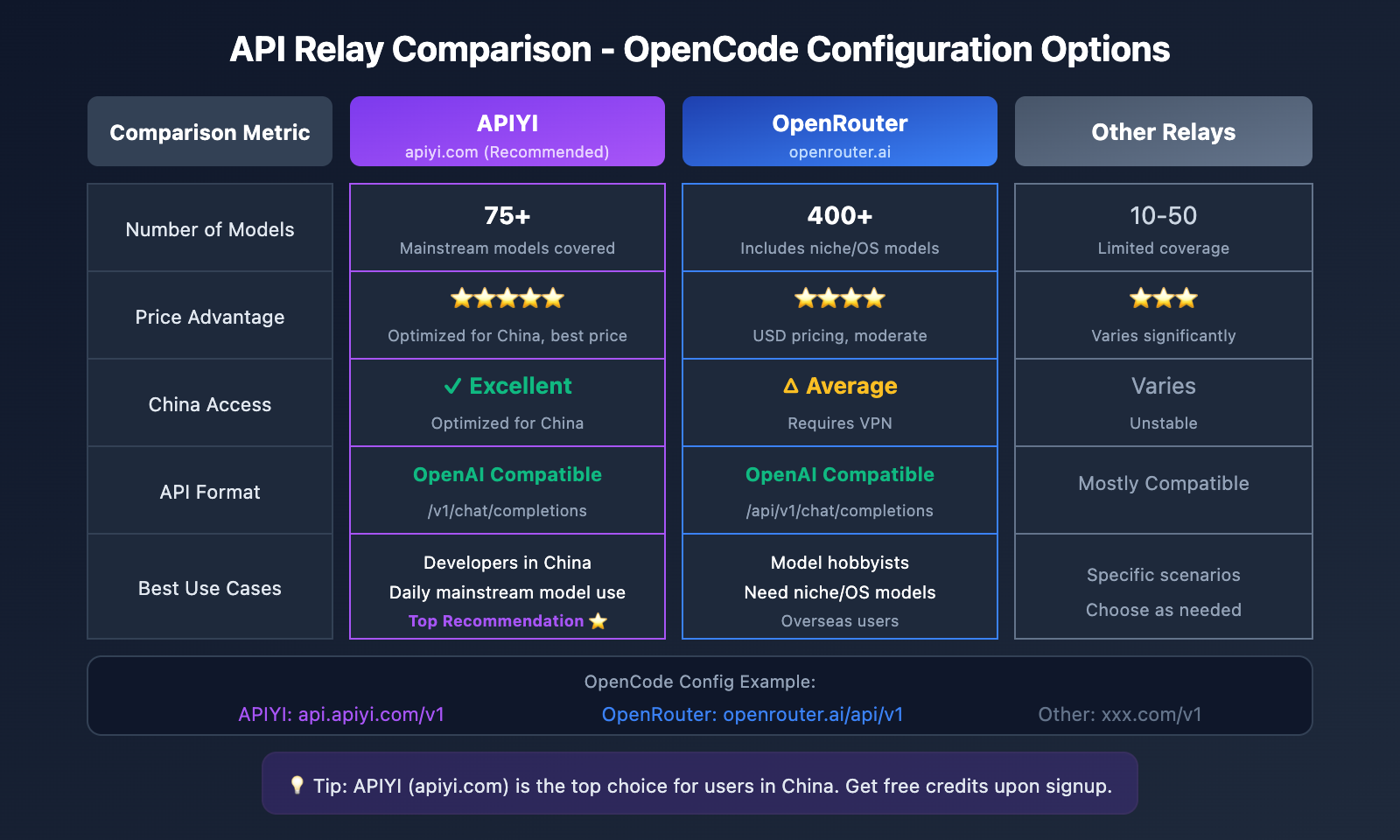
Configuration Parameters for Mainstream API Relays
| Relay | baseURL | Features | Recommended Scenario |
|---|---|---|---|
| APIYI | https://api.apiyi.com/v1 |
Excellent Chinese support, affordable, fast response | Top choice for developers in China |
| OpenRouter | https://openrouter.ai/api/v1 |
Most comprehensive, 400+ models | For users who switch models often |
| Together AI | https://api.together.xyz/v1 |
Rich selection of open-source models | Ideal for Llama and Mistral users |
| Groq | https://api.groq.com/openai/v1 |
Lightning fast, free tier available | Latency-sensitive scenarios |
APIYI Configuration Details
APIYI is an AI API relay platform optimized specifically for developers in China. It offers:
- A unified OpenAI-compatible interface
- Support for mainstream Large Language Models like Claude, GPT, Gemini, and DeepSeek
- Pay-as-you-go pricing with no monthly fees
- Free trial credits
- Chinese language customer support
{
  "provider": {
    "apiyi": {
      "npm": "@ai-sdk/openai-compatible",
      "name": "APIYI",
      "options": {
        "baseURL": "https://api.apiyi.com/v1"
      },
      "models": {
        "claude-sonnet-4-20250514": { "name": "Claude Sonnet 4" },
        "claude-opus-4-20250514": { "name": "Claude Opus 4" },
        "gpt-4o": { "name": "GPT-4o" },
        "gpt-4o-mini": { "name": "GPT-4o Mini" },
        "gemini-2.5-pro": { "name": "Gemini 2.5 Pro" },
        "deepseek-chat": { "name": "DeepSeek V3" }
      }
    }
  }
}
OpenRouter Configuration Details
OpenRouter aggregates over 400 AI models, making it perfect for scenarios where you need to switch models frequently:
{
  "provider": {
    "openrouter": {
      "npm": "@ai-sdk/openai-compatible",
      "name": "OpenRouter",
      "options": {
        "baseURL": "https://openrouter.ai/api/v1",
        "apiKey": "{env:OPENROUTER_API_KEY}",
        "headers": {
          "HTTP-Referer": "https://your-app.com",
          "X-Title": "My OpenCode App"
        }
      },
      "models": {
        "anthropic/claude-sonnet-4": {
          "name": "Claude Sonnet 4"
        },
        "google/gemini-2.5-pro": {
          "name": "Gemini 2.5 Pro"
        },
        "meta-llama/llama-3.1-405b": {
          "name": "Llama 3.1 405B"
        }
      }
    }
  }
}
💡 Selection Tip: If you mainly use the Claude and GPT series, APIYI (apiyi.com) is highly recommended for its better pricing and faster response times. If you need to experiment with open-source or niche models, OpenRouter provides more comprehensive coverage.
OpenCode Advanced Configuration Tips
Agent Model Allocation Strategy
OpenCode has two built-in agents: Coder and Planner. You can assign different models to each of them:
{
  "agent": {
    "coder": {
      "model": "apiyi/claude-sonnet-4-20250514",
      "maxTokens": 8000,
      "description": "主要编码任务,使用强模型"
    },
    "planner": {
      "model": "apiyi/gpt-4o-mini",
      "maxTokens": 4000,
      "description": "规划分析,使用轻量模型节省成本"
    }
  }
}
Switching Between Multiple Providers
Once you've configured multiple providers, you can switch between them anytime in OpenCode using the /models command:
# 启动 OpenCode
opencode

# 在 TUI 中切换模型
/models
# 选择 apiyi/claude-sonnet-4-20250514 或其他模型
Environment Variable Best Practices
We recommend managing your API keys in a .env file:
# .env 文件
APIYI_API_KEY=sk-your-apiyi-key
OPENROUTER_API_KEY=sk-or-your-openrouter-key
Then, reference them in your opencode.json:
{
  "provider": {
    "apiyi": {
      "options": {
        "apiKey": "{env:APIYI_API_KEY}"
      }
    }
  }
}
Token Limit Configuration
Specify context and output limits for your models to avoid "limit exceeded" errors:
{
  "models": {
    "claude-sonnet-4-20250514": {
      "name": "Claude Sonnet 4",
      "limit": {
        "context": 200000,
        "output": 65536
      }
    }
  }
}
OpenCode Troubleshooting
Here are some common issues you might run into during configuration and how to fix them:
Q1: Getting a “Route /api/messages not found” error after configuration?
This is usually caused by an incorrect baseURL configuration. Check the following points:
- Make sure the
baseURLends with/v1, not/v1/chat/completions. - Confirm the proxy/gateway supports the standard OpenAI API format.
- Verify that your API key is valid.
Correct format:
"baseURL": "https://api.apiyi.com/v1"
Incorrect format:
"baseURL": "https://api.apiyi.com/v1/chat/completions"
API addresses obtained via APIYI (apiyi.com) have been verified and can be used directly.
Q2: Getting a “ProviderModelNotFoundError” saying the model can’t be found?
This happens when the configured model ID doesn't match what's defined in the Provider. Here's the fix:
- Check the
modelfield format:provider-id/model-id. - Ensure the model is defined within the
modelsobject.
Example:
{
  "provider": {
    "apiyi": {
      "models": {
        "claude-sonnet-4-20250514": { "name": "Claude Sonnet 4" }
      }
    }
  },
  "model": "apiyi/claude-sonnet-4-20250514"
}
Q3: How do I verify if the configuration was successful?
Use these commands to check:
# 查看已配置的认证信息
opencode auth list

# 查看可用模型
opencode
/models

# 测试简单对话
opencode -p "Hello, 请用中文回复"
If you get a normal response, you're good to go! You can also view API call logs in the APIYI (apiyi.com) console to help with troubleshooting.
Q4: Where’s the best place to put the configuration file?
Choose based on your use case:
| Scenario | Recommended Location | Description |
|---|---|---|
| Personal Global Default | ~/.config/opencode/opencode.json |
Shared across all projects |
| Project-Specific Configuration | Project root opencode.json |
Can be committed to Git (excluding keys) |
| CI/CD Environment | Environment variable OPENCODE_CONFIG_CONTENT |
Dynamically injected configuration |
Q5: How do I switch between different API proxies in OpenCode?
After configuring multiple Providers, use the /models command to switch:
opencode
/models
# 选择不同 Provider 下的模型即可切换
You can also set a default model in your configuration:
{
  "model": "apiyi/claude-sonnet-4-20250514"
}
OpenCode vs Claude Code: API Access Method Comparison
| Comparison Dimension | OpenCode | Claude Code |
|---|---|---|
| Model Support | 75+ models, freely configurable | Claude series only |
| API Proxy | Supports any OpenAI-compatible interface | Does not support custom interfaces |
| Pricing | Free software + Pay-as-you-go API | $17-100/mo subscription + API |
| Configuration | JSON config files + Environment variables | Built-in configuration, non-modifiable |
| Open Source Status | Fully open source | Closed source |
| Performance | Depends on the chosen model | Claude native optimization, SWE-bench 80.9% |
🎯 Technical Tip: OpenCode's biggest advantage is its model flexibility. By pairing it with the APIYI (apiyi.com) gateway, you can switch between Claude, GPT-4, Gemini, and various other Large Language Models using the same configuration to find the most cost-effective solution.
References
Here are some resources you might find useful when configuring OpenCode:
| Resource | Link | Description |
|---|---|---|
| OpenCode Official Docs | opencode.ai/docs |
Full configuration reference |
| OpenCode GitHub Repository | github.com/opencode-ai/opencode |
Source code and issues |
| OpenCode Provider Config | opencode.ai/docs/providers |
Detailed Provider instructions |
| OpenRouter Documentation | openrouter.ai/docs |
OpenRouter integration guide |
Summary
By following this 3-step configuration guide, you've now mastered how to:
- Install OpenCode: Quickly install using the one-click script or a package manager.
- Configure API Keys: Set up authentication via
/connector environment variables. - Create Configuration Files: Write your
opencode.jsonto specify the API gateway and models.
As an open-source terminal AI coding assistant, using OpenCode with an API gateway gives you an experience comparable to Claude Code, all while keeping costs under control and maintaining model flexibility.
We recommend using APIYI (apiyi.com) to quickly get your API keys and start testing. The platform offers free credits and supports major Large Language Models like Claude, GPT, and Gemini. Its unified interface format makes configuration a breeze.
📝 Author: APIYI Technical Team | APIYI (apiyi.com) – Making AI API calls simpler.