Deep Analysis of Nano Banana Pro API 503 Error "The model is overloaded" with 5 Effective Solutions to Address Google's Compute Shortage
Many developers have recently reported frequent encounters with the "The model is overloaded. Please try again later." error when calling the Nano Banana Pro API (gemini-2.0-flash-preview-image-generation), with response times surging from 30 seconds to 60-100 seconds or more. This article dives deep into the root cause of this issue and provides 5 verified solutions.
Core Value: After reading this article, you'll understand the real reason behind Nano Banana Pro API overload errors, master effective coping strategies, and ensure your image generation application runs stably.
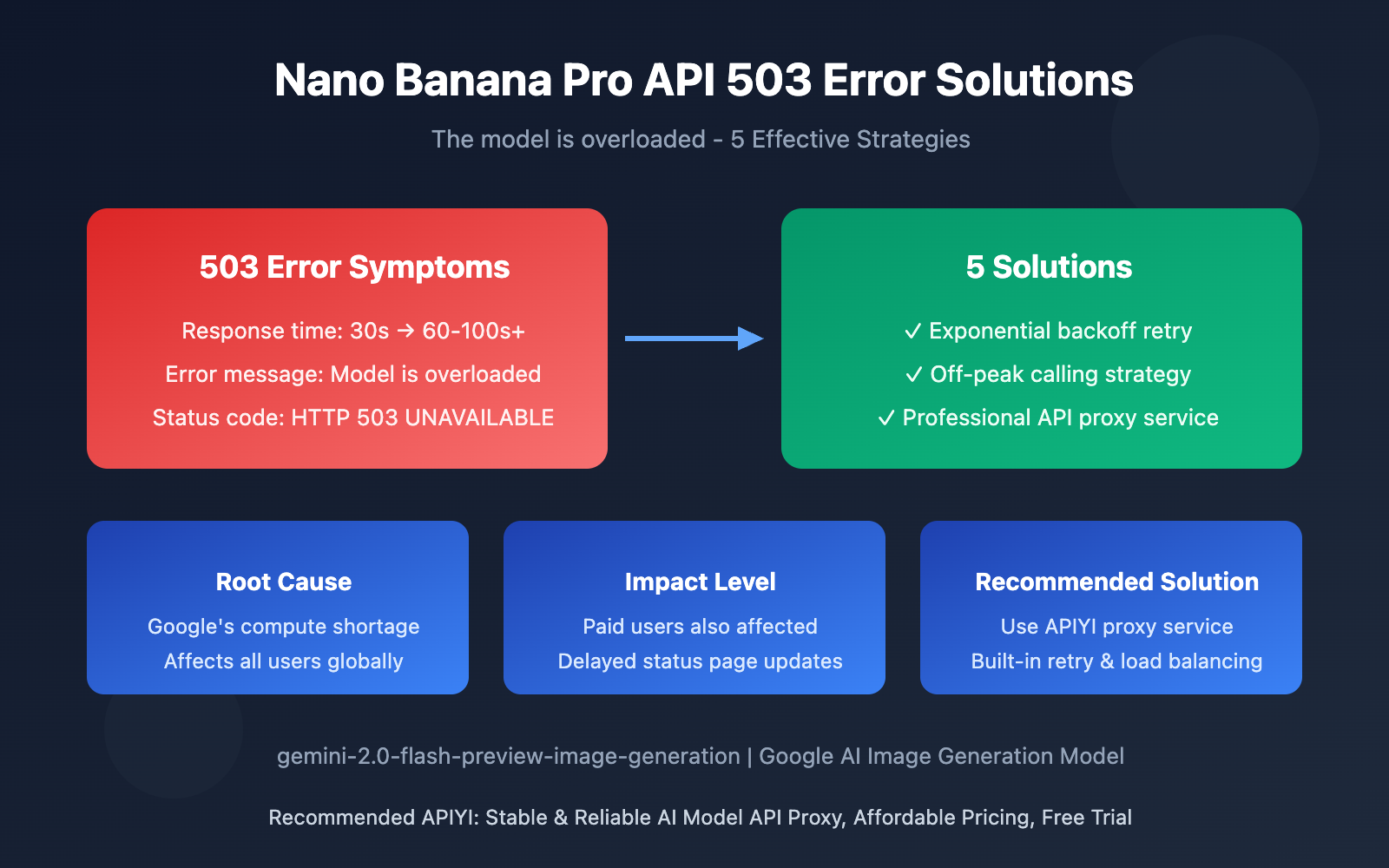
Nano Banana Pro API Overload Error: Key Points
| Key Point | Description | Impact |
|---|---|---|
| Error Type | HTTP 503 UNAVAILABLE server error | API requests completely fail, retry required |
| Root Cause | Google's official compute resource shortage | Affects all developers using this model |
| Response Time | Extended from 30s to 60-100+ seconds | Severely degraded user experience |
| Scope | All global API users (including paid) | Universally affected regardless of tier |
| Official Response | Status page shows normal, no clear fix timeline | Developers must handle it themselves |
Understanding the Nano Banana Pro API Overload Issue
This 503 error isn't a problem with your code—it's a compute capacity bottleneck on Google's server side. According to multiple discussion threads on the Google AI developer forum, this issue started appearing frequently in the second half of 2025 and hasn't been fully resolved yet.
The complete error response format looks like this:
{
  "error": {
    "code": 503,
    "message": "The model is overloaded. Please try again later.",
    "status": "UNAVAILABLE"
  }
}
What's worth noting is that even Tier 3 paid users (the highest quota tier) encounter this error when their request frequency is well below quota limits. This indicates the problem lies at Google's infrastructure level, not individual account limitations.
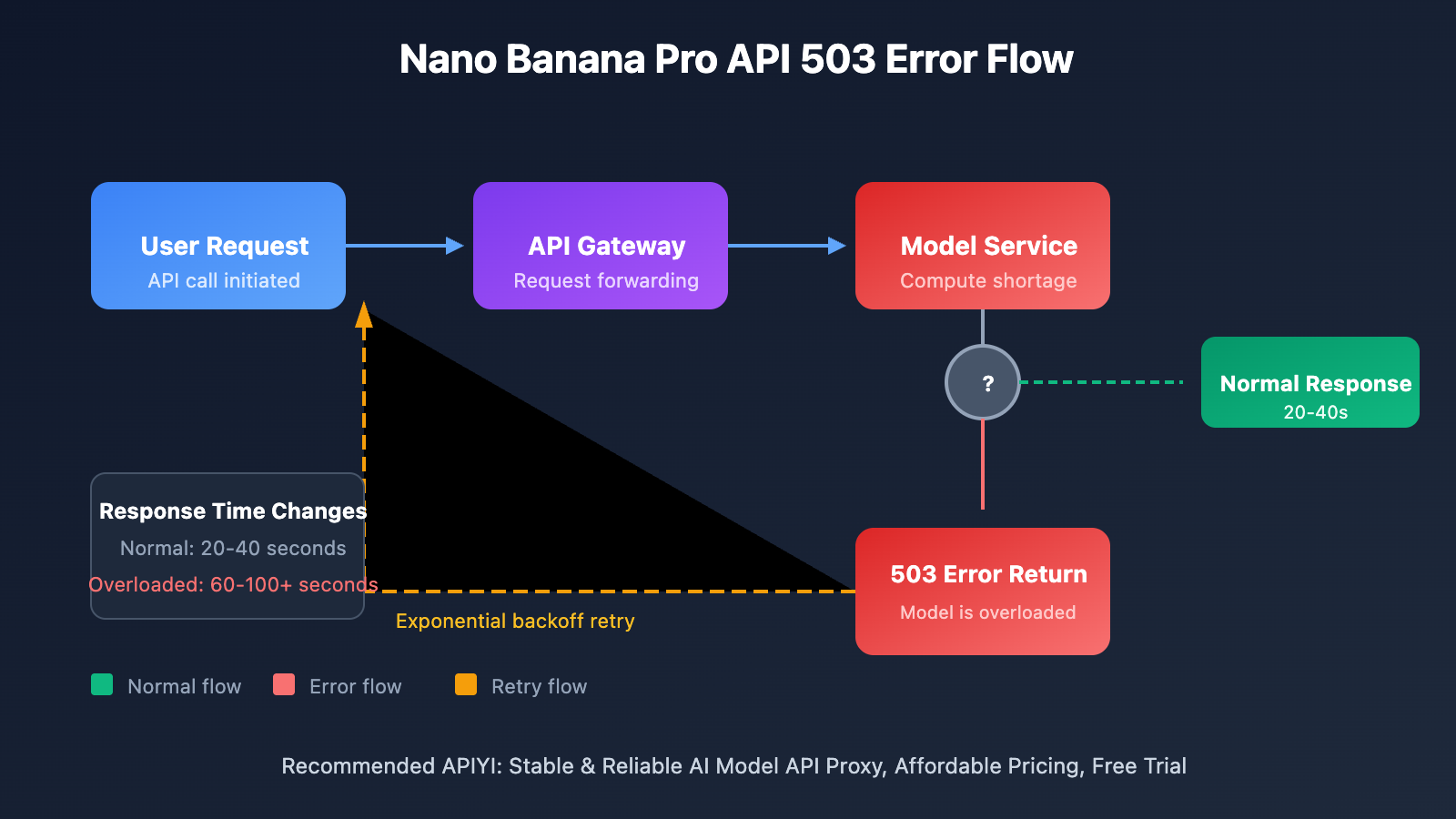
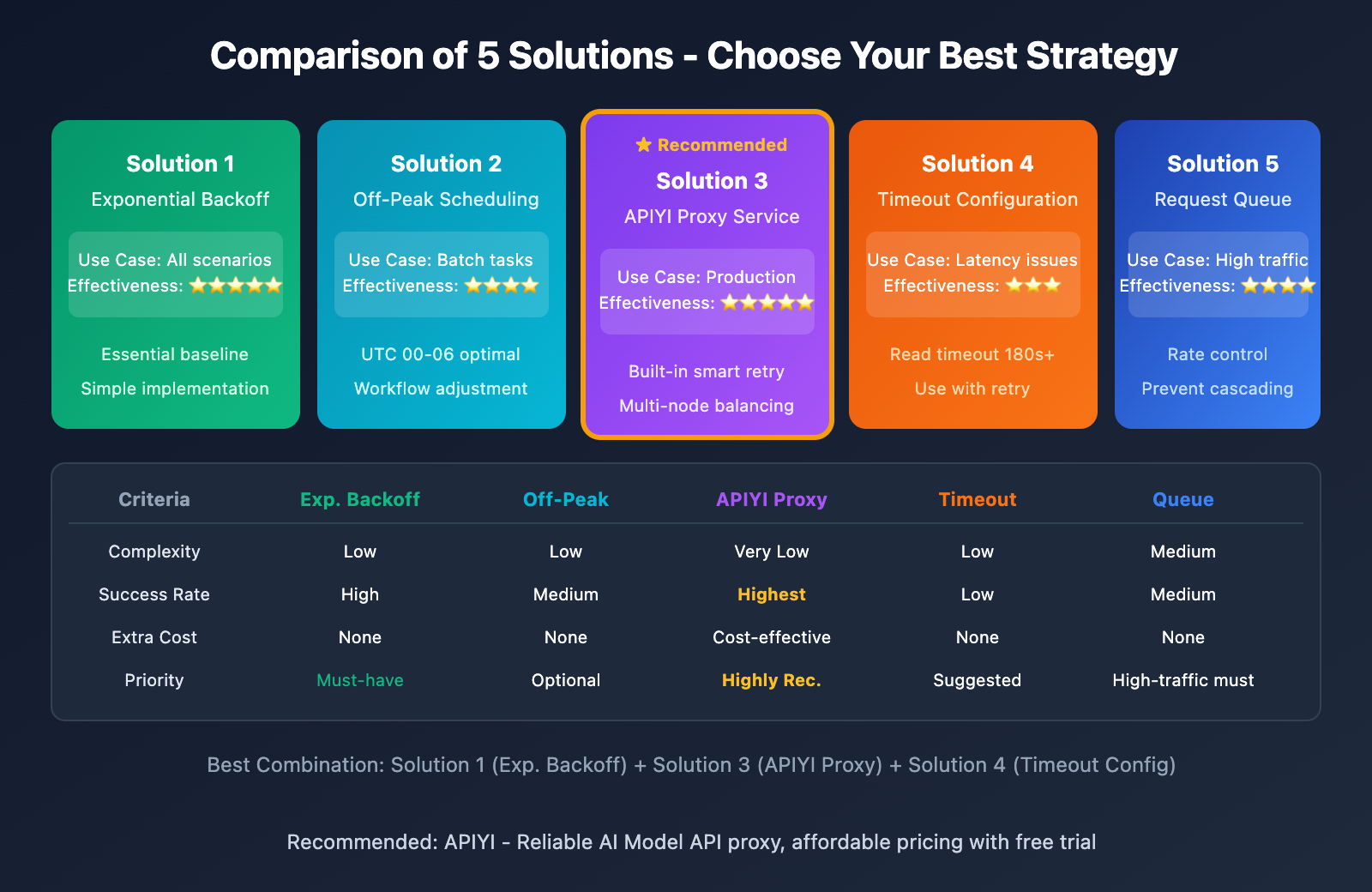
5 Solutions for Nano Banana Pro API Overload Issues
Solution 1: Implement Exponential Backoff Retry Mechanism
Since 503 errors are recoverable temporary failures, the most effective strategy is implementing intelligent retry logic:
import openai
import time
import random

def call_nano_banana_pro_with_retry(prompt: str, max_retries: int = 5):
    """
    Nano Banana Pro API call with exponential backoff
    """
    client = openai.OpenAI(
        api_key="YOUR_API_KEY",
        base_url="https://vip.apiyi.com/v1"
    )

    for attempt in range(max_retries):
        try:
            response = client.chat.completions.create(
                model="gemini-2.0-flash-preview-image-generation",
                messages=[{"role": "user", "content": prompt}]
            )
            return response
        except Exception as e:
            if "503" in str(e) or "overloaded" in str(e).lower():
                wait_time = (2 ** attempt) + random.uniform(0, 1)
                print(f"Model overloaded, retrying in {wait_time:.1f}s...")
                time.sleep(wait_time)
            else:
                raise e

    raise Exception("Max retries reached, please try again later")
View Complete Implementation (Including Async Version)
import openai
import asyncio
import random
from typing import Optional

class NanoBananaProClient:
    """
    Nano Banana Pro API client wrapper
    Supports automatic retry and error handling
    """

    def __init__(self, api_key: str, base_url: str = "https://vip.apiyi.com/v1"):
        self.client = openai.OpenAI(api_key=api_key, base_url=base_url)
        self.async_client = openai.AsyncOpenAI(api_key=api_key, base_url=base_url)

    def generate_image(
        self,
        prompt: str,
        max_retries: int = 5,
        base_delay: float = 2.0
    ) -> dict:
        """Synchronous call with exponential backoff retry"""
        for attempt in range(max_retries):
            try:
                response = self.client.chat.completions.create(
                    model="gemini-2.0-flash-preview-image-generation",
                    messages=[{"role": "user", "content": prompt}],
                    timeout=120  # Extended timeout
                )
                return {"success": True, "data": response}
            except Exception as e:
                error_msg = str(e).lower()
                if "503" in error_msg or "overloaded" in error_msg:
                    if attempt < max_retries - 1:
                        delay = (base_delay ** attempt) + random.uniform(0, 1)
                        print(f"[Retry {attempt + 1}/{max_retries}] Waiting {delay:.1f}s")
                        time.sleep(delay)
                        continue
                return {"success": False, "error": str(e)}
        return {"success": False, "error": "Max retries reached"}

    async def generate_image_async(
        self,
        prompt: str,
        max_retries: int = 5,
        base_delay: float = 2.0
    ) -> dict:
        """Async call with exponential backoff retry"""
        for attempt in range(max_retries):
            try:
                response = await self.async_client.chat.completions.create(
                    model="gemini-2.0-flash-preview-image-generation",
                    messages=[{"role": "user", "content": prompt}],
                    timeout=120
                )
                return {"success": True, "data": response}
            except Exception as e:
                error_msg = str(e).lower()
                if "503" in error_msg or "overloaded" in error_msg:
                    if attempt < max_retries - 1:
                        delay = (base_delay ** attempt) + random.uniform(0, 1)
                        await asyncio.sleep(delay)
                        continue
                return {"success": False, "error": str(e)}
        return {"success": False, "error": "Max retries reached"}

# Usage example
client = NanoBananaProClient(api_key="YOUR_API_KEY")
result = client.generate_image("Generate a cute cat")
Tip: By calling Nano Banana Pro API through APIYI (apiyi.com), you'll benefit from built-in intelligent retry mechanisms that effectively reduce the impact of 503 errors on your business operations.
Solution 2: Choose Off-Peak Hours for API Calls
Based on community feedback, Nano Banana Pro API's overload issues follow clear time patterns:
| Time Period (UTC) | Load Level | Recommended Action |
|---|---|---|
| 00:00 – 06:00 | Low | Ideal for batch tasks |
| 06:00 – 12:00 | Medium | Normal usage |
| 12:00 – 18:00 | Peak | Reduce calls or increase retries |
| 18:00 – 24:00 | High | Patience required |
Solution 3: Use Reliable API Proxy Services
Calling Google's official API directly exposes you to compute capacity risks. Using a professional API proxy service offers these advantages:
| Comparison | Direct Official API | APIYI Proxy Service |
|---|---|---|
| Error Handling | Manual retry logic needed | Built-in intelligent retry |
| Stability | Heavily affected by official compute fluctuations | Multi-node load balancing |
| Response Speed | 30-100+ seconds fluctuation | Relatively stable |
| Technical Support | Forum community only | Professional tech team |
| Cost | Official pricing | Cost-effective options |
Real-world Experience: Calling Nano Banana Pro API through APIYI (apiyi.com) shows noticeably higher success rates during peak hours compared to direct official API connections. The platform automatically handles retry and fallback strategies.
Solution 4: Configure Reasonable Timeout Settings
With significantly extended response times, you'll need to adjust your client timeout configurations:
import openai
import httpx

# Configure longer timeout periods
client = openai.OpenAI(
    api_key="YOUR_API_KEY",
    base_url="https://vip.apiyi.com/v1",
    timeout=httpx.Timeout(
        connect=30.0,    # Connection timeout
        read=180.0,      # Read timeout (image generation requires longer time)
        write=30.0,      # Write timeout
        pool=30.0        # Connection pool timeout
    )
)
Solution 5: Implement Request Queuing and Rate Limiting
For production environments, implementing request queuing helps avoid excessive concurrent requests:
from queue import Queue
from threading import Thread
import time

class RequestQueue:
    """Simple request queue implementation"""

    def __init__(self, requests_per_minute: int = 10):
        self.queue = Queue()
        self.interval = 60 / requests_per_minute
        self.running = True
        self.worker = Thread(target=self._process_queue)
        self.worker.start()

    def add_request(self, request_func, callback):
        self.queue.put((request_func, callback))

    def _process_queue(self):
        while self.running:
            if not self.queue.empty():
                request_func, callback = self.queue.get()
                result = request_func()
                callback(result)
                time.sleep(self.interval)
            else:
                time.sleep(0.1)
Nano Banana Pro API Official Status Monitoring
How to Check Google's Official Compute Status
While Google's status page often shows "everything's fine," you can still get real-time information through these channels:
| Monitoring Channel | Address | Notes |
|---|---|---|
| Google AI Studio Status Page | aistudio.google.com/status |
Official status, but updates may lag |
| Vertex AI Status Page | status.cloud.google.com |
Enterprise-level status monitoring |
| Google AI Developer Forum | discuss.ai.google.dev |
Community feedback is most timely |
| StatusGator Third-party Monitoring | statusgator.com |
Real status reported by users |
| GitHub Issues | github.com/google-gemini |
Developer issue aggregation |
Important Note: Based on community feedback, even when the status page shows "0 issues," the actual service might still have serious availability problems. We recommend also keeping an eye on real-time discussions in the developer forum.
Common Questions
Q1: Why do paying users also encounter 503 errors?
503 errors indicate overall server-side compute shortage—this is a Google infrastructure-level issue that's unrelated to your account's payment tier. Paying users do get higher request quotas (RPM/RPD), but when there's an overall compute shortage, all users are affected. The advantage for paying users is that their requests get priority processing during peak times.
Q2: Is it normal for response times to go from 30 seconds to 100 seconds?
This isn't normal—it's a classic symptom of Google's servers being overloaded. Under normal circumstances, Nano Banana Pro's image generation should complete within 20-40 seconds. Dramatically longer response times mean the service is queuing requests. We'd recommend implementing longer timeout configurations and retry mechanisms to handle this.
Q3: How can I reduce the impact of 503 errors on my business?
We recommend combining these strategies:
- Use a reliable API proxy service like APIYI apiyi.com to get built-in retry and fallback capabilities
- Implement local caching to avoid regenerating identical content
- Design graceful degradation—provide alternative functionality when the API's unavailable
- Set up alerting and monitoring to catch service issues early
Summary
Key points about Nano Banana Pro API overload errors:
- Error Nature: This is a 503 error caused by insufficient computing resources on Google's server side, not an issue with developer code
- Response Strategy: Implementing exponential backoff retry mechanisms is the most effective solution
- Recommended Approach: Using professional API relay services can provide a more stable calling experience
When facing Google's official computing power fluctuations, developers need to design adequate fault tolerance. Through reasonable retry strategies, timeout configurations, and service selection, you can effectively reduce the impact of overload errors on your business.
We recommend calling the Nano Banana Pro API through APIYI apiyi.com, which provides stable and reliable service, intelligent retry mechanisms, and professional technical support to help your image generation applications run smoothly.
📚 References
⚠️ Link Format Note: All external links use the
Resource Name: domain.comformat, easy to copy but not clickable, avoiding SEO weight loss.
-
Google AI Developer Forum – Model is overloaded Discussion: Official community discussion thread about 503 errors
- Link:
discuss.ai.google.dev/t/model-is-overloaded-gemini-2-5-pro/108321 - Description: Learn about other developers' experiences and solutions
- Link:
-
Google AI Studio Status Page: Official service status monitoring
- Link:
aistudio.google.com/status - Description: Check the official operational status of Gemini API
- Link:
-
GitHub gemini-cli Issues: Developer issue aggregation
- Link:
github.com/google-gemini/gemini-cli/issues - Description: View and report Gemini API related issues
- Link:
-
Vertex AI Gemini Documentation: Official image generation documentation
- Link:
cloud.google.com/vertex-ai/generative-ai/docs/multimodal/image-generation - Description: Learn the official usage of Gemini image generation models
- Link:
Author: Technical Team
Tech Discussion: Feel free to discuss in the comments. For more resources, visit the APIYI apiyi.com tech community