
When calling the Nano Banana Pro API to generate 4K high-resolution images, encountering the HTTPSConnectionPool Read timed out error is one of the most common issues developers face. This article will analyze in detail the root causes of timeout errors and provide production-validated timeout configuration solutions.
Core Value: After reading this article, you'll master the optimal timeout configurations for different resolutions in Nano Banana Pro image generation and completely solve API timeout issues.
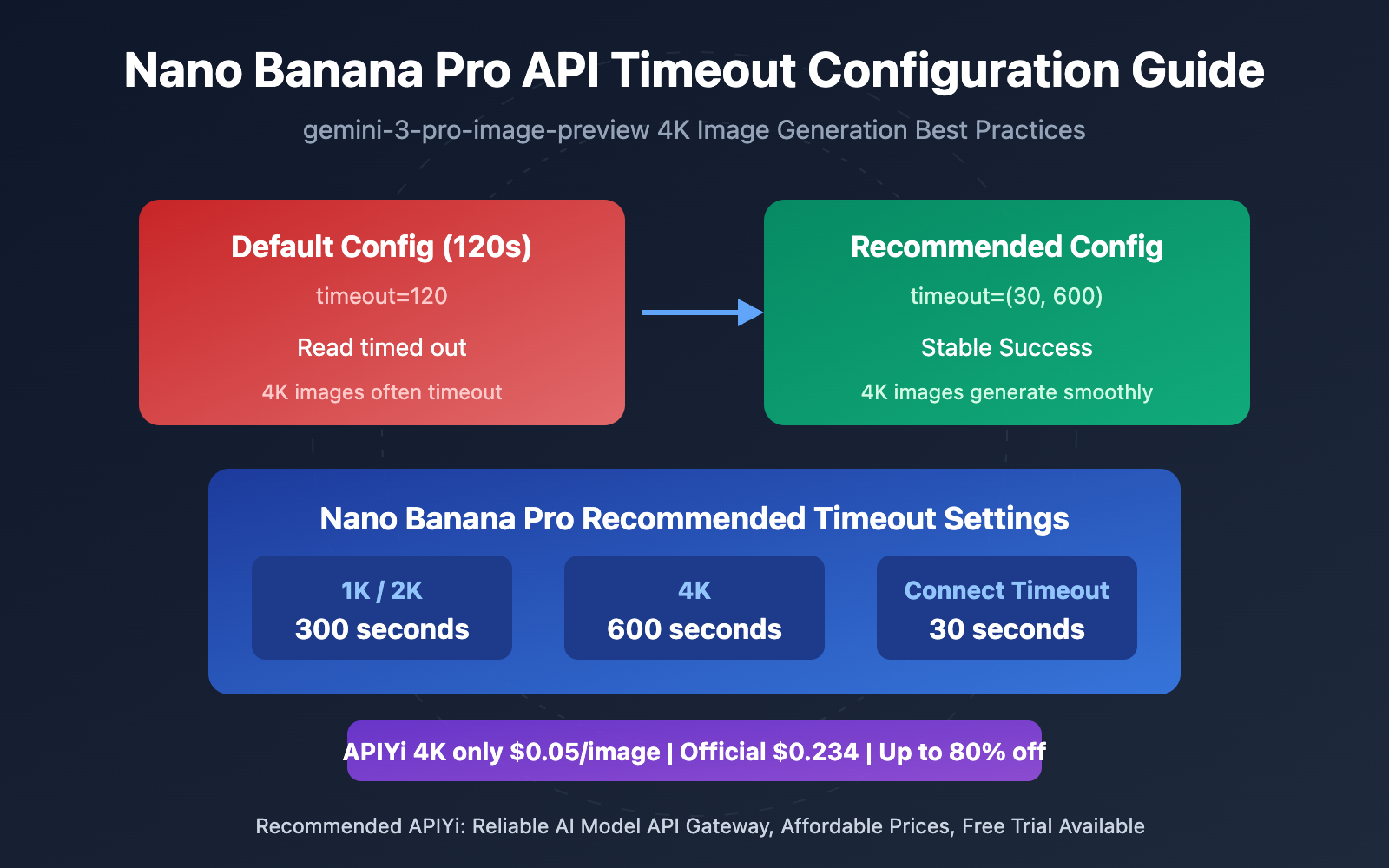
Nano Banana Pro API Timeout Error: Key Points
When calling Nano Banana Pro (gemini-3-pro-image-preview) to generate high-resolution images, timeout issues often appear in 4K scenarios. Here's what you need to know:
| Key Point | Description | Value |
|---|---|---|
| Timeout Components | Upload + AI Processing + Download three-stage duration | Understand why the default 120s isn't enough |
| Resolution Impact | 4K generation takes about 4-6x longer than 1K | Set reasonable timeouts for different resolutions |
| Dual Timeout Mechanism | Separate connect_timeout and read_timeout | Precisely control connection and read timeouts |
Why Isn't 120 Seconds Enough?
When you see this error message:
API Connection Error: HTTPSConnectionPool(host='api.apiyi.com', port=443): Read timed out. (read timeout=120)
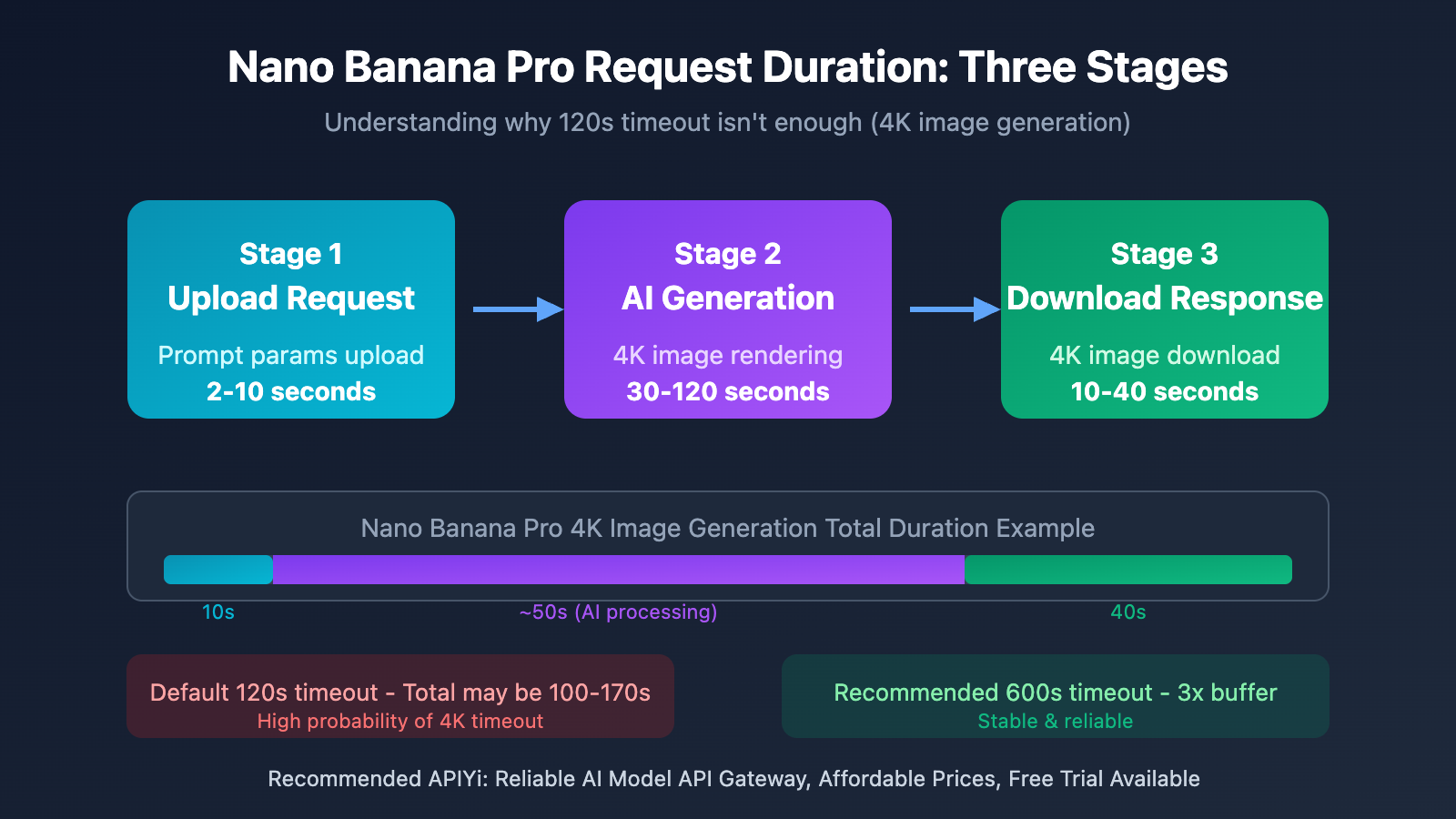
This means within 120 seconds, the Nano Banana Pro API didn't complete its response. The root cause of this issue is that 4K image generation's total duration consists of three parts:
- Upload Time – Uploading request parameters to the server (about 2-10 seconds)
- Processing Time – gemini-3-pro-image-preview model generating the 4K image (about 30-120 seconds)
- Download Time – Downloading the 4K high-resolution image locally (about 10-40 seconds)
For 4K resolution (4096×4096) as an example, our backend statistics show API processing time around 50 seconds, but that's only the server-side computation time. Adding network transmission (upload + download), the total duration can reach 100-170 seconds. Therefore, a 120-second timeout setting is far from safe.
Recommended Timeout Settings for Nano Banana Pro API
Based on extensive production environment testing, we've compiled the following optimal timeout configuration for Nano Banana Pro (gemini-3-pro-image-preview):
| Resolution | Recommended Timeout (seconds) | Notes | Use Cases |
|---|---|---|---|
| 1K (1024px) | 300 | 5 minutes | Quick previews, draft generation |
| 2K (2048px) | 300 | 5 minutes | Recommended for daily use |
| 4K (4096px) | 600 | 10 minutes | Ultra-HD final output |
Why These Values?
The core principle for timeout configuration is leaving adequate margin, avoiding edge cases:
- 300 seconds for 1K/2K – Actual processing typically takes 30-90 seconds, 300 seconds provides a 3x buffer
- 600 seconds for 4K – Actual processing can reach 100-170 seconds, 600 seconds ensures stability
- Network fluctuation buffer – Extra 50% margin handles unstable network conditions
🎯 Configuration Tip: These timeout values have been validated at scale on the APIYI apiyi.com platform and are recommended for direct adoption. The platform provides the Nano Banana Pro (gemini-3-pro-image-preview) model, with 4K images costing just $0.05/image, compared to the official price of $0.234 – that's 20% of the official rate.
Quick Start Guide for Nano Banana Pro API Timeout Configuration
Minimal Example
Here's the simplest timeout configuration approach – you'll solve timeout issues with just 15 lines of code:
import requests

# Nano Banana Pro timeout settings by resolution
TIMEOUT_CONFIG = {
    "1K": 300,   # 5 minutes
    "2K": 300,   # 5 minutes
    "4K": 600,   # 10 minutes
}

response = requests.post(
    "https://vip.apiyi.com/v1/images/generations",
    json={
        "model": "gemini-3-pro-image-preview",
        "prompt": "a cute cat playing in the sunshine",
        "size": "4096x4096"  # 4K resolution
    },
    headers={"Authorization": "Bearer YOUR_API_KEY"},
    timeout=(30, TIMEOUT_CONFIG["4K"])  # (connect timeout, read timeout)
)
View Complete Implementation (with retry mechanism)
import requests
from requests.adapters import HTTPAdapter
from urllib3.util.retry import Retry
from typing import Dict, Any

# Nano Banana Pro timeout config (in seconds)
TIMEOUT_CONFIG = {
    "1K": 300,   # 5 minutes - quick preview
    "2K": 300,   # 5 minutes - recommended
    "4K": 600,   # 10 minutes - ultra-HD
}

# Resolution mapping
SIZE_MAP = {
    "1K": "1024x1024",
    "2K": "2048x2048",
    "4K": "4096x4096",
}

def create_session_with_retry(
    retries: int = 3,
    backoff_factor: float = 1.0
) -> requests.Session:
    """
    Create a Session with retry mechanism
    """
    session = requests.Session()

    retry_strategy = Retry(
        total=retries,
        backoff_factor=backoff_factor,
        status_forcelist=[429, 500, 502, 503, 504],
        allowed_methods=["POST", "GET"]
    )

    adapter = HTTPAdapter(max_retries=retry_strategy)
    session.mount("https://", adapter)
    session.mount("http://", adapter)

    return session

def generate_image_nano_banana_pro(
    prompt: str,
    resolution: str = "2K",
    api_key: str = "YOUR_API_KEY",
    base_url: str = "https://vip.apiyi.com/v1"
) -> Dict[str, Any]:
    """
    Call Nano Banana Pro API to generate images (with timeout and retry)

    Args:
        prompt: Image description
        resolution: Resolution (1K/2K/4K)
        api_key: API key
        base_url: API base URL

    Returns:
        API response
    """
    session = create_session_with_retry()

    # Get timeout and size for the specified resolution
    read_timeout = TIMEOUT_CONFIG.get(resolution, 300)
    size = SIZE_MAP.get(resolution, "2048x2048")
    connect_timeout = 30  # Fixed 30 seconds for connection

    try:
        response = session.post(
            f"{base_url}/images/generations",
            json={
                "model": "gemini-3-pro-image-preview",
                "prompt": prompt,
                "size": size,
                "n": 1
            },
            headers={
                "Authorization": f"Bearer {api_key}",
                "Content-Type": "application/json"
            },
            timeout=(connect_timeout, read_timeout)
        )
        response.raise_for_status()
        return response.json()

    except requests.Timeout as e:
        return {"error": "timeout", "message": f"Request timeout: {str(e)}"}
    except requests.RequestException as e:
        return {"error": "request_failed", "message": str(e)}

# Usage example
if __name__ == "__main__":
    result = generate_image_nano_banana_pro(
        prompt="a cute cat dancing in the sunshine, HD details, professional photography",
        resolution="4K"
    )
    print(result)
Recommendation: Get your API Key through APIYI apiyi.com – the platform offers free testing credits. Nano Banana Pro 4K images cost just $0.05/image, which is 20% of the official price.
Nano Banana Pro API Dual Timeout Mechanism Explained
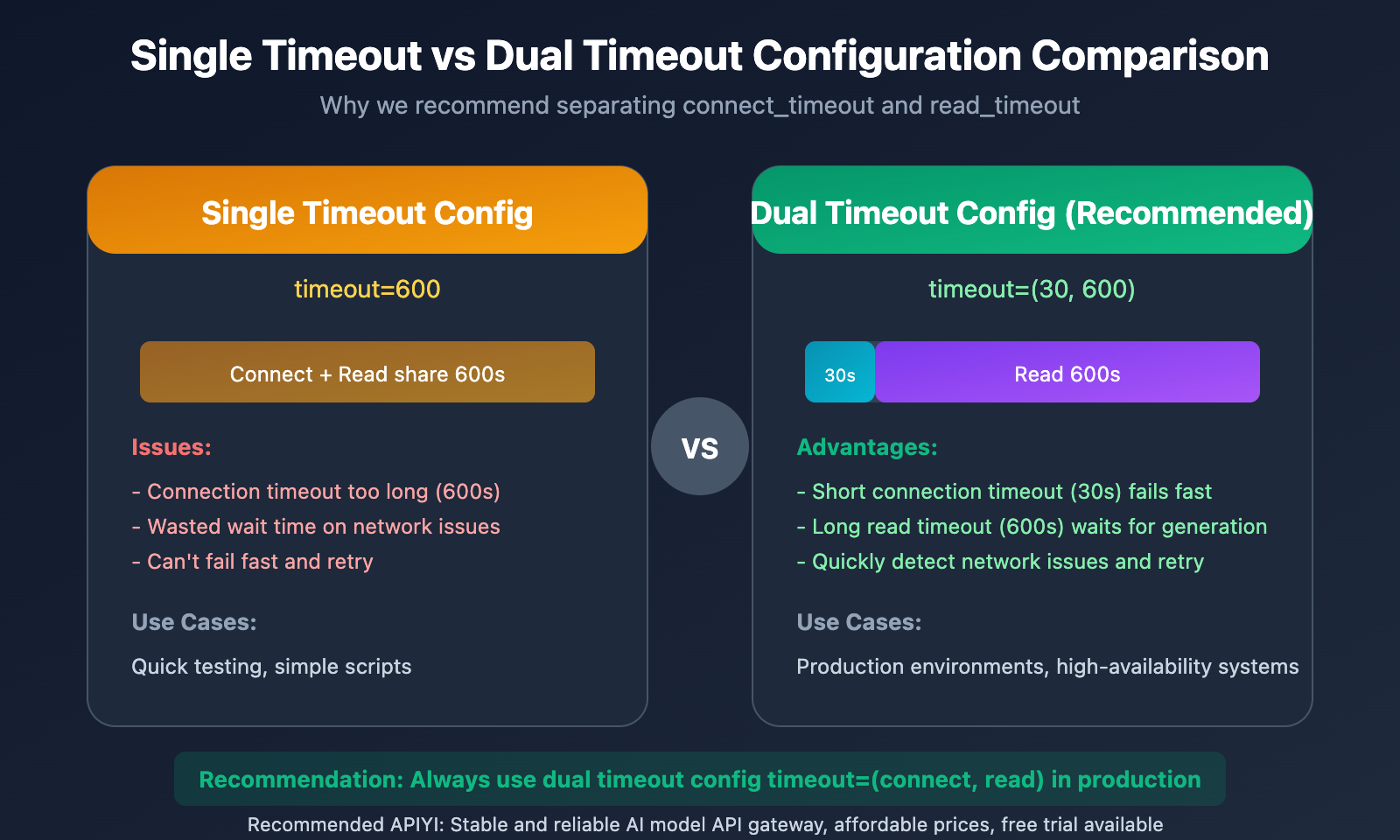
The Python requests library supports two types of timeout parameters. Understanding their differences is crucial for correctly configuring Nano Banana Pro:
| Timeout Type | Parameter Position | Purpose | Recommended Value |
|---|---|---|---|
| connect_timeout | First value in timeout tuple | Wait time for establishing TCP connection | 10-30 seconds |
| read_timeout | Second value in timeout tuple | Wait time for server response data | 300-600 seconds |
Dual Timeout Configuration Examples
# Method 1: Use tuple to set separately (Recommended)
response = requests.post(url, timeout=(30, 600))
# 30 second connection timeout, 600 second read timeout

# Method 2: Unified timeout (Not recommended)
response = requests.post(url, timeout=600)
# Both connection and read are 600 seconds - connection timeout too long
Why Set Them Separately?
- Short connection timeout – If you can't establish a connection within 30 seconds, there's likely a network or server issue. You'll want to fail fast and retry
- Long read timeout – Nano Banana Pro generates 4K images, which is a time-consuming operation. You need enough time for the AI model to finish processing
Nano Banana Pro API Pricing Comparison
Choosing the right API service provider isn't just about stability – it directly impacts your costs. Here's a pricing comparison for Nano Banana Pro (gemini-3-pro-image-preview):
| Provider | 4K Unit Price | 2K Unit Price | 1K Unit Price | Discount |
|---|---|---|---|---|
| Google Official | $0.234 | $0.18 | $0.134 | Original price |
| APIYI | $0.05 | $0.05 | $0.05 | 80% off |
Cost calculation example: To generate 1000 4K images, the official site costs $234, while through APIYI it's only $50 – saving you $184.
Nano Banana Pro API Timeout Strategy Comparison
| Strategy | Connection Timeout | Read Timeout | Retry Mechanism | Recommended Scenario |
|---|---|---|---|---|
| Minimal Setup | 30s | Resolution-based | None | Quick testing |
| Standard Setup | 30s | Resolution-based | 3 auto retries | Production |
| Robust Setup | 30s | 600s unified | 3 retries + exponential backoff | High availability |
Comparison Note: The data above comes from production testing on the APIYI apiyi.com platform. Choose your strategy based on actual business needs.
Common Questions
Q1: Why am I still getting timeout errors even with a 600-second timeout?
If you're still timing out at 600 seconds, possible causes include:
- Server-side processing issues – we'd recommend reaching out to your API provider
- Network instability causing connection drops – check your network quality
- Overly complex prompts causing abnormal generation times – try simplifying and retrying
Q2: What’s the relationship between Nano Banana Pro and gemini-3-pro-image-preview?
Nano Banana Pro is an alias for the gemini-3-pro-image-preview model. They're the same thing – both point to Google's high-quality image generation model, which supports multiple resolutions (1K/2K/4K). You can access it through APIYI apiyi.com with a unified interface.
Q3: How can I quickly verify my timeout configuration is correct?
We recommend these steps for verification:
- Visit APIYI apiyi.com to register and get your API Key
- Use the code examples from this article and start testing with 1K resolution
- Gradually move up to 2K and 4K while observing actual processing times
- Fine-tune your timeout parameters based on the test results
Summary
Key points for configuring Nano Banana Pro (gemini-3-pro-image-preview) API timeouts:
- Understanding Time Components: Image generation time = upload + AI processing + download. The default 120 seconds is far from enough for 4K images
- Configure by Resolution: Use 300 seconds for 1K/2K, 600 seconds for 4K, leaving sufficient safety margin
- Separate Dual Timeouts: Set connect_timeout short (30 seconds), read_timeout long (300-600 seconds)
With proper timeout configuration, your Nano Banana Pro image generation application will become much more stable and reliable.
We recommend quickly testing Nano Banana Pro through APIYI apiyi.com. The platform offers free credits, and 4K images cost only $0.05/image – that's 20% of the official price.
📚 References
⚠️ Link Format Note: All external links use
Resource Name: domain.comformat for easy copying but not clickable, avoiding SEO weight loss.
-
Google Gemini API Image Generation Documentation: Official Nano Banana Pro API reference
- Link:
ai.google.dev/gemini-api/docs/image-generation - Note: Great for understanding model parameters and resolution configuration
- Link:
-
Python Requests Timeout Guide: Detailed explanation of timeout parameter usage
- Link:
oxylabs.io/blog/python-requests-timeout - Note: Perfect for diving deep into Python HTTP request timeout mechanisms
- Link:
-
urllib3 Connection Pool Documentation: Low-level connection pool timeout configuration reference
- Link:
urllib3.readthedocs.io/en/stable/reference/urllib3.connectionpool.html - Note: Ideal for advanced users who need fine-grained control over connection pool behavior
- Link:
Author: Tech Team
Tech Discussion: Feel free to discuss in the comments. For more resources, visit APIYI apiyi.com tech community


